SNACK HAZARD ZONE is a playful table planner for arranging board game snacks, drinks and components. Move a coffee cup, compare exposure overlays and ask the tool to suggest a lower-exposure arrangement. Its value is making a placement discussion visible before the first turn.
Checked 13 November 2026 in Chrome. We tested the default layout, protective options, rescue and undo, keyboard movement, Korean controls at 390px, automatic local restoration and a fresh shared link. These were browser-model tests. We did not spill a drink, measure food residue, complete the mission or inspect an exported PNG file.
Plan board game snacks with a schematic table, exposure overlays and rescue. Actual tests explain indices, mobile controls, local saving, sharing and model limits.
- Brand
- SNACK HAZARD ZONE
- Tool languages
- en, ko
- Verified date
- 2026-11-13
On this page
Key takeaways for board game snacks
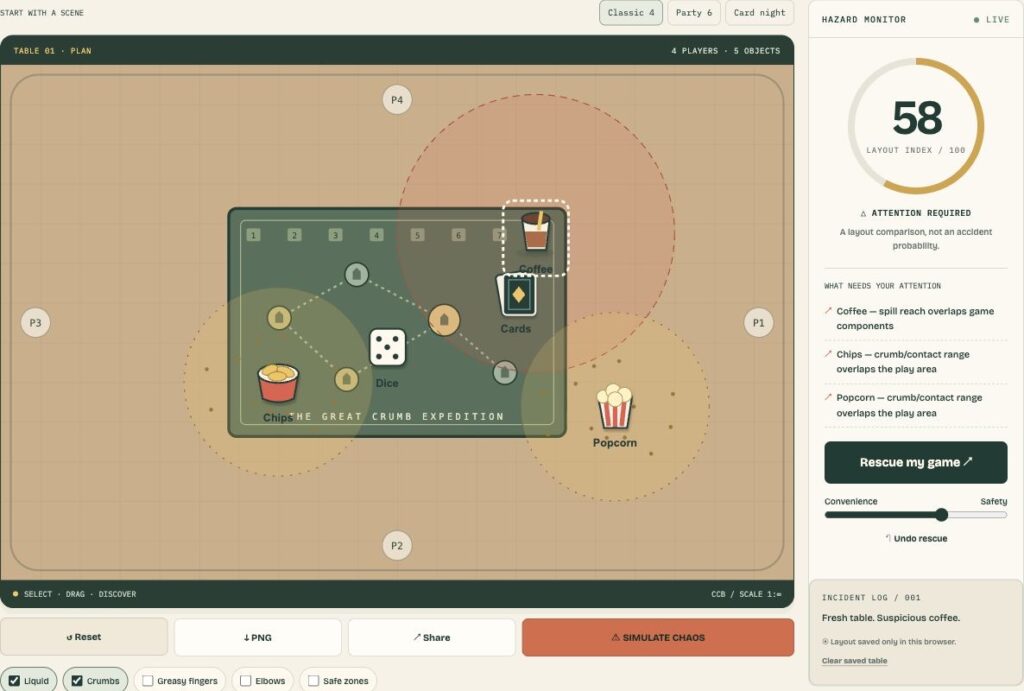
The 0–100 layout index is a comparison aid, not a percentage chance of an accident. Our default Classic 4 table scored 58. A lid reduced it to 53; adding a cup holder reduced it to 48. One-click rescue at the default safety preference then produced 0, while retaining all five objects. Zero means the model detected low exposure for those inputs; it does not certify a real table as safe.
English and Korean interfaces are available. The diagram uses illustrative coordinates rather than calibrated furniture dimensions. Keep a separate real-world checklist for reach, stability and available space. A useful session ends with a placement decision everyone understands, not merely the lowest number on the screen.
What SNACK HAZARD ZONE does
The official name is SNACK HAZARD ZONE, presented by the fictional Crumb Control Bureau. It is an educational entertainment tool for exploring how drinks, snacks, cards and dice share a table. The problem is familiar: a convenient cup may sit beside a shared deck, or a snack bowl may put several hands through the playing area.
The lab combines an object library, a top-down table, object settings and a live monitor. Start from Classic 4, Party 6 or Card night, select an object and change its position. The interface offers player counts from two to eight, four board shapes and right/left handedness. Those controls describe the schematic scenario; they do not scan your room or identify the game you own.
It does not recommend a universally best snack, inspect ingredients or model an actual liquid spill. The snack dossier provides qualitative profiles for crumbs, oil and stickiness, with serving suggestions. Treat those profiles as prompts to discuss how food is served, rather than measured product rankings.
Prepare a useful game-night layout
Before opening the lab, decide what you want to compare. “Where should this coffee go?” is a better first question than “What is the safest possible game night?” The smaller question lets you keep the board, cards, players and snack positions fixed while changing one cup setting or coordinate.
Write down the number of players, the approximate shared play area and the components you want to keep away from drinks. Note which snacks need a bowl, tongs or wrappers. If you are arranging an actual table, measure it separately and physically check that the serving positions leave useful space. The app does not convert its X/Y values into reliable centimeters or inches.
| Preparation | Why it matters | Keep outside the score |
|---|---|---|
| Choose one preset and player count | Establish a comparable starting scene | Actual chair spacing and elbow room |
| Identify the shared deck and board | Make the component area explicit | Value or replaceability of your collection |
| Record cup size, lid and holder settings | Avoid changing several assumptions accidentally | Whether a real cup is stable or a lid seals |
| Choose a serving route | Discuss how snacks reach people | Ingredients, dietary needs and cleanliness |
| Record the baseline index | Make the before/after comparison auditable | A claim that the score predicts accidents |
A host can prepare a simple screenshot, then ask the group where people naturally reach. This catches disagreements the software cannot know: someone may prefer passing a bowl, another may need the cup near a particular hand. Enter those decisions as a second scenario rather than treating an automatic suggestion as an instruction.
Inputs, overlays and the hazard monitor
The Drinks library exposes coffee, water, soda and beer. Snacks include chips, popcorn, chocolate, gummies, cookies, pretzels, nuts and fruit. Gear includes cards, dice, a snack tray and a cup holder. Availability is visible in the interface; our controlled result sequence used the five objects already present in Classic 4 rather than testing every object combination.
Select an object to expose X/Y sliders and four direction buttons. Coffee also offers cup size, a lid/covered-snack option and a cup holder option. The table has controls for Liquid, Crumbs, Greasy fingers, Elbows and Safe zones. These are different ways of inspecting the same layout. Turning an overlay off should not be mistaken for removing the real-world issue it represents.
The monitor shows an index, a qualitative status and warnings naming affected objects. At our baseline it identified coffee spill reach overlapping components and chips/popcorn contact ranges overlapping the play area. Reading those named warnings is more useful than reacting to the number alone: they identify which part of the plan needs a decision.
7 checks for planning board game snacks
1. Establish a reproducible starting scene
Open the English lab, choose Classic 4 and confirm four players and five objects. Reset returned our layout to index 58. The initial coffee was at X540, Y170; cards were at X520, Y230. If your saved state differs, reset deliberately before comparing our example, and preserve your existing arrangement first if you need it.
2. Select the issue, not just the object
Select Coffee on the table and read the warning beside the index. Decide whether you are testing location, cup size or protection. Start with one change. A lower score after several simultaneous changes tells you less about which decision mattered.
3. Test a protective option while holding position fixed
On the default medium coffee, check Lid / covered snack. Our index changed from 58 to 53. Then check Cup holder: it became 48. These differences belong to the programmed model and this layout. They do not measure how well a particular retail lid or holder performs.
4. Compare movement with the warning list
Use a direction button or the X/Y sliders to move a selected item. Watch whether the specific overlap warning changes. Keep board and card positions fixed during a cup-placement comparison, so moving valuable components away is not accidentally counted as a cup-protection improvement.
5. Try rescue as a suggestion
At safety preference 65, click Rescue my game. Our protected-cup layout changed from 48 to 0; all five objects remained. Read the suggested positions and consider whether people could actually use them. The optimization balances lower modeled exposure with how far items move from their original positions.
6. Undo and compare the same plan again
Undo rescue restored index 48 and the original positions. Use this dedicated rescue control to inspect the before/after proposal. Ordinary Undo change is also available for edits: a keyboard ArrowRight moved our coffee from X540 to X560, and undo restored X540. State which kind of change you are reversing.
7. Preserve the decision and verify it at the table
Share a layout link or keep screenshots of the before/after arrangement. Add a short decision note: what moved, which warning changed and what still needs a physical check. Then arrange the real components without drinks first and confirm that shared items are reachable. The browser diagram is a discussion aid for that final check.
Our actual Snack Hazard Zone results
| Direct test | Observed result | Interpretation |
|---|---|---|
| Reset Classic 4 | 58; four players, five objects | Baseline for this browser scenario |
| Add lid at original coffee position | 53 | A model reduction of 5 index points |
| Then add cup holder | 48 | A further 5-point model reduction |
| Rescue at preference 65 | 48 → 0; five objects retained | A proposed relocation, not deletion of the hazards |
| Undo rescue | 48; original positions restored | The before/after proposal can be reversed |
| ArrowRight on selected coffee | X540 → X560; Undo → X540 | Keyboard movement worked in our desktop test |
| Korean mobile direction button | X540 → X560; undo restored X540 | A drag-free movement path worked at 390px |
| Reload and fresh shared link | Protected layout restored at 48 | Persistence and link restoration worked in our tests |
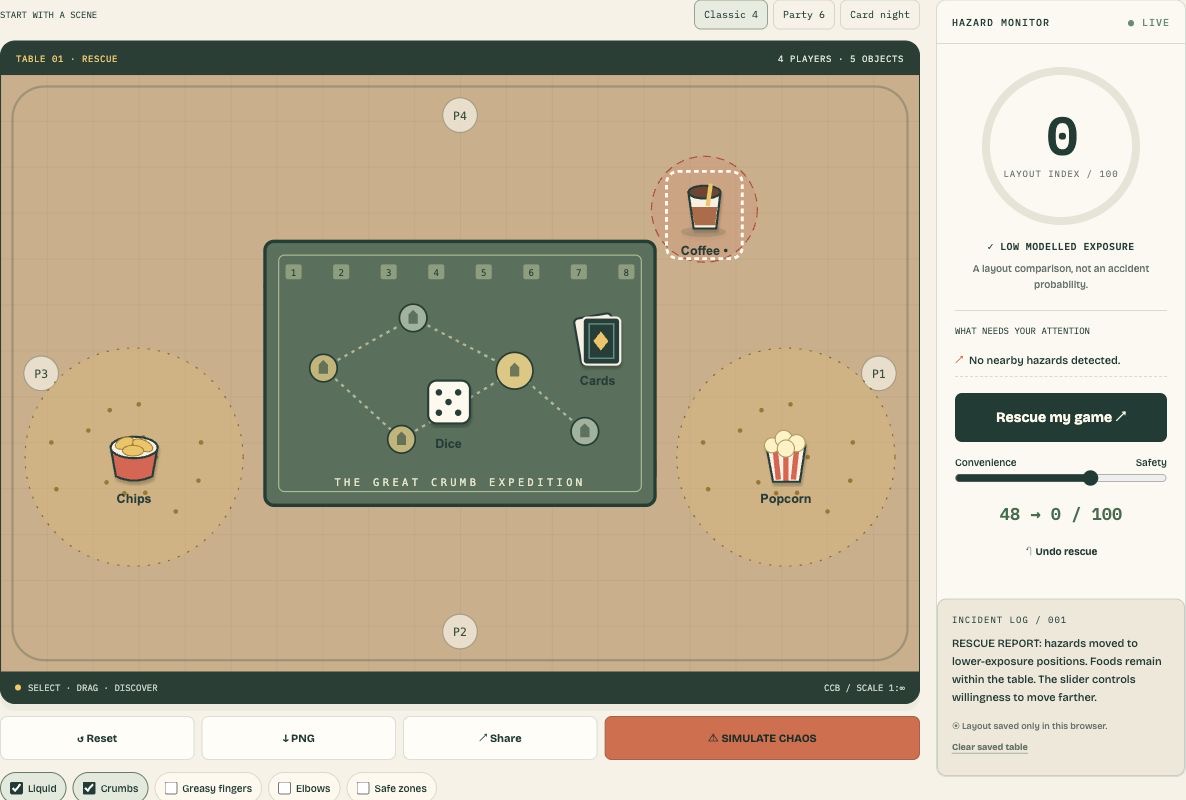
SIMULATE CHAOS produced a fictional incident accusing Coffee of exposing Cards. We verified that the incident log changed; we did not treat it as an observed accident. The index remained 48 in that test. A colorful incident message can make a warning memorable, but it does not add experimental evidence about a real spill.
Starting the three-move mission showed 0/3 moves and a target below 25. Rescue, object removal and cup-protection controls were disabled. We checked those restrictions and reset without completing the mission. No successful mission outcome is claimed here. Likewise, the PNG button is present, but an exported image file was not inspected.
A practical four-player table worksheet
Consider four friends sharing a deck with coffee, chips and popcorn. The useful output is a compact decision record. Our example deliberately keeps the objects, player count and board fixed while comparing protection and then relocation. It separates two interventions that hosts often combine without noticing.
| Stage | Decision to record | Follow-up question |
|---|---|---|
| Baseline: 58 | Coffee/cards overlap and two snack warnings | Which shared component matters most? |
| Protection: 48 | Lid and holder enabled; positions unchanged | Do the real accessories fit and stay stable? |
| Rescue: 0 | The app relocates hazards, retaining five objects | Can every player reach the suggested positions? |
| Physical review | Set up the real layout without open drinks | Are serving routes comfortable and unobstructed? |
A sensible meeting note might say: “Keep the deck in a shared central position; discuss a separate drink area; compare snack reach before starting.” That is a proposed hosting decision, not a result we physically tested. Avoid writing “accident risk eliminated” simply because the model reaches zero.
For a card-heavy evening, focus on the path between a shared snack and the draw pile. For a larger party, start a separate Party 6 scenario rather than assuming the four-player result carries over. If several serving positions are needed, compare one group decision at a time and keep a screenshot of each baseline. This avoids quietly changing the reference scene.
Rescue settings, undo and the three-move mission
Rescue is best used after you understand the warning list. According to the model notes, it evaluates candidate positions for drinks and snacks and trades exposure against movement distance. The safety slider controls willingness to move farther. It is not a sensitivity calibrated against real accident records.
Use the default value first, record the result, and only then explore other preferences. We verified preference 65; we did not benchmark every slider value. If the suggestion places a cup somewhere inconvenient, take the suggestion as a candidate to discuss, move it manually and reread the warnings.
The mission is a different exercise: move three hazards below 25 within three moves, without automatic rescue or deleting objects. Starting it resets the scenario and restricts controls. Save a layout you want to keep before experimenting. A first successful move is not a completed mission; only report the ending you actually see.
Mobile controls and keyboard alternatives
On a narrow screen, the object library and selected-object controls can be collapsed. During our Korean 390px test, selecting coffee did not by itself expose every setting. Opening the “선택한 물체” panel revealed the sliders, buttons and cup options. The right-direction button changed X540 to X560; 변경 취소 returned it to X540.
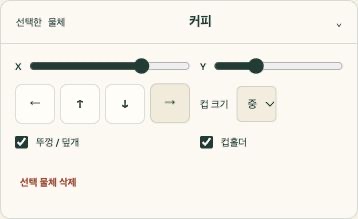
Use these controls when dragging feels imprecise. The publisher also describes selecting an object and tapping an empty table location; we did not separately validate that input path. Desktop keyboard ArrowRight was tested. Do not assume every keyboard shortcut or touch gesture has been checked because one movement method worked.
The source page loaded without horizontal overflow at 390px. Google advertising overlays appeared during research and sometimes covered content. Close the overlay with its own close/collapse control if it blocks the lab, then continue with the tool controls. The English desktop view and Korean mobile controls were both usable after dismissing interference; ad presentation can vary.
Save, share and document a table plan
The source says the layout is stored in browser local storage. Our reload restored the protected-cup layout at index 48. English and Korean source pages also reflected that saved configuration in the same Chrome session. That observation does not establish cross-device synchronization or guaranteed long-term storage.
Share generated a copyable URL containing an encoded layout in #table=…. We opened that displayed link in a fresh tab and confirmed index 48 and the lid/holder state. The link field is useful even when clipboard integration is unreliable: verify the text you copy rather than assuming a “copied” message proves what another app will paste.
The shared fragment contains the arrangement and settings, so anyone receiving the full link can inspect the plan. Avoid putting private information in a plan or accompanying notes. The source claims no table-data upload, while Blogger and Google advertising operate under their own policies. We did not run an independent network audit and cannot promise a page without third-party requests.
For a screenshot record, retain an unedited baseline and a second image showing the proposal. Label the player count, protection settings and index. PNG export is offered by the interface, but we did not retrieve and inspect the generated file. The images in this article are actual browser screenshots, not evidence that the app’s export function succeeded.
Model limits, privacy and common mistakes
The index is a spatial heuristic. It does not simulate fluid dynamics, measure residue, certify food hygiene or quantify injury/property-damage probability. Cup size, distance, cover settings, equipment and reach paths are simplified inputs. A 10-point difference is an index difference, not a measured percentage-point reduction in accidents.
Do not interpret X/Y coordinates as a construction drawing. The table is schematic, and a convenient screen position may be impractical on a real surface. Check the dimensions, stability and reach of the real arrangement separately. A zero warning state only describes what the simplified model notices.
Common mistakes are changing the preset during a comparison, confusing a hidden overlay with a removed hazard, assuming a cup-holder checkbox proves your own accessory works, or treating sleeves as a waterproofing guarantee. The snack profiles also vary with recipes, toppings, packaging and serving methods. Read them as qualitative prompts.
If a control appears missing on a phone, open its collapsed panel. If an old arrangement appears on reload, recognize local restoration before assuming a preset is broken. If a shared link seems wrong, preserve the entire fragment and verify the visible positions and settings in a fresh tab. Clear saved table is provided for removing the browser copy; we did not test that deletion action.
Compare planning approaches
| Approach | Useful for | Main limitation |
|---|---|---|
| SNACK HAZARD ZONE | Rapid visual comparisons and group discussion | Heuristic model without calibrated physical dimensions |
| Paper sketch or annotated photo | Recording the actual objects and available space | No automatic overlap score or rescue suggestion |
| A real dry setup | Checking reach, stability and usable playing area | Requires the actual table and components |
| A written host checklist | Assigning serving and cleanup decisions | Does not show spatial relationships by itself |
Combine these methods instead of asking one score to do every job. Begin with a schematic hypothesis, discuss it with the group, and then verify the real arrangement. A before/after image with one clear decision is often more useful than a complicated plan whose assumptions nobody remembers.
Related tools for your next tabletop task
If the next question is sleeve fit, stock or deck height, read the Card Sleeve Fit Guide. It calculates different quantities and does not validate the snack planner’s exposure model. Sleeving decisions and drink-placement decisions need separate checks.
For a separate dice-path experiment, see DICE TOWER CHAOS. It explores a simulated D6 journey and batch results; it does not prove that a physical tower will contain dice or protect a drink. Use it when the discussion shifts from table placement to experimenting with a tower design.
To explain the chosen layout to your group, the FrameMint Studio screenshot editor guide covers framing, captions and manual masks. Keep the before/after numbers visible and distinguish annotations from the app’s original warnings. These are published guides for concrete follow-up tasks, not prerequisites for using the lab.
Frequently asked questions
Does 58 mean a 58% chance of a spill?
No. It is a model index from 0 to 100. The source explicitly distinguishes layout comparison from accident probability. Our measurements document interface behavior, not a calibrated risk forecast.
Does rescue remove snacks to improve the score?
In our test it retained all five objects and relocated hazards. The source describes balancing lower exposure against distance moved. Check the proposed positions before applying the idea to a real table.
Can I plan board game snacks in Korean?
Yes. A dedicated Korean lab is available. We verified its 390px movement controls and undo. The English and Korean sites describe the same model and limitations.
Will sharing automatically synchronize my group’s changes?
We verified restoration from a full generated fragment link in a fresh tab. We did not verify collaborative editing or live synchronization. Treat a link as a snapshot of a plan and send a new one when the intended arrangement changes.
Is there a verified downloadable report?
The interface offers PNG, but the exported file was not inspected in this review. Keep a browser screenshot if you need an immediately reviewable record, and inspect any downloaded image before relying on it.
What should I do first?
Open the lab, establish one baseline and change one thing. Read the named warning before celebrating a lower number. Then check whether the proposed arrangement makes sense for the people and components at your actual table.
A RELEVANT NEXT STEP
Tools with a useful connection
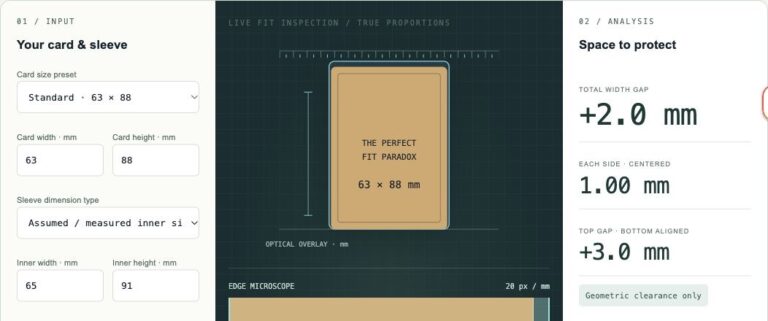
CARD SLEEVE FIT GUIDE
Card Sleeve Fit Guide: 7 Smart Checks Before Buying
Compare card sleeve inner clearance, calculate one-option pack quantities and estimate deck height. Actual tests explain stock, double sleeves, sharing and fit limits.
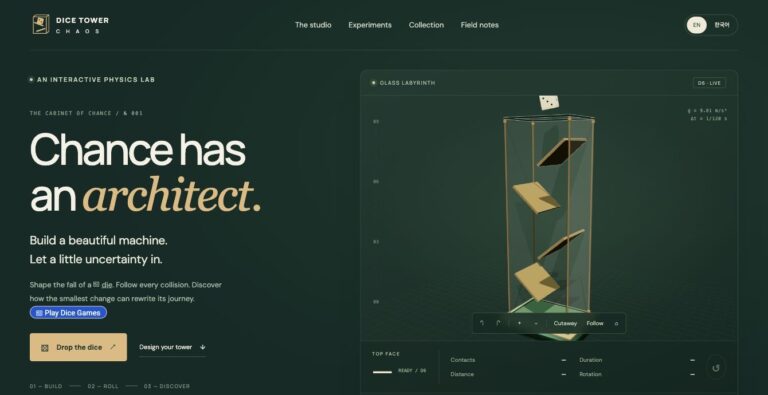
DICE TOWER CHAOS
Dice Tower Chaos: 7 Smart Experiment Checks
Build a D6 dice tower and inspect actual simulator results. Learn repeated seeds, 0.1° comparisons, settled-only percentages, recipe restoration and limits.

FrameMint Studio
Screenshot Editor: 7 Smart FrameMint Studio Checks
Frame screenshots, add manual masks and build captioned stories in FrameMint Studio. Real import, order, recovery and size tests explain what to check before sharing.