CARD SLEEVE FIT GUIDE compares a card with an assumed or measured sleeve interior, calculates pack quantities and estimates deck height. Use this card sleeve calculator to organize measurements before buying. Its most useful distinction is between a numerical gap and a physical fit that still needs checking.
Checked 13 November 2026. We tested dimensions, unknown-size handling, pack arithmetic, storage modes, saving, fresh-link restoration and the Korean mobile interface in Chrome. All dimensions and prices in our examples are test inputs. We did not measure a physical card, test a retail sleeve or inspect a printed/PDF report.
Compare card sleeve inner clearance, calculate one-option pack quantities and estimate deck height. Actual tests explain stock, double sleeves, sharing and fit limits.
- Brand
- CARD SLEEVE FIT GUIDE
- Tool languages
- en, ko
- Verified date
- 2026-11-13
On this page
Key takeaways for card sleeve choices
Confirm what the sleeve label measures before subtracting anything. Card size, sleeve outer size and usable inner size are different quantities. In our test, switching to Outer / unknown size replaced the gap values with dashes and asked for an inner size. That is a useful stop point, not a reason to guess the missing measurement.
Three questions need separate answers: is there geometric clearance, how many packs of one option are needed, and how tall might the combined stack become? Double-sleeving mode changes the stack calculation, but did not automatically create separate inner- and outer-sleeve purchase plans. A shared result link also includes your entered values visibly in its URL.
What CARD SLEEVE FIT GUIDE actually calculates
The official tool name is CARD SLEEVE FIT GUIDE, with THE GLASS CALIPER used as its studio label. The workbench contains a dimension overlay, a two-sleeve comparator, a nominal card-format library, a purchase planner, a storage estimate and report controls. English and Korean versions were available, and our workflow required no account or file upload.
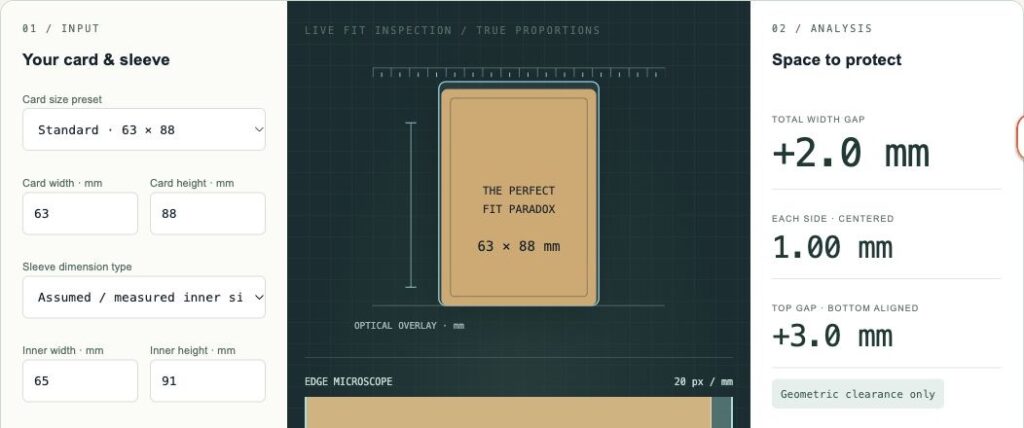
The fit calculation subtracts card width and height from the entered sleeve interior. It also shows half the width difference for a centered card and the height difference as top clearance when the card is bottom-aligned. These are geometric relationships. They do not account for every seam, corner, insertion resistance or manufacturing tolerance of a product.
The pack planner uses combined card counts, usable stock, sleeves per pack and an entered pack price. The storage section uses the combined count again, plus card thickness and film thickness per face. The report summarizes those calculations. It is a planning workbench rather than a manufacturer-verified compatibility database or a shopping-price comparison service.
Prepare a card sleeve plan: measurements and stock
Before opening a card sleeve plan, write down the actual card dimensions for your edition and how the sleeve dimensions were established. A nominal Standard preset is not evidence that every card in your box measures 63 × 88 mm. If you only know a package’s printed size, determine whether that number describes the card, the exterior or the usable interior.
Group cards that need the same sleeve model and size. Count only usable sleeves of that option as existing stock. Mixing different sizes, finishes or models into one stock total may make the arithmetic look adequate while leaving one deck unfinished. The calculator cannot inspect the sleeves you own or decide whether different products should be mixed in a deck.
For storage, decide whether you are estimating one combined stack or separate stacks in different compartments. Additional decks increase both purchase demand and the modeled combined height. If those decks will live in separate boxes, run the relevant count for each storage question instead of reading the combined number as an automatic box-layout plan.
Read the card sleeve inputs and outputs
| Input or display | What it means |
|---|---|
| Card presets and custom dimensions | Nominal card formats, not recommended sleeve interiors. Our mobile Tarot selection changed the card to 70 × 120 while leaving the sleeve input at 65 × 91. |
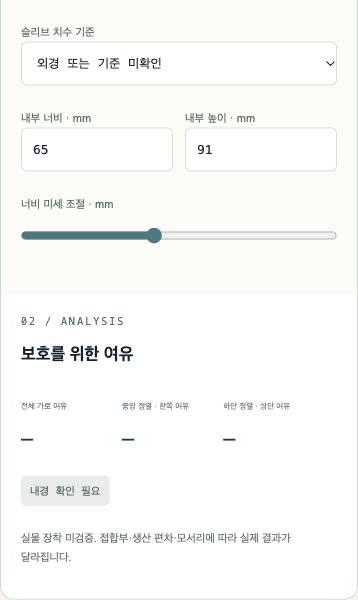
| Sleeve dimension type | Use an assumed/measured inner size for gap arithmetic. Outer/unknown mode withholds the assessment. |
| A versus B | Two alternative sleeve interiors compared against the same card; not a verified nesting test for double sleeves. |
| Total width / each side / top | Width difference, half-width difference under centering, and height difference under bottom alignment. |
| Pack size, stock and price | One pack option and your entered currency units. No tax, shipping or mixed-pack price optimization. |
| Film thickness | Micrometres per face. Two faces are included for each sleeve in the stack model. |
The drawings preserve relative proportions, but the source calls them schematics rather than life-size prints. A screen pixel, browser zoom or resized screenshot is not a calibrated ruler. Use the diagram to understand which gap changed; do not hold a physical card against it to certify a product’s dimensions.
The library offers 20 named nominal formats, including standard, poker, tarot, square and oversize options. We verified searching and selecting Tarot in Korean, not every physical game edition associated with those format names. Selecting a format saves typing, but you must still enter the intended sleeve interior and check the resulting values.
7 checks for a useful card sleeve plan
1. Establish the card dimensions
Select a matching nominal preset or type your own width and height in millimetres. Treat the preset as a starting point and measure the relevant cards separately when making a purchase decision. Our default interface showed a 63 × 88 card; it was an assumed test case, not a measured collection.
2. Identify the sleeve measurement basis
Choose Assumed / measured inner size only when that is the intended basis of your numbers. If the label is outer or unknown, select that option and stop interpreting the gap until you have better information. The tool does not derive a reliable interior merely by subtracting a guessed film thickness from an outer measurement.
3. Read all three clearance values
With the default 65 × 91 assumed interior, our 63 × 88 test card produced 2.0 mm total width gap, 1.00 mm per centered side and 3.0 mm top gap. The last number is not automatically split between top and bottom: the displayed convention is bottom alignment. Positive gaps describe the rectangle arithmetic, not confirmed insertion.
4. Compare one alternative without changing the card
Enter sleeve B’s dimensions while keeping the card fixed. At A = 66 × 91 and B = 66 × 92, the comparison showed the same 3.0 mm width gap and a 1.0 mm greater height gap for B. This lets you separate extra height from extra width; it does not decide which amount of looseness you will prefer in handling.
5. Plan one sleeve option at a time
Enter the main deck, comma-separated additional decks, usable stock, pack size and price. Our test used 240 + 60 + 100 cards, 50 owned sleeves and 110 sleeves per pack. With a hypothetical price input of 5 currency units, the result was 4 packs, cost 20 and 90 sleeves remaining. No product was bought or quoted at that price.
6. Recheck the storage count and units
Choose unsleeved, single or double mode and enter card thickness in millimetres, film in micrometres per face and usable tray height in millimetres. For 400 cards, 0.30 mm card thickness and 90 μm outer film, single mode displayed 192.0–230.4 mm. Adding 40 μm inner film in double mode displayed 224.0–268.8 mm.
7. Save the conditions and reopen the result
Use Save on this device, then verify Load saved report. For sharing, inspect Copy result link and open it in a new tab. We restored a non-default report after editing and after reloading. The copied URL included card/sleeve dimensions, counts, stock, price and storage inputs; check those values before passing the link to another person.
Our actual card sleeve calculator tests
We used hypothetical inputs to test the calculator on 13 November 2026. These are real interface observations and arithmetic checks, not physical sleeve-fit experiments. The distinction is particularly important where the screen says there is clearance.
| Test | Observed result |
|---|---|
| Default inner geometry | 63 × 88 card, 65 × 91 sleeve: total width +2.0 mm, each side 1.00 mm, top +3.0 mm. |
| Negative width | Sleeve width 62.5 versus card width 63: total −0.5 mm, each side −0.25 mm; No positive clearance. |
| Unknown measurement | Outer / unknown size replaced gap metrics with dashes and displayed Inner size needed. |
| A/B height comparison | A 66 × 91 and B 66 × 92: width-gap difference 0.0 mm; height-gap difference 1.0 mm. |
| Pack test | 400 cards, stock 50, pack 110, price 5: 4 packs / cost 20 / remaining 90. |
| Stock already sufficient | Stock 500 for 400 cards: 0 packs / cost 0 / remaining 100. |
| Invalid deck entry | Entering 60, abc, 100 produced dashes in the purchase outputs rather than a partial total. |
| Storage modes | Single 192.0–230.4 mm; double 224.0–268.8 mm. A 250 mm tray in double mode received a close-fit warning. |
| Persistence and sharing | Custom A66, stock 50, extra 60/100, double mode and tray 250 returned through same-page Load, reload + Load and a fresh copied link. |
| Korean mobile | 390 × 844 with document width 390. Tarot filtering loaded card 70 × 120; outer/unknown mode withheld gaps. |
Card sleeve packs: separate arithmetic from selection
The pack result is a minimum count for one specified pack option. Our 400 cards minus 50 usable sleeves left 350 to purchase. Three packs of 110 supply only 330, so the calculator rounded up to four. The 440 newly purchased plus 50 owned sleeves minus 400 cards left 90. That is remaining total stock after the job, not an additional requirement.
Double-sleeving introduces two separate sleeve products in many workflows, but this tool’s purchase section remains one option at a time. Selecting double mode changed height and left our four-pack purchase result unchanged. Run a separate quantity calculation for each intended inner and outer option, using that option’s stock, pack size and price. Multiplying one pack count by two can be wrong when the two options have different pack sizes.
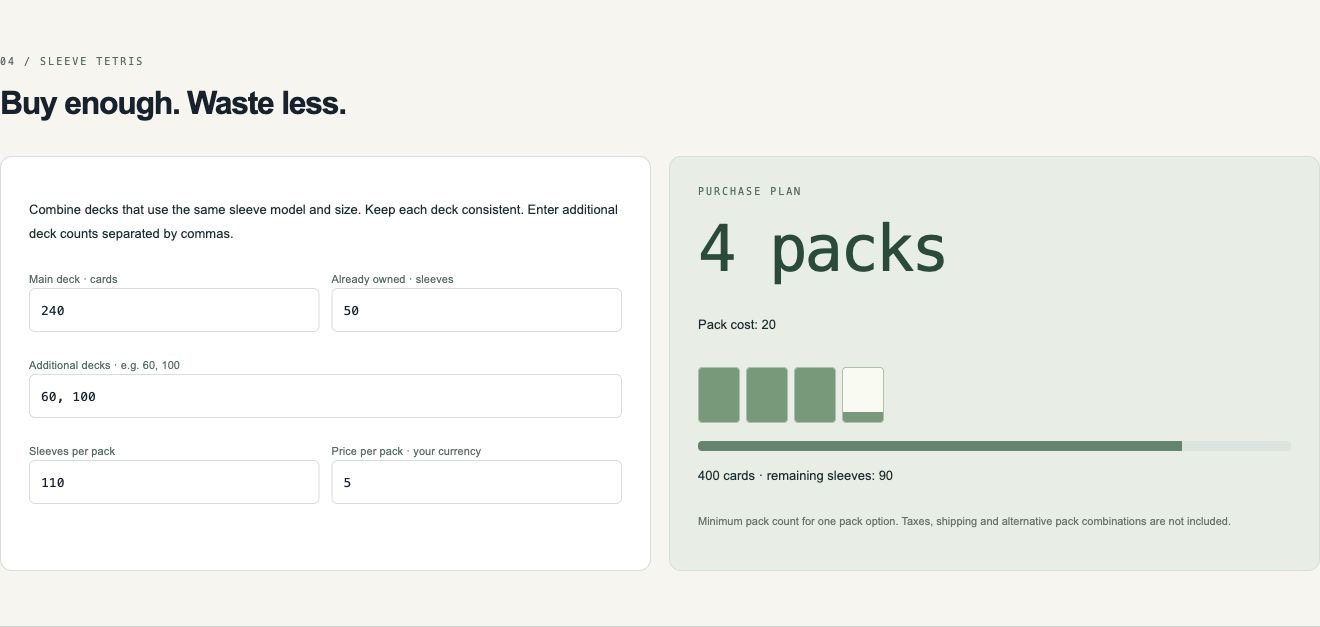
If different retailers sell different pack counts, compare those options in separate runs and add the costs that the tool excludes. Taxes, shipping and alternative pack combinations are explicitly outside its minimum-pack calculation. The output does not establish that one retailer or bundle is the cheapest complete order.
Card sleeve storage: read height as a planning range
The model adds two film faces per sleeve. In our single-sleeve case, 90 μm becomes 0.09 mm per face, so the modeled card thickness was 0.30 + 2 × 0.09 = 0.48 mm. Multiplying by 400 gave the lower estimate of 192 mm. Double mode added 2 × 0.04 mm and reached 0.56 × 400 = 224 mm.
The upper bound adds an illustrative 20% allowance. It is not a measured confidence interval or a probability that the deck will fit. At 250 mm usable height, our double-mode range crossed the available height and the tool warned that air and seams might exceed the tray. Do not convert that warning into an invented percentage chance of success.
Width, dividers, tray shape, orientation and actual seams still require checking. The tool does not pack multiple piles into a box or check whether an inner sleeve physically nests inside an outer sleeve. The A/B rectangles are alternatives against the card, while the two film inputs estimate thickness. Those are different models sharing one workbench.
A practical card sleeve buying worksheet
The following is a suggested workflow rather than an additional physical test. Stage one is measurement and a small real fit check: identify your edition, measure several cards, establish the sleeve interior and test insertion without forcing a card. Stage two is quantity and storage planning after you have selected a compatible option.
| Worksheet field | What to preserve |
|---|---|
| Card and edition | Actual dimensions and how they were obtained; keep nominal presets separate. |
| Sleeve option | Model, size basis, usable interior evidence and the outcome of a small physical check. |
| Purchase group | Cards needing the same option, usable stock, pack count and entered price units. |
| Storage group | Cards in this stack, thickness assumptions, sleeve layers and usable box dimensions. |
| Verification | Which facts were measured, assumed or calculated; any result still needing a physical check. |
For a mixed collection, make a separate row for each sleeve option and storage group. A card count suitable for a combined purchase may not be suitable for one tray-height calculation. Keeping those groups distinct prevents a good quantity estimate from becoming a misleading storage estimate.
Save a report and inspect its shared URL
The source says local storage is used when you save and that the tool does not upload your collection. We observed explicit save/load behavior with a non-default report. We did not test long-term retention, browser-data deletion or cross-device synchronization, so keep a separate note if these measurements matter.
The actual copied result link used query parameters before #report. Values such as cw, sw, qty, owned, price and layers were visible in the URL. This is not the same as a fragment-only private record: anyone receiving the address can inspect the entered values. Share only information you intend to disclose, and check a fresh tab rather than trusting the copy notification alone.
Print report is offered, but we did not independently inspect a printed page or saved PDF. A button label is not evidence that the paper scale or layout is correct. The dimension overlay itself is explicitly schematic, so printing the screen does not create a calibrated fit template.
Card sleeve fit limits and troubleshooting
No retail sleeve, card material or game edition was physically verified in our tests. Corner radius, seams, stiffness and manufacturing differences can affect insertion. A non-positive gap is a useful reason to stop; a positive gap is a reason to continue verification, not a guarantee. Never force a card into a sleeve because the arithmetic looked favorable.
If output becomes blank, check numeric fields and the comma-separated additional deck entry. Our invalid text test suppressed the purchase outputs. If a preset changes the card unexpectedly, recheck the sleeve fields too: the Tarot selection we tested did not choose a matching sleeve. Do not treat a format button as a product recommendation.
The Korean interface worked at 390 pixels without horizontal document overflow in our viewport test. That does not certify every physical phone or browser. Blogger and advertising services were visible, and we did not audit all network traffic. On-device arithmetic or local saving should not be described as a promise that the entire site makes no external requests.
Related tools for storage and report images
If your next task is arranging a drawer around a 42 mm storage grid, the published Gridfinity Gap Solver guide explains separate clearance, wall and fabrication checks. Use it for that organizer task; it does not verify the sleeve fit calculated here.
For a measurement report you want to explain with images, read the FrameMint Studio screenshot editor guide. It covers captions and manual masks. Keep the original measurements and inspect any shared image; a styled screenshot should clarify the evidence rather than replace the numerical record.
For an HTML version of your own card sleeve worksheet, the PrintFix Studio guide covers overflow and page-break checks. Review the final print output separately, including any dimensions you plan to use.
Frequently asked questions
Will a 66 × 91 sleeve fit a 63 × 88 card?
If 66 × 91 is the usable interior, the rectangular gaps are 3 mm in width and 3 mm in height. Our calculator showed those gaps, but we did not perform a physical insertion test. If the label is outer size or intended card size, the question is not answered by those numbers.
Does double mode buy both sleeve layers?
No automatic two-option purchase plan appeared in our test. It changed the stack estimate while the purchase result stayed at four packs. Plan each sleeve option separately with its own pack size, price and usable stock.
Is the upper storage estimate a 95% confidence limit?
No. The source describes an illustrative 0–20% air/seam allowance, not a measured statistical interval. Your actual deck and box still need a physical check.
Are the measurements hidden in a shared link?
No. Our copied URL visibly included dimensions, quantities, stock, price and storage inputs as query parameters. Review the address before sharing it.
Where can I verify the tool’s descriptions?
See the official English workbench and Korean workbench, especially the methodology and privacy disclosure. Verify the selected product’s current measurement basis separately; this article does not endorse a specific sleeve brand.
Start with one measured card sleeve pair
Start with one card and one sleeve option whose measurement basis you understand. Read total width, per-side and top gaps separately, then plan that option’s quantity and the correct storage group. Keep each conclusion labeled as measured, assumed or calculated.
Launch CARD SLEEVE FIT GUIDE and check one clear set of inputs →
A RELEVANT NEXT STEP
Tools with a useful connection
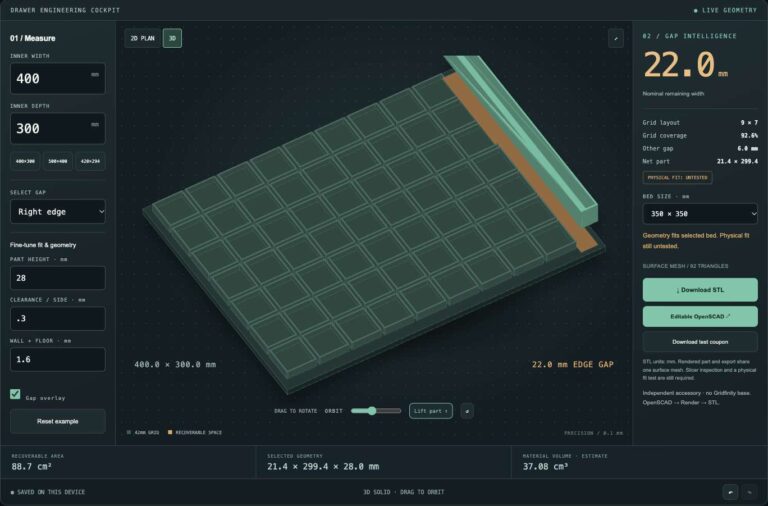
THE LAST MILLIMETER — Gridfinity Gap Solver
Gridfinity Gap Solver: 7 Smart Checks Before Printing
Plan strips beside a 42 mm drawer grid in THE LAST MILLIMETER. Actual clearance, wall, bed and part-type tests explain net dimensions, blocked exports and the limits of untested physical fit.

FrameMint Studio
Screenshot Editor: 7 Smart FrameMint Studio Checks
Frame screenshots, add manual masks and build captioned stories in FrameMint Studio. Real import, order, recovery and size tests explain what to check before sharing.
PrintFix Studio
PrintFix Studio: 7 Smart HTML Printing Checks
Prepare basic HTML for printing with overflow checks, repairs, page breaks and CSV document batches. Our hands-on tests show why 100 readiness does not catch a missing field and what remains to verify in the actual print output.