DICE TOWER CHAOS is a browser dice tower simulator for building a four-level route, dropping a D6 and inspecting the simulated journey. It turns a familiar roll into a useful question: did a different outcome come from the tower, the starting conditions or a change in how the sample was counted?
Verified 13 November 2026. We tested repeated rolls, a 0.1° comparison, two 100-trial batches, editing, local loading and a fresh shared link in Chrome. Measurements below belong to the simulation; they are not tests of a physical die, a manufactured tower or a certified random-number generator.

Build a D6 dice tower and inspect actual simulator results. Learn repeated seeds, 0.1° comparisons, settled-only percentages, recipe restoration and limits.
- Brand
- DICE TOWER CHAOS
- Tool languages
- en, ko
- Verified date
- 2026-11-13
On this page
Key takeaways
Use the same seed to check reproducibility, then use the batch function to examine a set of trials. Repeating one seed is useful for comparing a design, but does not produce a fresh independent sample simply because you clicked Roll again. Separate those two tasks before interpreting the results.
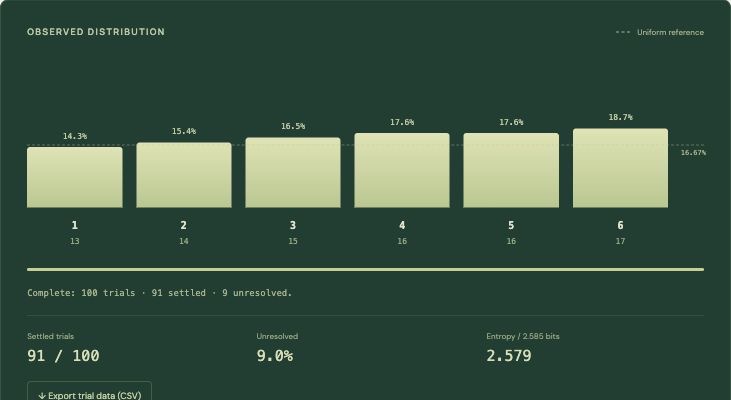
Our default seed-42 roll repeated face 4, 37 contacts and 5.64 simulated seconds. A 100-trial batch produced 91 settled results and 9 unresolved cases. The chart percentages used those 91 settled cases as their denominator. A visually balanced chart is therefore only part of the story, and cannot certify fairness.
What DICE TOWER CHAOS actually does
The official name is DICE TOWER CHAOS. It offers a visible 3D tower, four configurable collision levels and a six-sided cube. The publisher describes a rigid-body simulation rather than a button that simply chooses a face. You can inspect the path, replay a recording and compare a tiny angle change under the same seed.
No file is needed to begin. Inputs include module types, angles, restitution, friction, an experiment seed and playback speed. Outputs include a settled face or unresolved result, contact count, simulated duration, path distance, accumulated rotation, recorded trajectory and batch distribution. The inspected interface supports English and Korean, and our tests required no account.
The fixed-step setting shown on the site is 1/120 second, with gravity labeled 9.81 m/s² and a 15-second model timeout. These describe the educational model. We did not audit the physics engine or benchmark it against a laboratory apparatus. A long distance or many contacts on screen should be read as simulated metrics, not a prediction of your tabletop hardware.
Prepare a controlled dice experiment
Choose a question before changing a ramp. “Does the same setup reproduce?” requires one fixed seed. “How does this design behave over a sample?” requires a batch. “Does one small angle change alter this path?” belongs in the butterfly comparison. Those questions share controls, but their evidence is different.
Record the design name, all four module choices, the selected level and angle, friction, restitution and starting seed. Keep the browser environment fixed when comparing results. The publisher cautions that browsers or engine versions may differ numerically; a seed does not promise cross-platform identity. A screenshot of a face without its conditions is a weak experiment record.
Use a browser that can display the 3D scene and allow time for an active simulation to finish. On our tests, editing controls were disabled while a roll or batch was running. That lock helps keep conditions stable. If a control appears unavailable, inspect the status and progress first instead of repeatedly pressing a disabled button.
Dice tower inputs, modules and outputs
| Input or output | How to use it |
|---|---|
| Four levels | Select the level first; then choose its module and angle. Check the selected marker. |
| Five module choices | Inclined ramp, elastic bumper, cascade stairs, twin splitter or open space. These are available options, not five separately validated physical devices. |
| Restitution and friction | Set collision response and sliding conditions in this model. A higher-looking bounce setting is not a material certificate. |
| Seed | A reproducible starting-condition control within the tested environment, rather than a fairness score. |
| Playback | 1×, 0.25× and 2× options change presentation speed. Report simulated duration separately from time spent waiting. |
| Roll recorder and batches | Inspect one path or examine many outcomes. A path recording and a distribution answer different questions. |
Camera buttons offer rotation, zoom, cutaway, follow and reset. Trail and sound controls are also present. We inspected those controls but did not certify every camera mode or assess sound quality. The useful output for this article is the recorded state and numbers, so no claim about audible realism depends on them.
The collection contains Glass Labyrinth, Brass Cascade and Zen Cascade starting designs. If you use a preset to begin a new comparison, write down its resulting conditions rather than assuming every preset differs in only one way. Resetting or loading a design can clear the previous recording or distribution, so preserve the result before exploring another setup.
7 checks for a useful dice tower session
1. Start with an explicit baseline
Open the English tool and use Glass Labyrinth with seed 42. Our baseline had four ramps at 40°, restitution 0.35 and friction 0.25. Confirm those values in your interface before treating the numbers below as a reference. An unnoticed module change makes a same-seed comparison a different experiment.
2. Drop once and wait for the outcome
Press Drop the dice or Roll. Watch the status move from rolling to a recorded outcome. Read the final face alongside contacts, duration, distance and rotation. Do not stop at the largest digit: a tilted rest or jam belongs to a different outcome category from a settled face.
3. Repeat the same seed for reproducibility
Keep the design unchanged and roll again. Our repeated baseline showed the same displayed values: face 4, 37 contacts, 5.64 seconds, 13.39 metres and 1138° accumulated rotation. This is evidence for that repeated configuration in Chrome, not proof that every future environment will match or that the die is biased toward four.
4. Inspect a recorded path
Use the recorder slider or Replay to examine the journey. Moving the scrubber to its end selected the last recorded frame in our test; its displayed sample time was about 5.63 seconds, while the outcome duration was 5.64. Do not mistake a small sampling-display difference for a second independent timing measurement. We verified seeking to the end rather than every replay-speed combination.
5. Change one angle in the butterfly experiment
Select the intended level and run Compare the two worlds. In our default test, level 1 changed from 40.0° to 40.1° while the seed stayed 42. A and B showed different paths and settled faces. The feature illustrates sensitivity in one configuration; the page explicitly says a small change may also leave the result the same.
6. Run a batch and include unresolved cases
Select 100 rolls for an initial study and wait for completion. The interface also offers 500 and 1,000, which we did not run. Record attempted trials, settled results, unresolved cases and each face count before comparing bars. An unfinished or stopped sample should be labeled as such; we did not test the Stop workflow.
7. Preserve both the recipe and your observations
Save the design locally or copy a shared link, then keep a separate result note. We confirmed that a fresh link restored a custom stair module, 55° and seed 77, but it opened without the earlier recording or batch. Save/share is a way to reproduce conditions, not a verified archive of every experiment you ran.
Our actual dice simulator results
All results in this table were observed on 13 November 2026. We repeated the 100-trial baseline after reloading and obtained the same displayed counts. These checks are useful for reproduction in the tested browser; they are not a general statistical validation of the simulator.
| Test | Observed result |
|---|---|
| Default roll, repeated | Seed 42: face 4, 37 contacts, 5.64 s, 13.39 m, 1138° rotation. |
| Butterfly A | Level 1 at 40.0°: face 4, 37 contacts, 5.64 s; settled. |
| Butterfly B | Level 1 at 40.1°: face 3, 57 contacts, 5.83 s; settled. First separation over 5 cm: 1.283 s. |
| 100-trial batch, repeated | 91 settled and 9 unresolved. Faces 1–6 counted 13, 14, 15, 16, 16 and 17. Displayed entropy: 2.579 bits. |
| Local recipe | A stair module at 55° with seed 77 returned after editing away, and after reload followed by Load. |
| Fresh shared link | The copied URL reopened the custom stair/55°/77 conditions in a new tab; previous path and batch were absent. |
| Korean mobile | At 390 × 844, document width was 390. Level 2 changed ramp → bumper → Undo to ramp; angle control reached 55°. |
| CSV export | The enabled button was clicked, but no download file was captured within a 6-second listener. CSV contents remain unverified. |
Dice batch charts: read the denominator first
The face counts add to 91, not 100. The displayed face-6 bar was 18.7%, consistent with 17/91 × 100. As a share of all attempted trials, face 6 occurred in 17/100, or 17%. Both calculations are meaningful, but they answer different questions. The nine unresolved trials must remain visible when assessing the tower’s ability to deliver usable results.
| Quantity | Calculation for our batch |
|---|---|
| Settled proportion | 91/100 = 91%. |
| Unresolved proportion | 9/100 = 9%. |
| Face 1 among settled cases | 13/91 ≈ 14.3%, matching the chart. |
| Face 6 among settled cases | 17/91 ≈ 18.7%, matching the chart. |
| Face 6 among all attempts | 17/100 = 17%; a different denominator. |
The ideal reference is 16.67% for each of six faces. A finite sample need not hit that value exactly, and this run does not establish a long-run distribution. Nor does the displayed entropy settle the question: 2.579 bits is close to the shown uniform reference of 2.585, but that single summary says nothing by itself about manufacturing defects, cross-platform consistency or why nine attempts were unresolved.
A practical dice experiment worksheet
The following is a proposed lesson, not a third batch we performed. Divide the record into “conditions,” “attempted outcomes” and “interpretation.” Let one student describe the recipe and another check the denominator. This makes it harder to call a tower fair merely because its six bars look similar.
First have everyone reproduce one fixed-seed fall. Then run one batch without changing the design. Finally, change only one level angle and start a separate batch. Do not merge the two conditions into one unlabeled histogram. If a group cannot complete a batch, report the partial work and its uncertainty instead of substituting an attractive screenshot from another condition.
| Worksheet field | What to write |
|---|---|
| Question | Reproduction, sensitivity or distribution; choose one. |
| Recipe | Modules, four angles, friction, restitution, seed and browser context. |
| Sample | Requested trials, completed trials, settled and unresolved. |
| Faces | Six integer counts plus the denominator for percentages. |
| Conclusion | A statement limited to the observed conditions, with unresolved outcomes included. |
A useful discussion prompt is: “Would you prefer a near-uniform set of settled faces if many attempts jam?” There is no universal numerical answer supplied by this tool. The prompt separates outcome balance from reliability, and gives students a reason to look beyond the chart’s most visually persuasive feature.
Dice replay, sensitivity and the minimalist challenge
Dice contact count measures events as reported by the model. It is not a score that proves stronger randomization. Our 0.1° change increased the displayed contacts from 37 to 57, while the face also changed; that observation does not establish that more contacts always create a fairer distribution. A new batch would be needed to study that separate question.
Keep simulated time distinct from wall-clock time. A 5.64-second trajectory can be presented faster or slower, and batch work can compute multiple paths without playing each fall in real time. The speed menu is useful for viewing, but the article’s duration figures come from the outcome display rather than a stopwatch measurement of the browser session.
The minimalist challenge asks for three modules or fewer, at least eight contact events and a flat tray settlement within fifteen seconds. Those are the publisher’s displayed rules. We did not complete or certify that challenge. Use it as a design prompt after learning the controls, and keep its success condition separate from the fairness investigation.
When the result changes after an edit, Undo is a convenient way to return one step. Our Korean mobile test restored a ramp after selecting a bumper. That confirms this edit sequence, not unlimited history across reloads. A written recipe remains useful even when Undo works, especially if you plan to compare more than two designs.
Save a dice design and keep its experiment record
The source FAQ says saved designs use this browser’s local storage and share links put design parameters and the seed in a URL fragment. We tested a non-default recipe rather than relying only on the default screen: a stair module at 55° and seed 77 was saved, changed away from, loaded, then loaded again after a reload. It returned in the tested browser.
For sharing, copy the complete link and open a new tab. Our copied address used #design and restored those custom conditions. An existing page that receives only a changed fragment should not be assumed equivalent to a fresh load; for this guide we used a new tab as the verification step. The recipient should check the module, angle and seed before dropping.
The fresh page had no roll recording and no completed batch chart. Keep screenshots or a worksheet alongside the link if the results matter. CSV export is offered after a batch, but our browser automation did not capture a file. We therefore make no claim about its columns, encoding, row count or spreadsheet compatibility.
Dice model limits, privacy and troubleshooting
D6 only, four levels and a 15-second model timeout are stated scope limits. Moving pendulums and other polyhedral dice are explicitly future concepts rather than active features in the inspected interface. We did not test real dice imperfections, fabrication dimensions, physical tower safety or statistical certification. Use a separate method if you need a trustworthy game randomizer or a real hardware assessment.
The site describes on-device design storage, and the tested workflow needed no uploaded files, account or personal details. That is narrower than a claim that the whole site makes no external requests. Blogger hosting, advertising and shopping overlays were visible; we did not perform a network or privacy audit. Do not put private information into a link intended for sharing.
If an edit does not take effect, first confirm the selected level and whether a simulation is active. If a saved recipe seems missing, use Load and check the actual values rather than trusting a toast. If the scene is slow, the tool offers quality controls, but we did not benchmark devices. Ads may obscure controls; close the overlay through its own close control and return to the experiment.

Related tools for motion and balance
For active control of a moving object, continue with Magnet Marble Maze. Moving a magnet while the marble travels is a different task from designing fixed obstacles and observing a seeded fall. The distinction helps separate control skill from a tower’s repeated response.
For a slower balance-and-settling exercise, try Perfect Pebble Stack. Its placement and rotation workflow is useful when your question concerns stable configurations rather than six-face distributions. Both linked introductions are published, and neither should be treated as a laboratory calibration for this dice model.
Frequently asked questions
Why does seed 42 keep showing the same face?
A repeated seed with the same design is intended to reproduce starting conditions. In our baseline it repeated face 4 and the other displayed metrics. That is not the same procedure as drawing many independently varied trials, and is not by itself evidence of a faulty six-sided die.
Does 0.1° always change the answer?
No. Our default comparison changed the face from 4 to 3, but the tool explicitly warns that a different result is possible rather than guaranteed. Report both paths and conditions instead of promising a universal butterfly effect.
Why are the six face counts below 100?
Our 100 attempts included nine unresolved cases, leaving 91 settled faces. The bars described that settled subset. Include unresolved cases and state the denominator whenever you quote a percentage.
Did you verify the CSV file?
No. We clicked the enabled export button but captured no file in the test window. The guide verifies the displayed counts, not exported data structure or file integrity.
Where can I read the source explanations?
Use the official English tool or Korean tool, especially its model notes and storage FAQ. The source links to cannon-es documentation for the physics library; that reference does not independently validate this particular tower or its fairness.
Try one reproducible dice fall
Keep the baseline fixed, observe one fall and write down its conditions before changing anything. Then choose either a small-angle comparison or a batch study. A useful result includes the recipe, the attempted outcomes and the limits of the conclusion.
Launch DICE TOWER CHAOS and record one controlled experiment →
A RELEVANT NEXT STEP
Tools with a useful connection

Magnet Marble Maze: The Polarity Paradox
Magnet Marble Maze: 7 Smart Checks for Better Control
Move a magnet to guide a marble through a 2D puzzle. Our guide tests polarity, pulse, rewind, Maker completion and sharing, while separating game outputs from real magnetic measurements.

Perfect Pebble Stack
Perfect Pebble Stack: 7 Smart Balance Checks
Build a digital stone sculpture with preview placement, 1° rotation and three modes. Our hands-on guide explains settling, Undo, local portrait storage and the limits of this artistic physics game.
쓰리쿠션 길 안내소
3 Cushion Simulator: 7 Smart Practice Checks
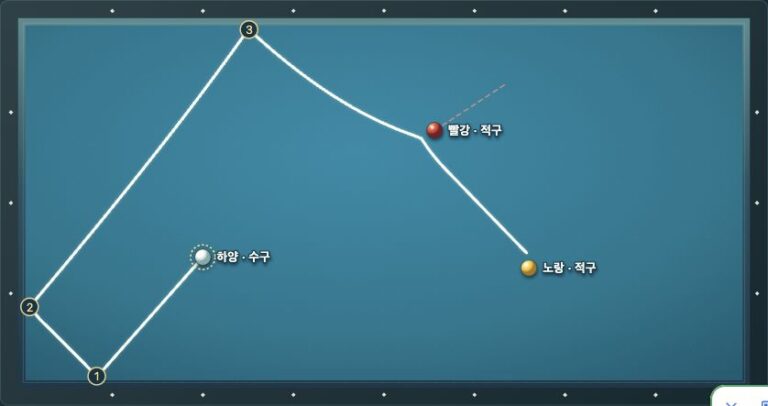
Compare experimental three-cushion routes, save a position and calculate points per inning with 쓰리쿠션 길 안내소. Korean interface; actual table accuracy is unverified.