Scrapcade is a browser quilt planner for arranging scrap shapes on an 8 × 8 board. It combines a fit puzzle, color studies and schematic sewing estimates. Use the screen to explore an arrangement, then check real fabric, seam allowances and joining order before cutting.
Verified 11 November 2026 in Chrome, including the Korean interface at 390 px. We completed the Easy puzzle, inspected a custom rectangle and restored a saved design. No fabric was cut or sewn. This library and the original tool share a creator.
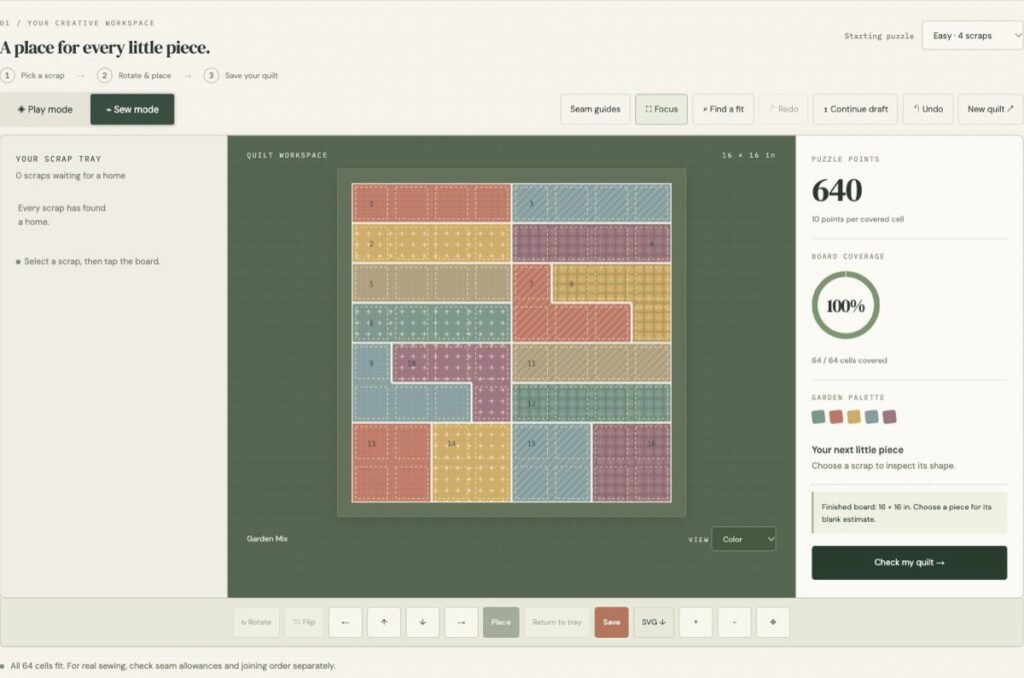
Plan scrap layouts with Scrapcade. Actual64-cell completion, overlap rejection, rectangle estimates and saved-design tests show where the screen helps and where real sewing checks begin.
- Brand
- Scrapcade
- Tool languages
- en, ko
- Verified date
- 2026-11-11
Table of Contents
Key takeaways
The strongest reason to use this quilt planner is to separate two questions: does a shape fit the board, and can the resulting layout be sewn sensibly? Scrapcade answers the first with grid placement and coverage. Its sewing view helps frame the second, but does not produce a verified construction plan.
Our Easy start had 48 of 64 cells covered, 75% coverage and 480 points. Four placements using Find a fit and Place reached 64 cells, 100% and 640 points. A fully covered board still rejected an extra custom rectangle. Saving created a local design card, which restored the completed layout after a reload.
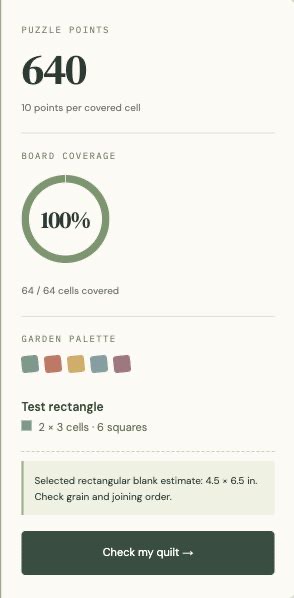
A 2 × 3-cell rectangle at 2 inches per finished cell and a quarter-inch seam allowance displayed a 4.5 × 6.5-inch rectangular blank estimate. This is useful arithmetic for a rectangle, not a full-size cutting template for every irregular puzzle shape. SVG delivery was not confirmed in our download attempt.
What this quilt planner actually does
Scrapcade calls itself a playable textile atelier. The workbench contains a tray, an 8 × 8 quilt board, a score and coverage panel, and piece controls. Easy leaves four scraps to place; Medium leaves eight; Blank offers sixteen. Existing pieces are already present in the easier starting layouts. The number in the difficulty name describes the remaining scraps, not the total board area.
Select a tray piece, choose an orientation and place it on the board. Rotate, Flip, directional movement, Return to tray, Undo and Redo support exploration. Find a fit outlines a possible position and explicitly warns that future moves are not guaranteed. It is a local placement suggestion, so a suggested move is not proof that every remaining piece will fit afterward.
Play mode emphasizes covered cells. Sew mode replaces the board size with finished inches and shows a selected piece’s rectangular blank estimate. Three palettes recolor the layout, while Color, Grayscale and Contrast offer viewing choices. A custom-scrap form accepts a name, rectangular width and height in cells, and a color. These are symbolic shapes rather than imported photographs of your actual offcuts.
A daily challenge is labeled by UTC date. We started the 11 November 2026 challenge and saw an eight-scrap start with a Daily quilt label. The site says everyone receives the same starting layout for that date; we did not compare multiple visitors or prove its full solvability. Use the date as a puzzle identifier, not as evidence of a multi-user study.
Prepare a useful scrap inventory
Before opening the workbench, decide whether you want a short puzzle, a color arrangement or a rough plan for material you own. For the puzzle, a browser is enough. For physical patchwork, collect a ruler, a record of usable fabric dimensions and a place to write down the finished-cell scale. Measure usable fabric after allowing for damaged edges or any preparation your material requires.
Keep three labels separate in your notebook: measured fabric, finished layout and proposed cutting blank. A measured offcut is what you have. A finished-cell size is what one sewn unit should occupy. A cutting blank includes extra material for seams. Typing an offcut directly as a finished size mixes these roles and can make a plausible digital design impossible to cut.
For a first physical study, choose a small group of fabrics with compatible handling and keep their real names outside the browser. Use neutral labels such as green cotton in the tool. Note directional prints and grain separately: rotating or flipping a drawing does not confirm that a physical scrap has the same usable face or stretch in its new direction.
How to use Scrapcade in 7 steps
1. Choose the starting problem
Open the original quilt planner and use Starting puzzle. Easy is the most direct way to learn because twelve pieces already occupy the board and four remain in the tray. Read the initial coverage and points before acting. If you want to arrange all sixteen pieces yourself, use Blank and expect more placement work; we did not complete that difficulty.
2. Select and inspect one scrap
Click a tray card. Its name, bounding dimensions and square count appear in the inspector. The Easy Scrap 04 was four cells in a 4 × 1 bounding box. Distinguish occupied squares from the outer rectangle for an irregular shape: empty corners inside a bounding box are not extra fabric coverage.
3. Set an orientation and a position
Use Rotate or Flip when needed, then tap the board or use the directional controls and Place. The board advertises arrow-key movement, R rotation, Enter placement and Delete return. We used the named buttons for the main test; the advertised keyboard mapping was not exhaustively tested. A collision message means the requested position was not accepted.
4. Use a hint without treating it as a solution
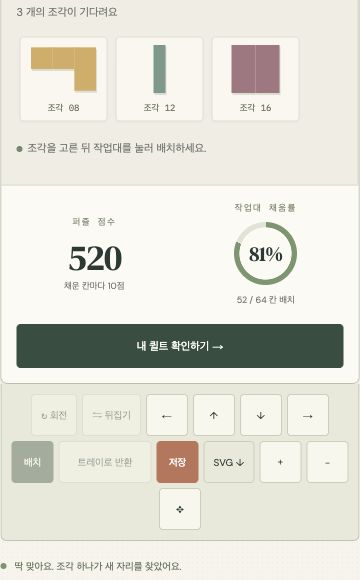
Find a fit outlines a candidate. Press Place to commit it and watch both the tray count and covered-cell count change. In our test the first placement changed 48 to 52 cells and 480 to 520 points. If later pieces cannot fit, Undo is the appropriate next experiment. Do not repeatedly add custom pieces just to remove a gap you have not understood.
5. Check the completed layout
Continue through the remaining pieces and use Check my quilt. Our finished Easy board showed 100%, 64 / 64 cells and 640 points, followed by a message to check seam allowances and joining order separately. That message is the handoff between the puzzle and a real sewing plan. It does not certify a cutting list or a safe construction sequence.
6. Inspect scale in Sew mode
Choose Sew mode and read Finished cell and Seam allowance in the fabric studio. At the default 2-inch cell size, eight cells span 16 inches. Add a small rectangular test piece and compare its estimate with your own arithmetic. Do this in a disposable layout if the current board is already full; extra material in the tray changes what you are planning.
7. Save and reopen before leaving
Press Save and look for a saved quilt card. Reload and open that card to verify the design you intend to keep. Our card restored the full board, but the interface reopened in Play mode; do not assume every viewing control is part of the saved design. The site retains the six most recent quilts in this browser. Keep a separate record of dimensions and decisions that matter to your project.
Our actual layout and saving tests
| Action | Observed result | What it establishes |
|---|---|---|
| Easy initial state | 48 / 64 cells; 75%; 480 points | Twelve pieces were already placed. |
| Four hint-and-place moves | 64 / 64; 100%; 640 points | This Easy layout was completed. |
| Undo then Redo | Placement was removed and restored | A reversible placement workflow worked. |
| Extra 2 × 3 rectangle on full board | Overlap or board-boundary rejection | An invalid requested placement was not accepted. |
| Save, reload, open Quilt 1 | Completed board restored | Local recovery worked in this browser. |
| Korean at 390 px | First placement reached 52 / 64 and 520 points | Named mobile controls worked; no page overflow observed. |
| SVG button | Download not captured | The final SVG file remains unverified. |
The test fixture was the tool’s built-in Easy layout plus our clearly labeled Test rectangle. These results describe interface behavior, not a sewing trial. We did not measure cutting accuracy, fabric consumption, seam strength, print scaling or environmental savings. The coverage score counts digital board cells, so its precision should not be borrowed for those other claims.
Read finished cells and blank estimates correctly
For a rectangular piece, the displayed default example follows a simple relationship: finished width is cell count × finished-cell inches; a rectangular blank adds the seam allowance twice to each dimension. Our 2 × 3 rectangle therefore had a 4 × 6-inch finished footprint and a 4.5 × 6.5-inch blank at a quarter-inch allowance. Rotation changed the displayed estimate to 6.5 × 4.5 inches.
The extra half inch comes from two quarter-inch edges on each dimension. It does not mean adding a quarter inch once to the whole rectangle. Likewise, 16 × 16 inches describes the finished eight-cell board at the default scale, not the size of an unsewn sheet you should cut. Borders, binding, backing and batting are separate decisions that this test did not calculate.
An irregular puzzle piece can have a rectangular outer boundary while still needing a more complicated seam path. Treat its outer dimensions as an envelope for discussion, not an instruction to cut one shape and sew it in a single operation. Identify concave corners and decide whether to subdivide into simpler units. The original page itself warns about partial seams and Y-seams.
Move from screen layout to a sewing decision
A useful first project is a layout discussion for a small decorative panel. Choose a cell scale, write the target finished span, and sketch a simple arrangement. Then create a paper list of each proposed unit with finished dimensions, cutting dimensions and orientation. If a digital piece would require an awkward join, replace it with an assembly of simpler units before cutting anything.
Use the display to identify a question you can test with a small sample: can you maintain the intended finished size with your seam allowance, and do adjoining units line up? Make that sample from spare compatible material. Compare the measured result with the planned finished unit. A mismatch is a reason to adjust the construction approach, not to stretch the fabric until it matches a screen.
For color studies, preserve the shape arrangement while changing one palette or view. We switched to Blue Hour and Grayscale and observed the selected controls. These are useful visual comparisons, but no calibrated fabric-color or accessibility audit was performed. Check real swatches under the lighting in which the finished piece will be used, especially when two fabrics have similar lightness.
For a lesson, ask learners to explain why a four-cell placement adds forty points and why complete coverage does not prove easy sewing. The arithmetic is directly visible. Keep the lesson focused on spatial reasoning and planning language; our browser session did not measure learning gains, waste reduction or crafting skill.
Choose a method that fits the job
| Method | Useful for | Extra work still needed |
|---|---|---|
| Scrapcade | Quick grid-fit puzzles, symbolic color layouts and rectangle estimates | Verify real dimensions, grain and sewing sequence. |
| Paper grid and labeled swatches | A tactile record tied to the fabrics you own | Count cells and revise arrangements manually. |
| Purpose-built drafting or quilting software | Projects requiring detailed construction documents | Check that the chosen program actually supports your required units and outputs. |
Choose by the decision you need to make. A short fit puzzle does not need a complex drafting system. A final cutting plan needs more than a coverage percentage. We did not test another product in parallel or claim Scrapcade has fewer errors than a competing application. The comparison separates workflow roles, rather than inventing benchmark results.
Limits, privacy and mobile behavior
The original privacy section says fabric names and saved layouts stay in the browser. Our saved-card reload is consistent with local persistence, but we did not independently audit storage or network traffic. Google/Blogger hosting and advertising services may use cookies or process usage data. Visible ads and an overlay appeared during research; local layout storage does not make the entire page free of external services. See the original notice and Google Privacy Policy.
The site exposes Save and SVG controls. We verified saving and restoration, but the SVG download was not captured within our attempt, and no exported file was opened. Do not assume the file is a full-size template, a reimportable backup or a production cutting pattern. If exporting matters, obtain the file, inspect its dimensions and contents, and test the intended destination before relying on it.
We verified the Korean interface at a freshly loaded 390-pixel Chrome viewport. Selecting a scrap, requesting a fit and placing it worked, with no horizontal page overflow. This is responsive-browser testing, not a survey of physical phones. Ads may cover lower controls; avoid mistaking an ad for the tool. Zoom, pan, Focus, return actions, all difficulty completions and every keyboard path were not exhaustively tested.
No account, payment or API key was required in the tested flow. We did not verify cloud synchronization, collaboration, photograph tracing, fabric purchasing, total material budgeting or automated seam sequencing. The displayed square inches are design measurements. They are not evidence of actual fabric savings or environmental benefits.
After entering 1.5 inches per finished cell, starting a new daily challenge displayed a 12×12-inch board. Immediate refresh of the existing inspector after the numeric edit was not clearly established in our automated interaction. Check that the current field and board labels agree before recording a dimension. The worked rectangle in this guide uses the verified default 2-inch setting.
Related tools for textile experiments
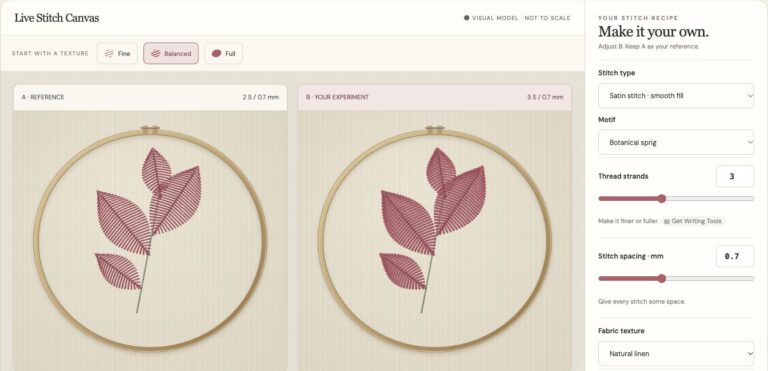
If your next question is how embroidery might look on a separate fabric sample, read StrandSpace embroidery simulator. Its strand and spacing comparisons help choose a small swatch to sew. It does not import Scrapcade layouts or certify the stitch behavior of your quilt materials.
For a different textile technique, LOOPSCAPE punch needle guide explores height, density and visual texture. Use it when planning a separate textured study or embellishment idea. It is not a quilting seam calculator. Both guides are already published, and neither connection implies automatic data transfer between the tools.
Frequently asked questions
Does this quilt planner make a ready-to-sew pattern?
No verified production pattern was obtained. It supplies digital layout feedback and schematic estimates. A full board still needs decisions about seams, joining order, fabric direction and cutting. Our test did not include physical construction.
Why does Easy start at 75%?
Twelve four-cell pieces were already on the 64-cell board in our start. Four remained in the tray. The mode gives a partly completed puzzle, so 75% does not mean you have already used 75% of your real fabric.
Does Find a fit solve the whole puzzle?
It suggests one possible placement and warns that future moves are not guaranteed. It worked for the four placements in our Easy completion. That does not establish a complete solver for every custom state or difficulty.
Can I treat the inch display as centimeters?
No. The controls explicitly use inches. For reference,2 inches equals 5.08 cm and a quarter inch equals 0.635 cm. Convert deliberately if you keep a metric notebook, and keep the original unit beside each value. We did not verify a metric-mode control.
Will a saved quilt follow me to another device?
The page describes browser-local storage and six recent designs. We restored one in the same browser. Another device, profile, cleared storage or private session was not tested as a recovery route. Keep important decisions separately.
Why might the daily date differ from my local date?
The challenge uses UTC. At midnight in Korea, the UTC date is still the previous day until 09:00 KST. Read the date printed beside the challenge when comparing a layout with someone else. We started one date, not a multi-day sequence.
Try one small, checked layout
Start Easy, inspect one piece and watch the cell count after each placement. Save a completed layout and reopen it. If you want to make something physical, translate the arrangement into measured units and test a seam sample before cutting your chosen fabric.
A RELEVANT NEXT STEP
Tools with a useful connection
StrandSpace
Embroidery Simulator: 7 Essential Steps for Better Swatches
Compare embroidery strands, spacing and mixed colors in StrandSpace. Our A/B, local-save and share-link tests explain what the visual model can show and what still needs a real fabric swatch.
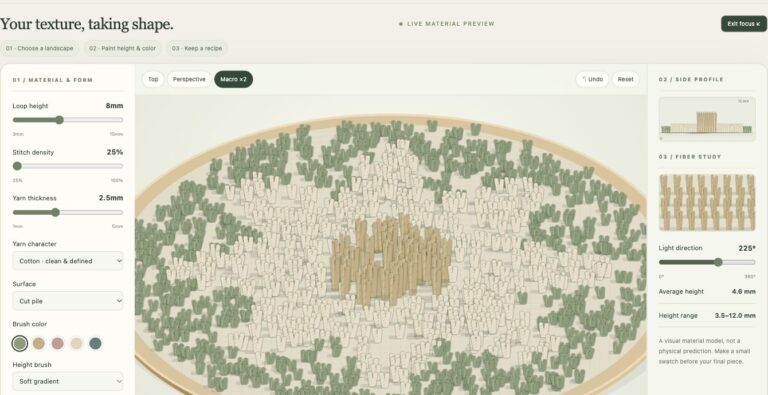
LOOPSCAPE
Punch Needle: 7 Essential Checks for Better Textures
Explore LOOPSCAPE punch needle texture with real paint, Undo, A/B and portable-restore tests. Learn what the height, density and recipe outputs can—and cannot—tell you.
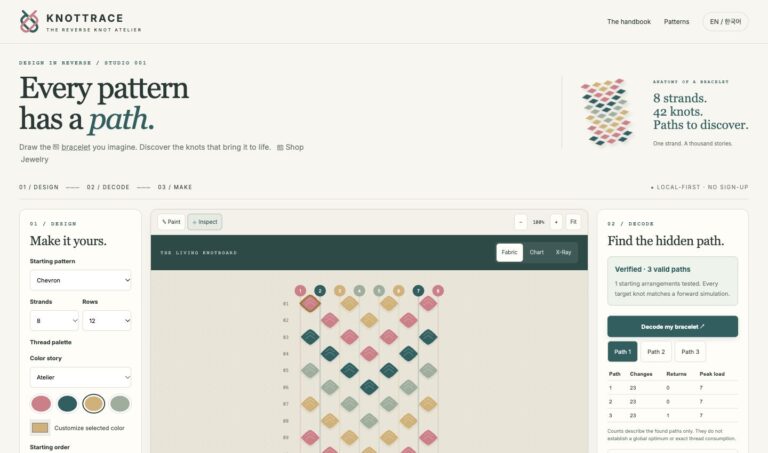
KNOTTRACE — The Reverse Knot Atelier
Friendship Bracelet Decoder: 7 Essential KNOTTRACE Checks
Turn a painted normal bracelet pattern into checked knot paths. Our 8-strand, 12-row tests cover 42 knots, 3 paths, strand tracing, F-to-FB changes, row marks and calibrated thread estimates.