StrandSpace is an embroidery simulator for comparing strand count, spacing and mixed colors. Keep A as a reference, adjust B and save a recipe for a real fabric swatch. The drawings are illustrative, not to scale: they do not predict physical coverage, thread use or a finished result.
Tested 9 November 2026. We checked presets, pinning and swapping, library selection, a numeric spacing edit, mixed colors, local save/load, copied recipe text and a share-link replay. We also tested the Korean interface at 390px. PNG preparation produced a notification; we could not inspect the downloaded file. No physical embroidery was made.
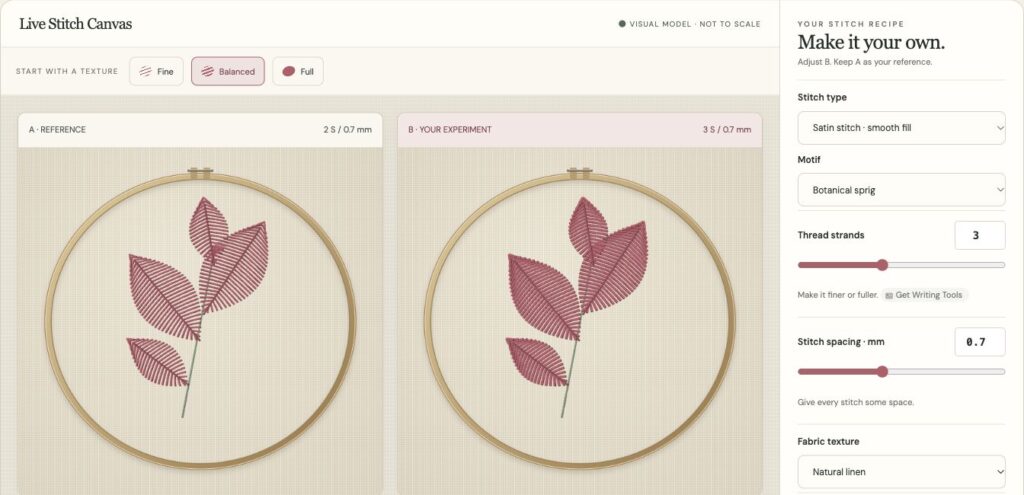
Compare embroidery strands, spacing and mixed colors in StrandSpace. Our A/B, local-save and share-link tests explain what the visual model can show and what still needs a real fabric swatch.
- Brand
- StrandSpace
- Tool languages
- en, ko
- Verified date
- 2026-11-09
Table of Contents
Key takeaways
- The official name is StrandSpace — The Embroidery Density Atelier. Both English and Korean interfaces were available.
- The default comparison was A: two strands at 0.7 mm and B: three strands at 0.7 mm. A stays fixed until you replace or swap it.
- Controls cover 1–6 strands and 0.3–1.3 mm nominal spacing. Numeric spacing accepted 0.8 mm; the library has only six spacing rows.
- The 36 swatches are six strand counts × six spacings. A tile loads settings into B; it is not a separate embroidery pattern download.
- Save/load and a replayed share URL restored our B recipe. The reference A returned to its default in our reset/load and fresh-link tests.
- The tool is useful for selecting questions to test on fabric. Its millimeters, fabric textures and X-Ray grid are not measurements of your materials.
What this embroidery simulator can show
A common planning problem is deciding what to compare first. Should a small leaf use fewer strands, wider spacing or a different stitch? Changing every variable on fabric can consume time without explaining which change produced the result. StrandSpace gives those choices a visible structure. The benefit is a comparison you can describe, not a guarantee that your thread will behave like the drawing.
The workbench combines two drawn hoop samples, a control panel, a swatch library, a structural view and a recipe area. Available stitches are satin, long and short, and back stitch. Motifs are a botanical sprig, a heart and a circle. Fabric appearances include natural linen, ivory cotton and deep sage linen. These are built-in choices; we found no upload workflow for your own motif or a photograph of your fabric.
For a beginner, the reference panel makes a simple question repeatable: what changes when B has another strand count while the motif and spacing stay the same? For an experienced stitcher, it can be a quick visual notebook for candidate color combinations. Neither use turns the display into machine digitizing software. No needle path file, stitch count, exact cutting length or calibrated coverage percentage was produced in our session.
Prepare a comparison before changing controls
Start by choosing the decision you actually need to make. A strand-count comparison should keep motif, stitch, fabric appearance, spacing and colors unchanged. A color study should keep strand count and spacing unchanged. If you change six strands and 0.3 mm together, you can describe the combined result, but cannot isolate the effect of either setting.
Keep your real project materials nearby for the later stage: the actual fabric, needle, floss and hoop. On screen, write down the selected stitch and motif as well as the numbers. Two recipes with the same strand count can describe different experiments if one is a filled sprig and the other is an outlined heart. A short note prevents a screenshot from becoming an ambiguous memory.
Make a baseline before using a preset. We used the default A two strands/0.7 mm and B three strands/0.7 mm. Fine changed B to two strands/1.1 mm. Later we pinned that B to A and loaded six strands/0.3 mm into B. The comparison status correctly described more strands and closer stitches. That sequence is useful for learning the controls, but it changes two variables and should not be mistaken for a controlled materials experiment.
Strands, spacing and the 36-swatch library
- Strand count: the number field and slider represent 1–6 individual strands. Only the first N color slots contribute when N strands are active.
- Nominal spacing: 0.3–1.3 mm in 0.1 mm input steps. The six library rows use 0.3, 0.5, 0.7, 0.9, 1.1 and 1.3 mm.
- Fixed reference: Pin B as A captures the current experiment; subsequent B edits can differ in shape and appearance while A remains a reference. Swap A / B exchanges the two.
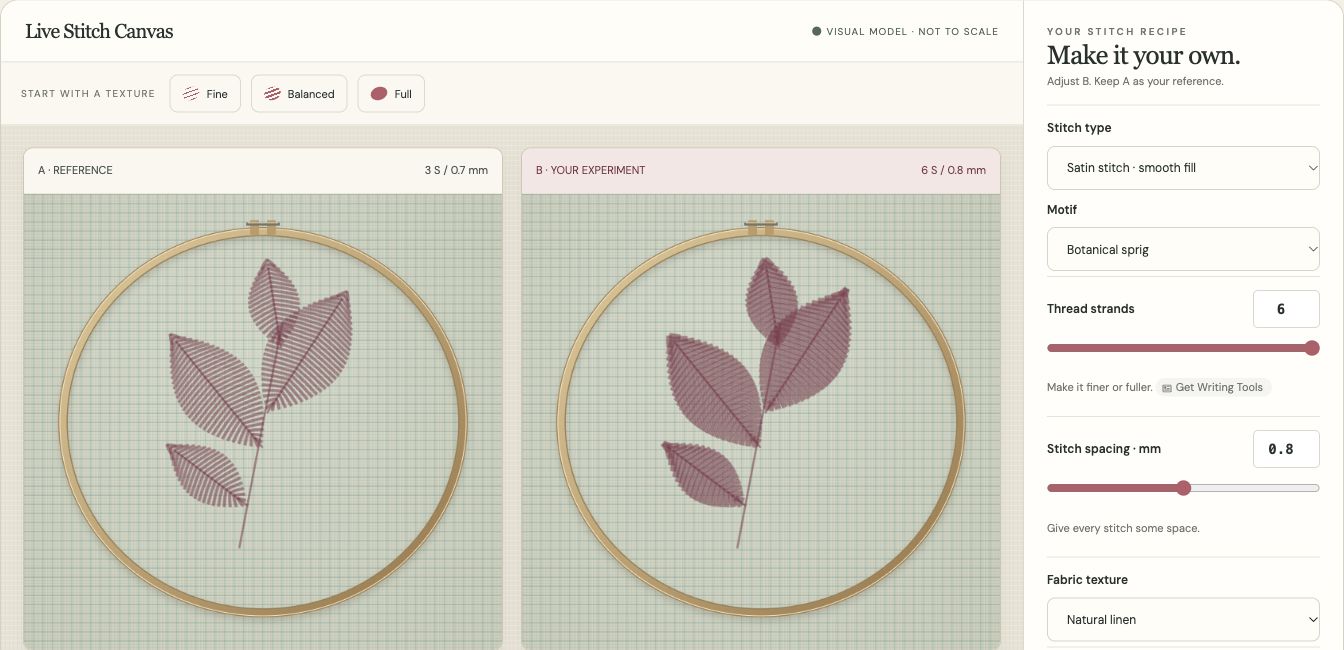
- Viewing aids: Fiber X-Ray overlays an illustrative structural grid and paths. Fiber zoom ×2 changes the view, not a measured physical scale.
- Individual colors: six color controls plus whole-strand palette buttons and an atelier blend. These are screen colors, not floss manufacturer codes.
- Recipe records: copied text, a share link, device save/load and a PNG control serve different purposes. Their scopes should be checked separately.
The library is a fast way to compare combinations without repeatedly editing two fields. Its colors and stitch follow the current experiment. If you change the stitch and then revisit a tile, you are viewing that tile within the current setup, not an immutable photographed sample. Read the selected recipe whenever you return to an earlier idea.
How to use StrandSpace in 7 steps
1. Choose the interface and establish a baseline
Open the English studio or select KO for the Korean page. Check the A/B labels before touching the controls. At a narrow viewport the samples become A and B tabs rather than two simultaneously visible hoops. The comparison text still refers to both states. Switching to A is a view change; it does not make the recipe panel an editor for A.
2. Choose a stitch, motif and fabric appearance
Use the three dropdowns to define the study. We changed to Back stitch, Heart and Deep sage linen, and those names appeared in the recipe. Choose the stitch for the question you are exploring. A back-stitch outline and a filled satin motif show different constructions, so a visual difference between them is not evidence that one spacing produces a specific coverage percentage.
3. Pin a reference before changing B
Select Pin B as A when B represents the baseline you want to keep. Then change a single number in B. Pinning is an explicit replacement: do not pin your new candidate again unless you intend to discard the old comparison. Swap A / B is useful when the new candidate becomes your working reference, but it also changes which recipe is being edited.
4. Compare strand count and spacing separately
Try an adjacent strand count first, then restore it before trying a spacing change. Library buttons load both count and spacing; for a one-variable comparison choose a tile in the same row or column as your baseline. Numeric input can reach intermediate spacing values: our 0.8 mm edit appeared in B and the recipe even though there is no 0.8 mm library row.
5. Inspect the structure and active colors
Toggle Fiber X-Ray to reveal drawn paths and the fabric grid. We verified the pressed state and changed rendering, and also toggled zoom ×2. Return to normal view before judging the ordinary appearance. Then check which color slots are active. With three strands, the first three colors matter; editing the sixth slot does not make it part of a three-strand recipe.
6. Keep the candidate in more than one useful form
Copy recipe produces readable settings text. Save on device gives a local restoration path. Share link copies a URL containing the settings in its fragment. We verified each of those paths, including opening the share URL in a fresh tab. Treat B as the saved candidate: our restored B did not recreate a custom A reference after Reset or in the fresh shared session.
7. Make a real sample and add observations
Use the screen recipe as a starting note, then stitch a small sample on the actual project materials. Compare neighboring candidates under the same conditions. Record visible ground, bulk, handling and any puckering in your own notes. This article did not test those physical outcomes. The digital comparison helps choose the trial; the physical sample supplies the evidence for your project.
Our actual browser tests
| Action | Observed result | Meaning |
|---|---|---|
| Default load | A 2 / 0.7; B 3 / 0.7 | A clear starting comparison |
| Fine preset | B 2 / 1.1 | Preset changed two values |
| Pin then library | A 2 / 1.1; B 6 / 0.3 | A held the previous B |
| Swap | A 6 / 0.3; B 2 / 1.1 | Both roles exchanged |
| Spacing input | B displayed 0.8 mm | Intermediate value accepted |
| Atelier blend | 3 active rose/copper/sage colors | Mixed recipe text updated |
| Reset then load | B heart/back/sage restored; A default | Local save is not a full A/B workspace |
| Fresh share URL | Same B recipe; default A | B replay confirmed |
| Korean 390px | Library 4 / 0.5 loaded; A tab worked | Narrow layout usable in this test |
| Download PNG | Prepared notification; no inspectable file | Output bytes remain unverified |
These are browser observations from one session, not a test of physical stitch quality. We also copied the Heart / Back stitch / Deep sage linen recipe text: three strands, 1.1 mm and active colors #b65c69, #c69d73 and #84968a. The fresh shared tab reproduced those B settings. A subsequent EN-to-KO switch retained the observed B recipe in this session; that is not a promise that every navigation or browser retains unsaved work.
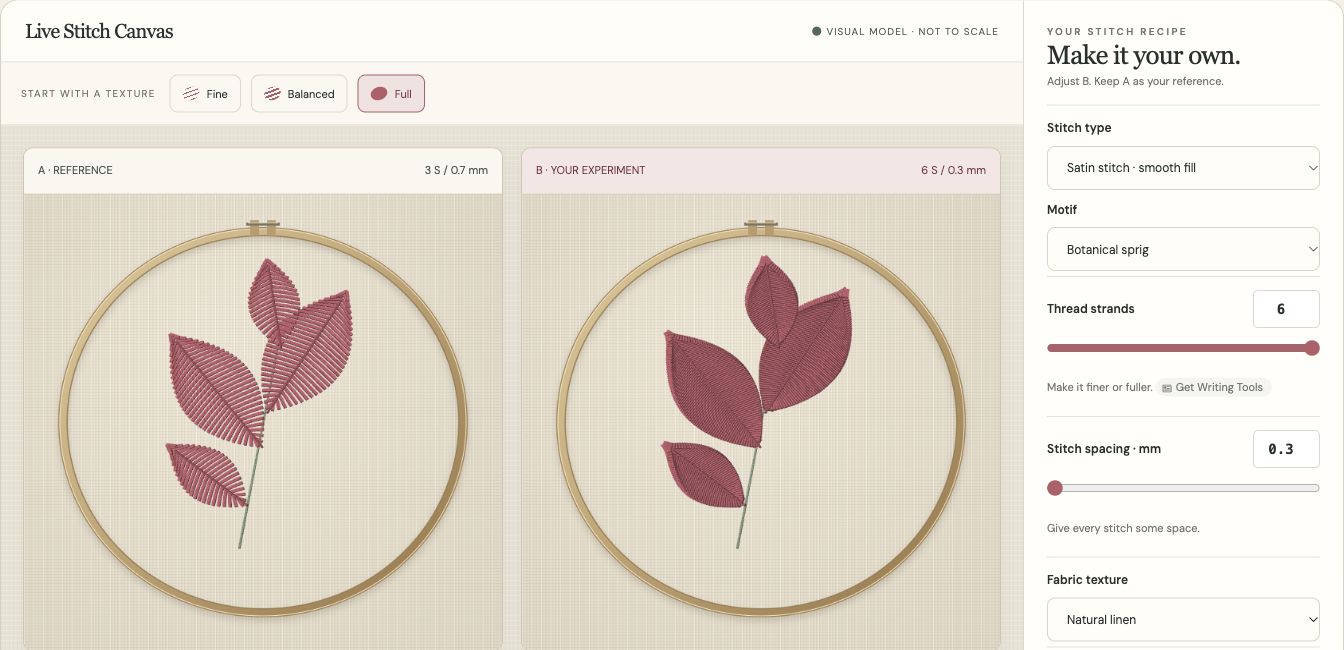
Notice that the screenshot is a later study, not the earlier Fine-to-Swap test row. Its reference is three strands at 0.7 mm. Keeping that distinction explicit prevents mixing evidence from separate states. A good working record should identify the current A and B, not merely say that one sample looked fuller.
Build a useful mixed-strand study
The atelier blend set alternating rose, copper and sage values across six slots and activated three strands. The first three colors appeared in the copied recipe. Increasing strand count activates additional slots rather than blending everything into one flat color. A whole-strand palette button, by contrast, is labeled to set all strands to that color. Check the slots again after using a palette shortcut so you do not accidentally replace a mixed recipe.
For a useful study, compare one mixed candidate with a single-color reference using the same count and spacing. Choose names for your actual floss separately; hexadecimal colors are display values and do not specify a manufacturer shade. Monitor settings, ambient light and the real thread’s finish can change perceived color. We did not calibrate display colors against a physical floss chart.
Save, copy and share the right record
Choose a record based on the next task. Copied text is easy to paste into a project notebook with your fabric and needle notes. A shared URL is a replayable B configuration for another browser. Device save is convenient for returning in the same browser. A screenshot can retain a particular A/B comparison that the B-only recipe does not reproduce.
Our Save on device → Reset → Load saved sequence restored the Heart, Back stitch, Deep sage linen, three-strand/1.1 mm candidate. A remained the default two-strand/0.7 mm reference after Reset. The fresh share URL likewise loaded that B with default A. If both sides matter, record both separately. Do not describe one saved candidate as a complete version history or cloud-synchronized project.
PNG export is a separate question. The source FAQ says it includes B and settings at a fixed resolution, in normal view regardless of X-Ray or zoom. Our button produced “PNG prepared for download,” but no inspectable file was available during a ten-second download observation. We therefore did not verify dimensions, embedded text, image fidelity or printing quality. A website screenshot in this article is not presented as an exported PNG.
Turn a screen comparison into a fabric test
A practical physical trial can start with a single motif and two nearby strand counts at one spacing setting. Label the samples with the actual floss and fabric, and keep stitch direction and tension as consistent as you can. This is a suggested trial design, not a trial performed for this review. Its purpose is to learn which candidate suits your materials without changing every variable at once.
Use the model’s numbers as labels for the digital study. The on-screen millimeters are not a ruler for measuring the displayed hoop, and a denser picture does not establish a percentage of fabric coverage. If your real sample differs, retain the real observation rather than forcing it to agree with the drawing. The site itself asks users to test fabric, needle, thread and tension.
Before committing a large piece, write a decision note: which two recipes did you compare, what physical difference mattered, and which candidate did you choose? Include the date and a photo of your own sample if useful. This connects an exploratory picture to evidence from making. It also helps another person understand why a visually fuller option was not necessarily your preferred option.
Limits, privacy and mobile behavior
- Not a calibrated density predictor: no measured coverage, thread-length estimate or machine embroidery file was verified. Built-in motifs and fabrics are visual models.
- One candidate is not the whole comparison: our local and shared restoration paths recovered B, with default A after reset or fresh replay. Keep a separate A/B note.
- Browser processing is a publisher statement: the page says simulator calculations run in the browser, local recipes are saved only on request and share settings live in the URL fragment. We tested visible save/replay behavior, not the implementation or all traffic.
- Advertising is separate: ads and an interstitial appeared during testing. The FAQ notes advertising cookies. Do not interpret browser-side calculations as a whole-site no-tracking guarantee.
- Mobile uses tabs: at fresh 390px Korean load, document width stayed 390px, studio width was 358px and the visible B canvas was 328px. The A canvas was hidden until its tab was selected.
- Output and physical results: downloaded PNG contents and real fabric behavior remain unverified. No account or payment was needed for the tested controls.
The narrow layout changes how to compare: switch between A and B and read the labels instead of expecting both hoops to remain visible. We loaded four strands/0.5 mm from the Korean library and then selected A to see its fixed two-strand/0.7 mm reference. This was browser viewport emulation, not a complete physical-device, touch or assistive-technology audit.
Related tools for a different thread project
If the next project is a knotted friendship bracelet rather than embroidery, the published KNOTTRACE friendship bracelet decoder guide explains a different thread workflow: painted normal-pattern targets, knot paths and making checks. It is relevant when you are choosing between thread crafts, not as a way to import StrandSpace’s recipe or generate an embroidery stitch file.
For this embroidery task, the most direct next step is a real fabric swatch and a notebook. A generic color picker can record display colors but does not retain A/B stitch context; a physical swatch reveals handling and material behavior the visual model cannot. Choose the method according to the question, rather than treating one tool as a replacement for all three.
Frequently asked questions
Does this embroidery simulator predict fabric coverage?
No measured prediction was established. It draws illustrative stitches and explicitly says the model is not to scale. Use a real sample for your material decision.
Why are there 36 swatches if 0.8 mm works?
The library uses six counts and six spacing rows. The numeric control supports finer 0.1 mm steps within its range; we verified 0.8 mm in B and the recipe.
Does pinning preserve only the numbers?
The reference is a captured recipe rather than a continuously synchronized B. We observed the botanical reference remain while B changed to a heart/back-stitch/sage setup. Read the full recipe, not only the count label.
Does Save on device preserve both A and B?
Our reset/load test restored B while A stayed at its reset default. Fresh-link replay also used default A. Record both sides separately when the comparison matters.
Does the shared link upload a design file?
The copied URL contained settings and colors in a fragment, and replay restored B. The publisher says no design file is uploaded. We did not independently audit network or advertising behavior.
Can I print the PNG at real stitch scale?
We did not inspect the downloaded file. The source describes fixed-resolution B export, not a calibrated physical-scale pattern. Do not infer print scale from the model’s millimeter parameter.
Is there a Korean version?
Yes. We opened the original Korean page, loaded a 4-strand/0.5 mm swatch at 390px and switched between its A/B tabs. The article’s Korean explanation links directly to that interface.
Start with one controlled comparison
Choose one motif, pin a clear reference and change one setting in B. Keep the candidate recipe and the comparison context, then let a real swatch decide what works on your fabric. StrandSpace is most useful when that boundary between visual exploration and material evidence stays clear.
Evidence record: Original English and Korean interface, field guide and practical/privacy notes checked 9 November 2026. Screenshots show actual browser states. Save/load, clipboard and shared-link replay were observed; downloaded PNG bytes, network implementation and physical stitching were not independently verified.
A RELEVANT NEXT STEP
Tools with a useful connection
KNOTTRACE — The Reverse Knot Atelier
Friendship Bracelet Decoder: 7 Essential KNOTTRACE Checks
Turn a painted normal bracelet pattern into checked knot paths. Our 8-strand, 12-row tests cover 42 knots, 3 paths, strand tracing, F-to-FB changes, row marks and calibrated thread estimates.
POOLSHIFT
Planned Pooling: 7 Essential Checks for Better Swatches
Explore planned pooling with POOLSHIFT. Actual width, row-advance, local-save and shared-link tests explain color forecasts, sensitivity panels and the need for a real swatch.
Amigurumi Face Lab
Amigurumi Eye Placement: 7 Essential Face Lab Checks
Compare crochet doll expressions with Amigurumi Face Lab. Real 48-stitch tests explain half spacing, wrapped stitch numbers, A/B faces, saved recipes and share links, with physical-fit and privacy limits.