Poetry Breath Map — The Breath Atlas is a browser studio for planning poetry reading pauses. Keep your line breaks, compare sentence and line readings, and edit the silence at each boundary. Voice Mirror adds an energy-based audio comparison so you can investigate differences between a planned score and quiet intervals in sound.
Verified 14 November 2026, Korea time, in Chrome. We mapped an original English four-line poem and a separate Korean example, tested one-step Undo, a silent practice cursor, local restoration and the supplied synthetic audio demo. The demo is tones, not a person reading. We did not record a microphone, import a human performance or measure breathing. Project export was attempted, but no completed artifact became available through the browser connection within eight seconds. This library and the original tool share a creator.
Plan poetry reading pauses in Poetry Breath Map. Original poem and synthetic audio tests explain sentence versus line readings, silence filters, alignment, local recovery and limits.
- Brand
- Poetry Breath Map — The Breath Atlas
- Tool languages
- en,ko
- Verified date
- 2026-11-13
In this guide
Key takeaways for poetry reading
The useful distinction is between a written line, a planned pause and an observed quiet interval. They are not automatically the same event. A sentence may continue across a line break, a pause may not include an inhalation, and low sound energy may come from quiet speech rather than silence. The tool lets you keep these ideas visible while rehearsing.
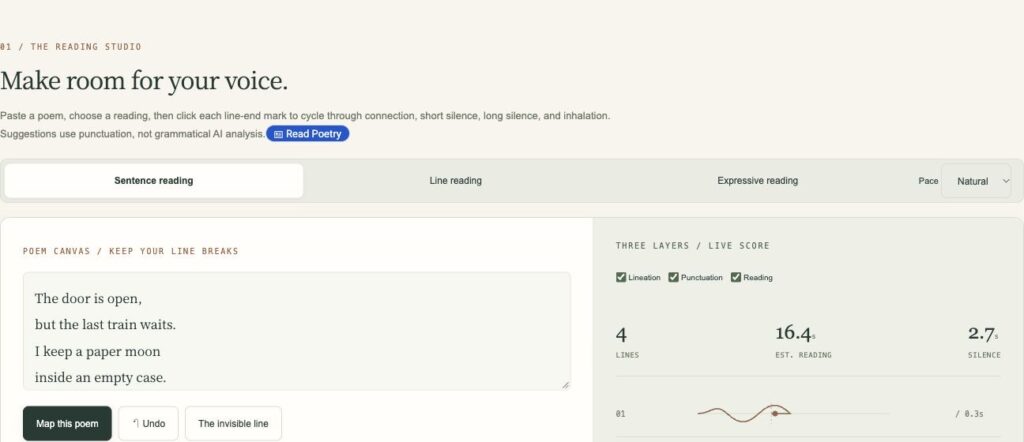
For our English poem, Sentence reading at Natural pace showed four lines, an estimated 16.4 seconds and 2.7 seconds of planned silence. Line reading showed 14.9 seconds and 1.2 seconds of silence. Those are model outputs for the entered plan, not stopwatch measurements of a reader. The most productive question is why you prefer one boundary treatment, rather than which number is better.
Voice Mirror’s synthetic demo supplied a known comparison: 6.25 seconds of audio, three quiet intervals and 2.95 seconds of detected quiet including the edges. Raising Minimum silence from 0.25 to 0.50 seconds removed the shortest interval, leaving two intervals totaling 2.65 seconds. That is a filter effect on the same sound, not an improvement in anyone’s performance.
What Poetry Breath Map actually does
The official page title is Poetry Breath Map, with The Breath Atlas as its studio identity. It preserves poem lines, proposes punctuation-based pauses and compares sentence, line and expressive reading plans. The page explicitly distinguishes its suggestions from precise grammatical AI analysis. You remain responsible for phrasing, emphasis and interpretation.
Line-end choices are Connect, Short, Long and Inhale. The default short and long values displayed as 0.3 and 1.2 seconds; the selected-line slider allowed 0 to 3 seconds. Pace offers Slow, Natural and Quick. Three visible layers—Lineation, Punctuation and Reading—provide ways to inspect the score. The abstract fingerprint represents the edited plan, not physiological breath data.
The audio area offers microphone recording, an audio-file input labeled maximum 30 MB / five minutes, and a synthetic demo. It displays a waveform, detected intervals and a per-line comparison. Available output controls include SVG artwork, a project file, print/PDF, audio and a comparison JSON report. We verified the demo and plan workflow, not every input or output route.
Prepare the poem and define one rehearsal question
Start with a short original poem or text you are entitled to use. Keep intentional line breaks. Our four lines were “The door is open,” / “but the last train waits.” / “I keep a paper moon” / “inside an empty case.” These are editorial test lines, not a quotation from a published poet. The unpunctuated third boundary provides a concrete connection to investigate.
Choose one question before touching audio: should the third line carry directly into the fourth, or should the image hang for a moment? You can then compare two readings without treating every pause as a mistake. A useful rehearsal note names the word or idea affected by the decision, rather than only recording a duration.
For a real audio session, decide how you will locate each line ending. The interface provides Mark line end during recording and editable seconds afterward. We did not exercise those controls on a real take. Use the synthetic example first to understand the display, and keep any performance you need before closing the page. Saving a poem project does not mean its sound has been saved.
7 essential checks for your first reading plan
1. Map the poem with its original line breaks
Paste the poem into Poem Canvas and choose Map this poem. Check the displayed line count and the words in the score. Our example remained four lines. The textarea exposed a 12,000-character maximum in the inspected interface; we did not stress-test text near that limit or establish a maximum practical rehearsal length.
2. Compare Sentence reading with Line reading
Sentence reading assigned our endings 0.3, 1.2, 0.0 and 1.2 seconds. Line reading assigned 0.3 seconds to each ending. Compare what those decisions do to the image crossing the third boundary. Do not treat a period or comma as an obligation to stop for exactly the suggested duration; the initial assignment is an editable proposal.
3. Edit a specific boundary and check Undo
A line-end button cycles its mark; the selected line’s panel provides explicit choices and a duration slider. With line 1 selected in our sentence plan, choosing Inhale changed estimated time from 16.4 to 16.7 seconds and total silence from 2.7 to 3.0 seconds. Undo restored 16.4 and 2.7. This isolated test checked one edit, not a multi-session version history.
4. Try the silent practice cursor
Follow the score showed a line-1 status with 0.3 seconds in our test; Stop ended the cursor. The interface describes it as silent, not synthesized speech. Use it as a pacing aid alongside your own reading, rather than expecting an audio performance or a pronunciation model. Its passage estimates do not measure lung capacity.
5. Inspect the synthetic audio before using a real take
Try synthetic demo generated the 6.25-second test display described below. It explicitly labeled itself synthetic tones, not a real reading. At default threshold −40 dBFS and minimum silence 0.25 seconds, three intervals appeared. This is a reproducible way to learn what the rows mean without granting microphone access or supplying a private recording.
6. Check alignment and analysis settings separately
Read the captured poem and the actual line-end seconds before deciding a difference is meaningful. The overview scales planned timing to the recording; the table’s pause durations remain unscaled. The interface says each quiet interval is matched at most once within 0.6 seconds of a line end. Treat that as its stated matching rule, not proof that speech has been recognized.
7. Save, restore and inspect an actual backup
Save in browser produced a saved project that Restore saved reading recovered after reload. The original poem and sentence plan returned, while Voice Mirror had no current take. Export project produced no completed download artifact through our connection in eight seconds. Keep an inspected file before depending on portable recovery; an attempted download alone is not a backup test.
Our original four-line score tests
| Plan or action | Displayed estimate | Planned silence |
|---|---|---|
| English sentence / Natural | 16.4s; four lines | 2.7s |
| English line / Natural | 14.9s; four lines | 1.2s |
| First English line → Inhale | 16.7s | 3.0s |
| Undo that edit | 16.4s | 2.7s |
| Korean sentence / Natural | 8.0s; four lines | 2.7s |
| Korean line / Natural | 6.5s; four lines | 1.2s |
The Korean poem was written independently: “문을 열면,” / “막차가 기다린다.” / “종이달 하나를” / “빈 가방에 넣는다.” Both examples have the same punctuation pattern, but their estimated speaking portions differ. We did not infer a general speed relationship between English and Korean from two short examples. They check the tool’s behavior for these texts only.
Notice that changing a plan changes the estimate without changing a sound recording. Conversely, changing the audio filter can change detected quiet while the plan stays fixed. Keep those two experimental directions separate. Otherwise an attractive chart can encourage a causal claim that the test does not support.
What the synthetic Voice Mirror test showed
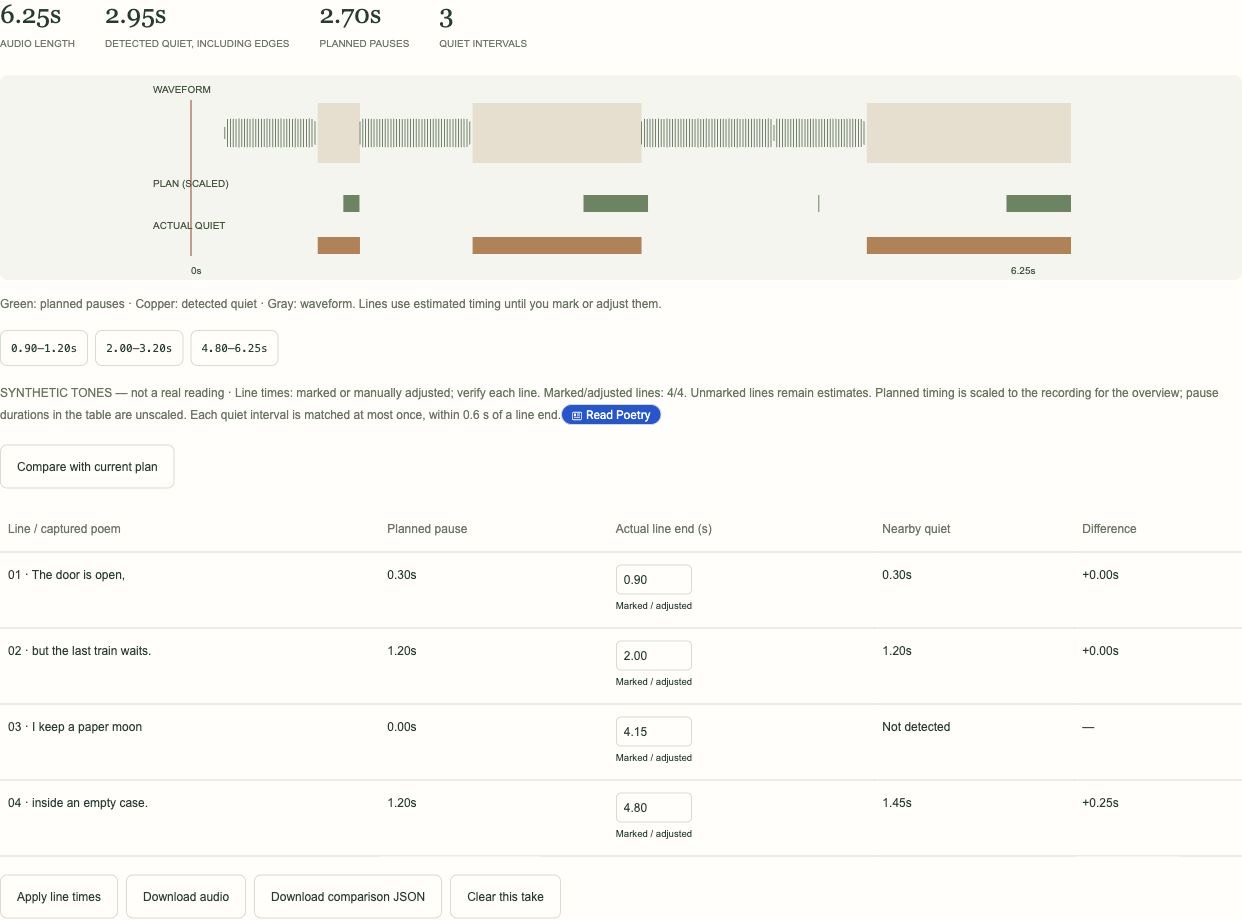
At the default settings, intervals were 0.90–1.20, 2.00–3.20 and 4.80–6.25 seconds. Their durations were 0.30, 1.20 and 1.45 seconds. The sum, 2.95 seconds, includes the edge of the audio. A trailing quiet interval can contribute to the total without representing a deliberate pause before another spoken line.
The table paired line 1’s planned 0.30 seconds with 0.30 seconds of nearby quiet, and line 2’s planned 1.20 with 1.20. Line 3 had a 0.00-second plan and no detected match. Line 4 paired 1.20 planned with 1.45 detected, displaying +0.25 seconds. These are results of the supplied synthetic fixture and its line times, not validation on natural speech.
The demo marked all four line times as marked or adjusted. That labeling does not mean the software listened to a speaker and discovered each word boundary. The source warns that unmarked lines remain estimates. The comparison is only as meaningful as the plan snapshot, timing and detection conditions that you inspect.
Why changing a silence filter changes the result
Minimum silence controls which quiet spans count as intervals. Keeping threshold −40 dBFS, we selected 0.50 seconds and reanalyzed. The 0.30-second span disappeared; the two longer spans remained and the quiet total became 2.65 seconds. Planned pauses stayed 2.70 seconds. The audio length remained 6.25 seconds.
This provides a useful troubleshooting order. If a short pause is absent, check the minimum duration before rewriting the poem. If quiet speech is counted as silence, inspect the threshold and sound itself. Room noise, breath sounds and low-volume speech can affect energy detection, as the interface explains. We did not test noisy human recordings or establish ideal settings for them.
Do not tune filters merely to make the actual row resemble the plan. First decide what event you want to inspect and whether it is audible. Use the same settings when comparing takes, or record the changed settings beside the comparison. A lower difference after changing the filter does not establish that a second reading improved.
Align the line before interpreting a difference
The per-line seconds are the bridge between the poem and the sound. If the line time points to the wrong place, a nearby quiet interval may belong to a different phrase. The interface offers manual editing and Apply line times, plus Compare with current plan to refresh the comparison plan. We observed those controls but did not validate a manually aligned human take.
Before a comparison, check the captured poem text against your current draft. Then check whether the line-end times were marked or estimated. Finally inspect a nearby interval by listening in your own session. A neat row with a zero difference cannot prove interpretive success, correct stress or a clear delivery.
A missing match is also a question, not a failing grade. It may reflect an intentional connection, a short gap removed by the filter, an inaccurate line time or sound above the threshold. The tool does not identify inhalations, words or grammatical boundaries. Use the chart to find a place to examine, not to outsource the decision about how a poem should sound.
A practical rehearsal and workshop workflow
For private rehearsal, save a first plan and write one sentence explaining its purpose. Try the line-connected version aloud, then try a pause at the same boundary. Note what happens to the image or emphasis before looking for numerical confirmation. This proposed workflow was not tested with participants and carries no claim of learning improvement.
In a workshop, ask readers to make their own plans before showing a shared score. Otherwise the suggested duration can become an unintended answer key. Let each reader explain one changed boundary using the words of the poem. A difference in interpretation can be productive even when neither version follows the default sentence plan.
| Rehearsal question | Check in the tool | Decision outside the chart |
|---|---|---|
| Does the image continue across a line? | Compare connection and a short pause | Which reading preserves the intended thought? |
| Why is a brief gap absent? | Inspect minimum silence and line time | Is the event audible and relevant? |
| Why did a total change? | Separate plan edits from filter edits | What actually changed in the performance? |
For a recorded exercise, keep the plan, take identifier, filter settings and alignment notes together. If you cannot preserve an output file, retain written observations and avoid claiming that a screenshot is an editable project. You can still use the visual plan as a rehearsal aid without treating its export routes as verified.
What local saving preserves—and what it does not
The source FAQ says browser project saving stores the poem and edited plan only. Audio stays in the current page until downloaded; closing or reloading clears the take. Our reload/restore test recovered the original English text and sentence plan, and the audio area returned to its ready state. We did not test recovery across devices or separate language-page storage behavior.
A project file, an audio file, a comparison report and an SVG artwork serve different purposes. Artwork visualizes a plan; it does not preserve a sound recording. A project is described as editable data; this review did not inspect its exported contents or import it again. Save the actual assets your future task will require, then rehearse restoring a disposable copy.
Project export was the only file-download route we attempted. No artifact became available in eight seconds. This limits our verification; it does not establish that every ordinary browser download is broken. SVG, comparison JSON, audio download and print/PDF output remain unverified. The advertised audio input limits were not tested with boundary-size files.
English, Korean and mobile inspection
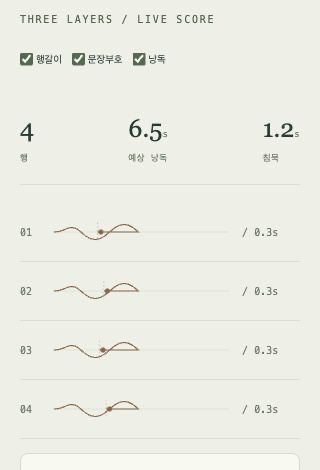
A fresh Korean page at 390 × 844 had document width 390px. We entered the independent Korean example, mapped it and changed from sentence to line reading. The score and controls remained available in the vertically stacked layout. We checked responsive Chrome behavior, not a physical phone, mobile microphone permission flow or every browser.
The English and Korean editions translate controls and provide their own examples. They do not remove your responsibility to inspect punctuation, line breaks and intended phrasing. The English and Korean test poems in this review were separately authored; we did not demonstrate automatic poem translation. Advertising overlays appeared during research and could cover content, so verify the changed state after interacting.
Privacy and the limits of a breath map
The FAQ states that poem and audio processing happens locally, imported audio is decoded in the browser, and microphone access begins only when recording is started and permission is granted. It also identifies Blogger, Google Fonts and Google advertising as separate sources of normal visit or cookie processing. We did not audit network traffic, storage code or microphone-track handling.
The word breath in the name is a creative metaphor for the plan. Inhale is a user-assigned mark, the fingerprint is abstract artwork, and silence detection works on sound energy. None of these establishes respiratory measurements, lung capacity or a medical conclusion. This distinction matters when using the tool in teaching as much as in private practice.
The estimates also do not grade a poem or certify a performance. We tested two short texts and synthetic tones, not long poems, real recording quality or acoustic conditions. Microphone recording and audio-file import remain untested here. The most reliable use is a specific rehearsal question with visible, editable assumptions.
Choose a score, an audio editor or a notebook
Choose this studio when the problem is where and how to pause in a line-preserving plan. A notebook can hold a few marks without any audio processing. A general audio editor is better when you need to inspect or edit a waveform as a production recording; confirm that editor’s actual capabilities for your task. A speech transcript answers a different question from silence timing.
The advantage here is seeing three plans, manual pause choices and an audio comparison within one reading workspace. The cost is interpretation and alignment work you must still do. There is no single correct default for free verse. A minimal plan with one meaningful change can be more useful than a fully decorated score whose decisions you cannot explain.
Related tools for interpretation and prompts
MARGINALIA GHOST pairs a passage with your reading response. Use it to preserve why a line felt suspended or why your interpretation changed before adjusting this score. The tools support different kinds of notes; no automatic data exchange was tested.
PULP COVER PRINTER creates a fictional magazine cover and a template-based story prompt. It can supply a title or image for an original writing exercise before you bring your own lines here. It does not automatically compose or import a poem into the breath map.
Frequently asked questions
Does the tool understand the poem’s grammar?
The proposed score uses punctuation, not precise grammatical AI analysis. It cannot identify every enjambment from punctuation alone. Read the actual phrase and decide whether a visual line ending should interrupt it.
Does Follow the score read the poem aloud?
No. It is a silent practice cursor. In our test it showed the current line and pause status. It is not synthesized speech, pronunciation instruction or a recording of your voice.
Does detected quiet prove that I inhaled?
No. Energy-based detection does not identify inhalations, words or syntax. A planned Inhale mark and a quiet audio span are different records. Inspect the sound and your intended phrasing before interpreting a match.
Does browser saving keep my audio?
The source says it stores the poem and plan only, and our restored project had no current take. Download and inspect any audio you need before closing. This review did not verify downloaded audio or a project import round trip.
Start with one line ending
Choose one boundary where the sentence continues beyond the line. Compare connection and a deliberate pause, explain the difference in your own words, then use the score as a record of that decision. Useful poetry reading practice starts with an attentive choice, not a target silence total.
A RELEVANT NEXT STEP
Tools with a useful connection
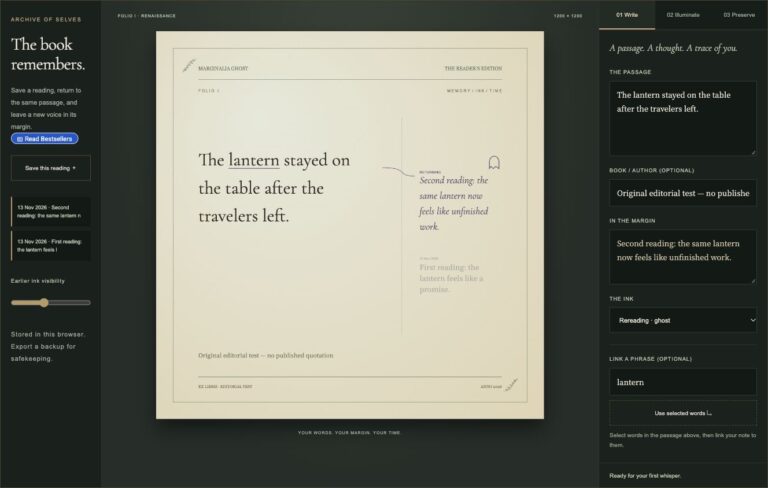
MARGINALIA GHOST
Marginalia: 7 Essential Checks for Better Reading Notes
Create a marginalia image with your passage and reading response. Real tests examine matching-passage history, ink visibility, mobile writing and the difference between images and project backups.
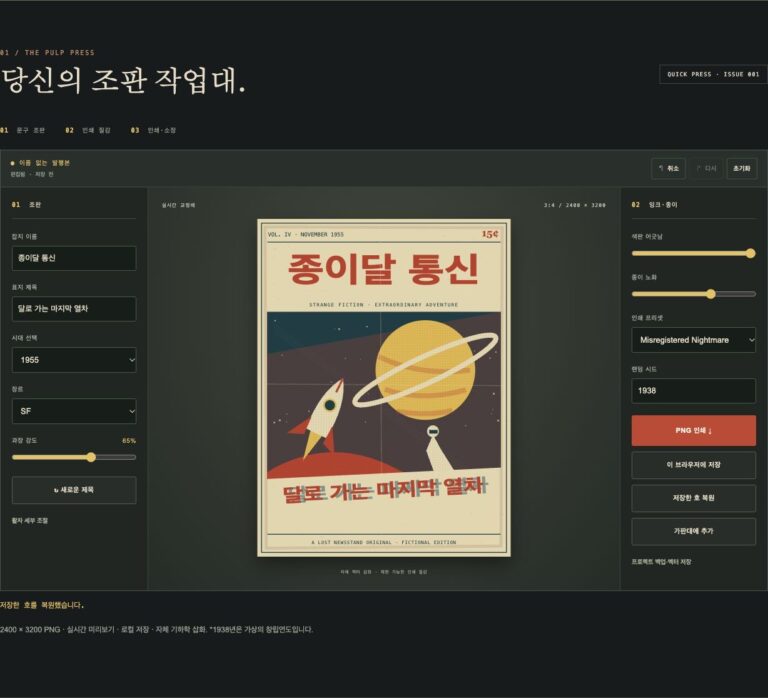
PULP COVER PRINTER
Pulp Cover: 7 Essential Checks for Better Fictional Issues
Make a fictional pulp cover with PULP COVER PRINTER. Actual English and Korean tests explain print presets, local restore, newsstand issues, story templates and unverified export results.
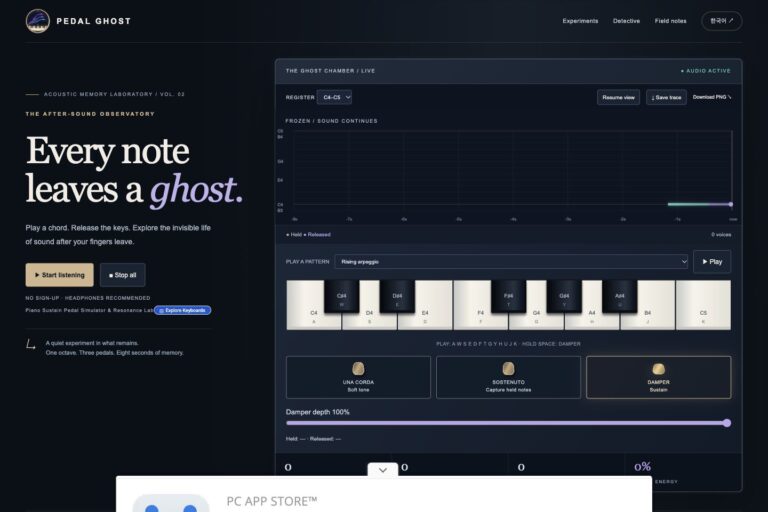
PEDAL GHOST
Pedal Ghost: 7 Smart Checks for Better Piano Sustain
Explore piano pedal release with modeled traces, sostenuto capture and event postcards. Checked controls and shared replay explain the graph, register, quiz and audio/export limits.