PULP COVER PRINTER is a browser pulp cover maker for fictional magazines. Write a publication name and story headline, choose an era and genre, then compare clean typography with distressed ink and paper. It suits a writing prompt, a fictional prop or an early visual concept for a story.
Tested 13 November 2026 in Chrome, including a fresh Korean workspace at 390px. We created ARCHIVE SIGNAL / THE LAST TRAIN TO THE PAPER MOON, then a Korean version, 종이달 통신 / 달로 가는 마지막 열차. Preset values, Undo/Redo, saving, explicit restoration, newsstand reopening and a story fragment were checked. PNG showed a completion message, but no completed download file became available through our browser connection within eight seconds. This library and the original tool share a creator.
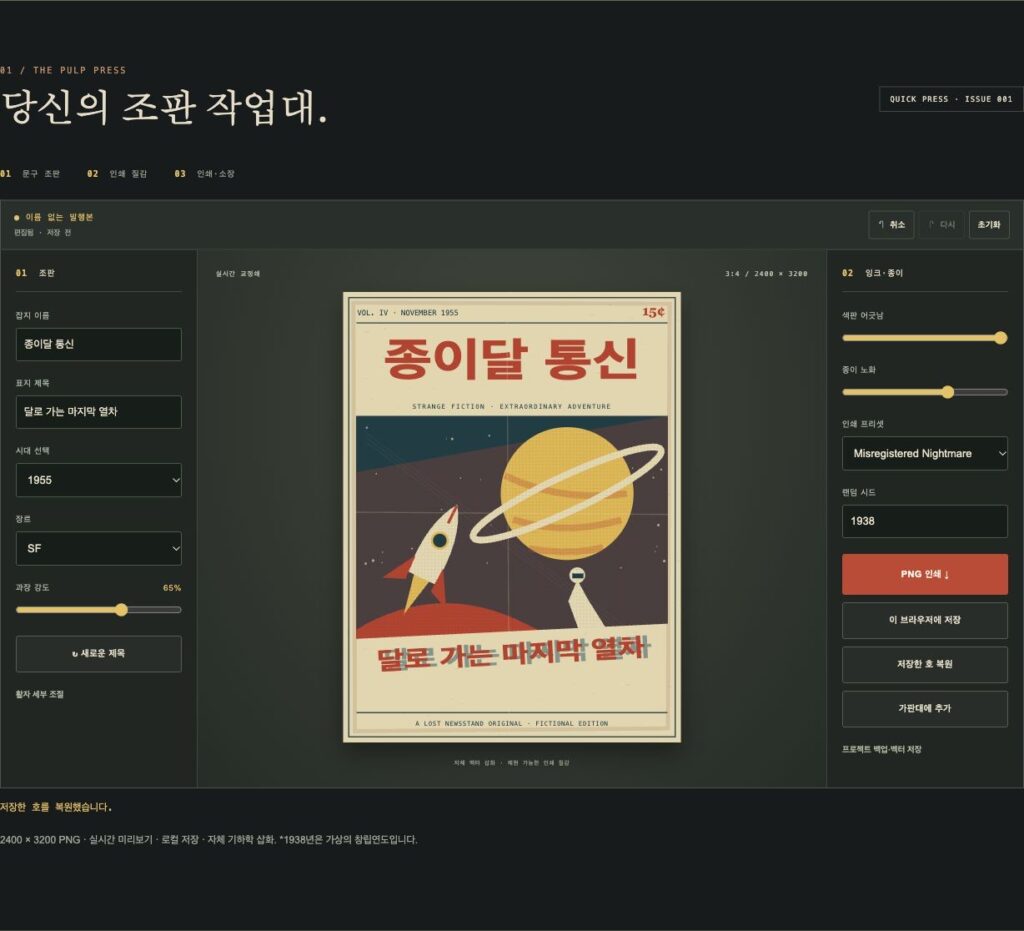
Make a fictional pulp cover with PULP COVER PRINTER. Actual English and Korean tests explain print presets, local restore, newsstand issues, story templates and unverified export results.
- Brand
- PULP COVER PRINTER
- Tool languages
- en,ko
- Verified date
- 2026-11-13
In this guide
Key takeaways for a pulp cover
The practical benefit is a constrained composition desk. You can change the words and print character without first building a page layout or drawing an illustration. The live cover responds to the settings, while the four-era section offers another way to inspect the same title. The result is a fictional edition, rather than a reproduction of an actual historical publication.
Keep a clean version before adding distress. Our Clean Press preset set ink registration and paper age to 0/0. Misregistered Nightmare changed those values to 12/65. Undo returned to 0/0 and Redo restored 12/65 in a separate Korean test. Those values are the tool’s controls, not calibrated measurements of a real press.
Do not confuse local saving with automatic session recovery. After a reload we saw the default issue. Restore saved issue brought back our saved text and settings, including from the Korean page. A newsstand issue could also reopen its stored settings. Keep those actions distinct when deciding what work you have actually preserved.
What PULP COVER PRINTER does
The official tool name is PULP COVER PRINTER. The site presents it as The Lost Newsstand, an independent typography and printing laboratory. Its “established 1938” label is explicitly fictional. The editor offers four era choices—1925, 1935, 1945 and 1955—and six genres: Detective, Horror, Science fiction, Adventure, Western and Fantasy.
Compose controls cover the masthead, headline, drama, type style, letter spacing, title tilt and palette. Ink controls include registration, paper age, five named press presets and a random seed. The default artwork is geometric illustration described by the source as original vector art. We did not test an uploaded-artwork workflow or find evidence to promise arbitrary page composition.
The page also has a clean-versus-current print comparison, a locally assembled story fragment, browser saving and a newsstand advertised for up to twelve issues. Export controls are labeled PNG, SVG and editable project JSON, with a project-file restore control. A visible control is evidence of an available workflow, not proof that every resulting file has been inspected.
Prepare a publication name and a story promise
Prepare two different pieces of text. The masthead names the fictional magazine; the headline promises the particular story. In our English case, ARCHIVE SIGNAL named the magazine and THE LAST TRAIN TO THE PAPER MOON supplied the impossible event. Keeping the publication name shorter leaves room for the story hook to do its work.
Choose what you want to learn from the first proof. For a writing exercise, the useful question may be whether the title suggests a conflict. For a fictional desk prop, it may be whether the magazine reads clearly from a distance. For a social preview, it may be whether the final line remains legible at the size people will actually see.
Use original working names and a brief headline while learning the controls. Save a clean baseline before experimenting with effects. If an existing saved issue matters, preserve and inspect a separate backup before replacing it. The on-device save is not a cloud account, a version history or a guarantee against clearing browser data.
7 essential checks before keeping your cover
1. Give the publication and the story different jobs
Enter a masthead and headline in Text & Style. Our test used the archive-and-moon wording above. Confirm both in the live preview, rather than judging only the input boxes. A long title can wrap into several lines; the layout you see is part of the decision, not merely decoration around the words.
2. Choose an era and genre, then read the proof
We selected 1955 and Science fiction. The proof displayed November 1955 and a geometric space illustration. The four era cards retained our words while presenting different visual treatments. Treat the era names as creative presets inspired by broad tendencies, as the page itself explains, rather than a historical authenticity certification.
3. Establish a clean print baseline
Select Clean Press and inspect the ink and paper values. In our case both became zero. Keep the headline readable before adding texture. Save to this browser produced an issue-saved status. Record the era, genre and seed beside your working title if you need to compare later variations methodically.
4. Add distress as a controlled variation
Select Misregistered Nightmare or adjust ink and paper individually. Our selected preset produced registration 12 and age 65 with seed 1938. We verified Undo back to the clean values and Redo back to the distressed values. Do not assume an effect that looks dramatic on a large proof will help a small thumbnail.
5. Inspect the clean/current comparison
The printing laboratory overlays a clean proof and the current print, with a movable divider. Use the same text and seed to compare the effect rather than changing several inputs at once. The screenshot below records the Korean test at the divider’s middle position; it is an actual interface capture, not an exported cover file.
6. Keep an editable issue and test reopening
Use Save to this browser for the saved issue, and Add to newsstand for a shelf entry. We changed the masthead after adding ARCHIVE SIGNAL and then reopened that shelf entry; the stored ARCHIVE SIGNAL settings returned. After reload, use Restore saved issue deliberately. Seeing the default issue at startup did not mean our saved copy had vanished.
7. Check the actual output before sharing it
Print PNG displayed “2400 × 3200 PNG downloaded” in our session. The browser connection supplied no completed file within eight seconds, so we could not inspect its dimensions, font rendering or content. Inspect your own downloaded file before treating it as finished artwork. The source’s advertised output size and a verified file are different evidence.
Our actual print-preset and recovery tests
| Action | Observed result | Practical meaning |
|---|---|---|
| Clean Press | Registration 0; paper age 0 | A useful baseline for comparing later effects. |
| Misregistered Nightmare | Registration 12; paper age 65 | A visible preset change, not physical press calibration. |
| Undo → Redo | 0/0 → 12/65 | The isolated preset change could be reversed and reapplied. |
| Reload → Restore | Default issue → saved original | Saving persists, but restoration is an explicit step. |
| Print PNG | Success message; no captured file in 8 seconds | Output file quality and dimensions remain unverified. |
The English test used seed 1938, era 1955, Science fiction and drama 65%. Its locally assembled story contained our chosen magazine name, headline and year, within a Mars/post-office scenario. This confirms that those inputs reached the template. It does not demonstrate a unique narrative, an AI response or a complete short story.
For the Korean proof we entered 종이달 통신 and 달로 가는 마지막 열차. Those words appeared in the live cover. The saved issue could be restored from a fresh Korean mobile page. We did not compare output files byte for byte or test twelve saved issues, multiple simultaneous browser tabs, storage exhaustion or private-browsing persistence.
Make typography survive a smaller screen
Read the masthead first, the hook second and the illustration third. If all three compete for the same attention, reduce one emphasis before increasing drama. The Fine-tune typography section exposes four type choices, spacing, tilt and four palette choices. Use those to solve a specific legibility problem rather than adding every treatment available.
A practical comparison is to keep the same headline while changing only the era. Then return to the preferred era and change only the print effect. That separates a composition decision from a texture decision. If you change the wording, palette, era and seed together, it becomes difficult to explain why one version works better.
The English headline wrapped differently after we restored it in the Korean interface. Language editions can have different type treatment even when the user text is unchanged. Korean characters were accepted, but a few tested phrases cannot establish coverage for every glyph, punctuation sequence or extremely long headline. Inspect the exact phrase you intend to publish.
Compare print effects without losing the headline
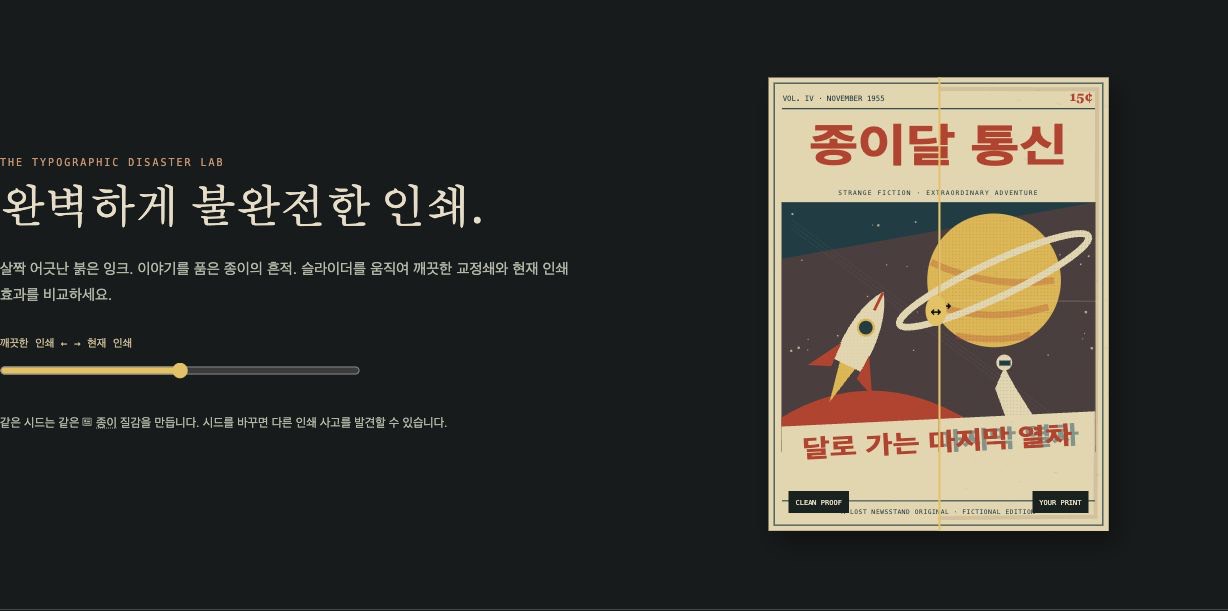
Registration offsets simulate imperfect alignment between color plates. Paper age adds a different kind of visual signal. Decide whether you want the cover to feel poorly aligned, weathered, or both. An old-looking surface can support the fiction, while a strong offset can make letters harder to distinguish.
The source says a fixed seed reproduces the paper texture. We kept seed 1938 for our preset comparison, but did not perform a pixel-equality test or verify deterministic exports. Record the seed as an input you can reuse; do not promise identical downloaded files from untested browsers or font environments.
At the final review size, check the last word of the headline and any small publication details. A title that is readable on the editing desk may not survive a tiny card. If the story hook disappears first, return to the clean proof and reduce effects before rewriting the title merely to fit a decorative accident.
Use the story fragment as a prompt
Open the story assembles a fragment from local templates. In our English test it used the selected 1955 date, ARCHIVE SIGNAL and the train-to-the-paper-moon headline, followed by a missing-reader premise. The source explicitly says there is no generative AI API. Treat the output as a starting constraint for your own writing.
Extract a question rather than accepting the fragment as a finished synopsis: why is the final train leaving, who cannot board, and what would printing the issue reveal? The page gives you an evocative starting situation. You still need character motives, a sequence of consequences and an ending that earns the title’s promise.
A group exercise can assign the same cover to several writers before showing the template fragment. Compare the conflicts they infer, then use the fragment as one more option. We did not run a reader study or measure whether this improves creativity; this is a suggested workshop workflow, separate from our feature tests.
Save, restore and newsstand are separate actions
Save stores a working issue in this browser; Restore retrieves it. Add to newsstand keeps a selectable issue on the shelf. Our added English cover remained available after reload and could reopen its settings. The page advertises a twelve-issue shelf, but we did not fill it or verify what happens when that limit is reached.
After reload the live editor returned to defaults and Undo/Redo were disabled. The saved issue was recovered with Restore, and the shelf entry was still present. A save status, a current editing screen and an Undo history are therefore separate things. Reopen one disposable test issue before depending on the workflow for an important cover.
The FAQ states that local storage is used and warns about private browsing, clearing site data and changing devices. Keep a separately inspected project file if you need editable recovery elsewhere. A screenshot or finished PNG preserves an appearance; it does not by itself prove you can recover the exact controls.
What we could establish about export
The visible PNG control advertises a 3:4, 2400 × 3200 image. The advanced export section offers Download SVG, Back up project (.json) and Restore project file. The page distinguishes editable settings from finished artwork. We attempted PNG only; SVG, JSON contents and an import round trip remain unverified.
No completed PNG artifact reached our browser connection within the eight-second observation window despite the success status. That limits this review, but does not establish that the user-facing download is broken. Check the browser’s actual download result on your device and open the file in another viewer. Review the final words, artwork edges and intended dimensions there.
For physical printing, this review did not verify bleed, safe areas, embedded fonts, color management or a print-shop specification. The presence of a large pixel size does not establish a print-ready production file. For a digital prop, first check its actual display size; for a print job, ask the printer what file and margins are required.
English, Korean and the mobile workspace
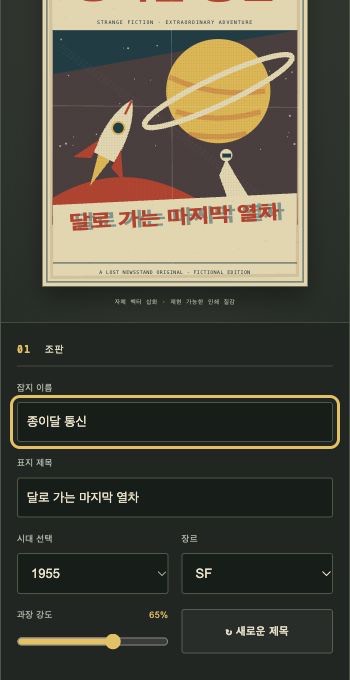
At 390 × 844, the Korean document width was 390px with no page-level horizontal overflow. Mobile editing used two tabs. Restore saved issue was in Ink & Export; the masthead and headline were in Text & Style. A mobile save-artwork button was also present above the workbench. We tested tab switching and restoration, not physical-device performance.
English and Korean interface links are provided. Both editions accepted our chosen text, and restoring the same saved issue did not translate its words. The Korean example was written separately, rather than being produced automatically by the language switch. Advertising overlays appeared and could obscure controls during the session; check the resulting state after an action.
Privacy, historical style and practical limits
The footer says cover text and saved issues stay on the device, while Blogger and existing advertising services may process visits and cookies. We verified local recovery behavior, not network traffic or storage implementation. Avoid describing the entire page as offline or free of external connections.
The artwork and publication identity are fictional. Broad era presets do not reproduce every magazine from the named decade. The source says the tool adds no watermark and advises checking rights in your own titles, trademarks and added content. We did not perform a rights clearance for any commercial project; access to historical archives is not reuse permission.
The tool is strongest when its built-in composition is a useful creative constraint. It is less suitable when you need an exact publisher template, a full magazine interior, a printer-approved production package or collaboration across devices. Those requirements should determine whether you keep the proof here or move the concept into another workflow.
Choose the right kind of cover workflow
| Need | Suitable workflow |
|---|---|
| A quick fictional magazine and story hook | Use this constrained cover desk and keep the title readable. |
| Precise page geometry or publication-wide consistency | Use a layout editor that supports your actual production requirements. |
| Plot logic or chapter rhythm | Move from the cover promise to a story-planning tool. |
A general design editor offers more layout freedom but asks you to make more decisions. A scanned historical cover supplies period detail but raises separate source and reuse questions. This tool offers a narrow, original-looking fictional construction quickly. Choose it for that constraint, not for capabilities that were not observed.
Related tools for developing the story
WHO KNEW?’s character knowledge map helps record who knows a fact and when the reader receives a clue. After the cover promises an impossible mystery, use that map to plan the information gap behind it. Both workflows need your editorial judgment; no automatic transfer was tested.
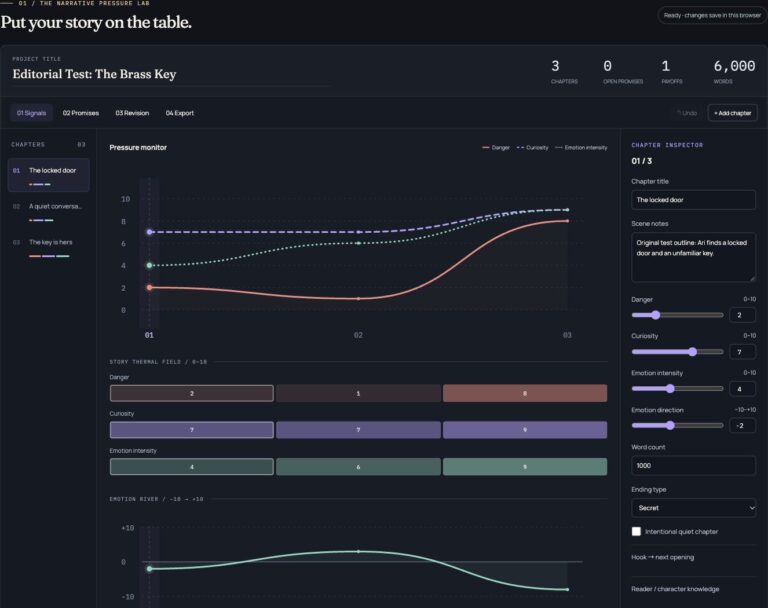
CLIFFHANGER HEATMAP records chapter pressure and question-to-payoff threads. Use it after the title suggests a question, to consider where you introduce evidence and deliver an answer. A striking cover and a satisfying story solve related but different problems.
Frequently asked questions
Is this a real magazine archive or a generative AI service?
No. The publication names, illustrations and fragments are fictional, and the source describes local fiction templates without a generative AI API. The historical reading links provide context, not proof that your fictional cover existed.
Why did my cover disappear after refreshing?
Our editor reopened with defaults, but Restore saved issue recovered the saved cover. Try explicit restoration before concluding that the saved issue is gone. Clearing local data or using another device is a different situation, as the FAQ explains.
Can I put Korean words on the cover?
Yes in the phrases we tested: 종이달 통신 and 달로 가는 마지막 열차 appeared in the preview and saved restoration. Verify your exact characters and output file. The Korean treatment is a creative reinterpretation, not a historical American cover reconstruction.
Did this review verify a 2400 × 3200 PNG file?
No. That size is advertised and appeared in the export status, but no completed file became available through the browser connection in eight seconds. Export dimensions, contents, SVG and project-file recovery were not established by this test.
Start with a clean, readable proof
Start with a short masthead, one impossible headline and Clean Press. Save it, restore it once, then compare one distressed variation. A useful pulp cover should make you want to tell the story while leaving the words clear enough for someone else to read.
A RELEVANT NEXT STEP
Tools with a useful connection
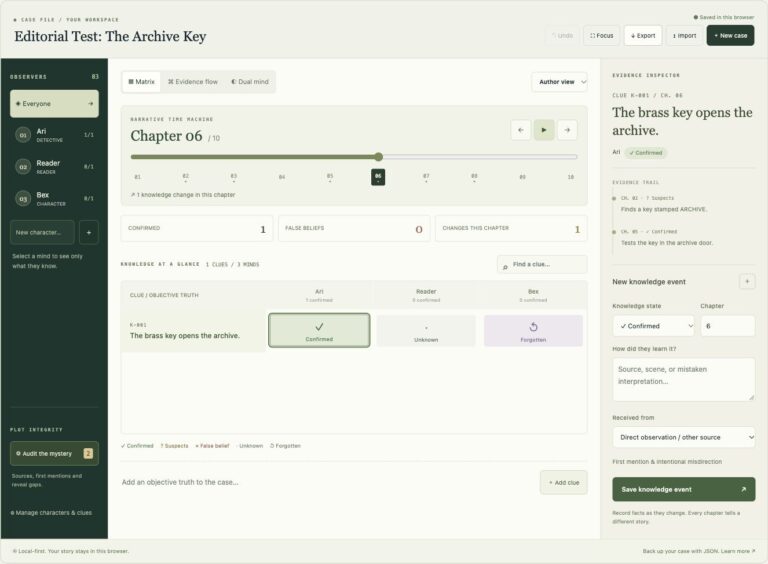
WHO KNEW?
Character Knowledge: 7 Essential Checks for Better Reveals
Track character knowledge by chapter in WHO KNEW? Actual states, reader-lens, wrong-assumption and revision tests explain what the matrix and audit can—and cannot—establish.
CLIFFHANGER HEATMAP
Pacing Map: 7 Essential Checks for Better Chapters
Make chapter pacing visible in Cliffhanger Heatmap. Actual three-chapter tests explain separate tension signals, setup/payoff links, reordered scenes, baselines and browser-local recovery.

FrameMint Studio
Screenshot Editor: 7 Smart FrameMint Studio Checks
Frame screenshots, add manual masks and build captioned stories in FrameMint Studio. Real import, order, recovery and size tests explain what to check before sharing.