PostPack Studio is an image pack maker for turning one title, a short description and an optional photo into four publishing layouts. It suits the moment when your article is finished but its blog preview and social cards are still missing. Write the shared message once, review each proportion, then prepare the files and metadata for your own publishing system.
Hands-on review: November 7, 2026, in Chrome. We used our own synthetic geometric PNG and test copy, edited a square-card headline, changed the shared title, tested long-text warnings and brand persistence, and ran single and two-row CSV pack generation to the on-screen completion message. We did not inspect the resulting downloaded file bytes or ZIP contents. This library and the original tool share a creator; observations below are separated from the source’s stated capabilities and our editorial suggestions.
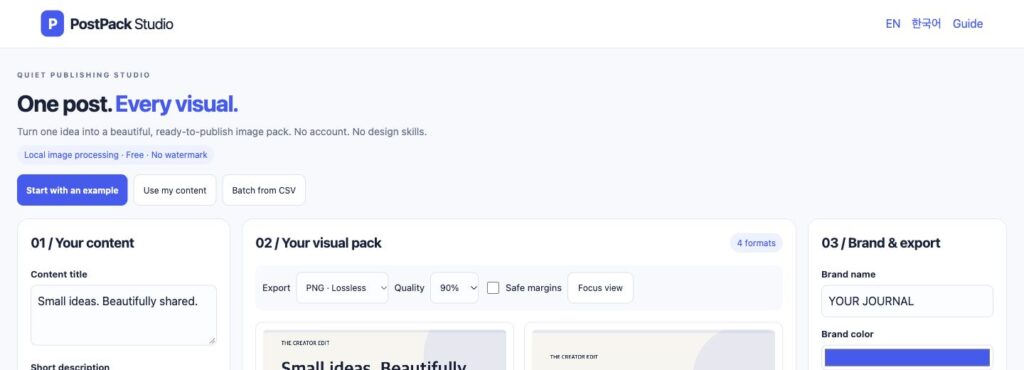
Create four template-based blog and social layouts from shared text and an optional image. Our guide checks platform copy, CSV generation, brand persistence and metadata while separating editor results from unverified downloaded files.
- Brand
- PostPack Studio
- Tool languages
- en, ko
- Verified date
- 2026-11-07
On this page
Key takeaways
- The official name is PostPack Studio. It uses templates and browser canvas layouts; it is not an AI image generator or an article-URL analyzer.
- The four canvas buffers we inspected were 1200×630, 1080×1080, 1080×1350 and 1000×1500. Those are observed editor dimensions, not measurements of downloaded files.
- A platform-specific edit survived reopening its dialog. Changing the shared title cleared that override in our test, so finish shared copy before tailoring each card.
- Single-pack and two-row CSV generation reached the ZIP-ready status. We could not inspect the downloaded archives and therefore do not claim a validated archive inventory or compression result.
- ALT and OG outputs are drafts. The preview retained an example image address even after we entered an article URL; a real public image URL still needs to be supplied.
What this image pack maker actually does
PostPack Studio is a template-based publishing workbench with English and Korean interfaces. Its content fields accept a headline, supporting sentence and category-style eyebrow. An optional photo and logo, brand name and color help make the layouts consistent. Eight named styles are offered, alongside a dark variation, title scale, alignment, maximum title lines and a word-underlining field.
Its main problem is repeated production, not idea generation. A landscape blog preview, a square social card and a tall card need different text and photo arrangements. Simply resizing a finished landscape image can make type too small or crop the subject. Here you begin from shared inputs and inspect separate layouts. You still decide what the headline promises, whether a crop works and whether each description is accurate.
The source describes a free workflow without accounts or a watermark. We used the editor without signing in or paying. It does not publish to a social account, install OG tags on your site or read the article behind an entered address. The URL field feeds metadata. A link is not a substitute for supplying and checking the actual title, summary and image.
Prepare the message before choosing a style
Begin with a finished or nearly finished article, a short promotional title, one supporting sentence and an image you have permission to use. A publication headline may be longer than a card headline: a thumbnail has limited space and often appears at a smaller display size. Keep the complete article title in your editorial record, and make a concise card version that still describes the same content.
If your article is not ready, settle its central promise first. Otherwise you may tailor four layouts and then invalidate those decisions with a new shared title. Our override-reset test makes that sequence particularly important. Keep the shared copy in a separate text note before experimenting; this editor’s brand save is not a backup of the whole project.
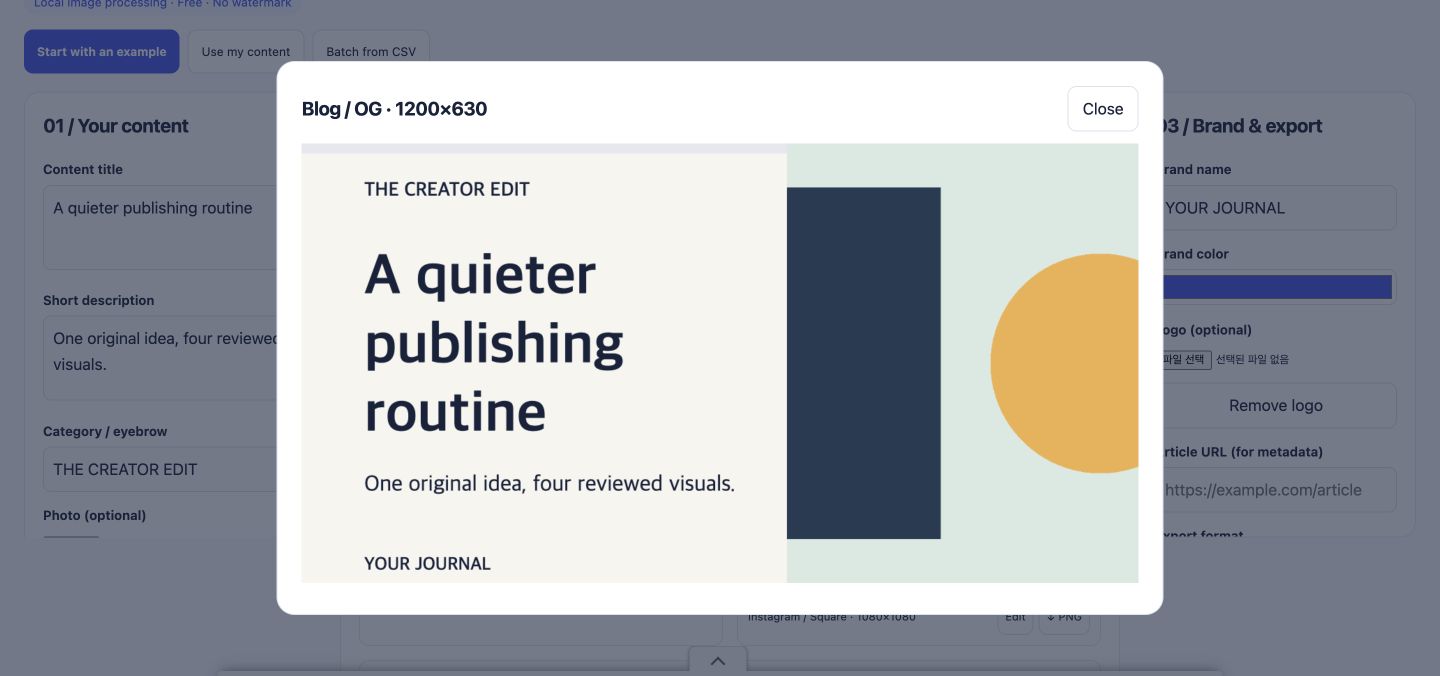
The photo helper states a maximum of 10 MB. Our own 1200×800 PNG contained a navy rectangle and a gold circle on a pale background, with no person or confidential information. It appeared in the preview after selection. This was a controlled upload test, not a photographic-quality comparison, a maximum-size test or an assessment of every accepted file type.
| Prepare | Why it matters | Useful review question |
|---|---|---|
| Shared headline and summary | All four formats start from this message | Does the shorter headline preserve the article’s meaning? |
| Owned or licensed image | A local file still needs appropriate usage rights | Does the crop keep the meaningful subject visible? |
| Brand name and color | Consistency across the pack | Is the brand legible without dominating the title? |
| Public article URL | Used in the metadata example | Is this the destination readers should open? |
| Real uploaded image URL | Needed for an actual OG image tag | Will the address load for visitors without an account? |
Four image layouts, with separate review jobs
| Editor layout | Observed canvas dimensions | What to review |
|---|---|---|
| Blog / OG | 1200 × 630 | A concise landscape headline and the relationship between text and image |
| Instagram / Square | 1080 × 1080 | A balanced square card and a headline that works without surrounding article context |
| Portrait / Feed | 1080 × 1350 | The vertical hierarchy and the space between text and photo |
| 1000 × 1500 | A clear tall-card promise and supporting sentence |
These names and dimensions describe the tool’s outputs and interface. They are not a guarantee that every platform placement accepts them unchanged or displays the whole frame. The source warns that placements can crop differently. Preview your final destination, including small displays, instead of treating the size label as a certification of platform compliance.
How to use PostPack Studio: 7 smart publishing checks
1. Finalize shared copy before tailoring cards
Enter the common title, summary and optional eyebrow. Read them as a small promise to a person who has not seen the article. Remove context that only makes sense inside the post. Keep essential qualifiers: a tested example should not become a universal guarantee simply because a shorter phrase looks better on a card.
We first used “A quieter publishing routine” as synthetic shared copy. The exact wording was only a test input, not a claim about a real productivity study. A later shared-title change cleared our square-specific headline. This is why platform adjustments belong near the end of the copy process.
2. Add the image and check the composition
Choose a photo from your device, then inspect how each frame positions it. Our geometric test made cropping easy to see: the rectangle and circle did not occupy the same part of every layout. A real portrait, product label or chart deserves the same attention. If important content disappears, change the source composition or simplify the layout instead of assuming the original file will be shown edge to edge.
3. Set style and type deliberately
Try a named style, then change one control at a time: dark variation, 85/100/115% title scale, left/center alignment or a two-to-six-line limit. We exercised the Bold style, dark variation, center alignment and the underline field. These are design controls, not evidence that one style increases clicks. Choose a readable hierarchy before judging decorative effects.
A deliberately overlong test title with a two-line limit produced both a space warning and a small-type warning. Shortening the title is usually a clearer editorial response than forcing a long sentence into the minimum space. The tool’s checks are heuristics; an all-clear list does not establish accessibility, accurate contrast in every setting or acceptance by a platform.
4. Review each platform’s copy
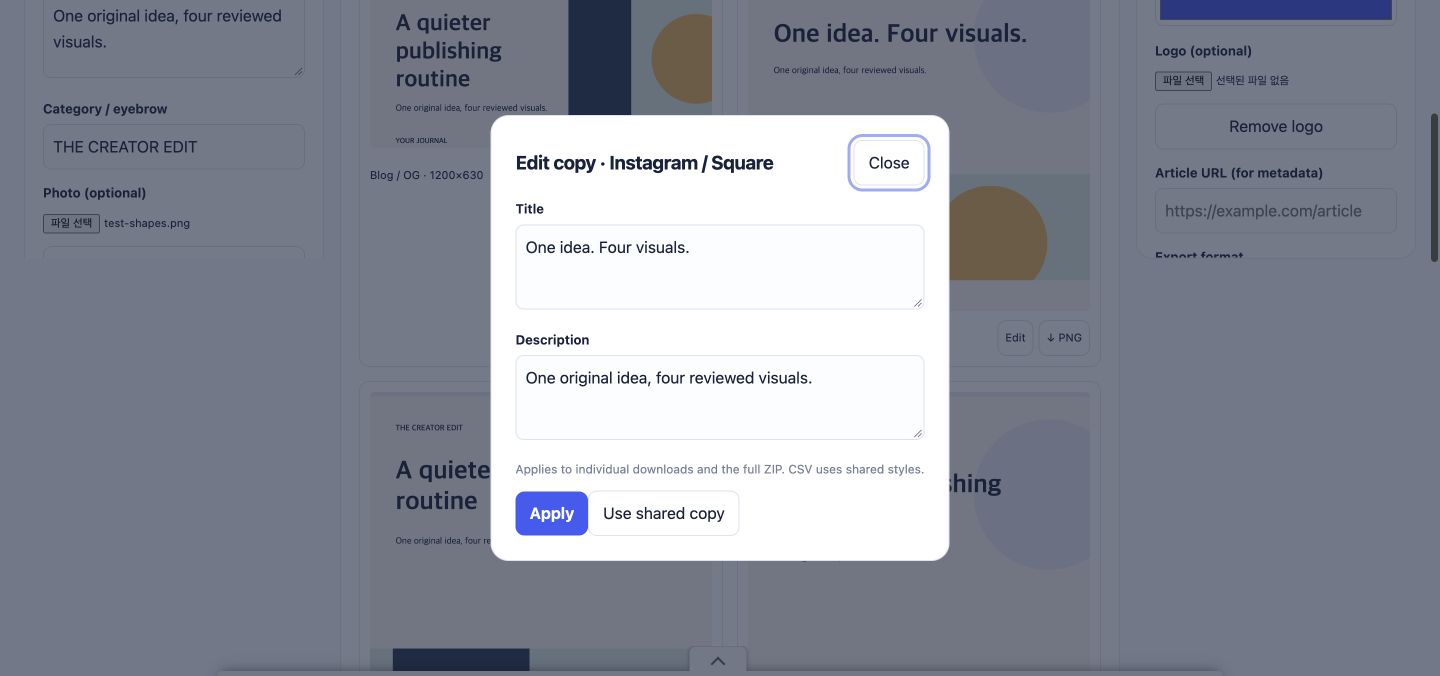
Use Edit on a preview to change that card’s title or description. We changed the square headline to “One idea. Four visuals.” Reopening the dialog preserved it, and the square preview showed the shorter text while the OG card retained the shared headline. The preview’s accessibility label continued to use the shared title in our session, so inspect the actual artwork as well as the label.
The source says these overrides apply to individual downloads and the full pack, while CSV uses shared styles. We verified the editor state, not the exported ZIP bytes. If you later edit the common title, return to every card and recheck tailored copy. Do not assume a previous override remains active after that edit.
5. Choose an export format and verify the actual file
PNG, WebP and JPG are offered. The source describes PNG as lossless and the quality choice as relevant to JPG and WebP. Changing the lower export-format control to WebP synchronized the upper control in our test. The quality choices were 80%, 90% and 100%. We did not measure resulting file size, compression artifacts, embedded metadata or exported dimensions.
Use an individual download when you want to inspect one card first, or the full-pack action for the publishing set. Our single-pack action reached the on-screen completion status, but download capture did not provide inspectable file bytes in this session. Before using a real pack, open it on your own device, confirm all expected images and check them at full size. A completion message is not the same evidence as a successful archive inspection.
6. Rewrite ALT and replace example OG addresses
Open the SEO pack preview. With our supplied geometric image, the ALT draft was still a generic title-based promotional description rather than a description of the rectangle and circle. That is useful as a starting scaffold, not an automatic visual understanding result. Write ALT for the image’s role in the final article, including relevant visual content, rather than copying a generic title into every field.
We entered https://example.com/review-test in the article-URL field. The preview used it for the article address while the OG image address remained an example.com image placeholder. Upload the final image to your own media library and replace that placeholder with its public URL. If your theme or SEO plugin already manages Open Graph, configure the image there rather than adding a duplicate set of tags blindly.
7. Pilot a CSV batch before scaling it
The batch panel asks for title, summary and slug columns and describes a limit of 50 rows with quoted fields. We first submitted an empty field and saw a header-format warning. Then we entered two synthetic rows, including a quoted comma in an English title and a Korean title, and the interface progressed to its ZIP-ready message. We did not inspect the archive or test a 50-row maximum workload.
Use a tiny pilot to check quoting and naming before a larger production run. Give each row a distinct, stable slug and keep its headline short. The source says current branding, photo and style are shared across the batch. Do not use that workflow when each article requires a different image unless you are prepared to create and review separate sets.
What our hands-on image tests established
| Test | Observed result | Boundary |
|---|---|---|
| Synthetic image input | The selected geometric PNG appeared in the layouts | No test of maximum size or every image type |
| Canvas dimensions | 1200×630, 1080×1080, 1080×1350, 1000×1500 | Editor buffers, not exported file measurements |
| Square copy edit | Override visible and preserved on reopening | Exported copy not inspected |
| Shared-title change | Override returned to shared copy | Recheck all tailored cards after editing common copy |
| Long title / two lines | Space and small-type warnings | Not an accessibility certification |
| Single pack and two-row CSV | Both reached ZIP-ready status | Downloaded file contents not verified |
| Save brand / reload | Test brand returned after reload | The article title returned to the example |
| Forget brand / reload | Default brand returned | Only our own test brand was removed |
| Korean mobile flow | 390px document, step tabs and platform selector worked | Chrome viewport test, not a physical phone audit |
The distinction between a saved brand and a saved project matters. After saving KIOPTRIX TEST and reloading, that brand returned but the title returned to the English example. After using Forget and reloading, the default brand returned. We removed only our own test setting. Do not rely on Save brand to preserve your copy, uploaded photo, logo or platform-specific decisions.
A practical production route from article to image pack
Consider an editorial workflow for a short tutorial. This is a suggested process, not an additional measured case study. Finish the tutorial, choose the one problem it answers and write a concise common headline. Produce the OG card first and check whether the text still makes sense at a small display size. Then tailor the square headline if it needs a shorter hook, without changing the factual promise.
Keep a small manifest beside the files: article URL, approved shared text, special text for each platform, chosen style, image source and final public OG address. That note provides a recovery path when the browser refreshes or a later title edit clears overrides. It also lets another editor identify which files belong to the approved version instead of relying on an attractive but outdated preview.
| Stage | Decision | Check before moving on |
|---|---|---|
| Draft complete | One useful reader outcome | The promotional headline matches the article |
| Shared design | Image, brand, style and common copy | No important subject cropped out |
| Per-card review | Only the copy that needs tailoring | The latest shared title has not cleared overrides |
| File review | Inspect the actual downloads locally | Images open, expected names/dimensions and readable text |
| Site setup | Use public image and article addresses | No placeholder or duplicate OG setup |
| Publication | Preview the real destination | Placement and cache reflect the intended image |
Advanced tips for repeatable image production
- Treat a long headline as an editing task first. Smaller type can hide the problem without making the message clearer.
- Change shared content before per-platform overrides. Reopen Edit after a common-title revision to see what remains.
- Check the photo at every ratio. A chart or product label can become unreadable even when the title fits.
- Keep source files and approved copy outside the browser. Brand persistence is a convenience, not project recovery.
- Use safe-margin overlays to inspect composition, but follow the source’s note that those orange guides are editor-only. We did not compare exported pixels to independently verify their omission.
- Pilot quoted CSV fields with two or three rows. The two-row status test does not establish large-batch reliability.
- Make the image URL public before testing link previews. A local file path or metadata example is not a hosted OG image.
Limitations, privacy and mobile use
Scope: this is a template image maker, not generative illustration, automatic article summarization or a publishing integration. It does not replace your rights review, factual editing, ALT writing or destination preview. Our tests do not establish SEO improvements, social engagement gains or universal platform compatibility.
Export verification: generation completed on screen, but we could not inspect actual downloaded image or archive contents. Verify files on your device before relying on them. We also did not test every style, logo rendering, a 10 MB boundary, 50 CSV rows or every browser. Some preview accessibility labels retained shared text after a visual override, so those labels alone are incomplete evidence of the final composition.
Privacy: the source says entered content and images are processed locally, with optional brand name/color storage and no stored photo or logo. Our reload tests supported the visible brand-save/forget behaviour. We did not audit storage or network requests. The notice separately discloses Blogger/Google technical processing and advertising cookies, so local image processing should not be described as a whole-site no-tracking guarantee.
Mobile: the Korean page fitted a 390×844 Chrome viewport without document overflow. It uses bottom tabs for content, style, preview and export, plus a platform selector to show one format. We entered Korean text, changed alignment, selected the square layout, applied an individual headline and opened the export stage. This is not a physical-handset or exhaustive assistive-technology test. A closable advertising overlay also interrupted desktop work.
Related tools and alternatives
If you need to finish the writing before making visuals, the published FinishDraft Studio guide covers a small drafting workflow with prompts, timing, manual finish checks and separate backup/export paths. A useful sequence is to complete and preserve the text there, then manually bring the approved title and summary into PostPack Studio. We verified no automatic transfer between them.
A general design editor may suit a custom composition with many independently positioned elements. This tool is useful when the preset proportions and shared branding match your task. A plain resize utility addresses existing image dimensions but does not perform the same copy-and-layout review. More published workflows are in the Image, Documents & Files collection.
Image pack maker FAQ
Does entering an article URL generate the images automatically?
No. The source explicitly says it does not fetch or analyze the article. Supply the actual content fields and optional image. Our test URL appeared in metadata while the image address remained a placeholder.
Will Save brand keep the whole project?
Our test brand survived a reload, but the common title returned to the example. The source limits saved data to brand name and color. Keep your approved text, photos and export records separately.
Why did a tailored square headline disappear?
Changing the common title cleared the override in our test. Finish shared text first, then review each card again. Reopening Edit is a useful check of which text the individual card is using.
Are the ALT drafts ready to publish?
They need review. Our geometric upload received generic promotional wording instead of a description of its actual shapes. Write for the image’s purpose and content in the final page; avoid a keyword list.
Did the review verify a complete exported ZIP?
No. Single and two-row batch generation reached the completion status, but the resulting bytes and archive inventory were not inspected. The guide deliberately distinguishes visible editor results from export-file verification.
Can I build the pack on a narrow screen?
We used the Korean page at 390 pixels with its four stage tabs and single-platform preview. Text entry and individual editing worked. Review the final image and real publishing placement separately, especially for long headlines and small photo details.
Create one reviewed image pack first
Open the studio with one approved headline and an image you own. Check the OG composition, finalize shared text, tailor the remaining cards and inspect the actual files on your device. Rewrite ALT and replace the example OG image address before publishing. Once that small route is reliable for your needs, use a carefully checked CSV pilot for the next set.
A RELEVANT NEXT STEP
Tools with a useful connection
FinishDraft Studio
FinishDraft: 7 Essential Steps for a Better Writing Session
FinishDraft Studio helps you finish a small draft with local saving, writing prompts and timed sprints. See tested counters, finish checks, exports and the important difference between draft export and full backup.
Pawprint Constellation
Pawprint Constellation: 7 Smart Keepsake Checks
Create decorative constellation keepsakes from an impression or sample. Our hands-on guide checks star memories, density regeneration, device recovery and the different jobs of artwork PNG and project JSON.
PrintFix Studio
PrintFix Studio: 7 Smart HTML Printing Checks
Prepare basic HTML for printing with overflow checks, repairs, page breaks and CSV document batches. Our hands-on tests show why 100 readiness does not catch a missing field and what remains to verify in the actual print output.