Pawprint Constellation turns a pawprint image into decorative star art, with a name, date, dedication and memories attached to individual stars. It is useful when an existing print deserves more than a place in a camera roll: a personal wallpaper, a square keepsake or a poster design. Start with the sample if you have no suitable impression. You do not need to make a new print from your pet.
Hands-on review: November 7, 2026, in Chrome. We uploaded a deliberately synthetic geometric PNG, generated 56 stars, saved a bilingual memory, tested regeneration and device restoration, and checked the Korean interface at 390px. This was not a real pet photograph or an animal-recognition test. We activated PNG and project export controls but did not inspect downloaded file bytes or test JSON import. This library and the original tool share a creator; our observations are distinguished from publisher statements below.
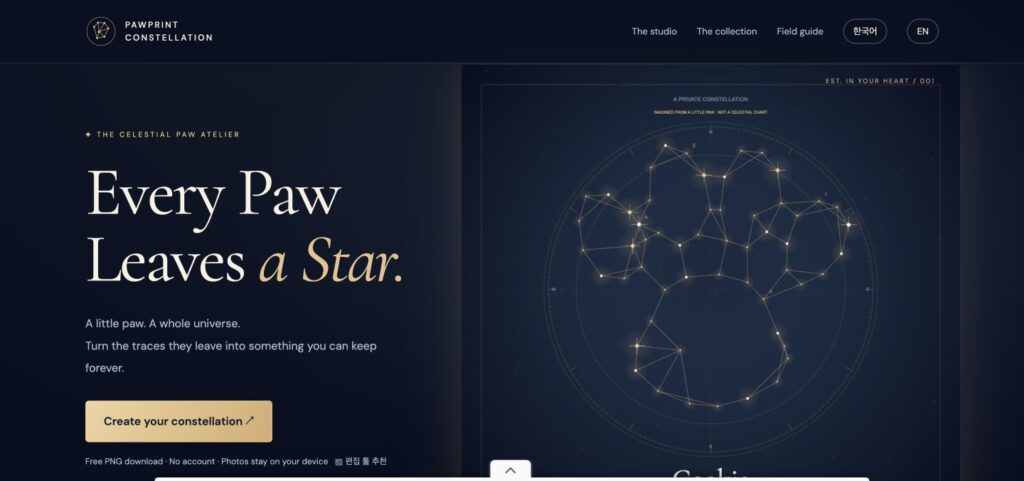
Create decorative constellation keepsakes from an impression or sample. Our hands-on guide checks star memories, density regeneration, device recovery and the different jobs of artwork PNG and project JSON.
- Brand
- Pawprint Constellation
- Tool languages
- en, ko
- Verified date
- 2026-11-07
On this page
Key takeaways
- Finish the silhouette and star density before writing memories. In our test, increasing density from 56 to 57 regenerated the stars and cleared the saved text on star 02.
- Keep the picture and the editable story separately. The source says PNG contains the displayed artwork, while project JSON carries per-star memories.
- A device save helped us recover the name, 56-star arrangement and memory. Browser storage is a working convenience, not a permanent backup.
- This is an art generator, not a real sky map, official star registration service or AI paw detector.
What this pawprint art tool actually does
The official name is Pawprint Constellation. Its three-step studio moves from an uploaded impression to visual styling and then to memory writing. Image contrast determines candidate star positions; you can refine the composition with manual star tools. Four named palettes change the atmosphere without requiring a general design application.
Its distinctive value is the link between an image and small stories. A normal photo editor can crop or caption a print, but it does not automatically give each star its own editable note. Conversely, a journal can preserve the stories without producing this constellation composition. The studio combines these two activities, provided you preserve the project as well as the finished picture.
English is available on the dedicated English studio page; the root page is Korean. Some canvas controls retain English accessibility names in the Korean interface. The free, no-account description is the publisher’s stated offer at the verification date, not a promise about future availability.
Prepare the impression before opening the studio
Choose an existing dark impression on plain light paper. Photograph it from above, avoid directional shadows, and crop distracting objects in your usual image editor before importing. A photograph of a furry foot on a patterned floor gives contrast sampling many irrelevant edges. Expect background details to become stars; the tool is not identifying toes or distinguishing a pet from its surroundings.
The upload control lists PNG, JPEG and WebP, with a 12 MB maximum. Our actual upload was a 480 × 480 PNG with simple circles on white. We did not test every listed format or the size boundary. Keep an untouched copy of your source image somewhere you control: the source says the project does not embed the original photograph.
Use an old keepsake or the built-in sample rather than restraining an animal for a new impression. The gallery examples are explicitly publisher-created demonstrations, not customer submissions. They show a style direction, not evidence that an arbitrary photograph will produce the same result.
Features that matter to the finished keepsake
| Control | Useful decision |
|---|---|
| Threshold and inversion | Threshold is shown from 25 to 230, initially 145. A checkbox accommodates a light print on a dark background. Adjust before writing stories. |
| Star density | The slider spans 24–100. Our 56→57 test regenerated the arrangement and removed the star memory. More stars are not automatically a clearer design. |
| Canvas editing | Memory, add, remove and move modes appear in the tool menu, with undo and zoom. We directly tested add, undo, zoom and directional movement controls. |
| Four art styles | Golden Atlas, Moonlight Whisper, Aurora Dreams and Celestial Archive. We rendered Aurora and the light Archive theme. |
| Story controls | Select a numbered star, enter text, press Keep this memory, and reselect the star to check persistence. Direction buttons offer precise movement. |
| Artwork text | Pet name, a date and a short dedication are separate from the individual star notes. |
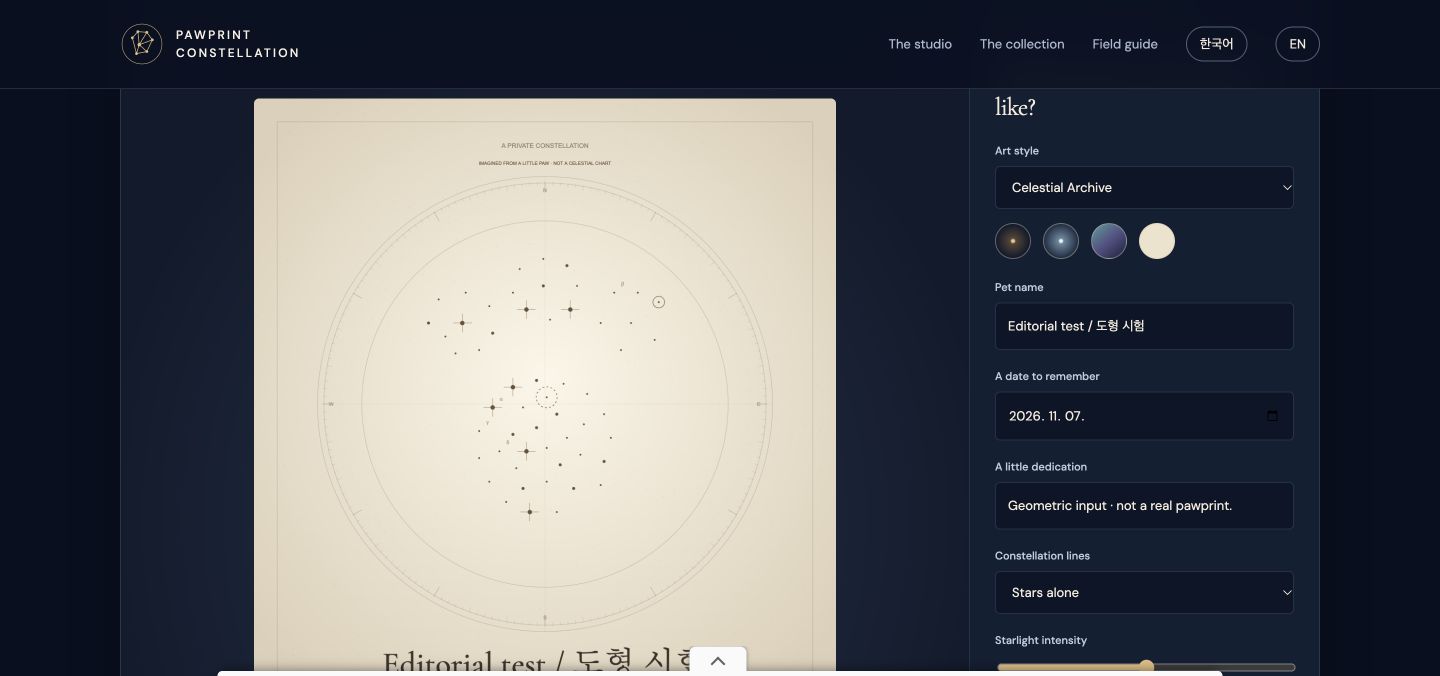
The line selector offers Delicate star atlas or Stars alone, and starlight intensity is adjustable. In our Archive preview, the pale background and isolated dots produced a noticeably quieter composition than the connected Aurora version. Choose a combination that remains readable at the final size, especially when the artwork contains small names or a long dedication.
How to use Pawprint Constellation: 7 smart checks
1. Establish a clean starting image
Open Print and choose your image, or use Explore with the sample instead. Confirm that a preview and generated stars appear before adjusting other settings. Do not interpret a plausible outline as successful animal recognition. Our circle-based fixture generated a paw-like arrangement precisely because the tool samples darkness rather than identifying a real animal.
2. Complete threshold and density decisions
Use the silhouette threshold to judge which marks belong in the design. If the input has reversed contrast, try the light-print checkbox. Then settle the star density. Compare the outline at normal zoom; a dense web can obscure the simple shape you wanted. These controls belong early in the workflow because regeneration can discard carefully written memories.
3. Refine the star arrangement
Choose an explicit canvas mode before clicking. Add star places a new point; remove mode is intended to delete points; move mode and the story panel’s direction buttons help refine position. We added a point to move the count from 56 to 57, then used Undo star edit to return to 56. Treat undo as a recent-edit aid, not as the only copy of your work.
4. Style the art and proofread its visible text
Open Style, choose one of the four themes, and enter the name, date and dedication. Decide whether to retain constellation lines. Our test included both English and Korean characters in the name, and both appeared in the preview. That confirms our test string, not comprehensive font support for every script or character. Keep the dedication short enough to inspect at the intended viewing size.
5. Add and verify each memory
Open Story, select a numbered star, write the memory and press Keep this memory. Select another star and return. Our saved star displayed a small mark in its menu label and returned the exact bilingual test text. The dropdown is useful when a tiny point is difficult to target on the canvas. If the story matters, verify it this way rather than relying on the textarea still showing unsaved typing.
6. Save an editable working copy
Open Project drawer. Save to device creates a browser-local copy; Load device save explicitly restores it. Export project file is the source’s portable JSON route, and Open a project is the import control. Save before a risky design experiment. In our test a changed name was replaced by the saved original after loading, and the erased memory returned with the 56-star version.
7. Choose an artwork layout and keep both outputs
Make it a keepsake lists Poster at 2400 × 2800, Wallpaper at 1440 × 2560 and Card at 2400 × 2400. These are interface-stated pixel dimensions. We selected Card and activated the artwork download; we did not verify the downloaded PNG’s dimensions or contents. After your own download, open the image, check spelling and framing, and separately retain the editable project. A picture alone is not a backup of the star stories.
What our hands-on tests established
| Test | Observed result |
|---|---|
| Synthetic PNG upload | A 480 × 480 geometric PNG was accepted and produced 56 stars. This establishes a working upload and generation path for that fixture. |
| Bilingual star memory | Star 02 retained our English/Korean test note after selecting another star and returning. |
| Device restoration | Saved name and memory returned after deliberate changes. On the Korean page in the same browser, the saved project also restored. |
| Density change | One arrow increment changed 56 to 57 stars. Star 02’s textarea was then empty; loading the device save restored 56 and the note. |
| Canvas controls | Adding one star changed 56→57; undo returned 56. Zoom changed 100%→120%→100%. Directional nudge controls were activated. |
| Style and export controls | Aurora and Archive previews rendered; Stars alone removed connecting lines in the Archive preview. Project export and card download were activated, without file-byte inspection. |
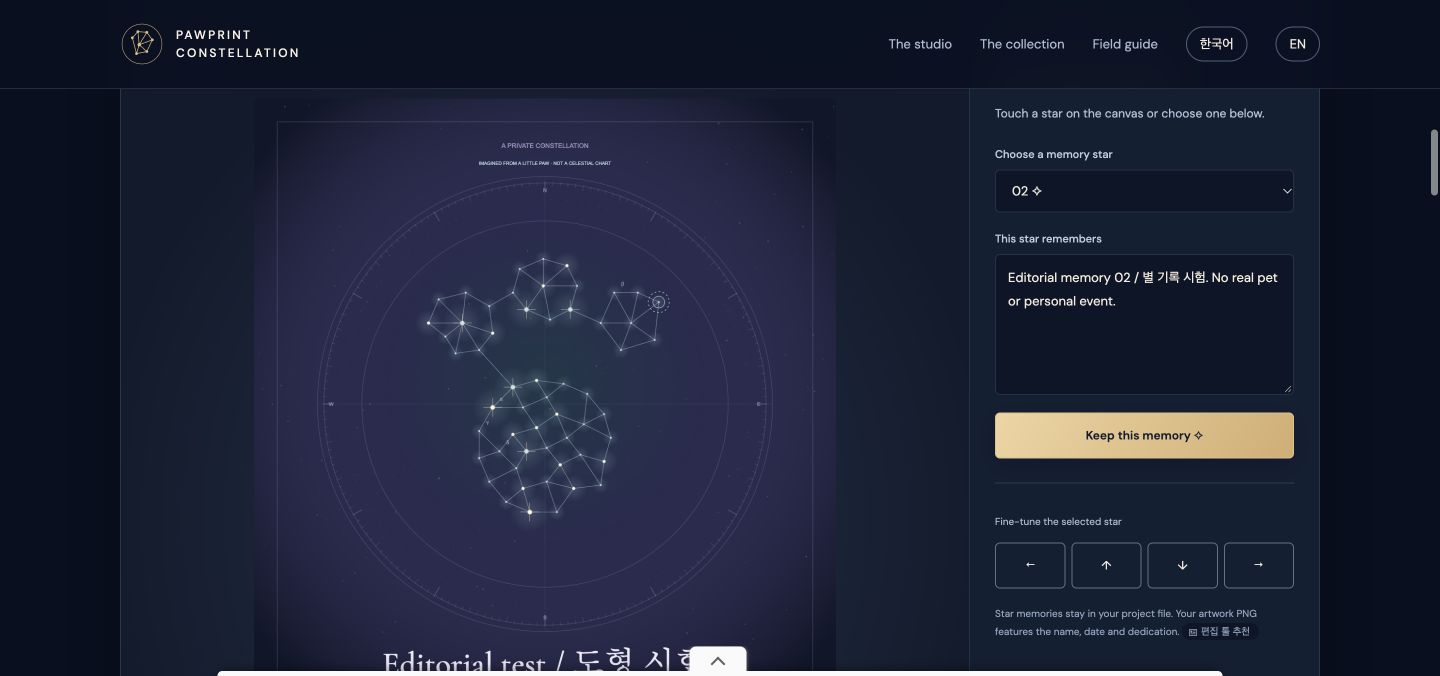
The most consequential result is the regeneration test. It turns a general warning into a concrete production order: establish the shape, save, write the memories, save again. We did not infer that every possible edit erases notes. We observed the loss after one density increment on this input, so we recommend saving before any operation that rebuilds the star arrangement.
A practical route from keepsake to family handoff
Suppose you already have a photographed ink impression and want a birthday card plus a private memory archive. Prepare a clean source image first. Build a restrained constellation, choose a square card layout, and enter a short visible dedication. Write one memory per star only after the visual arrangement is settled. This is a suggested workflow, not another test performed with a real animal.
Deliver the final picture to the person who only needs to view or print it. Keep the original impression and editable project with the person responsible for future revisions. If you share JSON so a family member can continue editing, review every name and private story first. The fact that the source photograph is excluded does not make the text anonymous.
Use a clear file naming convention such as pet-name_card_2026-11-07.png and pet-name_story_2026-11-07.json after confirming what the export actually contains. Store a second copy separately. A date in a filename helps distinguish a finished birthday edition from a later redesign, whereas an unlabeled “final” file quickly becomes ambiguous.
Advanced tips for a more durable result
- Use a small number of meaningful notes before filling every star. A sparse story can be easier to review than dozens of repetitive entries.
- Check the visible name and dedication independently from the star memories. They have different storage and display roles.
- Use the numbered selector for accurate review, especially on mobile. Zoom enlarges the canvas but does not replace a complete text check.
- Try a new palette after saving a known good version. Avoid mixing a visual experiment with irreversible changes to your only working copy.
- Before sending artwork to a printer, check the actual exported file, the requested crop and the printer’s requirements. Screen appearance alone cannot establish print color or physical dimensions.
Limitations, privacy and mobile behavior
The source explicitly says this is creative art: it does not locate real stars, register official constellations or issue astronomical certificates. Its contrast sampler can include shadows, paper texture and background objects. We did not test hand removal of every stray point, all upload formats, malformed JSON, the 12 MB boundary or a physical print.
The publisher states that selected images are processed in the browser and are not uploaded by this tool. It also says project files contain coordinates and entered text, excluding the original photo, and that explicit device saves use local browser storage. These are source statements; we did not audit network traffic or implementation. Blogger, Google and advertising services may process connection information or cookies separately, so “local photo processing” should not be expanded into “no data collection.”
Browser storage can be cleared, can differ between profiles and does not provide automatic cloud synchronization. A fresh Korean page did not automatically load our saved project; pressing Load device save restored it. We verified this within the same browser and origin, not on another physical device. The cross-device route described by the publisher is exporting and importing the project file.
At an emulated 390px width, the Korean page had matching 390px document and viewport widths. The canvas and controls stacked vertically, and the star selector restored our bilingual note. This was a desktop-browser mobile layout check, not a physical touchscreen test. Advertisements could cover parts of the controls; use their visible close or collapse control and scroll to the relevant step. Do not mistake an advertising link for a studio action.
Related tools and alternative approaches
If the finished artwork needs a title and separate publishing layouts, see our PostPack Studio image pack maker guide. It is a possible next layout step after you have checked your exported artwork, not an automatic connection or a substitute for saving memories. Only share a picture you are comfortable placing into another tool.
Browse Image, Documents & Files tools for adjacent image work. For a single caption on an unaltered impression, a normal image editor may be simpler. For detailed long-form memories, a private document can be easier to maintain. Pawprint Constellation fits the middle case where the constellation itself and its numbered stories both matter.
Pawprint art FAQ
Can I use it without a real pawprint?
Yes. The studio has a built-in sample, which is the safest way to explore the controls without personal material. Our separate synthetic PNG was accepted, but its success should not be read as proof that every real photograph will make a clean silhouette.
Will my star memories appear in the PNG?
The source says individual memories stay in the project file. The artwork PNG features the visible name, date and dedication. Preserve both the picture and project if you need the story later; we did not independently inspect the exported files.
Why did a memory disappear after I changed density?
Density regenerates the stars. In our actual 56→57 test, star 02’s saved note was gone. Load device save restored the earlier version because we had saved before experimenting. Without an earlier copy, do not assume undo or browser refresh will recover it.
Is it free, and can I print the artwork?
The publisher says the studio and PNG exports are free without an account, and describes personal wallpapers and printed keepsakes. We did not establish commercial licensing or order a print. Confirm current terms for any broader use and inspect the actual file before paying a printer.
Is a device save enough for long-term storage?
No. It is tied to browser storage and can be cleared. The source provides project JSON export for portable continuation. Keep your original image separately, and verify your own exported project can be reopened before treating it as your only archival copy.
Make one reviewed pawprint keepsake first
Start with the sample or an existing impression. Finalize the stars, write and recheck one memory, save the project, then choose the picture layout. The result becomes more useful when the visible artwork and its editable stories have clear, separate places to live.
A RELEVANT NEXT STEP
Tools with a useful connection
PostPack Studio
Image Pack Maker: 7 Smart Checks in PostPack Studio
Create four template-based blog and social layouts from shared text and an optional image. Our guide checks platform copy, CSV generation, brand persistence and metadata while separating editor results from unverified downloaded files.
PrintFix Studio
PrintFix Studio: 7 Smart HTML Printing Checks
Prepare basic HTML for printing with overflow checks, repairs, page breaks and CSV document batches. Our hands-on tests show why 100 readiness does not catch a missing field and what remains to verify in the actual print output.

FrameMint Studio
Screenshot Editor: 7 Smart FrameMint Studio Checks
Frame screenshots, add manual masks and build captioned stories in FrameMint Studio. Real import, order, recovery and size tests explain what to check before sharing.