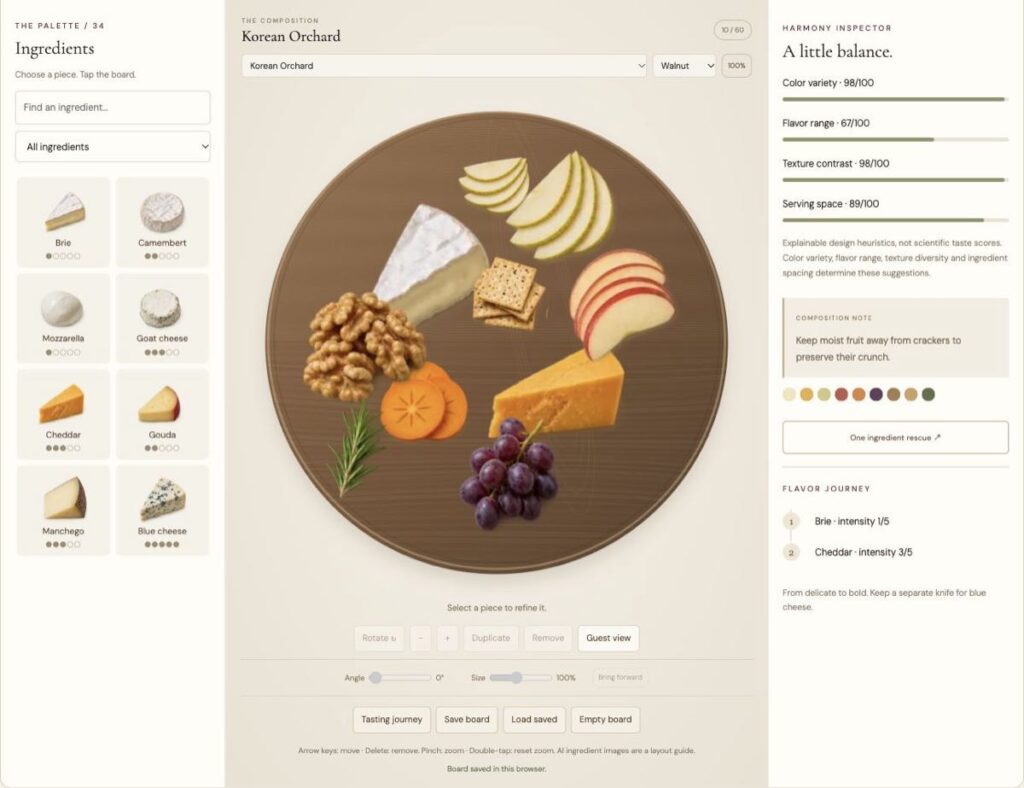
Arrange a cheese board and check guest-based shopping quantities in Cheese Board Composer. Seven actual tests explain piece counts, budget caps and the serving inputs a saved board leaves behind.
- Brand
- Cheese Board Composer
- Tool languages
- en,ko
- Verified date
- 2026-11-14
Cheese board planner Cheese Board Composer, branded The Cheese Atelier, combines a visual ingredient canvas with a guest-based shopping list. Choose a collection or place your own pieces, compare layout hints and plan an appetizer quantity. Its most useful distinction is between a picture of a board and a serving plan: duplicating a cheese image does not automatically buy more cheese.
Verified 14 November 2026, KST. We placed ingredients, rotated and resized a piece, duplicated it, tested deletion and Undo/Redo, changed collections, entered six guests and KRW, and checked manual save/load after reload. Korean controls were checked at 390×844. All review images are real interface screenshots; the source uses AI ingredient imagery. No food was prepared. Completed PNG/TXT files and printing were not independently inspected.
On this page
Key takeaways before planning
Treat the canvas, ingredient-type count and shopping quantities as three separate records. Our controlled board had five placed objects but four ingredient types, because Brie appeared twice. For six guests, the cheese range stayed 360–540 g and was split equally between Brie and Cheddar. The visible number or size of cheese pictures did not set that split.
Recheck the serving inputs after reopening. Load saved recovered our board, title and Dark slate surface, but guests, budget and currency remained at the freshly loaded page’s defaults. A title saying Six-guest layout test was therefore visible while the calculator still had four guests. Save the visual design and record the event inputs separately before generating a list.
What this cheese board planner does
The official tool name is Cheese Board Composer, under The Cheese Atelier branding. The English root links to English and Korean pages. It offers 34 ingredients across Cheese, Fruit, Crunch and Extras, plus five curated collections: Autumn Orchard, Quiet Minimalism, Mediterranean Sun, Midnight Contrast and Korean Orchard. Those are starting layouts, not purchased packages or guarantees of real serving suitability.
The editor is a canvas with a 60-piece counter. Choose a library ingredient and click or tap the board to place it; select a placed piece to rotate, resize, duplicate, remove or bring forward. The page advertises dragging and touch zoom. Our direct tests used placement clicks, numeric inputs, named buttons and keyboard controls. We did not test physical-phone pinch or drag precision, or fill the board to verify the maximum limit.
Walnut, Light oak and Dark slate change the background. Guest view and Tasting journey are display options. The inspector reports color variety, flavor range, texture contrast and serving space, alongside a palette and cheese-intensity list. The lower planning panel accepts guest count, budget, currency and a composition title; its shopping list is based on selected ingredient types rather than a live store catalog.
Prepare the brief before the board
Decide whether the board is an appetizer or another part of the meal, then note the number of guests and the actual serving surface. The page labels its ranges as appetizer planning estimates. It does not know the rest of the menu or your guests’ appetites. Keep those decisions in the event brief rather than trying to infer them from an attractive digital arrangement.
Make a separate list of constraints: ingredients you can actually obtain, package sizes, guest requirements and budget currency. The tool does not check labels, allergies, nutrition or food storage. A visually balanced board can still be unsuitable for an event. Use the canvas to discuss composition, while package labels and appropriate food-handling guidance govern the real food decisions.
Before replacing a saved board, inspect whether you need it. Our first Load saved attempt reported no saved board, so the manual specimen used here was our own. The interface exposes one save/load workflow, not a versioned project library. Keep an inspected image or separate note for a design you want to retain before overwriting that browser-local record.
Cheese board planner: 7 essential checks
1. Choose a starting collection
Load a collection or use Empty board for a controlled study. Our initial Autumn Orchard showed 10 pieces and nine ingredient types. Korean Orchard also loaded 10 pieces, and Undo returned our previous five-piece custom board. Read the live counter after an edit; the collection name can remain a theme label after you substantially change its contents.
2. Find and place an ingredient
Search the palette or narrow it by category. Cheese plus the search blue returned Blue cheese in our test. Select an ingredient and then click the canvas. We placed Brie on an empty board and saw 1/60 with its editing controls enabled. Picking an ingredient is preparation for placement, not proof that it has already been added.
3. Refine a selected piece
One Rotate press changed the selected Brie to 15°, and the plus button changed its displayed size from 100% to 110%. Duplicate produced two Brie objects. The Angle slider spans 0–359 and Size 45–180. These are illustration controls; they do not measure grams or establish the diameter of a real slice.
4. Test an edit and its recovery
Select a piece before using Delete. Our selected Cracker deletion changed five pieces to four; Undo returned five, Redo returned four and a final Undo restored five. This verifies that sequence, not unlimited history. Make a short, reviewable edit before experimenting further so you know which action you expect Undo to reverse.
5. Interpret the inspector
Read all four hints and look at the board. Two Brie pieces kept color/flavor/texture at 11/41/17 in our controlled test, while serving space changed from 96 to 92. Duplication altered spacing without adding another ingredient type. These are explainable design heuristics, not scientific taste, nutrition, safety or guest-satisfaction scores.
6. Enter event inputs explicitly
For six guests we entered budget 60000 and KRW. The page displayed a 60,000 KRW cap, 360–540 g cheese and 480–720 g fruit. With Brie, Cheddar, Pear and Crackers selected, cheese split into 180–270 g per cheese, Pear got the full fruit range and Crackers got 24–36 pieces. These are displayed planning calculations, not a verified catering order.
7. Save, reopen and recheck the list
Save board, change or clear the active board, then Load saved to verify recovery. After a full reload, our page started from its default collection. Load saved recovered the custom board, Dark slate and title, while the planning inputs stayed at defaults. Re-enter guests, budget and currency before exporting the shopping list.
Actual browser test results
| Control or comparison | Observed result |
|---|---|
| Empty board → Brie | 0→1 placed piece. One-Brie hints: color 11, flavor 41, texture 17, space 96. |
| Rotate / size / duplicate | 15°, 110%, then 2 Brie pieces. Same color/flavor/texture values; space 92. |
| Custom composition | Two Brie+Cheddar+Pear+Crackers:5 objects but 4 types. |
| Collection and Undo | Korean Orchard loaded 10 pieces; Undo returned custom 5. |
| Delete / Undo / Redo | 5→4→5→4; final Undo restored 5. |
| Six-guest list | Cheese 360–540 g; Brie 180–270 g, Cheddar 180–270 g; Pear 480–720 g; Crackers 24–36. |
| Budget/currency | 60000+KRW displayed 60,000 KRW as a cap, not a price quote. |
| One ingredient rescue | Suggested Blue cheese and asked us to tap the board; count stayed 5 before placement. |
| Save/clear/load | Recovered 5 pieces, Dark slate and title. Reload first opened default 10 piece board. |
| Planning persistence | After reload+Load saved:English 4 guests/40 USD; Korean 4 guests/50000 KRW despite savedSix-guest title. |
| Korean mobile | Manualsavedboard recovered; Harmony/tasting tab worked; 6 guests recalculated; document width 390. |
| Export activation | TXT said download started; PNG said 1800 px composition downloading; completed files unverified. |
Pieces, ingredient types and quantities differ
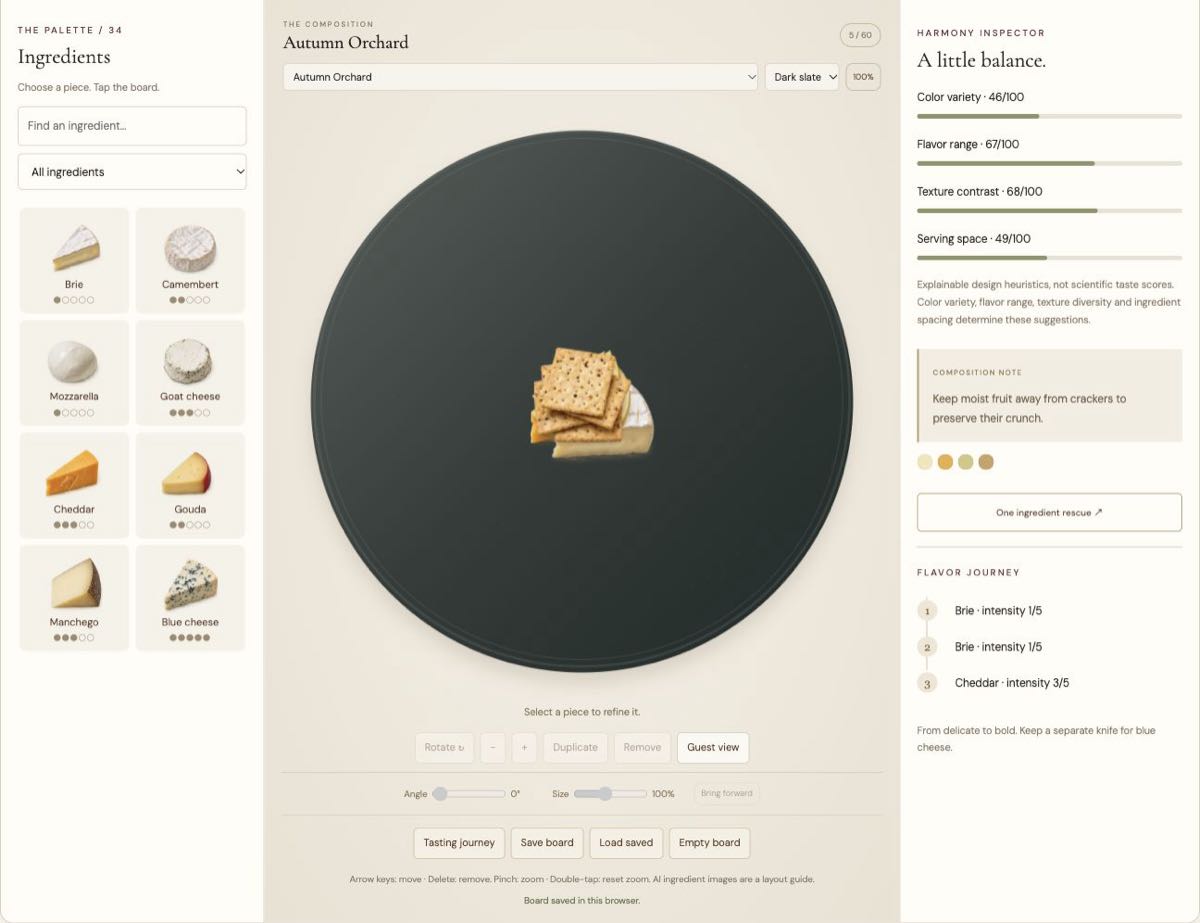
A placed object is a visual instance. An ingredient type is a unique ingredient included in the plan. Quantity is a category-level serving estimate divided among those types. Our duplicated Brie appeared twice in the Flavor journey, but the shopping list still had one Brie line. That distinction explains why a picture can look generous without increasing the amount on the shopping list.
With only Brie selected, the six-guest cheese line was 360–540 g even after duplication. Adding Cheddar split the same total equally into 180–270 g each. Adding more Brie pictures did not assign a larger share to Brie. If you want a real event to favor one cheese, write that allocation separately; the displayed composition is not a weight-proportional recipe editor.
The summary also displayed a fruit total even on a board with no fruit, while the actual shopping list omitted a fruit item until one was selected. Read the detailed list rather than the headline totals alone. A category allowance is not proof that an appropriate ingredient is present. Check both membership and quantities before turning the plan into a purchase checklist.
Read the harmony inspector as a design aid
The four scores ask different visual questions. Color variety and texture contrast describe diversity, flavor range uses the source’s assigned intensities, and serving space responds to placement. A duplicate can change space while keeping the other values fixed, as our one-Brie/two-Brie comparison showed. A high number should trigger inspection of the arrangement, not replace it.
Our center-stacked five-piece study displayed 46/67/68/49 for color/flavor/texture/space. It is deliberately a test arrangement, not a recommended serving layout. One ingredient rescue suggested Blue cheese, but did not add it automatically: the board still had five objects until a placement action. Consider whether a suggested ingredient belongs in the event before placing it; the suggestion is not an allergy or purchase check.
Tasting journey listed Brie twice at 1/5 and Cheddar at 3/5 for the duplicated board. That is a display of placed cheese instances, not three unique cheeses or a measured tasting panel result. Guest view and Tasting journey were toggled successfully, but our review did not establish every rendering or touch behavior. Keep their visual role separate from the arithmetic in the serving plan.
Build a shopping plan with the right assumptions
The source’s appetizer guide uses 60–90 g cheese, 80–120 g fruit and 4–6 crackers per guest. Six guests therefore produce 360–540 g, 480–720 g and 24–36 crackers. Those are the tool’s adjustable planning assumptions, not dietary advice or a universally appropriate serving. The right amount depends on the actual event; the app does not interview guests or inspect the rest of the meal.
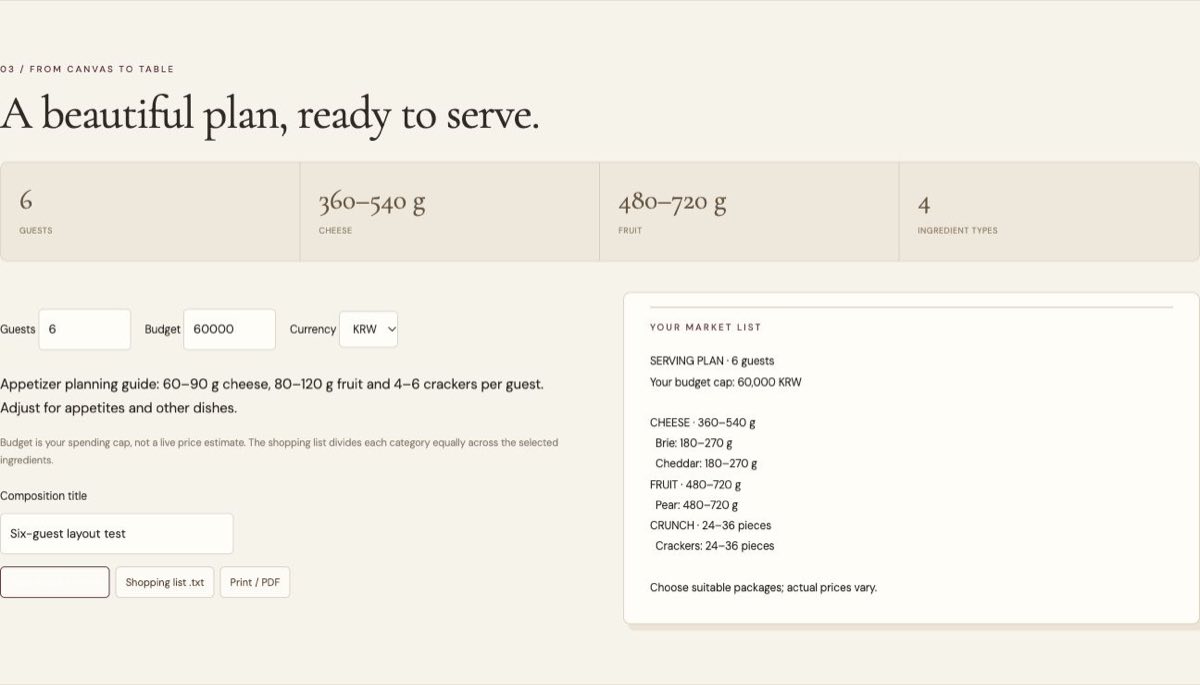
Budget is a declared ceiling. Changing the currency selector changes the label; the page supplies no live product prices, retailer inventory or checkout in the tested workflow. Do not interpret 60,000 KRW as the calculated cost of these quantities, or a switch to USD as an exchange conversion. Compare real package sizes and current prices outside the tool, then reconcile the shopping list with your own budget.
Rounding matters when a category is divided among several ingredients. The initial four-guest list assigned Figs, Pear and Green grapes 107–160 g each from a 320–480 g fruit range. The rounded lower allocations sum to 321 g, one gram above 320. This is a presentation effect in the displayed arithmetic, not evidence of a precision weighing plan. Choose workable package quantities instead of treating every rounded line as an exact requirement.
What saved boards restore and leave behind
Save board and Load saved preserved our composition, title and surface. Empty board affected the active canvas without removing the manual record: loading brought it back. A full reload opened the default Autumn Orchard rather than the saved canvas, so recovery required pressing Load saved. We did not verify cross-device synchronization or a cloud account backup.
Most importantly, the six-guest title did not restore six guests. The English page remained at 4/40 USD after loading; the Korean page remained at 4/50000 KRW while recovering the same board and title. Changing Korean guests to 6 produced the expected ranges again. Write guest count, amount and currency in a separate event note and read the current controls whenever you resume.
The language links are ordinary English/Korean page links; they did not expose a composition-parameter sharing URL in the tested interface. The Korean page could load the manual board in the same browser, which is local recovery rather than proof of a portable link. Sending the original site address to another person should not be described as sending your custom composition.
Export, sharing and mobile workflow
Shopping list .txt displayed Download started, and Save board as PNG displayed a message naming 1800 px. Our documented browser download waits did not provide completed files, so encoded dimensions, contents and title rendering remain unverified. Print/PDF was not tested. A button label or source status is not a substitute for opening the actual deliverable.
For a useful handoff, keep an inspected board image, a checked shopping list and a separate event note. Each answers a different question: where items go, what ingredient types to obtain, and how many people and which budget the list assumes. If files do not arrive, record the visible list manually rather than assuming a saved board contains every planning input.
Images, privacy and real-table limits
The source explicitly identifies AI ingredient images as a layout guide and labels its editorial food image as AI-created. Our screenshots document that interface, not real produce, a plated meal or measured slice dimensions. Scaling a picture cannot establish grams, real serving-board clearance or whether a knife can safely reach an item. Check the actual table arrangement independently.
The source says saved boards stay in the browser and compositions are not uploaded by the tool. We verified local recovery but did not audit network traffic. Blogger and Google advertising services may process data under separate policies, and ads were present. Avoid expanding browser-local saving into a claim that the entire website is offline or has no third-party processing.
Fresh 390×844 Korean layout had document width 390. Its Ingredients and Harmony/tasting tabs exposed different panels; switching to Harmony/tasting and changing guests worked. This was responsive viewport testing, not a complete screen-reader or physical-phone gesture audit. The canvas is named for keyboard use, but its individual food objects were not exposed as separate controls in the DOM snapshot, which limits what our accessibility check establishes.
The inspector does not assess nutrition, allergy suitability or food storage. Use package labels and guest requirements for ingredient decisions; for handling and storage, the source links to FoodSafety.gov’s official guidance. That guidance covers safe handling and storage rather than validating the app’s layout scores or serving arithmetic.
Related tools for the next step
For a decorative ribbon study after planning the board, see Garnish Spiral Studio. It compares illustrative cut paths, curls and plating, not measured food physics. Keep its concept imagery separate from a real garnish test just as you keep this canvas separate from ingredient weights.
Use FrameMint Studio to caption a planning screenshot and PixelFit to prepare upload dimensions. Preserve guest count, currency and the AI-layout context when cropping. These presentation tools do not verify food suitability or recover an editable board from a flattened image.
Frequently asked questions
Does this cheese board planner calculate a live shopping price?
No. Budget is your entered cap and currency is a label in the tested planning flow. Real package prices and availability need a separate check.
Does duplicating Brie double its shopping weight?
No. Our duplicate increased placed objects but kept one Brie type. The category total was divided across unique selected cheeses, not picture count or size.
Does Save board preserve the six-guest calculator?
Not in our test. Board, title and surface returned, while guests, budget and currency remained at page defaults after reload. Re-enter them before using the list.
Are harmony scores scientific taste results?
No. The source calls them explainable design heuristics. They do not establish nutrition, safety, allergies or whether guests will enjoy a pairing.
Are the food images actual prepared dishes?
The source identifies its ingredient and editorial imagery as AI-created layout guidance. Our review images are real screenshots of that digital interface, not food experiments.
Were the PNG and text downloads fully checked?
Only activation and source status messages were observed. Completed file bytes, dimensions and print/PDF output were not independently inspected.
Start with a board and a separate serving note
Open the cheese board planner, choose a mood and test a small edit. Keep pieces, ingredient types and serving quantities separate. Before using a resumed design, load the board and explicitly recheck guests, budget and currency so the shopping plan belongs to the event you are actually preparing.
A RELEVANT NEXT STEP
Tools with a useful connection
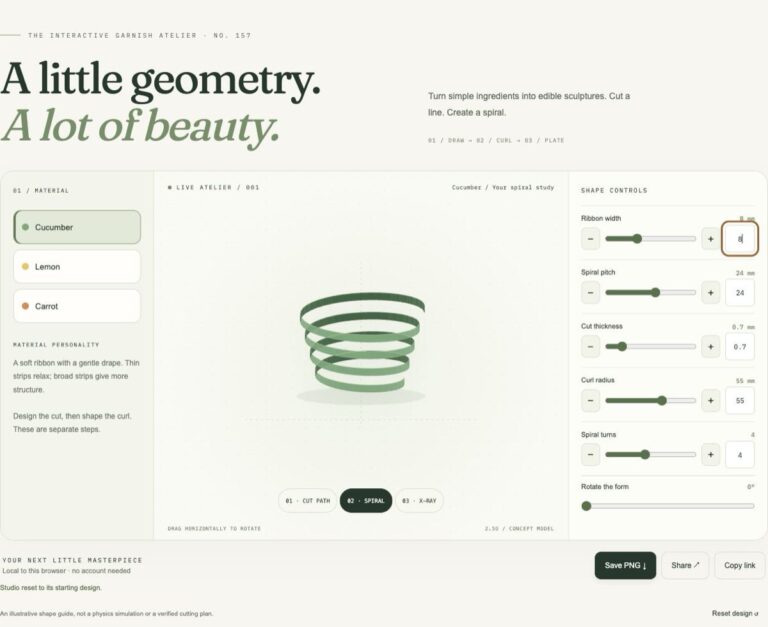
Garnish Spiral Studio
Garnish Designer: 7 Essential Spiral Studio Checks
Compare cucumber, lemon and carrot ribbon concepts, X-Ray cut paths and plating in Garnish Spiral Studio. Seven tested checks explain links, working state and manual saves.

FrameMint Studio
Screenshot Editor: 7 Smart FrameMint Studio Checks
Frame screenshots, add manual masks and build captioned stories in FrameMint Studio. Real import, order, recovery and size tests explain what to check before sharing.
PixelFit Studio
Image Upload Optimizer: 7 Essential PixelFit Checks
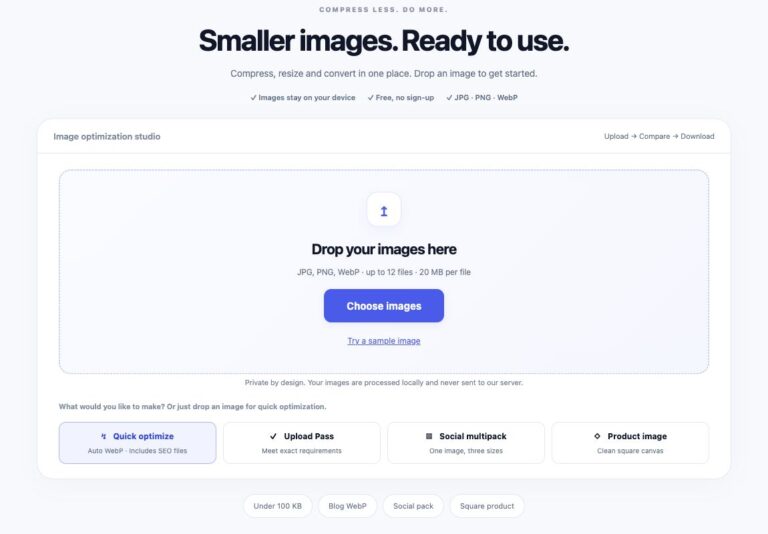
Prepare exact upload dimensions and file-size conditions with PixelFit Studio. Actual sample and JPEG tests explain PASS/CHECK, crop versus contain, social totals, copied HTML and the limits of unverified file receipt.