Test pebble balance in Pebble Balance Zen. Compare actual tremor results, restore a tower, read the fixed map and understand local-save and export limits.
- Brand
- Pebble Balance Zen
- Tool languages
- English, 한국어
- Verified date
- 2026-11-21
Pebble Balance Zen is a pebble balance game for building a small digital tower and comparing its response to controlled tremors. Add stones, change their orientation, then choose strength, frequency and duration. The balance archive records whether the simulated tower held or shifted. It is useful for a quiet play session or a lesson about changing one input at a time. Its results are not earthquake ratings, engineering calculations or predictions for real rock structures.
Verified 21 November 2026, KST. In a separate Chrome profile session with no prior test history, we tested the starting four-stone tower, restored it for a stronger tremor, ran map cells, reached the eight-stone limit, used Undo and local save/load, and checked history after reload. Korean map operation was tested at 390×844. An existing record in the other browser was left unchanged. JSON/artwork downloads, import recovery and reopening a shared garden were not verified; screenshots illustrate the article.
On this page
Pebble balance: key takeaways
Our first four-stone test held at 35% strength, 2 Hz and 4 seconds. After Restore tower, the same strength-control comparison at 100%, 2 Hz and 4 seconds shifted stone 4. These are outcomes of this simulated starting arrangement. They do not establish that every digital tower holds at 35% or that the percentages correspond to real ground acceleration.
The result map is narrower than the history. Its columns are 25%, 50%, 75% and 100%, and its rows are 1, 3 and 6 Hz. Our 35%/2 Hz result appeared in the recent list but did not fill a grid cell. Selecting the 25%/1 Hz cell actually restored and tested a tower; it was not a passive report filter. Read the caption before treating a blank cell as a missing record.
What Pebble Balance Zen does
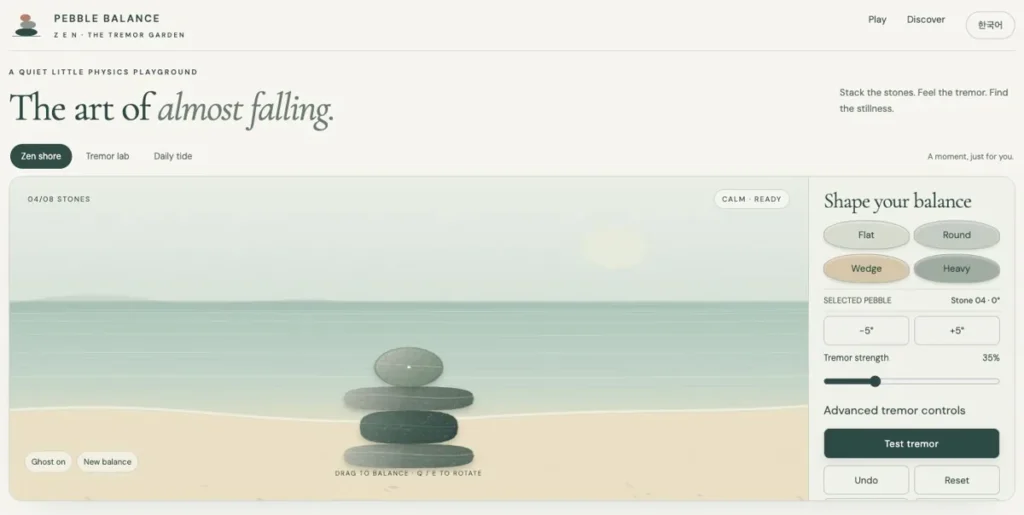
The official name is Pebble Balance Zen, with The Tremor Garden branding. The English root links to a dedicated Korean page. The experience includes Zen shore, Tremor lab and Daily tide modes, a stone canvas, four stone-addition buttons, rotation tools, a ghost view and a balance archive. The inspected FAQ names Matter.js as its 2D physics engine and describes simplified convex shapes and friction.
This addresses a practical learning problem: when a tower falls after several things change, it is difficult to say what caused the result. The tool exposes three tremor inputs and a pre-test restore route. A reader can keep a starting arrangement, predict a change, run it and inspect a recorded outcome without moving real stones or constructing a physical vibration experiment.
Use it for a short creative break, a prediction-and-observation exercise, or a discussion of why frequency and duration are different from force strength. The virtual shore is also a way to explore stacking without rearranging outdoor stones. We needed no account or payment for the tested operations. No claim of therapeutic benefit, classroom assessment validity or real structural safety follows from the calm visual design.
Read stones and tremor inputs
| Input or control | Observed meaning |
|---|---|
| Flat, Round, Wedge, Heavy | Adds a virtual stone type. We used Flat during the count-limit test. Names do not specify measured natural material properties. |
| Stone count | Maximum eight. Five attempted additions from four stopped at 08/08. |
| Rotation | Buttons show −5° and +5°. The instructions also name Q/E and arrow-key movement on the focused canvas. |
| Tremor strength | 10–100% input. The source describes applied horizontal force, not a calibrated seismic unit. |
| Frequency | 0.5–8 Hz, 0.5 step in advanced controls. Changes how quickly the horizontal force reverses. |
| Duration | 1–10 seconds. Our recorded trials used 4 seconds. |
| Restore tower / Undo | Restore the pre-test arrangement versus undo a move. Do not assume both operations remove the most recently added stone. |
The starting console showed 35% strength, 2 Hz and 4 seconds. Advanced tremor controls exposes frequency and duration; it is worth opening before a comparison so that all three values are visible. A stronger percentage with a different frequency is not a clean test of strength alone. Likewise, changing the tower while changing the stimulus combines two causes in one observation.
The ghost and stone outline are visual aids, not a numerical engineering margin. A position or angle can continue to change as the simulated stones settle. Let the arrangement settle before recording a baseline, then use Restore tower rather than trying to drag every stone back by eye. We tested the restore workflow; we did not measure placement accuracy with a physical mouse or touchscreen.
7 essential pebble experiment checks
1. Protect any existing garden before experimenting
Check the recent test list and any local work before using reset or mode changes. Our administration browser already contained tests, so new experiments used Chrome with an empty history. This avoids presenting somebody’s older records as new results or overwriting a saved garden just to obtain a clean screenshot.
2. Start with a small, known tower
The default scene began with four stones. For a comparison, keep the number, types and arrangement fixed. The source suggests a simple flat-stone exercise, but our documented results came from the starting four-stone scene, not an invented three-flat-stone trial. Give your own arrangement a clear description before making a prediction.
3. Read all three tremor settings
Expand Advanced tremor controls and record strength, frequency and duration. Our baseline was 35%, 2 Hz, 4 seconds. If the question is about strength, keep frequency and duration fixed. If it is about frequency, restore the same arrangement before changing the rate. A lower percentage alone does not define a gentler complete experiment.
4. Run the test and wait for its recorded result
Test tremor becomes disabled while a trial runs. Read the final status and the new recent-list row rather than judging from an intermediate picture. Our baseline ended HELD, while the restored 100% trial ended SHIFTED with stone 4 named. We did not equate the pictured shape of a fall with a physical damage measurement.
5. Restore before a controlled repeat
Use Restore tower to return to the recorded starting arrangement. Keep the other inputs constant and change the one you intend to study. Do not test a fallen pile and call it the same tower merely because the count is still four. A comparison needs the same arrangement as well as the same material labels.
6. Treat a map cell as an action
The map caption says a cell restores and tests the most recently tested tower. Our 25%/1 Hz selection ran a four-second trial and filled the cell as Shifted. On Korean mobile, 25%/3 Hz also ran and recorded a trial. Clicking several cells changes the experiment sequence; it is not simply selecting a coloured category of old records.
7. Check what actually survives
Our three recent records survived reload and appeared on the Korean page in the same Chrome profile. Saving a four-stone garden, adding stones to eight and loading the garden returned the count to four. That verifies local recovery for the tested save. Downloads, import restoration and cross-device sharing remain separate checks; a button alone is not a verified backup.
Actual tremor and recovery results
| Actual test | Observed result |
|---|---|
| Initial four-stone tower · 35% / 2 Hz / 4 s | Held. One recent record, one held result. |
| Restore tower, then 100% / 2 Hz / 4 s | Shifted, stone 4. Recent records became two; held count stayed one. |
| Choose 25% / 1 Hz map cell | Four-second trial ran; Shifted, stone 4. Three records, one held. |
| Save four stones; attempt five Flat additions | Count stopped at eight. Load garden returned the count to four. |
| Undo after the eight-stone sequence | Last move undone was shown, but the count stayed eight. Not verified as deleting an added stone. |
| Reload, then open Korean in same Chrome profile | Three records and one held result remained; Korean listed the same conditions. |
| Korean 390×844: 25% / 3 Hz cell | Shifted, stone 4. Four records, one held. Document width 390 px. |
| Download record / Share garden / Save artwork | Controls were attempted, but no received export or reopened share was verified. No output format dimensions or successful handoff claimed. |
The 35%/2 Hz and restored 100%/2 Hz examples keep the displayed rate and duration fixed. The 25%/1 Hz map result is a different frequency and a later restored-map workflow. It must not be used to claim that reducing strength caused failure or that 1 Hz is universally worse. We did not repeat a complete factorial experiment or calculate a statistical failure probability.
Held is a movement threshold, not perfect stillness
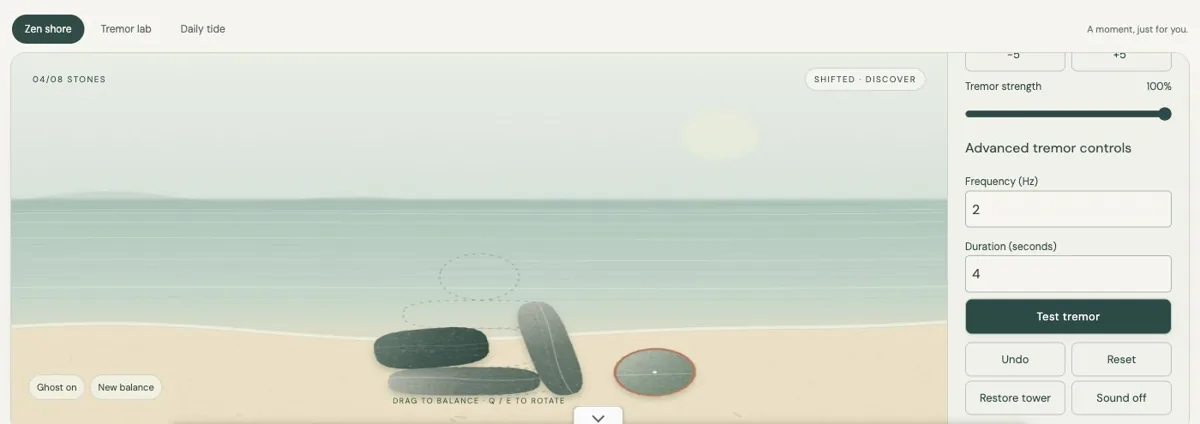
The source defines the highlighted stone as the first to move more than 24 simulation pixels or turn more than 0.45 radians during the test. The angular threshold is about 25.8°, a unit conversion, not an additional trial. These are game observation criteria. They do not measure crack formation, stress, permanent damage or a safe seismic design level.
Held does not mean every coordinate remained exactly constant. In our held baseline the selected stone’s displayed angle was no longer precisely the initial zero. The result label therefore needs its threshold context. Conversely, Shifted can be triggered by motion or rotation; it should not automatically be paraphrased as every stone collapsing or the lowest support failing first.
Use the named stone to decide where to look, then describe what is actually visible. A useful note might be “Stone 4 crossed the movement criterion at 100%/2 Hz/4 s.” A much stronger statement such as “The base could not support this real load” is unsupported. The simulation contains simplified 2D contacts and does not establish the properties of real materials or foundations.
Why the map can look empty after a test
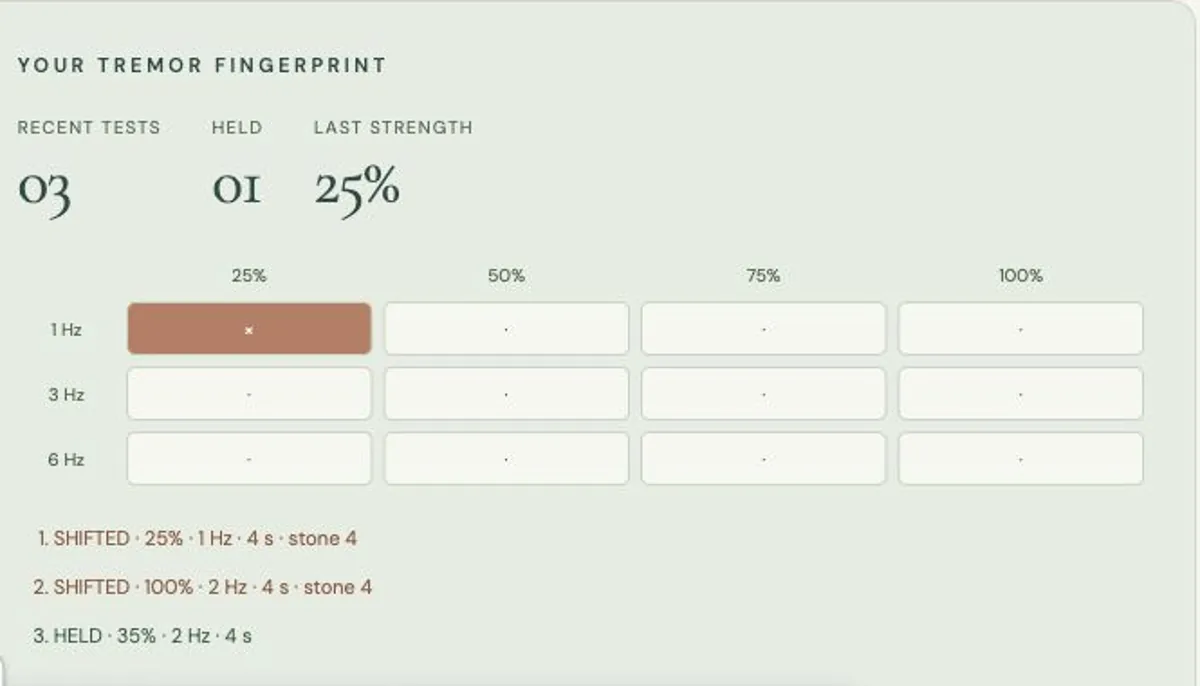
The grid samples twelve fixed combinations: four strength columns and three frequency rows. The recent list can contain settings outside those samples. After the 35%/2 Hz and 100%/2 Hz trials, every grid cell still said Untested, while two list rows existed. Selecting 25%/1 Hz filled that matching cell and added a third list row. Nothing about that requires the earlier records to have disappeared.
The caption also limits the map to the most recently tested tower. Do not interpret it as a universal material chart or a combined verdict for every arrangement you have built. The map button’s accessible name includes duration after testing, which helps keep a recorded cell tied to its conditions. We used four seconds throughout; we did not verify how all possible durations are aggregated in a reused cell.
For an experiment log, copy the whole condition rather than writing “the 25% square.” Include the tower description, whether you restored, frequency, duration and result. The same column can be part of several different questions. This is particularly important when switching languages or returning another day, because the visual map alone carries less context than a written method.
Restore the tower before comparing conditions
Restore tower is useful when a tremor has scattered the arrangement. Our stronger test used that route after the baseline. A count of four is not itself a restored geometry: four stones lying separately on the ground are a different starting system from four stones in contact. Ghost outlines can help a visual explanation, but they do not replace using the intended restore control.
Undo produced Last move undone in the addition sequence while the count stayed eight. We therefore do not describe it as a guaranteed delete-last-stone shortcut. If the intention is removing a specific object or reconstructing a complete editing history, verify the actual outcome before continuing. A familiar label from another drawing app can have a different scope in this live physics canvas.
The four stone buttons encourage changing shape and placement. That is a valid creative activity, but it becomes a new comparison if count, orientation or contact changes. Keep those edits separate from changing tremor settings. Repeating the same stimulus on a changed tower asks whether the arrangement matters; repeating different stimuli on a restored tower asks a different question.
Local saves, downloads and sharing limits
We saved the four-stone garden in the separate test browser, made additional Flat additions until the eight-stone limit, then used Load garden. The count returned to four. The recent history also persisted after reload, and the English/Korean pages in that same profile showed the same three records before the Korean test added a fourth. These are local-browser observations, not evidence of account synchronization.
The FAQ says local garden saves and the last twelve tests use browser storage and can be lost when browser data is cleared. Private browsing may make storage unavailable. We verified a small save and three-record persistence, not the twelve-record boundary or recovery after site-data deletion. A personal archive should not depend on assuming every browser profile or private window shares the same storage.
Download record is described as providing a JSON copy, and Import record offers a file-based route. Share garden and Save artwork are also present. In our connected test environment we did not obtain a received JSON/artwork file or a usable shared URL to reopen. We did not import a record. These functions are available controls with unverified transfer success here; the article uses screenshots and claims no validated file schema, artwork resolution or complete portable backup.
Korean and mobile operation
The Korean page labels the main actions 진동 실험하기, 시험 전 복원, 정원 저장, 정원 불러오기 and 세부 진동 설정. At a fresh 390×844 layout, selecting the 25%/3 Hz map cell ran the trial and recorded 이동 with stone 4. The recent counter became four and the held counter remained one. The document measured 390 px wide without horizontal overflow in that state.
This was a responsive Chrome and keyboard/button test, not a physical-phone touch precision evaluation. The page instructs users to select or drag stones and use rotation buttons; keyboard instructions mention arrow keys, Q/E and Up to lift. We did not independently audit every keyboard or sound interaction. Sound remained off, so no headphone or audio requirement is inferred from the design.
Daily tide is described as a shared daily stone set and tremor using the UTC date. In Korea a UTC day changes at 09:00 KST. That timezone conversion helps explain a daily change without assuming the local midnight. We did not complete Daily tide or claim a daily score. Choose a mode before investing time in a comparison, and read the current conditions rather than importing rules from another stone game.
Model, nature and privacy limits
The official Matter.js project page identifies a 2D web physics engine with rigid bodies, gravity, friction and stacking features. That supports understanding the kind of engine the source names. It is not a certification that this particular game’s shapes, forces or numerical thresholds reproduce real stone behavior. The game itself rejects earthquake and construction uses.
The virtual shore avoids moving rocks in natural habitats. The source warns that outdoor stacking can disturb small habitats and confuse trail markers. Treat the digital exercise as sufficient for testing a composition; there is no need to recreate its outcome in a stream or on a trail. We conducted no physical stability, ecological-impact or medical relaxation study.
The source says it does not send layouts or local records to a server. Our direct verification was local save/load and same-profile history persistence, not a network audit. Blogger and Google advertising may still process cookies and usage data under their policies. “Local game record” should not be rewritten as “the whole page has no external communication.” No account or upload was required for the tested core workflow.
Related tools and a useful next step
For a different stone-placement experience, read our Perfect Pebble Stack guide. That tool emphasizes outlined placement, fine rotation and game modes, including a seven-second stability condition. Pebble Balance Zen instead exposes tremor strength, frequency and duration and records their outcomes. The domains and game rules are distinct; do not carry the other game’s timer or stone options into this one.
A useful route is to practice deliberate placement in Perfect Pebble Stack, then return here to compare one restored tower under two stimuli. There is no verified automatic transfer between them. Bring the habit of recording initial conditions, not an assumption that a saved portrait or URL from one service is a compatible garden file for the other.
Frequently asked questions
What does Held mean?
The trial did not trigger the game’s stated movement/rotation criterion. It does not mean zero motion or a real structural safety rating.
Why was the map empty after my test?
The grid has only 25/50/75/100% columns and 1/3/6 Hz rows. Our 35%/2 Hz record appeared in the list without filling a map cell. Read both displays.
Does clicking a result cell just filter the list?
No. The caption says it restores and tests the most recent tower. Our 25%/1 Hz and Korean 25%/3 Hz selections ran new four-second trials.
Can I add more than eight stones?
Our repeated Flat additions stopped at 08/08, matching the stated maximum. That is a game limit, not a recommended physical tower size.
Are downloaded backups and shared gardens verified?
Not in this review. We verified local save/load and retained history, but did not receive and inspect an export, import a file or reopen a shared garden.
Is this the same tool as pebble.kioptrix.com?
No. Pebble Balance Zen is at pebblba.kioptrix.com. Perfect Pebble Stack at the other domain has separate controls and rules; its guide is linked for a related placement exercise.
Keep one question small enough to explain
Keep the starting tower small, record all three tremor inputs and restore before changing one condition. Read the threshold and the recent row together, then check whether that condition is represented in the map. Save locally and verify any transfer separately. The most useful balance is an experiment you can explain without confusing a quiet game with an engineering verdict.
A RELEVANT NEXT STEP
Tools with a useful connection

Perfect Pebble Stack
Perfect Pebble Stack: 7 Smart Balance Checks
Build a digital stone sculpture with preview placement, 1° rotation and three modes. Our hands-on guide explains settling, Undo, local portrait storage and the limits of this artistic physics game.
쓰리쿠션 길 안내소
3 Cushion Simulator: 7 Smart Practice Checks
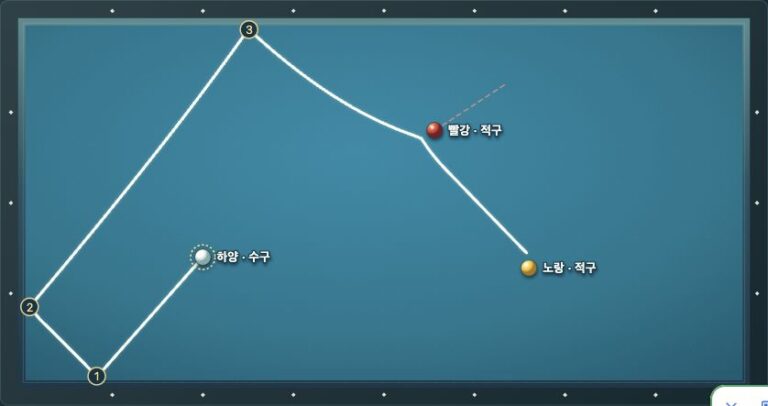
Compare experimental three-cushion routes, save a position and calculate points per inning with 쓰리쿠션 길 안내소. Korean interface; actual table accuracy is unverified.
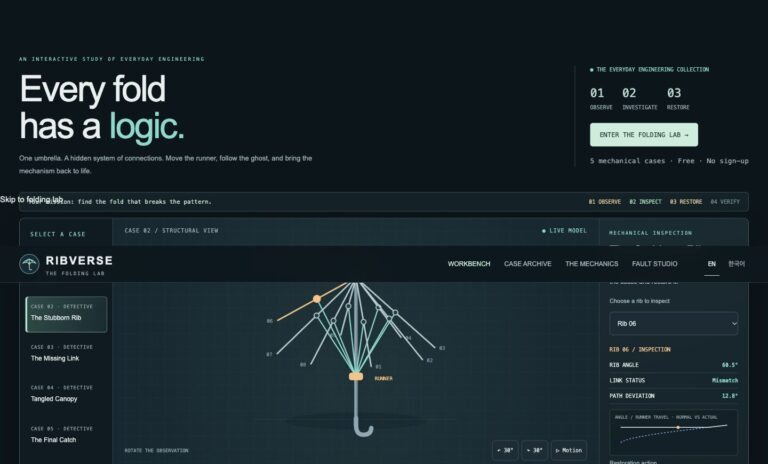
RIBVERSE — The Folding Lab
Umbrella Mechanism: 7 Essential RIBVERSE Lab Checks
Investigate a virtual umbrella linkage with RIBVERSE. Our five-case tests explain ghost paths, matching actions,0° latch faults, completion history and reproducible puzzle links.