Plan a shim from a measured table gap, compare coplanarity with levelness and review exact stacks, wedges and local café records. Actual WobbleLab browser tests keep calculations separate from physical verification.
- Brand
- WobbleLab
- Tool languages
- English, 한국어
- Verified date
- 2026-11-18
WobbleLab is a wobbly table fix calculator that turns a manually entered foot gap into a starting shim plan. It also compares four-leg geometry, builds exact thickness combinations, estimates wedge insertion and keeps local café notes. Its most useful distinction is between four feet sharing a support plane, a level tabletop and a physically verified repair. Those are separate outcomes.
Verified 18 November 2026, KST. We tested numerical inputs, unit conversion, unsupported table types, precision geometry, shim combinations, a wedge model, toy rotation, copied plans and downloaded/imported JSON records. Korean controls were tested at 390×844. Every example was hypothetical: no table was physically measured, shimmed or corner-tested. Screenshots show actual interface states, not successful furniture repairs. Print/PDF output and real-phone gestures were not tested.
On this page
Key takeaways
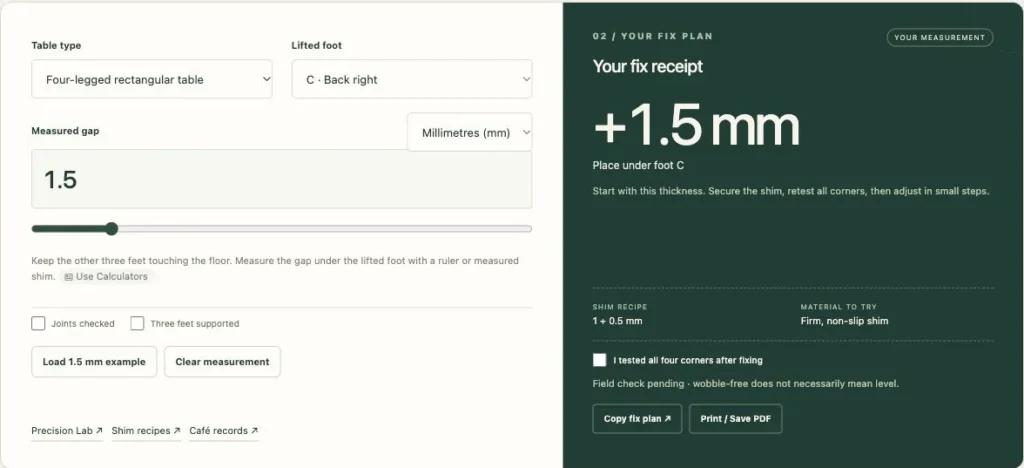
Entering 1.5 mm for foot C produced a +1.5 mm starting thickness and a 1+0.5 mm recipe. Copy fix plan retained “Corner test pending” and stated that top levelness was unmeasured. We left the final physical-verification checkbox unchecked. A tidy receipt or an animated After position cannot establish that a real table is stable.
In Precision Lab, equal 720 mm legs over floor heights 2/2/0/0 mm produced Δ=0, yet the level-top additions were A+0, B+0, C+2 and D+2 mm. The feet were coplanar in the model without the top being level. Café JSON imports also require care: renaming our demo before importing its old backup added another record and kept existing entries. Import was not a destructive replacement of the list.
What WobbleLab does for a wobbly table
The official name is WobbleLab. It presents itself as an independent educational tool for rigid rectangular four-leg tables, with English at the root and a Korean page. The primary workflow asks which foot is lifted, the measurement unit and the actual gap. Selecting a leg in the illustration chooses an input; the page does not sense which foot is off the floor.
A receipt shows the entered thickness, selected foot, a possible standard stack and a reminder to verify the result. Separate sections offer four-leg balance arithmetic, a custom thickness inventory, linear-wedge insertion, an illustrative floor-rotation experiment and a café checklist. Copying a plan is text output; the café exporter downloads JSON records. These outputs serve different purposes.
The Before/After slider is an illustration. Moving it to After in our test displayed a reminder that the real table still needs a corner test. The drawing should not be described as a sensor reading, measured deformation, force simulation or automatic repair. A measured gap and a chosen foot remain user inputs throughout the workflow.
Prepare a real measurement
The source starts by asking users to empty the table and check loose joints. For the gap workflow, three feet must remain supported while the clearance below the fourth is measured. Record which physical corner corresponds to A, B, C and D; the English selector labels them front left, front right, back right and back left. A and C are opposite corners in Precision Lab.
Check the table structure before choosing a formula. The supported model is a rigid rectangle with four contact points. Pedestal tables, three-legged furniture, flexible frames, loose joints and broad contact surfaces can involve different mechanics. The page itself excludes other structures from the quick plan and does not assess structural strength or load capacity. A calculated shim is not a diagnosis of damaged furniture.
Use one reference for floor elevations in Precision Lab and keep the millimetre units consistent. The quick calculator also accepts inches, but precision leg lengths, custom stack targets and wedge dimensions are labeled in mm. A phone’s angle reading is not a measurement of the clearance below one foot. The inspected interface has no automatic sensor measurement workflow.
7 essential checks before using a shim plan
1. Confirm the model matches the furniture
Choose Four-legged rectangular table only when that describes the intended geometry. Selecting Pedestal / three legs / other disabled the receipt’s copy and print controls and showed an exclusion message. That is useful behavior: an unsupported structure should not be forced through the rectangular four-foot calculation.
2. Identify the actual lifted foot
Use the source’s gentle corner-check procedure to determine the physical contact condition before entering a real job. We selected C for a numerical demonstration, not a measured table. Precision Lab can offer two one-foot coplanarity options from diagonal sums; it cannot determine which foot is actually lifted from leg lengths alone.
3. Enter the measured clearance in the chosen unit
Our 1.5 mm input produced +1.5 mm under C. Changing to inches displayed 0.059055 in for the same amount; entering 0.1 in produced +2.54 mm. Verify the unit rather than treating 0.1 as the same physical distance in both modes. The source accepts a quick gap in the 0–20 mm range.
4. Keep checkboxes as inspection statements
Joints checked and Three feet supported are user statements, not measurements taken by the site. A receipt appeared in our input test even before those boxes were checked. We briefly tested their UI operation, then left them unchecked because no physical furniture was inspected. Do not interpret their presence as an enforced audit or automatic assessment.
5. Compare a proposed stack with your real stock
The default recipe for 1.5 mm was 1+0.5 mm. In the custom lab, target 1.6 with 0.3 and 0.7 mm sizes produced 0.7+0.3+0.3+0.3 mm. That answer assumes unlimited pieces of each size. Count actual pieces and read material limitations before deciding whether the model’s minimum piece count is practically useful.
6. Verify stability and levelness separately
The source asks for another corner test after fitting and a separate level check when levelness matters. We did neither physical operation and did not mark the final verification checkbox. The quick receipt is a starting plan. A change in the illustration or a zero diagonal mismatch does not complete either field check for a real table.
7. Save a pending plan without overstating completion
Copy fix plan preserves the chosen foot and thickness with the pending-test status. In café notes, Attach this fix replaced our typed note with that compact plan, and Save changes was still needed. Keep important free-text context separately or add it back deliberately. Review the note before saving so a hypothetical demonstration cannot become a claimed finished repair.
Actual browser test results
| Input or action | Observed output |
|---|---|
| Quick gap 1.5 mm, foot C | +1.5 mm under C; standard recipe 1+0.5 mm; copied plan said corner test pending and top levelness unmeasured. |
| Units switched, then 0.1 in entered | 1.5 mm displayed as 0.059055 in; 0.1 in produced 2.54 mm and no exact standard stack. |
| Other table structure selected | Awaiting-input receipt; model exclusion message; copy and print disabled. |
| Precision default lengths A/B/C/D = 720/719/720/718 mm, floor all zero | Δ=3 mm; add 3 under either B or D for coplanarity; separate level additions 0/1/0/2 mm. |
| Lengths all 720 mm, floors 2/2/0/0 mm | Δ=0 and coplanar; level-top additions 0/0/2/2 mm. |
| Custom target 1.6, available 0.3 and 0.7 mm | 0.7+0.3+0.3+0.3 = 1.6 mm; four pieces. |
| Custom target 1.5, available 0.4 and 0.6 mm | No exact combination at 0.1 mm resolution; suggested adjustable wedge. |
| Wedge length 40, maximum thickness 4 mm | Target 1.5 → insertion about 15 mm; target 1.6 → about 16 mm. |
| Synthetic rotation slider 0° → 45° | Absolute diagonal mismatch 1.6 → 0 mm in the toy model, with levelness still separate. |
| Korean 390 px, 1.5 mm ArrowUp and foot A | 1.6 mm under A; document width 390 px; no exact default stack. |
Every measurement above was an authored numerical test, not a real observation of a table or room. The results establish how the controls and formulas responded. They do not establish material compression, contact quality, strength, stability under load or a correct repair thickness for any actual piece of furniture. Keep this boundary with a screenshot when using one to explain the tool.
A stable table can still be tilted
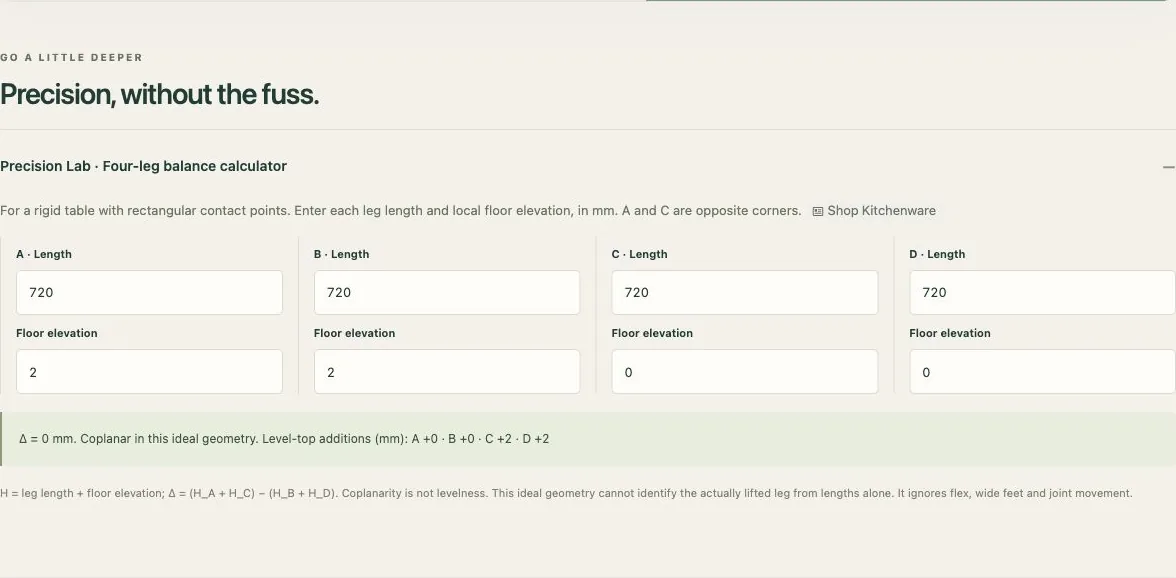
The source defines effective height H as leg length plus local floor elevation, then Δ=(H_A+H_C)−(H_B+H_D). For the default numbers, 720+720−719−718=3 mm. Adding 3 mm to B or D balances the diagonal sums. Equalizing each effective height to the highest instead gives 0/1/0/2 mm additions, a different objective.
Our second test makes the distinction clearer. All legs were 720 mm, with floor elevations 2,2,0,0. Effective heights were 722,722,720,720, so both diagonal sums were 1442 and Δ was zero. Bringing each value to 722 still requires 2 mm at C and D. These are arithmetic consequences of the model, not instructions to put those shims under an unmeasured table.
Use Precision Lab to understand measurements and competing objectives, not to overrule actual contact observations. Wide feet, a flexible frame or moving joints violate its simplified contact geometry. The source explicitly says that lengths alone cannot identify the lifted leg. A pair of possible mathematical corrections is not two independently verified physical fixes.
Find a stack without inventing stock
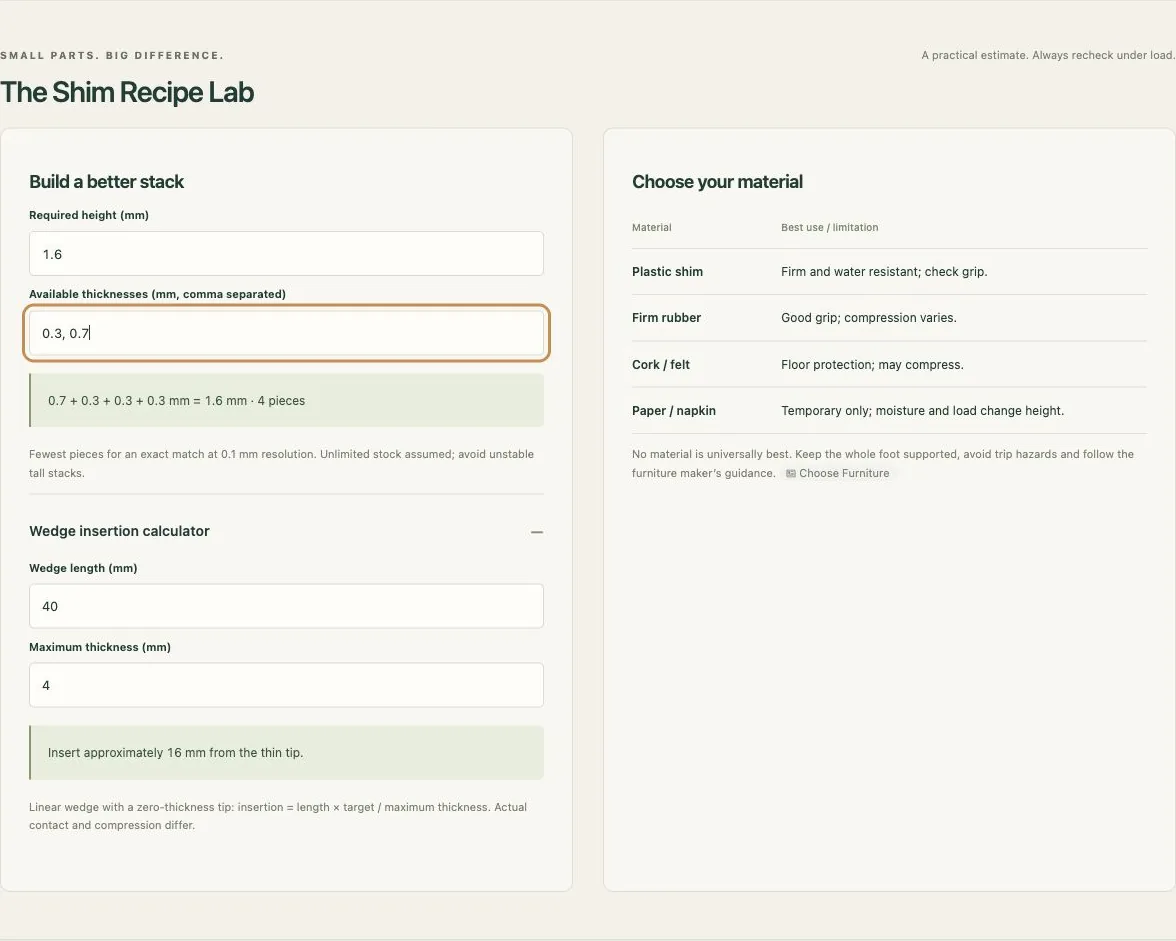
The custom stack lab seeks an exact match with the fewest pieces at 0.1 mm resolution. Enter available thickness sizes separated by commas. The four-piece 1.6 mm example is useful because simply choosing the largest piece repeatedly would not finish the job: two 0.7 mm pieces leave 0.2 mm, which the listed sizes cannot supply. The returned combination uses one 0.7 and three 0.3 mm pieces.
With 0.4 and 0.6 mm pieces, every sum is a multiple of 0.2 mm, so 1.5 mm cannot be reached exactly. That explains the observed no-combination message. It does not prove that an approximate stack would be suitable, nor does it establish a physical tolerance for a table. The page’s numerical resolution and a real measurement’s uncertainty are separate limits.
The custom target can be edited independently. After changing it, compare it with the quick plan’s gap instead of assuming every number on the page still describes the same test. Unlimited stock also means that listing a size does not limit how many pieces the solver may use. A mathematically short recipe can exceed the quantity in your drawer or form an unsuitable physical stack.
Read wedge insertion as a linear model
The wedge calculation assumes a straight taper from a zero-thickness tip. Insertion = wedge length × target height ÷ maximum thickness. For 40 mm length and 4 mm maximum thickness, a 1.5 mm target gives 15 mm; 1.6 gives 16 mm. The interface labels these approximate distances from the thin tip.
That model does not inspect tip thickness, taper irregularity, the size of the furniture foot or compression under actual load. Insertion distance is not automatically the same as the length of secure support. Follow the source’s instruction to support the whole foot and consult the furniture maker’s guidance. Do not use the arithmetic as a load rating or a promise that a particular commercial wedge fits.
The rotation experiment is not your floor
At 45°, the synthetic experiment showed zero mismatch; its formula is Δ=1.6 cos(2θ) mm on an invented saddle-shaped surface. This explains a geometric idea. It does not scan the café floor, infer tile heights or calculate which way to rotate a real table. We changed the slider, not a physical table.
The linked André Martin paper, On the stability of four legged tables, has an abstract describing equilibrium by rotation for a perfect square table under continuous-ground and slope conditions. We checked that abstract, not every proof detail. It is a limited mathematical result, not a guarantee for arbitrary rectangular furniture, cracked tiles or unequal legs. Keep the theorem’s assumptions separate from the synthetic 45° example.
Café records, attached plans and JSON imports
The café map begins with six labeled entries. We added an explicitly named Demo review record, set Needs attention and typed a hypothetical-test note. Attach this fix replaced the text with the copied pending plan. Save changes persisted it and added a date. Because the field check was not completed, the example should not be interpreted as a repaired table or an inspection certificate.
Export JSON downloaded an array containing name, state, note and date fields. We inspected seven records: six default unchecked entries and the demo. After reloading, records remained while the quick gap field was blank. A saved café note and the currently editable calculator are therefore separate records. Do not assume a restored note automatically reloads the original measurement into every calculator input.
We then renamed the demo to Demo changed, saved it and imported the earlier file. The page reported one new record imported and existing records kept. Both names were present, making eight records. This is an actual merge observation. Do not describe Import as a clean replacement, and do not infer its complete deduplication rule from this one test. Review counts and labels after importing a backup.
The exported fields do not include a full copy of Precision Lab or the custom stack configuration. Preserve those settings separately when they matter to the explanation. Also, do not equate the Condition dropdown’s Fixed label with the site measuring a successful repair. Labels, dates and verification statements depend on what the operator actually observed and entered.
Mobile controls and keyboard input
The Korean page was tested at 390×844. We entered 1.5 mm, pressed ArrowUp to reach 1.6 and selected front-left foot A. The receipt updated to +1.6 mm under A, and the document width stayed at 390 px. The quick plan reported that the default standard sizes could not make that exact height. This browser viewport test did not include real-phone touch gestures or a screen-reader audit.
Named numeric fields provide a direct way to change values when a slider is awkward. The custom stock lab remains a separate section with its own target field. Recheck units when moving between quick inches input and labs labeled in millimetres. A before/after slider or selected leg button changes a display setting; it does not supply a new physical measurement.
Limits, materials and privacy
The material guide distinguishes firm plastic, rubber, cork/felt and temporary paper or napkins, while noting grip, compression, moisture and load. It does not declare one material universally best. We did not test any material. The source tells users to stop using damaged furniture and seek appropriate repair; this tool cannot assess structural strength or safe loading.
WobbleLab states that calculations run in the browser and café records stay on the device. It also discloses Google/Blogger and advertising cookies. Our local persistence and JSON tests support the observed workflow, not a complete privacy or security guarantee. We did not audit network requests, retention, offline behavior or cross-device synchronization. Shared exports can expose the notes an operator typed, so inspect them before distributing them.
Related tools for a clear handoff
The published FrameMint Studio screenshot editor can add context to an existing WobbleLab capture. Label the tested inputs and make “hypothetical” or “field check pending” visible in a handoff. It does not measure the table or validate a shim. We verified the published guide’s purpose; no automatic WobbleLab-to-FrameMint integration was tested.
For a useful maintenance handoff, keep the table identity, foot orientation, measured gap, proposed materials and actual field-check status together. Use the text plan for concise instructions, a reviewed screenshot for input context and JSON for café records. Those outputs are complementary. None should silently turn a pending mathematical plan into a completed physical inspection.
Frequently asked questions
Can WobbleLab find the short leg automatically?
No. The selected foot is an input. Precision Lab can show diagonal-sum options under its ideal assumptions, but it explicitly cannot identify the actually lifted foot from lengths alone. Observe the real contact condition separately.
Does Δ=0 mean the tabletop is level?
No. Our equal-leg test on floor elevations 2/2/0/0 was coplanar with Δ=0 and still needed separate level-top additions in the model. Use a separate level when levelness matters.
Are the checkboxes proof that inspection happened?
No. They record user statements. We did not physically inspect a table and left final verification unchecked. A generated receipt or a saved date is not independent evidence of a repair.
Does the shim recipe know how many pieces I own?
The custom lab assumes unlimited quantities of the listed sizes. It minimizes pieces for an exact numerical match at 0.1 mm resolution, not stock purchase cost, grip or physical stack stability.
Will importing JSON replace my café list?
In our test it kept existing records and added one renamed-backup entry. Review counts and names after import. The complete duplicate-handling rules were not established by that single round trip.
Is the print/PDF function verified?
The control became enabled for a supported entered gap, but we did not inspect a completed printed page or PDF file. Text copying and café JSON download/import were directly verified; keep those test scopes distinct.
Start with the measured foot
Start with the supported structure and an actual gap under the identified foot. Read the receipt as a starting thickness, compare real available materials, and keep the physical corner test separate from a level check. Save a pending plan honestly. WobbleLab is most helpful when it exposes the difference between an input, an ideal calculation and a result someone has actually verified.
A RELEVANT NEXT STEP
Tools with a useful connection

FrameMint Studio
Screenshot Editor: 7 Smart FrameMint Studio Checks
Frame screenshots, add manual masks and build captioned stories in FrameMint Studio. Real import, order, recovery and size tests explain what to check before sharing.
Last Meter
Last Meter: 7 Essential Leftover Filament Checks
Plan the last grams of a spool with Last Meter. See tested weight/length conversions, reserve and purge arithmetic, tiny-print combinations and the limits of illustrative model weights.

SQUEAKSCAPE
Squeaky Door Tracker: 7 Smart SQUEAKSCAPE Checks
Track door noise windows, hinge observations and dated maintenance notes with SQUEAKSCAPE. Tested save behavior, status differences, local persistence and mobile controls.