Leftover filament creates two different questions: how much material remains, and whether a particular sliced job can finish with it. Last Meter, branded by The Last Gram Studio, helps with the planning arithmetic. Enter net filament mass, a weighed spool and its empty weight, or a measured length; then reserve a margin and explore small-print ideas.
The useful feature is the separation between material on the reel and the amount available for a job. The important limit is equally clear: the tiny-print library uses illustrative PLA-equivalent masses, not verified consumption for its linked files. A combination that fills the screen perfectly still needs a real slicer estimate. We tested the calculator, combination planner, copied plan, local journal export and Korean mobile interface on November 6, 2026. We did not make a physical print.
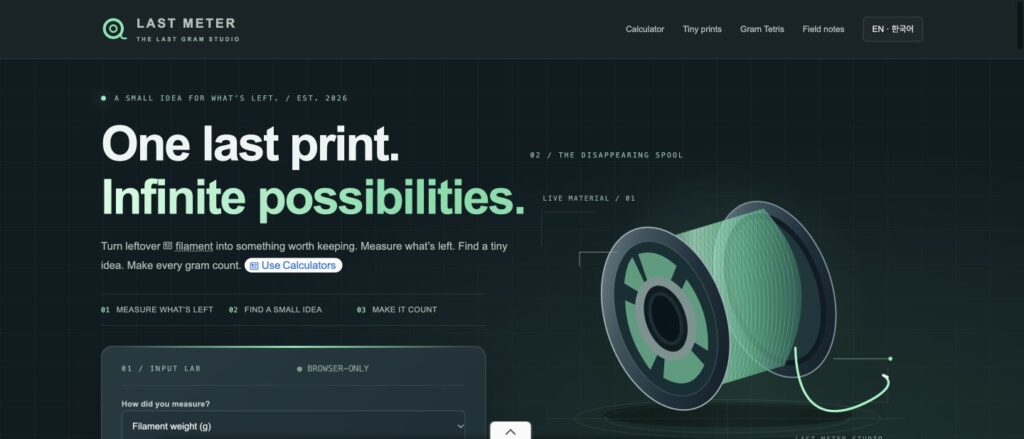
Plan the last grams of a spool with Last Meter. See tested weight/length conversions, reserve and purge arithmetic, tiny-print combinations and the limits of illustrative model weights.
- Brand
- Last Meter
- Tool languages
- en, ko
- Verified date
- 2026-11-06
Key takeaways
- At 12g PLA, 1.75mm diameter, density 1.24g/cm³, 20% reserve and no extra purge, the tool displayed 4.02m and a 9.6g print budget.
- A 220g measured spool minus a 200g empty spool leaves 20g. With 25% reserve and 1g extra purge, our tested budget was 14g; a 14.1g job was flagged 0.1g over.
- Maximum use selected a 2.3g plant clip, 4.5g mini name tag and 2.8g corner bookmark: 9.6g in the illustrative library. These are not measured weights of the linked models.
- Use the slicer’s complete consumption estimate, avoid counting purge twice, and keep actual material suitability and printer behavior outside the calculator’s verdict.
On this page
What this leftover filament calculator does
Last Meter combines a filament calculator, a budget-filtered gallery, a small combination planner called Gram Tetris, a slicer-consumption comparison and a local journal. The input panel offers PLA, PETG, ABS and TPU presets, two diameters and editable density. A colored spool illustration reacts to inputs, but the page explicitly describes it as conceptual rather than a geometric measurement of the reel.
The gallery is an idea shortlist. Depending on budget, it shows objects such as filament clips, cable clips, bag clips, plant labels, plant clips, name tags, bookmarks and a mini tray. Some links lead to a named model’s files and license; others lead to a Printables search. A search link does not identify a single file with a validated material requirement.
This is most useful between discovering a nearly empty spool and opening a selected model in your slicer. It gives you a plausible budget and a small set of ideas worth investigating. It does not read your STL, 3MF or G-code, slice a model, monitor a printer or certify a part. No account or installation was required for our tested path.
Before you measure: three things to prepare
- A trustworthy input: either net filament mass, a measured gross spool plus a matching empty spool weight, or a length you have actually measured. A visually similar reel is not automatically the same tare.
- Material information: the real diameter and an appropriate density from your filament’s information. The editable presets are approximations; a filled or foaming product should not inherit a generic PLA density without checking.
- A separate slicer estimate for the exact file, orientation and profile you intend to print, including supports, adhesion structures and relevant waste. Record any additional purge allowance separately.
Do not use the illustration as a scale. The picture can look fuller or emptier after an input changes, but it has not inspected the spool. Likewise, a favorite tiny object from another maker may consume a different amount when scaled or printed with another wall count. Preparing the measurement and the sliced file separately prevents that attractive picture from becoming the evidence for your decision.
Seven checks for a better last-spool plan
1. Choose the correct measurement mode. Use Filament weight for material without the reel. Use Spool + filament weight when the scale includes both, and enter the actual empty-spool weight. Use Remaining length only when the number is metres. The same numeric entry changes meaning when the mode changes; read the label again instead of assuming a preset button always means grams.
2. Check the subtraction before the conversion. Our gross-weight example used 220g measured and 200g empty, leaving 20g of material. Switching into gross mode while the measured value was only 12g and the empty reel was 200g produced a check-values message and blank calculation outputs. That is a reason to inspect the inputs, not evidence that a spool contains a negative usable quantity.
3. Match diameter and density to the filament. At 12g PLA and density 1.24, changing diameter from 1.75mm to 2.85mm changed the estimated length from 4.02m to 1.52m. The usable mass stayed 9.6g because this was a mass input with the same reserve. A thicker strand uses more mass per metre; it does not create more grams on the reel.
4. Set a deliberate reserve and purge allowance. The displayed method is usable budget = remaining filament mass × (1 − reserve / 100) − extra purge. For the 20g remainder, 25% reserve removes 5g and an extra 1g removes another gram, leaving 14g. The status line showed 6g reserved in this case, so read it as the combined withheld amount rather than treating all 6g as the percentage reserve.
5. Compare the complete sliced job. Enter the slicer’s total consumption in Enough for this print? Our 14g input showed a zero margin within the planning budget. Changing only that field to 14.1g changed the verdict to 0.1g over budget. The comparison checks the entered mass against the budget; it has not checked extrusion calibration, adhesion, moisture or the suitability of the part.
6. Explore combinations, then verify their files. With the default 9.6g budget, Maximum use selected plant clip + mini name tag + corner bookmark. The displayed masses summed to 9.6g, leaving 0.0g unallocated inside that already-reduced budget. The tool specifies one of each idea and 0.1g steps. It is not a production planner that can choose an unlimited quantity of one clip.
7. Keep an honest record of what happened. Copy my print plan copied the total, object names, unallocated amount and source URL in our test. We also saved a journal entry explicitly labeled “Editorial test — synthetic, not printed” with mass 3.2g, then inspected its JSON export. This verified record handling without pretending that an object had been made. For your own real print, record the measured use after completion rather than copying the gallery estimate.
Our measured-input test results
These were browser calculations using entered numbers, not measurements made with a physical scale or printer. We changed one relevant input at a time where indicated. Unless otherwise stated, the material was PLA, density 1.24g/cm³, reserve 20% and extra purge 0g.
| Test input | Displayed result | What it establishes |
|---|---|---|
| 12g net mass, 1.75mm | 4.02m; 9.6g budget | Default mass-to-length conversion and reserve arithmetic |
| Same 12g, diameter 2.85mm | 1.52m; 9.6g budget | Diameter changes estimated length, not the entered mass |
| 220g gross, 200g tare, reserve 25%, purge 1g | 20.0g remaining; 6.71m; 14.0g budget | Tare subtraction followed by reserve and extra allowance |
| Required 14g, then 14.1g against that budget | Within with 0.0g margin, then over by 0.1g | The planning boundary reacts to a 0.1g change |
| 10m length, 1.75mm, reserve 20% | 29.8g remaining; 23.9g budget | Length input is converted into mass before the budget |
| Korean mobile: 25g, reserve 20%, extra 1g | 8.38m; 19.0g budget | Direct input worked at a 390px emulated viewport |
The 10m example is also a useful rounding lesson. The formula uses the diameter and density to compute a mass, while the interface displays rounded grams and metres. Rebuilding a result from an already rounded intermediate number can differ slightly from working with the formula’s unrounded number. Do not read the extra display digit as a claim about the precision of your scale or the consistency of an actual strand.
Reading Gram Tetris without overclaiming
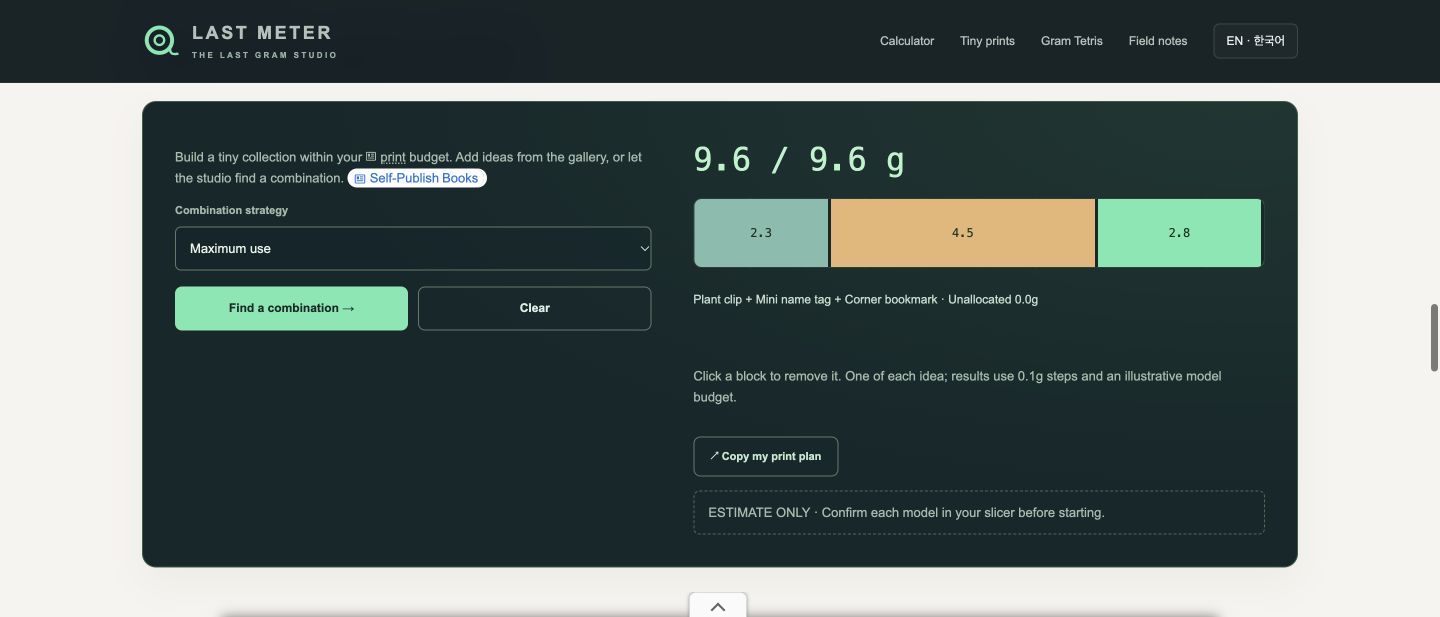
The selected 2.3g, 4.5g and 2.8g blocks fit the 9.6g usable budget exactly. That leaves no unallocated space in the illustrative combination, but it does not remove the original 2.4g reserve from the physical 12g remainder. Confusing those two balances can lead to the mistaken belief that the planner has allocated every physical gram.
The other strategy labels are Most useful · desk + care and Lightest combination · up to 3 ideas. We read those options but did not independently validate every strategy, every budget or the optimization routine. The directly confirmed maximum-use example establishes that particular result. It does not establish that every future collection or mathematically equivalent input has been exhaustively checked.
Manual addition and block removal controls are visible, together with Clear. Use them to express your actual preference: a maximum-mass collection is not automatically more useful than one small object you need. The library is a finite collection, and a no-matching-ideas message can simply mean that none of its registered estimates fits your current budget and category.
From an idea to a real slicer decision
Treat each gallery card as the start of a new check. Open the original model or search result, inspect the maker’s file and license, and select the actual geometry. Then slice that exact file in the intended material and profile. A resized name tag, a thicker clip or a supported orientation is a different consumption question from the gallery’s illustrative number.
Return to Last Meter with the total from that sliced job. If it exceeds the usable budget, choose a smaller file, change a justified project parameter or use a better-supplied spool. Do not reduce the reserve merely to make the indicator green. The calculator can show the consequence of a changed assumption, but it cannot tell you that the assumption became more reliable.
Keep purge accounting consistent. The source asks for slicer total consumption including extras, yet also provides a separate extra-purge field. Use that separate field for an additional allowance you have not already included in the entered total. If the same purge is present in both places, the comparison becomes more conservative because it has been counted twice. Write down the boundary of each number so another person can reproduce your plan.
For a project using several leftover colors, keep each filament spool identifiable and evaluate the relevant quantities separately. Last Meter’s colored illustration is not a multi-spool inventory system or a printer event schedule. If your sliced file requests changes or pauses, inspect those requests with the slicer and the appropriate documentation rather than inferring them from the diagram.
Advanced tips: keep the uncertainty visible
- Use a matching empty spool measurement when possible. The source warns that reel weights vary by manufacturer and batch; a convenient universal tare can create a false remainder before any other calculation starts.
- Distinguish a planning input from a measured fact in shared notes. “Assumed reserve 20%” and “measured remainder 12g” are different kinds of statement, and neither should be silently overwritten by a library estimate.
- Keep the complete slicer total with the file revision and profile. A number from an earlier orientation or scale no longer describes the file you are about to print.
- A full combination is optional. Choose one useful item if its verified sliced requirement is the sensible match; maximizing illustrative mass is a preference, not a quality standard.
- Use the journal to compare estimates with actual use, but keep its meaning narrow. A typed mass is not a measurement taken automatically by the website, and a saved name is not evidence that the printer completed the job.
A compact handoff note can contain six fields: spool identity, measurement method, net material, density/diameter assumptions, reserve and additional allowance, and the exact sliced job’s total. Add the resulting margin and unresolved questions. This is a suggested review record, not a hidden export feature we discovered. It makes the calculator’s assumptions visible without turning a simple planning tool into an unsupported inventory or certification claim.
Journal, privacy and mobile behavior
Our exported JSON contained the synthetic record’s name, mass 3.2 and an ISO-style date string. The interface says that journal names and masses stay in browser storage and that records are not uploaded by this tool. It also tells users to export before clearing browser data and offers individual Delete controls. We did not test deletion, cross-device transfer, import, storage clearing or automatic synchronization.
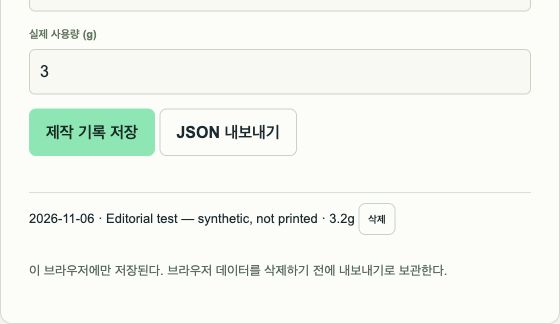
The disclosure separates local tool processing from Google/Blogger services and advertising. We observed advertising, including an interstitial and banners, during the review. We did not perform a network or storage security audit. “Browser-only” should therefore describe the calculator’s stated processing model, not a promise that the entire visit makes no third-party requests. Use non-sensitive labels in a public planning tool.
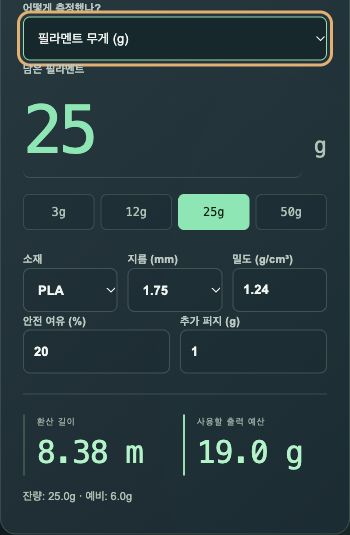
At 390px, we directly entered 25g and an extra 1g allowance in Korean. The page displayed 8.38m and 19.0g, and its document width stayed 390px. This was browser emulation, not a physical-phone test. Long model searches and slicer review remain easier on a larger screen; the mobile calculation does not establish a model’s real consumption.
Limitations and useful alternatives
Last Meter does not establish that your measured value is correct, that the selected density describes a particular product, or that the printer can execute a job. The default percentage is an adjustable planning assumption, not a universal recommended margin. The green comparison is a mass-budget result only. Filament condition, machine settings, geometry and required part performance still need their own checks.
The gallery illustrations are conceptual, and the listed masses are explicitly illustrative. Original links can lead to a search rather than a specific model. We did not print the linked objects, verify their licenses for a particular use, benchmark maximum journal size or validate every optimization strategy. Confirm the file and license at the original destination before using it.
For a single job with a known net mass, a separate arithmetic note and the slicer total can be enough. Last Meter adds convenient conversions, reserve accounting and ideas in one place. For repeated multi-spool inventory or automated consumption tracking, use a workflow designed to retain spool identities and measured changes; no such automatic integration was verified here.
Related tools for the next printing question
If the next question is where a text G-code file requests a change or pause, read our CHROMA TRACE G-code color-change viewer guide. It covers event and layer inspection, not a guarantee of material sufficiency. Last Meter does not send its budget to that viewer, so the connection is a deliberate review workflow rather than a tested integration.
If a print has failed despite a plausible material budget, the Benchy troubleshooting guide helps distinguish visible symptoms from rule-based hypotheses and plan one-variable follow-up tests. It does not turn a budget result into a diagnosis. These are published KIOPTRIX introductions from the same creator’s project; neither link is a third-party endorsement.
Frequently asked questions
What can I do with 5g of leftover filament?
Use the gallery as a shortlist, then slice the actual selected file. Its displayed estimates are not verified model weights, so we cannot promise that any linked file will consume the number on its card.
Does a zero margin mean a guaranteed finish?
No. Our 14g boundary test was within the chosen planning budget with a displayed zero margin. That says nothing about measurement error, real extrusion or the suitability of the reserve assumption.
Does changing diameter change the grams remaining?
In our net-mass test it changed estimated metres, while the 9.6g usable budget stayed the same. In length mode the diameter participates in calculating mass, so recheck the mode as well as the number.
Can Last Meter inspect a spool from its picture?
No measurement from an uploaded image was part of the observed workflow. The on-page spool is explicitly a conceptual illustration responding to the numeric inputs.
Is my journal a cloud backup?
The source says it is stored in the browser and advises exporting a copy before clearing browser data. We verified one synthetic JSON export, not cloud backup or synchronization.
Verification record and final check
Verified November 6, 2026. Direct checks covered net-mass and diameter changes, gross/tare subtraction, reserve/purge arithmetic, an invalid gross/tare state, a 14g versus 14.1g boundary, 10m length input, one maximum-use combination, copied-plan text, a synthetic journal save and exported JSON contents, English/Korean navigation and Korean 390px direct input. No physical printing or independent privacy audit was performed.
The original Last Meter page supplies the advertised method and restrictions; the exact results above come from our own entered examples. Before a real job, reconcile your measurement, the chosen allowances and the complete slicer estimate. Open Last Meter and plan your leftover filament →.
A RELEVANT NEXT STEP
Tools with a useful connection
CHROMA TRACE
CHROMA TRACE: G-code Color Change Viewer in 7 Clear Steps
Inspect filament-change requests, pause candidates and tool switches in text G-code, with layer previews and a CSV checklist.
Benchy Failure Detective
Benchy Troubleshooting: 7 Essential Checks for Failed Prints
Use Benchy Failure Detective to turn visible FDM print symptoms into rule-based hypotheses and one-variable test plans. See our actual interface tests, language differences and local-save limits.
Balloon Arch Geometry
Balloon Arch Calculator: 7 Essential Blueprint Checks
Plan a balloon arch from real color inventory. Compare spacing, complete clusters, spare allowance and clearance, with verified editing and shared-design tests.