SQUEAKSCAPE is a free squeaky door tracker for remembering where a door makes noise, what you observed and when to look again. Its miniature home, angle model and silence diary organize your own notes; they do not listen to a microphone or certify a repair.
Verified 9 November 2026. We tested the browser interface with an explicitly labeled test door. No physical door was inspected or repaired. Screenshots below show actual tool screens and synthetic inputs, not evidence of quieter hardware.
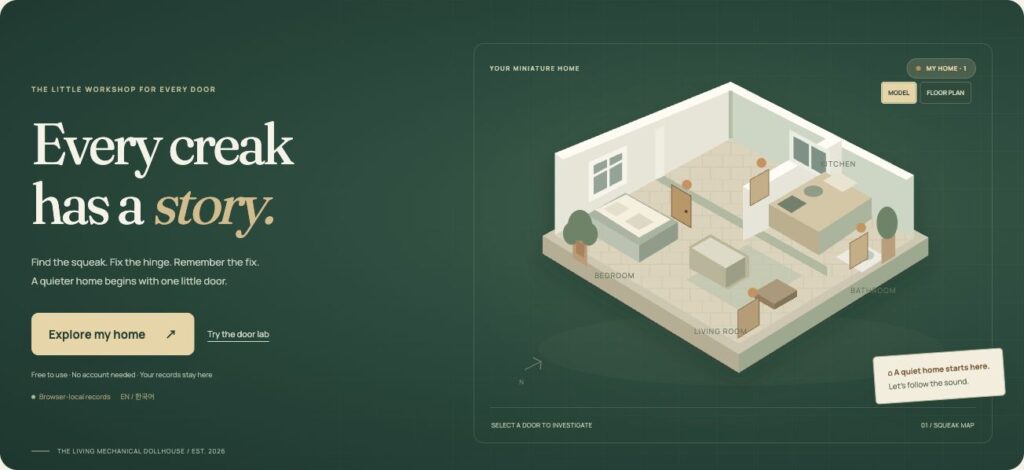
Track door noise windows, hinge observations and dated maintenance notes with SQUEAKSCAPE. Tested save behavior, status differences, local persistence and mobile controls.
- Brand
- SQUEAKSCAPE
- Tool languages
- en, ko
- Verified date
- 2026-11-09
Table of Contents
Key takeaways
- Start your own home before relying on saved records: the initial example workspace says its changes are temporary.
- A 30°–90° range, middle-hinge selection and repeated-click label survived saving, reloading and switching to Korean in our test.
- The diary separates your before/after scores from your selected outcome. A lower score does not automatically mean the door is marked quiet.
- “Checked” counts doors with history. We saw a completed-check headline while the test door still said “To inspect.”
- Local records need a backup plan. The page offers JSON, CSV and calendar controls, but we did not validate their downloaded files or restoration.
What this squeaky door tracker actually does
The official name is SQUEAKSCAPE. The English page describes a squeaky-door finder and hinge maintenance tracker; its Korean page presents a home noise map and hinge diary. Both provide the same core observation workflow. You name a door, assign a room, choose hardware and hinge position, describe the sound, and save an estimated opening interval. Later, you add dated notes and a personal review date.
The problem it solves is lost context. A vague note such as “bedroom door noisy again” does not tell the next person whether the sound came from a hinge, latch or rubbing edge, whether it happened during opening, or what the last visit established. A structured record makes those missing questions visible. It is especially useful when several similar doors are being tracked or a recurring noise needs a clear history.
The moving door is an illustration controlled by the user. Its 0°–120° display is not a camera measurement of your actual opening angle. The four sound choices are labels you select. We saw no audio-recording input in this workflow and did not test any acoustic analysis. Treat the word “finder” as a way to organize a search around the home, not a promise that software locates a sound source.
Prepare a useful observation
Before entering anything, decide which door the record means. Use a stable, non-sensitive name such as “Study door A,” then choose its room. Avoid addresses, access codes, occupants’ schedules or security details. An export may later contain whatever you type. If you manage a rental, use a neutral asset label and follow the property’s normal reporting process.
For a real observation, write down whether the sound occurs while opening, closing or both, and whether its apparent location is near the hinge, latch, floor or frame. Keep clear of moving gaps. Use an estimated interval consistently rather than pretending a visual guess is precise. Do not force a stiff or unsupported door merely to fill in the model.
Identify the hardware before planning any intervention. A cabinet’s concealed hinge and a heavy door with a closer are different cases. The application itself directs heavy, fire-rated, dropping or damaged hardware toward qualified assessment. This article teaches the record-keeping interface; it does not prescribe dismantling, adjustment torque or a universal lubricant.
Features that make a record easier to revisit
- Home and door cards: room labels, status filters, search, recent history and next-review information keep multiple records distinguishable. Model and floor-plan controls offer two views of the illustrated home.
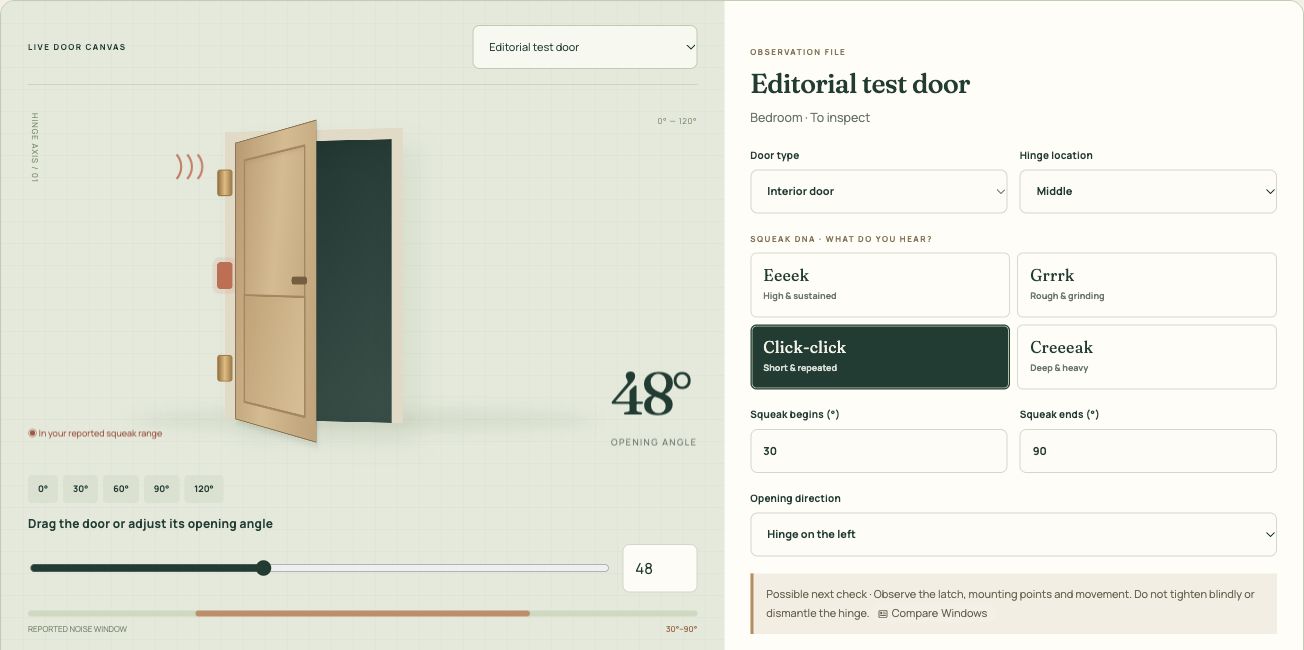
- Door lab: presets at 0°, 30°, 60°, 90° and 120°, a slider, numeric input, start/end markers, hinge location and opening direction describe a reported noise window. A sweep control animates the model.
- Observation vocabulary: high sustained, rough grinding, repeated click and deep heavy sound labels prompt more specific notes. They remain user classifications, not measured frequencies.
- Case Desk: four selections—hardware, location, visible clue and timing—update a suggested observation route. The chosen branch is a checklist, not a diagnosis.
- Illustrated reference: butt-hinge and concealed-hinge views explain parts. Eight searchable case files cover sound, alignment, cabinets, recurrence, environment, safety and records.
- Silence diary: dated before/after scores, outcome, free-text notes, review dates, a chart and an all-home ledger retain a history. JSON, CSV, printing and .ics controls address different ways to keep or review that history.
How to use SQUEAKSCAPE in 7 steps
1. Leave the temporary example workspace
Open the tool and read the workspace banner. We initially saw four example doors and two example diary entries. Select Start my own home to begin your own records. In our test this produced an empty home with zero doors and an “active” label. Do not mistake example repairs for your own observations.
2. Add one identifiable door
Enter a door name, choose a room and select Add door. We used “Editorial test door” in Bedroom. Its new card started as “To inspect.” Select the correct card or use the Door Lab’s door selector before making changes, particularly if several doors share a room.
3. Describe the reported sound window
Choose the door type and hinge location. Set the model to an estimated beginning angle and use Mark start here; set the end angle and use Mark end here. Alternatively, enter the two numeric limits. We used the 30° and 90° presets, selected the middle hinge and the repeated-click description, then selected Save observation. The door card displayed the new interval and label.
4. Read the Case Desk as a separate checklist
Choose the hardware, apparent source, visible clue and timing that you actually observed. Read the resulting route instead of guessing from sound pitch. Selecting “Heavy / fire door / closer” changed our route to professional review. After we saved a diary entry, the desk returned to the ordinary route associated with the test door’s saved interior-door type. Recheck these selections when the page refreshes; a temporary branch choice is not the same as changing the saved door type.
5. Save a dated diary note and outcome
Use the workbench to record what you actually checked or changed. Set before/after scores from 0 to 5, choose the work date and select the outcome explicitly. Then select Save to silence diary. Our synthetic 3→2 entry retained “More checks needed,” displayed as “To inspect.” No physical improvement is implied by this input test. A note can honestly record “not inspected yet; awaiting assessment” instead of inventing completed work.
6. Choose a personal review date
Set a next-review date directly or use +7, +14 or +30 days. On 9 November, +7 days produced 16 November 2026 in our test. These buttons create your chosen follow-up schedule, not a manufacturer-approved service interval. The calendar export control became enabled once a date was present. We did not validate a downloaded .ics event or import it into a calendar.
7. Reopen and check what was retained
Reload, select the door again and read the card plus diary. We confirmed the name, middle hinge, click label, 30°–90° range, note, 3→2 values and review date. Switching to Korean retained that same record. Search the all-home ledger for a distinctive word when the list grows. Before clearing browser data, use the offered backup route and confirm that your own exported file is available and restorable; our test did not establish export-file integrity.
Our actual browser test results
Testing used desktop Chrome and a freshly reloaded 390px browser viewport. All values in this table were deliberately entered to test the interface. They are not readings taken from a real door, a sound meter or a completed repair.
| Test | Observed result | Meaning |
|---|---|---|
| Own-home activation | 4 demo doors → 0 personal doors | Example history was separate from our new workspace. |
| Save observation | 30°–90°, Middle, repeated click | The card and reopened controls retained the settings. |
| Diary input | 3→2; More checks needed | The record stayed To inspect despite the lower after-score. |
| Review date | +7 days → 2026-11-16 | A personal date was displayed and persisted. |
| Case Desk safety branch | Heavy/fire/closer → professional review | The checklist changed; no hardware diagnosis was made. |
| Reload and Korean | Same door, note, range and date | Persistence and language continuity worked in this browser. |
| Ledger search | Unmatched query → no matching notes | Clearing the query restored the test record. |
| Mobile width | 390px viewport / 390px document | No page-wide horizontal overflow observed; 120° preset worked by keyboard activation. |
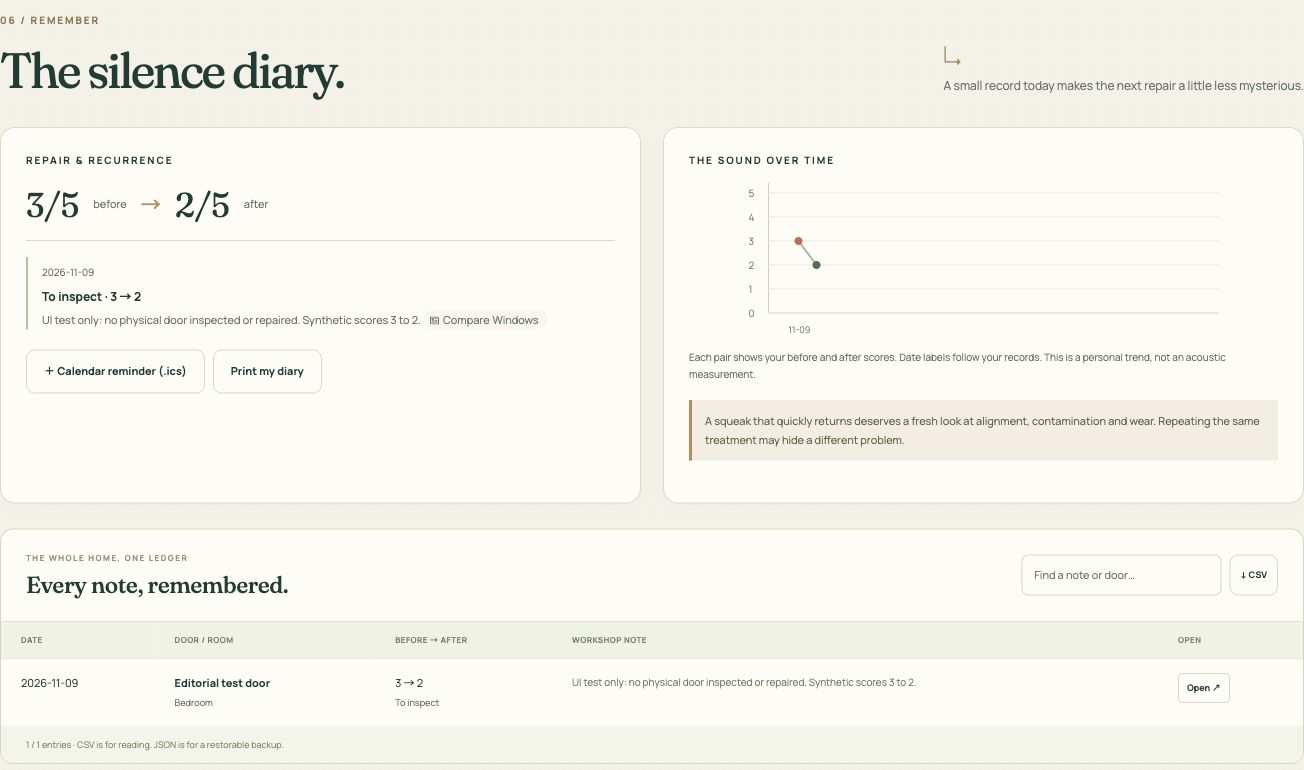
One important result is the difference between history and resolution. With one diary entry, the dashboard showed 1/1 checked and congratulated us, although the card remained “To inspect.” Read that headline as coverage of records, not evidence that every door is quiet, safe or professionally approved. The card’s status and the note provide the more specific context.
Turn observations into a useful handover
A useful real-world handover could read: “Study door A; clicking reported during closing; apparent location near latch; no work performed; hardware identification pending.” That is a suggested note format, not an observation from our test. It lets a building manager or repairer distinguish a reported symptom from an action already taken.
Use three short sentences in each note: what was observed, what was done, and what remains uncertain. Keep those categories separate even though the application provides one free-text box. If a professional later changes a part, record the identified part and actual work date rather than rewriting the earlier uncertainty as if it had been known all along.
For recurrence, compare like with like. A subjective score recorded during opening should not silently replace an earlier closing-only observation. State the direction and context again. If nothing was done between two entries, say so. A trend line can show your entered values over time, but it cannot establish why the sound changed or prove that a particular product caused improvement.
Advanced tips and common mistakes
- Choose the outcome deliberately. The score and status are separate inputs. Inspect the resulting card after saving rather than assuming a 0 or a lower number changes the status automatically.
- Keep observation and diary saves distinct. Save the sound window in the lab and the dated work note in the diary. Verify both surfaces when reopening a door.
- Read “checked” cautiously. A door with an unresolved note can count toward the completion headline. Do not use that number as a safety inspection certificate.
- Keep hardware context consistent. A temporary Case Desk choice can differ from the saved door type. Re-select the intended branch after saving or reloading before relying on its text.
- Use a stable scoring convention. Define what 1, 3 and 5 mean to you and mention conditions. Do not translate an ordinal 3→2 change into a decibel or percentage reduction.
- Separate backups from reading copies. The site labels JSON as restorable backup and CSV as reading output. Do not assume the ledger CSV can be imported back as a complete workspace.
- Verify the exact manual. Blum’s hinge instruction index asks users to match a product code to the corresponding sheet. That supports identifying a specific model, not applying one instruction to every hinge.
Limitations, privacy and mobile use
No automatic diagnosis or acoustic measurement. The model follows your controls and the chart follows your entered scores. Our interface test cannot establish that its suggestions fix a squeak. We did not test a real door, touch dragging on a physical phone, browser-to-browser migration, JSON restoration, downloaded CSV/ICS contents or final printing.
Browser-local is not a blanket privacy guarantee. The publisher says the tool stores door records locally and does not send those records to a server. Reloading and language switching supported persistence in our browser, but we did not audit storage implementation or network traffic. The privacy notice separately mentions Blogger and Google AdSense cookies and usage information. Ads, shopping annotations and an interstitial appeared during our session; close their own dismiss controls to return to the tool.
Mobile use worked within the tested scope. A fresh Korean page at 390px matched its document width, retained the saved record and accepted the 120° preset through keyboard activation. This does not verify every physical handset, touch gesture, accessibility technology or ad configuration. Numeric controls are a useful alternative when manipulating the illustrated door is inconvenient.
Safety decisions stay outside the tracker. Do not force a door or put fingers in a hinge gap. Heavy, fire-rated, self-closing, dropping, cracked or poorly supported hardware needs the appropriate building manager or qualified repairer. A quiet outcome in a diary does not establish safe support, correct closing or compliance.
When a spreadsheet or another tool fits better
A paper note is sufficient for one short observation, and a spreadsheet is easier when several people need a shared asset register or custom columns. SQUEAKSCAPE adds a visual interval, room cards, a guided checklist and a diary chart without requiring an account. The trade-off is that we verified only one browser’s local continuity, not team synchronization or a multi-device service.
A calendar app is better for an already agreed appointment. SQUEAKSCAPE offers a date and .ics control beside the observation history, but it should not be treated as a confirmed calendar notification until you verify the exported event in your calendar. A real acoustic measurement also needs an appropriate measurement method; these 0–5 ratings do not replace one.
If you need to annotate a screenshot of the diary for a maintenance handover, the already published FrameMint Studio screenshot-editor guide explains a separate image workflow. Use it after capturing your own non-sensitive screen. It does not connect to SQUEAKSCAPE, inspect hinges or validate a repair. Keep the original note and date so a decorated image is not mistaken for primary evidence.
Frequently asked questions
Does SQUEAKSCAPE record the squeak?
The tested workflow used manual sound labels, model angles and typed notes. We did not see a microphone-recording control there. Do not describe it as sound recognition or automatic hinge-fault detection.
Why does a lower score still say “To inspect”?
The outcome is a separate selection. Our synthetic 3→2 entry kept “More checks needed” and the card stayed “To inspect.” Check the selected outcome and saved card instead of inferring status from the chart.
Can I use the English and Korean pages with one record?
Yes within the browser we tested: the dedicated Korean page showed the same saved door, interval, diary note and review date. That result does not establish synchronization across devices or browser profiles.
Which export should I keep?
The interface identifies JSON as a restorable backup, CSV as a reading copy, and .ics as a calendar event. We confirmed the controls and date-dependent calendar availability, not the contents or successful restoration of downloaded files. Verify your own files before relying on them.
Which lubricant should I use?
This review does not select one. Identify the exact hardware and follow its manufacturer’s instructions and the product label. The tracker can record that decision and what was actually done, but it cannot establish compatibility from a sound label.
Does “every door checked” mean the home is safe?
No. In our test it appeared when one unresolved diary entry existed. It is a record-coverage indicator, not a professional inspection, repair sign-off or safety determination.
Start one honest door record
Start with one clearly named door, save an honest observation and reopen it to confirm the details. SQUEAKSCAPE is most useful when the next note has enough context to make the next conversation or check easier. Keep uncertainty visible and treat the saved history as a record of your inputs.
Review record: source interface, English/Korean continuity and stated privacy notice checked 9 November 2026; actual screenshots captured the same day. Product-code reference: Blum’s official hinge instruction index. Export files, physical repairs and acoustic accuracy were not verified.
A RELEVANT NEXT STEP
Tools with a useful connection

FrameMint Studio
Screenshot Editor: 7 Smart FrameMint Studio Checks
Frame screenshots, add manual masks and build captioned stories in FrameMint Studio. Real import, order, recovery and size tests explain what to check before sharing.
STRAPSHIFT
Backpack Fit Tool: 7 Essential Checks for Better Notes
Compare manual strap measurements, photo reference pixels and three-zone packing in STRAPSHIFT. Actual browser tests explain the model and local recipes while keeping real comfort untested.
FRAYTRACE
Cable Inspection Journal: 7 Essential Checks for Better Records
Keep region-labelled cable notes, dated photographs and retirement history in FRAYTRACE. Actual fictional-record tests explain local persistence, same-region comparison and the limits of safety and backup claims.