Plan a balloon arch from real color inventory. Compare spacing, complete clusters, spare allowance and clearance, with verified editing and shared-design tests.
- Brand
- Balloon Arch Geometry
- Tool languages
- English, 한국어
- Verified date
- 2026-11-15
Balloon arch calculator Balloon Arch Geometry turns frame dimensions and three color inventories into a visual arch, complete four-balloon clusters and a numbered materials map. It helps answer a practical question before a celebration: can the balloons already in the cupboard cover the intended arch, or should the spacing, frame or shopping list change?
Verified 15 November 2026, KST. We tested spacing, inventory shortages, spare allowance, diameter and ceiling changes, individual keyboard edits, undo/redo, palettes and a shared design in a fresh tab. We also operated the Korean source at 390×844. Screenshots are actual interface captures. No physical arch was assembled, and completed PNG, PDF or CSV files were not inspected.
On this page
Key takeaways
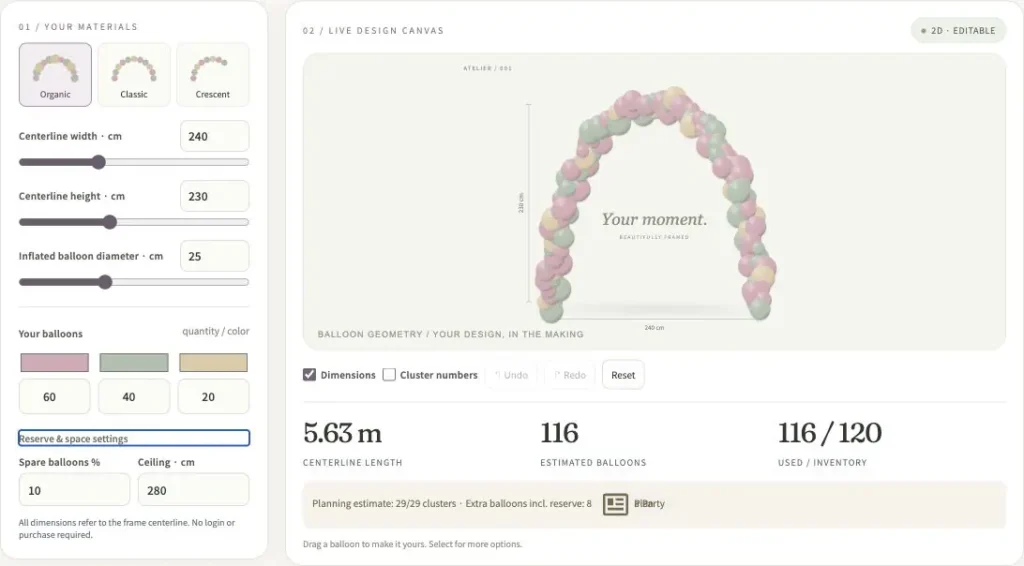
At the default 240 cm centerline width, 230 cm centerline height and 25 cm inflated diameter, Balanced estimated 5.63 m of path, 29 clusters and 116 balloons. The stock was 120, but a 10% spare allowance raised the target to 128, leaving eight to buy. Having enough balloons for the drawing did not mean having the requested reserve.
With only 100 balloons, the estimate still read 116 while the built plan used 100 in 25 complete clusters. Airy reduced the same frame’s estimate to 88, or 97 including spares. Manual movement and resizing changed the illustration while counts stayed based on the base diameter. Keep those three layers separate: desired quantity, inventory-limited assembly and visual styling.
What this balloon arch calculator does
The source identifies itself as Balloon Arch Geometry and Balloon Blueprint Studio, with the interface wordmark balloon geometry. The browser title is Balloon Arch Calculator & DIY Blueprint. English and Korean standalone pages provide the same core planning workflow without an account or a purchase requirement.
Inputs include Organic Cloud, Classic Spiral or Crescent style; frame centerline width and height; inflated balloon diameter; three color choices with stock counts; spare percentage; and ceiling height. Numeric fields and dimension sliders work alongside an editable two-dimensional canvas. Outputs include path length, estimated demand, used versus available inventory, complete clusters, reserve-inclusive quantity, extra purchases, color leftovers and a numbered cluster table.
Compared with a mood board, the materials map makes the color allocation explicit. Compared with multiplying arch length by an assumed balloons-per-metre value, the calculator exposes its base diameter and spacing choice. Neither comparison makes the result a structural design: the drawing does not tell you which frame, weights, ties or anchoring method can safely support a real installation.
Measure the frame and count the stock
Measure between the frame centerlines for width and from the floor to the frame top for height. Do not enter the desired clear walking opening as the frame width. Balloons extend inward and outward from that line. Record ceiling clearance separately, including anything in the installation area that a simple height measurement does not describe.
Count actual stock by color rather than entering the number printed on an unopened kit as if every piece were available. Inflate a sample to the intended diameter and use that working size, not a product’s uninflated measurement. The source accepts width 60–600 cm, height 60–500 cm, diameter 5–60 cm, three stock quantities from 0–3000 and spare allowance 0–50%. These are interface ranges, not tested guarantees for every possible combination.
Decide what a shortage would mean for your occasion. A small photo backdrop may tolerate wider spacing; a promised dense entrance display may require more stock or a smaller frame. Write down the chosen style and spacing with the dimensions. A count of 88 is only useful if the team knows it describes Airy at the stated diameter, rather than the original Balanced appearance.
Balloon arch calculator: 7 essential checks
1. Enter the frame centerline dimensions
Begin with width, height and inflated diameter. Our reference used 240 / 230 / 25 cm. The result was about 5.63 m of centerline path. If your frame is a rectangular doorway, a circular hoop or an irregular garland path, this half-ellipse estimate may not describe it. Measure the real path separately before treating the count as a shopping commitment.
2. Enter all three color inventories
The default stock is 60, 40 and 20 balloons. Color use is distributed in proportion to available stock and constrained to complete four-balloon clusters. The default plan used 58, 39 and 19, leaving 2, 1 and 1. Leftovers are real inventory values in the model; they are not automatically extra completed clusters.
3. Expand Reserve & space settings
Check Spare balloons % and Ceiling. The default reserve is 10% and ceiling is 280 cm. With 116 required balloons, the reserve-inclusive target was 128. Changing reserve to 0% returned 116 and zero extra purchases against the same 120 stock. The planned arch count did not increase when the reserve was added.
4. Compare the spacing cards before buying
Airy, Balanced and Lush showed 88, 116 and 136 balloons at the reference dimensions. We applied Airy and confirmed 22 complete clusters, 97 with spares and zero to buy from 120. The cards describe alternative spacing; pressing a card changes the current plan. Keep the selected option attached to any quantity you quote.
5. Check the inventory-limited blueprint
The main demand can exceed the number actually drawn and tabulated. At 100 stock, Balanced still estimated 116 but returned 25 of 29 clusters and 100 used. Its reserve-inclusive target remained 128, with 28 to buy. Read the shortage message before handing the numbered rows to someone as a full assembly plan.
6. Review dimensions and edit the appearance
Check outer height and opening estimates, then select a balloon for keyboard movement or size controls. We moved Balloon 1 with ArrowRight, increased its visual size by 10% and reversed both actions with Undo. Redo reapplied them. Count metrics stayed unchanged; an enlarged drawing was not a new materials calculation.
7. Open the shared result before sending it
Share design copied an editable URL. Our fresh-tab test preserved the Crescent style, 60/30/13 stock, Coastal palette, geometry and the moved, resized balloon. Check the reopened result, then share the full URL together with the selected spacing and measurement convention. A screenshot is useful context but cannot substitute for the editable state.
Understand the centerline estimate
The source approximates half an ellipse using L ≈ π/2 × [3(a+b) − √((3a+b)(a+3b))], with a equal to half the width and b equal to height. Its guide describes Balanced spacing as 80% of inflated diameter. At 25 cm, that is 20 cm between planned cluster positions. A 5.63 m path therefore needs approximately 29 cluster positions after rounding up, with four balloons each.
These calculations explain the reference demand rather than proving real packing efficiency. Organic varies illustrated balloon sizes around the base diameter; actual clusters compress, rotate and overlap. A different tying technique can change coverage. A short real sample section is a better check on your particular materials than assuming the attractive 2D cloud is a photograph of an achievable build.
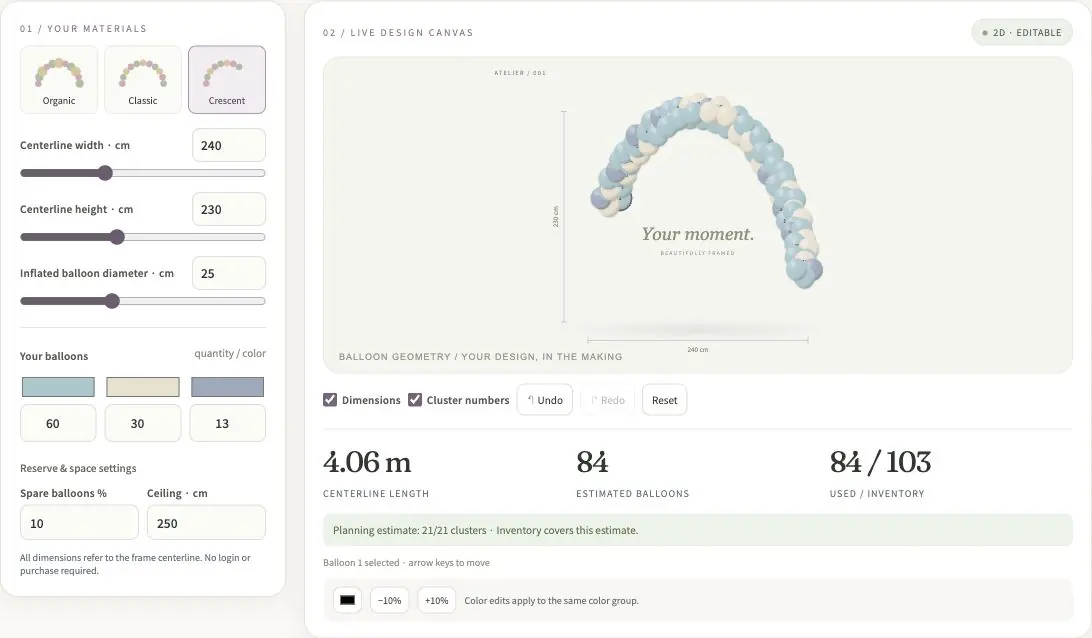
Crescent covers a 72% portion of the half-ellipse path according to the source. In our test with the same 240 / 230 / 25 cm dimensions, it returned 4.06 m, 21 clusters and 84 balloons. This describes a partial asymmetric design. It does not promise a fully covered arch for fewer balloons. The displayed opening dimensions also need interpretation when the shape is only partly covered.
Actual quantity and spacing tests
| Test condition | Observed result |
|---|---|
| Default Balanced, 120 stock, reserve 10% | 5.63 m; demand 116; 29 clusters; 128 with spares; buy 8. |
| Apply Airy, otherwise same | Demand/use 88; 22 clusters; 97 with spares; buy 0. |
| Balanced stock 60 / 30 / 10 | Demand 116; use 100; 25/29 clusters; buy 28 with spares. |
| Balanced stock 60 / 30 / 13 | Use 100 of 103; 25/29 clusters; loose leftovers 3; buy 25. |
| Default geometry and stock, reserve 0% | 29 clusters; target 116; buy 0. |
| Default geometry and stock, diameter 30 cm | Demand/use 96; 24 clusters; 106 with spares; outer height 260 cm. |
| Crescent, 60 / 30 / 13, diameter 25 cm | 4.06 m; demand/use 84; 21 clusters; 93 with spares; buy 0. |
| All three inventories set to zero | Demand 116; use 0; 0/29 clusters; reserve-inclusive target and buy quantity 128. |
The diameter comparison is a useful trade-off. Increasing from 25 to 30 cm reduced the reference demand from 116 to 96, but increased outer height from 255 to 260 cm and reduced maximum inner width from 215 to 210 cm. Fewer pieces did not imply the same occupied space, visual density or cost. Balloon price, inflation time and durability were not measured in this review.
Why 100 balloons can leave an incomplete plan
Four is an important unit here. With stock 60 / 30 / 13, total inventory was 103, but only 100 balloons could form 25 complete clusters. The allocation used 58 / 29 / 13, leaving 2 / 1 / 0. Three leftovers cannot form another four-balloon cluster. The four missing cluster positions in the 29-cluster target represent 16 more balloons before considering reserve.
The extra purchase value is a total target comparison: 128 minus the 103 already owned equals 25. That does not mean the current table contains instructions for 128 balloons. It lists the clusters that the present inventory can make. Nor does the total purchase number specify an ideal shopping split by color. After adding actual new stock, enter its color counts and recalculate to produce the new allocation.
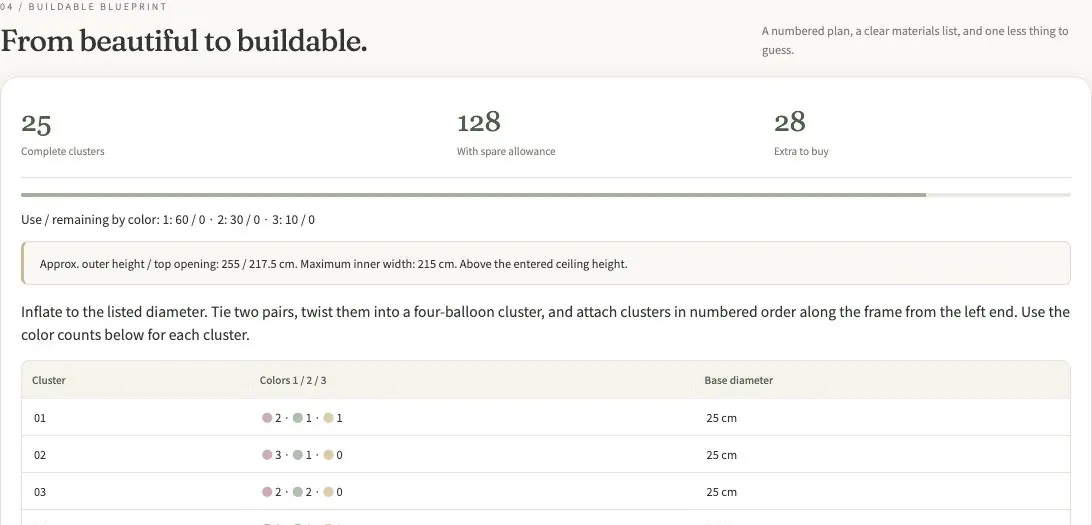
If you cannot buy more, apply Airy and check the new appearance before accepting the smaller count. In the Korean mobile test, 60 / 30 / 10 stock produced 25/29 Balanced clusters; Airy changed it to 22 complete clusters, 88 used and 97 including reserve. The color allocation became 53 / 26 / 9. This is a concrete path from an incomplete dense plan to an inventory-covered sparse plan.
Check outer size and opening separately
For the 240 cm wide, 230 cm high frame with 25 cm base diameter, the blueprint reported about 255 cm outer height, 217.5 cm top opening and 215 cm maximum inner width. With ceiling entered as 280 cm, the source said the estimate fitted. Changing only the ceiling to 250 cm produced an explicit above-ceiling warning, while the inventory counts stayed unchanged.
A 215 cm maximum inner width is not a 215 cm-wide rectangular passage with uniform headroom. Curved sides narrow the usable opening away from its widest point. The source explicitly notes that limitation. Treat the clearance figures as planning prompts and measure the physical installation area. They do not establish access compliance, safe evacuation width or stability in wind.
Edit the illustration without changing the estimate
The canvas exposes individual balloons as labeled controls. Selecting one reveals a color-family control and ±10% size buttons; the interface says color edits affect the same color group. We verified keyboard movement, size changes and undo/redo, and separately applied the Coastal afternoon palette. The palette changed the three color values while retaining the entered stock counts. We did not verify every color-picker interaction or touch-drag gesture.
In the shared Crescent test, inventory remained 103 and calculated use remained 84 after moving and enlarging a balloon. Manual edits are therefore a way to discuss appearance, not a packing optimizer that recalculates quantities after every overlap. Choose the right base diameter before editing. If the real build needs many substantially larger balloons, revise the inputs rather than using enlarged illustrations as the purchasing specification.
Reset returned our dimensions, colors, inventory and reserve to the default setup. A root-page reload also returned default numeric inputs. Keep a tested design link before experimenting with Reset or revisiting the root URL. The source does not present a multi-project account library in the workflow we inspected; we did not verify automatic local recovery of an unsent design.
Share the editable design and check exports
Share design displayed “Design link copied.” The resulting URL was 11,338 characters in our edited example and opened an English standalone calculator page with the saved state. The reopened balloon’s position and size matched the original, as did the dimensions, palette and stock. Copy the complete link; a short-looking preview label in a message does not establish that all state has arrived. Retest after pasting it into your chosen communication channel.
Print / save PDF, PNG and Materials CSV controls are present. The source FAQ describes browser printing, a canvas image and per-cluster CSV quantities. We attempted Materials CSV, but the supported download observation did not return a completed file for inspection. We therefore do not claim that a received CSV, PNG resolution or PDF pagination was verified. Open any actual export before relying on it as the event team’s only working copy.
Use the mobile settings panel
At 390×844, the Korean source collapsed the materials panel behind 디자인 설정 열기 ↓. Pressing it revealed style, dimensions and stock. The page measured 390 px wide, the studio 358 px and the blueprint table 320 px. We changed stock to 60 / 30 / 10, observed the shortage, then applied 에어리 / 절약형 successfully. This was responsive Chrome testing rather than a physical-phone build rehearsal.
Use the numeric inputs when a precise slider change would be awkward. After editing, scroll to the summary and blueprint rather than assuming a visible arch is complete. Ads appeared above and below the source content and could cover part of the view or increase scrolling. Mobile availability should be judged by the expanded controls and calculated output, not by whether the initial canvas is visible.
Model, installation and privacy limits
The model omits wind, heat, balloon deformation and support loads. Follow the actual frame manufacturer’s installation instructions and test a short cluster section with your balloons before a full build. The source also advises keeping exits clear and uninflated or broken balloons away from young children. These reminders do not turn the calculation into a structural approval or a substitute for venue requirements.
The source says this calculator processes measurements and inventory in the browser, and that shared links contain the chosen settings. We verified state reconstruction through a link, not network isolation. Blogger and Google advertising were visible and are described as subject to their own policies. Do not infer no cookies, no external requests, guaranteed offline use or private shared parameters from the browser-calculation claim.
Related tools for a complete event brief
For another part of the same table or photo-backdrop brief, StemCut Studio flower stem calculator plans retained flower lengths and vase assignments. Keep its flower measurements separate from the arch dimensions; the useful connection is preparing the same event’s decoration, not exchanging the two tools’ formulas.
Use FrameMint Studio screenshot editor to annotate the selected spacing, shortages and ceiling warning on a captured plan. Include the numeric inventory and reserve with the picture. A polished canvas alone can hide an incomplete materials map, so a helpful briefing image preserves the evidence needed to build or revise the plan.
Frequently asked questions
Why does it say 116 estimated but only 100 used?
Estimated is the target for the chosen frame and spacing. Used is limited by available complete four-balloon clusters. Our 100-stock Balanced case produced 25 of the required 29 clusters.
Why buy eight when I own 120 and need 116?
The default 10% reserve raised the total target to 128. Four balloons remained after the base plan, but they did not cover the full requested spare allowance.
Can three leftover balloons complete another cluster?
This planner uses four-balloon clusters. In our 103-stock case, 100 were used and three were left, so the plan stayed at 25 clusters. A different real-world filler technique is outside that grouping model.
Does resizing a balloon update the shopping list?
Our manual move and +10% size change did not alter quantity metrics. The source explicitly bases quantities on the input diameter. Revise that input if the actual balloons will be a different size.
Is Crescent a cheaper full arch?
It models a partial 72% path, not full coverage at the same density. Our reference returned 84 balloons over 4.06 m, compared with 116 over the full path.
Will the design survive Reset?
Our Reset returned numeric and stock defaults. Preserve and test the shared URL first. A fresh tab reopened our edited state, while automatic recovery of an unsaved root-page design was not established.
Start from your actual inventory
Enter the real stock, working inflated diameter and frame centerline dimensions. Compare spacing, read the inventory-limited cluster count and include reserve in the target. Check physical clearance and a sample section before assembly. Save a reopened, verified link with the materials notes so the design and its assumptions travel together.
A RELEVANT NEXT STEP
Tools with a useful connection
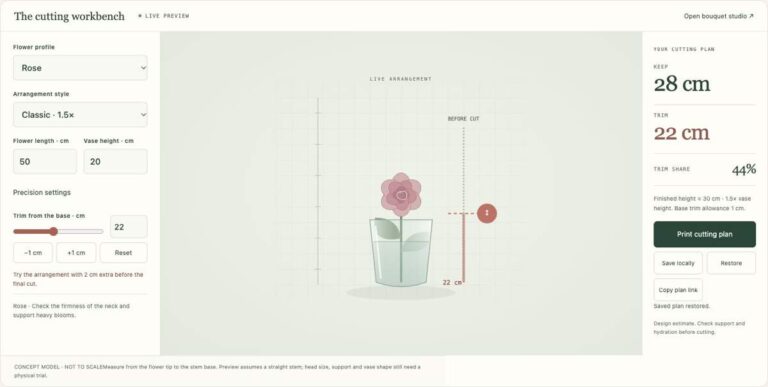
StemCut Studio
Flower Stem Calculator: 7 Essential StemCut Checks
Estimate retained flower length, trim and finished height, compare vases and assign whole stems to arrangement slots. Includes real geometry and batch-priority tests.

FrameMint Studio
Screenshot Editor: 7 Smart FrameMint Studio Checks
Frame screenshots, add manual masks and build captioned stories in FrameMint Studio. Real import, order, recovery and size tests explain what to check before sharing.
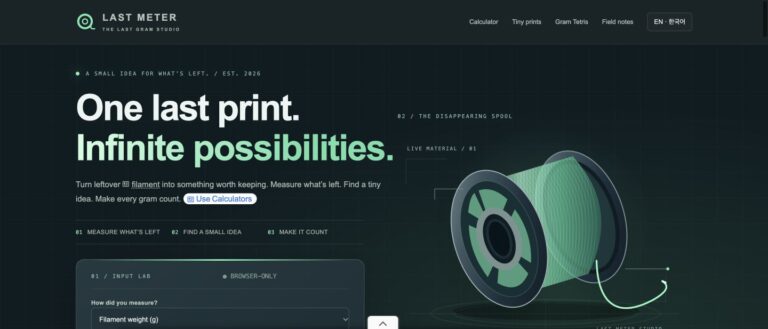
Last Meter
Last Meter: 7 Essential Leftover Filament Checks
Plan the last grams of a spool with Last Meter. See tested weight/length conversions, reserve and purge arithmetic, tiny-print combinations and the limits of illustrative model weights.