MARGINALIA GHOST is a marginalia image maker for pairing a passage with your own reading note. Choose a manuscript-inspired edition, save successive readings and see an earlier interpretation beside the same sentence. It is most useful when you want to preserve how your reading changed, not merely collect a quotation.
Verified 13 November 2026 in Chrome, including Korean editing at 390px. We used original editorial sentences and saved two interpretations during one test session. These are simulated successive readings, not a multi-year study or a demonstrated learning outcome. This library and the original tool share a creator.
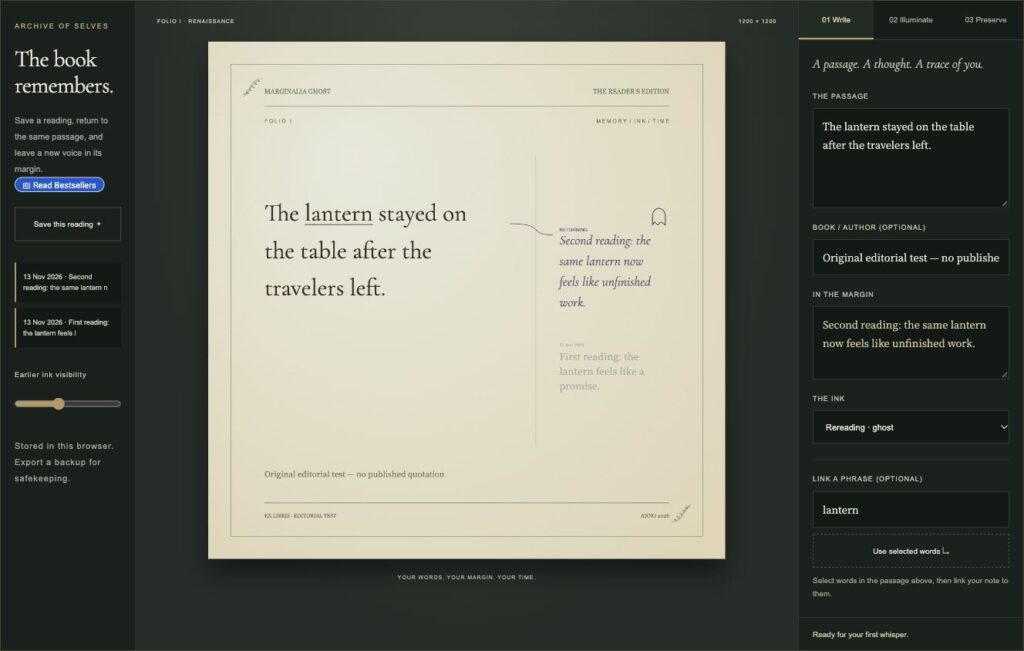
Create a marginalia image with your passage and reading response. Real tests examine matching-passage history, ink visibility, mobile writing and the difference between images and project backups.
- Brand
- MARGINALIA GHOST
- Tool languages
- en,ko
- Verified date
- 2026-11-13
In this guide
Key takeaways
Marginalia here means your passage, source and response arranged as a designed page. You type the text and choose the note’s character. The tool does not read a book, identify its author or use AI to interpret your emotion. A snail or ghost is a creative symbol you select yourself.
The useful distinction is between the current note and saved earlier readings. Two saved responses to the same original sentence appeared together in our canvas. Replacing that sentence with a different passage removed the historical layer, but left the current note in place. Always review the pair after changing the passage.
Save reading preserves a reading entry in the local archive. PNG is intended for a finished image, while JSON is the editable project backup route. Both export controls produced completion messages, but we could not obtain the completed files through the browser tools. We therefore do not claim verified file contents or successful restoration.
The future letter is a visual prompt. We sealed and immediately reopened our question without a timer or password; its editing field remained accessible. Treat it as a reminder to revisit an idea rather than confidential storage.
What this marginalia tool actually creates
The Scriptorium puts an archive, live canvas and editor panels in one workspace. Write contains the passage, optional book or author, margin note, ink category and linked phrase. Illuminate controls the edition, page format, paper patina, type size, alignment, signature, contrast and ornaments. Preserve contains exports and the future letter.
A plain quotation card says which words you kept. A marginalia page can also say what those words meant to you on a particular reading. That extra voice helps distinguish admiration, a question, disagreement or a changed interpretation. The source calls its animal and weather motifs original creative symbols, not a historical classification system.
The archive adds another dimension: the same sentence can retain an earlier response instead of silently replacing it with your latest thought. This can support a personal rereading journal or a small reading-group exercise. The tool supplies the layout and retrieval mechanism; the intellectual work remains your own.
Prepare a passage and an honest reading note
For a first marginalia page, use a short sentence you wrote yourself. Our original fixture was “The lantern stayed on the table after the travelers left.” We attributed it to an editorial test so neither the screenshot nor a later handout would mistake it for a published author’s quotation.
Keep the source separate from your interpretation. If you use a book passage, check the wording against your edition and add enough source information to find it again. For public sharing, use your own writing or material you are permitted to reproduce. An author label is not itself permission to distribute a passage.
Write a response that adds something. “I like this” is valid as a private reaction, but a more useful marginalia note identifies a detail or a question. For our first reading the lantern suggested a promise; for the second, unfinished work. These are invented interpretations of our own sentence, not a correct reading of someone else’s novel.
Keep a separate source copy before experimenting. A styled image is easier to share than it is to edit. Retain the original passage, citation and note in your normal text workflow, then use the studio to create the visual version and archive successive readings.
7 essential checks from passage to preserved reading
1. Enter a short passage and identify its source
Open Write and replace the demo with your sentence. Add a book or author if relevant; for a test, label the text as original. Read the passage in the canvas as well as the field so you notice wrapping or transcription errors before saving a marginalia entry.
2. Add your response and choose its ink
Type a margin note, then choose Memory, Question, Disagreement, Wonder, Sorrow or Rereading. We used Question for our first response and Rereading for the second. The selected icon communicates your chosen category; no sentiment analysis or interpretation was established.
3. Connect the note to a phrase
Enter a phrase that actually appears in the passage in Link a phrase. We entered lantern and observed an underline with a connector toward the note. A Use selected words control is also provided, but our test used the phrase field rather than verifying the selection shortcut.
4. Choose an edition and inspect the whole page
Open Illuminate and compare the available editions. We switched from the initial Medieval presentation to Renaissance and selected a square page. Keep both the quotation and note readable. Changing the visual mood does not improve an uncertain source or turn a personal inference into fact.
5. Save the first reading before revising its meaning
Use Save reading or the archive’s Save this reading control. Our first save created one dated entry. Revise the note for a second interpretation of the same passage and save again. We then saw two marginalia archive entries, with the earlier response available as a separate layer.
6. Review history and contrast deliberately
Adjust Earlier ink visibility and inspect the canvas. With high contrast off, moving the control to 0 concealed the old note; at 100 it returned. High contrast changed the faded appearance in our session, so inspect the actual page rather than treating the slider number as an exact opacity specification.
7. Separate the finished image from the working backup
Use Preserve for Download PNG and Backup JSON. Reopen any files you obtain before relying on them, and test Restore with a disposable copy. Our controls reported completion, but completed artifacts were unavailable to inspect; neither export integrity nor a cross-device restore is claimed in this guide.
Actual tests with two readings of one sentence
We saved two marginalia responses to the lantern sentence in one session. The first described a promise; the second described unfinished work. Keeping the passage unchanged made the history test specific. No real reader’s long-term interpretation or private reading diary was used.
| Action | Observed result | What it establishes |
|---|---|---|
| Save first and second responses | Two dated archive entries; earlier note appeared on the page | Multiple readings can coexist for the tested passage |
| Replace passage with a different station sentence | Earlier note disappeared; current lantern response remained | History matching and current-note editing are separate |
| Restore the second archive entry | Original passage and second response returned for editing | An archive entry can be revisited through the interface |
| Linked phrase: lantern | Word underlined with a visible connection to the note | Manual phrase linkage rendered in the canvas |
| Square → A4 format | Canvas changed from 1200 × 1200 to 2480 × 3508 | Rendering dimensions changed; printed output not tested |
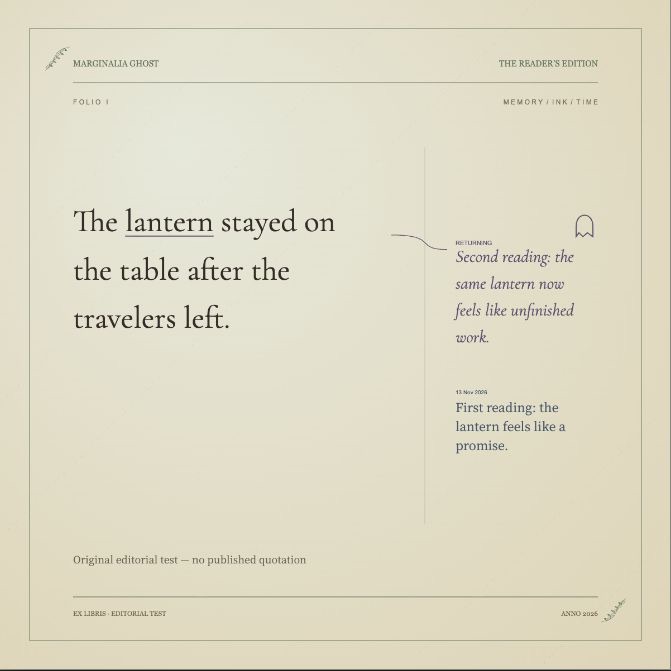
How matching passages and earlier ink work
A marginalia history is most useful when the passage stays stable. We changed only the note between the two saves, then changed the passage to an unrelated sentence as a control. The earlier layer disappeared for that different sentence. We did not test whether case, whitespace or punctuation differences are normalized.
This means a different translation or edition should not be assumed to share one history automatically. Keep a consistent passage in a rereading project, and preserve edition details in the source field or an external journal. If you intentionally change the words, inspect which earlier entries are actually displayed.
The current marginalia note is a separate editing field. Our second lantern response stayed visible when the passage became a station sentence, even though its history layer vanished. The result could be a misleading marginalia image if exported without review. After replacing a quotation, check the note, linked phrase, source and signature together.
The marginalia ink control changes the presentation, not the existence of your earlier entry. After testing 0 and 100, both archive buttons remained. In our high-contrast test the old note was still visibly strong at 0; after turning high contrast off it disappeared. Verify the combination you plan to share rather than promising a particular fade level.
Choose an edition without losing readability
| Control | Available choices or role | Review before sharing |
|---|---|---|
| Edition | Medieval, Renaissance, Victorian, Modern | Treat these as manuscript-inspired designs, not historical facsimiles |
| Page format | 4:5, 1:1, 9:16, A4 | Inspect wrapping after each change |
| Type size and alignment | Text size slider; left or centered layout | Long text may need a different composition; no maximum capacity benchmark |
| Patina, contrast, ornaments | Paper treatment and decorative presentation | Make source and marginalia readable at the final display size |
| Signature | Ex libris / author-entered label | Remove names you do not want in a shared image |
We verified the canvas attributes for square and A4 after choosing them. A4 was 2480 × 3508 pixels; this is a rendered dimension, not proof of a correctly tagged PNG, printer profile or physical print result. No printed sheet was produced in this review.
The source also offers a portrait 4:5 format at 1200 × 1500 and a tall 9:16 format at 1200 × 2133. We observed the initial portrait canvas and the listed formats, but did not independently inspect every downloaded image. Choose a format for the place you will read or share it, then examine the final file yourself.
A small preview can hide text that is technically present but hard to read. For a marginalia page with several older notes, test the actual viewing size before using it as a social image or handout. We did not stress-test long quotations, many archived layers or every writing system.
PNG images and editable project backups
Three forms of preservation serve different needs: the local reading archive, the finished PNG and the JSON project. The archive gives you dated entries inside this browser. The image is intended to preserve appearance. JSON is the source-provided route for restoring editable work, not an image format.
In our test Download PNG displayed a poetic completion message and Backup JSON displayed a backup-downloaded status. We waited up to eight seconds for each completed download artifact through the available browser tool, but neither became available. These messages establish that the controls responded; they do not establish usable file contents.
We therefore did not test a JSON round trip, inspect embedded fields or verify that private notes are excluded from an output. Before moving devices, restore a copy and compare the passage, current note, archived readings, style and future letter. Keep the original file until that comparison succeeds.
Use filenames that distinguish a public image from a private project, for example “lantern-public-square” and “lantern-project-private.” These are suggested labels, not observed automatic filenames. Do not assume a JSON project contains only what is visible on the current page.
What the future letter does and does not protect
Preserve includes a future-self letter. We entered a question about whether the lantern would still feel like a promise, pressed Seal / open letter and saw a sealed status. Pressing the same control again immediately displayed the question. No waiting period or password was requested.
The editing textbox remained accessible while sealed. This is consistent with the source’s explanation that sealing is a visual reminder, not encryption or a timed lock. It can give a marginalia session a useful closing question, but should not hold secrets you expect the interface to secure.
A practical prompt asks something you can revisit: “Which word changed my response?” or “What would make me disagree with this note?” Such prompts are your own reflective method. We did not measure any psychological or learning benefit from using the letter.
Korean, mobile editing and reload persistence
The Korean page opened the same two English archive entries and current English text. We then entered and saved an original Korean passage and response, linked the word 등불 and changed the visual edition. At a fresh 390 × 844 viewport, both viewport and document width were 390px, without horizontal overflow in the inspected workflow.
This demonstrates interface localization and author-entered Korean text in our tested view. Switching languages did not automatically translate our English writing. The source describes a shared local archive on the domain; our same-browser language switch was consistent with that description, but no other-device synchronization was tested.
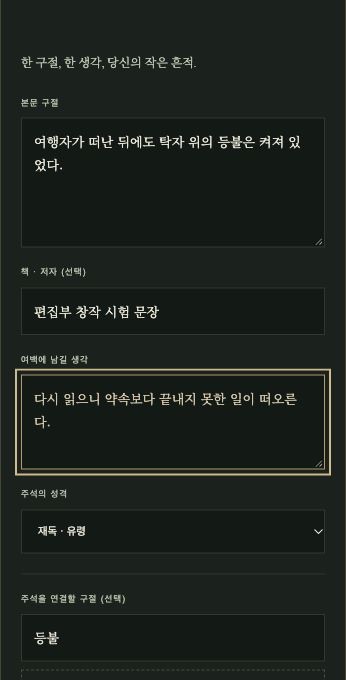
After reload, the current passage, source, response, edition, square format and archive remained available. The editor returned to Write and Earlier ink visibility returned to 40. A saved marginalia project does not imply that every panel and view preference persists.
This was Chrome viewport emulation rather than a physical-device test. We did not audit every keyboard route, screen reader, touch selection or selection-link shortcut. Desktop space is more comfortable for reviewing the full page and several archive entries together.
Choose between marginalia, a notebook and a quote card
| Method | Choose it when | What you must maintain |
|---|---|---|
| MARGINALIA GHOST | You want a designed passage with a personal response and rereading layers | Matching passage text, source accuracy and external project backups |
| Plain reading journal | You need long notes, many citations and searchable argument development | Your own presentation and version structure |
| Quote-card editor | You mainly need a visually clear standalone quotation | Your response and history usually need a separate record |
| PDF annotation tool | You must place notes on exact pages of an existing document | Document permissions, backup and sharing settings |
Use marginalia as a deliberate selection from a larger reading practice. A full chapter summary or complex argument may belong in your journal, while one sentence and one changed interpretation fit the designed page. We did not verify direct import from an e-reader, a PDF or another annotation service.
Troubleshooting and practical reading routines
If an older marginalia note is missing, first confirm the passage has not changed. Next check Earlier ink visibility and the contrast setting. Do not repeatedly save duplicate readings merely because a faint layer is hard to see. Inspect the archive buttons and restore a known entry before changing more controls.
If a linked word looks wrong, compare the phrase field with the current passage. Replacing the main text does not automatically make an old linked word meaningful. We tested a present phrase, not every absent, repeated or punctuation-heavy phrase.
For a reading group, ask everyone to use one permission-cleared sentence and write one independent response before comparing. A second save can record a revised response after discussion. This is a suggested activity, not a measured improvement in comprehension, memory or agreement.
Before publishing a marginalia image, read it as a stranger would. Can they distinguish the quoted text, source, current response and older note? Check names, signature and future-self material as well as the main sentence. A visually quiet page can still contain information you did not intend to share.
Privacy and confirmed limitations
The source says passages, annotations and the project stay in local browser storage rather than being uploaded as story content. We observed same-browser persistence, but did not perform a network or security audit. Blogger, Google Fonts and advertising services are present and may process technical data under their own policies.
Local storage is tied to the browser environment; it is not an account-based cloud archive. The source warns that private browsing, clearing site data and switching devices can affect access to records. Keep an independently verified backup before relying on the tool as the sole home for reading notes.
No AI interpretation, encrypted letter, timed release, collaboration, e-reader synchronization or verified print production was established. File payloads and restoration remain unverified. Advertisements interrupted navigation during our inspection; close the advertising overlay and identify the actual editor controls before continuing.
Related tools for evidence and presentation
If a passage depends on who knew what at a certain chapter, consult UNTIL HERE’s relationship map guide first. Its manually maintained reveal chapters help keep a discussion within the group’s reading boundary. It tracks scene evidence; MARGINALIA GHOST preserves your response to a selected passage. No direct data integration was tested.
For a captioned presentation of a captured page, see FrameMint Studio’s screenshot editor guide. It can frame screenshots and add context or manual masks. Review the finished output and keep any private project separately; adding a mask is not proof that every underlying source record is safe to distribute.
Frequently asked questions
Is MARGINALIA GHOST an AI quote or emotion generator?
No AI interpretation was established. You enter the passage and marginalia, choose a category and select the visual edition. The icons are creative symbols, not an automatic assessment of your feelings.
Why did an earlier reading disappear?
Our earlier layer disappeared when we replaced the passage with a different sentence. Check the exact passage, ink visibility and contrast. Normalization of spelling, punctuation and translations was not tested.
Does changing the passage clear the current marginalia note?
It did not in our test. The current lantern response remained when a different sentence was entered. Review the current note, source and linked phrase whenever you replace the passage.
Does a sealed letter require waiting or a password?
No. We reopened it immediately using the same button, and the editing field remained accessible. The source explicitly describes a visual reminder rather than encryption or a timed lock.
Can I print the A4 output?
Selecting A4 changed the canvas to 2480 × 3508 pixels. We did not inspect the downloaded PNG or print it, so final file dimensions, printer settings and physical readability require your own check.
Can I restore the project on another device?
Backup JSON and Restore are offered for that purpose, but our completed downloads were unavailable to inspect and we did not verify a restore round trip. Test a copy before moving your only working record.
Make one reading worth returning to
Start with a short original passage, one precise marginalia response and a simple edition. Save it, write a second response to the same words and inspect the earlier layer. That small exercise establishes how your notes, history and backups behave before you commit an entire reading journal to the browser.
A RELEVANT NEXT STEP
Tools with a useful connection
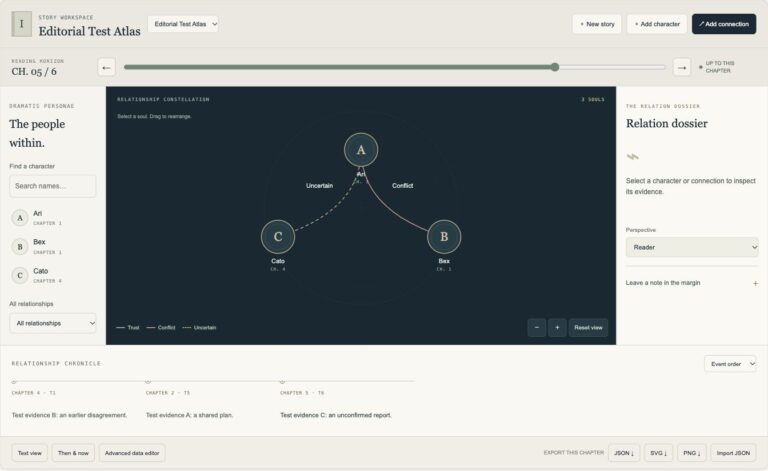
UNTIL HERE — The Unfinished Atlas
Relationship Map: 7 Essential Checks for Better Reading
Build a chapter-aware character relationship map in UNTIL HERE. Actual tests separate reveal order from event time, compare changing connections and explain reader exports versus full author backups.

FrameMint Studio
Screenshot Editor: 7 Smart FrameMint Studio Checks
Frame screenshots, add manual masks and build captioned stories in FrameMint Studio. Real import, order, recovery and size tests explain what to check before sharing.
FinishDraft Studio
FinishDraft: 7 Essential Steps for a Better Writing Session
FinishDraft Studio helps you finish a small draft with local saving, writing prompts and timed sprints. See tested counters, finish checks, exports and the important difference between draft export and full backup.