UNTIL HERE — The Unfinished Atlas is a manual character relationship map maker that shows only the people and events revealed by your chosen chapter. Use it to separate what happened from when a reader learned it, then compare how a connection changes.
Verified 13 November 2026 in Chrome, including the Korean interface at 390px. We tested the built-in fictional demo and an original six-chapter story called Editorial Test Atlas. No published novel was analyzed. This library and the original tool share a creator.
Build a chapter-aware character relationship map in UNTIL HERE. Actual tests separate reveal order from event time, compare changing connections and explain reader exports versus full author backups.
- Brand
- UNTIL HERE — The Unfinished Atlas
- Tool languages
- en,ko
- Verified date
- 2026-11-13
In this guide
Key takeaways
This relationship tracker is useful when a cast expands faster than your memory, particularly in mysteries, alternating viewpoints and stories with flashbacks. You supply the names, chapter numbers and evidence. It does not read a manuscript or infer a trustworthy map with AI.
Two time fields solve different problems: the reveal chapter controls visibility; actual event order sorts the revealed chronology. In our test, an event marked T1 remained hidden at chapter 3 because its reveal chapter was 4. Sorting by event time did not override that boundary.
The chapter boundary is a display aid. Full author data remains accessible through the advanced editor, and the source explicitly warns that its static dataset can be inspected in the browser. Do not use the slider as access control for unpublished secrets.
Keep a complete author copy separately. The source describes the ordinary JSON export as chapter-limited, while the advanced editor exposes the full story and a separate full-backup button. We attempted reader JSON export but could not obtain a completed download artifact, so file contents and round-trip import remain unverified.
What this relationship map does
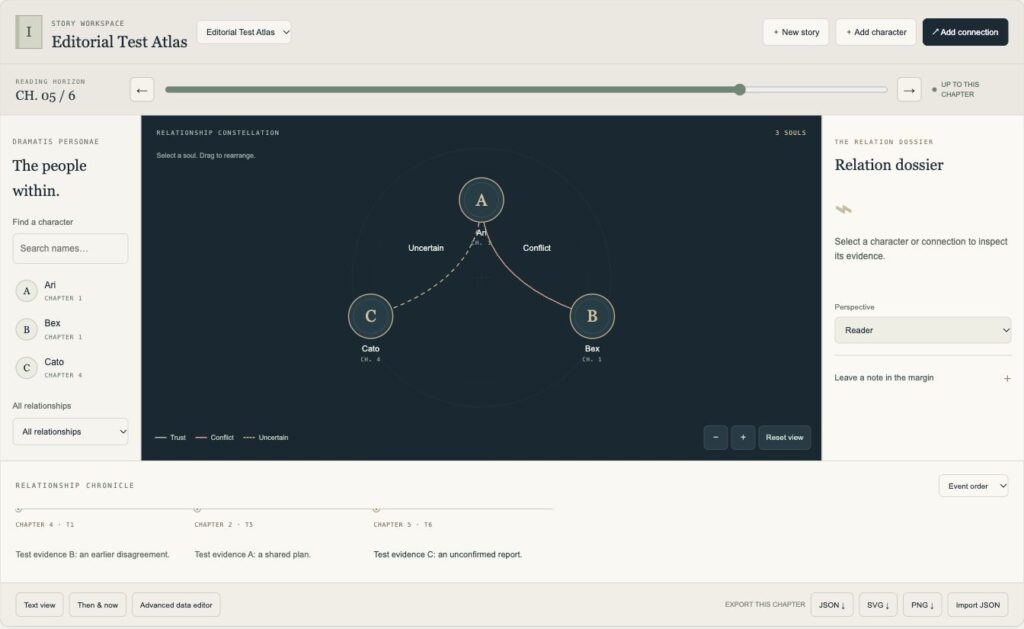
The workspace combines a saved-story selector, character search, relationship constellation, evidence dossier, reading-horizon slider and chronicle. English and Korean interfaces are available. A new story can coexist with the supplied fictional example, The Glass Train; creating our test story retained the demo in the library.
A relationship is not just a line between two names. The evidence behind it has a reveal chapter, a position in the story’s event sequence, a category and a short explanation. Later evidence can change the line currently displayed while earlier entries remain available in the dossier.
This is especially helpful after a reading break. Instead of searching a character’s name on the open web and encountering a final-act summary, inspect the record you have maintained up to your own stopping point. Its accuracy still depends on what you entered and whether you assigned the correct reveal chapter.
Prepare a chapter-safe reading record
Choose one edition and one numbering convention before entering data. A prologue, interlude or bonus chapter can shift chapter numbers between editions. Write your convention in a separate reading log, for example “prologue treated as chapter 1.” The tool cannot reconcile editions for you.
Use stable character names. If a later identity is a spoiler, name the record by the identity known at your current point. Avoid placing the eventual revelation into an early character label or evidence sentence: a correct chapter slider cannot repair a prematurely revealing label.
Prepare short, original scene summaries rather than copying pages of a novel. A useful relationship note says who acted, what was observable and which chapter disclosed it. Keep interpretation separate: “Ari accepts Bex’s plan” describes a scene; “Ari will always trust Bex” predicts more than that scene establishes.
For an initial trial, use invented names and three short events. You can check the filtering behavior without risking personal notes or spoiling a book. Our reproducible worksheet below uses Ari, Bex and Cato; these names and events are synthetic test material.
7 essential checks for your first relationship map
1. Create a small story
Choose New story, give it a recognizable title and enter its chapter total. We created Editorial Test Atlas with six chapters. Check the saved-story selector afterward so you know whether you are editing your own record or the demonstration. Starting a new story did not remove the demo in our test.
2. Add characters with first-reveal chapters
Use Add character for a name and the first chapter in which that character should become visible. We entered Ari and Bex at chapter 1 and Cato at chapter 4. A character’s first appearance is a separate decision from the reveal date of a particular relationship event.
3. Record one connection with evidence
Choose Add connection, select both characters and choose Trust, Conflict or Uncertain. Enter the reveal chapter, actual event order and evidence text, then add it to the story. For our first relationship entry, Ari and Bex had Trust, reveal chapter 2, event order 5 and a short shared-plan description.
4. Lower the reading horizon before checking results
Set the slider to an earlier chapter and inspect the graph, search and perspective options. Our chapter 3 view contained Ari and Bex with the Trust connection. Cato and the later events were absent. Recheck the horizon after authoring because adding our relationship moved the workspace to that entry’s reveal chapter.
5. Sort only the evidence already revealed
Switch the Two clocks selector between Reveal order and Event order. At chapter 5 our event chronology ran T1, T5, T6 although the reveal chapters were 4, 2, 5. This helps reconstruct a flashback without pretending that the reader knew it earlier.
6. Read the dossier and compare another chapter
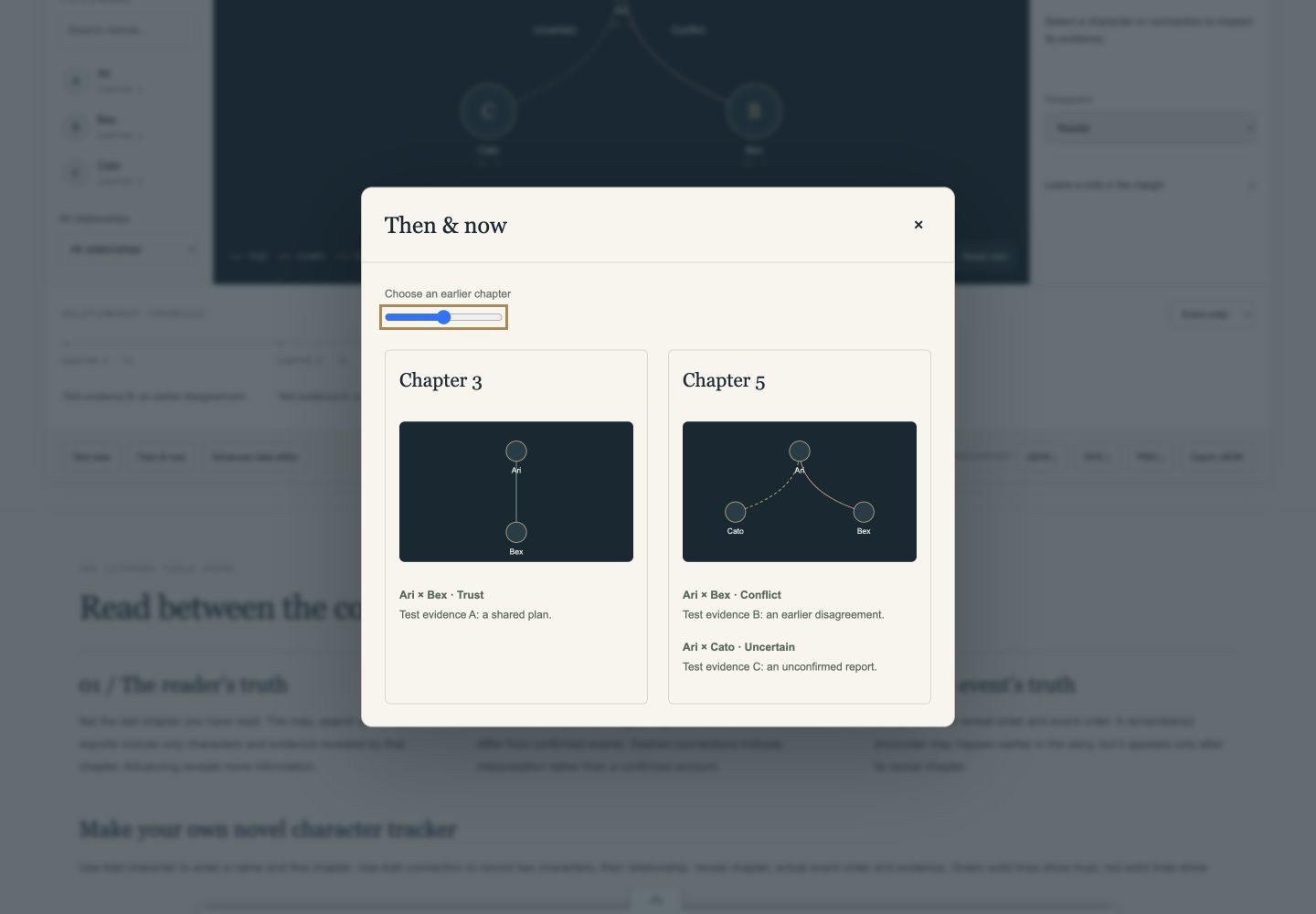
Select a relationship; Text view provides labeled relationship buttons when the small graph is awkward. The Ari/Bex dossier listed our chapter 2 and chapter 4 evidence. Then & now compared chapter 3 with chapter 5, showing Trust in the former and Conflict in the latter.
7. Save a note, verify persistence and preserve author data
Open Leave a note in the margin, write a short interpretation and use Save note. Reload before trusting a working session: our story, chapter and note returned. Preserve the full author JSON separately before clearing browser data, changing devices or experimenting with imports.
Actual tests: two clocks and changing connections
We deliberately made reveal order disagree with event order. This tests the distinction more clearly than a timeline where both numbers increase together. Ari and Bex first appear in chapter 1; Cato first appears in chapter 4. The following entries were added through the guided connection form.
| Pair and state | Reveal chapter | Event order | Our evidence |
|---|---|---|---|
| Ari / Bex · Trust | 2 | 5 | A shared plan |
| Ari / Bex · Conflict | 4 | 1 | An earlier disagreement |
| Ari / Cato · Uncertain | 5 | 6 | An unconfirmed report |
At horizon 3, only the first entry appeared in the chronicle, including when Event order was selected. At horizon 5, all three appeared, sorted T1 → T5 → T6. The current Ari/Bex relationship showed Conflict, while the comparison for chapter 3 showed Trust. Event time is therefore useful for chronology; the tested display changed with later revealed evidence.
| Additional check | Observed result | Practical implication |
|---|---|---|
| Demo horizon 4 → 2 | Hana disappeared from map, search and perspective; selection cleared | Check all views when preparing a reading-group handout |
| Trust filter in the demo | Trust edge remained; all three revealed character nodes stayed | The filter narrows connections, not the cast |
| Text view | Labeled connection rows appeared below the graph | Use the text controls when selecting a small edge is difficult |
| Reload after saving | Story, horizon 3 and note returned; sorting and map view reset | Persistent story data does not mean every view preference persists |
Separate relationship state from evidence status
An important distinction emerged from the basic form. We selected Uncertain for Ari/Cato and wrote “an unconfirmed report” in the evidence. The resulting dossier nevertheless labeled the entry Confirmed. The category describes the relationship; that word choice did not automatically classify the evidence as a character belief.
Do not read a dashed line as proof that the tool has evaluated a narrator’s reliability. The guide describes character perspectives and beliefs, but we did not establish a custom belief-authoring workflow through the basic form. Our tests support manual category entry and dossier inspection, not automatic truth detection.
For a reading group, use a simple note convention: begin a factual scene summary with “Observed,” and an inference with “My interpretation.” These are editorial labels you write yourself. They make disagreement discussable without implying that a category or a software-generated badge settles literary interpretation.
Compare chapters without erasing earlier evidence
Add a later event when the relationship changes rather than overwriting the earlier scene. The dossier can then explain why the current relationship differs from a previous chapter. In our test, both Ari/Bex entries remained readable after the relationship changed to Conflict.
Use Then & now for a precise discussion question: “What became available between chapters 3 and 5?” That is stronger than asking why a character suddenly changed. A flashback may change the reader’s understanding of an earlier action without representing a new action in story time.
The comparison is only as good as your recording choices. If you compress five scenes into one late summary, the map cannot reconstruct the intermediate states. Record meaningful changes, keep descriptions short and cite your own edition’s chapter or page in the evidence when useful.
Reader exports and full author backups
| Control | What the interface/source says | What we established |
|---|---|---|
| JSON under Export this chapter | Revealed story data and notes only | Button attempted; file contents not inspected |
| SVG / PNG | Map for the selected chapter | Controls present; encoded images not verified |
| Advanced data editor | Full author JSON, including later chapters; separate full-backup control | Full six-chapter data visible in the editor |
| Import JSON | Bring story data into the workspace | Control present; successful import round trip not tested |
Use two deliberately different filenames in your own backup routine, for example “atlas-author-full” and “atlas-reader-through-03.” These are suggested labels, not names verified from downloaded files. A chapter-limited reader copy should not silently replace your complete author record.
Before distributing any output, reopen the actual saved file and inspect the visible chapter, names, evidence and notes. A reader handout can still reveal too much if you wrote a future twist into an early note. We did not inspect the download payload, so independent file review remains part of your workflow.
The full editor exposes structured JSON rather than a word-processing manuscript. Keep a known-good copy before editing it. If you are unfamiliar with JSON, use the guided character and connection forms first; a misplaced comma or an inconsistent reference can be harder to diagnose than an incorrect chapter number.
Mobile reading and browser persistence
In a fresh 390 × 844 Korean view, the page width and document width were both 390px. The reading controls were pinned at the bottom. Moving from chapter 5 to 3 reduced the map to two characters; the text-view control also responded. This was Chrome viewport emulation, not a physical iPhone or Android test.
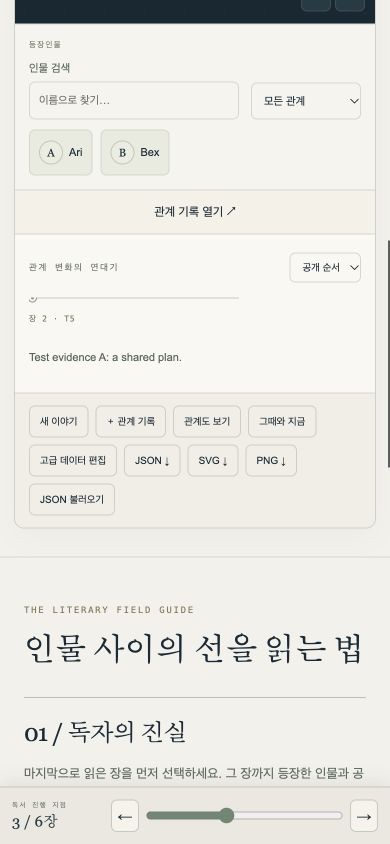
The Korean page opened the same custom story created in English on this origin. Names and our evidence remained English because we entered them that way. Language switching translates the interface; it does not establish automatic translation of your writing.
After reload, our selected story and chapter returned. Opening the margin again showed the saved note. The chronicle returned to Reveal order and the graph view returned, so check those controls at the start of a session instead of assuming they match yesterday’s presentation.
A small mobile map is good for review, while desktop space is more comfortable for adding several entries and inspecting the author JSON. Text view gives a second way to reach the evidence. We did not audit every keyboard path, screen reader or touch-drag behavior.
When a spreadsheet or paper chart works better
| Method | Best use | Tradeoff |
|---|---|---|
| UNTIL HERE | Explore a manually maintained chapter-limited relationship map | Requires careful reveal metadata and browser backup |
| Spreadsheet | Audit many scenes, citations and alternate interpretations in rows | You must build and check your own chapter filters |
| Paper chart | Fast private notes while reading away from a screen | Harder to compare many historical versions |
| General diagram editor | Design a polished custom presentation | Chapter-aware filtering must be maintained manually |
Keep a spreadsheet as the source ledger if your main need is hundreds of evidence entries or edition-specific citations. Use the map for the smaller set of connections you want to discuss. We did not benchmark a maximum cast size, so the three-character test cannot establish large-novel performance.
Troubleshooting and editorial tips
If a character disappears, inspect its first-reveal chapter before recreating it. If a relationship disappears, check the horizon, event reveal chapter and relationship filter. Sorting by Event order will not reveal an event whose disclosure chapter is still ahead of your reading position.
If a graph click does not open useful evidence, try Text view and select the labeled pair. In our session the textual Ari × Bex button opened both evidence entries reliably. Do not add duplicate connections simply because a tiny line was difficult to select.
Before a group meeting, agree on a common stopping chapter. Rehearse the complete handoff: select that chapter, read the labels, inspect the notes, capture the view and check the final image. Never advance the shared display beyond the group’s boundary while searching for the right setting.
If a local record seems missing after moving devices or browser profiles, do not assume account synchronization. Keep your external author copy and confirm the profile and origin first. Reload is a useful persistence test, but it is not a backup against storage deletion or device loss.
Privacy and practical limitations
The source says stories and notes stay in local browser storage and that the tool does not upload story data. We observed local persistence, but did not conduct a network or security audit. Blogger, Google and advertising services are present, and the page explicitly distinguishes their cookie and access-data practices from story processing.
The full data editor is an authoring surface that can show later chapters regardless of the reading horizon. Display filtering is not encryption, user authorization or a spoiler-proof container. Avoid confidential manuscripts on a shared device, and avoid giving readers a full author record when you intend to disclose only an excerpt.
No automatic manuscript analysis, collaboration, cloud synchronization, objective emotional scoring or publishing-ready book interpretation was established. Download contents, import recovery, physical-device gestures and large datasets remain unverified. Advertisements may interrupt navigation; close them and identify the actual workspace controls before continuing.
Related tools for discussion and recall
After reviewing a chapter-limited map, use FrameMint Studio’s screenshot editor guide to frame a captured screen and add a clear chapter caption. Inspect the finished image yourself; an annotation workflow cannot remove a spoiler that remains elsewhere in the source project.
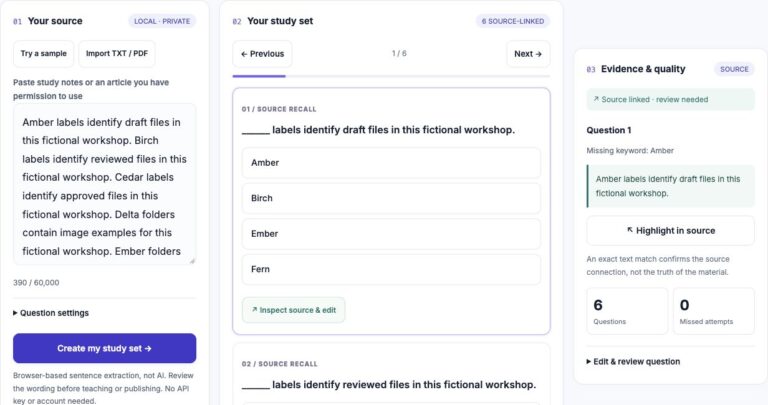
For revision, turn your own short, accurate scene summaries into a small set with RecallProof Studio’s quiz maker guide. It extracts keywords and links answers to source sentences. That can check recall of a written association, but does not assess whether your literary interpretation is correct. No direct integration with UNTIL HERE was tested.
Frequently asked questions
Does it automatically create a relationship map from a novel?
No. The tested workflow requires manual characters and connection events. You supply the chapter metadata and evidence; we did not upload or automatically analyze a novel.
Does an earlier event number expose a future revelation?
Not in our test. Reveal chapter 4 with event order T1 stayed hidden at horizon 3. Event order changed the sequence of already revealed entries rather than the visibility boundary.
Is the ordinary JSON button a complete backup?
The source says reader JSON excludes later chapters. Preserve full author data separately in the advanced editor. We could not inspect a completed download, so neither file contents nor successful restoration are claimed.
Does Uncertain mean the evidence has been marked as a belief?
Do not assume so. Our basic-form Uncertain entry still displayed Confirmed in the dossier. Inspect both the relationship category and evidence labels rather than treating them as interchangeable.
Can I use Korean character names and an English interface?
Names and evidence are author-entered text. Our English entries remained unchanged when switching to Korean. We verified both interfaces, not automatic translation or every possible writing system.
Can I safely share the full story with readers at chapter 3?
A display horizon is not access control. Inspect the actual reader output and keep full author data private if it contains later revelations. Even an early note can disclose a twist when its text is poorly written.
Start with two characters and one scene
Build a small relationship record you can verify against a single scene. Add a later change, lower the horizon and inspect the earlier state before expanding the cast. That short exercise establishes your chapter convention and backup habits before a long reading project depends on them.
A RELEVANT NEXT STEP
Tools with a useful connection

FrameMint Studio
Screenshot Editor: 7 Smart FrameMint Studio Checks
Frame screenshots, add manual masks and build captioned stories in FrameMint Studio. Real import, order, recovery and size tests explain what to check before sharing.
RecallProof Studio
Quiz Maker: 7 Essential Checks for Better Study Sets
RecallProof Studio turns clear notes into source-linked questions. Actual scoring, keyword-edit rejection, TXT import and saved-review tests explain what to verify before studying or sharing.
Focus Garden
Pomodoro Timer: 7 Essential Checks for Better Focus
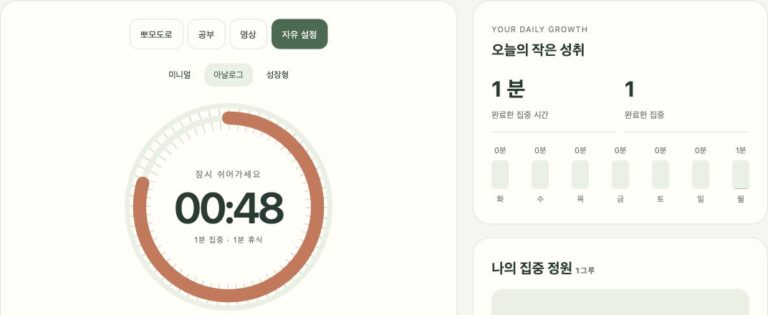
Use Focus Garden’s Korean controls with an English guide. Our real one-minute focus and break tests explain manual transitions, completion records, reload, pause, sharing and alarm limits.