QUARTET PARALLAX is a string quartet seating simulator for exploring how four synthesized voices relate to a listener. Move a musician or the fifth chair, save two layouts and compare their geometry at the same playback moment. It is useful for a focused music lesson or a first encounter with spatial audio.
Checked 13 November 2026. We tested controls, playback state and shared-layout restoration in Chrome. The results below are interface and model observations; we did not independently assess headphone sound quality, hearing ability or real ensemble performance.
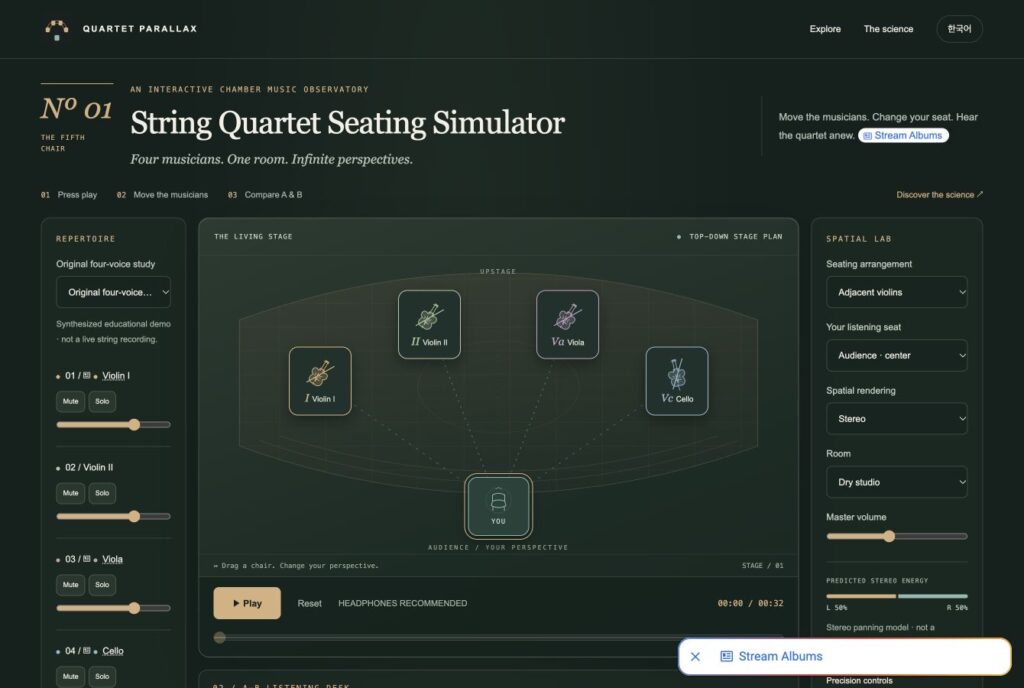
Explore a synthesized string quartet from different seats. This tested guide explains fair A/B comparisons, layout sharing and the limits of the spatial model.
- Brand
- QUARTET PARALLAX
- Tool languages
- en, ko
- Verified date
- 2026-11-13
On this page
Key takeaways
Start with Stereo, Dry studio and a centered listening seat. Change only one variable before judging what changed. A dramatic stage movement is easy to see, but a reliable explanation requires a stable mix and the same musical passage.
Three distinctions matter: the four parts are synthesized demonstrations, the L/R energy display is a prediction rather than a measurement, and the A/B slots store layout geometry rather than a complete project. A share URL carries a broader current setup. Keep these differences in mind before using the tool in a classroom.
What this string quartet seating simulator does
The official brand is QUARTET PARALLAX; its English page calls the experience “String Quartet Seating Simulator.” The top-down stage contains Violin I, Violin II, Viola, Cello and YOU. That fifth chair represents your listening position. Both the players and the listener can be repositioned, and the right-hand panel offers convenient starting presets.
The input is a set of browser controls, not a recording upload. Choose one of two original demos, select a seating arrangement and listening position, adjust individual part levels, then choose stereo or generic HRTF rendering and a synthetic room. The output is browser-generated playback, a live waveform, model pan/distance values and predicted stereo energy. A shared link records the current configuration.
English and Korean interfaces were available during our visit. No account was needed for the tests. The tool does not offer a verified way to import your own quartet recording, score or multitrack session in the inspected interface. Treat it as a controlled illustration of perspective, not a player for a specific commercial performance.
Choose one quartet listening question first
A quartet seating diagram can show that two violins sit apart, but it cannot let a student move the audience while the same music continues. A concert video offers musical realism, yet usually fixes the microphones and seats. This experiment sits between those methods: its sound source is simplified, while the spatial relationship is directly adjustable.
Choose a question small enough to answer. For example: “How does moving the listener left change the model balance when the violins face across the stage?” This is more useful than asking which arrangement sounds best. The latter mixes preference, repertoire, room, headphones and loudness into one vague judgment.
Prepare a modern browser, a quiet enough environment and a comfortable starting output level. The site recommends headphones. If you intend to compare stereo with HRTF, keep the same listening device and system settings during that comparison. We did not calibrate devices or verify the perceptual effect of HRTF; the recommendation here is to control the experiment, not to promise a particular directional sensation.
Controls and quartet seating arrangements
| Control | Useful interpretation |
|---|---|
| Adjacent violins | Audience-view order I · II · Va · Vc. A simple baseline. |
| Antiphonal violins | Audience-view order I · Vc · Va · II. Useful for exploring opposite-side violin replies. |
| Cello in the middle | Audience-view order I · II · Vc · Va. A different low/inner-voice relationship. |
| Listener presets | Audience center, left, right, or the position of one of the four players. |
| Mute, Solo and part levels | Isolate a voice, then return to the full texture before making an ensemble judgment. |
| Precision controls | Select a chair and use labeled directional buttons; inspect normalized pan and distance. |
The room choices are Dry studio, Warm salon · synthetic and Long hall · synthetic. The publisher explains that the reverberant presets use generated decaying noise as an impulse response. They are demonstrations of overlap, not measured recordings of named halls. Changing a room therefore adds a second experimental variable; do it after the seating comparison.
7 checks for a useful comparison
1. Establish a baseline before pressing Play
Open the tool and choose Original four-voice study. Set Adjacent violins, Audience · center, Stereo and Dry studio. Check that no part is unexpectedly muted or soloed. A quiet or one-sided result may come from the mix rather than from the arrangement. Write down these starting settings if someone else will repeat the exercise.
2. Start playback and identify the transport
Press Play. The button becomes Pause, the elapsed time advances and the waveform represents the output. Pause when you need to inspect a value without the passage moving on. The displayed original study lasts 32 seconds. Do not mistake a paused transport for a broken audio engine, and keep the system volume comfortable instead of raising it to compensate for an unexplained setting.
3. Save a clearly defined layout A
Use the Save current button beside A. There are two buttons with that wording, so check which slot you are saving. Use A for the baseline geometry. Avoid changing the listener at the same time as every player: if the goal is to study the violin arrangement, a stationary listener makes the result easier to explain.
4. Make one change and save B
Choose Antiphonal violins while keeping the centered listener. Save with the button beside B. Later, repeat the exercise with a listener move while holding the quartet arrangement fixed. These are two different questions. Combining them can be an interesting demonstration, but it no longer identifies which movement produced a difference.
5. Switch A and B without changing the mix
Use A Listen and B Listen to recall geometry. Keep the demo, room, rendering mode and part levels steady. In our test the A layout returned while the subsequently selected Warm salon remained active. This makes the slots useful for layout comparison, but unsuitable as an assumption that every setting has been restored. After recall, the dropdowns can say Custom layout and Custom position even when recognizable saved geometry is present.
6. Use precision controls for small movements
Open Precision controls, select the musician or YOU chair, then use Left, Up, Down or Right. Read the model values alongside the movement. This is an alternative to dragging, especially when a touch screen makes small adjustments awkward. Record the selected chair before pressing a directional button so that a listener move is not mistaken for a player move.
7. Preserve the setup and test the link
Press Share layout, check the resulting address and open it in another tab before sending it to a classmate. Our fresh-tab test restored the current quartet setup and waited for Play. The page reported that it copied a link, but the automation clipboard still contained older text; copying the updated address bar was the reliable fallback. Verify the actual URL rather than trusting a copied-status message alone.
What we actually tested
These checks were performed on 13 November 2026. They establish that the interface responds and that selected states can be reproduced. They are not acoustic measurements or evidence of improved listening skill.
| Test | Observed result |
|---|---|
| Transport | Play changed to Pause; elapsed playback advanced to 8.6 seconds, and Pause stopped it. |
| Listener perspective | Antiphonal violins with the left audience seat displayed predicted L 26% / R 74%. |
| Precision movement | With Violin I selected, Right changed its shown pan from 0.05 to 0.11; distance changed from 0.42 to 0.43. |
| A recall | Saved geometry returned; the later Warm salon selection remained. The transport stayed at its current paused moment. |
| X feedback | After saving A and B, a new X requested an answer. Selecting A produced Correct · X = A · 1/1 in this trial. That was a UI check and a guess, not an auditory discrimination result. |
| Shared link | A new tab restored HRTF, Warm salon, Violin I Solo and a 00:14 time display, with Play still waiting. |
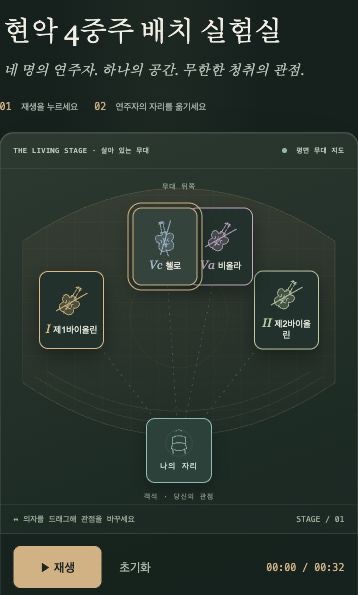
| Korean mobile | At 390 × 844, the page width was 390 pixels. Cello Right moved its shown pan from −0.19 to −0.13. |
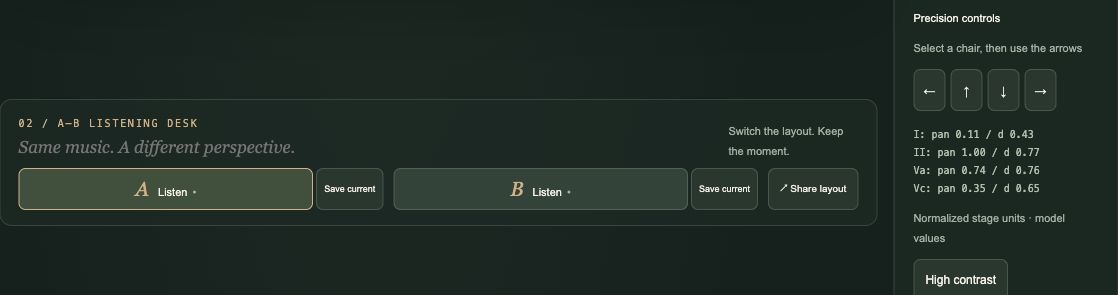
A small display inconsistency appeared on the fresh shared-link page: the time label showed 00:14 while the seek slider initially reported zero. We therefore verified the restored time label, not a sample-accurate resume point. Before a precise classroom comparison, press Play and check the passage you actually want to use.
A practical quartet listening worksheet
The following is a suggested lesson, not an additional experiment we performed. Give students one prompt: “Where is the answering violin relative to the listener?” Use Call & response as the demo, Stereo as the renderer and Dry studio as the room. First explain that all left/right references are from the audience looking toward the stage.
Save the adjacent-violin quartet as A and antiphonal violins as B, keeping the listener centered. Ask for a short observation about relative position, not a rating of which quartet is more professional. Then return to one arrangement and move only YOU to the left audience seat. A new pair of notes can distinguish an arrangement change from a perspective change.
| Worksheet field | What to record |
|---|---|
| Question | One relationship, such as the answering violin’s position. |
| Fixed settings | Demo, passage, room, renderer, levels and solo/mute state. |
| A and B | Player arrangement and listener position, described separately. |
| Observation | What you noticed and which on-screen model values changed. |
| Uncertainty | Device, room noise, visible stage clues and any setting changed accidentally. |
For a short remote lesson, send a tested current-setup URL plus the written A/B instructions. A recipient should not assume that your two quartet comparison slots travel with the link: our fresh tab showed no saved A/B markers. Recreating those slots takes only a few deliberate steps, and makes the conditions of the exercise explicit.
Advanced quartet comparison tips
Separate geometry from audibility. A stronger predicted right channel does not prove that every individual will hear an equally strong rightward image. The energy display is labeled a stereo panning model even when HRTF is selected. Use it as a clue about settings, not as a confidence score for the renderer or the listener.
Isolate a part briefly, then restore the ensemble. Solo makes it easier to follow one line, but it changes the task from balancing four voices to locating one source. The first-violin Solo state survived our shared link. That is convenient for a focused exercise and an easy way to surprise a recipient expecting the full quartet.
Use the X challenge only after making two meaningfully different layouts. Save both, play a new X and answer A or B. The site suggests hiding the stage, but we did not verify a separate automatic stage-hiding control. Cover or look away from visual cues if you want an informal listening exercise. A single correct answer has no diagnostic value, and this page is not a hearing test.
Change the room last. A longer synthetic decay can make one passage overlap the next; that is a different question from where a chair is placed. Keep a simple written record when exploring it: “same geometry, changed room.” This is more reproducible than saving a favorite-looking stage and forgetting which sound settings were active.
A/B memory versus a share URL
Think of A/B as an in-session comparison desk and Share as a portable description of the current setup. We verified geometry recall in A/B and broader restoration through the URL fragment. We did not verify long-term storage of the two slots, cross-browser consistency or a link containing the whole experiment history. Keep your own worksheet if the exercise matters.
The inspected share address used a #qp fragment. The publisher says it stores positions, listener, demo, room, rendering, mix and playback position. The reopened link restored several of those visible settings, including Solo. No microphone permission or upload was needed in our tests. Do not add private student names or confidential lesson notes to a URL you intend to share.
Limitations, privacy and troubleshooting
This string quartet seating simulator is an educational model. The publisher explicitly excludes player adaptation, body occlusion and measured hall acoustics. It cannot decide your ensemble’s best real seating arrangement. Sight lines, communication and an actual rehearsal remain separate practical considerations; use the tool to formulate a question before that rehearsal.
The source says the experiment runs in the browser and does not upload microphone recordings. We observed a workflow without recording or microphone access, but did not audit all network traffic. Google/Blogger and advertising services have their own data practices. Browser processing of the experiment is not a promise that the entire site makes no external requests.
If no sound is apparent, first check Play/Pause, system output, master level, each part level and mute/solo states. We verified transport behavior rather than independently listening to or measuring the audio. Do not raise the output sharply as a troubleshooting shortcut. If a share link seems wrong, inspect its full fragment and open it fresh before changing the layout.
On the Korean page, the controls stacked at 390-pixel width and the directional adjustment worked. This was viewport testing in Chrome, not a physical-phone or multi-browser certification. Ads and automatic shopping overlays appeared during the visit and sometimes covered controls; use the overlay’s close control when necessary. Screenshots here are real captures, with some cropped to keep the relevant controls readable.
Related tools for the next step
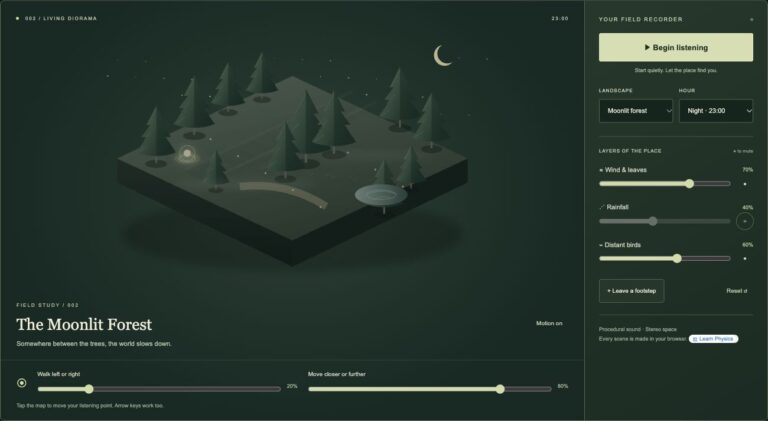
For a broader spatial composition exercise, continue with Field Recording Diorama: its layer-based scene provides a different way to think about sources and space. Use it after distinguishing player position from listener position here.
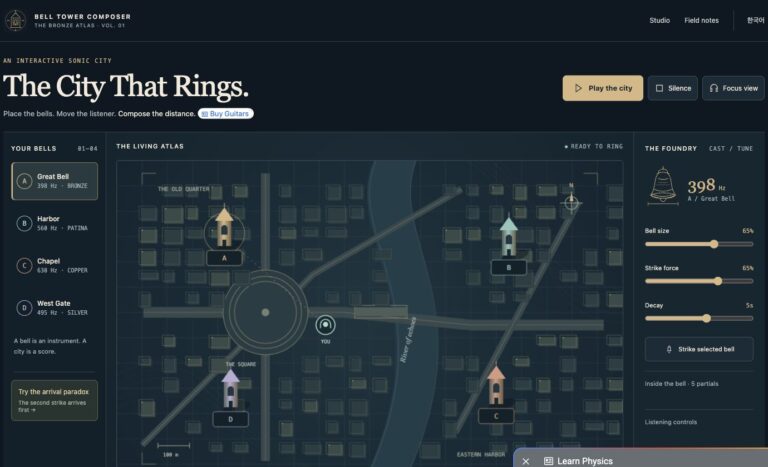
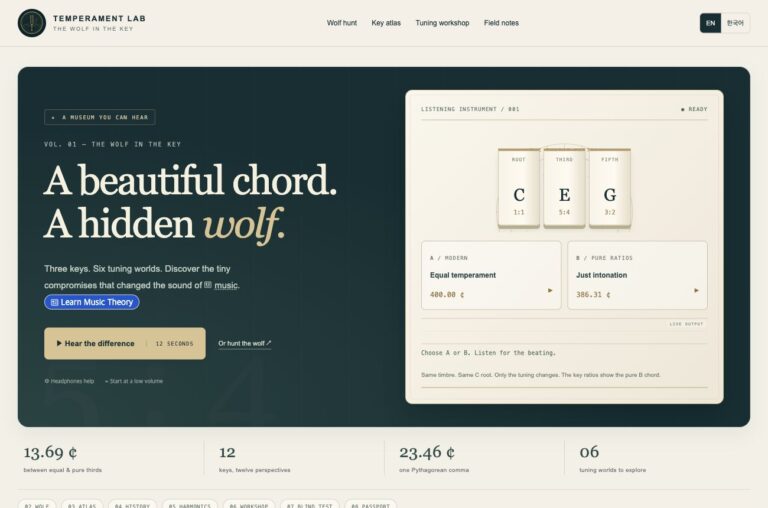
If the question is arrival timing over distance rather than quartet seating, read BELL TOWER COMPOSER. For a separate pitch-and-interval experiment, move to TEMPERAMENT LAB. These are related learning paths, not interchangeable acoustic prediction tools.
Frequently asked questions
Can I upload an actual quartet recording?
We found two built-in synthesized demos and no recording-upload workflow in the inspected interface. A commercial recording or your own multitrack session is outside this verified workflow.
Why does A not restore the room I saved earlier?
Our A recall restored geometry while the later room setting remained. Keep room and rendering fixed for an A/B quartet seating comparison. Use a tested share URL when you need to preserve a broader current configuration.
Does L 26% / R 74% mean the room was measured?
No. That was an on-screen prediction from one model configuration. It is neither a decibel reading nor a measured distribution in an actual concert hall.
Is the X score a hearing assessment?
No. It is informal A/B identification feedback. Our 1/1 result came from a software-interaction check, not a validated listening experiment or a medical assessment.
Where can I verify the source descriptions?
See the official English interface and Korean interface, especially the science, sharing FAQ and privacy sections. The publisher also links to the MDN Web Audio API reference for the underlying browser-audio technology; it does not validate this particular model’s acoustic accuracy.
Try one controlled comparison
Start with one centered-listener baseline, save it to A and change only the violin arrangement for B. Check the mix before switching. A useful session ends with a specific observation and a reproducible setup, rather than a claim that one seating order is universally best.
Launch QUARTET PARALLAX and compare two layouts →
A RELEVANT NEXT STEP
Tools with a useful connection
Field Recording Diorama
Field Recording Diorama: 7 Smart Soundscape Checks
Build an imaginary soundscape in Field Recording Diorama. Tested layer mutes, listener controls, Save/Restore and a fresh shared link explain what the scene recipe preserves and why a postcard is not recorded audio.
BELL TOWER COMPOSER
Bell Tower Composer: 7 Smart Arrival Timing Checks
Compose a four-bell city, edit 16 half-beat steps and compare strike times with distance-based arrival. Includes tested save/load, sharing and model limits.
TEMPERAMENT LAB
Tuning: 7 Smart TEMPERAMENT LAB Checks for Better Comparisons
Compare six tuning systems, inspect interval maps and beat estimates, and build a clearly labeled experimental comma budget in TEMPERAMENT LAB.