RecallProof Studio is a browser quiz maker that removes keywords from your notes and connects each answer to a source sentence. Generate a small set, inspect the extraction and use missed terms to guide another review.
Verified 11 November 2026 in Chrome, including Korean at 390 px. Tests used original, clearly fictional workshop notes and the built-in sample. This library and the original tool share a creator. No learning improvement or classroom outcome was measured.
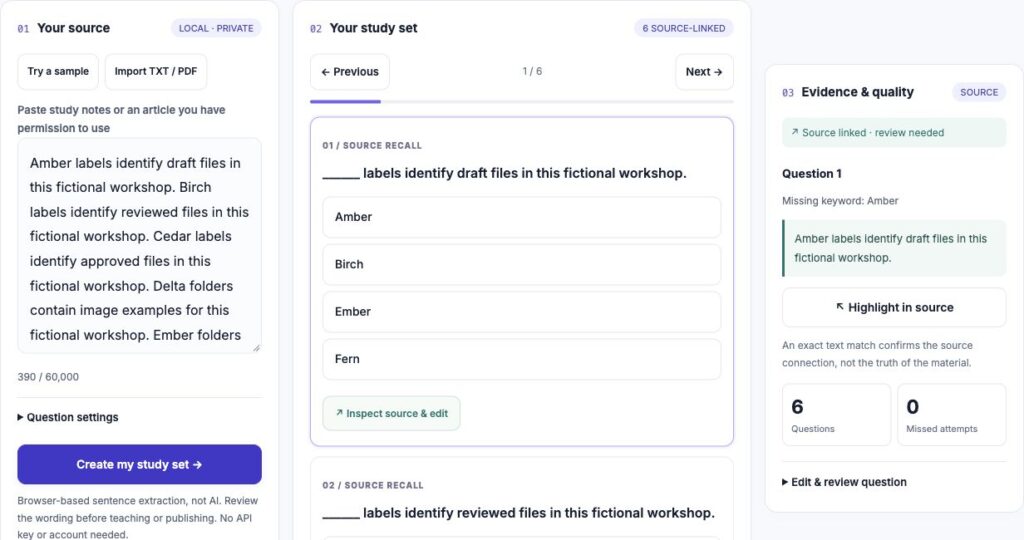
RecallProof Studio turns clear notes into source-linked questions. Actual scoring, keyword-edit rejection, TXT import and saved-review tests explain what to verify before studying or sharing.
- Brand
- RecallProof Studio
- Tool languages
- en, ko
- Verified date
- 2026-11-11
In this guide
Key takeaways
This is sentence extraction, not an AI tutor. It can turn clear statements into multiple-choice, fill-in-the-blank or flashcard prompts. A source link tells you where an answer came from; it does not establish whether the note is true, complete or appropriate for assessment.
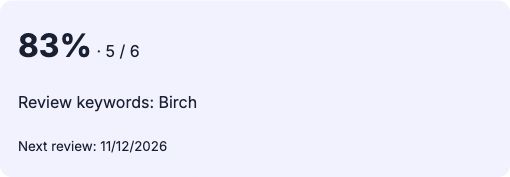
A requested count is a target, not a promise. The eight-sentence built-in sample produced eight questions when 10 were requested. Our own six-sentence example produced six. Completing five correctly and one incorrectly gave 83%, identified Birch as missed and displayed a next-review date of 12 November 2026 in the test.
Review mistakes reduced the current working set to one question. Reload and Open saved review brought that subset back. Preserve the original notes and inspect the displayed question count before exporting, so a one-question revision is not mistaken for the full worksheet.
The inspected embed code included the question, answer and evidence in a sandboxed iframe with an input and an answer-reveal section. It was a self-check handoff, not a verified copy of the studio’s automatic grading and progress tracking. Do not publish private source notes merely because the visible question is short.
What this quiz maker actually creates
The official tool is RecallProof Studio. Paste a passage you may use, or import text, choose a mode and set size, then create the study set. The main view places source text, questions and an evidence inspector together. In practice and review views, you can focus on individual items, move between them and revisit missed concepts.
Question construction is narrower than open-ended reasoning. In our invented workshop notes, the sentence “Amber labels identify draft files in this fictional workshop” became a missing-keyword prompt with Amber as the answer. Other extracted names supplied distractors. The result tests recall of the written association, not an explanation of why a real filing policy would work.
That makes the tool useful for terminology, definitions and short associations in your own notes. It is less suitable as the only assessment of reasoning, application or nuanced interpretation. For those goals, add separate human-written questions that require an explanation, new example or justification; do not present a fill-in-the-blank score as proof of broad mastery.
The page offers multiple choice, blank answers and flashcards, with requested sizes 5, 10, 15 and 20, and a visible 60, 000-character input limit. TXT and text-based PDF import are advertised. We tested TXT import, not PDF extraction or the character-limit boundary. The source says scanned-PDF OCR and fetching an article URL are unsupported.
Prepare notes that make useful questions
Start with at least a handful of informative sentences. Put one clear relationship in each sentence and name its subject explicitly. Keep the original outside the browser. If the passage contains headings, fragments, duplicated claims or references such as “this does that, ”the extracted keyword can be technically connected yet unhelpful as a question.
For a reproducible first test, use invented material rather than confidential school or work content. Our six sentences mapped Amber to draft files, Birch to reviewed files, Cedar to approved files, Delta to image examples, Ember to text examples and Fern to archived examples. These are fictional labels, not a recommended real records policy.
A good source is accurate before it enters the tool. Source linkage cannot repair an incorrect definition. If you later discover an error, correct your external note and regenerate or review the affected items. Keep a date or version name so you know which statement your saved question reflects.
When using Korean, read the exact extracted token. Our Korean example returned terms such as 호박표시는, including the attached particle. That is an observed tokenization result, not a language-learning recommendation. Edit the prompt and answer together if you need a bare term, while retaining an answer that appears in the evidence.
7 checks from source to a reviewed study set
1. Add a short, permission-cleared source
Paste your notes or choose Import TXT/PDF. We imported an original 390-character TXT fixture through the file chooser and confirmed its six sentences in the source field. For a first run, short text is easier to inspect than a large document. No account or API key was requested during the tested workflow.
PDF support should be treated separately from TXT. The source describes text-based PDF extraction using PDF.js from a CDN, and excludes OCR. A scanned page that looks readable to you may still contain no extractable text. We did not test PDF import, so no successful PDF result is claimed here.
2. Choose a mode and count, then read the actual count
Open Question settings and select Multiple choice, Fill in the blank or Flashcards. Pick a target size and generate. Our six informative sentences yielded six items with 10 requested, and selecting five blank questions produced five. Read the actual set total before planning a session or promising a worksheet length.
The tool does not need to invent extra facts to reach your requested number. If the result is shorter, improve or expand the source with genuine useful statements. Do not repeat the same sentence only to fill a count. A smaller reviewed set is more useful than a longer set of ambiguous or duplicated prompts.
3. Inspect the keyword and the exact evidence
Use Inspect source & edit on a question. The evidence panel identifies the missing keyword and shows the original sentence; Highlight in source locates it in the passage. Check whether the answer is specific, whether the sentence remains meaningful with the blank, and whether every distractor is plausible enough for your intended practice.
In the studio, the answer is visible in the inspector while you study. That is useful for author review but unsuitable for a secured exam. Decide whether you are checking the generated material or practicing recall, and avoid looking at the inspector before answering if you want a meaningful personal test.
4. Edit responsibly and mark your review
The edit panel exposes the question sentence and correct keyword. We replaced Birch with Maple, which did not occur in the selected evidence, and Save changes rejected it. Restoring Birch succeeded. The panel warns that editing clears that question’s answers; recheck the item after saving.
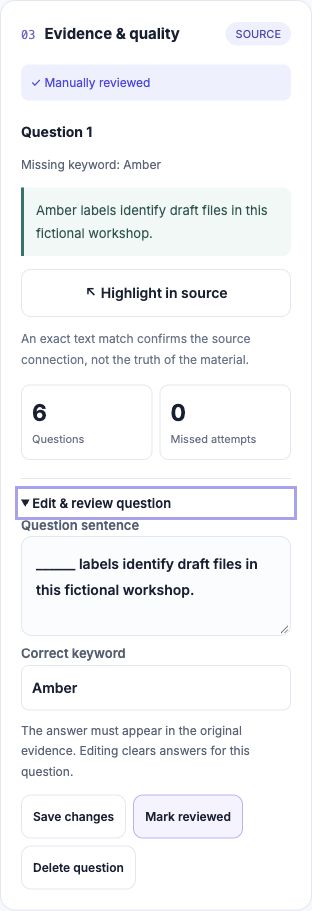
Mark reviewed changed the status to Manually reviewed. That is your review marker, not a certification from the tool. Do not use it to imply a teacher, subject specialist or fact checker reviewed something unless that actually happened. A keyword appearing in a source is a necessary connection, not a sufficient quality test.
5. Complete the set before grading
We answered only two of six questions and pressed Check answers. The studio asked us to answer every question and did not produce a final score. After completing the set with one intentional mistake, it displayed 5/6 and 83%, showed the answer and source under each item, and identified Birch as the review keyword.
In a separate five-item blank test, we typed “ amber ” with surrounding spaces and “BIRCH” in capitals, then the other expected terms. The result was 100%. That verifies those tested whitespace and case variations; it does not establish synonym recognition, fuzzy spelling acceptance or natural-language semantic grading.
6. Revisit the missed concept, then check what is saved
Review mistakes produced a one-question working set for Birch. A missed-attempt count and next-review date were visible. After reload, Open saved review loaded that subset, its manual-review flag and the missed concept. Read the count again before assuming you are looking at the original six questions.
The page describes a simple 1, 3 and 7-day schedule. We observed the first next-day date, not an elapsed multi-day progression or a reminder notification. A due date in a browser record is not evidence that email, push or calendar alerts will arrive. Plan how you will return to the page yourself.
7. Inspect the exact sharing format before distributing
Export CSV, Download quiz, Embed preview, Embed code, Print/PDF and Answer key/PDF controls were present. We inspected the actual generated embed text and saw source evidence and answers inside it. The CSV click did not yield a captured file within eight seconds. Downloaded quiz files, printed PDFs and final blog compatibility were not verified.
Share only source material you may distribute. A short visible blank does not mean the export excludes the full evidence sentence. Keep a private authoring version and a separately reviewed sharing copy, then test the destination. Do not claim the shared version has the studio’s grading or review persistence without testing that exact format.
Actual tests and scoring results
| Test | Observed result |
|---|---|
| Built-in sample, 10 requested | Eight source sentences produced eight questions. |
| Original six-sentence fixture, 10 requested | Six questions; answers were the invented labels. |
| Only two answers submitted | Final grading blocked until all items were answered. |
| Five correct, one wrong | 83%, 5/6; Birch missed; next date 11/12/2026 shown in English UI. |
| Five blank questions, case/space variants | 100%, 5/5 for the tested expected terms. |
| Maple substituted for Birch | Rejected because the proposed answer was absent from evidence. |
| Review mistakes, reload, Open saved review | One-item subset and missed concept recovered. |
| Korean notes and 390 px practice | Six items; particles remained in tokens; document width 390 px. |
These results establish interface behavior, not a learning outcome. We intentionally knew the invented mapping and inserted a mistake. There was no participant study, long-term retention measurement, classroom assessment or comparison with another learning method. The displayed percentage is the score on that set only.
After marking an item reviewed, its source sentence still carried the same informational limits. The test material was fictional and labeled as such. A truthful account of this experiment does not turn its file labels into general knowledge or infer that an evidence-linked question is automatically factually correct.
Source evidence, editing and review labels
There are three different checks to keep separate: text connection, source accuracy and question quality. The studio can associate the answer with a sentence. You must still judge whether that sentence is reliable and whether the item tests something worthwhile. A perfectly connected question can faithfully reproduce an inaccurate or trivial claim.
For a definition, check that the removed word is the concept you wanted to recall. For a multi-clause statement, check that the blank does not leave an ambiguous pronoun. For a multiple-choice item, check whether more than one option could be defended. These are suggested editorial checks, not automatic features demonstrated by a green label.
The Korean particle example makes this concrete: an answer such as 호박표시는 may be present in the source but broader than the bare label you intended to memorize. Keep the exact answer rule in mind. If you shorten it, adjust the blank sentence so the particle is not lost or repeated, and review the rendered result before distributing it.
Some status marks in the tested page appeared as literal entity text such as✓ or×. The answer labels, score and evidence remained readable. Use the written answer and the percentage to interpret the result rather than depending only on a symbol. This was a presentation limitation, not a reason to invent different scores.
Use the mistake review without losing context
The missed-term list is a route back to the original material. Before retrying, explain why the correct association fits and why your chosen alternative did not. For example, our fictional Birch label concerned reviewed files, whereas Amber described drafts. That discussion is a suggested learning exercise, not a measured improvement from this test.
Keep source and set versions together. The observed reload recovered the reduced working set after Review mistakes. If you need all original questions again, you may need to regenerate from the retained notes. We did not verify an unlimited deck library, separate named projects, cross-device sync or a downloadable backup that restores all review history.
A sensible session can be short: review the source once, answer without inspecting the evidence, then inspect the missed items and record the next date. Add a new explanation question outside the tool if your goal involves understanding rather than keyword recall. Use the studio score to choose what to revisit, not as a complete statement of mastery.
Sharing, files and the embed distinction
The actual embed code we inspected contained a sandboxed iframe with a srcdoc document, a text input and an Answer & evidence disclosure. The answer and source text were included in the code. We found no grading script in that generated code. This is an inference from the visible output: the inspected version supports self-checking rather than the studio’s automatic scored attempt.
The embedded preview accepted a typed answer, but our attempts to automate opening its disclosure timed out. We therefore did not claim a fully verified embedded quiz interaction or compatibility with WordPress, Blogger or a classroom platform. Host editors may also restrict iframe/srcdoc content; test a reviewed copy in the destination before relying on it.
CSV receipt and content were not established in this session. The printable worksheet and answer-key controls were not followed through to saved PDFs. Treat an export button, generated code and a successfully opened file as distinct levels of evidence. If a file matters, check that it exists, open it, and inspect questions, answers, encoding and evidence before sharing.
Do not remove source context merely to make a screenshot look cleaner. At the same time, do not assume a self-check export is appropriate for a confidential or closed-book assessment: its answers are distributed with it. Choose a different assessment workflow if answer secrecy, identity verification or centrally collected results are requirements.
Privacy, languages and practical limits
The source says notes and answers are processed on the device and stored locally. PDF import requests PDF.js from jsDelivr, and Google advertising may use cookies and process advertising data. We saw advertisements, including overlays. No independent network or storage audit was performed, so “local” should not be read as “the whole page never connects externally.”
Use your own notes or permission-cleared material, and avoid private student records, credentials or confidential documents in an example. Exported quizzes and embeds can contain source evidence. Consult the page disclosure and Google’s advertising privacy explanation. No account, payment, subscription or cloud storage was required or verified in our test.
English and Korean pages are linked in the header. We generated Korean prompts and opened saved review and Practice at a fresh 390 px viewport without horizontal document overflow. This was Chrome responsive testing, not a physical-phone compatibility survey. Source language quality still needs human judgment, including attached particles and awkward extracted phrases.
Limits not tested include PDF import, OCR counterexamples, 60, 000-character boundary behavior, multi-day scheduling progression, every browser and final file delivery. The source explicitly excludes OCR and URL fetching. Do not expect AI paraphrasing, source fact checking, a hosted classroom gradebook or a secure examination system from the verified workflow.
Related tools for notes and study sessions
Before extraction, FinishDraft Studio offers a separate writing desk for preparing a clear original note. It is not a fact checker or an automatic quiz generator. Keep the final note outside the browser as the reference version you will review.
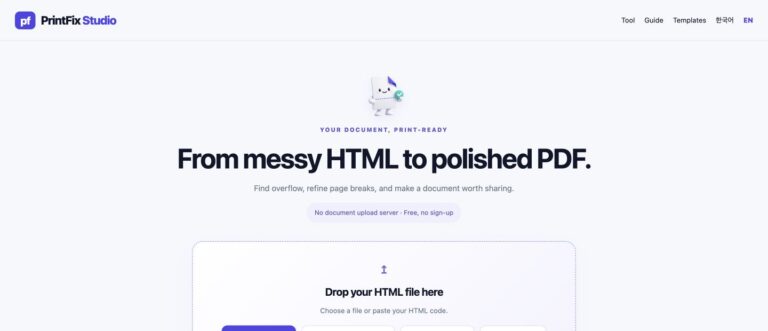
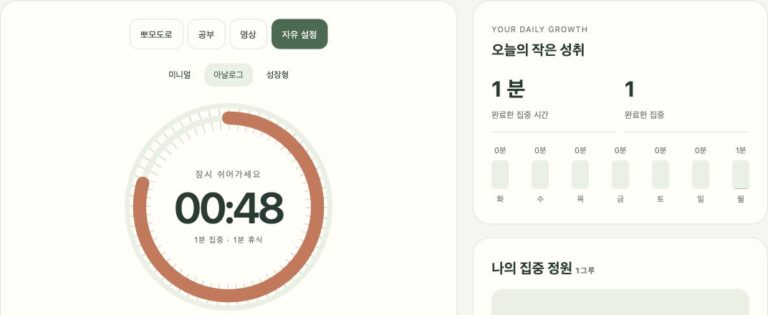
For a deliberate study interval, Focus Garden can separate focus and break periods. It does not synchronize RecallProof review dates. If a separately prepared basic HTML worksheet needs print-layout work, PrintFix Studio covers overflow and page-break checks; it does not verify answer correctness or guarantee the resulting PDF. These are already published guides with separate roles.
Frequently asked questions
Is this an AI quiz generator?
No. The page identifies browser-based sentence extraction, not AI. It removes a term and uses extracted terms as distractors. We did not observe model-generated reasoning, automatic fact checking or a need for an API key.
Why did 10 requested questions become six?
Our six-sentence fixture yielded six eligible prompts. The built-in eight-sentence sample yielded eight. The target count does not guarantee enough distinct source material. Add informative, accurate statements rather than duplicate filler.
Does an evidence link mean the answer is true?
It confirms a connection to the original sentence. It does not validate the original claim. Our fictional workshop mapping could produce source-linked questions even though it was invented for testing.
Will synonyms count as correct blank answers?
We verified case and surrounding-space variations for exact expected terms. Synonyms and semantic equivalents were not tested. Read the saved keyword and avoid promising natural-language grading.
Can I share only the visible question?
Not by assuming the export hides the rest. The inspected embed included the answer and evidence. Review generated code or files and share only material you are allowed to distribute.
Will the tool remind me tomorrow?
A next-review date was displayed and saved. Email, push and calendar notifications were not verified. The described 1, 3, 7-day schedule is a simple review rule, not an observed guarantee of improved memory.
Start with six sentences you can verify
Use a short source you can verify. Generate a small set, review the exact keyword and evidence, then complete the questions before grading. Save the original note separately and inspect the actual sharing output before sending it to anyone.
A RELEVANT NEXT STEP
Tools with a useful connection
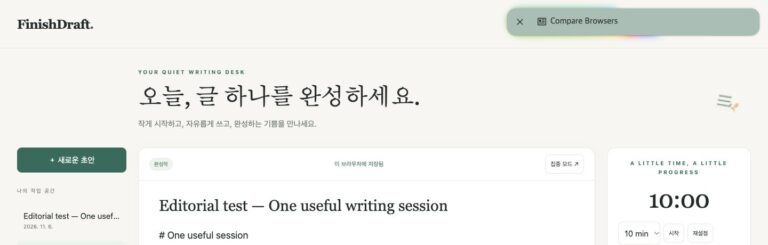
FinishDraft Studio
FinishDraft: 7 Essential Steps for a Better Writing Session
FinishDraft Studio helps you finish a small draft with local saving, writing prompts and timed sprints. See tested counters, finish checks, exports and the important difference between draft export and full backup.
PrintFix Studio
PrintFix Studio: 7 Smart HTML Printing Checks
Prepare basic HTML for printing with overflow checks, repairs, page breaks and CSV document batches. Our hands-on tests show why 100 readiness does not catch a missing field and what remains to verify in the actual print output.
Focus Garden
Pomodoro Timer: 7 Essential Checks for Better Focus
Use Focus Garden’s Korean controls with an English guide. Our real one-minute focus and break tests explain manual transitions, completion records, reload, pause, sharing and alarm limits.