Felt pad designer FELTATLAS helps you compare furniture contact shapes with protective pads and prepare labelled cutting-pattern previews. It models geometry, not noise or pressure.
Verified 11 November 2026 (KST). We tested the browser controls with sample dimensions, not real furniture. Actual screenshots and observed numbers are below. Downloaded files and a physically calibrated print were not confirmed in this review.
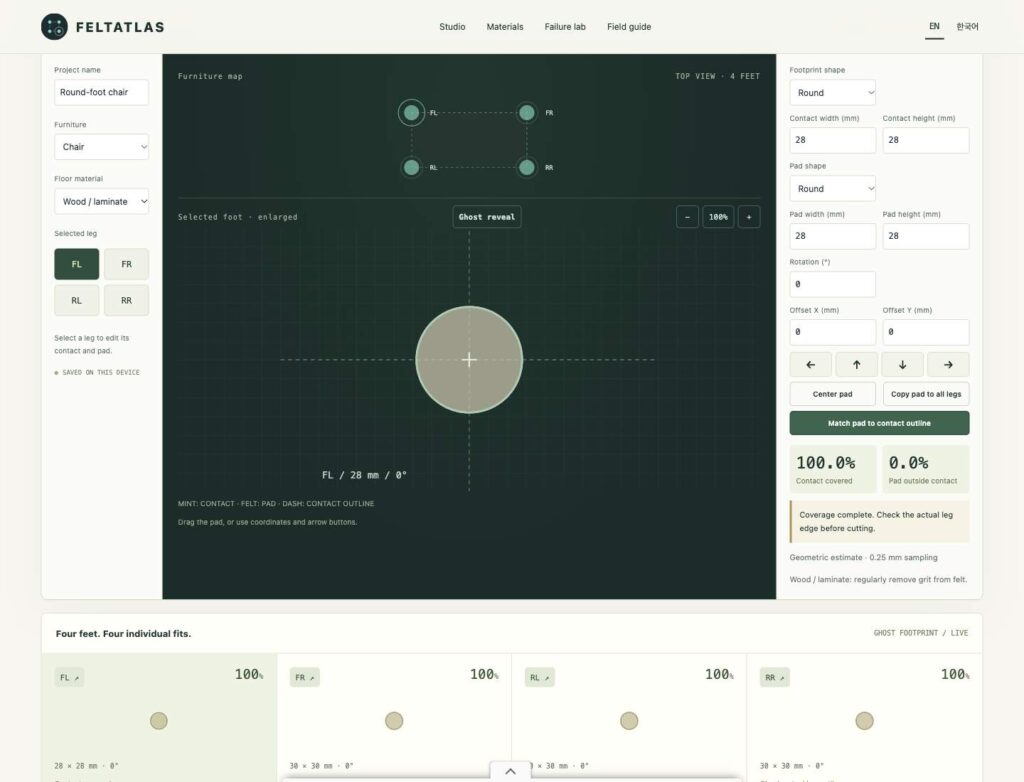
Compare four furniture contact shapes and felt pads, inspect geometric coverage and prepare labelled cutting-pattern previews. Includes real fit tests, print calibration and local-save limits.
- Brand
- FELTATLAS
- Tool languages
- en, ko
- Verified date
- 2026-11-11
On this page
Key takeaways
- Measure each contact and select the corresponding FL, FR, RL or RR leg. A sample design is a starting point, not a scan of your chair.
- Contact covered and Pad outside contact use different denominators. Full contact coverage can still leave material protruding.
- A 28 mm round contact and a 30 mm round pad at X+4 mm produced 88.0% coverage and 23.4% outside material in our test. Matching the outline changed the pad to 28 mm and centered it: 100.0% and 0.0%.
- Copying a pad to all four legs did not replace the different contact shapes. Recheck every leg after using that shortcut.
- The source offers A 4 printing, SVG patterns and JSON backup/import controls. We verified the on-page pattern preview; file receipt and JSON reimport remain unconfirmed.
- Named designs and an explicitly fictional inspection note survived reloading. Local saving does not establish cross-device synchronization.
What this felt pad designer can solve
FELTATLAS is titled “Furniture Felt Pad Designer & Cut Patterns.” Its workbench records four furniture feet, their round, rectangular or elliptical contact shapes, and a protective pad for each. You can change dimensions, rotate or offset the pad, inspect a larger view and compare the four labelled results. The page also contains material notes, an illustrative motion trail, a cutting-pattern preview, sheet layout, inspection records and a local furniture collection.
It is useful when a pad seems large enough on paper yet leaves part of a contact exposed, or when one chair leg wears a pad differently from the others. Rather than buying a larger circle immediately, you can separate three questions: what shape actually touches the floor, where the pad is centered, and whether its edge extends beyond the real furniture leg. Only the first two are represented by the entered contact and pad shapes.
That last distinction is central. A contact patch is not necessarily the whole physical end of an angled leg. Covering its two-dimensional shape does not prove the adhesive is well supported everywhere. FELTATLAS repeatedly asks you to check the actual leg edge before cutting. Use the drawing to organize a physical inspection, then verify materials and attachment on the real object.
Prepare measurements before opening the workbench
Prepare a ruler or suitable measuring tool, four leg labels and a way to record dimensions in millimeters. Support the furniture securely before inspecting its feet. Follow the source guidance: do not tilt heavy furniture alone or put your body beneath it. There is no need to upload a photograph; this version has no photo-upload or sound-recording feature.
Write down the observed contact width and height for each foot, rather than copying the first measurement across the furniture by habit. For a round shape, width acts as diameter and height is disabled. Rectangles and ellipses use two dimensions. An irregular or worn patch may only be approximated by these shapes; keep a note of that simplification instead of pretending the rounded diagram reproduces every edge.
Also record the existing pad, flooring finish and intended movement. A pad for sliding a dining chair is a different physical decision from a glide for carpet or an anti-slip support. The floor selector supplies guidance, not a laboratory compatibility result. The source advises checking the pad and floor manufacturers’ instructions and testing a discreet spot before use.
7 essential checks for a better fit
1. Start with a clearly labelled project
Open the English or Korean page and choose a sample only to learn the controls. Replace its name with the actual furniture identifier before keeping a permanent record. A useful label is “Dining chair A — measured November,” rather than “final.” The named design in our persistence test was Felt fit review, with a note explicitly saying that physical fit had not been tested.
2. Select the leg before entering geometry
Use Front left, Front right, Rear left or Rear right, or the corresponding map controls. Confirm the enlarged view’s label. The four overview cards provide a second check that you are changing the intended foot. It is easy to improve FL and assume the entire furniture map is ready; the sample already contains different conditions across the feet.
3. Enter the contact shape and dimensions
Choose Round, Rectangle or Ellipse for the footprint, then enter the measured millimeter values. After changing a field, move focus away and confirm the diagram and readout reflect the intended value. A number visible in an active box is less useful than an updated model. For the test below, the reproducible reference is a round 28 mm FL contact.
4. Fit the pad with both size and position
Select a pad shape and dimensions, then use offsets, rotation or the 1 mm direction buttons. The interface also offers dragging. We directly tested the direction buttons, which made the movement reproducible without relying on pointer placement. Watch both percentages and the status message. A centered oversized pad and a displaced oversized pad are not equivalent fits.
5. Use shortcuts, then inspect their scope
Center pad changes position; Match pad to contact outline changed our round pad to the contact’s 28 mm size and centered it. Undo restored the prior 30 mm pad at X+4 mm, and Redo restored the matched state. Copy pad to all legs is convenient for a first proposal, but it copies a pad rather than proving that the feet have identical contact geometry.
6. Review all four feet and the movement path
Select each leg and read its own enlarged result. Use the motion selector if you want to inspect the illustrated travel trail, but do not treat that trail as a friction or noise prediction. If a pad protrudes near a rough joint or unsupported edge, take that question to the real furniture and the product instructions. The model cannot inspect adhesive contamination or an uneven floor.
7. Check the pattern, backup and inspection plan
Review the labelled preview, then use A 4 actual-size printing with page fitting disabled according to the source. Measure the 100 mm calibration line on the paper before cutting. The site offers SVG and JSON controls; verify a received file before relying on it. Record installation and later inspection separately from this geometry-only planning stage.
Our actual FELTATLAS tests
Our browser test used synthetic dimensions from the editable sample. No chair was measured, no felt was cut and no acoustic improvement was measured. The numbers establish what the interface displayed under those inputs. They do not validate a furniture protection product or guarantee the model’s physical accuracy.
| Condition | Contact covered | Pad outside contact |
|---|---|---|
| Round FL contact 28 mm; round pad 30 mm; centered | 100.0% | 12.9% |
| Same dimensions; X+4 mm via four 1 mm moves | 88.0% | 23.4% |
| Match pad to contact outline: pad 28 mm; X 0/Y 0 | 100.0% | 0.0% |
| Copy matched 28 mm round pad to all; inspect RL ellipse 28 × 23 mm | 100.0% | 17.9% |
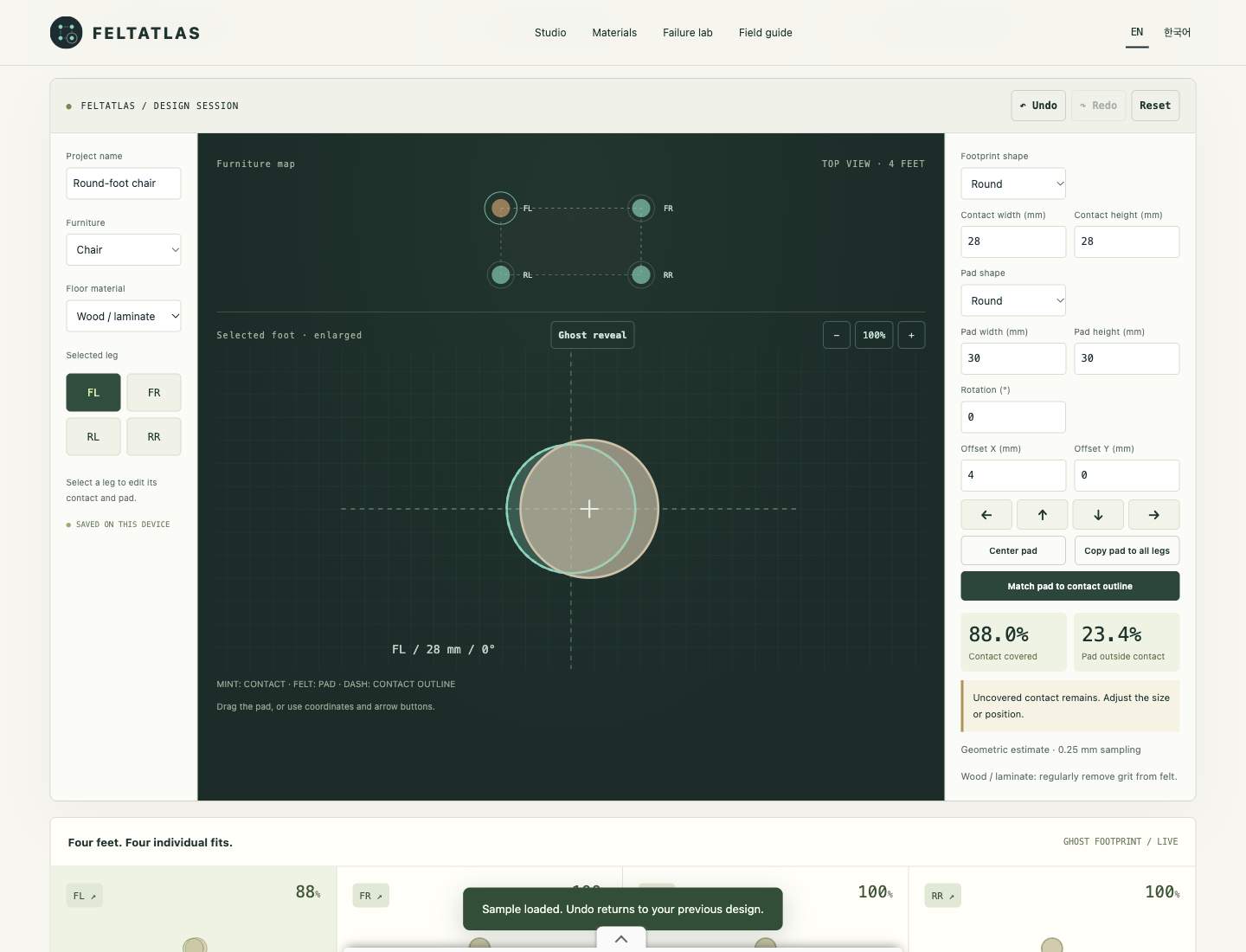
Undo and Redo returned between the displaced and matched states in the first comparison. After copying the 28 mm round pad to all legs, the RL contact was still an ellipse 28 × 23 mm. It showed 100.0% coverage with 17.9% of the pad outside the contact. This is direct evidence that “copy to all” does not erase the need for per-leg review.
We entered the project name Felt fit review, saved the note “Geometry only; physical fit not tested.” and archived the design. Reloading retained the name, dated note and archive entries. Undo/Redo were disabled after reload, so the saved design and the live editing history should not be treated as the same form of recovery. We did not run a backup-and-reimport round trip.
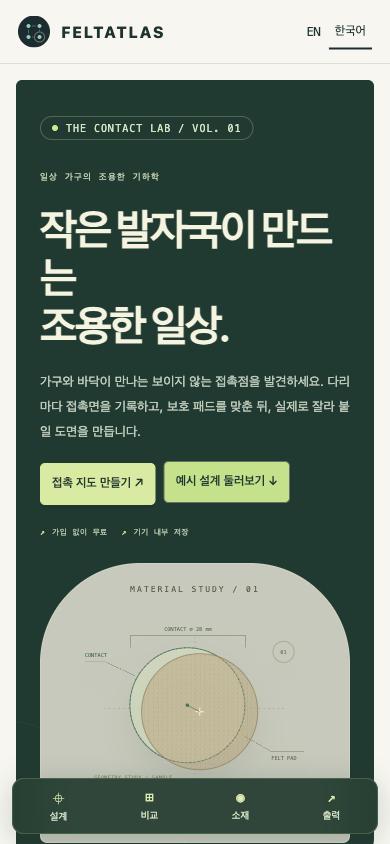
On a fresh 390 × 844 Korean browser viewport, the rectangular desk sample, a 1 mm direction button and outline matching responded. The document width remained 390 pixels. That is a responsive-browser check, not a test on a physical touch device. Advertising was present during the visit and could cover controls; use only the ad’s own close or collapse control if needed.
Read the two percentages correctly
Contact covered asks how much of the entered contact lies under the pad. Pad outside contact asks how much of the pad lies beyond that contact. One divides by contact area; the other divides by pad area. They are not two parts of one 100% total. Adding them is therefore not a meaningful fit score.
The centered circles make a useful arithmetic check. A 28 mm diameter circle is completely inside a 30 mm diameter circle. The ideal area fraction outside is 1 − (28 ÷30)², approximately 12.9%, consistent with the displayed centered result. This checks the interpretation for that simple geometry; it does not independently validate every sampled overlap calculation.
For the 4 mm displacement, the model showed 88.0% coverage and 23.4% outside. Some material extends beyond the contact while some contact is uncovered on the other side. Making the pad bigger is only one possible change. Re-centering may address the overlap more directly, provided the actual leg outline and intended installation support it.
The interface labels its values as a geometric estimate sampled at 0.25 mm. That sampling interval is not a promise of 0.25 mm measurement accuracy or manufacturing tolerance. Input error, shape simplification, printer scaling, cutting error and actual attachment remain separate. A displayed 100.0% is a result for the entered shapes, not an engineering certification.
From a drawing to a checked cutting pattern
The pattern preview we inspected contained four labelled outlines, FL through RR, with dimensions, offsets and rotation, plus a 100 mm calibration line. After matching only FL, its outline was 28 × 28 mm while the other three remained 30 × 30 mm. The visible SVG element used millimeter dimensions. The screenshot here is the on-page preview, not a successfully downloaded file and not a paper-size template to print from this article.
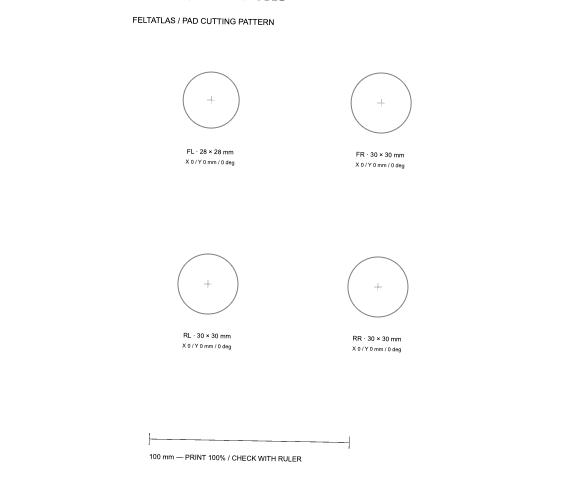
A sensible production sequence is: verify the four dimensions, inspect the on-page labels, request the native print or export, check the resulting document, then print with the source’s A 4/100% settings. Measure the calibration line with a ruler. If it differs from 100 mm, correct the scaling before cutting. Screen zoom and workbench view zoom are not substitutes for a physical calibration check.
The sheet-layout panel is a separate question: can the pad bounding boxes be arranged on the entered sheet with a cutting gap? The source describes height-sorted rows, a simple shelf layout and no optimal-nesting guarantee. Initially, four 30 mm circular pads on a 100 × 100 mm sheet showed PLACED 4/4 and PAD AREA 28.3%. After copying 28 mm pads, the share became 24.6%. These are observed design states, not measured production yields.
Do not read 28.3% as proof that the remaining 71.7% is all reusable scrap. Circular area, rectangular bounding boxes, the cutting gap and the arrangement are different quantities. A placed count also does not certify that an irregular offcut is usable. Keep extra material for a physical trial and check the fit on the actual leg before repeating a cut across the set.
Download SVG and Back up JSON were clicked, but file receipt was not confirmed. Import JSON and Download sheet SVG were visible controls, not completed round-trip tests. The browser review can support a guide to the available workflow while remaining explicit about that boundary. Open any saved file yourself and confirm the dimensions or design content before depending on it for another device.
Save a useful furniture maintenance record
The furniture protection passport offers an installation date, inspection notes and a save action. Keep planned work distinct from completed work: “geometry reviewed” should not become “pads installed” just because a record has a date. A useful later note identifies the leg, visible wear, grit, edge peeling and what you actually changed. There is no sound recorder to supply an automatic before/after measurement.
The collection advertises up to 12 named designs in this browser, with JSON export recommended before changing devices. Its status says matching names update the latest design. Give different pieces distinct names if you need separate records. We verified saved entries surviving a reload; we did not fill all 12 slots or test long-term retention, storage eviction or private browsing.
For a practical maintenance handover, retain four things together: the measurement date, your geometry assumptions, the actual pad and floor product information, and an inspection note after use. When an edge peels, compare that leg’s real contact and overhang with the drawing instead of silently changing all four dimensions. An older plan is useful precisely because it shows what was assumed before wear appeared.
Limitations, privacy and mobile use
FELTATLAS does not measure load, pressure, decibels, friction or physical safety. It does not scan feet from photos. Its movement trails are illustrations. Material cards are starting guidance, and any real compatibility or adhesive decision depends on the relevant products and flooring. A clean geometric diagram cannot establish whether a pad will stain, remain attached or prevent scratches.
The source says designs use local browser storage and JSON backups download to the device. It also states that this version has no photo upload or sound recorder. Our saved-name and note test supports local persistence in the tested browser. It does not amount to a complete storage or network audit. Blogger, Google and existing advertising services have their own data practices; “local design storage” does not mean the hosted page has no third-party processing. See Google’s privacy policy for that broader service context.
We tested desktop and a freshly loaded narrow Korean viewport. We did not certify keyboard-only accessibility, assistive-technology operation, every browser, physical touchscreen behavior or printer output. Numeric controls and direction buttons provide alternatives to dragging, but that alone is not an accessibility certification. If a field looks changed, confirm the rendered geometry and selected leg before using its result.
Related tools for a quieter, better organized workspace
- For the same desk-improvement session, use the BENDATLAS cable routing planner to record cable routes and standing-desk travel separately from floor-contact protection. It models another part of the workspace; it does not calculate felt compatibility.
- If the noise is at a door rather than under a chair, the SQUEAKSCAPE door tracker offers observation and maintenance notes. Use it to identify a different source of household noise instead of expecting a pad drawing to diagnose a hinge.
A conditional alternative: the source FAQ suggests considering a correctly sized protective cap or another fixing method when peeling persists. If you already have a suitable printable replacement-cap model and are planning a 3 D print, Last Meter can help estimate a filament budget. It does not design the cap or establish floor compatibility; use the actual slicer estimate and verify the part separately.
Frequently asked questions
Does a 100% result mean the pad is correctly installed?
No. It means the sampled entered contact is covered. Check the physical leg outline, material compatibility, adhesion, grit and actual use separately. The tool does not see those conditions.
Why is there outside material when coverage is complete?
An oversized pad can surround a smaller contact. Our centered 28/30 mm circles showed 100.0% coverage and 12.9% outside. The two figures divide by different areas, so they need not add to 100%.
Can I copy one pad to every leg?
Yes, the control exists and was tested. Our RL contact remained elliptical after copying a round pad. Review all four labels and results; a shortcut is an initial proposal rather than a measurement of the other feet.
Can I print the screenshot in this article?
It is evidence, not an actual-size cutting file. Use the original tool to generate the current design, print at 100% with page fitting disabled and verify the 100 mm line physically. We did not confirm a calibrated paper print.
Will the collection follow me to another phone?
Do not assume that. The collection is described as browser-local. Export and verify an appropriate JSON backup before changing devices; successful file receipt and reimport were not established in this review.
Does the floor selector predict which felt is quietest?
No. It presents material guidance. There is no microphone input or decibel calculation. The source says motion trails do not predict friction or noise, and our tests made no acoustic claim.
Start with one measured foot
Start with one measured contact, compare a centered pad with an offset one, then review the other three feet individually. Keep the pattern’s scale check and the real installation inspection as separate steps. That turns FELTATLAS into a useful measurement record without asking its geometry to prove more than it can.
A RELEVANT NEXT STEP
Tools with a useful connection
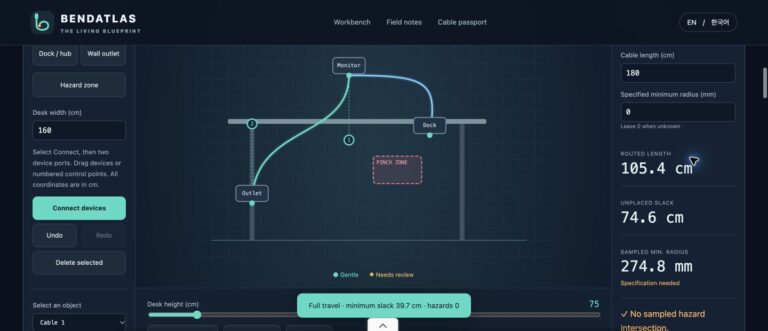
BENDATLAS
Cable Routing Planner: 7 Essential Checks for a Better Desk
Sketch desk cable routes and compare length allowance, sampled bend radius and standing-desk travel. See real BENDATLAS tests and what its model cannot establish.

SQUEAKSCAPE
Squeaky Door Tracker: 7 Smart SQUEAKSCAPE Checks
Track door noise windows, hinge observations and dated maintenance notes with SQUEAKSCAPE. Tested save behavior, status differences, local persistence and mobile controls.

Last Meter
Last Meter: 7 Essential Leftover Filament Checks
Plan the last grams of a spool with Last Meter. See tested weight/length conversions, reserve and purge arithmetic, tiny-print combinations and the limits of illustrative model weights.