This AI cost calculator separates actual payments from the value of finishing a job. AI·SaaS 비용계산소 estimates text API charges, allocated subscriptions and human review time in Korean won. Use it to plan a workflow and explain your assumptions.
The button opens a separate website in a new tab. The reviewed interface is Korean and results are in Korean won. This English walkthrough translates the decisions and controls; it does not imply an English mode exists.
Key takeaways
- Start with a finished deliverable, including every draft, retry and review step. One API request is usually the wrong unit for a workflow budget.
- Choose estimated usage, measured token totals or an actual monthly bill deliberately. These modes answer different questions and apply different adjustments.
- A lower allocated subscription cost is not a lower subscription payment. Keep cash outlay, task allocation and time-inclusive cost separate.
- All worked scenarios below use synthetic inputs checked on 5 November 2026, Korea Standard Time. They are not customer invoices or measured productivity gains.
On this page
Plan AI workflow costs in Korean won with AI·SaaS 비용계산소. Compare token assumptions, allocated subscriptions, cash outlay and review-time value using documented synthetic tests.
- Brand
- AI·SaaS 비용계산소
- Tool languages
- ko
- Verified date
- 2026-11-04
What the AI cost calculator does—and what to prepare
The most useful question is not “Which model has the lowest token rate?” It is “What does one acceptable, reviewed result cost under my workflow?” The AI cost calculator provides presets for blog articles, product descriptions and document summaries. Monthly job count, output scale and review minutes form the simple starting point. An expandable panel exposes model, usage mode, exchange-rate assumptions, fixed subscriptions and optional expenses.
Bring three small records before using it: a count of accepted deliverables, the total usage needed to finish each one, and the human minutes spent checking or revising it. Keep your subscription invoices nearby if you want to reconcile actual payments. Do not paste the invoices or their personal details into the tool; enter only the numerical amounts needed for the calculation.
| Korean control | Meaning | Decision |
|---|---|---|
| 사용량 계산 방식 | Usage calculation mode | Estimate, measured tokens or monthly bill |
| 실측 토큰 | Measured tokens | Entire accepted deliverable, all calls combined |
| 고정비 비율 | Fixed-cost allocation | Share assigned to this task, not a discount |
| 검토·수정 시간 | Review and revision minutes | Human effort, not model waiting time |
| 미포함 | Not included | An expense is missing, not necessarily zero |
No API key, account creation or purchase was required in our tests. We did not send prompts to any of the listed models or compare their output quality. The interface calculated scenarios from the numbers we entered.
7 checks before you trust an AI cost calculator result
- Define the finished job. Choose a deliverable you would accept, such as one reviewed product description. Count the research prompt, initial draft, corrections and final version together. Otherwise retries vanish from your estimate while still appearing on the bill.
- Choose the right evidence level. Use the estimated range before you have usage records; switch to measured totals after a pilot; use the actual monthly bill when special pricing makes a standard token calculation unsuitable. Do not present a range as measured Korean token usage.
- Separate input from billed output. In measured mode, enter all input tokens and all chargeable output, including billed reasoning where applicable. Do not enter Korean character counts or just the visible final paragraph. The source limits its comparison to 180,000 combined tokens per finished job.
- Use a consistent currency basis. Token modes start with dollar rates and a user-supplied KRW exchange rate. The example rate is not a live currency quote. Enter your own applicable payment assumptions; the tool does not decide your tax treatment.
- Allocate subscriptions without changing cash reality. If a ₩30,000 subscription supports several tasks, assigning half to this one makes its allocated fixed cost ₩15,000. The full payment remains ₩30,000 while you continue the subscription.
- Make omitted expenses explicit. Expand the cost panel and check image, search/tool and operating expenses. A blank means not included. Enter zero only when you intentionally exclude a category. Ensure a bill and an extra-cost field do not contain the same charge twice.
- Run a reconciliation check. Read allocated tool spending, time-inclusive work cost and full-subscription cash outlay separately. Compare the tool-spending components with your own arithmetic before using the result in a budget. Save only after the scenario and its assumptions make sense.
The AI cost calculator is most helpful when you can explain why you chose every nonzero number. If the estimate changes dramatically, find the changed assumption before interpreting it as a genuine saving. A model selection, an allocation percentage and a real cancellation have very different business consequences.
Our measured-token test: allocation is not cash saving
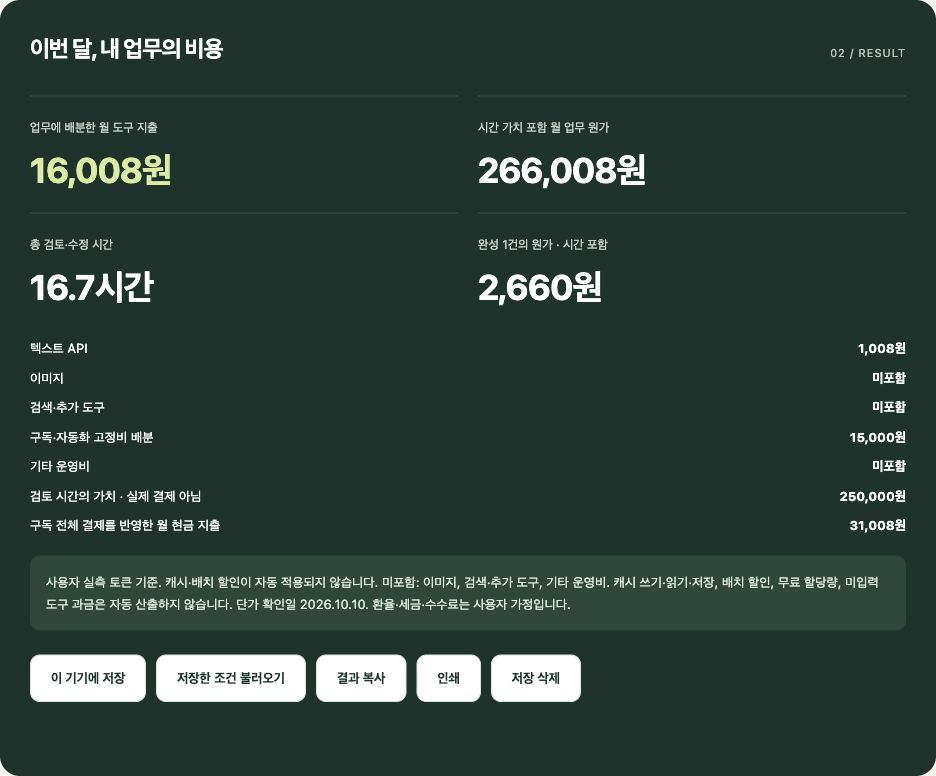
We entered 100 finished jobs, 6,000 input tokens and 3,000 output tokens per job, GPT-4.1 mini, ₩1,400 per US dollar, ten review minutes per job and ₩15,000 per hour. The subscription was ₩30,000 per month. Image, search and other operating costs were initially blank. These inputs deliberately test arithmetic; they are not a record of our publishing costs.
At the built-in standard rates of $0.40 input and $1.60 output per million tokens, the text calculation is ((6,000 × 0.40 + 3,000 × 1.60) / 1,000,000) × 100 × 1,400 = ₩1,008. Review time is 100 × 10 / 60 × 15,000 = ₩250,000. The screen rounds displayed won amounts and review hours.
| Test condition | Allocated tool spending | With review-time value | Cash outlay |
|---|---|---|---|
| 100% subscription allocation | ₩31,008 | ₩281,008 | ₩31,008 |
| 50% allocation, same work | ₩16,008 | ₩266,008 | ₩31,008 |
| 50% allocation; fee3%, extra tax10% | ₩16,142 | ₩266,142 | ₩31,142 |
We also set the rework multiplier to two in measured-token mode. API cost stayed ₩1,008: the measured totals were not doubled again. This matters because a completed-job total should already include the calls used for revisions. In estimated mode, by contrast, the multiplier is an additional usage assumption.
The fee-and-tax check produced ₩1,142 for API use, consistent with ₩1,008 × 1.03 × 1.10 = ₩1,142.064 before display rounding. That validates this synthetic calculation, not the correct tax or fee for any particular reader. The source applies these adjustments to the token-based API calculation, not automatically to every other entered cost.
Use actual bills when token arithmetic is the wrong evidence
Next we kept the 50% subscription allocation and entered a synthetic ₩50,000 monthly text API bill. The previous fee3% and extra-tax10% inputs remained in the form. The calculator correctly kept the bill at ₩50,000 rather than adding those adjustments again. Allocated tool spending became ₩65,000; time-inclusive work cost became ₩315,000; full-subscription cash outlay became ₩80,000.
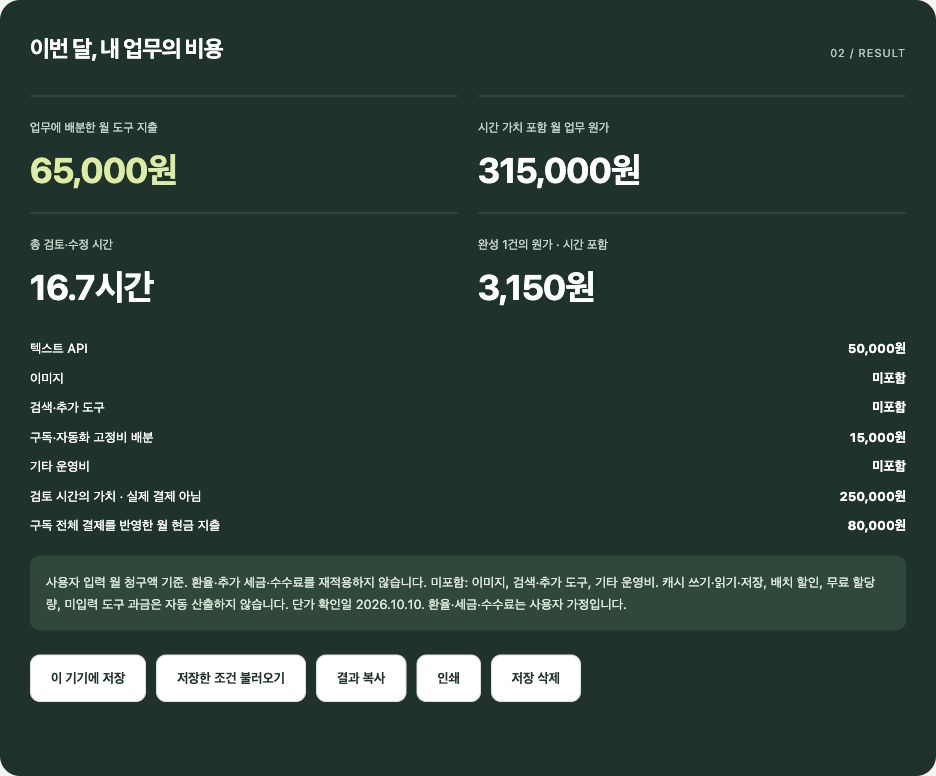
The model comparison disappeared, and budget capacity was replaced by an explanation that a monthly bill is not a proportional unit price. That is a useful limit: one historical total cannot prove how another model or a larger workload would be billed. For cached usage, batch arrangements, credits or other special terms, this mode can reflect the paid amount without pretending the tool reconstructed the provider’s entire billing system.
Keep subscription charges out of that text API total if you also enter them as fixed subscriptions. If one bill spans multiple workflows, decide how to isolate the relevant text API amount before entering it. The calculator can add numbers consistently; it cannot audit whether you assigned the same expense twice.
Time value and budget capacity answer different questions
The comparison widget lets you supply saved review minutes and an added AI cost per job. Entering four minutes saved and ₩100 added cost at ₩15,000 per hour showed ₩900 lower time-inclusive cost per job, with a break-even review saving of 0.40 minutes. Four minutes are worth ₩1,000 at that hourly assumption, so the arithmetic is straightforward.
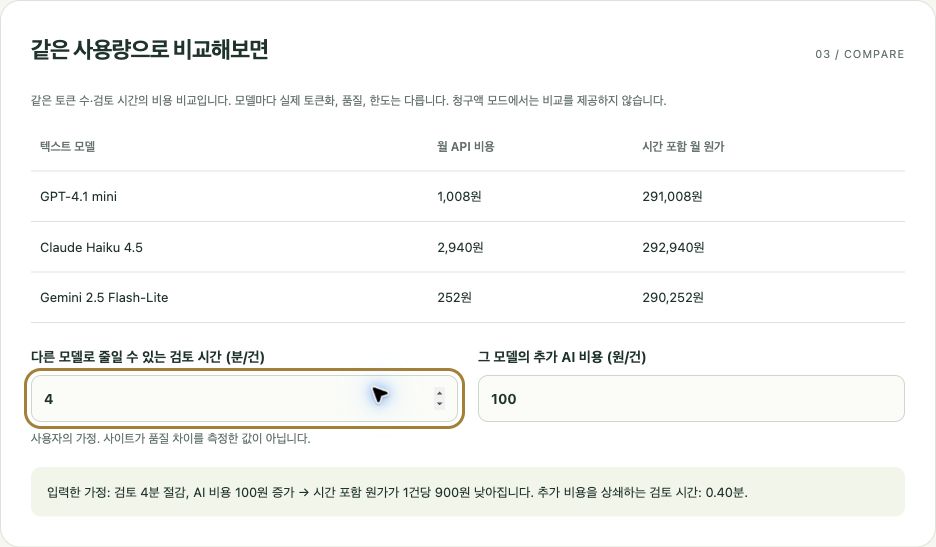
Treat this as a sensitivity question: how much review time would have to disappear before the higher tool price makes sense? Then time a small, comparable set of real tasks. Use the same acceptance standard and include failed attempts. Do not turn the hypothetical ₩900 into a claim that a particular model saves your business money.
The budget feature considers included variable costs, allocated fixed costs and a reserve percentage. It excludes human time value and service limits. In our earlier measured scenario with 50% subscription allocation, the displayed capacity was 2,976 jobs: floor((50,000 × 0.90 − 15,000) / 10.08). This is a conditional included-cost ceiling, not a forecast of accepted output, available human hours or API quota.
Subscription versus API: read the crossover conditionally
The original site also has a separate subscription-versus-API comparison. We pressed its compare button with the displayed synthetic defaults: subscription ₩30,000, allocation100%, API variable cost ₩120 per job, 100 monthly jobs and zero API fixed operating cost. It returned ₩12,000 monthly API cost and a monetary crossover near 250 jobs.
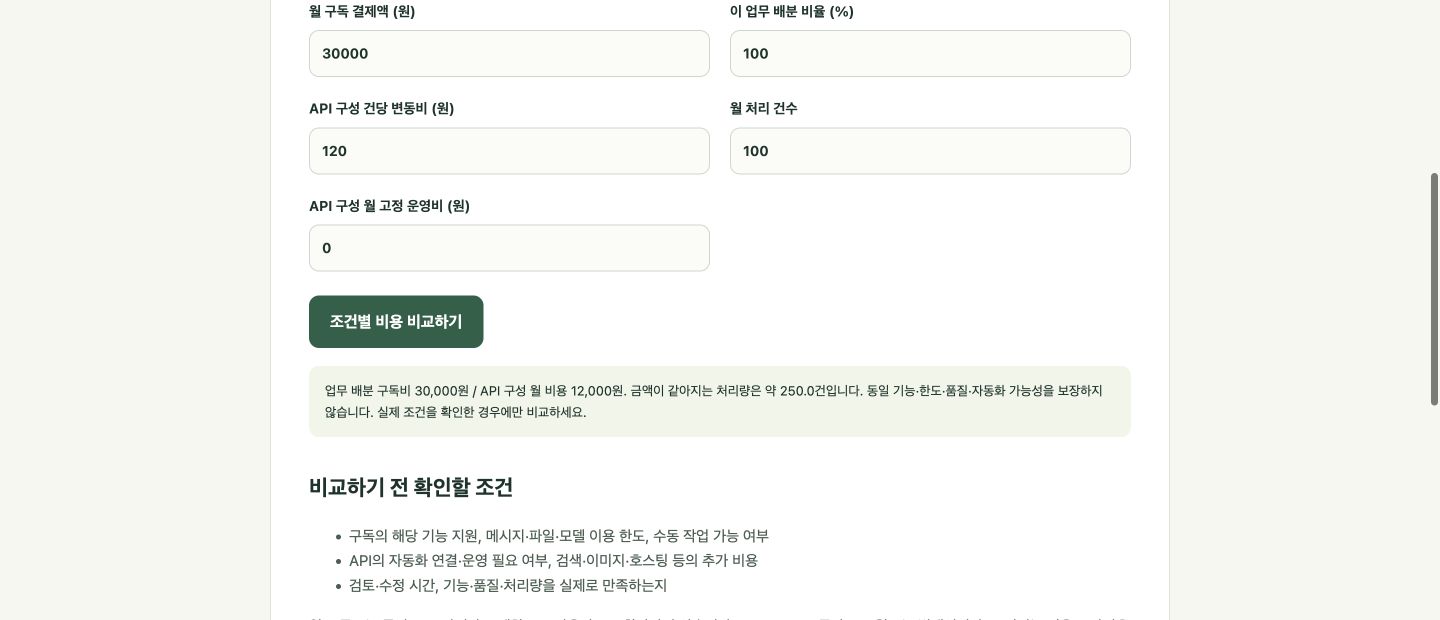
Before interpreting that crossing, check that both approaches can actually complete the same task. A subscription may have manual workflows or usage limits; an API workflow may require integration, hosting, search calls and maintenance. A price equality cannot establish functional equivalence. The page does not convert a subscription into a token entitlement or guarantee unlimited automated usage.
Rates, estimate ranges and other limits to keep visible
The original calculation methodology explains the assumptions and exclusions. The source labels its built-in price snapshot 10 October 2026. On 5 November 2026 KST we checked the linked official documents: GPT-4.1 mini listed $0.40 input/$1.60 output, Claude Haiku4.5 $1/$5, and Gemini2.5 Flash-Lite $0.10/$0.40 per million standard paid text tokens. These are dated references, not live quotes or recommendations to choose those models.
- Only three predefined text models are listed. This is not a complete current-market comparison, and availability or billing terms can change.
- The estimated range is 60–180% of a task baseline, with scale and rework assumptions. It is not a statistically validated Korean token distribution or confidence interval.
- Caching, batch discounts, free allowances and provider-specific tools are not automatically reconstructed. Some expenses require manual entry.
- Equal token counts and review minutes do not mean equal tokenization, accepted quality, context limits or output performance across models.
- The reviewed UI is Korean and uses KRW. No complete English UI, cross-device synchronization or live exchange-rate feed was verified.
A spreadsheet is preferable when you need custom models, detailed provider-specific charges or a reconciliation ledger. This AI cost calculator is faster for a bounded scenario with its supported assumptions. A provider’s usage report supplies actual usage; this tool adds allocation and time-value interpretation. Use the two together instead of asking either one to do the other’s job.
Saving, privacy and related reading
We saved the ₩50,000 bill scenario, reloaded the page and used 저장한 조건 불러오기 (“load saved conditions”). The tool restored the scenario and recalculated ₩65,000 allocated spending. Refresh alone had shown the default scenario: loading was an explicit step. We then removed only our synthetic saved test through 저장 삭제. No cross-device restoration was tested.
The original privacy notice says calculations run in the browser and the explicit save button stores conditions and results locally. No API key was requested. We verified the visible saving behavior, not the complete source or every network request. Blogger hosting and AdSense advertising are separate; ad slots were present. Local calculation does not establish that the entire website is offline, cookie-free or free of third-party processing.
This library and the original tool share a creator. This is a documented first-party walkthrough, not an independent third-party endorsement. See our editorial standards and How This Library Works. We link related introductions when their practical purposes connect. No other published cost-planning tool guide was available when this article was prepared.
AI cost calculator FAQ
Does “measured tokens” mean the tool measured my usage?
No. You supply those totals. In our tests they were deliberately chosen arithmetic inputs, not data collected from actual model requests.
Why is my cash outlay higher than allocated tool spending?
A subscription can be shared across tasks. The task gets only the chosen share, while cash outlay still includes the full subscription payment.
Should I add the rework multiplier to measured totals?
The tool did not multiply measured tokens again in our test. Include all calls in the measured job total; the multiplier belongs to estimated mode.
Does a blank image field mean images are free?
No. It means that cost is omitted. Enter an actual amount, or a deliberate zero if exclusion is appropriate.
Can the cheapest row tell me which model to buy?
No. The rows compare money under equal usage assumptions. They do not measure output quality, review effort, feature suitability or service limits.
Is the displayed time value a bill I must pay?
No. It is an economic assumption for comparing workflows. Actual wages, invoicing and payment obligations depend on your real situation, outside this calculator.
Can I transfer saved settings to another device?
We only verified save, reload and explicit load in one browser. The source says there is no automatic device synchronization; cross-device transfer was not tested.
Start with one finished job and one honest assumption
Open the AI cost calculator, record the assumptions for a single accepted deliverable and reconcile its components. Then compare one change: measured usage, subscription allocation or review minutes. A clear question and a traceable input are more useful than a large saving number with no evidence behind it.
Verified: 5 November 2026, Korea Standard Time. Direct browser interaction and actual screenshots. All numerical cases are synthetic tests. No real invoice audit, productivity benchmark, provider API call or independent network audit was performed.
A RELEVANT NEXT STEP
Tools with a useful connection
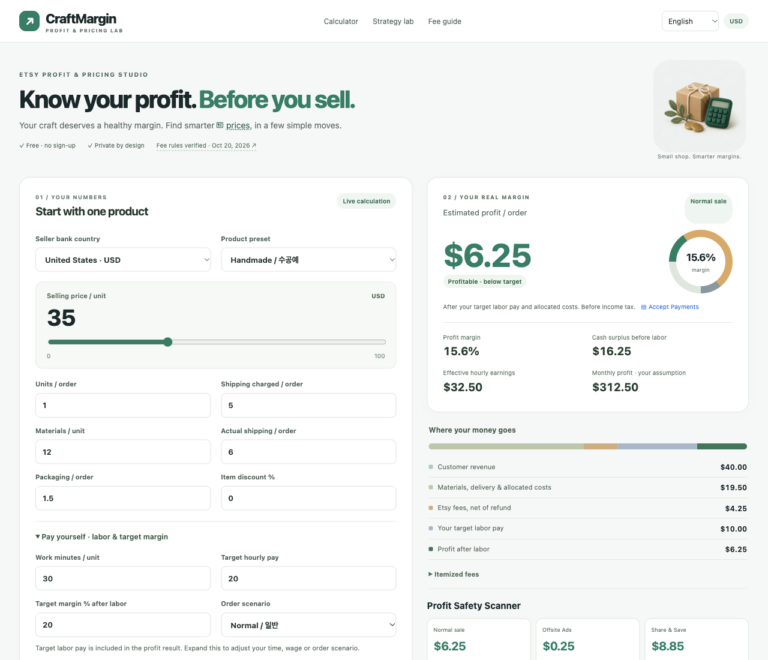
CraftMargin
Etsy Profit Calculator: 7 Smart CraftMargin Checks
Use CraftMargin to estimate Etsy profit after fees and labor. Tested examples explain discounts, free shipping, country rates and target pricing before you sell.
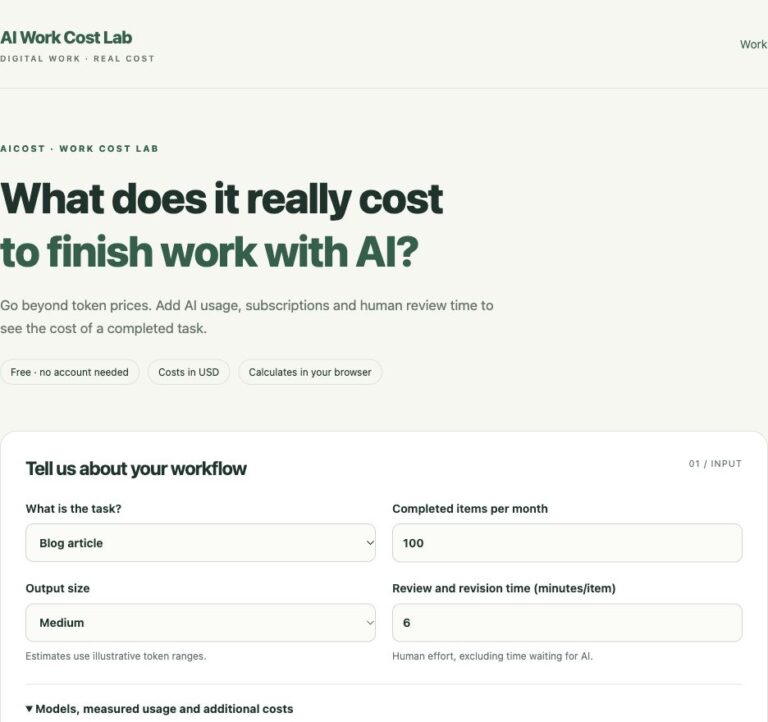
AI Work Cost Lab
AI Workflow Cost: 7 Smart Checks for Better USD Budgets
Plan AI workflow cost in USD with actual tested scenarios. Separate allocated subscriptions, cash payments, API usage and human review time in AI Work Cost Lab.
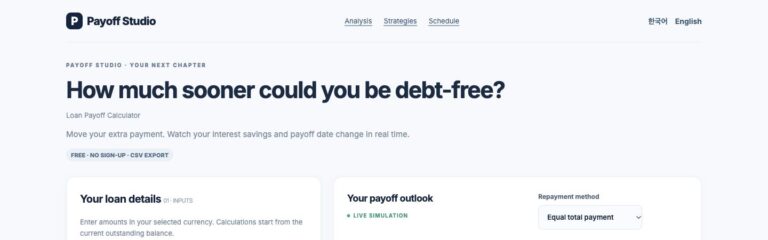
Payoff Studio
Payoff Studio: 7 Smart Loan Repayment Checks
Compare extra principal, interest, fees and payoff timing with Payoff Studio. Independently checked examples explain term shortening versus payment reduction, rounded results and the limits of this fixed monthly loan model.