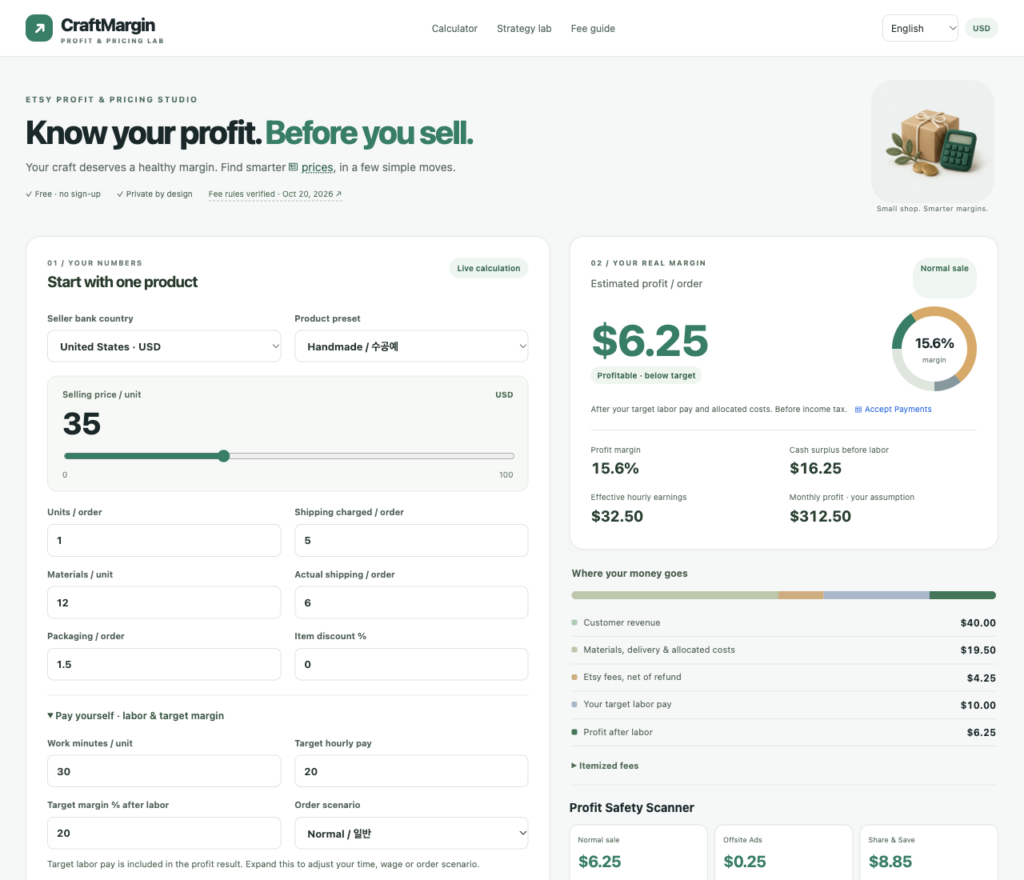
Use CraftMargin to estimate Etsy profit after fees and labor. Tested examples explain discounts, free shipping, country rates and target pricing before you sell.
- Brand
- CraftMargin
- Tool languages
- en, ko
- Verified date
- 2026-11-06
CraftMargin is an Etsy profit calculator for the moment when “materials cost twelve dollars” stops being a useful pricing strategy. It puts order fees, shipping, packaging and your own work in the same calculation, then lets you stress-test the result before offering a discount or free delivery.
Our practical finding: the supplied US example leaves $6.25 after a $10 labor allowance. A 10% item discount reduces that to $3.08; an attributed Offsite Ads order at that discounted price becomes a $2.39 loss. These are synthetic planning examples we operated in the browser, not sales from a real shop.
On this page
Key takeaways
- Start with your seller bank country. Changing the display language does not choose the appropriate payment-processing rate.
- Keep per-unit materials and work separate from per-order shipping and packaging. Otherwise a two-item order can quietly double the wrong costs.
- The headline profit already deducts your chosen labor pay. Cash surplus before labor is a different measure.
- Normal, Offsite Ads and Share & Save are separate scenarios, not benefits and charges to add together indiscriminately.
- The default 4% Share & Save input needs checking: eligible sellers may have a different promotional rate. We entered 6.5% separately after reviewing the current official terms.
What this Etsy profit calculator actually does
CraftMargin combines a live order calculator with a Pricing Strategy Studio. Its visible country choices cover the United States, South Korea, the United Kingdom, Canada, Germany, France and Australia, plus a custom setting. The interface switches between English and Korean. Product presets include handmade, digital downloads, print on demand, stickers and candles.
A preset is a starting point, not evidence that the tool knows your product. You still supply the price, quantity, delivery charges, costs, work time and desired hourly pay. The result separates customer revenue, costs, net Etsy fees, labor and residual profit. A scanner compares order-attribution scenarios alongside the main result.
The six strategy tabs are Discount map, Free shipping, Target price, Ads & $1 challenge, Product battle and CSV auditor. We directly tested the first three and the main calculator, country switch and results export. We did not validate every product-battle or CSV-import path. This Etsy profit calculator guide concentrates on the functions with reproduced results.
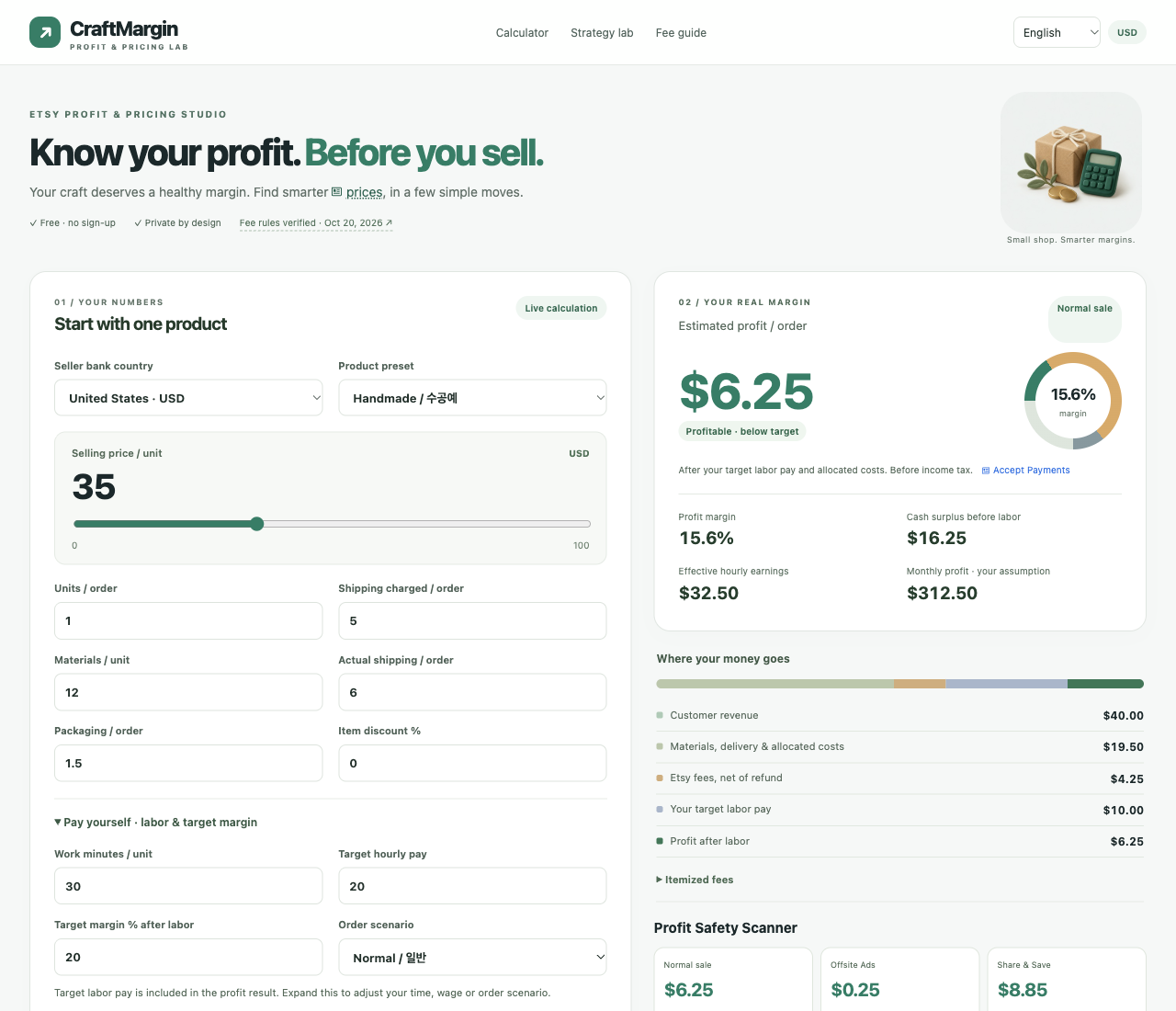
1. Prepare costs before touching the price
Before opening the calculator, gather one product’s material cost, average packing cost, likely shipping charge and the time needed to make and finish a unit. Include the time that is easy to forget: trimming, inspection, labeling or preparing a digital deliverable. Use a repeatable average rather than the fastest item you ever made.
- Per unit: selling price, materials and work minutes multiply with quantity.
- Per order: buyer shipping, actual shipping and packaging describe one parcel in this model.
- Per month: overhead is allocated using your assumed monthly order count. That count is an input, not a sales forecast.
- Exceptions: expected return loss, other costs, tax on fees and seller tax payable have separate manual fields.
A useful first pass is to write down what each number excludes. If materials cover only the finished item, add waste elsewhere. If your labor estimate covers production but not customer messages, either include that work in the average or allocate it consistently. Do not enter the same allowance twice.
For a digital product, setting shipping and materials to zero does not make production free. Divide design and update work across a realistic number of sales, or treat part of that work as overhead. Keep the assumption visible so that a change in expected demand can be tested later.
2. Choose the bank country, not the interface language
The Etsy profit calculator’s bank-country selection changes fee presets and account currency. Its own notice says that your existing money values are not converted. Switching from a USD account to a GBP or EUR example while retaining “35” changes the meaning of the input; it does not perform a currency exchange.
We checked the official country processing-fee table. It lists US processing at 3% + $0.25 and South Korea at 6.5% + $0.30 USD. Processing is additional to the transaction fee and can use a tax-inclusive payment base. Confirm the actual rate and applicable taxes for your account.
With the same $35 item, $5 charged shipping and unchanged costs, switching from US to South Korea changed our displayed profit from $6.25 to $4.80. The South Korea preset remained USD. That is a useful warning for Korean sellers: translating the interface and converting a budget to won are different tasks.
3. Read your Etsy profit calculator results
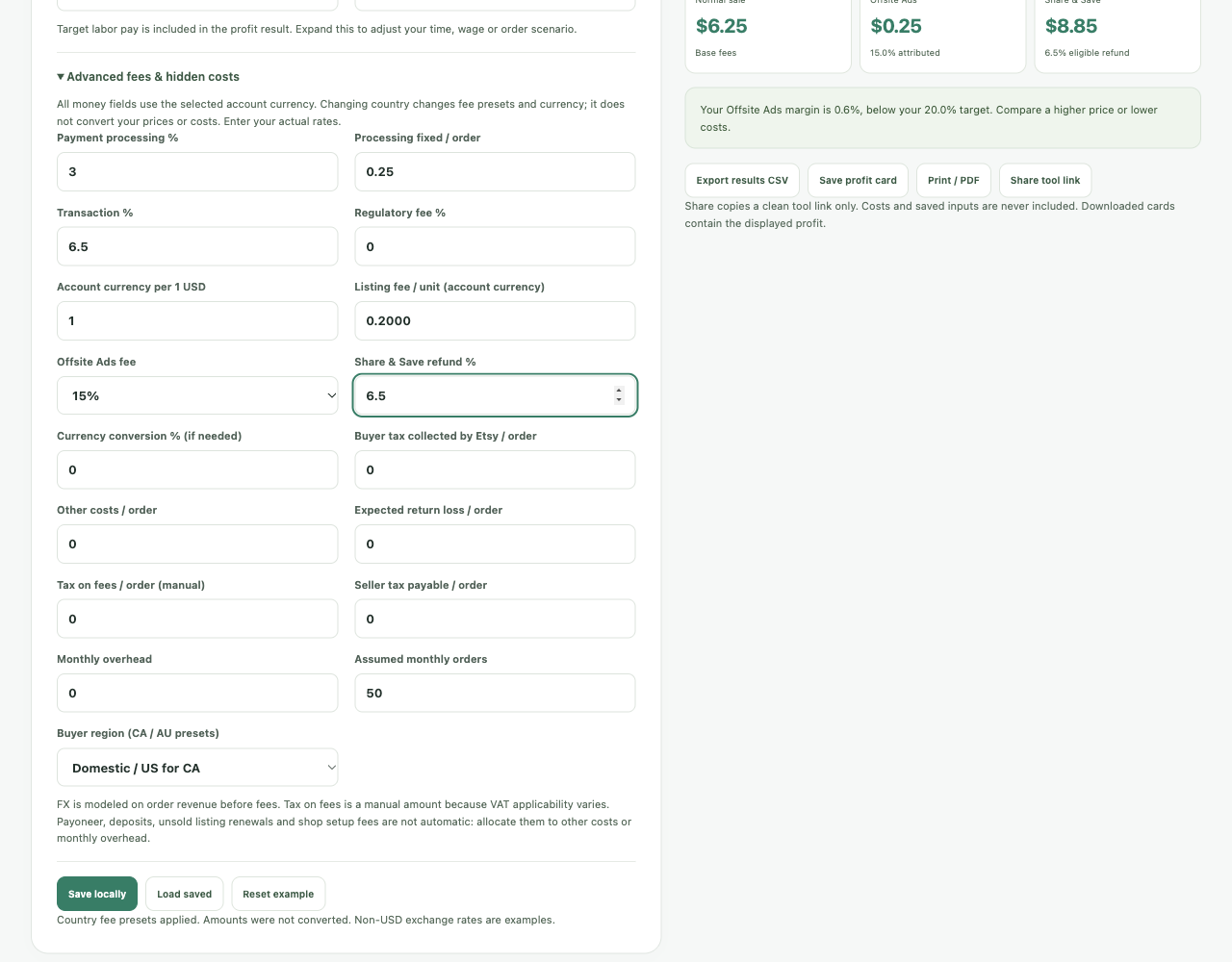
Use the following synthetic inputs with US bank country and the normal order scenario. Leave discounts and optional costs at zero. The example is designed to make the calculation auditable, not to recommend a selling price for a particular craft.
| Input | Value | How the model treats it |
|---|---|---|
| Item price / quantity | $35 / 1 | One item |
| Shipping charged / actual | $5 / $6 | One order |
| Materials / packaging | $12 / $1.50 | Materials per unit; packaging per order |
| Work / desired pay | 30 minutes / $20 per hour | $10 labor allowance |
| Target margin / monthly orders | 20% / 50 | Planning assumptions, not forecasts |
Customer revenue is $40. Materials, actual delivery and packaging total $19.50. Transaction, processing and listing fees total $4.25 under these inputs. Subtracting the $10 labor allowance leaves $6.25 profit, or 15.6% of revenue. The displayed $16.25 cash surplus is before labor; it is not an additional profit amount to add to $6.25.
The effective hourly figure of $32.50 uses that pre-labor surplus and the entered half hour. It is not a measured wage across your whole business. Time spent on photography, messages, failed products or bookkeeping changes the real interpretation. The displayed $312.50 monthly profit simply scales the current example to 50 assumed orders.
We also changed quantity to two. Revenue became $75 because the $5 shipping charge stayed per order. Materials, shipping and packaging totaled $31.50; labor became $20. The tool displayed $15.72 profit and $7.78 fees. The unrounded residual is $15.725: binary floating-point rounding can make the last displayed cent differ from a hand-rounded calculation. Reconcile real statements rather than treating this model as a settlement ledger.
4. Test a discount before announcing it
Enter a 10% item discount while retaining the single-item US example. Revenue falls to $36.50 because the $5 charged shipping is unchanged. CraftMargin displayed $3.08 profit after labor and an 8.4% margin. At a 15% attributed Offsite Ads rate, the scanner instead displayed a $2.39 loss.
That distinction is more useful than saying the sale is “only ten percent off.” The discount takes $3.50 out of item revenue, while materials, packing and the half-hour of work remain. Percentage-based fees fall slightly, but the remaining profit takes a disproportionate hit.
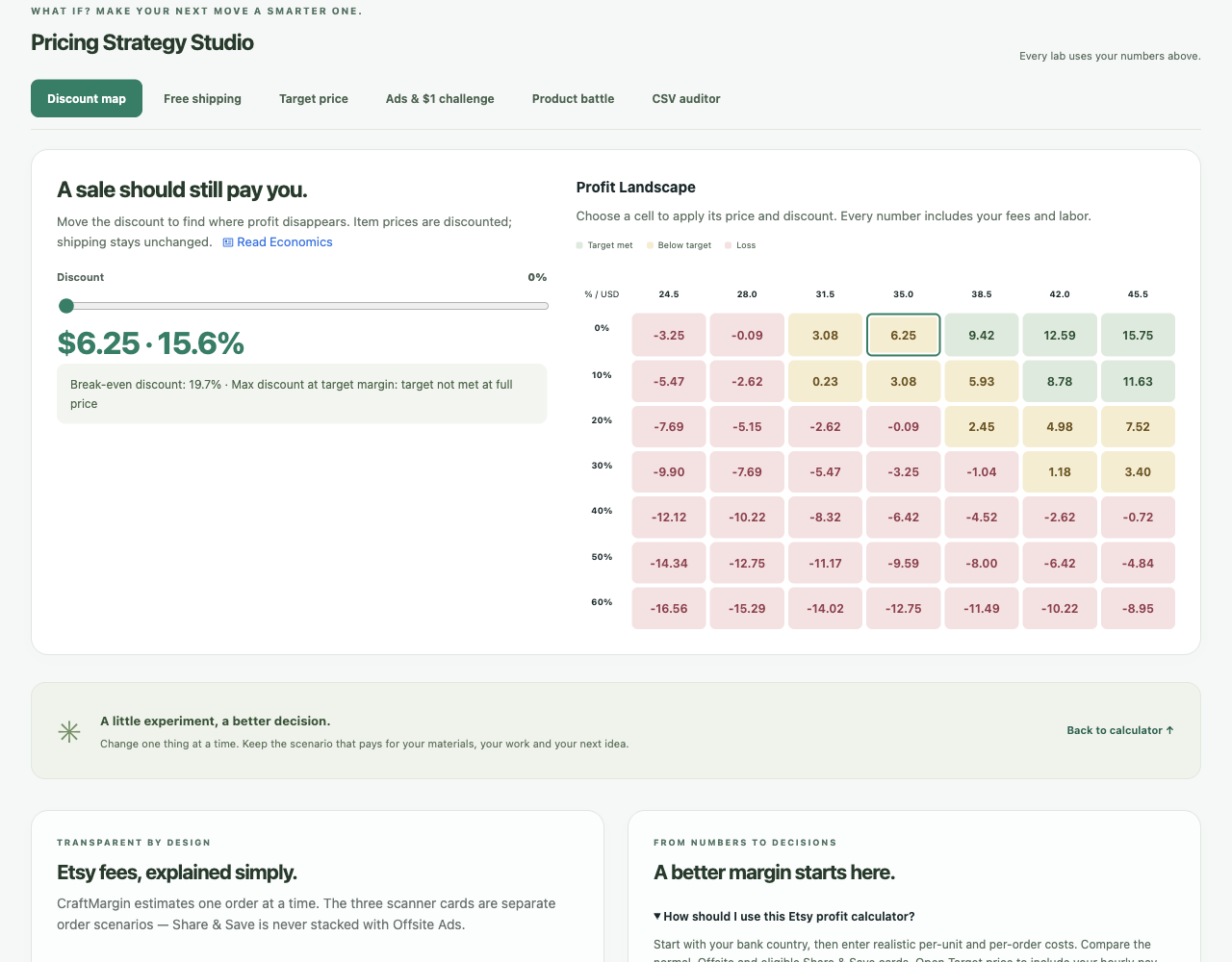
The Discount map showed a break-even discount of 19.7% for this example, while also warning that the 20% target margin was not met even at full price. Break-even is therefore not a safe promotion budget: at that boundary the modeled residual profit is almost gone. A sensible operating buffer depends on your own uncertainty and return risk.
Use the map to reject fragile offers before writing the promotion. Compare a smaller discount, a higher list price or genuinely lower costs. Do not justify a loss by assuming that an untested increase in volume will compensate for it.
5. Compare free shipping honestly
The Free shipping tab separates two decisions that often get mixed together: moving shipping into the item price, and absorbing it without changing the item price. They can sound identical to the buyer and produce very different margins.
| Strategy in our US example | Checkout total before tax | Profit after labor |
|---|---|---|
| Current $35 item + $5 shipping | $40.00 | $6.25 |
| Same checkout total, free shipping | $40.00 | $6.25 |
| Keep $35 item and absorb shipping | $35.00 | $1.73 |
| Two units at $35, free shipping | $70.00 | $11.20 per order; $5.60 per unit |
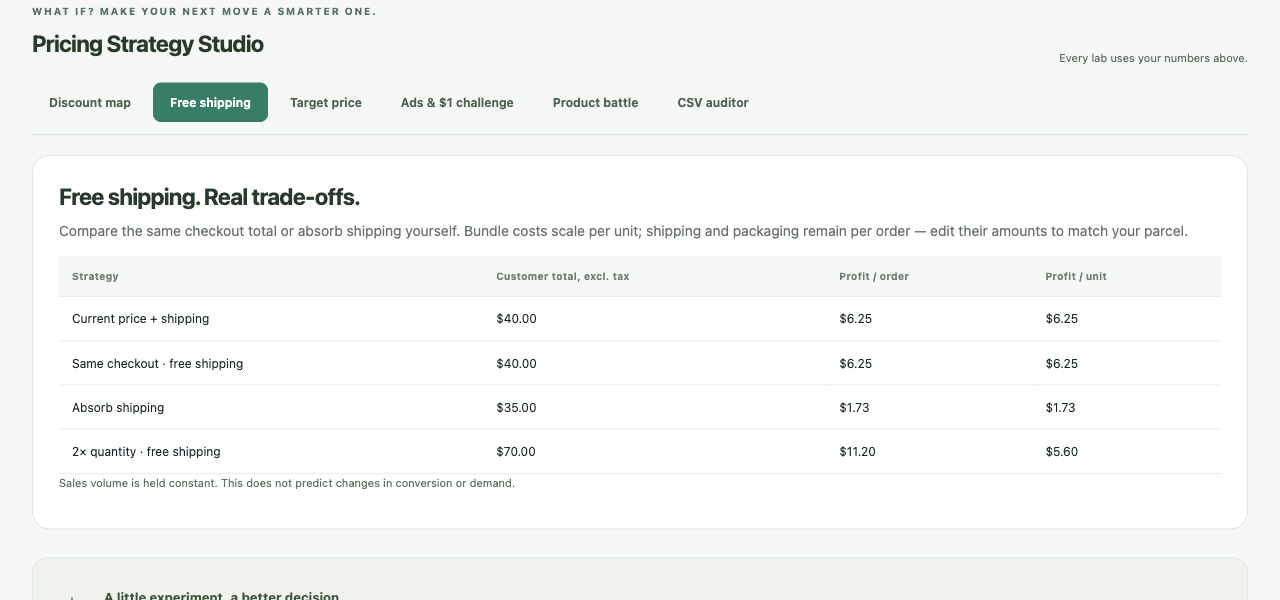
The two-unit row shares a parcel’s shipping and packaging costs in the model. Check whether your real parcel becomes heavier or needs different packaging before accepting that improvement. A bundle that crosses a shipping band can erase much of the apparent saving.
Compare the per-unit result as well as the order result. A bigger checkout can still be a worse use of production time. The tool holds demand constant; you need a separate, ethically run sales experiment to learn what buyers actually prefer.
6. Solve for pay and margin together
Return the discount to zero and open Target price. Under our normal US inputs, the solver displayed an effective unit price of $37.49 for a 20% margin after the $10 labor allowance. Its break-even item price was $28.10. These are different thresholds: covering modeled costs is not the same as achieving your chosen margin.
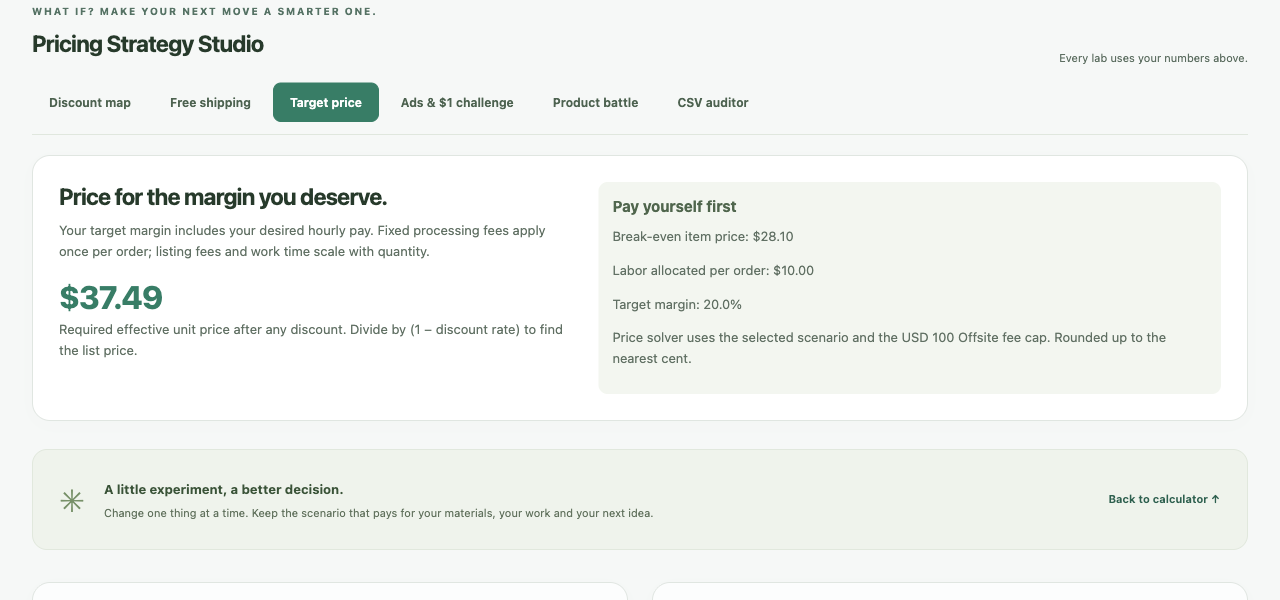
The target is an effective price after any discount. If you intend to give 10% off, divide the required effective price by 0.90 to obtain a candidate list price, then enter that candidate and discount into the main calculator again. Verify the actual displayed margin after cent rounding rather than relying only on the algebra.
Choose the scenario you are planning for. A normal-sale target does not prove that an attributed-ad sale meets the same margin. Equally, a price that covers one order’s expected costs is not evidence that the market will buy the product. Use the solver as a constraint check alongside product quality and demand research.
7. Check attribution and the eligible refund rate
The scanner’s three cards represent alternatives. In the undiscounted US example, normal profit was $6.25 and the 15% Offsite Ads case was $0.25. With the default 4% eligible refund input, Share & Save showed $7.85. Entering 6.5% changed that separate card to $8.85; it did not change the normal-sale result.
Check Etsy’s Offsite Ads rules for your actual 12% or 15% rate, attribution and fee cap. We did not test the cap boundary in this review. Do not apply an attributed-ad fee to every hypothetical order unless that is the scenario you deliberately intend to model.
Time-sensitive rate check: the official holiday promotion terms, checked November 6, 2026, specify a 6.5% refund for qualifying transactions during October 20, 2026, 9 a.m. Eastern to January 4, 2027, 9 a.m. Eastern. Eligibility and qualifying-link conditions apply; the promotional refund replaces the standard refund. Confirm your own invitation and account terms before entering that rate.
The Share & Save guidance also explains why an order attributed to an Offsite ad may not qualify. Do not stack the two scanner cases. The tool’s editable field is useful precisely because default assumptions and current account eligibility can diverge.
Export your Etsy profit calculator results
After verifying the scenario, use Export results CSV. Our downloaded file contained a single estimate row with USD currency, revenue 40, profit_after_labor 6.25, cash_before_labor 16.25, margin 0.15625, fees 4.25, labor 10 and monthly_profit 312.5. This confirmed that the export preserved the main estimate and an unrounded margin fraction.
Store a separate note with the input assumptions, bank country, eligible rate and verification date. A one-row results export is not a complete audit trail for every advanced input. It is also not evidence of a sale or a live reconciliation with Etsy.
- First run: enter realistic current inputs and record the baseline.
- Second run: change only one variable, such as discount or shipping policy.
- Third run: switch attribution scenario and check whether the offer still pays for labor.
- Before committing: compare your chosen input rates with the current account statement and official rules.
Save locally and Load saved are available, but we did not exercise them or overwrite any existing saved scenario. Print / PDF and a profit-card download are also visible controls; those export paths were not included in our pass criteria. Do not confuse a visible button with a tested feature.
Etsy profit calculator limitations and privacy
This Etsy profit calculator is a planning model, not accounting software, a tax return or a connection to your shop. It cannot know whether your packaging average, labor allowance or expected return loss is realistic. Non-USD exchange rates are examples rather than live quotes, and some fees and taxes require manual treatment.
Payoneer costs, deposit charges, unsold-listing renewals and shop setup fees are not automatically itemized. Allocate relevant amounts consistently to other costs or monthly overhead, using your actual account evidence. Country-specific tax handling and extreme inputs were not exhaustively validated. The one-cent quantity rounding observation is another reason to reconcile actual payments separately.
The tool’s own privacy explanation says calculations and imported CSV rows are processed on the device, with optional browser storage when Save locally is clicked, and no Etsy login or API connection. We verified that explanation on screen, not the complete network implementation. Blogger hosting and Google advertising were present. Therefore “local calculation” must not be read as “no cookies, requests or third-party tracking.” Avoid entering customer identifiers or confidential order records.
Related tools for a small-shop workflow
- If your workflow uses paid writing or image tools, use the AI cost calculator to examine that separate expense, then allocate a consistent amount here without double counting.
- For organizing your own product notes into marketing drafts, see VoiceCraft Studio. Review the wording yourself; it does not validate price or sales claims.
- If you sell printed objects, Benchy Failure Detective can support print troubleshooting before you estimate waste. It does not calculate your manufacturing cost.
These tools and CraftMargin belong to the same creator’s project. Related introductions stay on this library; the CraftMargin launch button opens a separate one-page site. Choose the next tool only when that task is part of your actual workflow.
Frequently asked questions
Which Etsy profit calculator inputs should I update first?
Check bank country, actual payment fees, production time and delivery costs before testing an offer. Recheck the eligible refund rate whenever a promotion changes.
Is CraftMargin an official Etsy tool?
No. Its own footer identifies it as independent and not affiliated with or endorsed by Etsy. Check official policies and your account for binding rates and eligibility.
Why is my payout different from the profit shown here?
A payout and modeled economic profit have different boundaries. The calculator subtracts entered production, shipping and labor costs even when those costs were paid elsewhere or at a different time. It also depends on manual allowances and your selected scenario.
Can I use it for Korean sellers?
A South Korea preset and Korean interface are available. The tested preset uses USD and different processing fees from the US example. It does not automatically convert costs from won or calculate every Payoneer-related expense.
Does a green cell guarantee a successful price?
No. It only means the modeled result meets the selected margin under your inputs. It says nothing about customer demand, product-market fit or your future order mix.
Can I use the monthly profit as a forecast?
No. It scales the scenario using the number of orders you enter and any allocated overhead. It does not predict traffic, conversion, seasonality or capacity.
Verification and official references
Direct browser verification: November 6, 2026. We tested bank-country changes, quantity, item discount, normal/ad/refund comparisons, discount map, free-shipping comparison, target-price output, CSV results export and the Korean interface at 390px. All figures in this guide use synthetic inputs. Source rate documentation was checked separately from the tool’s own October 20 badge.
Consult the Fees & Payments Policy for the broader fee framework, alongside the official processing, Offsite Ads and Share & Save references above. Rates and promotions can change. For our review method, see Editorial Standards.
Ready to check one product? Open CraftMargin’s Etsy profit calculator ↗, enter your bank country and actual costs, then compare the normal and attributed-order cases before making an offer.
A RELEVANT NEXT STEP
Tools with a useful connection
AI·SaaS 비용계산소
AI Cost Calculator: 7 Smart Checks Before You Budget
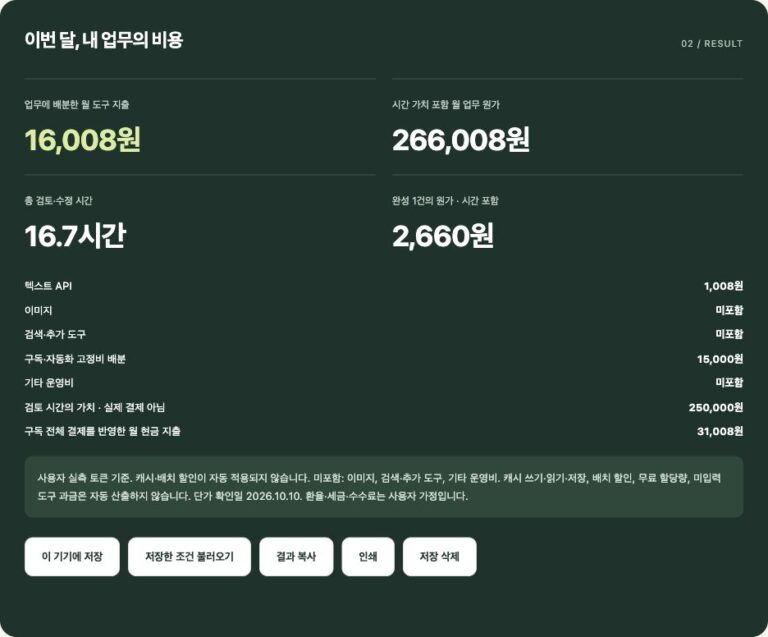
Plan AI workflow costs in Korean won with AI·SaaS 비용계산소. Compare token assumptions, allocated subscriptions, cash outlay and review-time value using documented synthetic tests.

VoiceCraft Studio
Content Package Generator: 7 Smart VoiceCraft Checks
Use VoiceCraft Studio as a content package generator for editable blog, social, summary, checklist and HTML drafts. See actual text tests and SourceGuard’s limits.
Benchy Failure Detective
Benchy Troubleshooting: 7 Essential Checks for Failed Prints
Use Benchy Failure Detective to turn visible FDM print symptoms into rule-based hypotheses and one-variable test plans. See our actual interface tests, language differences and local-save limits.