AI Work Cost Lab is an AI workflow cost calculator for USD budgets. It combines text API usage, subscriptions, extra tools and human review time around a completed item. This guide uses reproducible synthetic inputs to explain three different totals: allocated spending, cash spending and cost including time.
Verified 10 November 2026 in Chrome, with a fresh 390 × 844 mobile viewport. Screenshots show actual calculator results from invented test inputs, not customer bills or measured productivity gains. The interface is English; its Korean link opens a separate KRW calculator.
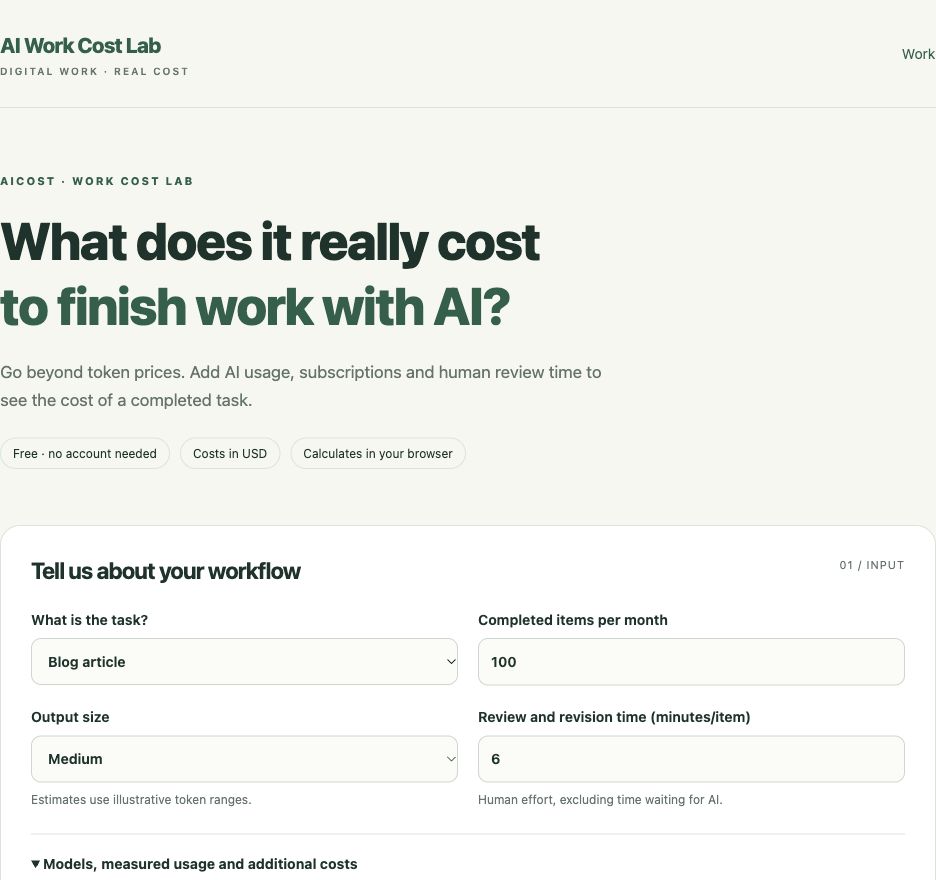
Plan AI workflow cost in USD with actual tested scenarios. Separate allocated subscriptions, cash payments, API usage and human review time in AI Work Cost Lab.
- Brand
- AI Work Cost Lab
- Tool languages
- en
- Verified date
- 2026-11-09
Table of Contents
Key takeaways
- Use the tool for a finished workflow, including retries and human revision. A single request can understate the resources required to finish one accepted item.
- Choose illustrative estimates, measured tokens per item or an actual monthly text API bill. They apply different assumptions and offer different comparisons.
- Our synthetic measured-token test returned $45.15 allocated spending, $245.15 including time and $75.15 cash spending. Allocating 25% of a subscription did not reduce its full payment.
- The calculator handles USD inputs in an English interface. Advertisements and hosting are separate from its stated browser-side calculation and optional local save.
What this AI workflow cost calculator does
The tool addresses a practical accounting mismatch: the API rate is quoted per million tokens, subscriptions are paid monthly and human review happens in minutes per deliverable. AI Work Cost Lab brings those units into a monthly workflow estimate and a cost per completed item. It does not run a language model, judge the output or connect to your billing account.
The main page offers Blog article, Product description and Document summary tasks; short, medium and long output assumptions; monthly volume; review time; three text-model choices; and additional cost fields inside an expandable section. The result separates allocated subscriptions from the full cash payment. A comparison table holds token counts and review time constant across the listed models. Another section estimates how many items fit a tool budget with a reserve.
The supported language on this domain is English. The header’s 한국어 link goes to aicost.kioptrix.com, a separate calculator whose results are in Korean won. Changing domains is therefore a currency and tool decision, not a translated view of the same USD scenario. This article reviews token.kioptrix.com specifically; the related guide below covers the KRW edition.
Prepare a completed-item cost record
Define “completed” before choosing a model. For a product listing, that might mean an accepted description after factual review and revisions. For a summary, it might mean a document that has passed a check against the source. Count completed items rather than raw requests. Otherwise repeated drafts can inflate the denominator and make the cost per useful result look artificially small.
Prepare monthly volume, input and output usage across all calls per accepted item, review minutes, an hourly time assumption, subscription payments and an allocation rationale. Add image and search charges separately when they are part of the workflow. Label every number as measured, billed or assumed. A plausible number is still an assumption until it comes from your records.
For an initial study, collect several representative completed items and keep the rejected drafts in the usage totals. Use a consistent boundary: the same kind of source document, acceptance standard and review steps. The calculator does not establish a statistically representative sample or verify your measurements. Its value is making the cost boundary explicit enough for another person to challenge or reproduce.
Choose the right calculation mode
| Mode | Useful evidence | Important boundary |
|---|---|---|
| Illustrative task estimate | Task, size and rework assumption | 60–180% range is a planning scenario, not a confidence interval |
| Measured tokens per completed item | All relevant input/output tokens per finished item | Rework should already be in the entered totals |
| Actual monthly text API bill | Final USD text API charge | No automatic cross-model comparison or budget capacity |
The methodology lists medium presets of 6,000 input and 3,000 output tokens for an article, 1,200 and 500 for a product description, and 10,000 and 1,500 for a summary. Short uses half and long uses twice the preset. These are illustrative task assumptions, not measured English or Korean averages. The estimate-mode multiplier adds expected rework and context usage.
Measured mode is more specific only when its evidence is better. Enter tokens across the complete workflow, including retries and billable reasoning where applicable. The method says the rework multiplier is not applied again in this mode. Do not enter only the successful final request and expect a second multiplier to recover the missing calls. Character counts cannot supply exact token totals.
7 checks for a better USD budget
- 1. Confirm currency and period. All money inputs here are USD. Keep monthly subscription costs separate from per-item image and search costs. Do not paste a KRW amount into a USD field.
- 2. Choose a mode deliberately. Open Models, measured usage and additional costs. Use presets for an early scenario, measured tokens for a tracked workflow or bill mode for a final monthly text charge.
- 3. Set the finished-item volume. Enter the number of accepted deliverables per month. Keep this denominator consistent with the token and review-time records.
- 4. Add human effort. Review and revision minutes exclude waiting for AI. Multiply active human work by an explicit hourly value, while remembering this value is not necessarily a new cash payment.
- 5. Separate allocation from payment. Enter the full monthly subscription and the share assigned to this workflow. A lower allocation changes the workflow total, not the amount charged to your card.
- 6. Include extras and fees once. Enter image/search costs per item and other operating costs per month. API fee and tax assumptions apply sequentially in token modes, while a final actual bill must already include them.
- 7. Calculate and inspect every total. Check allocated spending, time-inclusive cost, cash spending, included/excluded costs and the rate date. Use Copy results for a short summary and keep a separate detailed input record.
Our measured-token test and arithmetic
We entered a synthetic monthly workflow of 100 completed items using the selected GPT-4.1 mini rate. Each item used 1,000 input and 500 output tokens, six review minutes and a $20 hourly value. Additional assumptions were a 10% API fee, 10% additional API tax, a $40 subscription allocated at 25%, images at $0.20/item, search at $0.10/item and $5 in other monthly operating costs. The fee and tax percentages are arithmetic test inputs, not advice about an applicable tax rate.
| Result field | Actual screen value | Reason |
|---|---|---|
| Text API | $0.1452 | Token base $0.12 × 1.10 × 1.10 |
| Allocated tool spending | $45.15 | API + $20 images + $10 search + $10 allocation + $5 other |
| Review time and value | 10 hours; $200.00 | 100 × 6 minutes; valued at $20/hour |
| Cost including time | $245.15; $2.45/item | Allocated cost plus time value |
| Monthly cash spending | $75.15 | Uses full $40 subscription rather than $10 allocation |
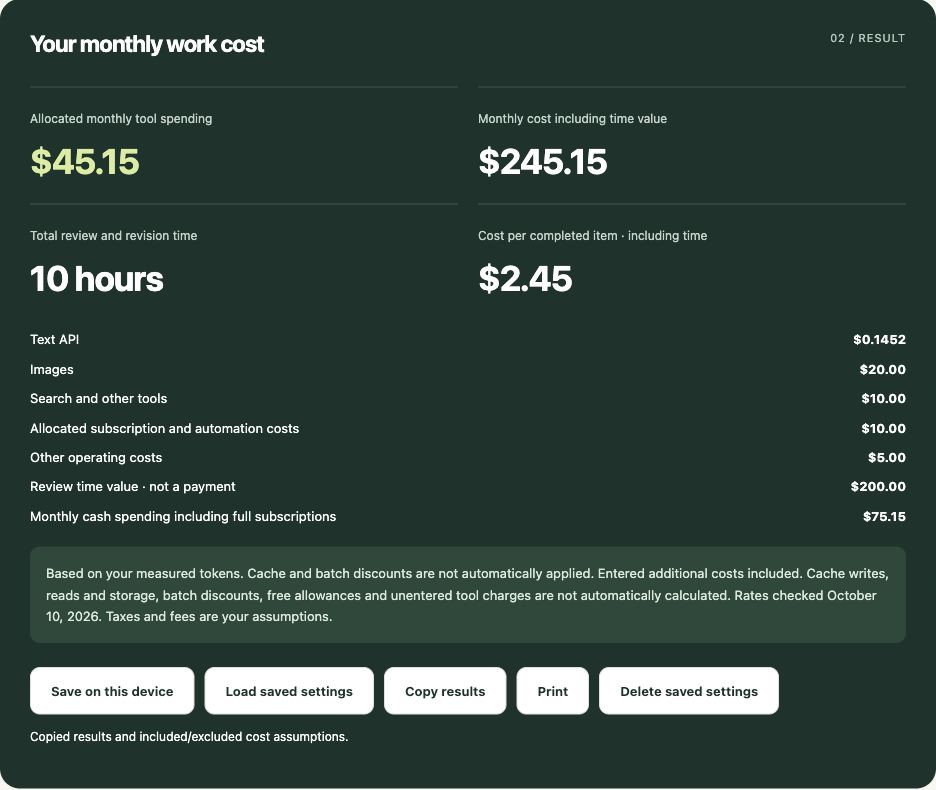
Using the displayed rates of $0.40 per million input tokens and $1.60 per million output tokens, the text base is (1,000 × 0.40 + 500 × 1.60) ÷ 1,000,000 × 100 = $0.12. Sequential 10% adjustments produce $0.1452, not $0.144. This small difference confirms how the selected fee and tax inputs were applied in the tested calculation.
The subscription contribution is $40 × 25% = $10. Allocated spending is therefore $45.1452 before display rounding. Review adds $200, and replacing the $10 allocation with the full $40 payment gives $75.1452 cash spending. These independently checked arithmetic relationships match the displayed amounts. They do not validate an actual provider invoice, the representativeness of the token counts or the quality of the underlying work.
Actual bills without duplicate fees
Next we changed only the usage mode and entered a synthetic final monthly text API bill of $12.34. The earlier 10% fee and 10% tax settings remained in the form. After calculating, text API cost stayed $12.34, allocated spending became $57.34, cost including time became $257.34 and cash spending became $87.34. The page explicitly stated that extra taxes and fees were not added again.
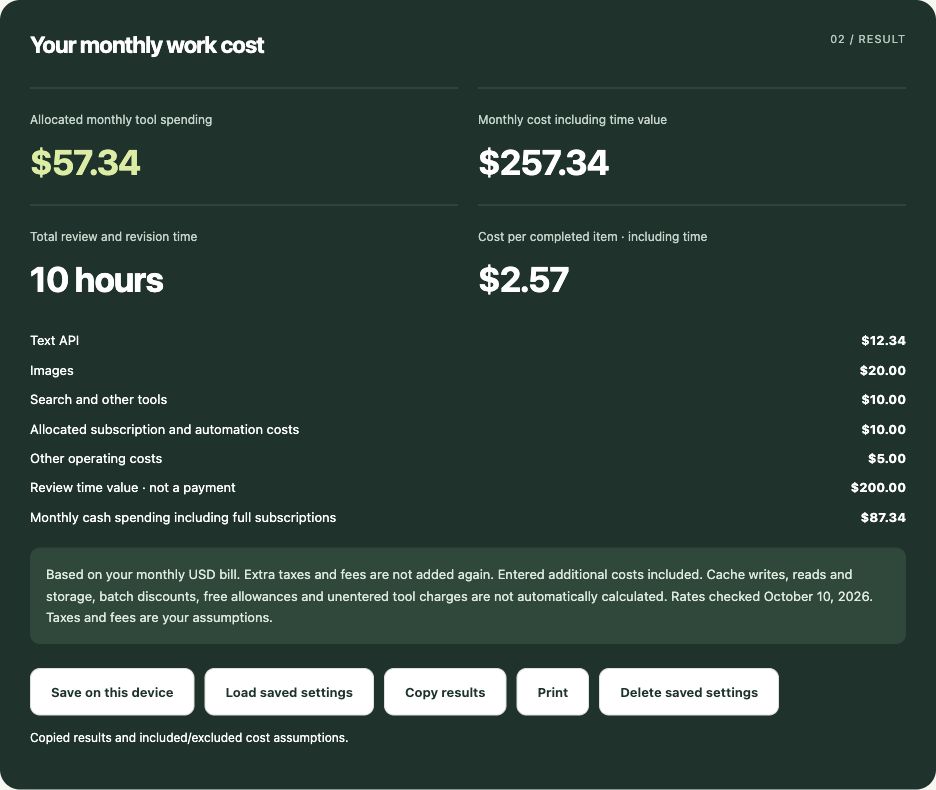
Model comparison disappeared and budget capacity became unavailable in bill mode. That is a useful boundary: a single monthly bill is not a known variable rate for a hypothetical volume. Do not divide a mixed invoice by the item count and treat the result as a universally scalable token price. Discounts, credits, fixed charges or unrelated workloads may be inside that bill.
Before using bill mode, establish what the bill includes. If it already contains a charge you also enter as an image, search or subscription cost, the total can double-count it. Conversely, a text-only bill does not automatically include your separate image service. Reconcile the field boundary with the billing record rather than relying on a field name alone.
Review time and budget capacity
In the measured-token test, a $50 monthly tool budget with a 10% reserve left $45 available. Allocated fixed costs were $15: $10 of subscription plus $5 other operating cost. The included variable cost was $0.301452 per item. Flooring ($45 − $15) ÷ $0.301452 gives 99 items, which matched the screen. This capacity uses allocated costs, excludes time value and is conditional on unchanged pricing and service limits.
The same example has $45 of full monthly fixed cash costs before any variable use: the $40 subscription plus $5 operating cost. A $50 budget after a 10% reserve leaves no room for positive variable costs on that full-payment basis. Thus “99 items” is not a promise that the whole business can pay all bills from $50. Read the allocation assumption before using capacity for a cash decision.
We also entered four review minutes saved and $0.10 additional AI cost per item. At the chosen $20 hourly value, the page reported a $1.23 lower time-inclusive cost per item and a 0.30-minute offset threshold. Four minutes is worth about $1.3333 under that assumption, minus $0.10. This is a conditional calculation; the site did not measure those minutes or establish that any model delivers the saving.
A useful follow-up is to time the active review for two workflows using the same acceptance standard, then replace the assumed saving. Keep waiting time and active work distinct. If output quality changes, compare accepted items and revision requirements as well as time. A lower token bill with substantially more checking can be a poor operational trade even when the text-only comparison looks attractive.
Subscription versus API decisions
The separate Subscription vs API page accepts a subscription payment, allocation percentage, API variable cost per item, completed volume and API fixed operating cost. Its default figures are clearly labeled illustrative. We operated its Compare conditional costs button and observed a conditional cost comparison; we did not purchase or connect either type of service.
Use that page only after confirming both routes can perform the required work. A subscription’s interface, usage limits and manual steps are not automatically interchangeable with API automation. A financial crossover cannot establish access to the same model, equivalent output quality or sufficient capacity. Keep integration and operation costs in view, and compare the full payment when deciding which recurring charge can actually be removed.
For a small team, allocation can still answer a useful internal question: how much of a shared tool belongs to this workflow? Write down the allocation basis, such as a consistent usage share, and apply it across alternatives. Avoid changing the allocation simply to make a preferred option look cheaper. Cash planning and internal cost attribution can both be valid while producing different totals.
Rates, mobile behavior and privacy
The calculator displayed three models and a rate-check date of 10 October 2026. Treat that as a published snapshot, not a live survey of all currently available models. During this review, the official GPT-4.1 mini page showed the same standard input/output rates used in our arithmetic and marked the model Deprecated. The official Claude Haiku 4.5 page marked it Legacy. Verify model status and your actual rate before planning new deployment.
The tool does not automatically model cache writes, reads and storage, batch discounts, free allowances or all provider-specific tools. Additional fields can account for known charges, and bill mode can represent a final charge, but neither fixes an unclear cost boundary. The methodology also limits comparison to 180,000 total tokens per completed item; this is a calculator boundary, not a guarantee about every provider’s context or service limits.
At 390 × 844, a fresh page fitted the viewport without horizontal overflow. Visible form fields were approximately 312 pixels wide. We changed monthly volume to ten and calculated again: the default estimate showed $55.04–$55.13 including time and 1.7 review hours. This verifies a narrow-screen calculation in Chrome emulation, not physical-phone usability across all devices. Ads, including an interstitial, interrupted the session; only their close controls were used.
The privacy page says calculations stay in the browser and calculator inputs are not sent to the operator or an AI API. No API key or account was required in our tests. Optional Save is described as storing settings, results, rate date and timestamp locally; Load recalculates using published rates. We verified Copy results and its clipboard text, but did not test Save/Load persistence or Print. The copied text contained headline totals, volume, selected model, mode and cost notes; keep exact input details separately.
Browser-side calculation does not make the whole page free of third-party processing. The policy separately discloses Blogger hosting, AdSense, cookies and device/ad interaction data. Read the tool privacy policy for that distinction. We did not conduct a network audit, test offline operation or verify cross-device synchronization.
Related tools and the KRW edition
If your working records and budget are in won, use our AI·SaaS 비용계산소 guide. It covers the separate Korean-interface KRW calculator. The current guide is for English-interface USD accounting. Keep currency labels attached to saved notes; matching field concepts do not make the numeric inputs interchangeable.
A spreadsheet is another practical route when you need multiple clients, changing exchange assumptions or a detailed audit trail. AI Work Cost Lab is quicker for one transparent scenario; a maintained spreadsheet can preserve every row and version. Neither approach supplies missing usage measurements. Start with the same completed-item definition, then choose the format that makes review easier.
Frequently asked questions
Does the tool count tokens from my text?
No text-tokenization input was used in the reviewed workflow. The presets are illustrative; measured mode expects token totals from your records. It does not convert character counts into guaranteed exact usage.
Why is cash spending higher than allocated spending?
Allocation assigns only a share of a subscription to the workflow. Cash spending includes the full subscription payment. In our test, $40 paid versus $10 allocated explains the $30 difference.
Is the estimate range a statistical confidence interval?
No. The methodology defines a 60–180% planning range around illustrative preset usage. It is not a measured language benchmark or a guarantee that your actual workload falls inside it.
What does a blank extra-cost field mean?
The page labels blank image, search and operating fields Not included. An explicit zero records intentional exclusion. Neither option proves that a real workflow has no such costs.
Can I choose the best model from the cheapest row?
The comparison holds usage and review time constant. It is a cost comparison under shared assumptions, not a quality evaluation. Availability, different tokenization and human rework still need separate evidence.
Build one transparent cost scenario
Open the AI workflow cost calculator with one accepted deliverable in mind. Choose evidence you actually have, enter USD consistently and check the three totals before copying the summary. Replace assumptions as records improve, while retaining a clear note of what the calculation excludes.
A RELEVANT NEXT STEP
Tools with a useful connection
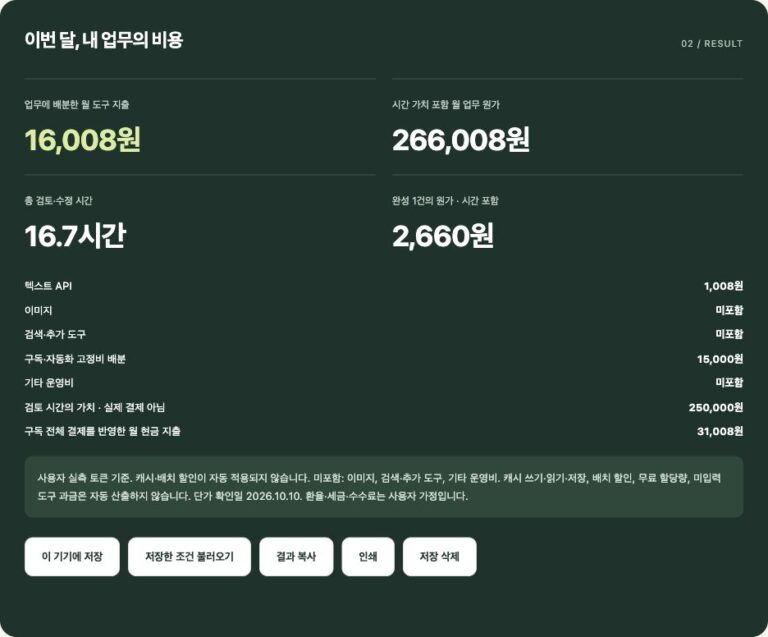
AI·SaaS 비용계산소
AI Cost Calculator: 7 Smart Checks Before You Budget
Plan AI workflow costs in Korean won with AI·SaaS 비용계산소. Compare token assumptions, allocated subscriptions, cash outlay and review-time value using documented synthetic tests.
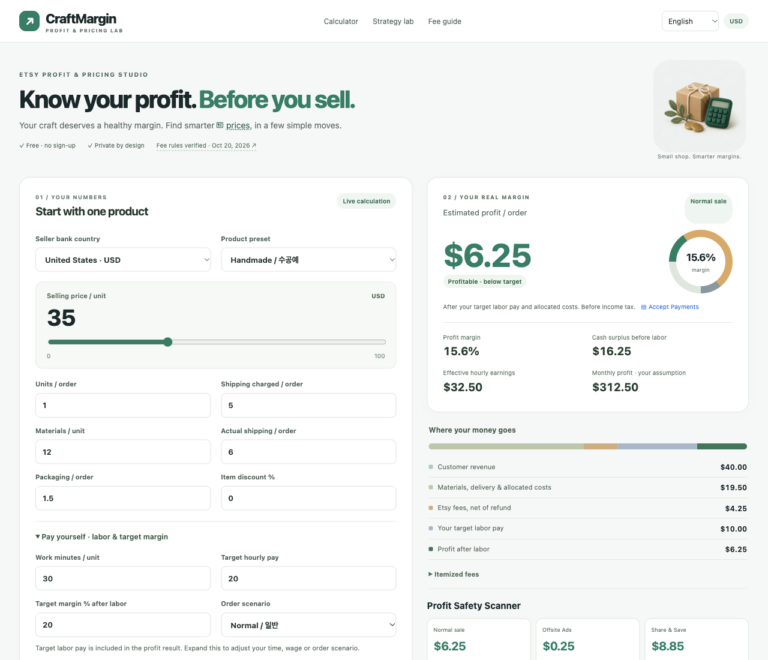
CraftMargin
Etsy Profit Calculator: 7 Smart CraftMargin Checks
Use CraftMargin to estimate Etsy profit after fees and labor. Tested examples explain discounts, free shipping, country rates and target pricing before you sell.
Payoff Studio
Payoff Studio: 7 Smart Loan Repayment Checks
Compare extra principal, interest, fees and payoff timing with Payoff Studio. Independently checked examples explain term shortening versus payment reduction, rounded results and the limits of this fixed monthly loan model.