Photo comparison becomes useful when the camera setup, reference and date stay consistent. Succulent Stretch Tracker brings manual alignment, relative measurements, a local observation journal and light-observation plans together. Use it to record visible changes and care adjustments while keeping plant-health interpretation separate from the numbers.
Verified 12 November 2026. We tested the English and Korean pages with clearly labeled artificial calibration charts, not plant photographs. We checked manual measurements, saved journal entries, a seven-day plan, reload and alignment changes. No real succulent growth, recovery or diagnosis was tested.
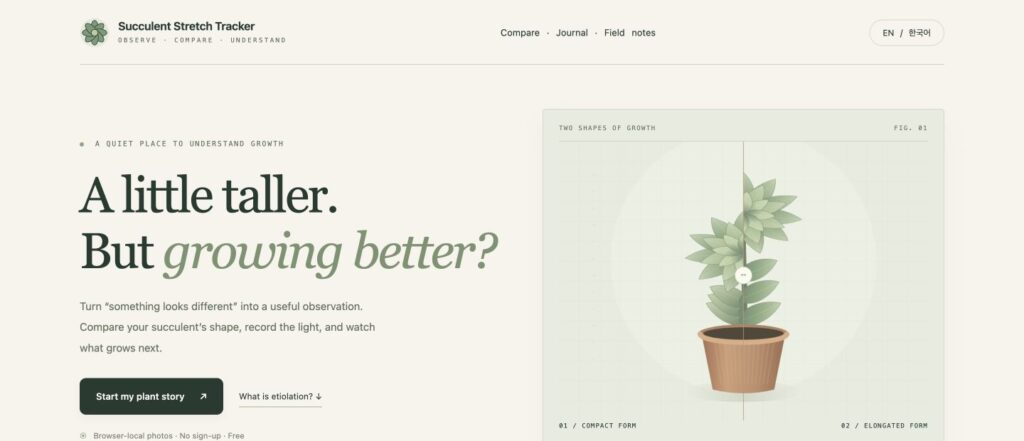
Compare succulent photos with manual references, a local journal and light-observation plans. Actual synthetic +50% measurements, alignment and reload tests explain the numbers, storage and export limits.
- Brand
- Succulent Stretch Tracker
- Tool languages
- en, ko
- Verified date
- 2026-11-12
Table of Contents
Key takeaways
One image can start a journal. Two comparable photographs are needed for a before/after measurement. The tracker does not identify your plant or find endpoints automatically: you select the reference, height and leaf-gap points yourself. Its illustrated opening example is explicitly a demonstration, not evidence of a successful recovery.
Our synthetic photo comparison used a constant reference and height 160→240, with gap 40→60. The report displayed +50.0% for both normalized changes. That confirms the tested arithmetic and interface; it is not a 50% change measured in a living plant.
Align before measuring. One horizontal-position adjustment cleared our after-photo measurements, and Reset alignment did not restore them. Saved records survived reload and appeared in the Korean page, while the live comparison returned to the demo. A saved journal and an open workspace are different records.
What this comparison workspace does
The official name is Succulent Stretch Tracker. It offers English and Korean interfaces, free use without sign-up, manual photo comparison and a browser-local journal. The workbench accepts a starting photo and an optional later photo, with a date for each. Split, Overlay, Flicker and Measure are offered beside alignment and viewing controls.
The practical problem is turning a vague impression into a repeatable observation. A plant can appear taller because it grew, because the camera moved closer or because the frame changed. This comparison workspace puts a reference measurement beside height and leaf-gap measurements, then keeps dated photographs and notes about a change in light.
It does not analyze photographs with AI, score plant health or assign a probability of etiolation. The symptom checkboxes organize what you noticed into a next-visit checklist. A light-observation plan records a change and dates to revisit it. The tool does not establish that a particular window position or lamp will produce a desired result.
Prepare photographs that can be compared
Photograph the same individual from the same viewing direction, camera height and approximate distance. Keep the stem base in frame. Include an unchanged reference in the plant’s plane, such as the same pot rim or a ruler. A photo comparison cannot reliably compensate for a different perspective merely because both images contain a scale reference.
| Prepare | Useful record | Why it matters |
|---|---|---|
| Identity | Stable plant name and species if known | Avoid comparing different growth habits |
| Camera setup | Angle, distance, background and framing | Reduce visual changes caused by photography |
| Reference | The same unchanged length in both photos | Normalize image scale consistently |
| Care context | Date and a specific light change | Keep an observation separate from an explanation |
| Originals | Unedited photographs stored separately | Preserve context when making smaller comparison copies |
Do not replace the pot and keep treating its rim as the old scale. If the reference changed, use another unchanged measurement or start a new baseline. Likewise, compare equivalent leaf gaps. Choosing a large lower gap in one image and a new center gap in another changes the question even if both endpoints were clicked accurately.
The source lists browser-readable JPG, PNG and WebP examples and a 30 MB limit per image. Our uploads were PNG test charts; we did not stress-test that maximum or every format. If a phone image will not open, prepare a copy in a listed format while keeping the original. Avoid edits that crop away the base or stretch one axis.
Use photo comparison in 7 checks
1. Start with one image and a clear date
Use Before photo for the starting image and read its photo date. A single image is enough for a saved observation, even before you have a useful later comparison. Give it a recognizable plant name and a factual note. Our first record used a deliberately artificial chart named “Editorial calibration — not a plant,” so it could not be mistaken for a real growth observation.
2. Add the later photo and compare the view
Use After photo for the second image. Split is useful for looking across a boundary, Overlay for checking coincidence and Flicker for a switching view. We selected Overlay and moved its slider to 100, then selected Flicker; we did not benchmark switching timing. Check the actual image, date and viewing face before measuring. The photo comparison mode is a viewing choice, not an automatic registration or diagnosis.
3. Align the photographs before recording points
Open Align the after photo and adjust scale, horizontal position and vertical position as needed. Match the stable reference and stem base before interpreting a difference. In our test, a single horizontal arrow-key adjustment removed all after-photo measurements. Returning the alignment control to its default did not bring those points back, so make alignment decisions before the ruler work.
4. Measure the unchanged reference in both photos
Choose Measure, select Before photo and Reference length, then tap the two endpoints on the canvas. Repeat for After photo. These are canvas measurements, not millimeters supplied by a calibrated camera. The tool uses the two references to normalize the comparison. An incomplete reference pair should prompt another measurement, not an assumption that there was no change.
5. Measure equivalent height or leaf-gap endpoints
Select Plant height or Leaf gap and place two points for the chosen photo, then repeat on the other photo. Use the same anatomical definition of height and equivalent locations for gaps. Repeating a measurement replaces it according to the source instructions. A blurred endpoint, overlapping leaf or shifted camera can undermine a precise-looking percentage. The ruler only knows the points you choose.
6. Read the ratio and save the observation
The report describes normalized visible change. Read it with the reference, date and image context, then save a journal entry with a concise note. Keep observations factual: “new center leaves appear closer together” is different from asserting that a treatment succeeded. We saved two test journal entries and later observed both after reload; the current comparison itself was not restored.
7. Save a light-observation plan and revisit new growth
Choose a proposed change, start date and observation days, then Save observation plan. Our seven-day test from 12 November produced an end date of 19 November and a midpoint prompt for 16 November. This verified date handling, not a seven-day recovery prediction or delivery of an external reminder. Record what you actually changed and return to comparable photos of the newest growth.
What our actual tests showed
| Test | Observed result | What it means |
|---|---|---|
| Save the built-in demo | Warning to upload a photo first | Illustrations were not accepted as a saved observation |
| Upload one artificial PNG | A dated journal entry was saved | One-observation journaling worked |
| Six manual measurements | Normalized height +50.0%; gap +50.0% | The tested reference-ratio calculation worked |
| Move after-photo alignment | Before measurements remained; after measurements cleared | Realignment requires new after-photo points |
| Reset alignment | Cleared after measurements stayed empty | Reset did not undo measurement loss |
| Save second photo and seven-day plan | Two journal entries and a dated plan appeared | Photo observations and plans are separate entries |
| Reload and open Korean page | Both records and the plan remained | The tested browser journal was shared across these pages |
| Inspect the fresh workspace | Demo returned; new plan input showed 21 days | Saved records do not imply complete workspace restoration |
| Export and timeline controls | Backup reported export; PNG and replay controls were invoked | Received files, restore and replay frames were not verified |
The calibration inputs were two 640×480 charts explicitly labeled NOT A PLANT PHOTO. Both had a 200-pixel reference; the first had height 160 and gap 40, and the second height 240 and gap 60. Displayed canvas readings were approximately 260.3 reference, 208.3 height and 52.5 gap before; 260.3, 312.4 and 78.8 after. The canvas values differed from the source-image pixels because the image was fitted into the workbench.
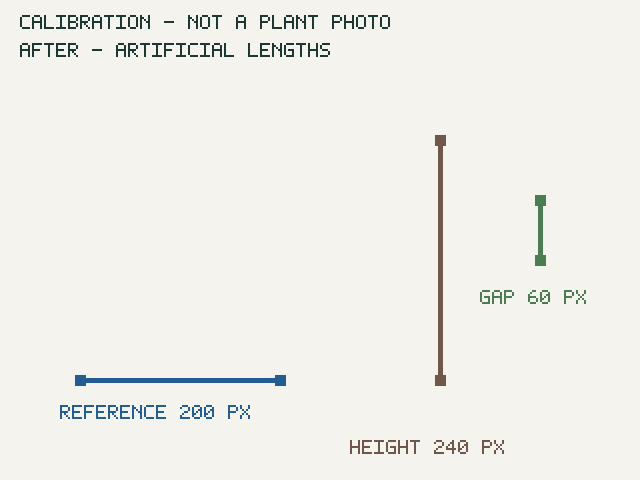
We read +50.0% for both normalized changes in the actual report. Small rounding differences in the displayed canvas lengths should not be used to infer biological precision. We did not measure a real plant, test treatment efficacy, compare species or follow growth over several days. All dated journal entries in this trial were clearly named calibration records.
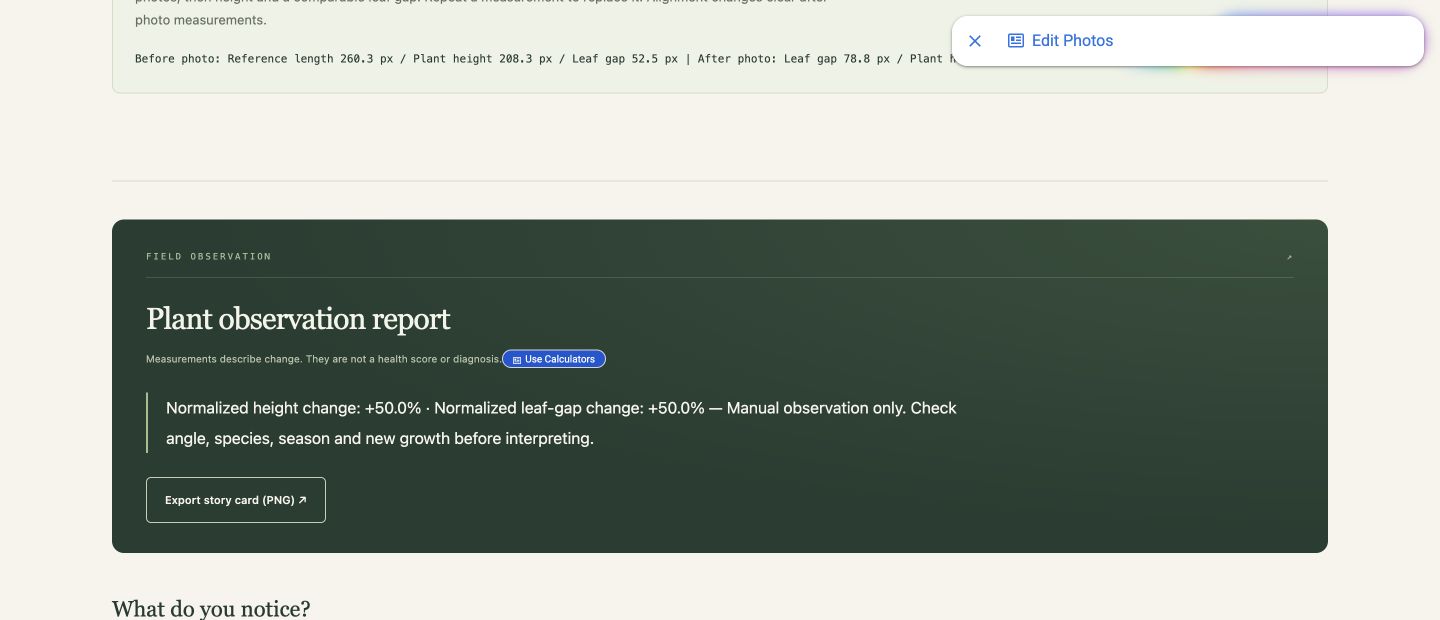
Understand the reference-normalized result
The source formula is: relative change = (after length ÷ after reference) ÷ (before length ÷ before reference) − 1. Multiply that ratio change by 100 to express a percentage. In the intended calibration geometry, height/reference changed from 160/200 = 0.8 to 240/200 = 1.2. The quotient 1.2/0.8 is 1.5, hence a 50% increase. Gap/reference similarly changed from 0.2 to 0.3.
| Arithmetic example | Before | After | Normalized change |
|---|---|---|---|
| Our intended test geometry | Height 160 / reference 200 | Height 240 / reference 200 | +50% |
| A scale-only counterexample | Height 160 / reference 200 | Height 240 / reference 300 | 0% |
The second row is a worked arithmetic example, not another browser trial. It shows why a larger pixel height alone need not mean a larger plant. If the reference grows in the image by the same factor, the normalized height is unchanged. This normalization addresses image scale; it does not remove perspective, fix an incorrectly chosen reference or identify the cause of a visible difference.
A positive result is also not an etiolation score. The numerator is a length ratio, not evidence about light intensity, roots, disease or overall health. An honest photo comparison records what was visible under a documented setup. Decisions about the plant need its identity, normal habit, season and care context as well.
Read new growth alongside plant context
The source guide emphasizes new growth and warns that already elongated stems generally do not shorten again. Use a consistent definition of the newest growth rather than expecting the old silhouette to reverse. Rosette-forming plants and upright or branching succulents need different visual questions; a flower stalk should not automatically be treated as elongated vegetative growth.
Iowa State University Extension describes lanky, pale growth in low light and notes that intense light can damage leaves and stems. Use species-appropriate guidance when changing exposure. The tracker’s saved plan is a place to document your observation, not a universal lighting prescription.
For a useful comparison, record the change you made and other relevant events, such as repotting, a different location or a change in the camera setup. Keep other conditions steady where practical, while recognizing that a home observation is not a controlled biological experiment. A later compact-looking photo can suggest a question to investigate without proving which adjustment caused it.
Separate saved records from the live workspace
The publisher says saved photos and plans use IndexedDB in this browser on this device, without automatic synchronization. We saved two artificial journal entries and one plan. After reload they were still listed, and the Korean page showed the same records. This verifies that local continuation in our browser; it does not establish a second-device recovery process.
The working comparison returned to the illustrated demo after reload. The saved seven-day plan still showed 12→19 November, while the new plan input displayed the default 21 days. Read the saved entry rather than concluding that the plan was lost or silently changed. Form defaults and stored records answer different questions.
Journal entries provide Before photo and After photo assignment buttons. Use them to choose which saved observations belong in a new comparison, then verify the visible images and remeasure. Changing the interface language does not translate the content you wrote: our original English notes and saved plan label remained English in the Korean interface. Language availability concerns controls, not automatic rewriting of records.
Use consistent plant names, but also preserve dates and a clear note about the observation. Two photographs taken on the same date can be useful for checking the setup; they are not evidence of time-based growth. Our calibration entries intentionally shared the review date and were labeled as non-plant tests.
Story cards, backups and privacy
The page offers a PNG story card, Back up all records and Import backup JSON. We invoked export, and the backup action reported “Backup exported.” We could not verify received PNG or JSON files or complete a restore test. Treat file contents and transfer behavior as unverified in this review. A success notice alone is not enough to describe a complete backup recovery.
The source privacy explanation says a backup contains photographs, dates, names, notes and experiment plans, and that restoring adds records to the browser. That describes the publisher’s intended scope, not a file format we independently audited. Before relying on a backup, inspect an actual file and test restoration in an appropriate separate environment. Keep the original photographs as well.
Local photo processing and storage are separate from the hosted page’s advertising and access logging. The source mentions Blogger and Google device information and cookies. We did not perform a network audit or verify metadata removal. Review any image or backup before sharing it, especially when the record includes names or contextual notes that are not needed by the recipient.
Mobile use and practical limits
At a fresh 390-pixel viewport, the Korean page had no document-wide horizontal overflow and the saved record area remained present. Advertising banners and injected text links appeared over parts of the source on desktop and mobile, sometimes obscuring controls. No software installation was required for the tested tracker actions. Check the actual tool labels when using the page.
We tested two small PNG inputs, not maximum-size images, large journals, all browsers, offline operation or storage exhaustion. The publisher warns that browser cleanup and storage limits may remove records and that private browsing may not retain them. We also did not validate timeline replay frames, automated notifications or backup deduplication. Those limits should shape how much you rely on the page as your only plant record.
Choose the right observation method
| Method | Best use | What remains separate |
|---|---|---|
| Phone image album | Preserving original photos and dates | Alignment, references and structured notes |
| Spreadsheet or notebook | A portable care log with explicit fields | Visual comparison of photographs |
| Succulent Stretch Tracker | Manual image ratios beside a local observation journal | Plant interpretation and verified backups |
| Plant-specific guidance | Understanding normal habit and care needs | A repeatable record of your own specimen |
Use this comparison workspace when you already have comparable observations and want to organize them. If the images use different perspectives, taking a better new photo may be more useful than refining endpoints on an unfair pair. If the concern is plant health rather than shape alone, read the record alongside suitable horticultural guidance.
Related tools before and after comparison
Before a cactus repot, CACTUS FIT helps compare measured roots with pot interiors. It addresses container geometry, not a diagnosis. If you change the pot, review whether the old scale reference is still valid and establish a new baseline when necessary.
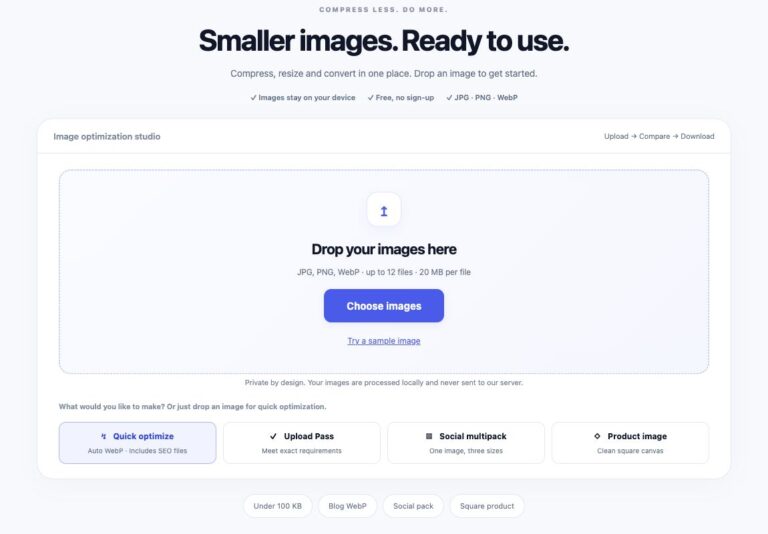
For a smaller image copy, PixelFit Studio compares resizing, compression and format conditions. Its published input limit is 20 MB per file, lower than this tracker’s listed 30 MB. Preserve the original and choose a preparation method that keeps the stem base and reference visible.
To explain a result in a shareable screenshot, FrameMint Studio offers captions and manual masks. Keep the measurement evidence legible and retain the unedited comparison separately. A framed explanation and a full journal backup serve different purposes.
Frequently asked questions
Can one image start the journal?
Yes. Our single uploaded PNG produced a saved record. A two-photo ratio still needs comparable measurements and references from both sides.
Does +50% mean the plant is unhealthy?
No. Our +50.0% result came from artificial geometry, and the tool describes manual length change rather than health, cause or diagnosis.
Why did my measurements disappear after alignment?
The source warns that alignment changes clear after-photo measurements. We confirmed that behavior and observed that Reset alignment did not restore the points.
Does switching to Korean translate my journal?
No automatic translation was observed. The Korean controls appeared, while our saved English note and plan text remained in their original language.
Start a repeatable plant record
Take one clear baseline photo with a stable reference and an accurate date. Save a factual note, then repeat the same camera setup for the next observation. Align before measuring, read ratios as visible changes and keep originals and verified backups outside the browser. A useful record makes the next question clearer without pretending to answer every plant-health question.
Sources: Succulent Stretch Tracker and its field guide, Korean interface, and the Iowa State Extension guidance linked above. Direct checks and real screenshots: 12 November 2026. Artificial chart inputs are labeled throughout.
A RELEVANT NEXT STEP
Tools with a useful connection
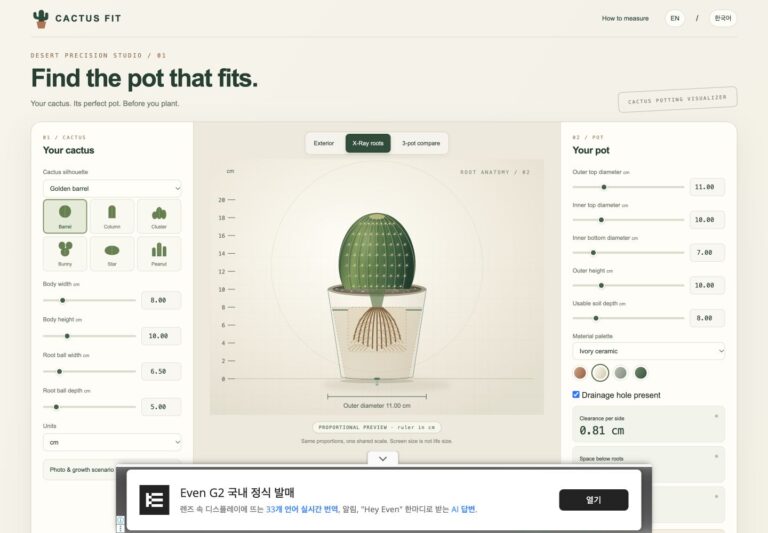
CACTUS FIT
Cactus Pot Size: 7 Essential CACTUS FIT Checks
Measure cactus roots and tapered pot interiors before choosing a container. Our tests explain clearance,293mL soil geometry, warning states, three-pot studies and local setup sharing.
PixelFit Studio
Image Upload Optimizer: 7 Essential PixelFit Checks
Prepare exact upload dimensions and file-size conditions with PixelFit Studio. Actual sample and JPEG tests explain PASS/CHECK, crop versus contain, social totals, copied HTML and the limits of unverified file receipt.

FrameMint Studio
Screenshot Editor: 7 Smart FrameMint Studio Checks
Frame screenshots, add manual masks and build captioned stories in FrameMint Studio. Real import, order, recovery and size tests explain what to check before sharing.