Practise screen-based pour-over motion with Coffee Pour Spiral. Actual center and free-input tests explain dwell maps, timing, speed variation and local-save limits.
- Brand
- Coffee Pour Spiral
- Tool languages
- en, ko
- Verified date
- 2026-11-14
Pour-over practice on a screen can help you notice where your cursor pauses and how your path changes. Coffee Pour Spiral offers six motion prompts, timed sessions, a time-weighted placement map and descriptive results. It is a useful observation exercise when you keep those results separate from real water flow, extraction and coffee taste.
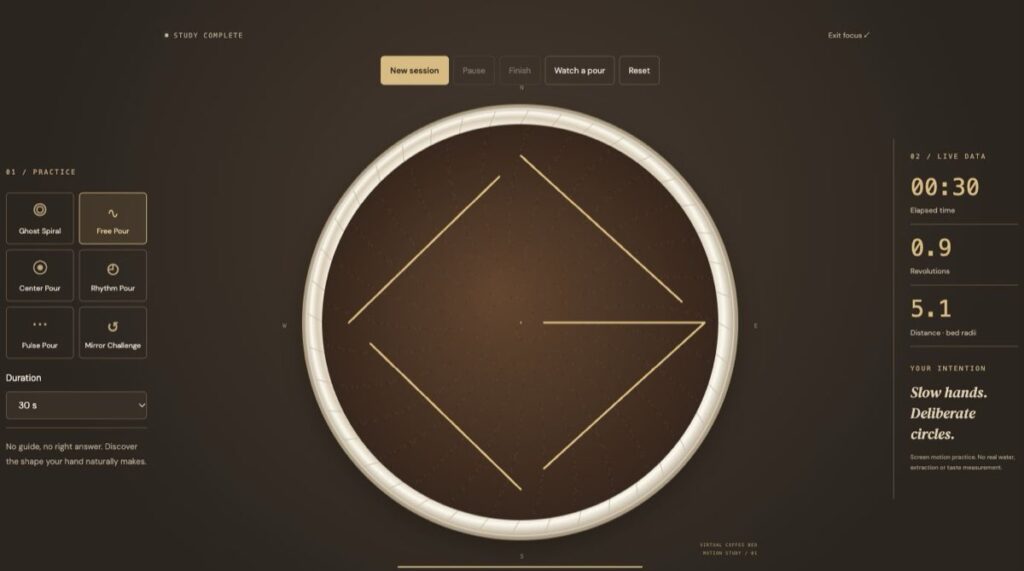
Verified 14 November 2026 (KST). We completed an early-finished Center Pour and a full 30-second Free Pour, then tested Korean keyboard controls at 390px. We checked session recovery, mode descriptions and result selection. No coffee was brewed, and no completed PNG download was received through our test. The figures below describe these browser inputs only.
On this page
Key takeaways
Elapsed session time and pouring time are different. Our 30.0-second Free Pour recorded only 3.7 seconds of active input. A stationary center input produced 100% center dwell without drawing a spiral. This makes an important distinction visible: a percentage can describe where time was spent without grading the quality of a movement.
A bright placement-map spot means longer dwell while pouring is active. It does not mean greater extraction, more water or a better cup. Pace variation can exceed 100%; our Free Pour showed 227%. A dash can mean insufficient movement data rather than a failed exercise. Use the result to choose one repeatable observation for the next session.
What Coffee Pour Spiral actually measures
The official name is Coffee Pour Spiral, styled as a pouring atelier. The root page is English; its navigation also links an English article page and a separate Korean interface. The workbench has a mode selector, pattern buttons, a duration selector, Start, Pause, Finish, a demonstration button, Reset and Focus view. It accepts pointer, touch and keyboard input according to its visible instructions.
Hold and move inside the virtual bed to record a path; release to stop the virtual stream. Keyboard instructions say to focus the bed, move with arrows and toggle pouring with Space. We used a stationary keyboard input in the first test, native pointer holds and straight drags in the second, and Space plus arrows on the Korean mobile layout. No camera, kettle sensor or microphone input was required by the tested workflow.
Live data shows elapsed time, revolutions and distance in bed radii. Completed studies add center dwell, outer-zone dwell, pouring time, radial span, angular balance and pace variation. Recent-session cards allow result selection. Replay, Heatmap, Previous overlay and PNG-save controls become available after a result; the first session initially had no previous overlay to compare.
Six practice prompts and three durations
| Mode | Visible prompt | How it was checked |
|---|---|---|
| Ghost Spiral | Begin at the center and follow the outward guide | Selection and instruction inspected; no full scored or timed guide-following trial |
| Free Pour | Explore a path without a guide | Completed 30-second pointer trial |
| Center Pour | Stay within the inner quarter-radius | Completed stationary-keyboard and short Korean trials |
| Rhythm Pour | Aim for one turn per 15 seconds using a four-beat cue | Selection and instruction inspected; cue timing not benchmarked |
| Pulse Pour | Alternate five seconds pouring and five seconds resting | Selection and instruction inspected; full pulse sequence not tested |
| Mirror Challenge | Try the opposite direction and notice ease of movement | Selection and instruction inspected; full mirror trial not tested |
The offered durations are 30, 60 and 90 seconds. The daily challenge invites a 60-second spiral followed by Free Pour, with dwell comparison rather than a taste score. We did not complete that daily pair or treat its prompt as a prescribed brewing recipe. Choose a mode because it answers a movement question, not because its name sounds more advanced.
Actual browser test results
| Test | Observed output |
|---|---|
| Center Pour with stationary Space input | Finished at 17.3 s elapsed after pausing. Active pouring 10.8 s; center 100%; outer 0%; radial span 0%; angular balance and pace variation were dashes. |
| Pause | Elapsed display stayed at 00:17 while paused across subsequent checks. Finish was available from the paused state. |
| Free Pour pointer holds and angular drags | Automatically completed at 30.0 s. Live data showed 0.9 revolutions and 5.1 bed radii of distance. |
| Free Pour analysis | Pouring time 3.7 s; center dwell 42%; outer-zone dwell 45%; radial span 92%; angular balance 44%; pace variation 227%. |
| Focus and result review | Focus view expanded the workbench. Earlier session selection restored its displayed metrics. Replay, Heatmap and Previous overlay were activated; full replay fidelity was not audited. |
| PNG save | Save Pourprint PNG was activated, but no completed file was received. Image contents, dimensions and downstream use remain unverified. |
| Local recovery | The two main results appeared on the Korean page. After the short Korean test, all three session cards remained after English reload; the ready workbench returned to its default mode and duration. |
| Korean mobile keyboard | Fresh 390 × 844 layout had document width 390px. Space and two right-arrow inputs recorded 0.1 bed radii; Pause and Finish produced an 8.0-second session. |
These are interaction tests, not brewing experiments or evidence of improved motor skill. The two main trials used different modes, elapsed times and input methods, so they are illustrative contrasts rather than a controlled before-and-after improvement test. Neither the 100% center value nor the 227% pace value is a coffee-quality score.
Pour-over practice: 7 essential checks
Before starting, choose an input device and a comfortable viewport. Use the same setup for a meaningful repeat. Check whether the recent-session area already contains work you want to retain. Resetting the active workbench and clearing local history are different operations; do not clear records merely to start a new study.
1. State a motion intention
Begin with a question such as “Where do I pause?” or “Can I keep this movement within a smaller radius?” Pour-over practice is more useful when the next result has an intended interpretation. Avoid goals such as obtaining a perfect extraction score: the tool measures no extraction or taste.
2. Choose a mode and duration deliberately
Select a prompt and 30, 60 or 90 seconds before Start. The active session disabled those choices in our test. Use Center Pour to inspect central dwell or Free Pour to see an unconstrained path. Inspect the other instructions before using them, and remember that this review did not complete all six modes.
3. Separate starting the clock from starting input
Press Start, then hold and trace in the virtual bed. With keyboard focus, Space toggles pouring and arrows move. In the first test we started the clock before switching pouring on, which helped produce 17.3 seconds elapsed but 10.8 seconds of active pouring. Releasing a pointer stops input; it is not the same as pausing the whole session.
4. Use Pause and Finish for their different purposes
Pause suspends the session; Finish creates a result, including when you end early. Our center session was paused at 00:17 and finished from that state. The Free Pour was allowed to reach its 30-second automatic end. Record actual elapsed and pouring times rather than labelling every selected 30-second session a completed 30-second trial.
5. Read path and placement map together
The path shows movement, while the placement map accumulates active time at locations. A brief sweeping line can be visually long but contribute little dwell beside a held point. Our Free Pour used center and edge holds plus angular drags; the map emphasized the held locations. Look for the behavior you actually performed rather than a prettier image.
6. Open the definitions before interpreting percentages
Center is inside 25% of the bed radius and the outer zone is beyond 80%. Radial span is maximum minus minimum radius. Angular balance describes sector distribution, while pace variation is a speed-variation ratio. A high or low percentage does not become a universal target without a clearly stated movement intention.
7. Preserve context and verify any export
Write down mode, duration, input device, viewport and the one change you plan next. Select an earlier session to inspect its result, but check the current workbench settings before pressing Start again. If using PNG save, confirm an actual file arrived and opens. We verified result recovery, not a completed downloaded image.
Why a bright center spot is not a high score
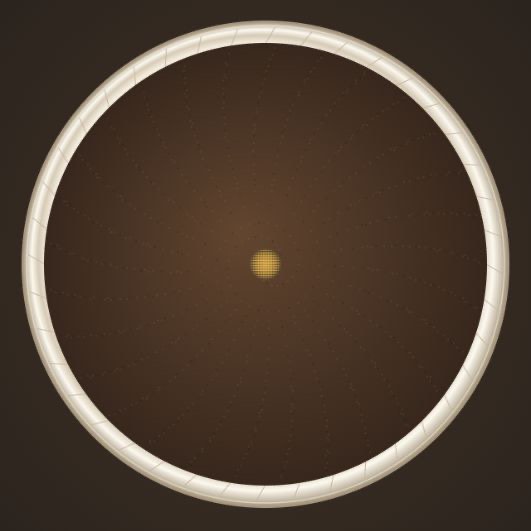
Our first test intentionally used no moving spiral. After Start, we toggled pouring with Space and held the keyboard position at the center. The result showed 100% center dwell, 0% outer dwell and 0% radial span, with dashes for angular balance and pace variation. The placement map showed one bright central spot. That is a truthful description of a stationary input, not a certificate of precise circular pouring.
Our second test used native pointer holds at the center and near the right edge, connected with several straight angular strokes around the bed. It was deliberately an irregular path, not a claimed expert pour. The session ran to 30.0 seconds with 3.7 seconds pouring time. The map emphasized two dwell locations even though the visible path extended around the bed.
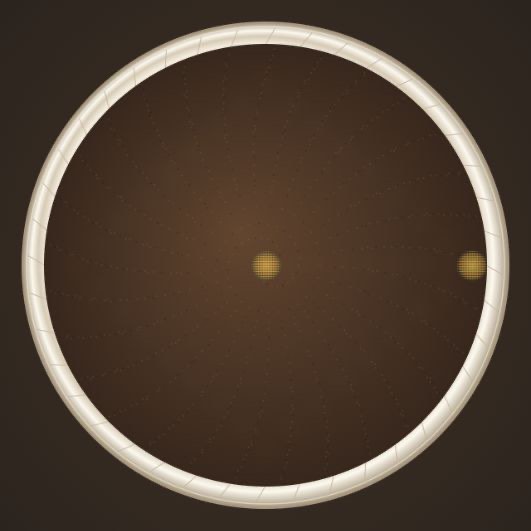
This pair illustrates why area coverage, line length and time-weighted placement are different observations. It does not show which real coffee tastes better. The contrast is useful precisely because the input was simple enough to explain: stationary active time concentrates a map, while fast movement can span a broad radius without much time in between.
Read the six motion metrics correctly
| Metric | Meaning in this interface | Common misreading |
|---|---|---|
| Center dwell | Share of active pouring time inside the inner 25% radius | Not the share of the entire session, and not a target taste score |
| Outer-zone dwell | Share beyond 80% of the radius | Not measured water on a real filter |
| Pouring time | Time with the virtual stream active | Not necessarily equal to selected duration or elapsed time |
| Radial span | Maximum recorded radius minus minimum radius | Not percentage of the bed’s area evenly watered |
| Angular balance | Time-weighted distribution across eight sectors, excluding the inner 12% radius | Not guide-following precision or extraction uniformity |
| Pace variation | Speed standard deviation divided by mean speed | Not an error percentage limited to 100% |
A useful geometric check is that 25% of radius is not 25% of area. For an ideal circle, a central disk with radius 0.25R occupies 0.25² = 6.25% of total area. The outer ring beyond 0.8R occupies 1 − 0.8² = 36%. These are editorial area calculations for the displayed thresholds, not measurements of water distribution or extraction. The dwell percentages still refer to time.
The Free Pour pace value of 227% means the displayed variation ratio was about 2.27 times mean speed. The source explicitly allows values above 100%. Do not rewrite it as 227% inaccurate. Our stationary result’s dashes likewise should not be filled with invented zeroes: there was not enough motion information for those reported measures.
Revolutions are described by the source as cumulative signed angular motion away from the center. Treat that as an angular summary, not a verified count of complete, smooth circles. Our angular pointer path displayed 0.9 revolutions. We did not independently audit the sampling, every equation or opposite-direction cancellation, so avoid stronger algorithm claims than the visible definitions support.
Design a useful comparison session
For a proposed repeat exercise, choose Free Pour for 30 seconds with the same mouse, display size and posture. First record an ordinary path. Then repeat with the single intention of using a smaller radius. Compare outer-zone dwell, radial span and pouring time together. This is an editorial practice plan, not an additional experiment we performed or a claim of skill improvement.
Keep active time comparable. A session with one brief touch and a long rest should not be judged against continuous input merely because both clocks reached 30 seconds. Record both times and explain pauses. If you switch from mouse to touch or keyboard, label the change; normalized bed-radii distance does not remove every difference in device handling and event sampling.
Choose an observation before selecting a preferred result. A central exercise may intentionally have low angular spread; a broad spiral may intentionally visit more sectors. There is no reason to maximize every metric simultaneously. Read the source’s “a reflection, not a verdict” framing literally and describe the input rather than turning the dashboard into an unsupported ranking.
History, replay and file-save limits
Recent-session cards restored the tested results, including in the Korean page. After the short Korean keyboard trial, English reload showed three cards and selected the newest result. The ready workbench returned to its default Ghost Spiral and 60-second duration. A selected old result and the mode for a new session are therefore separate things to check.
The source says practice data stays in the browser. Our test supports recovery within that browser and across the site’s language pages, not synchronization to another device or profile. Clearing browser data may remove local work. Keep notes or a verified external copy when the record matters; the article’s screenshots were actual browser captures, not PNG files delivered by the tool.
Replay, Heatmap and Previous overlay were available and activated in result review. We inspected selected results and the displayed placement maps, but did not audit every frame of replay or all overlay combinations. PNG-save activation produced no completed downloaded file through our test, so file resolution, contents and a sharing workflow based on that file remain unverified.
Connect screen practice to a separate brew log
The independently read HARIO V60 guide describes a spiral outward from the center while avoiding pouring directly onto the paper filter. That gives context for a spiral prompt; it does not validate any screen metric as a brewing score. Coffee Pour Spiral identifies itself as independent and not affiliated with HARIO.
If you later compare real brews, keep that as a separate record of actual inputs and observations. A scale and timer can record mass and timing; a brew log can record beans, grind setting, water, method and your sensory notes. This screen tool does not supply those measurements. We brewed no coffee and tested no physical transfer of skill for this review.
A simple log can keep two columns: screen intention and real-brew observation. An intention might be a more repeatable path; an observation must come from the real brew, not from the placement map. Keep conditions consistent for a meaningful comparison, and do not claim a taste improvement without an actual, appropriately described test.
Mobile behavior, privacy and limitations
The page records screen input, not real water amount, flow rate, pour height, kettle weight, grind, temperature, dissolved-solids concentration or taste. A mouse does not reproduce the physical load of a kettle. We did not test whether screen practice improves physical kettle control. Use the activity as a small observation exercise rather than a qualification.
At 390 × 844, the Korean page fitted the viewport without document overflow. Space and arrows worked, and Pause plus Finish produced an 8.0-second record with 0.1 bed radii of movement. This was a narrow-browser keyboard test, not a touch-drawing benchmark on a physical phone. Ads and interstitials sometimes obscured the workbench or delayed access to result controls.
The source’s privacy statement says coordinates are recorded during a session, without camera or microphone use, and notes Google AdSense advertising processing. Our workflow requested neither device permission, and records survived locally. We did not audit network traffic or all scripts, so we do not promise zero transmission, complete offline operation or an encrypted backup service.
Alternatives and related tools
For actual brew mass and timing, use real measuring equipment and a separate log. For studying screen movement without coffee materials, this tool makes active dwell visible with very little preparation. A general drawing app can retain a path, but it does not necessarily provide these specific dwell definitions or session summaries. Compare the task you need, not just the appearance of a spiral.
To explain your screen study to someone else, the published FrameMint Studio guide connects to presenting an annotated capture. WebP Studio covers preparing converted sharing copies, and PixelFit Studio addresses destination dimensions and file-size constraints. Preserve the original capture and include the mode, both times and the input method in its caption.
Those are image-presentation steps, not coffee-analysis substitutes. We did not receive a Pourprint PNG and then test it through those tools. Use an actual received image or your own truthful screenshot, and keep any visual adjustment separate from the measured values. Never retouch a map to imply a result the session did not produce.
Frequently asked questions
Does 100% center dwell mean a perfect pour?
No. A stationary keyboard input gave that result. It describes active time inside a location threshold and says nothing about real extraction or taste.
Why is the pouring time shorter than the session?
Starting the clock does not necessarily activate pouring. Pointer release or toggling the stream off creates inactive periods. Our Free Pour reached 30.0 seconds elapsed with 3.7 seconds pouring time.
Is pace variation above 100% a bug?
Not necessarily. The visible definition is speed standard deviation divided by mean speed. The source says it can exceed 100%, and our test displayed 227%. It is not a bounded accuracy score.
Does a bright map region show stronger extraction?
No. The source defines brightness as longer active dwell at a screen position, including holding still. It receives no physical extraction measurement.
Do old results restore my next session settings?
Check them separately. The tested results survived reload, while the ready workbench returned to Ghost Spiral and 60 seconds. Select a mode and duration deliberately before starting another session.
Were all six modes and PNG export fully tested?
No. We completed Center and Free Pour tests and inspected the other prompts. A completed PNG file was not received; full demonstration, replay fidelity and every mode’s timing were not audited.
Choose one movement to observe
Open Coffee Pour Spiral, choose a short session and make one movement you can describe. Read active time before judging the placement map, and keep the next comparison controlled. Pour-over practice becomes more useful when the dashboard helps you observe an action without pretending to measure the cup.
Evidence record: actual browser input, saved session text and screenshots checked 14 November 2026 (KST). The seven-check workflow, area calculations and comparison plan are editorial additions. HARIO’s official guide was independently read. No real brewing, taste comparison or completed downloaded PNG was verified.
A RELEVANT NEXT STEP
Tools with a useful connection

FrameMint Studio
Screenshot Editor: 7 Smart FrameMint Studio Checks
Frame screenshots, add manual masks and build captioned stories in FrameMint Studio. Real import, order, recovery and size tests explain what to check before sharing.
WebP Studio
WebP Studio: 7 Essential Checks for Better Batch Images
Use WebP Studio’s English interface to compare image quality, keep dimensions or resize a batch. Actual tests reveal smaller JPGs, larger outputs and a rounded zero-saving total.
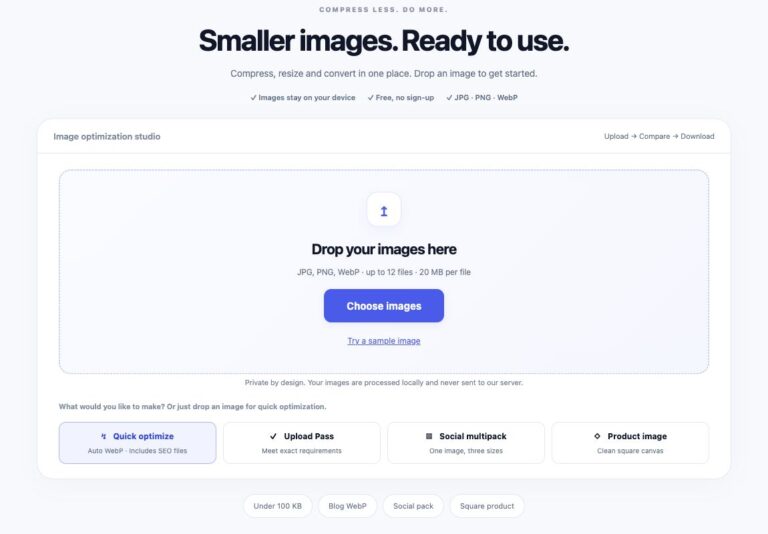
PixelFit Studio
Image Upload Optimizer: 7 Essential PixelFit Checks
Prepare exact upload dimensions and file-size conditions with PixelFit Studio. Actual sample and JPEG tests explain PASS/CHECK, crop versus contain, social totals, copied HTML and the limits of unverified file receipt.