ProofLaunch Studio is a free one page builder for a small service, workshop, product or portfolio. Arrange blocks, edit a live preview and check the configuration before taking the page to a publishing destination.
Verified 11 November 2026 in Chrome, including the Korean interface at a fresh 390px viewport. The original tool and this library share a creator. The tests below used clearly marked demonstration content, not a customer project.
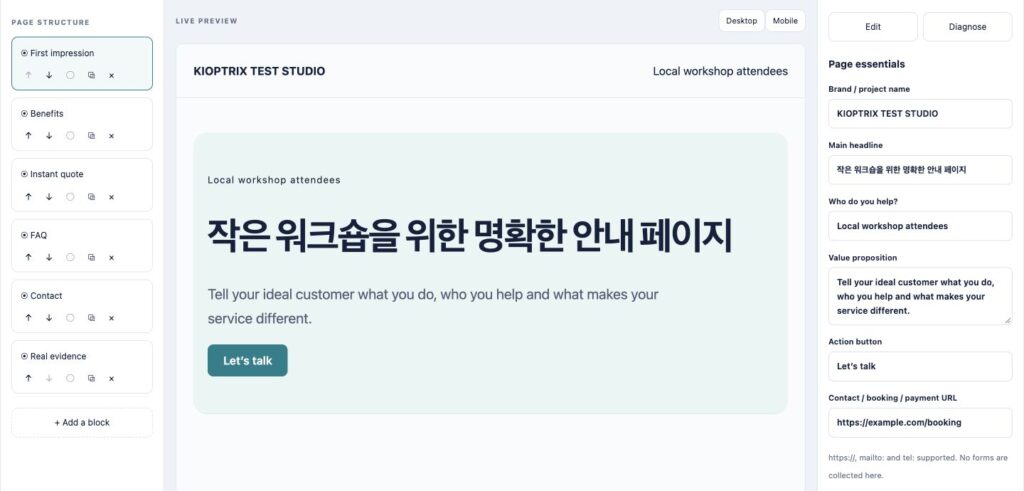
Build a focused page with ProofLaunch Studio. Actual quote arithmetic, block changes, 9-rule diagnosis, local saving and export limits explain what to check before publishing.
- Brand
- ProofLaunch Studio
- Tool languages
- en, ko
- Verified date
- 2026-11-11
In this guide
Key takeaways
The useful output is a clear page with a working next action, not a green score alone. The editor combines a block list, an embedded preview and fields for brand, audience, headline, value, action URL, description, color and currency. It is a structured builder rather than a verified AI writing service.
We calculated a sample quote of 100 + 25 × 3 + 10 = 185 USD, observed an event-purpose change add a booking block while retaining existing content, and recovered saved project settings after reload. Moving between English and Korean kept the written content; it did not translate it.
The diagnosis changed from 8/9 to 9/9 after we added an accurately labeled editor-test example. Those are configuration rules: the example.com URL passed without becoming a real booking destination, and the check did not authenticate the evidence. HTML export displayed a downloaded status, but the actual file was not captured in our test. Verify exports yourself before depending on them.
When this one page builder is useful
A freelancer with one service, a small class with one booking destination or a creator with a concise work sample often needs a focused page before a larger website. Starting from a blank HTML file makes even a simple layout decision feel technical. ProofLaunch offers a more concrete starting point: choose the job, then fill and arrange the suggested sections.
Six purpose buttons cover inquiries, bookings, product sales, launches, portfolios and events. A choice suggests blocks; it does not open a merchant account, collect a lead or reserve an appointment. In our event test the builder added Booking to the existing structure. Your external destination still handles the actual inquiry, reservation or payment.
This is especially useful when you can state one audience, one offer and one action. A visitor should be able to answer “Is this for me?”, “What do I get?” and “What happens when I press the button?” from the page. The builder gives those decisions a place, but you supply the facts and wording.
Use a full website platform when you need user accounts, inventory, a content database or a managed booking system. Use a code editor when you need unrestricted layout and script control. ProofLaunch occupies a smaller space: a portable first page with a repeatable structure and an optional simple estimate.
Prepare the content and the destination
Prepare a public project name, a specific headline, the audience, a short explanation of the offer, a primary button label and a destination you control. Also prepare real rates if using the quote block, question-and-answer pairs, and an honest work sample that you may publish. Avoid private customer notes or personal data in a demonstration project.
Decide where the result will live before exporting. The source describes standalone HTML for static hosting and adapted body sections for WordPress or Blogger. It does not host the page for you. A full HTML document is not a Blogger theme, and copying a whole file into an existing editor can produce nested document tags or styling conflicts.
Keep a simple content checklist beside the workspace: what the offer includes, who it is suitable for, any important exclusion, what the estimate assumes, and what happens after a click. A beautifully arranged page with a placeholder action is still unfinished. Test the real destination separately; syntactic acceptance by the diagnosis cannot confirm that a booking is possible.
7 steps from purpose to a reviewed page
1. Choose one purpose and one audience
Open the English workspace and select the closest purpose. A class could start with bookings or an event, while a consultant might choose inquiries. Fill the audience field with a useful description rather than “everyone.” Our demonstration used Local workshop attendees and a visibly marked KIOPTRIX TEST STUDIO brand.
If you change purpose later, inspect the block list before editing further. Existing content can remain while a recommended section is added. That is helpful for exploring a new route, but it can also leave two sections asking for the same action. Keep the combination that serves the visitor rather than every block the tool can generate.
2. Replace the headline and the primary action
Edit the main headline, value proposition and action label. Make the headline describe the offer, not just welcome visitors. Put the intended contact, booking or payment destination in the URL field. The interface advertises https:, mailto: and tel: support; the tested example used https://example.com/booking strictly as a demonstration placeholder.
Read the preview after editing. We saw the brand, audience, headline and repeated action links update. Repeated links help a visitor take the same next step after reading a lower section. They also multiply the consequences of a wrong destination, so inspect every location after moving the page to its final host.
3. Arrange only the sections you need
The initial service structure contained First impression, Benefits, Instant quote, FAQ and Contact. Add a block exposed choices including Pricing, Real evidence, Recommendation and Booking. The visible block controls offer movement, visibility, duplication and removal, with Undo nearby. We tested adding evidence and undoing a purpose change; we did not exhaustively test every structural control.
Use the list as a reading order. Explain the offer, provide useful details, show genuine evidence, answer objections and finish with a clear action. If a block contains a list, the editor asks for one item per line. The FAQ diagnosis specifically expects question|answer pairs; check the rendered questions rather than assuming any two lines create a usable FAQ.
4. Configure and verify an estimate
Select Instant quote to reveal base fee, unit rate and optional surcharge. Replace fictional sample rates. Our test set these to 100, 25 and 10 USD, then entered quantity 3 and checked the optional service inside the preview. The result was $185.00 in English and US$185.00 in Korean.
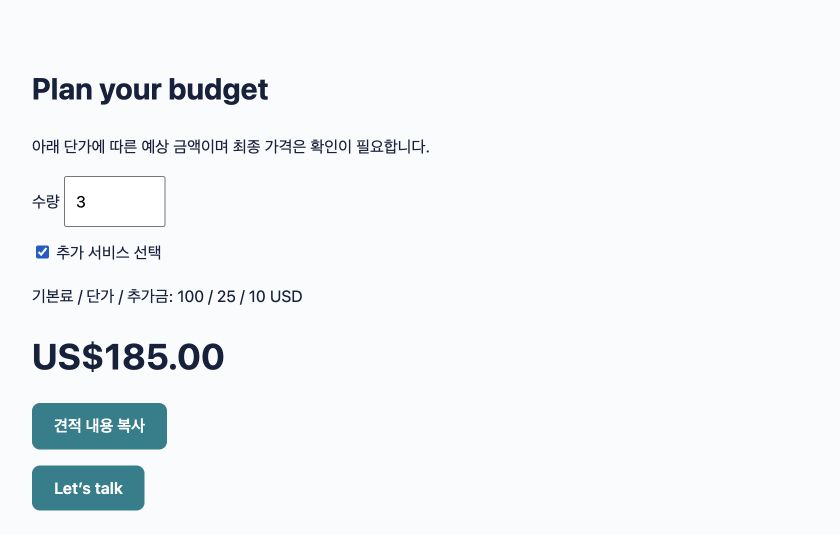
Keep the base fee separate from the per-unit charge. A reader can otherwise mistake “100 plus 25 per attendee” for “100 per attendee.” State whether taxes, materials, delivery and final confirmation are included where relevant. We did not test a tax engine, discounts, multiple optional items or production payment processing.
5. Read the diagnosis as a list of rules
Open Diagnose and inspect each of the nine rows. The tested page passed eight until an evidence block was added; then the count became nine. This checks that qualifying content or configuration exists. It does not verify the claims, visit the action URL, predict conversion or establish search ranking.
Our evidence text described only the calculator test and explicitly said no testimonial or sales result was claimed. Use a real work example in your own page, or leave the evidence check unresolved until you have one. A diagnostic target is not a reason to invent a client quote, certification, revenue figure or endorsement.
6. Preview narrow screens and preserve the project
Use the built-in Desktop/Mobile controls to inspect the preview, then test the editor itself on a small viewport or phone. At 390px the Korean workspace offered Preview, Blocks and Edit · Check controls. We opened the editing panel, changed a Korean headline and ran diagnosis without horizontal document overflow.
The source offers local autosave, JSON backup and Restore. We verified saved brand and rates after reload, not a full backup-and-restore cycle. Keep an external backup before a major revision, confirm that the downloaded JSON exists and restore it in a safe test before trusting it as the only recoverable copy.
7. Export, inspect and publish to your own destination
HTML, ZIP and JSON controls appear in the toolbar. Our Export HTML click produced an “HTML downloaded — test before publishing” status, but no download file was captured within eight seconds. The file contents, ZIP package and restoration were not verified. The procedures below explain the source’s intended handoff, not a completed deployment from this review.
After confirming that you received a file, open it and repeat the important tests: headline, character rendering, action destination, quote arithmetic and mobile layout. Then use your selected publishing service. An exported file is not automatically online, and a successful button click in the builder is not evidence that a customer can reach your offer.
Hands-on results and the quote calculation
| Test | Observed result |
|---|---|
| Brand, headline, audience and sample URL | Preview updated; links used the configured example.com destination. No booking was attempted. |
| Quote100/25/10, quantity3, option on | 185USD displayed. This confirms that tested positive-number case. |
| Change purpose to event | Booking added; previous blocks and edited content remained. |
| Undo, then reload | Booking addition reversed; custom brand and rates were retained after reload. |
| Add clearly labeled test evidence | Diagnosis changed8/9→9/9; it did not validate evidence authenticity. |
| EN→KO navigation | Labels translated while written project content remained. |
| 390px Korean fresh load | Editing/check panel worked, Korean headline edited, document width390. |
| HTML export | Downloaded status displayed; actual file capture timed out after8s. |
One subtle behavior matters for testing: after a design change rebuilt the preview, the quote’s visitor input returned to quantity 1 with the option unchecked. The configured base/unit/optional rates remained 100/25/10, yielding 125 USD. Treat those as different layers: project settings versus a visitor’s current calculation. Re-enter your test case after editing.
Currency options included USD, KRW, EUR and GBP. We changed the selector to KRW and back, but did not establish exchange-rate conversion. Enter rates in the currency you intend to display; do not assume switching a label recalculates your commercial prices.
The example.com address is intentionally not a real workshop booking. Its acceptance in the diagnosis is useful evidence of a limitation: URL format can pass while the business destination remains unfinished. Replace it before publication and visit the actual link from the deployed page.
What the nine checks actually prove
The displayed rules covered a headline of at least 12 characters, a named audience, a value explanation of at least 50 characters, an accepted action URL, a visible hero and action, a 40–180 character search description, a visible FAQ in question|answer format, an accent color with 4.5:1 contrast against white, and evidence or a work example.
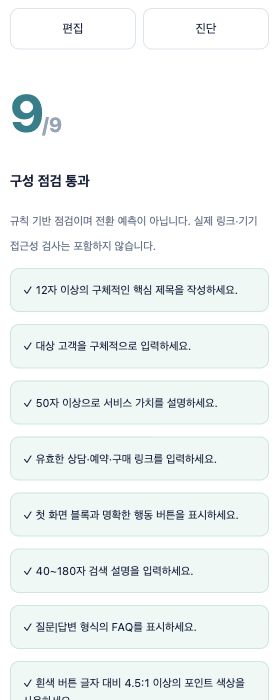
Several rules are useful prompts rather than editorial judgments. Twelve characters do not guarantee a specific headline. Fifty characters can still say little about value. A search description of acceptable length can remain vague. Read the text as a prospective visitor would, then ask another person what they think the page offers before explaining it to them.
The contrast rule concerns the configured accent against white. It is not an audit of every text/background pair, focus indicator, image or final theme. A pass cannot replace testing keyboard access, zoom, reading order and actual device behavior on the exported or adapted page. We did not claim that these broader checks passed.
HTML, JSON and a practical publishing handoff
| Artifact or route | What to check |
|---|---|
| HTML | Source describes a standalone document with styles and calculator. Verify receipt and operation before deployment. |
| JSON | Intended for editable project backup; confirm the file and trial restoration. Not the public website. |
| ZIP | Export control is present; package contents were not examined in this test. |
| Static hosting | Upload only to a host/account you control and inspect the resulting public URL. No hosting was performed here. |
| WordPress/Blogger | Adapt body sections and styles to the destination. Recheck scripts and theme conflicts; do not upload standalone HTML as a Blogger theme. |
Preserve an untouched export before cleanup. A generic HTML cleaner may remove scripts, event attributes, embeds or styles that the calculator relies on. For a purely informational section that may be acceptable; for the quote block it may change the function. Compare a copy and retain the original so you can identify what disappeared.
When adapting to WordPress, confirm what your account, editor and site configuration permit. A Custom HTML block is not a guarantee that scripts execute or survive saving. Avoid promising a working calculator merely because a screenshot looks right. Reopen the saved page and run the same 185 USD calculation if the rates still match the demonstration.
Separate writing approval from deployment approval in a real team handoff. Label the file version, chosen currency, action destination and unverified items. Have the person responsible for the offer confirm prices and evidence. This small record is more useful than forwarding a screenshot of a nine-check badge without the project files.
Privacy, mobile use and limitations
The privacy notice says project data stays in the browser and exported files and warns against entering sensitive information. We observed local persistence and language-page continuity, but did not independently inspect network traffic or storage contents. Blogger hosting and Google advertising have separate policies; advertisements were visible and sometimes overlapped the workspace.
Do not put private client notes, credentials, payment details or unpublished personal testimonials into the editor. Exported files can carry your written content to another device or recipient. External booking, contact, payment and hosting destinations have their own data policies. The source links to Google’s advertising privacy explanation; local project saving does not eliminate advertising cookies.
On small screens, switch the workspace panel rather than searching for the desktop sidebars. The tested 390px document stayed within its width, but this was Chrome viewport testing, not a physical-phone compatibility survey. The embedded preview and the published site are also separate environments; test the final destination again.
Important limits remain: no hosting, no built-in collection of inquiries, and no verified checkout, appointment management, AI text generation or automatic translation. We did not validate every block control, input edge case, output format or browser. The calculator test establishes one sample arithmetic path, not an exhaustive validation of negative, decimal or unusually large entries.
Related tools for the next task
After receiving an export, LaunchCheck Studio is a useful separate review of HTML structure, metadata and local project paths. Its static preview does not execute your scripts, so it cannot replace running the quote calculator in the actual page.
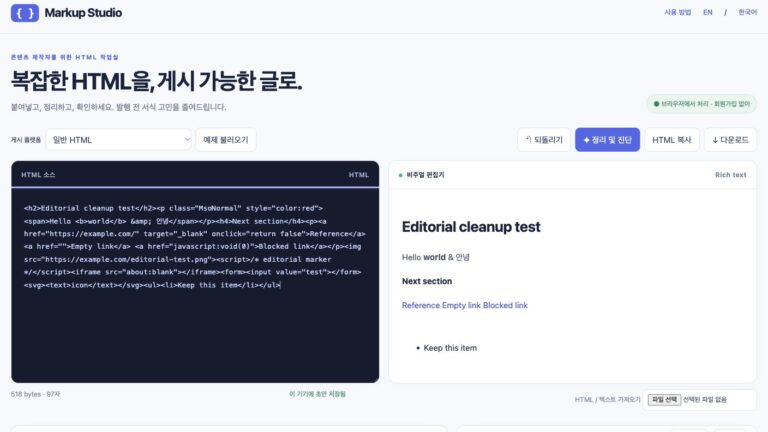
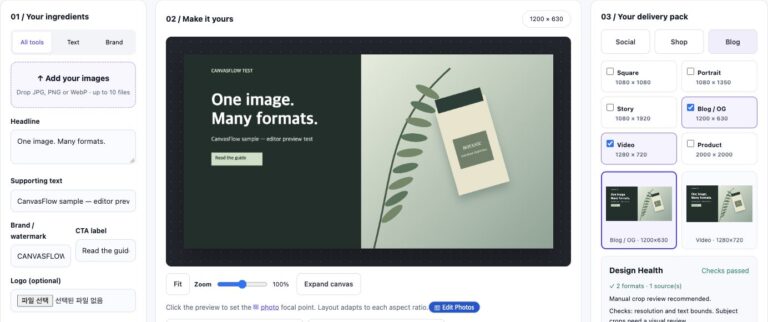
Markup Studio helps inspect copied HTML before moving an informational section into an editor. Its cleanup can remove functionality, so work on a copy and compare. For a social graphic announcing the page, CanvasFlow Studio offers an image-pack workflow; it does not publish or host your website. These are already published guides with distinct roles.
Frequently asked questions
Is ProofLaunch Studio an AI website generator?
The verified workflow uses purpose choices, structured fields, blocks and rules. We did not observe an AI prompt, model-generated copy or automatic research. You write the content and supply genuine evidence. Do not expect it to invent or verify an offer on your behalf.
Can it receive inquiries or take payments?
The interface says no forms are collected here. It places a configured external contact, booking or payment URL behind the action. Your destination handles the transaction or message. A placeholder URL passing the diagnosis does not establish that such a service exists.
Does switching to Korean translate my page?
No automatic translation was observed. Interface labels changed while our English project text remained. We manually edited a Korean headline. Prepare each language’s audience, offer, FAQ and action wording yourself; language navigation is not bilingual publishing management.
Is nine out of nine a launch certificate?
No. It is a configuration count. The source explicitly excludes live-link testing, actual-device accessibility checks and conversion prediction. In our test, a demonstration URL and a clearly labeled test example satisfied the relevant rules. Human review remains necessary.
Why did my quote return to 125 after editing?
In the tested design, rebuilding the preview reset its quantity to1 and optional service tooff while keeping configured rates100/25/10. That makes100+25=125. Re-enter quantity3 and enable the10 surcharge to check185. Distinguish saved rates from the current preview inputs.
Which file should I keep for later edits?
The source identifies JSON as the editable backup, with HTML intended for publishing. Both file receipt and restoration need confirmation in your browser. This review did not recover and reopen an export, so it cannot guarantee a successful round trip or the contents of ZIP.
Build one clear next step
Start with one audience and one real destination. Write a useful offer, check the quote with known arithmetic, and read every diagnostic row. Continue to publication only after receiving and testing the exported file or the adapted page at its actual destination.
A RELEVANT NEXT STEP
Tools with a useful connection
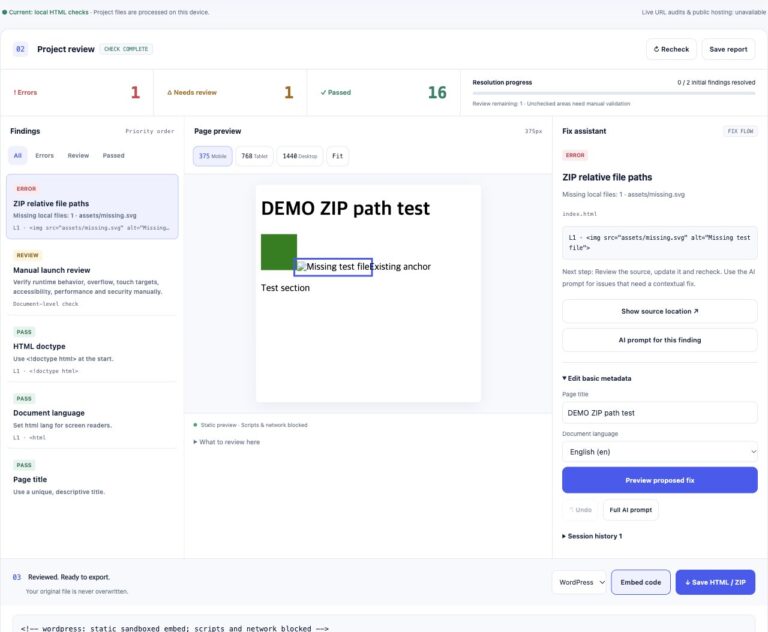
LaunchCheck Studio
HTML Checker: 7 Smart LaunchCheck Studio Checks
Inspect HTML and ZIP projects with LaunchCheck Studio. Actual sample, synthetic-code and missing-file tests explain findings, reversible metadata fixes, static previews and AI prompt privacy.
Markup Studio
Markup Studio: 7 Essential Checks for Better HTML
Markup Studio cleans copied HTML and checks basic issues before publishing. See our 52→68→100 test, WordPress/Blogger/Shopify copy differences, component builder and local-draft limits.
CanvasFlow Studio
Social Image: 7 Essential Checks for Better Packs
Reflow photos and shared copy with CanvasFlow Studio. Tested format presets, Story overrides, text warnings and brand recovery explain how to review a social image pack and its export limits.