Connect film scans to physical negative locations with sleeve maps, frame records and move history. Read real retrieval tests, gap-report interpretation and backup limits.
- Brand
- NEGATLAS
- Tool languages
- en, ko
- Verified date
- 2026-11-07
NEGATLAS is a film negative archive tool for connecting a scanned photograph to the strip in your binder. Map the sleeve, record a frame reference and follow its physical address when you need the original. These seven checks turn the attractive light table into a practical retrieval system, with actual sample tests and clear backup limits.
Table of Contents
Key takeaways
- Identity and location are different. A roll ID identifies the roll; a Physical Negative Address records where it is stored. Moving a strip should change the address without changing its identity.
- A reference is not a scan backup. A filename can count as a digital connection even when the inspector says no preview is available. Keep full-resolution image files separately.
- Unrecorded does not mean lost. The gap report compares catalogued numbers with an expected count. It cannot inspect the film in your box.
- Local does not mean automatically protected. The publisher describes browser-based IndexedDB storage, JSON backup and no cloud synchronization. We verified persistence, but not a complete export-and-restore round trip.
1. Give each negative a stable identity and a changeable address
The problem is familiar: you can find a scan on a drive, but not the physical negative needed for a better scan or print. A folder called “summer” may describe the photograph while saying nothing about the binder. NEGATLAS adds a physical map to the digital catalogue. It is useful for a small personal film collection, an illustrated inventory or a repeatable indexing exercise.
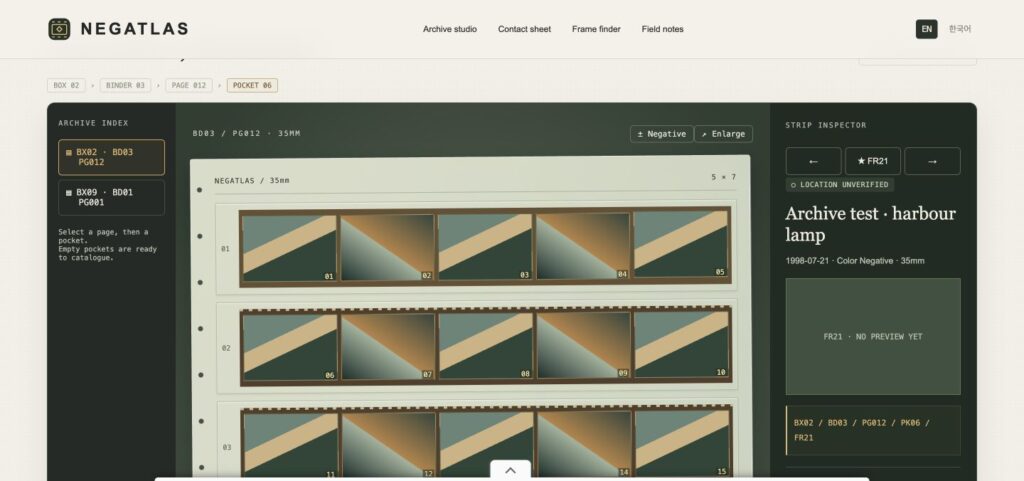
The official tool name is NEGATLAS, with the line “Every Frame Has an Address.” Its main workspace combines an archive index, a sleeve-shaped light table and a strip inspector. A contact sheet presents individual frame records. Search, roll reconstruction, gap inspection and printable page labels provide different routes back to the stored original.
A Physical Negative Address, or PNA, uses box, binder, page, pocket and frame. Our test address after a move was BX02 / BD03 / PG012 / PK06 / FR21. That is a locator within the archive, not a file path. The stable roll ID and strip ID have a different role: they keep a record connected when the physical locator changes.
| Record | Question it answers | Working rule |
|---|---|---|
| Stable roll ID | Which roll does this belong to? | Keep it independent of the binder location |
| Strip ID | Which catalogue object moved? | Retain identity while updating the address |
| PNA | Where should I look now? | Update it when the physical strip moves |
| Scan filename / reference | Which digital file should I locate? | Use a consistent reference and retain the actual file |
| Verification state | Was the physical location checked? | Do not mark verified merely because the record looks complete |
Decide the numbering convention before entering a large collection. Use the same box and binder labels on the physical containers and in your notes. If two people interpret page numbers differently, a formally correct address can still send the reader to the wrong place. The software stores your convention; it does not discover which sleeve you are holding.
2. Match the negative sleeve before cataloguing strips
Start by counting pockets and frames per pocket in the sleeve you actually use. The page form offers 35mm · 5 × 7, 120 6×6 · 3 × 4, 120 6×7 · 2 × 4 and Custom layout. The first number describes frame capacity across a pocket and the second the pocket count in these templates. These are map layouts, not instructions for cutting film or selecting storage materials.
Prepare a roll identifier, the frame numbering convention, a scan naming convention and a place to keep a backup. For a real collection, also decide whether page numbers restart in each binder. Start with one sleeve rather than transcribing every roll immediately; a small test reveals naming mistakes before they spread through the catalogue.
Choose New sleeve page, enter box, binder and page numbers, select a template and review Pockets and Frames per pocket before saving. Select an empty pocket and use Register strip. This separates the physical page from the strip record: an empty pocket is an available location, not a missing photograph.
We created BX09 / BD01 / PG001 using the 120 6×6 template. It displayed a 3 × 4 layout and four pockets. We registered a clearly labeled editorial test roll, TEST-120-2026, with frames 1–3 and an expected count of 12. The archive then contained two pages and 33 mapped frames alongside the original 30-frame sample. No real film was handled or physically verified during this exercise.
Treat suffix frame numbers carefully. The strip form has notes for suffix numbers, scan dates and other context, while its main range fields are numeric. If your edge markings include something such as 12A, do not silently replace that label with a different integer. Record the convention in the available notes and verify how your own catalogue will retrieve it; suffix-specific search behavior was not independently tested here.
3. Catalogue the strip, then refine the individual negative frame
The strip form collects a title, stable roll ID, first frame number, number of frames and an optional expected roll count. It also offers date photographed, film stock, camera, place/people/tags, scan reference, observed condition, an optional reduced preview and notes. A checkbox records whether the physical location has been checked. Leave that box unchecked when you are entering an unverified list or using sample data.
After registering a range, the inspector lets you navigate within it. Use Edit this frame · photo & scan when a single photograph needs its own title, file reference, notes or favorite state. A strip-level title can describe a sequence, while a frame-level title can describe one image. This avoids making five photographs share an inaccurate description just because they occupy the same pocket.
In the sample, we edited FR21 to “Archive test · harbour lamp,” set its reference to NEGATLAS_TEST_FR21.tif and made it a favorite. Those are synthetic editorial records, not facts about an actual family photograph. The original sample strip title remained “Summer by the sea” in roll reconstruction, while the individual frame showed our more specific title. That difference is useful when reading strip-level and frame-level outputs.
A reduced preview is offered in both strip and frame editing. The interface says it is resized and kept on the device; the publisher describes reduced previews as part of the local archive. We did not upload or validate a real scan preview in this test. Do not infer supported camera-raw formats, original resolution, color accuracy or lossless image preservation from the presence of the preview field.
The light-table artwork is explicitly simulated until you connect your own image. The Negative button toggled a pressed state in our test; it should not be described as a calibrated color-negative conversion workflow. Enlarge opened a read-only enlarged sleeve view, with a notice to use the workspace for editing. These display aids help orientation but do not inspect a real emulsion or diagnose image quality.
4. Move a negative without losing the route back to its scan
A useful archive must survive rearrangement. In the sample, FR21 belonged to sample-strip-4 at BX02 / BD03 / PG012 / PK05. We opened Move & keep history and first selected pocket 1, which was already occupied. NEGATLAS refused the operation with “Destination is occupied. Select an empty pocket.” It did not replace the existing strip.
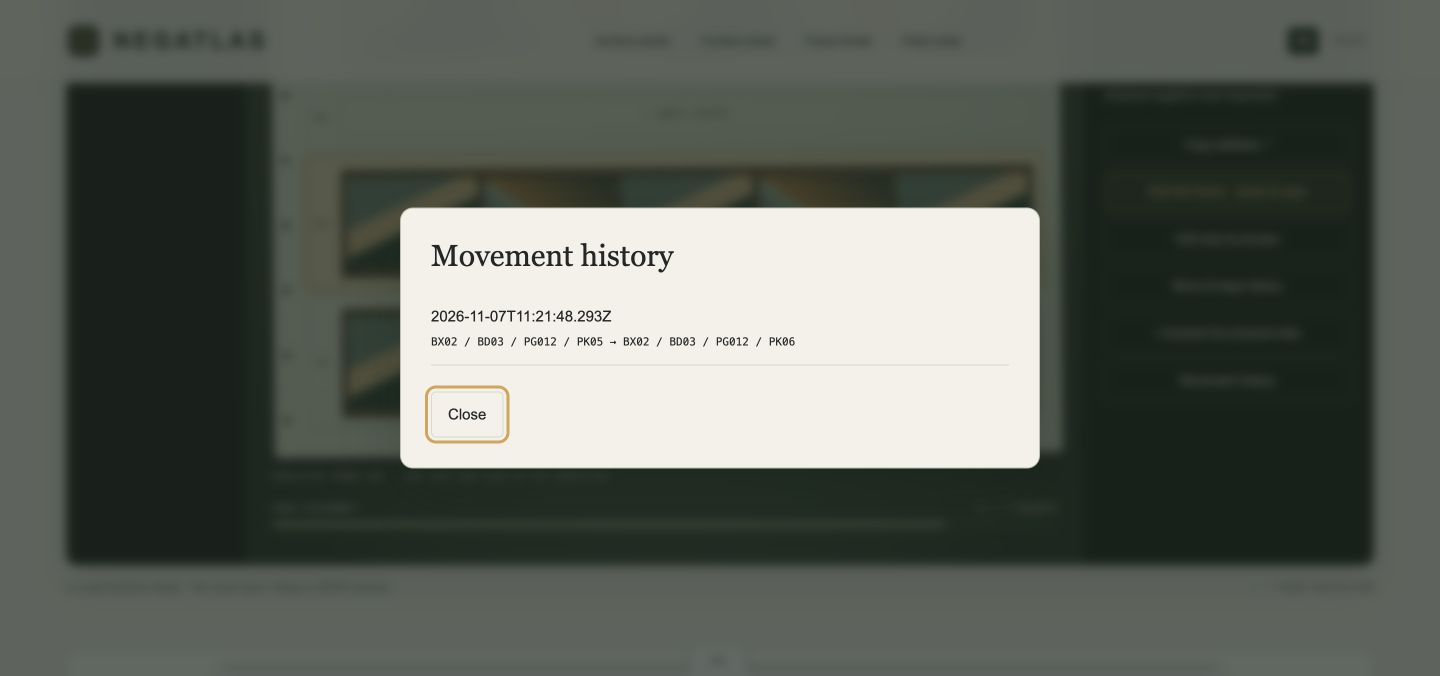
We then selected empty pocket 6. The new address became BX02 / BD03 / PG012 / PK06 / FR21. The strip ID, edited frame title, scan reference and favorite remained available. Movement history showed a timestamped PK05 → PK06 transition. The physical verification state changed from verified in the supplied sample to unverified after the move. We left it unverified because no physical strip had been checked.
Use a move as a two-part job: update the record and check the real destination. A digital move does not carry a strip across the room. After a real rearrangement, compare the binder and pocket against the new address before marking it verified. This is a workflow recommendation derived from the distinction the tool makes between a recorded address and a physically checked location.
Copy address produced the updated PNA including FR21. A printed list or your own scan notes can carry that locator, but keep the stable roll ID beside it. If you store only a PNA in a filename, a later move can make that filename misleading. A stable digital filename plus an updated catalogue address is easier to maintain than renaming every scan whenever a binder changes.
5. Retrieve and audit the negative archive with specific questions
Search a filename, then verify the returned location
Searching NEGATLAS_TEST_FR21.tif returned a single FR21 result with the edited title and the new PK06 address. The Korean interface in the same browser also showed that edit after reload. This demonstrates shared local records on the same site origin, not cross-device synchronization. A second computer still needs a usable backup before it can open equivalent records.
The contact sheet includes All frames, Favorites, No scan reference and Location unverified filters, with pagination. The original sample showed 30 frames across three contact-sheet pages. After our extra test strip there were 33 frames. On the fresh 390px Korean layout, Favorites reduced the contact sheet to the single starred FR21, and a filename search returned its current address without horizontal page overflow.
Read connection percentages as metadata, not preservation proof
The initial sample displayed Digital connection 100% even though FR21 said NO PREVIEW YET. A scan reference can satisfy that metric. After adding three test frames without a reference, the value was 91%, consistent with 30 referenced frames out of 33 total. The display does not establish that every referenced file exists on your drive or that its backup is readable.
Location confidence reflects strips marked checked, not a photographic inspection performed by the browser. The sample began with one verified strip out of six, displayed as 17%. After moving that checked strip, the location was unverified and the confidence display became 0%. This is a useful reminder to reconcile the catalogue with the container, not an automatic quality score for the collection.
Interpret gaps against the expected roll count
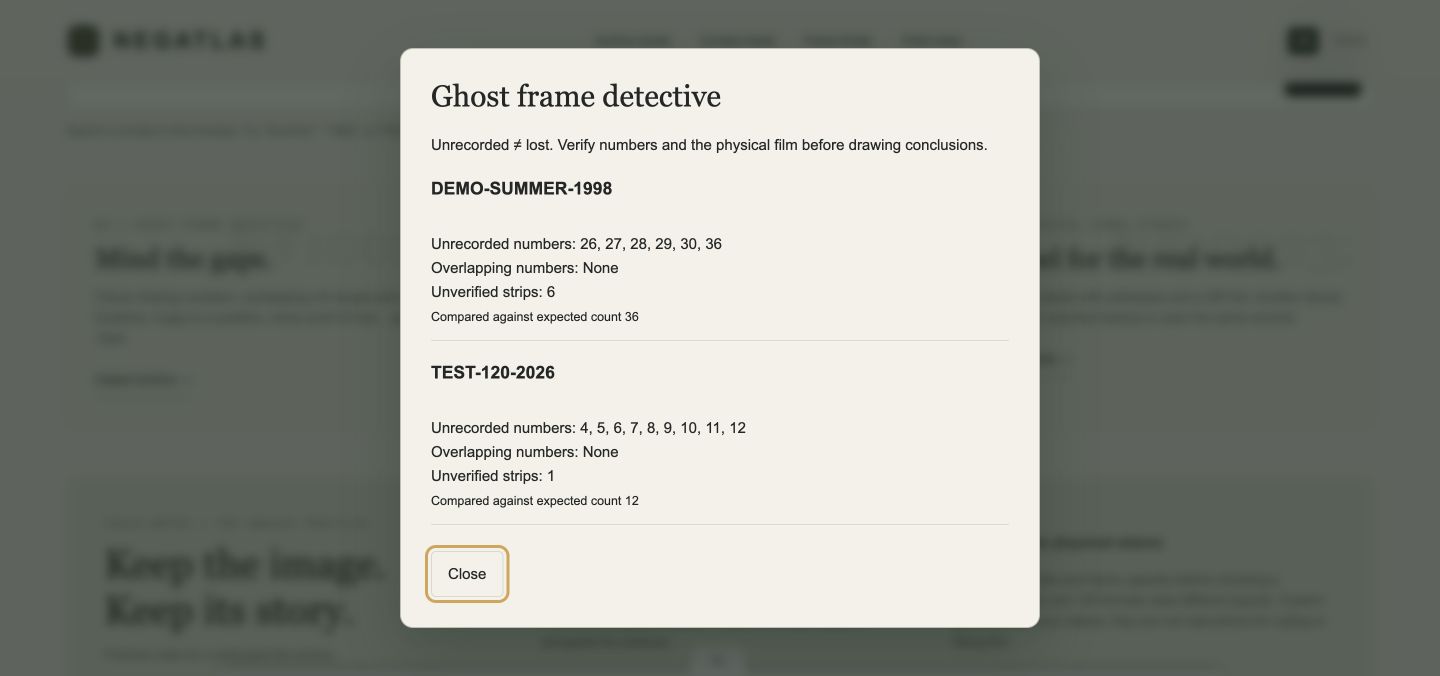
Ghost frame detective reported 26, 27, 28, 29, 30 and 36 as unrecorded for DEMO-SUMMER-1998 against an expected count of 36. It showed no overlapping numbers and six unverified strips after our move. For the separate test roll with frames 1–3 and expected count 12, it reported 4–12 as unrecorded. These are catalogue comparisons; an incorrect expected count can create a misleading checklist.
Roll reconstruction grouped strips in numeric order and showed the moved 21–25 range at PK06. It is useful when a roll spans several pockets or binders. It does not generate photographs for unrecorded numbers or stitch scan images into a recovered roll. Use it to locate and reconcile records, then inspect your own physical material separately.
6. Separate negative archive backup, inventory and QR labels
| Output | Intended role in the interface | What it does not establish |
|---|---|---|
| JSON archive | Restorable metadata, moves and reduced previews according to the publisher | A verified backup until you test the actual file and restore |
| CSV inventory | A convenient tabular catalogue | A complete restore file or a backup of full-resolution scans |
| Page label / QR | A URL fragment identifying a page | An embedded archive or automatic device synchronization |
| Scan reference | A route to your digital file naming system | A copy of the referenced image |
The Backup Center offers JSON, CSV, Paste JSON and file Restore. Its notice says restoration merges new IDs, skips existing IDs and stops on occupied physical addresses. Those are the stated rules. We activated JSON and CSV export controls but did not independently inspect the resulting files or complete a valid restore round trip. Our narrower test pasted invalid JSON and observed an error while the existing two pages and 33 frames remained after reload.
Do not promote that invalid-input test into a claim that all restore conflicts are handled correctly. Before relying on NEGATLAS for a substantial collection, use a small disposable catalogue to verify that your exported JSON can recover the records and any previews you need. Keep the latest dated archive outside the browser, and keep original scan files separately. A CSV is helpful for reviewing a list in a spreadsheet but is not the full recovery route described by the tool.
Prepare labels opened a page label containing BX02 / BD03 / PG012 and a page URL ending in #page=sample-page-012. The dialog explicitly said that the label contains a page link, not archive data, and to import a backup on another device first. We reviewed this label preview; we did not print it or test a physical QR scan.
The publisher says records and reduced previews use IndexedDB in this browser, with no account or automatic cloud sync. It also says advertising and the QR-code library may load third-party resources, while the tool does not send archive contents to them. We read that notice and verified local persistence; we did not audit network traffic or storage implementation. “Local-first” is not a guarantee that the entire page makes no external requests.
7. Establish a small negative archive routine and the next tool
Use a short reconciliation routine after a scanning session: assign the stable roll ID, map the occupied pockets, enter frame-specific references, search one distinctive filename and compare the returned PNA with the binder. Then review unverified locations and export a dated backup. This is a suggested workflow, not a claim that we scanned, printed or handled film during the test.
Compared with a general spreadsheet, NEGATLAS makes the sleeve layout, frame navigation and physical move history visible without building your own tables. A spreadsheet remains useful for flexible lists and review, while a photo manager addresses image browsing and file organization. NEGATLAS connects a catalogue to a physical locator; it should not be treated as an automatic file scanner, image restoration service or conservator.
For a real collection, separate cataloguing from material care. The Library of Congress guidance on photographs emphasizes identifying photographic materials before choosing appropriate handling and storage. A tidy sleeve map cannot establish that an enclosure is suitable or that deterioration has been diagnosed. Use the observed-condition field to record what you saw, and seek appropriate expertise for preservation decisions.
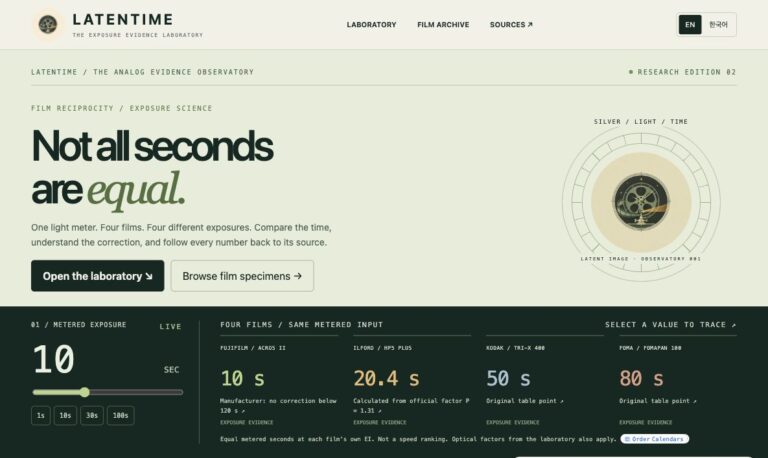
If your workflow begins with long-exposure shooting notes, our published LATENTIME film exposure guide explains a separate calculation and field-log tool. Keep a consistent roll identifier in your own shooting and archive notes to connect the stages manually. We did not test data exchange between LATENTIME and NEGATLAS. Browse Photography, Film & Darkroom for other published introductions.
Frequently asked questions
Does NEGATLAS scan or restore a negative image?
It catalogues records and offers reduced previews. It does not turn the supplied simulated frame artwork into your own photographs, automatically scan a binder or reconstruct lost image content. The Negative display toggle was not tested as a calibrated conversion tool.
Why is Digital connection 100% when there are no previews?
A filename or reference can count as a connection. Our initial sample showed 100% while FR21 had no preview. Verify the actual files and their backups separately.
Will a QR label open my archive on another phone?
The label carries a page identifier in a URL, not the archive. The publisher says another device needs the exported backup imported first. We checked the label preview, not physical QR scanning.
Does CSV replace JSON backup?
The tool describes CSV as an inventory and JSON as the recovery format. We did not validate either exported file or a complete successful restoration, so test recovery with a small catalogue before relying on it.
Can I use Korean and a narrow screen?
A dedicated Korean page is available. At a fresh 390px viewport it showed the same saved local edit, filtered the favorite frame and searched the test filename without horizontal overflow. A physical touchscreen and printing workflow were not tested.
Start with one sleeve and one successful retrieval
Catalogue a small page, choose one scan reference and use it to find the physical address again. Keep the stable identity separate from location, leave unchecked locations unverified and verify your own backup recovery before expanding the collection. The useful result is a negative you can reliably locate, not simply a higher frame count.
Verified 7 November 2026 UTC. Direct tests used supplied sample records and clearly labeled editorial test data. No physical negatives were inspected. Exported file contents, a full valid restoration, real-scan preview upload, physical printing/QR scanning and an independent network audit remain outside the verified scope.
A RELEVANT NEXT STEP
Tools with a useful connection
LATENTIME
Film Exposure: 7 Essential LATENTIME Reciprocity Failure Checks
LATENTIME compares film reciprocity corrections after ND, aperture and bellows factors. Read our source checks, calculated examples, timer and saved-log tests, plus clear estimate and export limits.
NEGAPROOF
Film Proof: 7 Essential NEGAPROOF Checks
Create a film contact sheet and keep selection reasons linked to sleeve references. Our NEGAPROOF tests explain missing frames, preview filters, local recovery and export limits.
PRINTSCORE
Dodging and Burning: 7 Essential PRINTSCORE Checks
Plan dodging and burning with tested stop-to-second calculations, drawn zones and a repeatable sequence. Read our 20-second example, browser-draft test and export limits.