Spaghetti Print Museum turns a selected image and title into a failed print art preview. Browse three illustrated studies and switch between creative captions and inspection prompts. The PNG control displayed a completion notice, but we could not confirm receipt of an exported file.
Hands-on review: 8 November 2026. We tested collection filters, art/autopsy text, lighting and angle controls, title generation, manual titles, image selection and reload behavior in English and Korean. Our input was an owned 480×480 geometric PNG, not a photograph of a failed print. We tested Korean at 390px. Export displayed a completion notice in two browsers, but we could not independently confirm a received PNG, its contents or its dimensions. All figures below are real interface captures, including an on-page preview—not an exported card. This library and the tool share a creator.
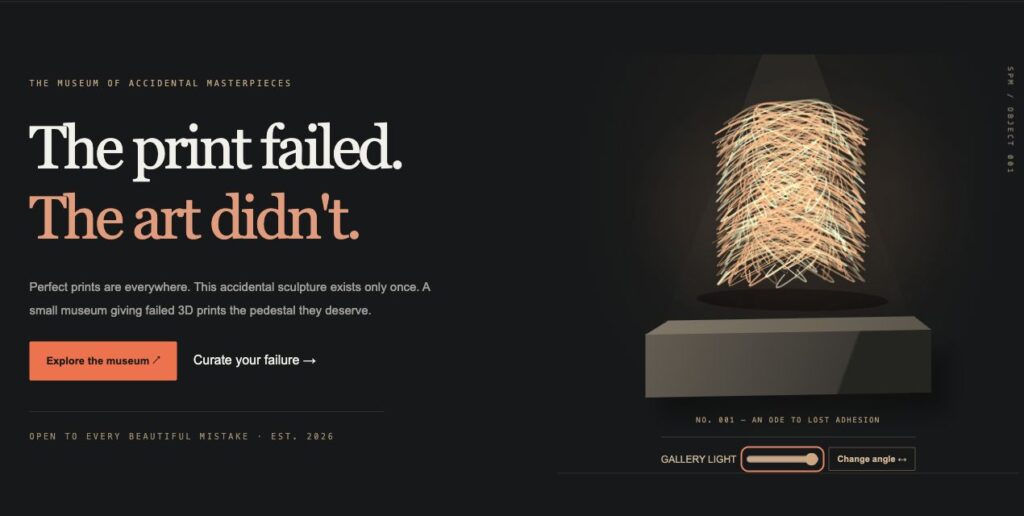
Explore illustrated failed-print studies and build an exhibition-card preview from an image and title. Real filter, title, image and reload tests explain the creative workflow while clearly marking PNG file receipt as unverified.
- Brand
- Spaghetti Print Museum
- Tool languages
- en, ko
- Verified date
- 2026-11-08
Table of Contents
Key takeaways for using failed print art honestly
- The official name is Spaghetti Print Museum. Its permanent collection contains procedural illustrations of spaghetti, layer shift and stringing, explicitly labelled as studies rather than user submissions.
- Art and autopsy are two readings of the displayed studies. The technical text is an inspection prompt, not an image-based diagnosis.
- The atelier accepts a selected image and an editable title. Our geometric PNG appeared in the preview and manual text replaced the default label.
- Reload removed our selected image and title. Keep the original image and your title outside the page before leaving.
- A completion notice does not establish that a file was received. The PNG download remains unverified in this review; check the actual file on your device.
When a failed print art card is the right next step
A tangled print can be disappointing and visually interesting at the same time. This workspace gives that object a different context: a photograph, a title and a museum-style frame. It is useful for a maker journal, a studio presentation or a playful record of a project that did not turn out as planned. Those are proposed uses, not evidence that a particular failed object has been diagnosed or repaired.
The useful distinction is between the story of the object and the evidence of the failure. A poetic name can make a memorable presentation, while the technical record needs material, settings and the point where the print stopped behaving as expected. Keep those two records connected through a project identifier without treating either as a substitute for the other.
This is not an STL or G-code analyzer, a printer-monitoring service or an automatic slicer repair tool in the inspected interface. No camera feed, printer connection or parameter recommendation was supplied by our selected test image. If your immediate goal is a successful reprint, use the collection notes as a prompt to gather evidence, then follow guidance for your own machine and material.
What the collection actually shows
The three displayed studies represent tangled extrusion, an offset layered form and fine threads between structures. They are procedural drawings. The source states that they are not user submissions. Do not cite the illustrated collection as photographs of three real print experiments, a public gallery of uploaded images or a catalogue of measured failure rates.
In the default art reading, each illustration has an imaginative caption. Switching to autopsy replaced those captions with practical observations. In our test, Layer shift isolated the corresponding study; choosing All studies restored the group. On the Korean page, selecting Stringing left the fine-thread study and its Korean inspection text visible.
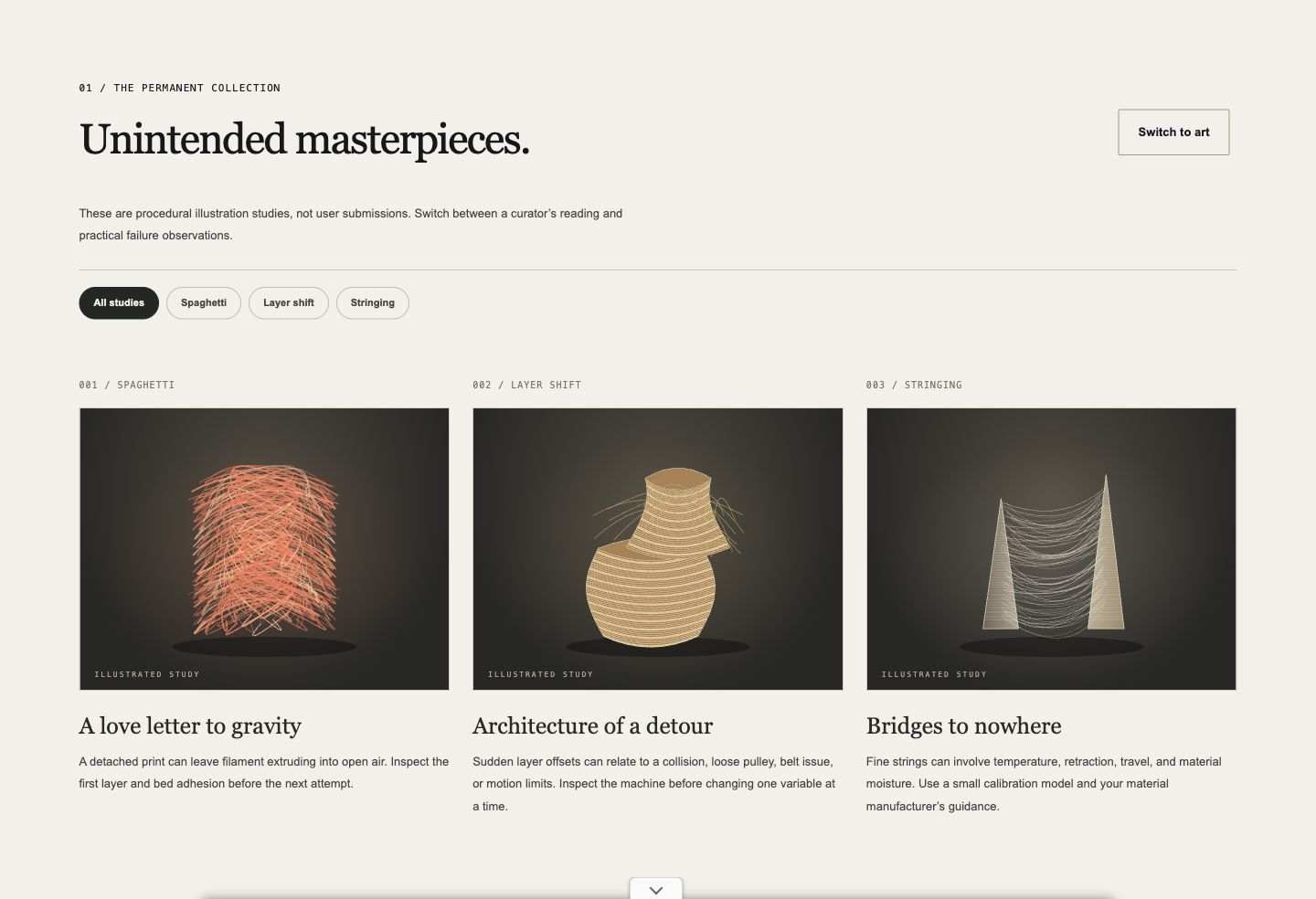
Spaghetti notes point toward checking whether the object detached and what happened at the first layer. Layer-shift notes suggest inspecting motion-related conditions. Stringing notes mention several possible influences rather than selecting one cause. We verified that this text changes with the reading mode; we did not run a physical printer experiment to validate a diagnosis.
Prepare the photograph and keep the evidence separate
Use a photograph you have the right to use. A simple background, sufficient contrast and an angle that shows the object help the presentation remain understandable. These are editorial photography suggestions, not an automatic enhancement feature in the app. No background-removal, cropping or retouching control was verified in the inspected atelier.
Keep the original image unchanged, especially if it also documents a failure. Before moving a real object for an attractive photograph, consider whether you still need an unaltered view of its position on the bed. Do not add a dramatic title and then lose the machine context that would help a separate troubleshooting process. Our review used a geometric test graphic, so it establishes file selection and layout response, not the quality of a real failed-print photograph.
The input label lists JPG, PNG and WebP up to 10MB. We tested one small PNG only. JPEG, WebP, orientation metadata, transparency, unusually large dimensions and the exact size boundary were not tested. If a phone image does not appear, prepare a copy in one of the advertised formats and check it locally rather than assuming that every gallery format is accepted.
How to use the museum: 7 essential checks
1. Identify whether you are viewing art or autopsy notes
Start in Collection and read the mode button before interpreting the captions. In English, Switch to autopsy changed the study descriptions to inspection prompts and the button offered a return to art. The Korean interface offered 기술 해설 보기. The drawing itself is still an illustration in either reading; a more technical caption does not turn it into a measured case report.
If you are showing the page in a workshop, say which reading is active. Ask viewers to describe a visible feature first, then distinguish that observation from a possible cause. For example, “the layers are offset” is a description, while “the belt caused it” requires additional evidence. The tool does not close that gap for an uploaded photo.
2. Filter a study and return to the full collection
Use Spaghetti, Layer shift or Stringing to narrow the illustrated collection. Our Layer shift selection left Architecture of a detour as the visible study. In Korean, Stringing showed 존재하지 않는 다리 and the corresponding technical note. All studies returns the categories to a shared view. This is a collection filter, not a label that analyzes or classifies the image you select later in the atelier.
The distinction matters when recording a real object. Selecting Stringing does not establish that your photograph contains stringing, nor does it add measured filament or temperature information. Choose a category as a way to browse the examples, then write down why you think a category might be relevant to your separate project.
3. Try the gallery controls without confusing them with photo editing
The hero illustration has a Light intensity slider and a Change angle button. We moved the slider from its initial 100 to its exposed minimum 70 and maximum 150, and operated the angle control. These are presentation controls for the gallery illustration. We did not establish that they modify your selected photograph or the eventual export.
This is a useful place to notice how lighting and viewpoint affect interpretation. A dramatic view can make a tangled form appear intentional, but it cannot add information about a print setting. Do not read the slider values as calibrated physical illumination or a change in printer parameters. Our screenshots preserve the actual interface rather than simulating a real photo shoot.
4. Select an image before attempting export
Open the atelier and choose an image through the photograph control. Clicking Download card PNG without an image produced “Please choose a photo first.” We then selected our owned 480×480 geometric PNG in the in-app browser and Chrome. The preview changed from the example sculpture to our test graphic. No real failed-print photograph or physical printing run was used.
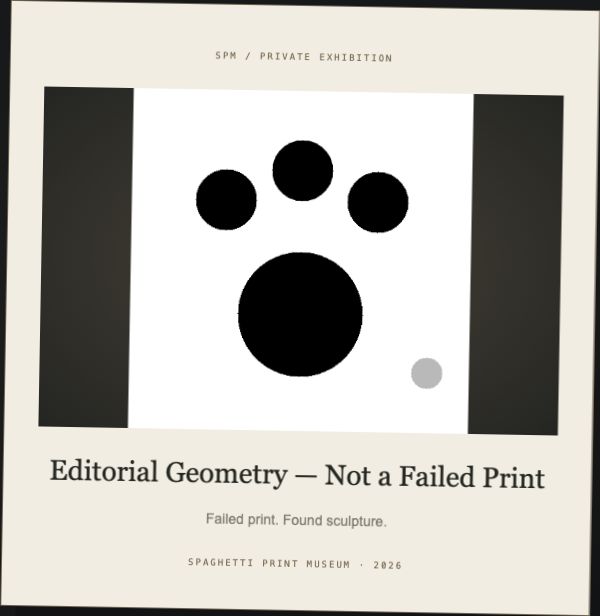
The geometric fixture makes the evidence boundary visible: black circles and a small grey circle are layout test content, not a synthetic photograph of filament. It lets us verify that a user-selected image appears without inventing a failed-print experiment. The tool still prints its fixed museum tagline around that content, so a reader needs the caption to understand what the test actually proves.
5. Generate a starting title, then edit for meaning
Generate a title returned Gravity Left a Note in our English test. We replaced it with Editorial Geometry — Not a Failed Print and saw the same text on the on-page card. The Korean field also accepted our manual test title. The inspected title input has an 80-character maximum attribute; we did not exhaustively test how long Korean or mixed-script titles wrap at that boundary.
Treat the generated wording as a creative starting point, not a conclusion about cause. A title involving gravity is not evidence that gravity caused the failure. If you want a public keepsake, choose a name that makes sense without private project details. Keep a separate note with your chosen wording because our reload test returned the default title.
6. Check the PNG control and verify the actual file yourself
After image selection, the export control displayed “Exhibition card created.” We saw this notice in both the in-app browser and Chrome. However, the download event did not yield a received file in our checks, so we did not open an exported PNG or measure its dimensions. The figure above is a screen capture of the preview. It must not be described as a successful exported-file test.
For your own work, verify that a file actually appears on the device and opens in an image viewer before closing the page. Check the title, image placement and legibility in that file. If it does not arrive, retain your source image and title and treat the export as incomplete. Our observation does not establish a universal site failure or a successful download in every browser; it records the limit of this session.
7. Preserve the source before navigating or reloading
We reloaded after editing. The default A Monument to Almost title and Example sculpture returned, replacing our selected image and manual title. This matches the source’s explanation that selected photos stay in browser memory and disappear on reload. We did not find a project backup, importable editing file or account-based recovery path in the inspected workflow.
A practical folder can contain the untouched photograph, the intended title in a text note and any verified output file. Give the set a project identifier so you can distinguish it from a different attempt. A screenshot can document the visible preview if needed, but it is not the same artifact as the site’s advertised PNG export. Label it accordingly.
Actual results and verification limits
| Test | Observed result | What remains open |
|---|---|---|
| No image selected | Photo-first warning | No output file expected |
| Layer shift filter | One matching study visible | No uploaded-image classification |
| Art/autopsy switch | Caption text changed | No cause confirmed |
| Light slider | 100→70→150 | No calibrated lighting claim |
| Geometric PNG input | Preview changed to fixture | Other formats/size limits untested |
| Manual title | Preview text matched | Long-title boundary untested |
| Export control | Completion notice | File receipt/content/dimensions unverified |
| Reload | Default image and title restored | No recovery workflow verified |
The table is deliberately narrower than a claim that the complete export pipeline worked. It also distinguishes the source’s advertised input formats from the PNG we actually selected. Repeating the test with a personal photograph would establish different facts, such as whether that particular image orientation and framing work well; it would not turn the collection notes into automated diagnosis.
A two-record workflow for a real failed object
For a maker journal, keep an exhibition record and a technical record with the same identifier. The exhibition record can contain a photograph, a short title and the date. The technical record can list material, machine, relevant settings, first-layer behavior, supports and the point of failure. These fields are our suggested worksheet, not an automatic data export from the museum.
A hypothetical example is attempt A03: a maker saves a photograph for a playful card, then separately records that the object moved before unsupported extrusion appeared. That is a proposed example, not a printer run we carried out. The next question is what evidence would distinguish attachment problems, support failure or another condition. The creative framing should help you keep the object memorable without erasing uncertainty.
The Prusa Knowledge Base discussion of spaghetti failures points to first-layer quality and also considers problems with a model or sliced file. This supports treating the tangled result as a starting symptom rather than a single-cause verdict. Apply guidance relevant to your own printer and material; this review does not supply a universal temperature, retraction or belt adjustment.
Prepare a presentation without overstating the evidence
A useful exhibition caption says what the viewer is seeing. If you use an illustration, call it an illustration; if you use a real photograph, preserve its provenance; if you capture an on-page preview, label it as a preview. Those distinctions matter more than making a failure look dramatic. Do not present our geometric test image as a specimen from a failed printer.
Before sharing, inspect the background for faces, addresses, labels or private project details. This is a photography and editorial check, not a privacy scanner supplied by the app. Use an image you are entitled to share, and retain the original. The tool did not establish rights or consent for a selected picture during our test.
Mobile use and language differences
The Korean page was loaded freshly at 390px. We selected Stringing, switched to technical notes, selected the test PNG and entered a Korean title. The document and viewport both measured 390px with no horizontal page overflow in that configuration. English category names remained in the Korean filter, while headings, explanations and atelier labels were localized.
This was a browser viewport test, not a test of every physical phone, camera format or download permission. Some page interactions triggered advertising overlays during the review; dismissing an ad is separate from using a museum control. We did not click advertiser destinations. A narrow preview that fits the screen also does not establish the layout of an unreceived exported file.
Privacy, storage and the boundaries of this review
The source states that the selected image is processed on the device, is not submitted to a public gallery and remains in memory until reload. We directly observed image/title loss after reload and used no account. We did not independently audit network requests, source code or storage. Blogger attribution and advertising were present, so the local-photo statement should not be expanded into a zero-tracking or offline guarantee.
- PNG receipt, exported contents and output dimensions were not verified. Check the actual file before relying on export.
- JPG, WebP, the 10MB boundary, unusual image metadata and many long-title cases were not tested.
- The collection is illustrative; autopsy text supplies prompts, not photo diagnosis or machine instructions.
- No public-submission gallery, cloud backup, printer integration or project recovery was used or verified.
- No real 3D print was produced, repaired or diagnosed in this review.
Related tools for the next useful task
For a structured record of visible FDM symptoms and one-variable follow-up questions, read our Benchy Failure Detective guide. Its hypothesis workflow is different from the museum’s creative presentation, and it still requires evidence rather than treating a symptom as a certain cause.
For a separate instruction graphic, the FrameMint Studio guide explains a screenshot-editing workflow. Keep your untouched image and label an annotated preview as an annotated preview. We did not verify a direct integration between either related tool and Spaghetti Print Museum.
Failed print art FAQ
Are the permanent-collection works real uploaded photographs?
No. The source labels them procedural illustration studies and says they are not user submissions. Our collection screenshot preserves that context.
Can the autopsy view identify the cause in my image?
The inspected interface supplies general observations for the displayed categories. Its FAQ states that a photograph cannot confirm a cause. We did not verify an image-analysis or diagnosis feature.
Did this review successfully download a finished card?
We confirmed image/title preview updates and a completion notice, but not receipt of a PNG file. No exported-file dimensions or contents are reported. The pictured test card is an on-page screen capture.
Will my image and title be there after reload?
They were not in our test: the default title and example sculpture returned. Keep the original image and title outside the page; no cloud recovery was verified.
Do I need a real failed print to test the layout?
Our geometric PNG was accepted for a functional preview test. If you use a substitute, label it honestly. That does not establish how a real photograph will be framed or whether an exported file will arrive.
Give the object a story and keep the evidence
Use the museum to browse interpretations and build a clearly labelled preview. Keep the technical record separate, preserve the source image and verify any actual output before leaving. Failed print art can be playful while remaining precise about what is an illustration, an observation and an untested assumption.
A RELEVANT NEXT STEP
Tools with a useful connection
Benchy Failure Detective
Benchy Troubleshooting: 7 Essential Checks for Failed Prints
Use Benchy Failure Detective to turn visible FDM print symptoms into rule-based hypotheses and one-variable test plans. See our actual interface tests, language differences and local-save limits.

FrameMint Studio
Screenshot Editor: 7 Smart FrameMint Studio Checks
Frame screenshots, add manual masks and build captioned stories in FrameMint Studio. Real import, order, recovery and size tests explain what to check before sharing.
PostPack Studio
Image Pack Maker: 7 Smart Checks in PostPack Studio
Create four template-based blog and social layouts from shared text and an optional image. Our guide checks platform copy, CSV generation, brand persistence and metadata while separating editor results from unverified downloaded files.