Drybox readings are easy to glance at and easy to forget. Spool Drybox Diary — The Humidity Observatory turns manually entered humidity, temperature and maintenance events into a local filament-storage journal. Give each drybox a target, log what changed and inspect a timeline before deciding what to investigate next.
Checked 12 November 2026, Asia/Seoul. We created two test boxes, entered synthetic values, checked arithmetic and threshold behavior, rejected a future timestamp and edited a target on a Korean 390 px screen. These were software tests, not sensor measurements or a physical drying trial. Screenshots show the actual tool. This library and the tool share a creator.
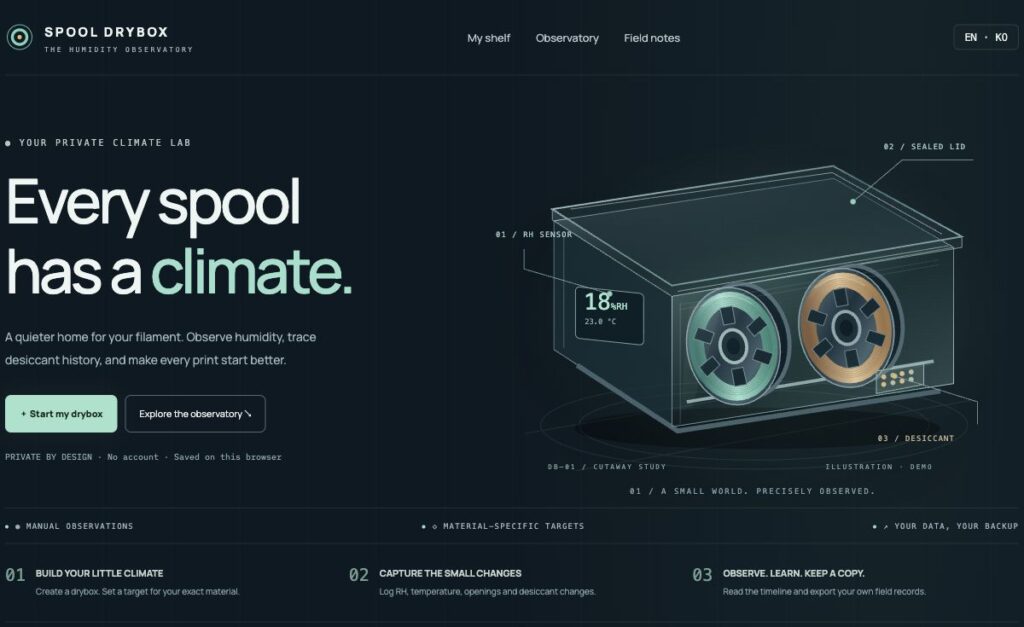
Keep manual filament drybox observations, targets and desiccant events in one local journal. Tested threshold arithmetic, monthly means, reload and Korean mobile editing, with clear backup limits.
- Brand
- Spool Drybox Diary — The Humidity Observatory
- Tool languages
- en, ko
- Verified date
- 2026-11-12
In this guide
Key takeaways
This is a manual journal, not an internet-connected hygrometer. You supply observations and events; the tool displays the history, selected-period summaries, target status and monthly totals. It does not turn on a dryer, read a Bluetooth sensor or measure moisture inside filament.
The most useful record combines RH with temperature, time and context. A lid opening or a desiccant replacement gives a rise or fall something to investigate. A blank event history cannot establish that no exposure occurred. A low air reading alone cannot establish print readiness.
English and Korean pages share records in the same browser and domain. We confirmed two boxes and four observations across a reload and the Korean page. The source describes localStorage, not cloud synchronization. Export controls exist, but we did not validate downloaded CSV/JSON contents or a restore round trip.
What this drybox diary records
The page uses the Spool Drybox branding, the subtitle The Humidity Observatory and the footer name Spool Drybox Diary. Its shelf gives each drybox a material, target ceiling, latest observation and log count. Selecting a drybox changes the detailed timeline and its desiccant passport.
A drybox observation accepts a timestamp, relative humidity in percent, temperature in Celsius, an event and a field note. Events include a lid opening, adding a spool, replacing desiccant, regenerating it and checking it. The drybox passport holds the box name, material, target, desiccant description and next inspection date.
The dashboard initially shows an explicitly labelled demonstration shelf. Starting our own drybox replaced that demo with an empty personal shelf; it did not turn the illustrative values into our measurements. The cutaway drybox in the hero is also labelled as an illustration/demo. Treat both as interface examples, not live hardware data.
There are two different comparison levels. A drybox shelf badge describes the latest observation against that drybox’s target. A period mean summarizes included observations. A drybox can therefore have a latest value within target while its earlier high readings keep the period average above it. Those are compatible statements about different summaries.
Prepare measurements before opening the journal
Choose a stable drybox name that maps to a physical container, and put that same name on the container if you manage several. Record the material grade and supplier in your own notes when that matters. A generic PLA or PETG selection is not enough to establish the right storage or drying instructions for every formulation.
Obtain RH and temperature from your actual instrument. Record when the reading was taken, not merely when you typed it. Note openings, sensor movement and maintenance. Keep the instrument and observation routine consistent when possible; otherwise a change in the chart might describe a measurement change rather than a drybox change.
Set a target from the relevant filament and storage guidance. Our 25% and 20% ceilings below are software test settings, not universal recommendations. The source’s editable defaults and demonstration targets should not replace the instructions for your exact material, desiccant and equipment.
For the physical distinction, the Prusa USS Drybox documentation explains that its desiccant box slows moisture absorption and does not dry already-moist filament. That supports separating storage from active drying; it does not validate this journal’s calculations or certify every drybox design.
7 steps from a new box to a useful record
1. Create your own drybox
Press Start my drybox or Add drybox. Enter a name, choose PLA, PETG, TPU, PA or Other, and set the maximum RH. Add a desiccant type/amount and an inspection date if useful. Save, then confirm that your own shelf is shown. In our test the new drybox began with no observations, rather than inheriting seven demo logs.
2. Enter one real observation with its time
Select the drybox and fill Observation time, Humidity and Temperature. Keep units straight: 25 in the RH field represents 25%, while the temperature field expects Celsius. Use an actual past observation time. A future 10:00 entry during our morning test was rejected with a valid-time message and did not increase the record count.
3. Add the event and an explanatory note
Choose the event that actually occurred and add a brief note. “Lid opened to remove PETG” is more useful than “humidity bad.” A replacement event can help locate maintenance in the history, but it is not proof that the replacement caused a later change. Our replacement event also updated the passport’s last inspection/change date.
4. Save and confirm the visible record
Press Save observation, look for the saved message and confirm the timestamp in the list. Our new records appeared on the shelf and timeline and increased the log count. Avoid repeatedly submitting the same filled form merely because you have scrolled away from its success message; check the list first.
5. Read RH and temperature over the same period
Choose 7 days, 30 days or All records, and use the RH % and TEMP °C buttons. The chart has selectable points and record buttons. Read the minimum, maximum and first-to-last change in the chosen metric. A change of minus 15 percentage points is not the same expression as a 15% relative reduction.
6. Review the target, passport and second box
Open Edit target & passport when your documented storage target or desiccant details change. Then choose Drybox A and Drybox B for selected-period means. Confirm which drybox and period are being summarized. Our mobile edit from a ceiling of 25 to 18 changed a latest reading of 20 from within to above target without changing the reading itself.
7. Review the monthly report and preserve a copy
Select the report month and read the observation count, mean RH and above-target count. The page offers Monthly CSV and Full JSON backup, plus a Restore backup input. Use a backup only after checking its actual saved file. We could not independently capture the CSV output within the bounded download test, and did not verify JSON export or restoration.
Our synthetic-input test results
| Synthetic input or action | Observed output | What it establishes |
|---|---|---|
| PLA ceiling 25; readings 35, 25, 20% RH | 25 and 20 were within target; 35 was above. Min 20, max 35, change −15 percentage points. | Threshold and range behavior for these inputs. |
| PLA temperatures 23, 24, 22°C | TEMP °C switched to a temperature history. | The same records can be viewed in the other metric. |
| PLA three readings; PETG one reading at 30% RH | Means 26.7% and 30.0% in the box comparison. | The displayed arithmetic matches the supplied values. |
| Four November records across both boxes | Monthly count 4, mean 27.5%, above-target count 2. | The month summary includes both boxes, not just the selected shelf item. |
| Future observation timestamp | Validation message; record count did not increase. | Future times were blocked in this test. |
| Korean mobile target edit 25 → 18 → 25 | Latest 20% changed within → above → within. | Status follows the configured ceiling, not a physical change. |
| Reload and Korean page | Two boxes and four observations remained. | Same-browser storage and cross-language access worked. |
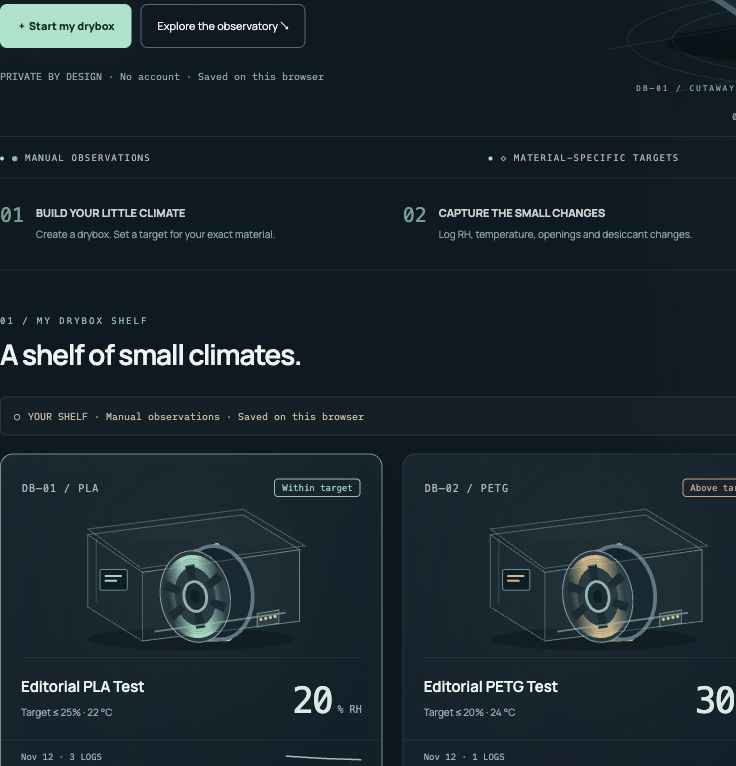
The arithmetic is transparent: (35 + 25 + 20) ÷ 3 = 26.666…, displayed as 26.7. Adding the PETG value gives (35 + 25 + 20 + 30) ÷ 4 = 27.5. The above-target records were PLA 35 against 25 and PETG 30 against 20. Equality at the PLA ceiling was treated as within target.
These observations are not a humidity-recovery curve from a real box. We deliberately entered a descending sequence to check display and calculations. The journal cannot convert our invented readings into evidence about silica-gel performance, print quality or how long a particular spool needs to dry.
Read trends without inventing a drying result
Start by separating latest status from the selected-period story. A current reading can be acceptable while the week contains an earlier excursion. Inspect the event list to see what was recorded around that excursion. If no opening was entered, the journal cannot reconstruct it after the fact.
Treat temperature as context, not an optional decoration. Before attributing an RH change to desiccant, compare the recorded temperatures, sensor placement and opening schedule. The tool itself asks users to check sensor accuracy and temperature. It supplies clues rather than diagnosing a saturated cartridge or a leaking seal.
A line connecting sparse observations is a visual guide between entered samples. It is not a continuous recording of everything that happened in the gap. If you only log once a day, a short exposure between readings may be absent. Record more deliberately around the event you are trying to understand instead of interpreting a smooth line as complete coverage.
Make box comparisons more informative
For a useful comparison, choose a question before choosing A and B. “What happened after opening this container?” is narrower than “Which desiccant is best?” Record container identity, material, amount of desiccant, sensor and observation schedule so the difference has context.
Our 26.7-versus-30.0 example is especially unsuitable for declaring a winner: one drybox has three readings and the other has one, with different materials and desiccant amounts. The monthly 27.5 mean weights observations equally; it is not the simple average of the two displayed box means. Unequal logging frequency can influence the combined result.
When you need a controlled physical comparison, organize that experiment separately and use the diary as a record. Keep the variables you intend to hold steady documented, change only what the question requires and preserve the raw observations. This tool does not predict future RH, normalize different sensors or certify a causal result.
Reports, backups and recovery limits
The source describes Monthly CSV as all dryboxes in the selected month, and Full JSON backup as the complete history, targets and passports. Those are different purposes: a monthly analysis file and a fuller recovery-oriented file. Do not assume that the CSV alone can restore every setting.
The restore explanation says new drybox IDs are merged while existing IDs are left unchanged. That is a particularly important limitation if you expect importing an old file to overwrite an existing box. We read that behavior in the interface but did not perform a restore, collision test or recovery audit.
Keep dated backups outside the browser and open an exported file to verify it before relying on it. Clearing site data, switching profiles or using private browsing may remove access to local records. A successful reload in one Chrome profile is useful evidence of persistence, but it is not a disaster-recovery guarantee or device-to-device synchronization.
Build a repeatable storage-to-print routine
Before a print, identify the container and filament, review its latest reading and look for relevant recent events. If the spool’s condition is uncertain, follow the supplier’s material-specific process rather than treating a green badge as authorization to print. The diary records air conditions; it does not inspect the polymer.
After an opening or maintenance event, add a timestamped note and take observations using a consistent routine. Use the next inspection date as an organizational reminder. The passport does not measure remaining desiccant capacity, and we did not verify a background notification service. Do not infer that a date field will alert you while the site is closed.
If a print later fails, keep storage history alongside slicer settings and visible symptoms. Change one relevant variable at a time when planning the next check. A storage journal can strengthen your notes, but it cannot replace a print diagnosis or prove that moisture caused stringing, surface defects or an extrusion issue.
Privacy, mobile behavior and limitations
Privacy: the source says records stay in localStorage on this browser/domain and are shared across its English and Korean pages. It also states that Blogger and advertising services have their own data practices. Advertising frames and an interstitial appeared during our visit. We did not perform a network audit, so the entire site should not be described as zero-tracking or fully offline.
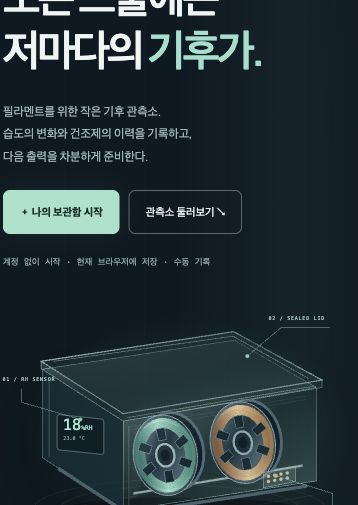
Mobile: the Korean passport dialog fitted a fresh 390 px viewport without horizontal overflow, and we saved the changed target. Some English branding and material tokens remain. Named fields and chart-point buttons are helpful, but no complete screen-reader or all-browser audit was conducted. Ads can temporarily obscure content; avoid confusing them with the journal’s controls.
Scope: there is no tested sensor connection, automatic sampling, active drying or filament-moisture measurement. Exported files, restore behavior and long-term storage durability remain unverified in this review. Our testing establishes the stated input, arithmetic, persistence and mobile flows as of the review date.
Related tools for the next printing decision
Once storage notes are in order, Last Meter helps with the separate question of how much filament remains for a planned job. Its reserve and purge arithmetic does not determine whether the material is dry.
If you already have a failed test print, use the Benchy Failure Detective guide to organize visible symptoms and a follow-up plan. Bring your storage notes as context rather than assuming moisture is the answer.
For a planned multi-color job, the CHROMA TRACE guide explains inspection of filament-change and pause requests in text G-code. That complements material preparation with a file check; it does not synchronize with the diary.
Drybox diary FAQ
Does it read my humidity sensor automatically?
No. The interface explicitly describes manual input and no sensor connection. You enter the reading, temperature and time. The decorative cutaway and initial demo shelf are illustrations, not live telemetry.
What target should I use?
Use the guidance for your actual material grade and storage equipment. The editable examples are not universal thresholds. Our test ceilings were chosen to check software boundaries, not to recommend storage settings.
Does a low drybox reading mean the spool is dry?
No. Air RH is not a direct measurement of moisture inside filament. Storage and active drying are different tasks; consult the material supplier when drying is needed.
Why does the monthly mean differ from the box means?
The report summarizes observations across boxes in the selected month. Our three-plus-one test produced 27.5%, while the box means were 26.7% and 30.0%. Different record counts matter.
Will English and Korean records stay separate?
Not in the same browser/domain: the source says they share local data, and our test confirmed the same boxes and records. That does not imply sharing across devices or Chrome profiles.
Can I rely on the backup and inspection reminder?
Verify an actual exported file and recovery process before depending on them. We did not validate CSV/JSON contents, restoration or background notifications. The inspection date is a planning field, not measured remaining capacity.
Start with one box and one honest reading
Choose one identifiable box, set a justified target and enter a real reading with its time and context. A small, consistent history is more useful than a long chart whose values cannot be traced to observations. Keep a verified backup before treating the browser as your only notebook.
A RELEVANT NEXT STEP
Tools with a useful connection

Last Meter
Last Meter: 7 Essential Leftover Filament Checks
Plan the last grams of a spool with Last Meter. See tested weight/length conversions, reserve and purge arithmetic, tiny-print combinations and the limits of illustrative model weights.
Benchy Failure Detective
Benchy Troubleshooting: 7 Essential Checks for Failed Prints
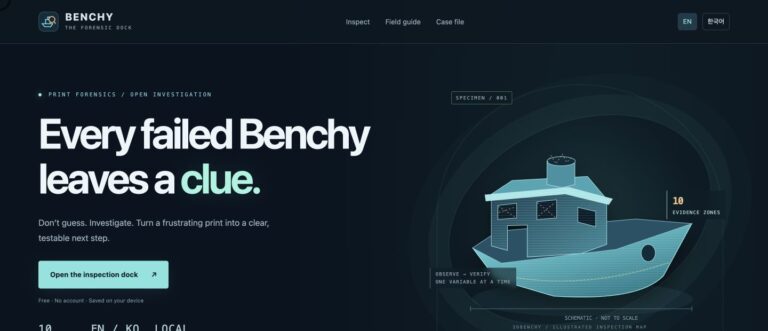
Use Benchy Failure Detective to turn visible FDM print symptoms into rule-based hypotheses and one-variable test plans. See our actual interface tests, language differences and local-save limits.

CHROMA TRACE
CHROMA TRACE: G-code Color Change Viewer in 7 Clear Steps
Inspect filament-change requests, pause candidates and tool switches in text G-code, with layer previews and a CSV checklist.