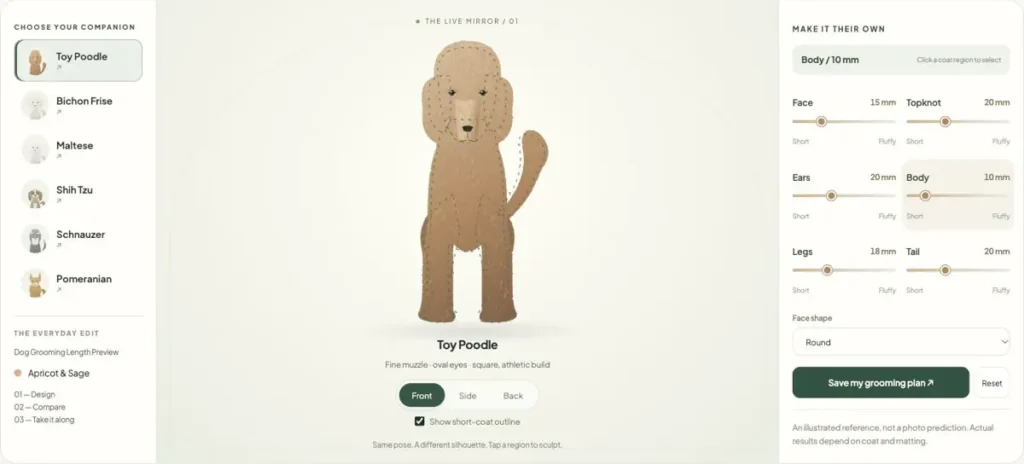
Preview six coat regions in FurMap illustrations and prepare a clearer groomer brief. Actual tests explain A/B comparisons, timeline limits, Pomeranian controls and notes versus style links.
- Brand
- FurMap
- Tool languages
- English, 한국어
- Verified date
- 2026-11-15
Dog grooming simulator FurMap is an illustrated planning tool for choosing desired remaining coat lengths and discussing them with a groomer. Select a breed, adjust six regions and compare two looks. It does not upload your dog’s photograph or predict a real haircut. Its value is making “shorter body, fuller legs, soft ears” a more precise conversation.
Verified 15 November 2026, KST. We operated presets, region selection, keyboard sliders, views, face shape, A/B saving, the timeline, lifestyle suggestions, Pomeranian restrictions and sharing. An English style link reopened the original lengths without the optional note. Korean controls were tested at 390×844. Screenshots are actual interface captures. No dog was groomed; completed PNG and PDF files were not inspected.
On this page
Key takeaways
The millimetres mean desired coat left after grooming, not clipper blade numbers. Default Toy Poodle values were face 15, topknot 20, ears 20, body 9, legs 18 and tail 20 mm. They describe a reference silhouette, not an instruction that every dog of that breed can receive those lengths. Coat condition and the groomer’s assessment still determine the agreed service.
The most important handoff distinction is between the editable style link and copied notes. The link restored breed, view, shape and base lengths in our English test, but excluded the special request. Copy notes included that request. Also, moving Fur Timeline to eight weeks changed the comparison scenario while the passport retained the original lengths. Do not send one output while assuming it contains everything visible elsewhere.
What this dog grooming simulator does
The official brand is FurMap, also presented as FurMap Studio and The Grooming Atelier. Its page title is Dog Grooming Length Preview: Free Haircut Simulator. The English root and Korean page provide an SVG illustration rather than an AI-generated photo. The source describes the tool as independent of salons and veterinary services.
Six breed models are available: Toy Poodle, Bichon Frise, Maltese, Shih Tzu, Schnauzer and Pomeranian. The editable regions are face, topknot, ears, body, legs and tail. Front, Side and Back buttons change the view, while a short-coat outline offers a reference under the silhouette. Round, Natural and Defined are the face-shape choices. Generic length sliders expose 3–50 mm on the ordinary Toy Poodle model; the Pomeranian behaves differently.
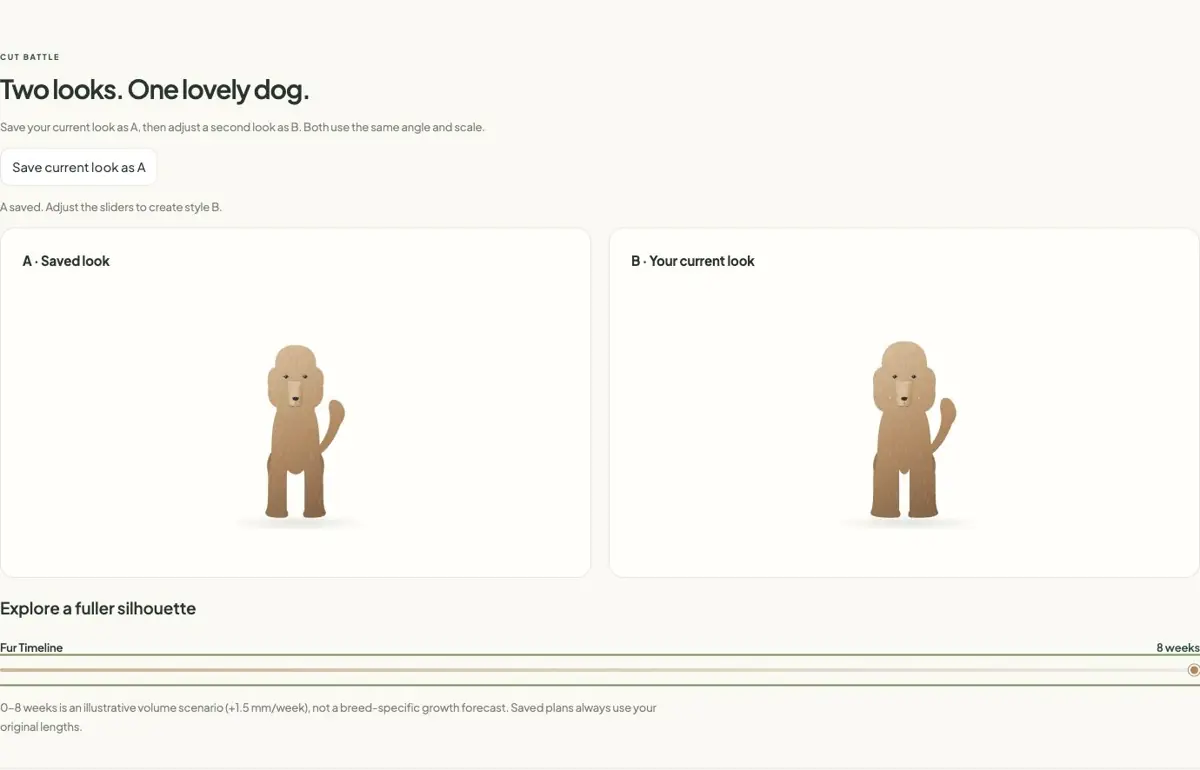
The style library offers Teddy bear, Puppy cut and Lamb-inspired. Further down, Cut Battle stores a look as A while the live settings become B. Fur Timeline adds an illustrative volume scenario. A rule-based lifestyle finder applies starting lengths, and Groomer Passport presents front and side drawings with a text summary. Copy notes, Copy style link, Download PNG and Print/PDF are separate controls.
Prepare a useful groomer brief
Start with the goal of the appointment, rather than trying to reproduce a picture at any cost. Decide which areas matter: the face outline, longer ears, fuller legs or a shorter body. Keep those priorities separate from exact millimetres. A groomer may need to adjust an initially preferred length after examining coat texture, tangles and skin. The tool’s own passport asks for that assessment.
Choose the closest available model, but state when your dog is a crossbreed or has a different build. FurMap does not measure your dog’s proportions. A current reference photo and a short list of priorities can complement the illustration when you speak with the professional; the website itself has no photo-import workflow in the interface we inspected. Avoid describing the generated illustration as a prediction of your individual animal.
Write down the six base lengths before comparing designs. “Teddy bear” and “Puppy cut” are visual presets here, not standardized salon specifications. Two people can use the same style name and imagine different ears or legs. The passport’s regional values make that disagreement easier to discuss. Ask the groomer to confirm a feasible result rather than treating the preset name as a complete order.
Dog grooming simulator: 7 essential checks
1. Choose a breed before saving a comparison
Select the intended breed in the companion list. We began with Toy Poodle. Breed changes alter the illustrated structure and defaults, so decide this before saving A. Later we changed from a saved Toy Poodle to Pomeranian and the two cards retained different breed labels. That is no longer a comparison of haircut length alone.
2. Select a region and change its desired length
Click a coat region or focus its named slider. Selecting Body exposed its current millimetres in the region panel. One ArrowRight press changed our default body from 9 to 10 mm, and the passport updated to 10. This is a convenient precision check when a mouse drag is awkward. The displayed number is a reference length, not a blade size.
3. Review the front, side and back
Use the view buttons to look for proportions that a single angle can hide. Front and Side were tested in English, and Back in Korean. The passport’s two illustrations remain a front-and-side handoff rather than a promise to export every current view. Keep the live-view choice distinct from what the passport actually presents.
4. Apply a preset, then inspect all six values
Teddy bear gave the default Toy Poodle set. Lamb-inspired changed topknot to 25, ears to 18, body to 6 and legs to 25 mm, with face 15 and tail 20. A preset can change several regions at once. Read the resulting passport rather than assuming only the part suggested by its name changed.
5. Save A and create a deliberate B
Press Save current look as A after confirming breed and base values. Then change one region, or apply a second preset intentionally. A saved message confirms the comparison slot. Keep the breed fixed and timeline at zero when the question is simply which haircut outline you prefer. Otherwise several effects can enter the comparison together.
6. Add a short, reviewable special request
The optional note can record a priority such as discussing the ears before cutting. Our demonstration note appeared in Copy notes, but not in the reopened style link. A note is also not a physical coat assessment. Use it to start a conversation, and make sure the groomer receives the actual text when it matters.
7. Test the handoff before leaving the page
Copy the style link and open it in a fresh tab. We recovered the Lamb-inspired base values, Round face and side view. The shared timeline was zero even though the originating comparison had shown eight weeks. Copy the text separately, or verify a received card, so the chosen design and requests can be read together.
Actual preset and control tests
| Observed test | Actual output |
|---|---|
| Toy Poodle default / Teddy bear | Face 15; topknot 20; ears 20; body 9; legs 18; tail 20 mm; Round. |
| Body keyboard ArrowRight | Body changed from 9 to 10 mm; regional panel and passport agreed. |
| Lamb-inspired preset | 15 / 25 / 18 / 6 / 25 / 20 mm in face-to-tail order. |
| Lifestyle: minimal brushing, muddy trails, practical look | Applied 12 / 15 / 15 / 6 / 12 / 15 mm; Round remained selected. |
| Fur Timeline at 8 weeks | Scenario showed eight weeks; passport stayed at the original Lamb-inspired lengths. |
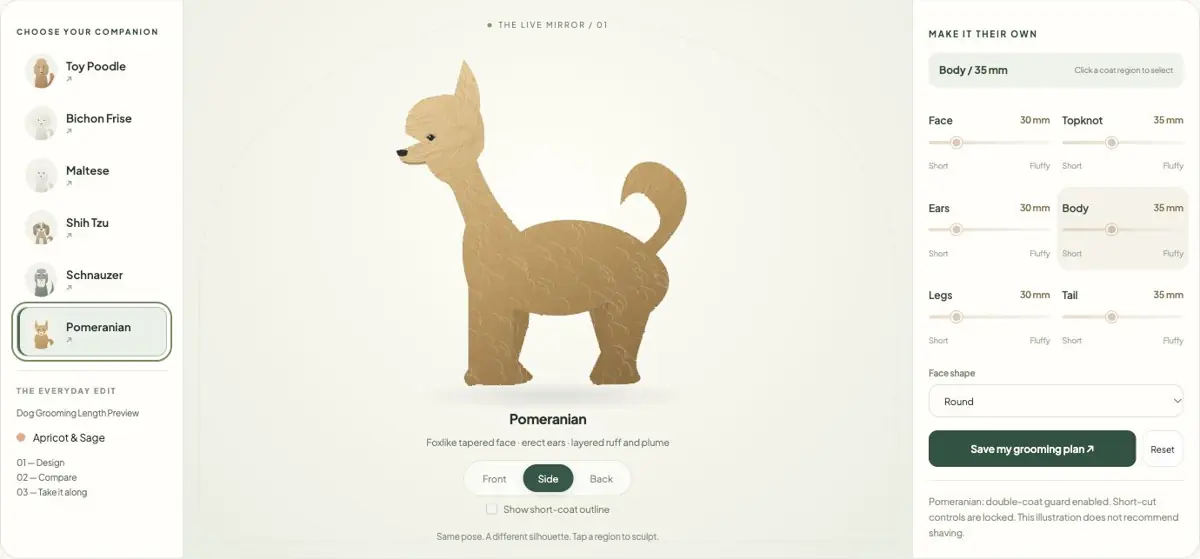
| Pomeranian selected | Six length sliders and short-coat outline disabled; values 30 / 35 / 30 / 35 / 30 / 35 mm. |
| Puppy cut while Pomeranian selected | Displayed 25 mm in all six regions despite the manual sliders being locked. |
| English shared link reopened | Restored base style and side view; no demonstration note; timeline zero. |
| Root-page reload after comparisons | Body returned to 9 mm, timeline zero, notes empty and saved-A drawing absent. |
The lifestyle numbers above are one observed input combination, not a universal recommendation. They are useful for checking that the button actually applies regional changes. Similarly, the Pomeranian preset test explains the interface’s behavior, not a suitable length for a real double coat. Keep the distinction between an app output and an agreed grooming specification.
Make an honest A/B comparison
A is a stored comparison snapshot, while B follows the current design. We saved Teddy bear and applied Lamb-inspired as B. The visible difference represented a shorter body with fuller legs and topknot, among other changed inputs. For a cleaner comparison, note every changed value or alter just one slider. The visual impression can otherwise be attributed to the wrong region.
The saved look retained its Toy Poodle identity when we selected Pomeranian for the current design. If you are comparing breeds for fun, that may be intentional. If you are discussing two trims for one dog, save a new A after returning to the correct model. A previous snapshot does not automatically become the currently selected breed. Read the labels rather than relying only on similar coat colors.
Timeline volume is not the saved haircut
The timeline runs from zero to eight weeks and is labeled as an illustrative +1.5 mm-per-week volume scenario. That is a fixed display assumption, not a breed-specific growth forecast or a schedule for the next appointment. Our eight-week test left the passport at face 15, topknot 25, ears 18, body 6, legs 25 and tail 20 mm.
The copied URL also specified zero weeks, and the fresh page restored the base haircut. This is consistent with the source’s statement that saved plans use original lengths. When you show someone the fuller scenario, explain whether you mean a preferred initial cut or a hypothetical later silhouette. Do not silently substitute the fuller drawing for the saved request or infer an actual 12 mm increase on your dog.
Understand the Pomeranian guard
Selecting Pomeranian enabled a double-coat guard message. All six manual sliders and the short-coat outline were disabled in our test. The first displayed set was 30 / 35 / 30 / 35 / 30 / 35 mm, and the slider minimum attributes changed to 25 mm. Because the sliders were locked, that minimum was not an ordinary user-selectable safe range.
Preset buttons remained available. Puppy cut changed all six displayed values to 25 mm. Therefore the guard should not be described as freezing every number or certifying any number it permits. FurMap explicitly says the illustration does not recommend shaving. Use the Pomeranian model to discuss silhouette and coat care with a professional, rather than converting its values into an all-over clipping instruction.
The American Kennel Club double-coat grooming reference, linked by FurMap and read for this review, discusses coat-specific care and professional assessment. It provides context for the guard; it does not validate FurMap’s millimetre values. We did not examine a real coat, test clipping or evaluate the suitability of any cut for an individual dog.
Use lifestyle suggestions as a starting point
Time for brushing, Outdoor activity and Preferred look feed the Lifestyle Cut Finder. We selected Minimal time, Grass and muddy trails, and Neat and practical. Suggest a starting point immediately applied a six-region set and displayed a confirmation. It changed the live design rather than merely showing a separate suggestion card that waits for another Apply action.
Save A or a tested link first if you want to preserve the previous look. After applying a suggestion, review the face, ears and legs as well as the body. This is a rule-based conversation starter, not an AI diagnosis of coat condition or an assessment of your actual brushing technique. A short routine description can help explain your priorities, but the groomer still needs to decide what is workable.
Copy notes, share settings and inspect exports
Copy notes produced the breed, six regional lengths, face shape, demonstration request and assessment reminder. Copy style link produced a compact URL fragment containing the style settings. Opening that English link in a new tab recovered the base plan without the request. Send both text and link when the note matters; the link alone is deliberately incomplete as a full written brief.
Reset restored the Toy Poodle lengths during our test but retained the demonstration note in the current page. A full root-page reload cleared the note, comparison A and timeline state and returned default length inputs. “Save current look as A” is therefore not evidence of a persistent account library. Keep the actual copied output or a tested URL before closing the page.
Download PNG displayed “PNG card download started,” but our supported download observation did not return a completed file to inspect. Print/PDF is also available; actual PDF pagination was not tested. Do not equate the status message with a verified received artifact. Open your real file and check whether illustrations, lengths and requests are present before making it the groomer’s only reference.
Mobile operation and keyboard controls
At a responsive Chrome size of 390×844, the Korean source document stayed 390 px wide. We changed 몸통 from 9 to 10 mm by keyboard, selected 후면 and changed 얼굴 형태 to 또렷하게. The Korean passport showed the updated body value and face shape. The share control displayed a copied-link confirmation; independent Korean link receipt and reopening were not verified, so our successful fresh-link test remains the English one.
Named sliders and region controls make precise adjustments possible without a drag. The short-coat outline also toggled in the English test. Physical-phone touch gestures, screen-reader navigation and complete accessibility were not audited. On a small display, review the passport after changing values rather than judging only the illustration at the top. The text is the most direct way to confirm the intended regional request.
Care, realism and privacy limits
FurMap cannot predict the individual dog’s face, behavior during grooming or the effect of matting. It does not provide a measured body scan or an image of a completed service. Generic preset names and idealized silhouettes can help express taste, but realistic coat condition may require a different outcome. A discussion tool is most useful when its uncertainty stays attached to the picture.
The source states there is no photo upload, account or FurMap server storage, and that notes remain in the current page session. Our reload test supports the observed session behavior, not a network-security guarantee. Blogger/Google advertising was part of the source environment and is described under separate policies. We did not audit external requests, cookies or offline use. Copied text and downloaded cards may contain whatever requests you choose to include.
Related tools for a readable reference
Use FrameMint Studio screenshot editor when you need to annotate a captured A/B comparison. Mark which design is preferred, what changed and whether a timeline scenario is active. Preserve the breed and regional values so a polished illustration does not lose its measurement context.
PixelFit Studio image upload optimizer can help prepare a reference image for a message or form with size requirements. Check that text remains readable after resizing. These tools support communication; they neither verify the haircut nor recover the FurMap note from a style URL that excludes it.
Frequently asked questions
Can FurMap show my actual dog after grooming?
No. It uses adjustable breed illustrations, without a photo upload or AI generation. Treat the silhouette as a reference for a conversation, not an individual before-and-after prediction.
Is 9 mm a clipper blade number?
No. FurMap describes its values as desired remaining coat length. Blade systems and the final result are separate matters to confirm with the groomer.
Does the eight-week slider change the saved request?
Our test kept the original passport lengths and shared a zero-week plan. The timeline is an illustrative volume scenario rather than a grooming interval or a measured growth prediction.
Does the style link contain my special request?
Not in our verified English test. Copy notes included the request, while the new link page omitted it. Share the actual text separately when it is important.
Does Pomeranian guard make the displayed lengths safe?
It restricts manual controls but does not certify suitability. A preset still changed the displayed values in our test. FurMap explicitly does not recommend shaving through that illustration.
Will A remain after reopening the root page?
Our root reload cleared the saved-A drawing and note and returned defaults. Keep a tested style URL and copied text if you need the plan later; A is a comparison slot in the observed workflow.
Take a clear plan to the conversation
Choose the breed, set a few clear priorities and inspect the six base lengths. Compare deliberate alternatives at timeline zero, then keep a tested link and the written requests together. Let the groomer assess the actual coat before agreeing a cut. That produces a more useful brief than a style name or a fuller illustration on its own.
A RELEVANT NEXT STEP
Tools with a useful connection

FrameMint Studio
Screenshot Editor: 7 Smart FrameMint Studio Checks
Frame screenshots, add manual masks and build captioned stories in FrameMint Studio. Real import, order, recovery and size tests explain what to check before sharing.
PixelFit Studio
Image Upload Optimizer: 7 Essential PixelFit Checks
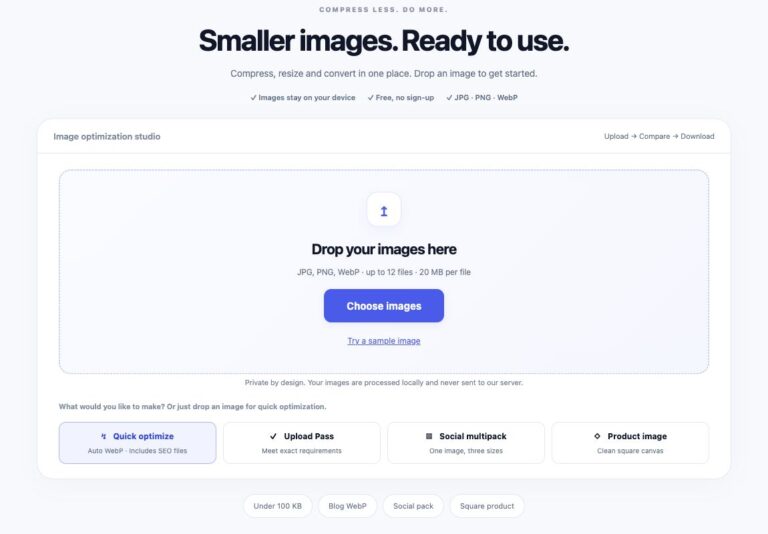
Prepare exact upload dimensions and file-size conditions with PixelFit Studio. Actual sample and JPEG tests explain PASS/CHECK, crop versus contain, social totals, copied HTML and the limits of unverified file receipt.
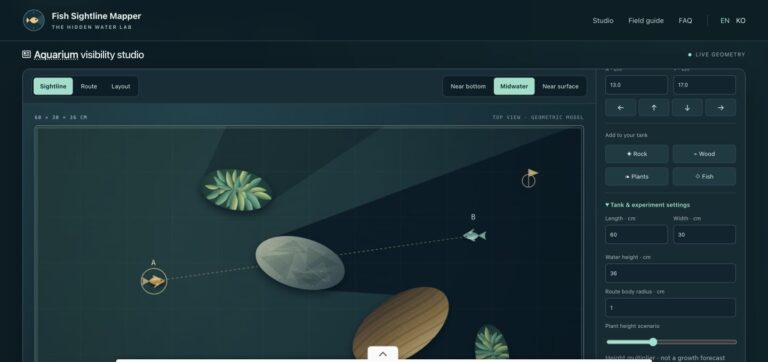
Fish Sightline Mapper
Fish Sightline Mapper: 7 Essential Aquarium Layout Checks
Compare aquarium sightlines with Fish Sightline Mapper. Our measured-input tests cover a 26.9% to 38.8% one-move experiment, depth and body-clearance changes, shared layouts and the model’s animal-care limits.