StatementReady is a bank statement to Excel demo for reviewing a fictional English USD sample. It shows editable transactions, source-page text, balance checks and expected-period warnings. Real-bank layouts are not released: use the supplied sample only, not personal or client financial documents.
Verified 9 November 2026. We tested the supplied sample, description editing, Undo, reason-based exclusion, a missing-transaction example and period coverage. An Excel export notification appeared, but we could not inspect a downloaded workbook. The file contents are therefore unverified.
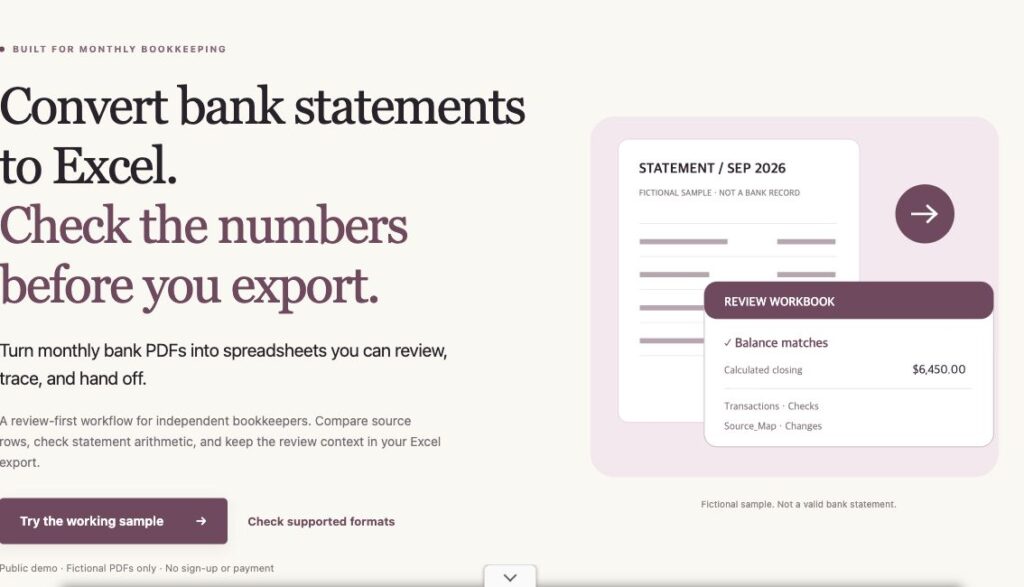
Explore StatementReady with fictional English USD data only. Actual sample tests explain balance checks, source review, exclusions and expected-month warnings; exported workbook contents remain unverified.
- Brand
- StatementReady
- Tool languages
- en
- Verified date
- 2026-11-09
Table of Contents
Key takeaways
- The supported scope is Sample Layout v1: an original, uncompressed, two-page fictional English USD PDF with five transactions. This is a preview, not general bank-PDF support.
- The baseline showed opening $5,000, money in $8,200, money out $6,750 and closing $6,450, with zero difference.
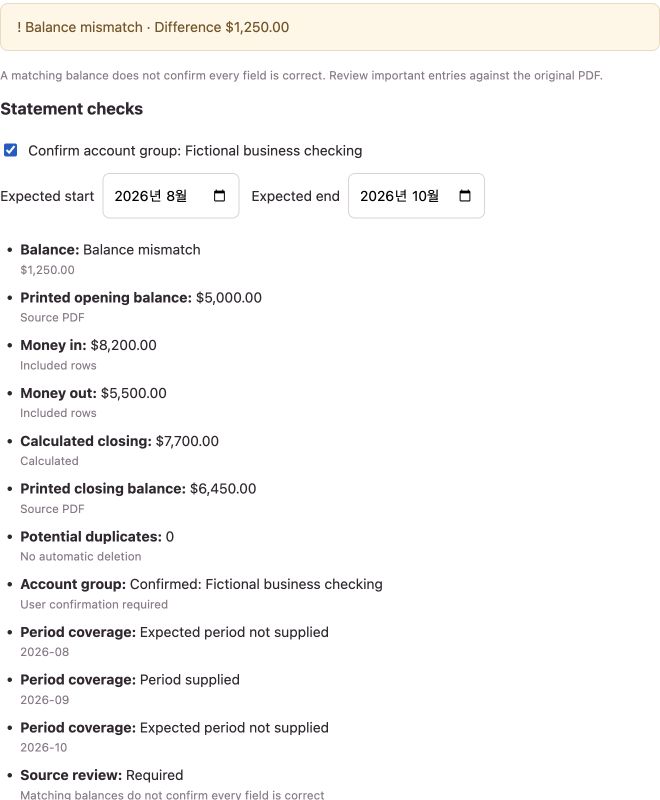
- Removing the final $1,250 expense raised calculated closing to $7,700 and produced a $1,250 mismatch. Undo restored a reason-based exclusion.
- Changing a description left the balance check matched. Matching totals do not prove that descriptions, dates or every field are correct.
- Confirming the fictional account group and requesting August–October flagged August and October as not supplied, while September was supplied.
- The original interface is English only. We verified a fresh 390px browser view; its transaction table scrolls within a narrower panel.
What this bank statement to Excel demo supports
The current working name is StatementReady. Its purpose is a review-oriented handoff: inspect extracted rows beside the source, compare arithmetic, retain review context and try spreadsheet export. The public page is explicit that real-bank validation is still pending. The supported sample is fictional business checking, not a statement issued by an actual bank.
That scope matters more than the headline. A reader searching for a production converter may expect to upload a monthly bank file and immediately receive reliable data. This preview does not establish that capability. It is useful for exploring what a reviewable conversion workflow should show: source references, separate checks, reasons for exclusions and unresolved issues that remain visible.
The sample button populated five rows and displayed a source-text preview with two pages. We used the page control to reach page 2. We did not independently inspect the downloaded PDF bytes or re-upload a file through Choose a sample PDF. The successful path verified here is the built-in sample workflow; it is not evidence that arbitrary PDFs, recompressed copies or other layouts work.
The site lists scans, photos, protected PDFs, credit cards, loans, investments and multiple currencies as unsupported. Multi-file batches, multi-statement continuity and accounting-specific import presets are not released. The planned US USD pilot and proposed subscription cards describe future scope. Billing is disabled, so they should not be presented as products available to buy.
Prepare a fictional review, not a real bank upload
Start with the provided fictional sample and keep real account files out of this preview. You do not need a bank login, sign-up or payment for the tested path. A useful preparation is to write down the question you want to test: can you trace a row, distinguish arithmetic from field accuracy, or identify months that were never supplied? This gives each control a clear purpose.
Record the baseline before making an edit. Our starting values were five included transactions and a zero balance difference. If you change several cells and exclude a row at once, a later mismatch will be harder to explain. Keep the original sample as a reference and use one deliberate change at a time. The interface’s Undo button is helpful, but it does not replace knowing what you changed.
Choose an expected period only after identifying the fictional account group. The period inputs are month values, not transaction dates. We entered 2026-08 through 2026-10, then confirmed the group and read the resulting list. A missing expected month means that a statement for that month was not supplied in this demo; it does not prove that the account had no activity.
For Korean readers using the English page, Money in means incoming amounts and Money out means outgoing amounts. They are separate columns in the sample. The USD figures here are not evidence of Korean-won support or compatibility with a Korean bank’s statement structure. Keep the tool’s input scope separate from the language of a guide explaining it.
The checks and review controls
- Source review: the left panel displays source PDF text and page navigation; transaction rows have Page 1 or Page 2 references. We verified page navigation, not every possible source-link interaction.
- Editable rows: dates, descriptions, incoming amounts and outgoing amounts appear as inputs. We committed a description edit by leaving the field, observed an available Undo, and restored Client payment with Undo.
- Reason-based exclusion: an empty reason was rejected. With a test reason, the final expense became excluded and the included-row arithmetic changed.
- Statement arithmetic: printed opening and closing values remain distinct from a closing value calculated from included rows. The mismatch example makes that distinction visible.
- Coverage checks: account-group confirmation and expected months control whether period coverage can be evaluated. This is separate from the balance result.
- Review indicators: the potential-duplicates counter remained zero in our tests and says no automatic deletion. We did not create a duplicate pair to validate its matching rule.
- Export controls: the page offers a review workbook and generic CSV. It describes Transactions, Checks, Source_Map and Changes sheets; their actual file contents were not independently verified.
How to review the sample in 7 steps
1. Open the built-in fictional sample
Select Try a sample statement. The tested screen changed from an empty workspace to five included USD transactions, with a sample-extracted status. Read the fictional-data notice. Choose a sample PDF and Download sample PDF are separate controls; we did not validate their full download-and-reimport path.
2. Compare the source page and row fields
Read the source panel and the transaction table together. Use Next and Previous to move through the source pages. We reached Page 2 of 2, while the table associated the final two transactions with Page 2. Review the date, description and both amount columns, rather than using a matched badge as a substitute for reading the source.
3. Commit one edit and test Undo
Select a description, make a clearly identifiable test change, then move focus away from the input. We changed the first description and the balance remained matched. Undo became available, and using it restored Client payment. A value visible in a focused field is not by itself proof that an edit has entered the review state; check the resulting controls and restored value.
4. Exclude a row only with an explanation
Select Exclude on the intended row. Without a review reason, the tool asked us to enter one and kept five included transactions. We then supplied an explicitly labeled editorial test reason and excluded the $1,250 Professional services row. The table offered Include for that row and the balance became mismatched. Undo returned the baseline. This was an intentional test, not a finding that the source expense was invalid.
5. Read the arithmetic without rewriting the source
Compare printed opening, incoming and outgoing totals, calculated closing and printed closing. In the baseline, 5,000+8,200−6,750=6,450. In the built-in mismatch, the last expense was omitted from the extracted list: 5,000+8,200−5,500=7,700. The source closing stayed 6,450, so the difference was 1,250. Do not change a printed source value simply to make a test pass.
6. Confirm the group and expected months
Confirm Fictional business checking, enter the expected start and end months, and read the coverage list after the inputs are applied. August–October produced not-supplied warnings for August and October and a supplied result for September. The baseline balance could still match while requested months were missing. Coverage, arithmetic and source review answer different questions.
7. Try export and inspect the actual output
The review workbook control produced a notification saying that Transactions, Checks, Source_Map and Changes were downloaded and warnings remained visible. Our download observation did not provide an inspectable file within 10 seconds, so we cannot confirm workbook sheets, values, formulas, formatting or compatibility. The generic CSV output was not independently inspected either. Treat file verification as a separate step, not something proven by a successful-looking message.
Actual sample results and arithmetic
All figures below come from the supplied fictional sample and deliberately introduced changes. We used no real bank or client records. These tests evaluate interface behavior; they do not establish production extraction accuracy, accounting correctness or suitability for a particular bank.
| Test | Observed result | What it establishes |
|---|---|---|
| Baseline sample | 5 included rows; difference $0 | The supplied sample’s displayed arithmetic matched. |
| Description edit | Changed text; balance still matched | A non-amount error can coexist with a matched balance. |
| Undo description | Client payment restored | The committed edit could be reversed in this session. |
| Exclude without reason | Reason requested; 5 rows remained | The exclusion control required an explanation. |
| Exclude final expense | 4 included; closing $7,700; difference $1,250 | Included-row arithmetic responded to exclusion. |
| Undo exclusion | 5 included; closing $6,450; difference $0 | The baseline could be restored. |
| Built-in mismatch | 4 rows; omitted final expense; difference $1,250 | A designed omission was flagged; the source retained the expense. |
| Expected Aug–Oct | Aug/Oct not supplied; Sep supplied | Coverage was evaluated separately from arithmetic. |
| Source navigation | Page 2 of 2 reached | The supplied source preview was navigable. |
| Clear workspace | Empty view and cleared status | Active rows were removed from the workspace view. |
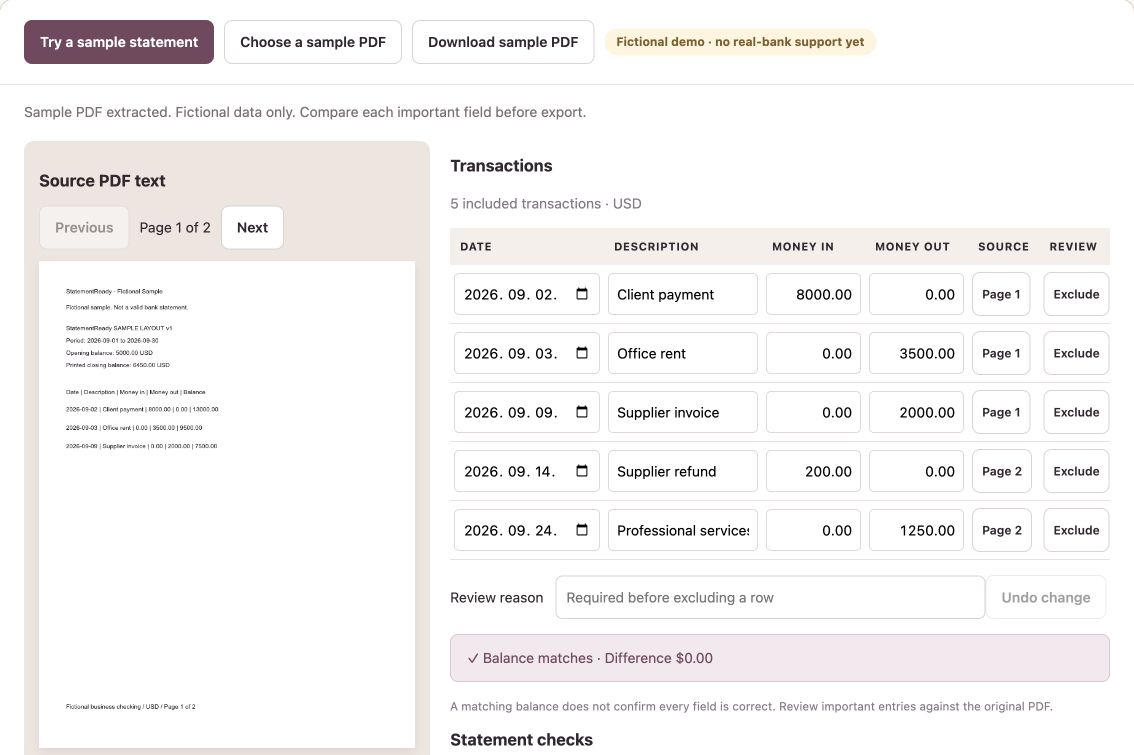
The sample’s five entries were Client payment 8,000 in, Office rent 3,500 out, Supplier invoice 2,000 out, Supplier refund 200 in and Professional services 1,250 out. Incoming amounts therefore total 8,200 and outgoing amounts total 6,750. This small list lets a reader independently check the displayed arithmetic without trusting the badge alone.
The built-in omission and our manual exclusion produced the same numeric gap through different interface paths. That is useful as a cross-check of the displayed arithmetic, but it does not make them two independent parser-accuracy tests. Both involve the same fictional final expense. We did not test a broad document corpus, image OCR, corrupted files or bank-specific layouts.
Understand the proposed workbook handoff
The proposed workbook is intended to carry more than transactions. The site names four sheets: Transactions for row data, Checks for review results, Source_Map for source references, and Changes for edits. Those names were repeated in the export notification. Because we did not inspect the file, this is a description of the promised structure, not a verified inventory of exported cells.
A practical handoff should distinguish the original fictional source, edited rows, reasons for exclusions and unresolved review questions. The application itself says its XLSX is editable rather than tamper-proof. Do not call an editable workbook a certified audit trail or evidence of independent approval. A Changes sheet, even if present, would need its own inspection before you relied on it for a specific workflow.
One important result is that export was offered while review warnings remained. The baseline did not mean the account group or expected period had already been confirmed, and Source review continued to say Required. A download control being available is therefore not equivalent to every check being cleared. Read the unresolved context before passing a file to another person.
A useful sample-only handoff note could say: “Fictional September 2026 sample; five rows; balance matched; description compared; August and October not supplied; workbook contents awaiting file inspection.” This is a suggested note format, not proof that we performed every task named in an arbitrary future handoff. State what is unfinished as clearly as what passed.
Advanced review tips and common mistakes
- Use independent checks. Row count, period coverage, descriptions and balance agreement are separate. One green result should not erase the others.
- Finish the input interaction. Move focus away after editing and verify the review state or Undo behavior. Do not mistake typed text for a confirmed change.
- Record why a row is excluded. A deliberate teaching omission is not a duplicate finding or evidence that a source transaction should be removed.
- Keep source and edited values distinct. An exclusion changes included totals; it does not remove the original entry from the source document.
- Interpret missing months carefully. Not supplied identifies a gap in supplied statements, not a zero-activity period and not a multi-month reconciliation result.
- Do not assume duplicate handling is tested. We saw zero potential duplicates and the no-automatic-deletion label. We did not verify the matching rule or a duplicate-resolution example.
- Validate output separately. File availability, workbook contents and downstream import are different checks. A notification cannot establish all three.
A matched balance can conceal offsetting amount errors as a matter of arithmetic: adding the same amount to one incoming and one outgoing value leaves closing unchanged. That is an explanatory example, not an experiment we performed here. Our actual description-edit test demonstrates the simpler point directly: fields that do not enter the arithmetic can be wrong while the balance still matches.
If a result changes unexpectedly, restore the fictional sample before adding more edits. Read which rows are included, then compare the incoming and outgoing totals. Check period inputs separately. This staged approach makes it easier to identify whether the issue is an amount change, an exclusion or a coverage expectation, without treating every warning as the same kind of failure.
Limits, privacy and mobile findings
Support is deliberately narrow. Only the original uncompressed Sample Layout v1 fixture is listed. Real-bank PDFs, scans, protected files, non-USD data and multiple currencies are outside the released scope. The interface is English; a Korean article does not add Korean-bank or KRW support. The proposed paid plans are not available subscriptions, and no checkout was tested.
Privacy claims are attributed, not independently certified. The publisher describes an isolated frame with network requests blocked by its content policy and no browser-storage features inside the tool. The surrounding Blogger page selects fictional samples and starts downloads. It separately uses Google advertising. We did not audit network traffic, hosting integrity or storage behavior, and an isolated-reader claim should not be expanded into an ad-free or no-data-processing guarantee for the whole website.
Clearing is not secure deletion. Clear workspace visibly returned us to the empty state and said downloaded files remain on the device. The publisher also says this is not a guarantee of forensic erasure from memory. We did not test secure deletion, inspect memory or claim that clearing the form deletes files already saved elsewhere.
Mobile has a scrolling-table trade-off. On a freshly loaded 390px browser page, document width remained 390px, the frame was 348px wide and the transaction table was about 664px inside a 318px scrolling parent. The sample loaded five rows. This avoids page-wide overflow but requires horizontal table navigation to reach all columns. We did not test every physical phone, touch gesture or assistive technology.
Export and integrations remain unverified. We could not inspect downloaded XLSX/CSV files, the sample-PDF reimport path or compatibility with QuickBooks and Xero. The site says accounting-specific imports and direct bank connections are not released. Ads and an interstitial appeared outside the tool during testing; use their own dismiss controls to return to the workspace.
How it differs from StatementProof
KIOPTRIX already has a separate StatementProof PDF-to-CSV review guide. That article covers a different tool at pdf.kioptrix.com, including a different review and CSV-layout workflow. StatementReady’s distinct value here is its single fictional fixture, expected-month list and proposed four-sheet handoff. The two names and source domains should not be treated as interchangeable.
Use the older guide to compare review concepts, not as evidence that StatementReady supports OCR, Korean statements or the same CSV presets. Likewise, this sample’s matched arithmetic does not validate the other tool. Neither article establishes accounting-import compatibility. A real-bank task needs a separately validated method with an appropriate privacy process; this preview explicitly asks you not to use real financial documents.
For learning, a manually prepared spreadsheet can reproduce the sample arithmetic with transparent inputs. StatementReady adds side-by-side source context, exclusions with reasons and a visible expected-period workflow. That is a comparison of learning approaches, not a recommendation to transfer private account documents into a service that has not released support for them.
Frequently asked questions
Can I convert my actual bank PDF here?
Not within the released scope shown during our review. The page supports the fictional Sample Layout v1 fixture and explicitly asks users not to select real financial documents. Real-bank layout validation remains pending.
Does Balance matches mean every row is correct?
No. We committed a description change while the balance stayed matched. Arithmetic does not establish field-level accuracy or completeness. Period coverage and Source review also remain separate checks.
Why was exclusion blocked?
The tool required a review reason. After entering an explicit test reason, we could exclude the final fictional expense, see the mismatch and undo the exclusion. The reason explains a change; it does not prove the change is justified.
Can it combine three months?
The tested demo contains one September statement. Requesting August–October marked August and October not supplied; it did not create, import or reconcile those missing statements. Multi-file batches and statement continuity are not released.
Did you verify the four-sheet Excel workbook?
No. The interface and notification name four sheets, but no inspectable downloaded file was available to us. File structure, values, formatting and import behavior remain unverified.
Does the Korean guide mean Korean-bank support?
No. The original interface and supported sample are English USD. This localized explanation helps readers understand that workflow without changing its input support.
Are the $9 and $19 plans available?
The source marks them as proposed plans, not for sale. Billing is disabled and the fictional sample path was free without an account. Do not report the cards as active subscriptions.
Try the sample with a clear scope
Use the built-in fictional sample, compare one row and one check at a time, and keep unresolved work visible. StatementReady is useful as a narrow review-workflow preview when its limits stay explicit. It has not earned a claim of general bank-statement conversion from the tests described here.
Evidence: original interface, FAQ, support scope and privacy/security disclosures checked 9 November 2026; screenshots captured during the same fictional-data session. We verified UI behavior and arithmetic. Exported files, arbitrary PDFs, production privacy and real-bank accuracy were not validated.
A RELEVANT NEXT STEP
Tools with a useful connection
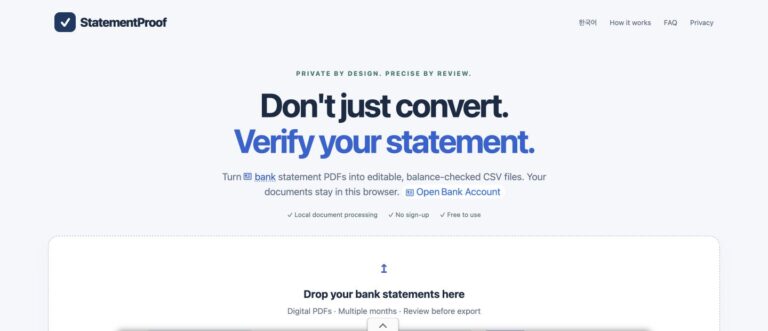
StatementProof
StatementProof: 7 Smart PDF-to-CSV Review Checks
Convert statement PDFs into an editable, source-linked table. Our fictional digital and OCR tests explain sign repair, count warnings, the limits of Matched and five CSV preview layouts.
PrintFix Studio
PrintFix Studio: 7 Smart HTML Printing Checks
Prepare basic HTML for printing with overflow checks, repairs, page breaks and CSV document batches. Our hands-on tests show why 100 readiness does not catch a missing field and what remains to verify in the actual print output.
PixelFit Studio
Image Upload Optimizer: 7 Essential PixelFit Checks
Prepare exact upload dimensions and file-size conditions with PixelFit Studio. Actual sample and JPEG tests explain PASS/CHECK, crop versus contain, social totals, copied HTML and the limits of unverified file receipt.