Soap Bubble Lab · The Fragile Universe is a creative bubble game for making, moving, merging and popping tiny floating worlds. Choose a quiet composition, a guided sculpture or a one-pop chain experiment, then keep a picture and an editable layout code. The shimmering scene is a fantasy playground with simplified physics, rather than a scientific soap-film simulator.
Hands-on review: 8 November 2026. We tested keyboard creation, two-bubble merging, daily creation limits, the Domino one-pop rule, pause/resume, artwork storage, DNA restoration and real square/portrait PNG downloads. The Korean page was freshly loaded at 390px; Space, press-and-hold creation and a paused Move drag worked. Images show our actual workspace, downloaded artwork and DNA dialog. This library and the original tool share a creator. Observed results, source descriptions and our suggested activities are distinguished below.
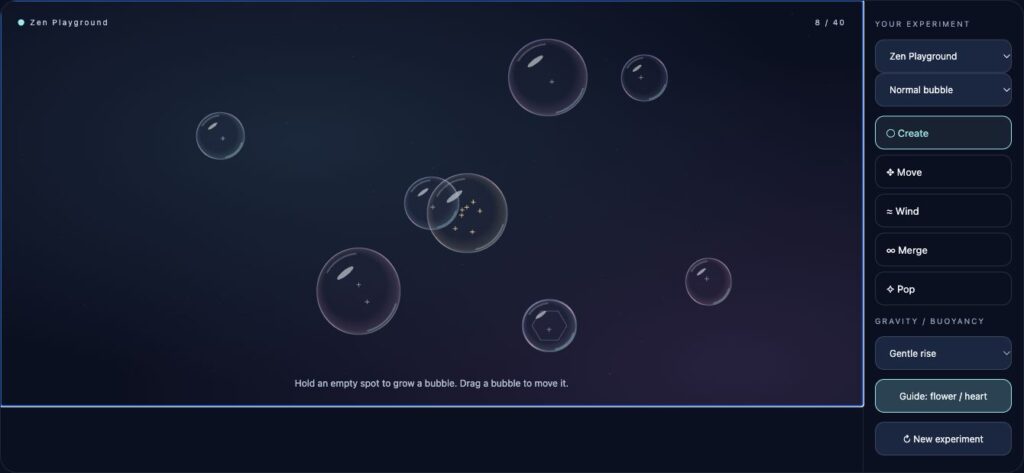
Create a tiny bubble universe, explore four modes and keep a picture plus layout DNA. Real merge, daily-limit, Domino, museum and PNG tests explain what Soap Bubble Lab saves and what its fantasy physics cannot prove.
- Brand
- Soap Bubble Lab · The Fragile Universe
- Tool languages
- en, ko
- Verified date
- 2026-11-08
Table of Contents
Key takeaways before starting this bubble game
- The official name is Soap Bubble Lab · The Fragile Universe. English and Korean pages provide the same four broad modes. No account was required in our session.
- Zen is open-ended play; Architect supplies shape guides; Pop Domino limits the initial manual pop; One Breath Daily adds ten creation opportunities to date-seeded starting conditions.
- Pause is valuable for composition. Our Zen keyboard test went from seven to eight bubbles; selecting two bubbles with Merge returned the count to seven.
- PNG preserves a viewable image, the museum preserves a local saved work, and Bubble DNA recreates a layout. These are different forms of preservation.
- The source limits the canvas to forty bubbles, describes local records rather than a global leaderboard and warns that later motion can differ between devices.
What this bubble game is useful for
This is a small creative break for someone who wants to make a scene rather than finish a level. You can arrange a cluster, explore what one starting pop does or make a titled image from a fleeting pattern. It works particularly well when you give yourself one clear question: can two separate bubbles become one, can a fragile cluster produce a chain, or can you preserve a composition before it drifts away?
The distinction between composing and running is the main practical insight. While the scene runs, motion can change the very arrangement you are trying to inspect. Pause first if you want a still starting point. Resume when you want to observe the consequences. Our tests used paused arrangements for several count comparisons, then briefly resumed Domino to see its chain continue. Neither the resulting count nor the length of that brief run is a performance benchmark.
A teacher could use the scene as a conversation starter about model assumptions, while an illustrator might use its output as a small digital keepsake. These are proposed uses, not measured learning outcomes, therapeutic effects or licensed-stock claims. It is not a bubble-solution calculator, a fluid-mechanics solver or a tool for predicting how real soap bubbles collide.
Choose the mode for your question
| Mode | Useful starting goal | Important boundary |
|---|---|---|
| Zen Playground | Explore tools and compose freely | No timed completion goal advertised |
| Bubble Architect | Follow flower/heart guides | No automatic correctness or level score |
| Pop Domino | Observe one starting pop | A second direct pop is refused |
| One Breath Daily | Try a shared dated setup | Ten new bubbles; later motion may differ |
All four modes appear in the inspected selector. We switched into each one. Architect displayed a dotted shape guide and the message to arrange bubbles along it and pause to keep the sculpture still. The source explicitly presents it as freeform arrangement, not a puzzle with an automatically judged solution. Completing a heart-shaped picture is therefore your creative decision.
The daily mode displayed “Daily seed · 2026-11-08.” The source says this date follows Korea Standard Time. Its claim concerns starting conditions, not a worldwide ranked contest or a replay that evolves identically on every screen. We did not compare two physical devices or test the midnight rollover. If you compare with another person, record the date and screen proportions alongside the layout.
Prepare a small experiment and a place to save it
Open the original tool in a browser, choose a mode and locate Pause, New experiment, Save art, Museum and Share DNA before investing time in a composition. Sound starts off in the inspected interface. We did not assess the synthesized audio or measure the performance effect of reduced effects. The controls provide options; they are not evidence of a tested audio experience or a guaranteed speed increase.
Choose whether you want a static artwork or a motion experiment. For the first, pause and work with a few separated bubbles. For the second, keep a simple arrangement and a note of the bubble type and gravity setting. The visible choices are Normal, Giant, Crystal and Golden, with Gentle rise, Zero gravity and Fall down. We inspected these choices, but did not measure their forces, shell durability or exact shockwave radii.
Prepare a folder for exported PNGs and a text note for DNA. A screenshot of a code is less useful than the complete selectable text. Keep an original before changing modes or resetting a scene. In our session New experiment retained the paused state; after switching from the English page to Korean, the interface started a new running playground while the saved museum entry remained available. A saved work and the current unsaved canvas are different things.
How to play: 7 essential checks
1. Pause and create one bubble deliberately
Choose Create and hold an empty place on the canvas. The source also documents Space when the canvas has keyboard focus. We tested that shortcut in paused Zen: the counter changed from 7/40 to 8/40. In the fresh Korean mobile layout, Space again produced 7→8 and a roughly 650ms hold on an empty spot produced 8→9. These counts establish creation in our tests, not an exact relation between hold time and radius.
An empty spot matters. Existing bubbles are interaction targets, so a press on a crowded area may not answer the same question as a press on clear space. Begin with separated objects, watch the counter and avoid rapid repeated taps while learning the current tool. If animation makes your target drift, pause before trying again.
2. Move a bubble while the scene is still
Select Move and drag a visible bubble to a different part of the canvas. In our 390px Korean test, a newly created lower-left bubble was visibly moved upward while paused, without adding another bubble. Make sure the canvas is actually in view: selecting a lower control can scroll the page, so the same screen coordinate may subsequently point to a toolbar rather than the bubble.
Wind is a separate gesture tool, described as sweeping the canvas. We inspected the control and its instructions, but did not isolate or measure a wind response. Do not confuse a moving picture after Resume with a quantified wind experiment. If you want to compare two gestures, first save a baseline layout and change only one condition.
3. Merge by selecting two bubbles in sequence
Choose Merge, then select one bubble and another. Our paused English test went from eight bubbles to seven and displayed “Two worlds, one universe.” This is a more useful success signal than merely seeing two circles overlap. Overlap alone does not prove that the merge action was completed.
Keep both targets clearly visible and use the counter as a second observation. The result is a game mechanic; it should not be used to infer that two real soap bubbles always become a larger sphere in the same way. We did not calculate mass, volume or surface-area conservation from the displayed radius.
4. Test Domino with a single initial pop
In Pop Domino our starting layout contained 24 bubbles. Selecting Pop and hitting one target changed it to 23 and set best chain to 1. A second direct pop left the count at 23 and displayed “One pop used. Reset to try again.” After briefly resuming and pausing, we observed 22 bubbles and best chain 2. This is one observed chain, not a promised outcome for all layouts.
The lesson is to distinguish a user action from a propagated response. Reset or New experiment gives another attempt; repeatedly clicking after the first pop is not the intended way to extend the same chain. The source describes giant shockwaves and more resilient crystal shells, but we did not isolate their individual effects or establish a scoring formula.
5. Read the daily creation budget separately
One Breath Daily started with 12 bubbles and 10 breaths in our dated session. One Space creation produced 13 bubbles and 9 breaths. After all ten opportunities were used, the display was 22 bubbles and 0 breaths; an additional attempt produced “No breaths left. Reset for another attempt.” We performed this check while paused so changes from ordinary motion would not complicate the count.
“Ten new bubbles” therefore did not mean “ten total objects” in this test. Also distinguish the creation budget from the forty-bubble canvas limit. Our session did not fill a scene to forty, and we did not test whether another saved layout changes the daily challenge rules. A reset is another attempt, not evidence that your previous scene was backed up.
6. Export a picture and inspect the actual file
Choose Save art, enter a title and select Square PNG or Portrait PNG. We named the work Editorial Bubble Test and actually downloaded both formats. The files opened as PNG images at 1080×1080 and 1080×1920 respectively. They included the project branding, our title, seven bubbles, a best-chain value of zero and the source domain. These are the output dimensions we inspected, not screen-capture dimensions.
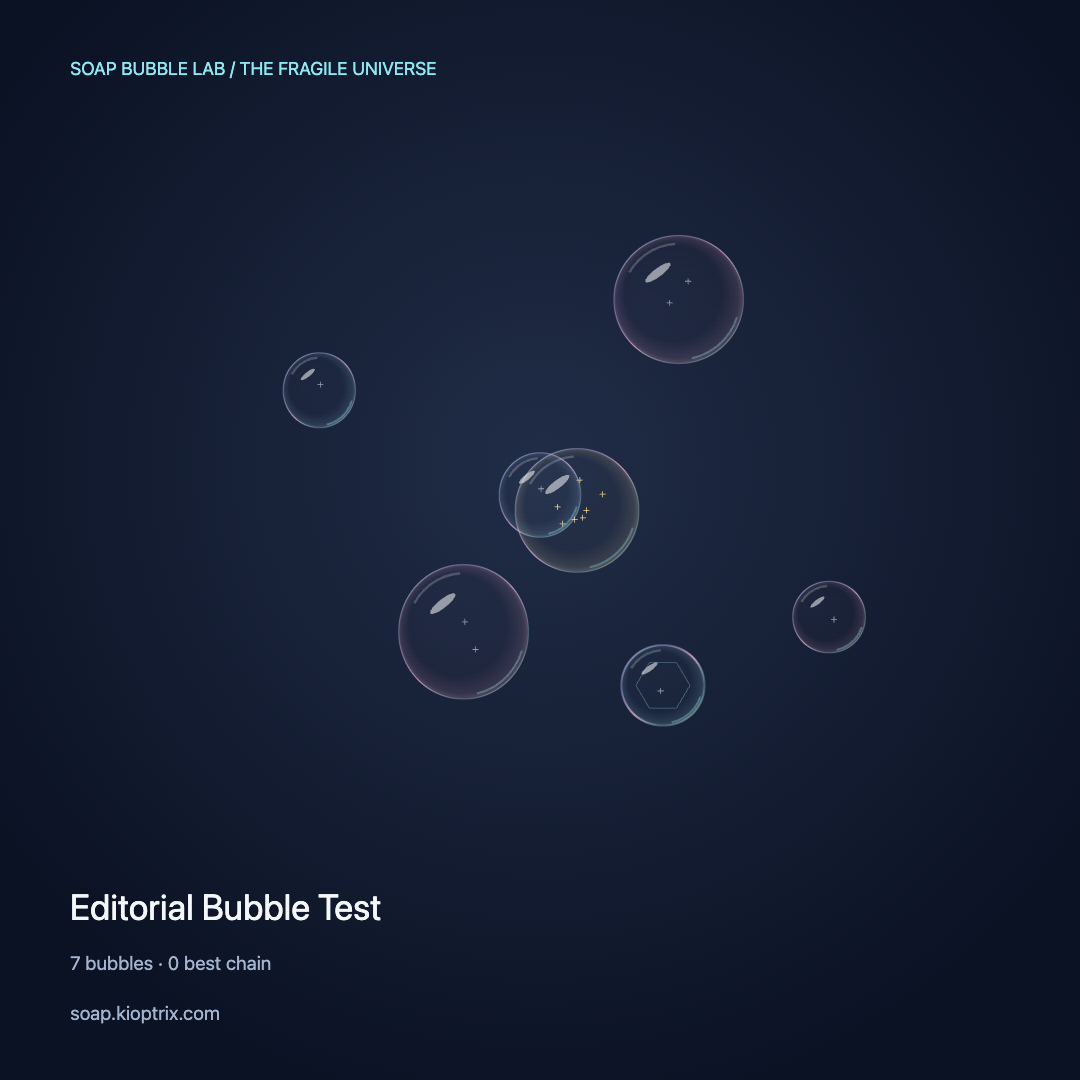
The square and portrait outputs frame the same saved moment differently. Inspect the file you intend to share for spacing, title readability and overlap rather than assuming the tall format is simply a cropped screenshot. The PNG is a static image. It does not preserve interactive controls or provide an editable scene when reopened as a picture.
7. Keep a local work and an independent DNA copy
Save to museum stored Editorial Bubble Test in the local list. We opened that entry and recovered its seven-bubble arrangement, and the entry remained after reload and navigation to Korean. The source says the museum keeps the twelve most recent works. We did not fill it to thirteen or test eviction, and the local list should not be treated as unlimited storage.
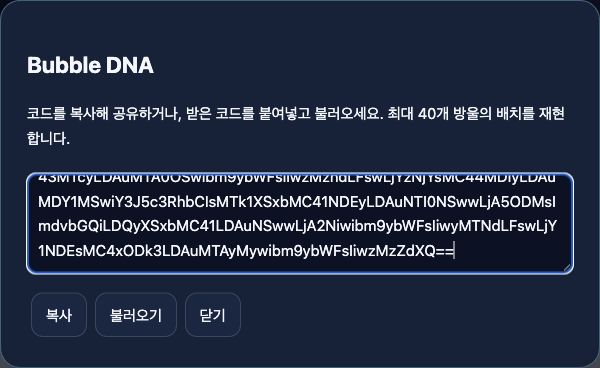
Share DNA opens a text code. We kept the real SBL1-prefixed code, added another bubble and loaded the earlier code; the display returned to seven with “Universe restored.” The Korean dialog also supplied Copy and Load controls. We observed restoration of the arrangement, not an exact movie replay or an account-based share link. No message was sent to anyone during this test.
Actual bubble game results at a glance
| Check | Observed result | What it establishes |
|---|---|---|
| Paused Zen / Space | 7→8 bubbles | Keyboard creation worked |
| Merge two targets | 8→7 plus success message | Explicit merge completed |
| Domino second pop | Refused at 23 bubbles | One starting-pop rule enforced |
| Brief Domino motion | 22 bubbles, best chain 2 | One chain continued after Resume |
| Daily creation | 12+10=22, then denied | Creation budget differs from total |
| PNG download | 1080×1080 and 1080×1920 | Both files opened and inspected |
| Museum and DNA | Saved arrangement returned to 7 | Local and code restoration tested |
The table combines separate experiments. The exported seven-bubble artwork has best chain zero; the later Domino run had best chain two. Those are not conflicting readings of the same scene. Keep the mode, pause state, date and output title together when making your own comparison sheet. We did not benchmark timing, calculate physical forces or claim the initial layouts always produce these counts.
PNG, museum or DNA: choose the right kind of backup
| Method | Best for | Does not establish |
|---|---|---|
| PNG | A viewable titled image | Editable state or animation |
| Museum | Reopening a local saved work | Cloud sync or unlimited retention |
| Bubble DNA | Keeping or transferring layout text | Identical future motion or account recovery |
A practical release pair is one PNG and one DNA text file named for the same work. Add the date, mode and any important gravity choice in a separate note. Save a new pair before an experiment you may want to undo. The tool is not a version-control system, and the reviewed interface did not provide a general Undo button for every play action.
If a museum looks empty in another browser, first consider storage boundaries rather than assuming your artwork was uploaded and lost. The source states that records are browser-local and clearing site data removes saved works. We deliberately did not clear site data, because that would erase local entries unrelated to this review. An exported file outside the browser is the practical independent copy.
Where the bubble game departs from real physics
Real soap films produce changing colors through interference of reflected light. The Exploratorium explanation of bubble colors describes reflections from the film’s two surfaces. That is scientific context for the visual inspiration; it is not evidence that this app computes film thickness, wavelength-dependent interference or fluid drainage.
The source itself describes circular collisions, stars, golden bubbles, crystal shells and explosive shockwaves as simplified or fantasy mechanics. There are no calibrated physical units or numerical force outputs in the interface we inspected. “Largest” is therefore a game display, not a measured diameter in millimetres. Use the scene to ask what a model leaves out, then consult a scientific reference for real-film behavior.
Mobile operation, motion and accessibility limits
Freshly loading Korean at 390×844 produced a 390px page with no horizontal overflow. The canvas was 364px wide in that layout. Mode and type selectors, the action buttons and lower save controls stacked below the playground. Space, a held creation gesture and an upward Move drag worked in our test. This browser viewport does not establish every physical phone’s touch, download or audio behavior.
Use Pause when motion interferes with selecting a small object. Reduced effects is offered, and we activated its control, but did not measure frame rate or CPU use. Keyboard Space creation is a useful alternative input; it does not mean that every spatial action has an equivalent keyboard workflow. We did not certify the canvas game against an accessibility standard or verify all assistive-technology interactions.
Privacy and the limits worth knowing
The source’s privacy dialog says saved artwork uses localStorage, PNG files download to the device and DNA contains positions and types rather than account information. Our museum, file and code tests support the described user workflow. We did not independently audit storage, source code or network requests. The same dialog states that Blogger and Google advertising may process cookies and device data, and ads were visible during our session.
- No account, cloud synchronization or global leaderboard was used or verified. Do not expand a local-artwork statement into an offline or zero-tracking guarantee.
- The source advertises a maximum of forty bubbles and twelve recent museum works; we did not test either capacity boundary.
- Daily date rollover, identical behavior across devices and full special-type mechanics were not tested.
- A static PNG cannot recover an editable layout; save DNA separately. DNA is not a promise of identical future motion.
- No therapeutic, scientific-accuracy, learning-outcome or conversion claim follows from our play tests.
Related tools for a different creative constraint
Try Perfect Pebble Stack if you want a different kind of digital sculpture based on placing and balancing stones. Its settling and rotation workflow asks a different question from this drifting bubble scene. Neither should be mistaken for an engineering calculator.
Use FrameMint Studio when you want to annotate a captured instruction image or present an exported scene with additional context. It is a separate editing step, not an automatic connection to the museum. Keep the untouched PNG and DNA as originals before preparing a presentation copy.
Bubble game FAQ
Is Soap Bubble Lab a scientific simulator?
The source calls its behavior simplified physics and identifies several effects as fantasy. Our tests establish interactive game behavior and file output, not physical accuracy.
Why can I not pop another bubble in Domino?
Only the initial direct pop is allowed in the tested mode. Our second attempt was refused with a reset message; Resume lets the existing response continue.
Why does Daily show more than ten bubbles?
The ten opportunities are new creations. Our date-seeded scene started with twelve existing bubbles, then accepted ten new ones while paused. Later motion and other layouts were not exhaustively tested.
Will DNA reproduce exactly the same animation?
We restored a seven-bubble layout. The source warns that later motion can differ between devices, so treat DNA as layout preservation rather than a deterministic video replay.
What should I save before clearing browser data?
Keep the actual exported PNG and complete DNA text outside the site’s browser storage. We did not erase storage during this review; the source says clearing it removes saved works.
Begin with one bubble game question
Pause a simple scene, make one deliberate change and watch the relevant counter or message. When a composition is worth keeping, save a viewable PNG and the layout DNA together. You can enjoy the scene’s fragile appearance while keeping a much less fragile record of what you created.
A RELEVANT NEXT STEP
Tools with a useful connection
Perfect Pebble Stack
Perfect Pebble Stack: 7 Smart Balance Checks
Build a digital stone sculpture with preview placement, 1° rotation and three modes. Our hands-on guide explains settling, Undo, local portrait storage and the limits of this artistic physics game.

FrameMint Studio
Screenshot Editor: 7 Smart FrameMint Studio Checks
Frame screenshots, add manual masks and build captioned stories in FrameMint Studio. Real import, order, recovery and size tests explain what to check before sharing.
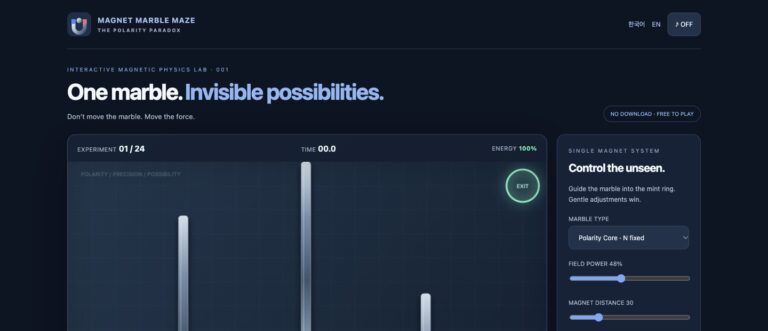
Magnet Marble Maze: The Polarity Paradox
Magnet Marble Maze: 7 Smart Checks for Better Control
Move a magnet to guide a marble through a 2D puzzle. Our guide tests polarity, pulse, rewind, Maker completion and sharing, while separating game outputs from real magnetic measurements.