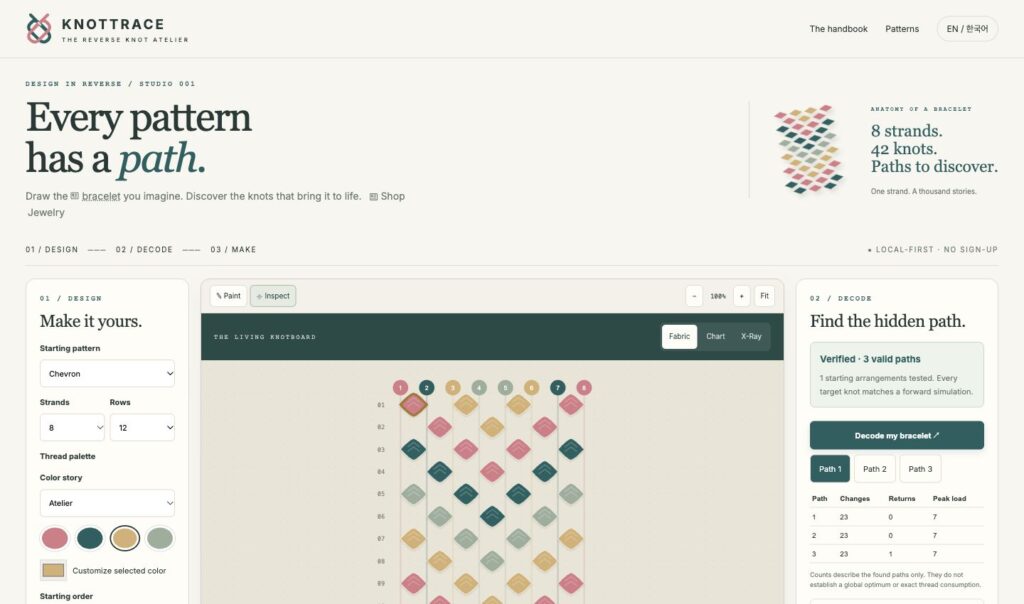
Turn a painted normal bracelet pattern into checked knot paths. Our 8-strand, 12-row tests cover 42 knots, 3 paths, strand tracing, F-to-FB changes, row marks and calibrated thread estimates.
- Brand
- KNOTTRACE — The Reverse Knot Atelier
- Tool languages
- en, ko
- Verified date
- 2026-11-08
KNOTTRACE is a friendship bracelet pattern decoder for hand-painted normal-pattern grids. Draw the colors you want, set the starting threads and ask it to find a knot sequence that reproduces the target. Then compare the found paths, follow individual strands and use the making checklist. Its central distinction is between a picture you request and a construction the model can verify.
Tested 8 November 2026. Our baseline used Chevron, eight strands, twelve rows and the Atelier colors. We checked decoding, playback, strand tracing, path-specific row marks, local restoration, a copied setup link, a deliberately unreachable first color and an F-to-FB experiment. The Korean workbench was also tested at a fresh 390-pixel viewport. We did not make a physical bracelet or verify downloaded export files.
On this page
Key takeaways for a reproducible bracelet design
- The official name is KNOTTRACE — The Reverse Knot Atelier. It accepts painted normal-pattern grids, not photographs or alpha-pattern conversions.
- Our 8-strand, 12-row baseline reported 3 verified paths and 42 complete knots. It reported one starting arrangement tested; this was not an exhaustive survey of all possible thread orders.
- A verified path is one construction of the target. It does not recover the original maker’s sequence or prove the globally easiest method.
- Editing the target clears the previous solution. Knot Lab is different: changing a knot runs the altered sequence forward and changes the target itself.
- Row marks belong to a particular knot sequence. They are not a universal progress position for every path that looks similar.
- Thread estimates cover the displayed rows and your calibration. They are not an exact cutting prescription for a full repeated bracelet.
What the bracelet decoder does
The workbench combines a color grid, starting thread order, a bounded path search, a knot player, an X-Ray view, a strand budget and a checklist. It is useful when you can sketch a small bracelet surface but do not yet know which knots could produce it. It also gives a way to inspect how one local choice changes later thread positions.
The controls offer nine starting studies, strand counts of 6, 8, 10 or 12, and row counts of 8, 12, 16, 20, 24 or 32. We inspected those menu options; our numerical tests use the eight-strand, twelve-row example rather than benchmarking every size. English and Korean pages are available. We used the public controls without signing in or encountering a payment requirement.
This is a design-and-check workflow, not image recognition. If you have a finished bracelet photograph, you would need to interpret and paint a target yourself. Hidden structure may remain ambiguous even if the visible colors are clear. The tool does not reconstruct damage in an existing bracelet or calculate a physical repair procedure.
Read the four knots before comparing paths
| Symbol | Working thread | What happens to the pair |
|---|---|---|
| F · Forward | Left thread | The threads exchange positions. |
| B · Backward | Right thread | The threads exchange positions. |
| FB · Forward-backward | Left thread | The threads return to their original sides. |
| BF · Backward-forward | Right thread | The threads return to their original sides. |
Each diamond represents one complete knot made from two half-hitches. A left-colored surface knot can come from F or FB, but those choices leave the threads in different positions. That is why a color picture alone does not uniquely identify its construction. Distinguish a thread’s numbered identity from its color: in our symmetric starting arrangement, threads 1 and 8 were both pink but remained separate strands to trace and count.
For an independent craft reference, halokiwi’s normal-pattern tutorial on BraceletBook explains the four directions and alternating row structure. With eight threads, a full row has four knots and the next has three. That supports reading the chart vocabulary; it does not certify KNOTTRACE’s solver or make the two services affiliated.
How to use KNOTTRACE: 7 essential checks
1. Start from a named, repeatable example
Choose Chevron, eight strands, twelve rows and the Atelier color story. Check the starting colors, which in our baseline were palette slots 1–2–3–4–4–3–2–1. A previously saved draft may load on a later visit, so do not assume the root URL always opens the untouched example. You can open the exact setup link we tested, then decode it yourself.
2. Paint a target deliberately
Select a swatch and use Paint before tapping a knot. The brush menu offers one knot, whole row and matching color, and a mirror-painting checkbox is available. We directly tested the one-knot edit; the other brush choices were inspected rather than exhaustively tested. Use a short section and a limited palette first so you can explain a failed result without losing track of several simultaneous changes.
3. Check the starting threads as well as the surface
At each normal-pattern position, only the two arriving threads can supply the visible knot color. Our first pair was palette colors 1 and 2. Painting that first target knot with color 3 produced no exact path for the tested starting arrangements. The failure was a useful constraint check, not evidence that the color is impossible under every other arrangement or that the tool can make arbitrary pixel art.
4. Decode and read the result precisely
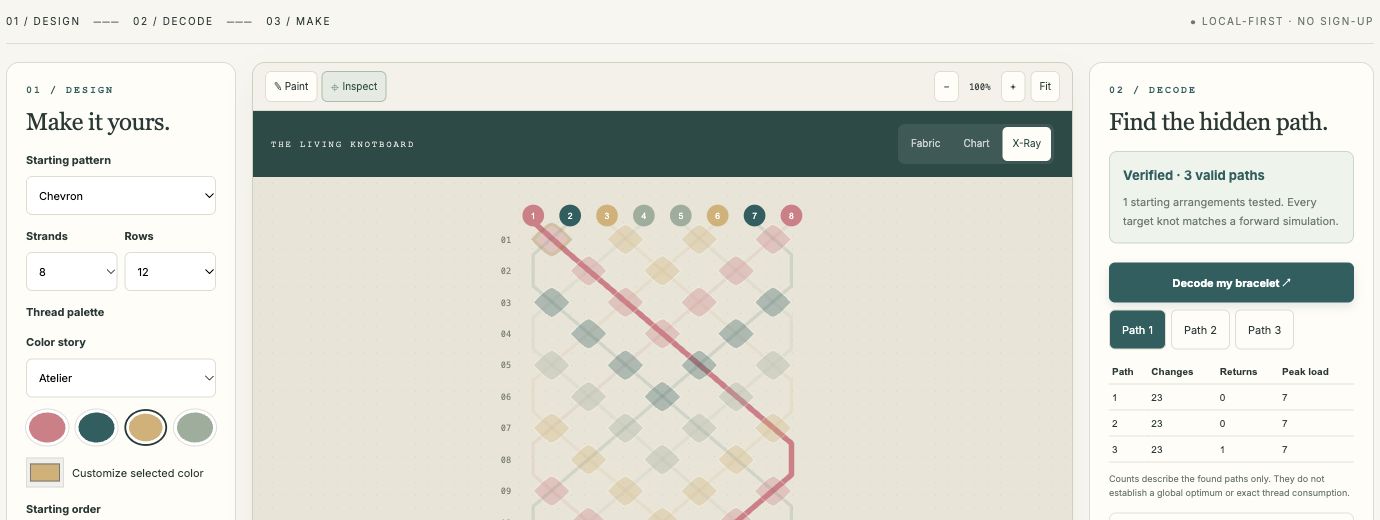
Press Decode my bracelet and wait for the search status to finish. The baseline reported Verified · 3 valid paths and one starting arrangement tested. The selected search option allowed the chosen order and its reversal; rotations are an additional option. These are candidate arrangements, not every permutation of colors. The handbook describes a bounded search comparing up to six verified paths, while our actual run returned three.
5. Compare the found paths without inventing an optimum
The table gives direction changes, return knots and peak working load. Our paths 1 and 2 both had 23 changes, 0 returns and a peak of 7; path 3 had 23 changes, 1 return and the same peak. A tie in those columns does not mean the sequences or numbered-thread histories are identical. The preference menu ranks found candidates; it does not prove minimum physical thread consumption or the easiest possible method.
6. Use the player and X-Ray for different questions
The first player step read 1 / 42, row 1, F, working strand #1, pair #1 / #2. Next knot moved to 2 / 42 with working strand #3 and pair #3 / #4. The player advances through complete knots, not individual half-hitches. X-Ray with Trace strand 1 highlighted that numbered thread’s route through the chart. Chart mode supplies direction symbols; Fabric emphasizes the requested surface.
7. Mark rows only on the path you are making
We marked row 1 on path 1 and saw 1 / 12 rows completed. Selecting path 2 showed 0 / 12, and returning to path 1 restored its mark. After reloading, the target needed decoding again, but the path-1 mark and our named cabinet entry returned. Before continuing a real project, confirm the same starting arrangement and knot sequence rather than relying only on the visible color pattern.
Actual test: what 42 knots and three paths establish
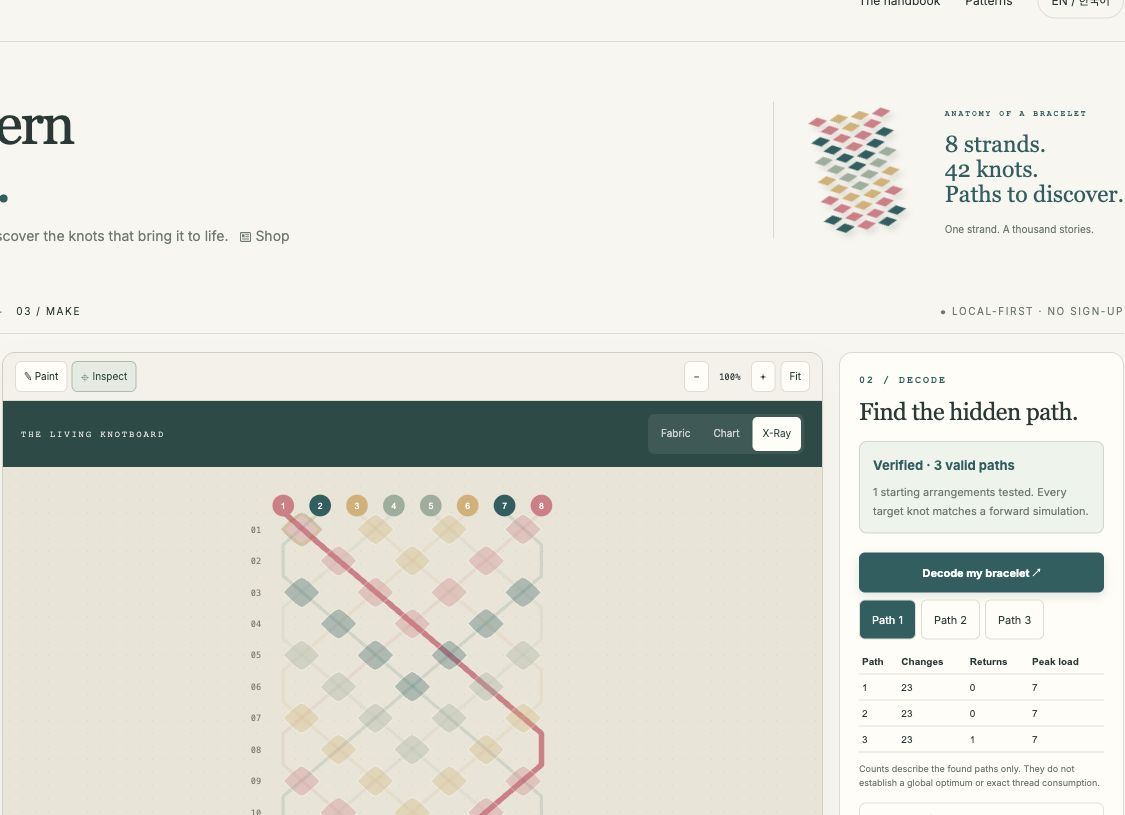
For this grid there are six four-knot rows and six three-knot rows: 6 × (4 + 3) = 42. This checks the displayed total against the row layout. The working-knot counts on path 1 were 7, 6, 5, 4, 3, 5, 5 and 7, also summing to 42. Each complete knot assigns one working strand, so the two totals provide a small internal consistency check.
| Test | Observed result | What it does not prove |
|---|---|---|
| Default Chevron 8 × 12 | 3 verified paths; 42 knots; one start tested. | Original sequence recovered or every start searched. |
| Path 1 versus path 2 marks | 1 / 12 → 0 / 12 → 1 / 12. | A single progress counter applies to every path. |
| First target painted color 3 | No exact path for tested arrangements. | No alternative start could ever work. |
| First knot F → FB in Knot Lab | Experiment verified; 12 changed target knots reported. | The old target stayed unchanged. |
| Shared baseline reopened | 8 × 12 restored; decoding again produced 3 paths. | The link contained a verified solution or checklist history. |
“Verified” here is the workbench’s claim that a complete sequence reproduces the target in its forward simulation. We observed that status and checked selected counts and behaviors; we did not audit the solver’s source or prove every search state correct. The distinction matters because a software-consistent path and a neatly tensioned physical bracelet are different kinds of evidence.
Knot Lab: one choice changed 12 target knots
After decoding, choose Inspect and select the first knot. Our baseline showed F, working strand #1 and a position swap. Replacing it with FB kept the left thread as the worker but returned the pair to its original sides. The panel changed to Experiment verified, stated that forward simulation had updated the target and reported 12 changed target knots.
This is a concrete demonstration of a downstream effect. F and FB can show the same working-thread color locally while routing the pair differently afterward. Do not describe the new display as a second solution of the untouched old picture. It is the surface produced by the modified sequence. Undo returned to the earlier design with a ready-to-decode status; decoding again restored the baseline’s three paths.
For a useful learning exercise, record the selected path, row and knot before changing it. Predict whether the pair swaps or returns, then read the changed-target count. Keep a named copy before exploring several edits. We tested the first-knot F-to-FB change, not every replacement at every position, so our count of twelve should not be generalized to other designs.
Thread budget: count work before estimating length
The budget uses how often each numbered thread is the worker, your working-centimetres-per-knot calibration, base length and tie allowance. At the default 1.5, 16 and 25cm settings, path 1 displayed 52, 50, 49, 47, 46, 49, 49 and 52cm. These are whole-centimetre displayed estimates, not measured consumption from a tied sample.
Changing the calibration to 2cm while keeping the other inputs fixed gave 55, 53, 51, 49, 47, 51, 51 and 55cm. For strand 1 the check is 7 × 2 + 16 + 25 = 55cm; strand 5 has three working knots, giving 3 × 2 + 16 + 25 = 47cm. This arithmetic explains what the number assumes and why equally colored strands should still be budgeted separately.
Calibrate on your own swatch before planning a long piece. Tension, fiber, thickness and knot style affect actual use. The site says these estimates cover the displayed rows, not a full repeated bracelet. If you repeat a motif, the base and tie allowances should not simply be added again for each repeat. Check the thread order at the end of a section before assuming its next repeat starts with the original arrangement.
Save, share and export without mixing up the records
We saved a uniquely named design, Editorial check 8×12, in the local cabinet and confirmed it after reload. The source says the cabinet holds up to twelve designs and saving an existing name replaces that entry; we did not test filling all twelve slots. Use distinct names for experiments so you can tell a target edit from a different path of the same target.
The copied share URL restored our target, palette, row count and starting order in another tab. It loaded without a verified path; decoding reproduced the three-path result. Its encoded fragment carries design data, so a long address is not a privacy barrier. Anyone given the link can view that design. It should not be treated as a secret account, a live synchronized project or evidence that another person has completed rows.
The interface offers JSON, CSV, SVG, PNG and browser Print/PDF controls. The handbook distinguishes editable target backups, verified knot sequences and current visual views. We could not complete the JSON file-import check or inspect downloaded export files in this session. Those file workflows remain unverified; our successful share-link test is not a substitute for testing a portable JSON backup. Use Chart mode when you need visible knot arrows, and inspect any exported file before relying on it.
The tool describes local browser storage, and we confirmed practical target, cabinet and row-mark restoration. We did not perform a full network audit. Advertising overlays were visible during the investigation, so “local-first” should not be expanded into a claim that the entire page makes no external connections. No account or photo upload was needed for the tested workflow.
Troubleshooting and a making-ready check
| What you see | A practical next check |
|---|---|
| No verified path | Confirm arriving colors, chosen start and search scope. Try a smaller section or another candidate start. |
| A chart tap repaints instead of inspecting | Check Paint versus Inspect before selecting a knot. |
| X-Ray has no current path | Finish decoding the edited target; the former solution may have been cleared. |
| Progress appears to disappear | Confirm the same knot sequence and browser before assuming marks were lost. |
| A budget seems too small | Check displayed rows, repeat assumptions and your measured calibration. |
| An export is unsuitable for making | Verify that the file contains the intended view, symbols and complete sequence. |
Before tying, write down the chosen path, starting thread order and first row. In our baseline path 1 that first row was F with worker #1, F with #3, B with #6 and B with #8. This small record is more useful than a screenshot of colored diamonds alone. A physical mistake is outside the decoder’s verified claim; the tool does not calculate a repair to an already-made bracelet.
Related visual pattern projects
For a separate visual-design exercise after working through the knot constraints, these published tools offer different ways to explore marks and variations. Their images are not importable knot instructions; KNOTTRACE still requires a hand-painted normal-pattern target.
- Moss Carpet Planner combines patterns and brushwork in a miniature composition, useful for experimenting with placement and contrast.
- Cactus Spine Studio explores fictional forms and editable visual recipes when your next goal is digital artwork.
- Ice Crack Studio connects marks with a generated branching pattern and replay; its guide explains which settings a shared pattern restores.
Frequently asked questions
Can KNOTTRACE decode a bracelet photograph?
No. The inspected version uses hand-painted normal-pattern grids. It does not recognize a photograph, infer all hidden knots or convert an alpha pattern automatically.
Does a verified result identify the original method?
No. Several sequences can reproduce the same colors, especially when different numbered threads share a color. Verification establishes a construction in the model, not the historical method used by another maker.
Does unsolved mean my design is impossible?
Not globally. Read the stated starting arrangements and search limits. Our deliberately wrong first color failed for the tested starts, but that observation says nothing about every possible starting permutation.
Does it work on a phone?
The Korean 390px browser test reproduced the three-path result and advanced the knot player without horizontal page overflow. This is browser emulation, not an audit of every physical phone, assistive technology or maximum-size pattern.
Turn the picture into a checked making plan
Begin with a short example, verify the starting threads, decode and inspect a numbered route before marking rows. Keep target data, the chosen path and physical length calibration as separate records. That is how KNOTTRACE can turn a color idea into an explainable plan while keeping its search and material limits clear.
A RELEVANT NEXT STEP
Tools with a useful connection
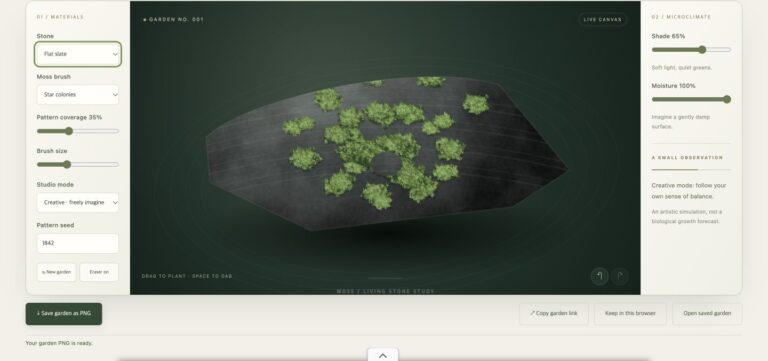
Moss Carpet Planner
Moss Carpet Planner: 7 Smart Design Checks
Design miniature moss-on-stone artwork with patterns and brushwork. Follow real tests of sharing, local restoration and imagined conditions, with clear botanical limits.
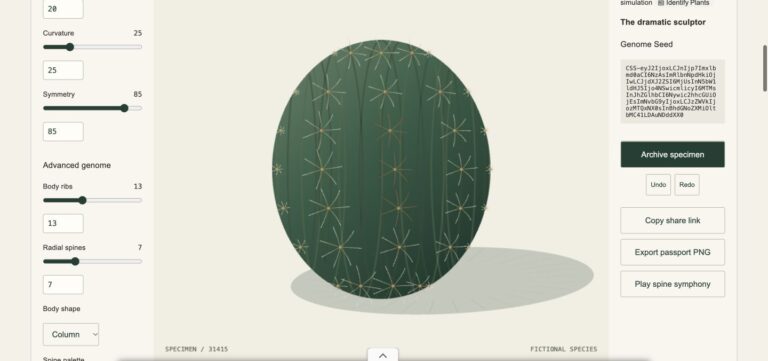
Cactus Spine Studio
Cactus Generator: 7 Creative Steps for Beautiful Forms
Create fictional cactus artwork with spine, body and painting controls. Compare descendants and restore a shareable recipe, with real tests and clear botanical limits.
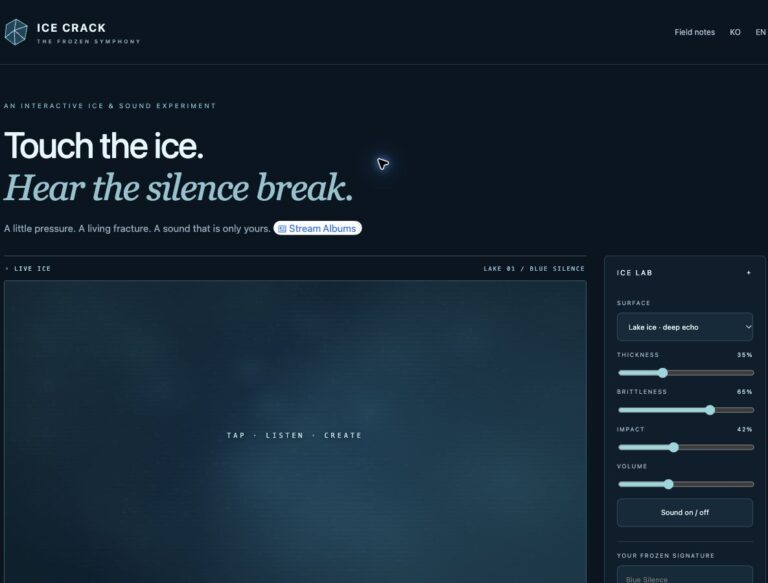
Ice Crack Studio
Ice Crack Studio: 7 Creative Steps for Beautiful Patterns
Ice Crack Studio turns touches into branching virtual ice and synthesized sound. See our Composer, Daily Fracture and replay tests, plus the settings a shared pattern does not restore.