LATENTIME is a browser reference for film reciprocity failure: the extra compensation that may be needed when a meter indicates a long exposure. It combines an optical-factor calculation, film-specific results, linked evidence cards, a manual-shutter timer and a local field log. Its most useful feature is the distinction between a formula result, a published table point, an aperture instruction and an optional site estimate.
We tested the English and Korean interfaces on November 7, 2026, Asia/Seoul and cross-checked the four linked manufacturer documents. The calculations, copied setup link, timer states and saved journal were directly checked. Our journal entry was explicitly synthetic: no film was exposed, developed or measured. Export buttons are present, but downloaded JSON/CSV files and JSON restoration were not independently verified.
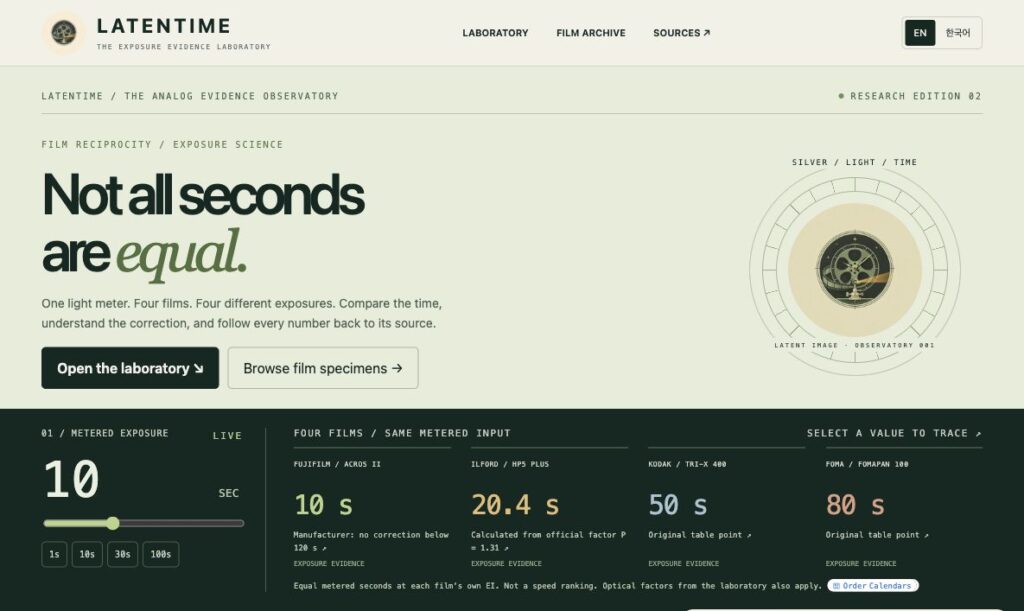
LATENTIME compares film reciprocity corrections after ND, aperture and bellows factors. Read our source checks, calculated examples, timer and saved-log tests, plus clear estimate and export limits.
- Brand
- LATENTIME
- Tool languages
- en, ko
- Verified date
- 2026-11-07
Key takeaways
- Apply only optical factors missing from the meter reading, before the selected film correction. Adding the same factor twice produces a different question.
- At the default 10-second input we saw ACROS II 10 s, HP5 Plus 20.4 s, TRI-X 400 50 s and Fomapan 100 80 s. These compare each model at its own film EI; they are not a film-speed ranking.
- TRI-X at 5 s returned No data until optional site estimation was enabled; then it showed 19 s, clearly labeled as an estimate. The original Kodak document also contains graphs, so an app blank is not proof that the manufacturer has no guidance.
- ACROS II at 120 s gave an aperture instruction, not an invented corrected shutter time. Loading the timer was disabled for that output.
- The field log compares durations, not negative density. A stored synthetic 30-second entry differed from its 20.4-second reference by the displayed 46.9%; that did not establish a better correction rule.
On this page
What this exposure calculator can answer
LATENTIME helps with a decision that a generic stop calculator cannot finish: after accounting for optics, which film rule applies, and where did that rule come from? You can enter a metered time, select one of 14 listed film identities, compare up to six curves and inspect an evidence card. The archive includes manufacturer filters and a film search field.
It is not a light meter. Entering a number does not measure scene brightness, validate your meter or determine the correct EI. It also does not operate a camera shutter. The timer and field log support a workflow that you still carry out yourself. The result should be a traceable starting point and a record of conditions, rather than a promise of a finished photograph.
The source registry is manually maintained. Its visible check date was November 3, 2026, while our browser review and document checks were November 7. Those are separate dates. A link to a primary document is valuable, but the reader should still confirm the film identity, format and applicable instructions in that document before relying on a calculation.
Prepare the input without counting a factor twice
| Input | What to enter | Common mix-up |
|---|---|---|
| Metered seconds | The meter indication at your intended film EI | Treating the app as if it measured the scene |
| ND stops | Only attenuation not already reflected in the reading | Entering a filter multiplier as a stop count |
| Apertures | Metered and taking f-numbers | Entering “two stops” into a field that expects f/16 |
| Bellows factor × | A multiplier, not a stop count | Adding compensation already included by a measurement |
| Actual time in the log | What was actually used, entered separately | Assuming the proposed correction proves what the camera did |
In this model, the intermediate film input is metered seconds × 2 raised to the ND-stop count × the squared taking-to-metered f-number ratio × bellows factor. Reciprocity is applied afterward. If your reading already incorporates an ND filter or another loss, leave that factor out of the additional compensation. Write down what the original reading included so the next person can reconstruct the chain.
The input controls allowed 0.001–86,400 metered seconds, ND 0–20 stops, bellows factor 1–64 and f-numbers 0.7–256. Those are interface ranges, not a claim that every selected film is supported throughout them. A valid number in a field can still lead to an unsupported model input after all multipliers are applied.
Seven checks for a traceable exposure plan
1. Confirm the film and meter context
Open the laboratory and select the exact listed film. Our starting choice was ILFORD HP5 Plus at a metered 10 s. Keep the EI used for metering with your notes. A comparison of equal seconds across films with different nominal speeds is not a prediction that they need identical readings for the same scene.
2. Enter only unincluded optical factors
Use ND filter · stops, Bellows factor ×, Metered aperture f/ and Taking aperture f/ as separate inputs. Our worked example used ND 1, bellows 2, f/8 metered and f/16 taking. Check the intermediate labels beneath the graph: they showed ×2, ×2 and ×4, with Film input 160 s from the original 10 s. This is a useful error check before reading the final number.
3. Read the output type before its magnitude
A numerical value may come from an official coefficient, an original table point or a site estimate. Another result may be an aperture instruction or No data. The type matters more than whether a card contains a large number. An unsupported interval is not a request to choose another film merely because its interface returns a number.
4. Trace the evidence card
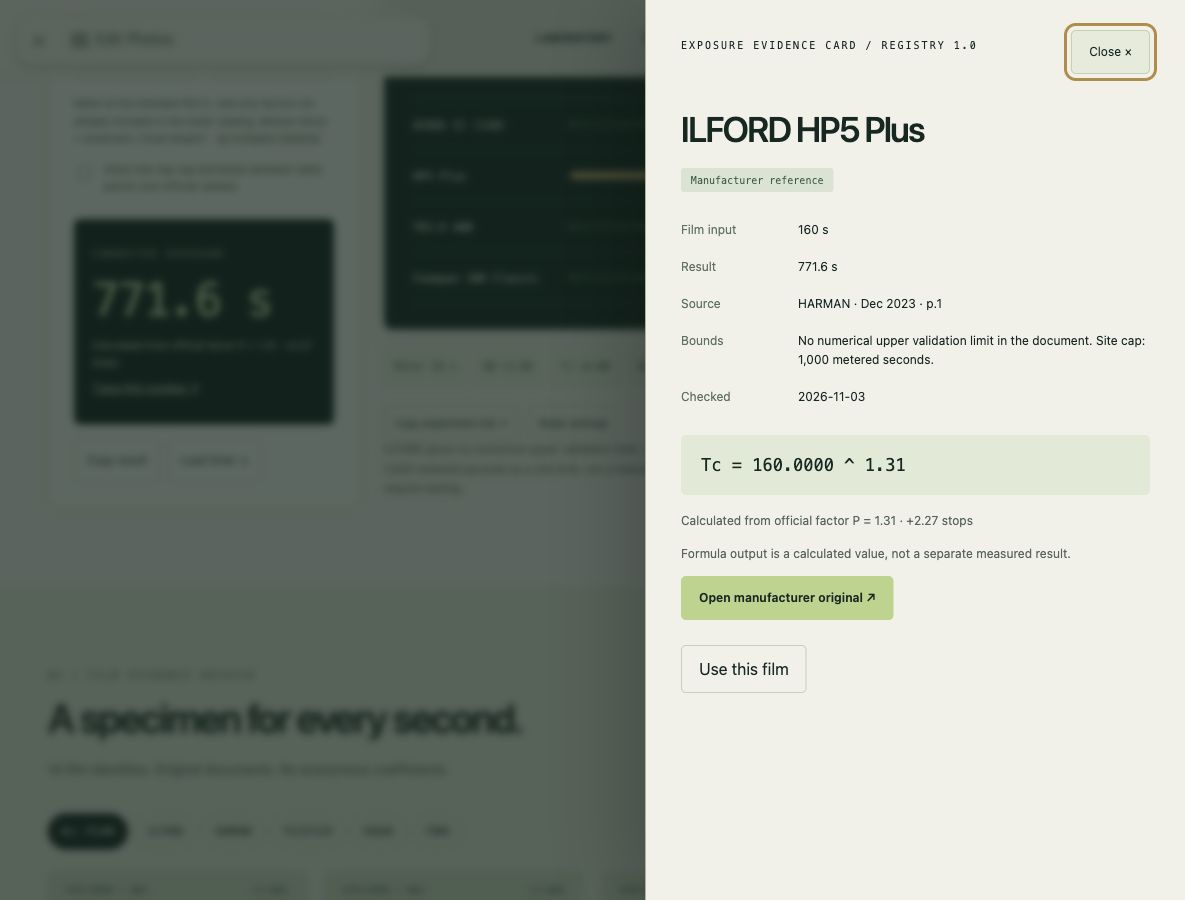
Press Trace this number. For our optical-factor example the card showed input 160 s, result 771.6 s, HP5 factor 1.31 and a link to HARMAN’s original. It explicitly called the output calculated rather than a separately measured result. Inspect the bounds and the source date as well as the equation; the display’s 1,000-second site limit is not an asserted manufacturer validation range.
5. Use interpolation deliberately
For table-based films, the default can withhold a value between anchors. At TRI-X 5 s, Load timer was disabled and the result was No data. Checking Allow site log–log estimates changed it to 19 s. The evidence card labeled it a site assumption, not a digitized official curve. If you use that option, preserve the estimate setting with your other assumptions.
6. Load the timer and operate the shutter yourself
Load timer transfers a supported numerical result to the countdown. We loaded 20.4 s, started it and paused with 12.5 s showing. After resetting, a separate 1 s run reached COMPLETE and the instruction to close the shutter. These tests checked visible states, not timing accuracy, audible alerts or a physical camera. Keep the page visible; the source warns about background tabs and device locking.
7. Save an observation with its real evidence level
Fill EI, Format, Actual exposure, evidence type and the developer/conditions note, then choose Save this experiment. The actual-duration field is separate from the proposed value: it still showed 20.4 s when our earlier optical calculation reached 771.6 s. Inspect it before saving. We later entered 30 s with a prominent no-film-exposed test note, which demonstrated the form without inventing photographic evidence.
Worked example: why the order changes the result
Our controlled software input was HP5 Plus, meter 10 s, ND 1 stop, bellows factor 2 and f/8 → f/16. The optical stage is 10 × 2 × (16/8)² × 2 = 160 s. Applying the HP5 exponent to that input gives 160^1.31 ≈ 771.6 s, matching the tool. This is an arithmetic and interface test, not an exposure made on film.
For comparison, multiplying the displayed default 20.4 s by the optical multiplier 16 would give 326.4 s. That is a calculation illustrating a different operation order; it was not a second successful result reported by the app. A nonlinear correction cannot generally be moved across the multiplication stage without changing the answer.
The card’s +2.27 stops refers to the film correction relative to the 160 s intermediate input. The optical stage already contributed four stops. If you compare the original 10 s with the final 771.6 s, the total difference is about 6.27 stops. Keep these reference points explicit when discussing the result; “additional stops” without a baseline can be misleading.
Four evidence types, not four interchangeable rules
| Film example at 10 s, no extra optics | Observed output | Evidence interpretation |
|---|---|---|
| HP5 Plus | 20.4 s | Calculation using HARMAN factor P=1.31 |
| TRI-X 400 | 50 s | Published table point |
| Fomapan 100 | 80 s | Published factor at that anchor |
| ACROS II (120) | 10 s | Manufacturer no-correction instruction below 120 s |
We checked the HARMAN compensation sheet, Kodak F-4017, Foma’s data sheet and Fujifilm’s ACROS II (120) sheet. The tested default outputs agree with the corresponding formula, table or instruction. These documents use different methods; do not flatten them into a universal exponent.
For ACROS II with no optical multipliers, 119.9 s remained 119.9 s. At 120 s the interface changed to Aperture +½ and disabled Load timer. The cited Fujifilm sheet instructs a half-stop increase in lens opening over 120–1000 s. LATENTIME does not assert that a simple shutter-time conversion is the manufacturer’s rule. If the requested aperture adjustment does not fit your setup, consult the original rather than inventing a supported timer value.
Kodak’s document includes graphs for intermediate times as well as a table, and its aperture/time alternatives must not be stacked. The app’s optional log–log interpolation is its own implementation choice, not a digitization of those graphs. This explains why a default app blank and a manufacturer document containing guidance can coexist. For HP5 at input 1001 s, we saw No data because of the site cap; the HARMAN sheet itself gives no numerical upper validation limit.
Compare curves without turning them into a speed ranking
The graph can switch between corrected seconds and additional stops. Its horizontal input is after optical factors, on a logarithmic scale. Solid segments, table-point dots and optional dashed estimates carry different meanings. A smooth-looking line is not proof of continuous measured evidence, and a missing segment is not proof of unusable film.
We opened the comparison picker and added two films to the default four. At six selected films the counter read 6/6; attempting a seventh was rejected with a 1–6-film notice in Korean. The HARMAN archive filter also returned 2/14 specimens, Kentmere 100 and 400. These are convenient browsing controls, not a recommendation that any one stock is best for every scene.
For a useful comparison, keep the intended metering context and optical assumptions explicit. Compare the correction methods and their support boundaries rather than sorting brands by the smallest displayed seconds. Film speed, desired tonality and processing remain part of a photographic decision outside this equal-input display.
Timer and bracket: a plan is not a shutter measurement
The countdown offers Start, Pause/resume, Reset, End, Focus view and Red display. We verified starting, pausing, resetting and a short completed run. We did not verify every presentation mode, background behavior, sound delivery or device power settings. The source describes an absolute-clock approach but warns that the visible display and completion alert may be delayed when the page is not active.
For the default 20.4 s reference the displayed duration bracket was 14.4 /20.4 /28.9 s. It varies duration by half a stop around the starting point; it is not three separately validated reciprocity laws. Likewise, a timer reaching zero does not prove when your shutter actually opened or closed. Record the real duration independently when that distinction matters.
Read the local log without overstating the evidence
Our test saved HP5, EI 400,35 mm, metered 10 s and entered actual 30 s, with Visual/scan impression selected. The note explicitly said no film was exposed, developed or measured. The row survived a page reload and appeared on the Korean page in the same browser. That verified local persistence in this session, not cross-device synchronization or indefinite retention.
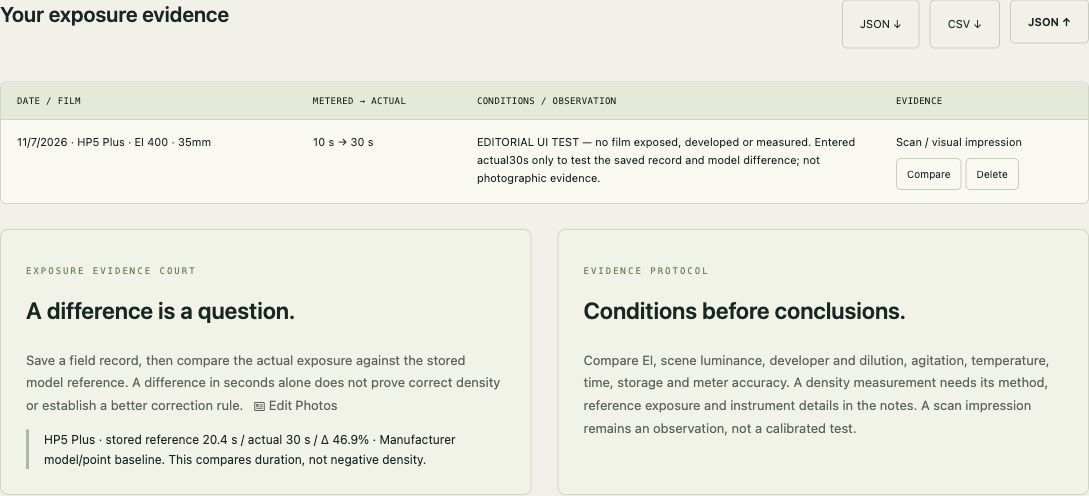
The evidence court displayed stored reference 20.4 s, actual 30 s and Δ46.9%. A calculation using only the rounded 20.4 may differ slightly; recalculating from 10^1.31 explains the rounding issue. More importantly, a percentage difference in duration cannot establish correct density, acceptable contrast or a better film model. Selecting a densitometry label would not itself perform or validate a measurement.
| Record component | What makes it useful later |
|---|---|
| Meter context | EI, scene and what the reading already included |
| Optical chain | ND, both apertures, bellows factor and resulting film input |
| Reference | Film identity, evidence type, source and estimate setting |
| Actual process | Real duration, developer, dilution, temperature, time and agitation |
| Observation | Clearly separated scan impressions and instrument measurements |
| Measurement method | Reference, instrument and method details when claiming density evidence |
Share a setup; verify a backup separately
Copy result put the film, input, result, evidence description and source URL on the clipboard. Copy experiment link produced a URL containing our meter, ND, bellows, apertures, film, comparison set and estimate switch. Opening that generated URL in another tab restored the tested optical setup and 771.6 s result. The copy notice said field logs were not included.
You can inspect the actual optical-setup example used in this review. It is a software test, not a completed photograph. A recipient may still see records already stored in their own browser, which does not mean the link transported our journal. Calculator configuration and saved field observations are different artifacts.
The interface offers JSON and CSV exports plus JSON import. We tried JSON export, but no completed download event was captured and no file was independently opened. We did not complete an import. Preserve important notes through a route you have checked, including an actual file and a non-critical restore test before relying on the backup. Do not assume a setup URL is a journal backup.
The source says calculator inputs stay on the device and only explicitly saved records persist locally. It also acknowledges Blogger/Google advertising data and cookies. Ads appeared during our use. We did not audit all network or storage behavior, so local calculation is not a claim that the entire webpage makes no external requests.
Mobile use, alternatives and related reading
In a fresh 390 px Korean view, document width was 390 px. Entering ND 1 at metered 10 s with otherwise default optics produced film input 20 s and HP5 Plus result 50.6 s; the evidence card worked in that layout. We did not test a physical phone, screen locking or audible completion. Keep the manual-shutter limitation in mind when moving from a desktop test to a real night session.
A scientific calculator can reproduce a coefficient calculation, while original manufacturer tables and graphs remain essential for interpreting support and alternatives. LATENTIME adds traceable comparison, context and a record workflow. It does not replace a meter, manufacturer instructions or photographic testing.
After you have independently verified a CSV export, the published SheetRescue Studio CSV guide offers a separate route for inspecting small tabular files. Check its file limits first; we have not verified automatic integration or that a LATENTIME export fits its schema. No unpublished film-tool article is linked as if it were available.
Frequently asked questions
Is LATENTIME measuring light or controlling the camera?
No. You supply the metered time and operate the shutter yourself. We verified calculations and visible timer states, not a connected camera or calibrated timing system.
Why does TRI-X show No data at 5 s?
The default app uses supported anchors rather than silently inventing an intermediate value. Optional estimation gave 19 s in our test, labeled as a site assumption. Kodak’s original graphs are a separate source to inspect.
Why is there no ACROS corrected shutter time at 120 s?
The cited 120-format document specifies opening the aperture by half a stop in that range. The app preserves that instruction instead of asserting a replacement shutter-time formula.
Does the site automatically adjust development?
No automatic development calculation is performed. Read the original film document and keep the actual process with the record. Do not combine alternative aperture and time corrections as cumulative instructions.
Does a 30 s field record prove the model is wrong?
No. Our 30 s entry was deliberately synthetic. A duration difference alone says nothing about measured negative density or the quality of a photographic outcome.
Were download and restore paths verified?
No completed file or JSON restoration was independently inspected. Clipboard copying, setup-link restoration and same-browser record persistence were verified separately.
Verification record and next step
Reviewed November 7, 2026, Asia/Seoul using the English laboratory, Korean interface and linked primary documents. Evidence includes actual calculations, source cards, copied text/setup, picker limit, archive filter, timer states and a clearly labeled synthetic log. Unverified areas include real film, density, physical phones, background timing, audible alerts, file contents/restoration and comprehensive privacy behavior.
Begin with a correctly contextualized meter reading, inspect the evidence type and keep the optical chain visible. Then preserve the proposed setup and record the real process separately. That is the practical value of LATENTIME: a number you can question and trace before relying on it.
A RELEVANT NEXT STEP
Tools with a useful connection
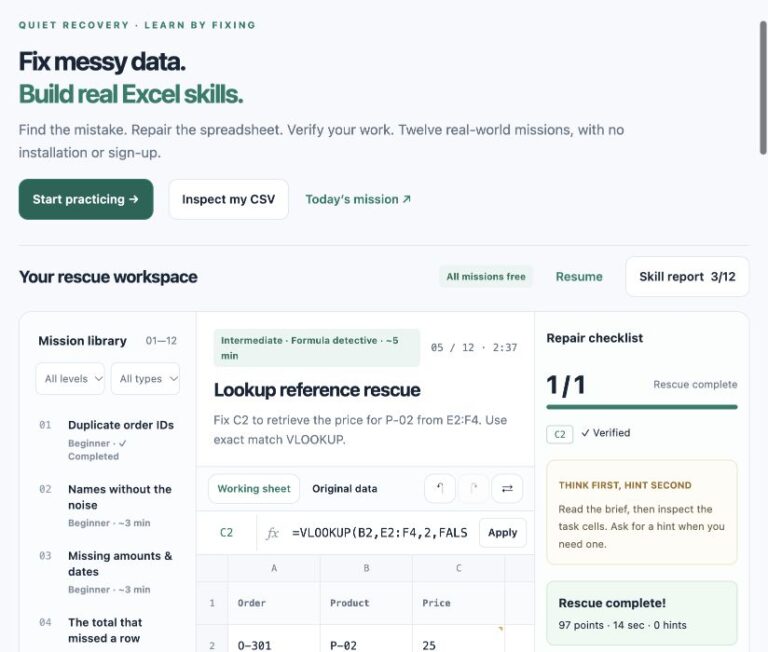
SheetRescue Studio
SheetRescue Studio: 7 Essential Repair Checks & Smart CSV Tips
Learn to repair spreadsheet mistakes with 12 missions, then inspect a small CSV. Includes a verified VLOOKUP example and a reproducible cleanup test.
SPOOLKIN
Bulk Film Loading Calculator: 7 Essential SPOOLKIN Checks
Plan 35mm bulk film lengths and material cost, then trace loads through reusable cassette IDs, passport notes and defect observations. Tested calculations reveal allowance resets, local persistence and backup limits.
OBSCURAFORGE
Pinhole Camera: 7 Essential Checks for Better Builds
Use OBSCURAFORGE to compare pinhole camera geometry, exposure and blur. Seven tested checks explain manual-time limits, saved setups and blueprint preparation.