Explore MARSHMALLOW LAB with tested roast passports, pause/reset behavior, daily storage and the difference between score, evenness and center softness.
- Brand
- MARSHMALLOW LAB
- Tool languages
- English, 한국어
- Verified date
- 2026-11-15
Marshmallow simulator MARSHMALLOW LAB is a browser game about managing heat exposure around twelve surface zones. Adjust fire intensity, distance and rotation, then finish to reveal a modeled cross-section and a roast passport. It is useful for a short timing challenge or a discussion of why a browned exterior and a softened center are different outcomes.
Verified 15 November 2026, KST. We completed Golden Classic, a hot stationary roast, Daily and a Korean Blind Roast; tested pause, reset, keyboard slider input and reload recovery; and checked the Korean source at 390×844. All three review images are actual interface captures. No real food was roasted. PNG reached a ready link, but a completed downloaded file was not inspected. The source’s result and daily labels used 14 November UTC during testing.
On this page
Key takeaways
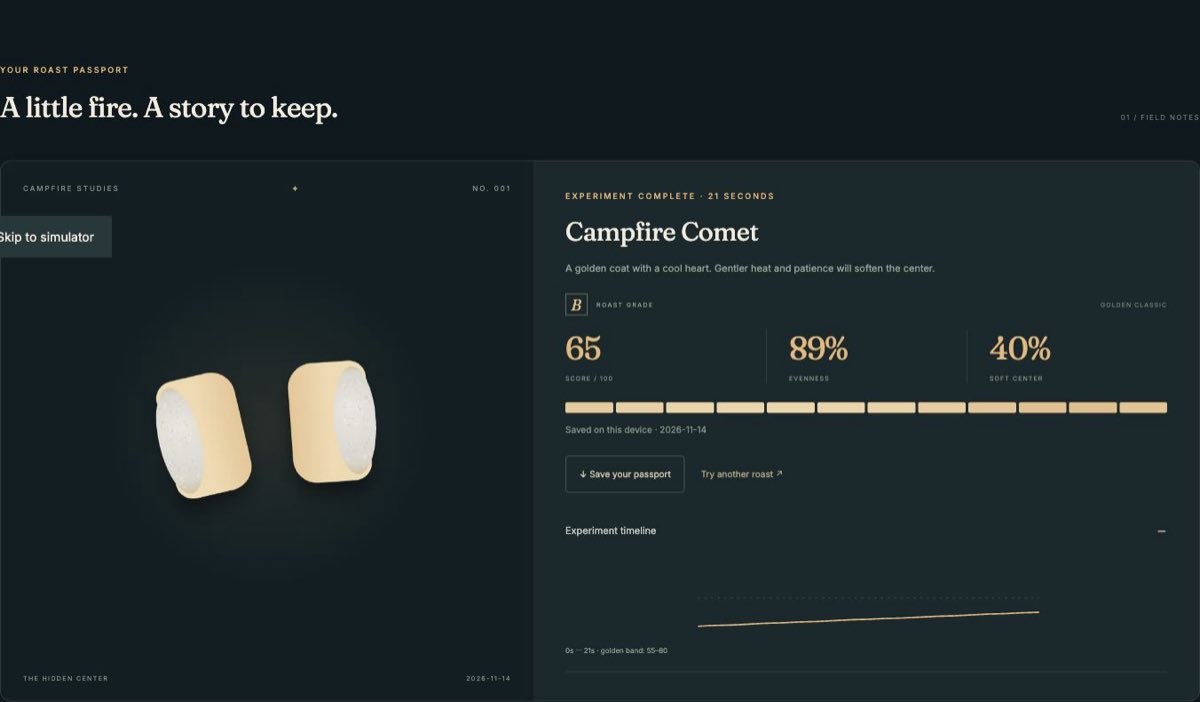
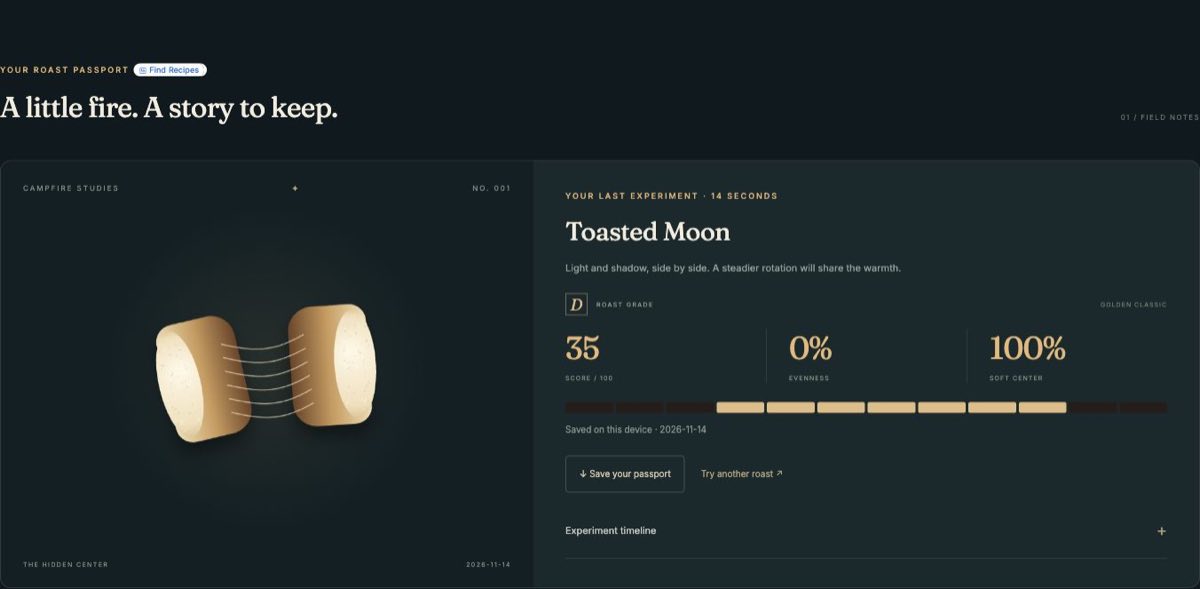
Read the passport’s score, evenness and soft-center value separately. Our default-condition result was 65 points with 89% evenness and 40% soft center. A hotter, closer, non-rotating example produced 35 points, 0% evenness and 100% soft center. Maximum center softness did not mean the best overall result. These are two observed cases with different durations and inputs, not a controlled measurement of rotation alone.
A saved result is not a saved active simulation. Reload recovered our last passport, while the live controls returned to 65% heat, 38 cm, 4 RPM and a zero timer. Also, Try another roast started immediately in our test. Use Reset experiment when you want a quiet setup phase before starting a new comparison.
What this marshmallow simulator does
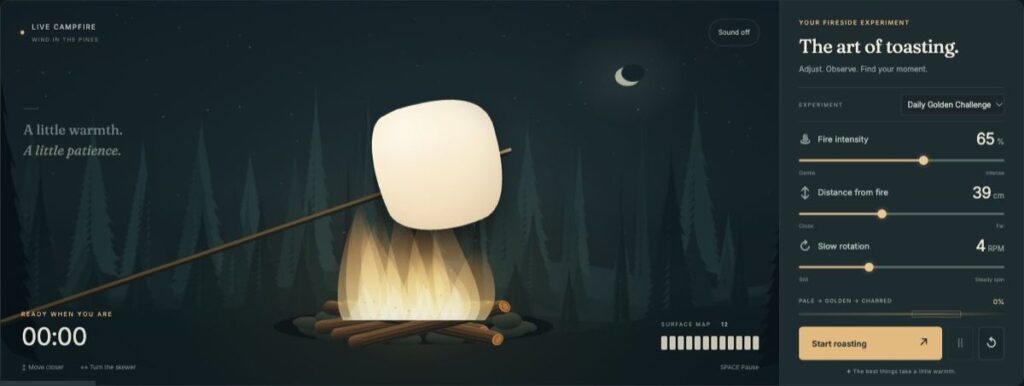
The official name is MARSHMALLOW LAB, presented as Midnight Campfire Atelier. The English root links through EN / 한국어 to a Korean standalone page. Its main scene illustrates a campfire, a skewer and a twelve-zone marshmallow. The controls operate an internal heat model; the page explicitly says it is not a food thermometer or a cooking-time predictor.
Fire intensity ranges from 10 to 100%, distance from 15 to 75 cm and slow rotation from 0 to 12 RPM. Modes are Golden Classic, Blind Roast, Daily Golden Challenge and Windy Night. Start, pause/resume, finish and reset govern a run. Outputs include elapsed game time, a surface indicator, a cross-section, a named style, letter grade, score, evenness, soft center, twelve zone values and an optional timeline.
The illustrated gallery names Golden Cloud, Toasted Moon and Deep Ember. Those examples help establish the visual vocabulary, but they are not our test specimens or a complete list of possible results. Our completed runs also returned Campfire Comet and Snowy Dream. The marketing phrase roast DNA should not be read as evidence of an editable project code: we did not verify a portable save string or import workflow.
Prepare a useful experiment
Before starting, decide what you want to observe: distribution around the surface, a change in center softness or judgment without timer feedback. Write down mode, intensity, distance and rotation. Take the duration from the completed passport rather than a wall-clock guess. Our first pause displayed 00:20, while the completed card rounded the run to 21 seconds. Exact duration should be recorded as displayed, not silently changed to match a planned value.
Check whether the scene is ready, paused, resting or showing a captured moment. These states matter as much as slider positions. Finish initiated a residual-warmth state before the passport appeared. A screenshot taken during that transition is not yet the final result. The pause control was disabled before starting, became available during a run and switched to a resume control when paused.
Marshmallow simulator: 7 essential checks
1. Choose Golden Classic and read all three controls
Begin with the default 65% fire, 38 cm distance and 4 RPM rotation. Reset retained our chosen control values, so resetting the timer did not necessarily restore default settings. Confirm the visible values before every comparison. A completed passport below the scene may still describe an earlier run; do not use its mode label to identify the current live setup.
2. Start and observe without changing everything
Press Start roasting. Watch the game timer, surface indicator and twelve-zone scene. For the reference run we left the default settings in place, then paused at a displayed 00:20 with a 34% surface indicator. That surface number is a game measure of browning, not a temperature or a fraction of the marshmallow that is safe to eat.
3. Pause before making a careful note
Pause roasting stopped the live run and changed the control to Resume roasting. Record the visible state and settings while paused. This is useful when comparing screenshots because an active simulation continues changing as you read. We confirmed the pause-state transition; we did not measure long-term numerical drift under every paused configuration.
4. Finish and wait for residual warmth
Finish & reveal worked from the paused reference run. The scene entered RESTING · RESIDUAL WARMTH before producing the cross-section. Wait for the completed passport rather than repeatedly pressing the disabled finish control. The final card gave 21 seconds, Campfire Comet, grade B, score 65, 89% evenness and 40% soft center.
5. Inspect the zones and timeline
Expand Experiment timeline. The reference display ran from 0s to 21s and marked a golden band of 55–80. The twelve final zone labels ranged from 28 to 43 in that run. Keep the zone scale, evenness and center value separate: a relatively even pale surface can have a different overall score from an uneven, strongly heated one.
6. Reset for a deliberate contrast
Use Reset experiment, choose your intended inputs and start explicitly. At 100% heat, 15 cm and 0 RPM, we paused at 14 seconds with a 93% surface indicator. Completion produced Toasted Moon, grade D, score 35, 0% evenness and 100% soft center. Both duration and settings differ from the reference, so this demonstrates a contrasting outcome rather than isolating one cause.
7. Reopen and verify what was kept
Reload after a completed run. Our last passport returned, but the current experiment was ready at default controls and time zero. A later English reload even recovered our Korean Blind Roast result, while keeping the Daily best separately. Check the current controls before a new run and keep an external note if you need several old comparisons.
Actual browser test results
| Run or action | Observed result |
|---|---|
| Classic: 65% / 38 cm / 4 RPM | Pause 00:20, surface 34%; completed card 21 s, B, 65 points, evenness 89%, center 40%. |
| Hot stationary: 100% / 15 cm / 0 RPM | Pause 00:14, surface 93%; final 14 s, D, 35 points, evenness 0%, center 100%. |
| Reset / Try another roast | Reset left input values in place; Try another roast began a new live run immediately. |
| Daily, 14 November UTC | Heat fixed at 65%; initial distance 39 cm was adjustable to 40 cm; rotation 4 RPM. |
| Completed Daily at 40 cm | 19 s, C, 61 points, evenness 91%, center 35%; personal best 61 survived reload. |
| Korean Blind Roast: 65% / 39 cm / 4 RPM | Timer and surface-state feedback hidden during play; final 7 s, C, 46 points, evenness 89%, center 14%. |
| Cross-language recovery | English reload recovered the Korean last result of 46; Daily best remained 61. |
| Korean mobile / keyboard slider | 390px document at 390px viewport; distance Arrow Right changed 38→39; start, pause and finish worked. |
| Passport export | Passport ready and Open / download PNG link appeared; completed file unverified. |
| Windy Night | Selected and wind scene label observed; a complete Windy run was not tested. |
Read the score and the three result metrics
The FAQ allocates 40 points to evenness, 25 to closeness to the golden target, 20 to center softness and 15 to removal timing. These weights total 100, but the displayed percentages are not themselves points. A soft-center reading of 40% does not mean forty score points. We did not reconstruct the entire algorithm or validate each subscore formula.
Our hot stationary run is the useful counterexample. It reached 100% soft center yet scored only 35 with zero evenness. Its named result, Toasted Moon, is a descriptive style label, not a certification of good cooking. The source’s feedback recommended steadier rotation. Keep the actual settings and metrics with the label; otherwise an appealing name can conceal a poor match to the scoring goal.
The timeline’s golden band is a game-scale reference. In our initial run the final zones were 36, 32, 29, 28, 28, 29, 31, 34, 38, 42, 43 and 40. The page still described a golden coat with a cool heart. Rather than forcing the prose label and numerical scale into one physical interpretation, read them as different outputs of a simplified model. We report the observed labels and values without claiming a calibrated material threshold.
Compare conditions without confusing cause and effect
To isolate rotation, you would need identical mode, heat, distance and completion time in both runs, changing only RPM. Our two Classic examples changed several conditions and ended at different times. They cannot establish a numerical rotation benefit or a real-world heating rate. This distinction is useful when showing the simulator in a lesson: a dramatic visual contrast can suggest a question without answering it experimentally.
For a stronger follow-up, record a fixed-condition run, reset, recheck the controls, then repeat at another RPM and stop at the same displayed time. Record any timing mismatch rather than hiding it. A separate experiment can hold RPM and distance fixed while changing heat. This is a proposed comparison protocol; no unperformed matched trial is presented here as a measured result.
A spreadsheet or a short paper table is enough for the experiment log: mode, fire, distance, RPM, final time, style, score, evenness and center. Preserve at least one screenshot per result. The page retains a last passport, so a second result can replace the convenient on-page reference before you have finished comparing it. External notes make the learning activity repeatable without relying on a multi-project library that we did not find or test.
Choose a mode for the question
Golden Classic keeps the normal timer and surface feedback. Blind Roast hides those cues while leaving the controls and final result available. On the Korean page we chose Blind Roast, changed distance from 38 to 39 cm using Right Arrow, started, paused and finished. The completed card revealed a seven-second Snowy Dream result. We observed the hidden feedback and recovery, not a claim that blind play improves timing skill.
Daily Golden Challenge uses a date-based setup. Our label was 2026-11-14, 65% heat and 39 cm. Heat was disabled, but distance was not: a keyboard step changed it to 40 cm. We completed at that chosen distance and got 61 points. Therefore the daily starting conditions should not be described as three permanently locked inputs. Record your changes if comparing attempts with another person.
Windy Night changed the scene label to WIND IN THE PINES when selected. We did not complete a Windy run or measure gust variation. Sound was off by default and left untested. Do not assume that selecting a mode verifies every behavior advertised for it. For a focused first session, choose the mode that exposes the feedback needed for your question and keep the rest of the setup simple.
Saved passport versus current experiment
The source states that the last roast and daily best are stored in this browser. We verified two distinct behaviors: reload restored the last completed passport while clearing the active scene, and Daily best 61 remained even after a later non-Daily result became the last passport. The English page recovered the Korean Blind Roast passport with 46 points in the same Chrome browser. This was local cross-language recovery, not account synchronization.
A restored fourteen-second passport was visible under a ready scene at 00:00 with default 65% /38 cm /4 RPM. That is not evidence that the old run used those current inputs. Keep a separate settings note because the result summary and current controls can refer to different experiments. We did not verify restoration of an active run, a full historical timeline after reload or transfer to another browser.
The date labels use UTC. Midnight UTC is 09:00 in Korea, so a new Korean calendar day can still display the previous UTC date. Our verification date is 15 November KST while the source card and Daily label were 14 November UTC. We did not test the daily rollover itself. Compare the visible game date, not just the calendar on two players’ devices.
Passport export and mobile controls
Save your passport changed to Passport ready and exposed an Open / download PNG link. The supported download flow did not yield a completed file for inspection. We therefore do not claim to have verified its resolution, included information or ability to reopen. A ready control is a useful intermediate state; a final deliverable needs an actual file that you can open and review.
At 390×844 the Korean page’s document width was 390px, with the scene and controls arranged vertically. Start, pause and finish worked, and the prior passport appeared after reload. This was responsive Chrome testing, not a physical phone gesture or sensor test. The source describes vertical scene dragging for distance and horizontal dragging for skewer angle; we did not verify those gestures. A rotation slider controls automatic RPM, which is a different input from manually choosing an angle.
Science, model and privacy limits
The source links to the Exploratorium explanation of caramelization and Maillard reactions. We read that primary educational page: it distinguishes sugar caramelization from reactions involving sugar and protein. It provides background for discussing browning, not validation of MARSHMALLOW LAB’s scoring, simulated softness or elapsed time. This review does not turn a game result into cooking instructions.
Treat intensity percentages and the distance slider as model inputs. The simulator does not accept an actual marshmallow recipe, size measurement, thermometer reading or fire calibration in the tested workflow. Evenness, softness and cross-section imagery describe the game’s internal state. No real roast, texture measurement or food-temperature experiment was performed for this article.
The FAQ describes local storage without a game account and warns that browser storage can be cleared. Advertising was visible, and the source says existing Google advertising may use cookies under its own consent settings. We tested same-browser persistence, not a network or privacy audit. Local result storage does not establish that the entire site is offline or free of third-party processing. The footer provides a Google privacy link.
Controls have visible labels and the sliders responded to keyboard input. The scene is exposed as an illustrated image with interaction guidance; individual live surface zones are not separate input controls in the inspected DOM. We did not conduct a full screen-reader audit, test reduced-motion settings or listen to the sound option. Source claims about those features should be distinguished from our direct tests.
Related tools for the next step
For another food-themed qualitative experiment, see SYRUPTOPIA waffle syrup maze. It models pocket-to-pocket flow rather than inward warming. Comparing their input units and score meanings is a useful way to discuss the boundaries of an interactive model.
Use FrameMint Studio to label a passport capture and PixelFit Studio to prepare upload dimensions. Preserve time, mode and the three result metrics when cropping. These tools help explain a result; they do not recover an editable roast session from an image.
Frequently asked questions
Is this marshmallow simulator a cooking timer?
No. It is a simplified heat game and explicitly disclaims prediction of real food temperatures or cooking times.
Why did 100% soft center score poorly?
The overall score also considers evenness, the golden target and timing. Our 100% center result had zero evenness and scored 35.
Does Reset restore the default sliders?
Not in the tested sequence: Reset cleared the active run while retaining the chosen controls. A full reload returned the live controls to defaults.
Does Try another roast wait for me?
It began a new live run immediately in our test. Use Reset if you want to set up a deliberate comparison before starting.
Are all Daily inputs locked?
No. In our dated setup heat was locked at 65%, while distance could change from 39 to 40 cm. Rotation also remained enabled.
Can I keep multiple passports?
We verified a last-result record and a separate daily best, not a multi-project archive. Keep inspected images and settings notes for comparisons.
Start with an observable baseline
Start with Golden Classic, record the three controls and pause for an observation before finishing. Let the residual-warmth state complete, then read all result metrics. Keep the completed time and settings with the passport. That creates an honest baseline for the next experiment without confusing a pleasing campfire image with a measured cooking result.
A RELEVANT NEXT STEP
Tools with a useful connection
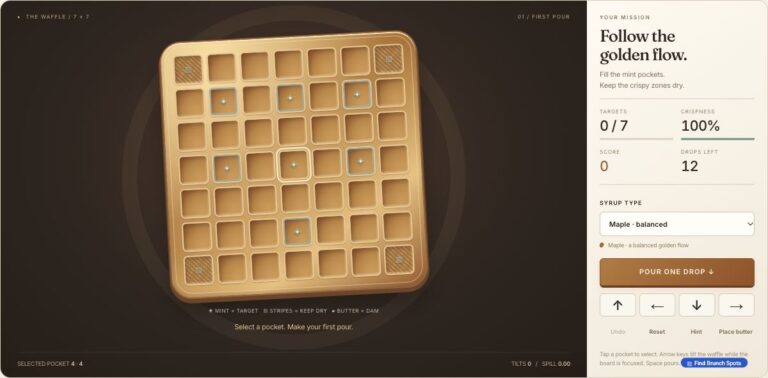
SYRUPTOPIA
Waffle Syrup Maze: 7 Essential SYRUPTOPIA Steps
Guide syrup across a 7×7 waffle. Tested pours, butter barriers, an 85-point baseline, daily storage and model limits.

FrameMint Studio
Screenshot Editor: 7 Smart FrameMint Studio Checks
Frame screenshots, add manual masks and build captioned stories in FrameMint Studio. Real import, order, recovery and size tests explain what to check before sharing.
PixelFit Studio
Image Upload Optimizer: 7 Essential PixelFit Checks
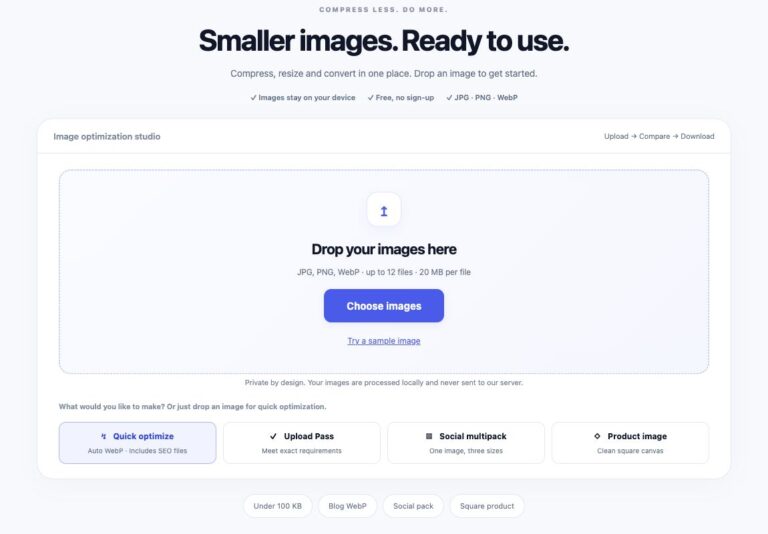
Prepare exact upload dimensions and file-size conditions with PixelFit Studio. Actual sample and JPEG tests explain PASS/CHECK, crop versus contain, social totals, copied HTML and the limits of unverified file receipt.