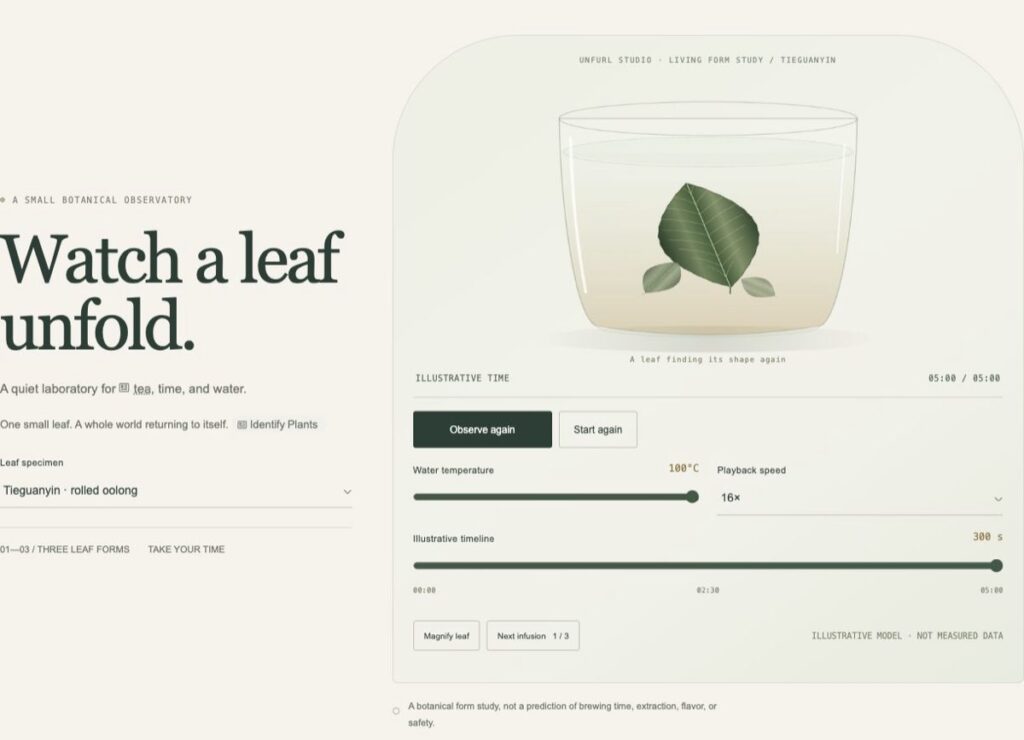
Explore three illustrated tea leaf forms, a shared two-cup timeline, anatomy and local photo pairs. Understand what UNFURL can show and what it cannot measure.
- Brand
- UNFURL
- Tool languages
- en,ko
- Verified date
- 2026-11-14
Tea leaf simulator UNFURL offers an illustrated way to watch rolled, twisted and flat leaf forms open over time. Change a specimen, move the timeline, compare two cups and inspect leaf anatomy. It is useful for learning what to look at before making your own observations, provided you keep its artistic animation separate from a real brewing experiment.
Verified 14 November 2026, KST. We tested the English and Korean interface, playback, timeline, specimen changes, next infusion, two-cup comparison, anatomy controls and local image selection. Screenshots are actual tool captures of illustrations, not photographs of tea we brewed. Two synthetic PNG diagrams were used only to check file selection. The PNG export displayed a ready message, but receipt and contents of a completed file remain unverified.
On this page
Key takeaways
UNFURL is an educational and artistic observatory. Its five-minute timeline, leaf opening and water color are illustrative rather than calibrated tea observations. Do not read the displayed temperature as a recommended recipe, the opening stage as extraction percentage or the water color as caffeine content. The source explicitly distinguishes form, flavor and safety.
The strongest workflow is to ask a visual question, freeze a moment and compare one variable at a time. Use Reduce motion to step through the timeline and the anatomy buttons to learn which features deserve attention. Keep real dry and wet photographs separately; the photo mirror places them side by side but does not identify a tea, score its quality or measure its chemistry.
What this tea leaf simulator does
The official name is UNFURL, presented as a small botanical observatory. The English page links to a separate Korean edition. Its three specimen choices are Tieguanyin · rolled oolong, Wuyi rock tea · twisted leaf and Longjing · flat green tea. These are three illustrated forms, not a catalog that recognizes every tea product. A particular packet can look different from the named drawing.
The main tea leaf simulator provides a 60–100°C temperature slider, playback choices of 1×, 4× and 16×, and a 0–300-second illustrative timeline. Begin a steep, Pause, Continue and Start again govern playback. Magnify leaf changes the view. Next infusion displays a sequence of up to three infusions, while the source describes preserving the previous opening stage. The continuation is still an artistic model.
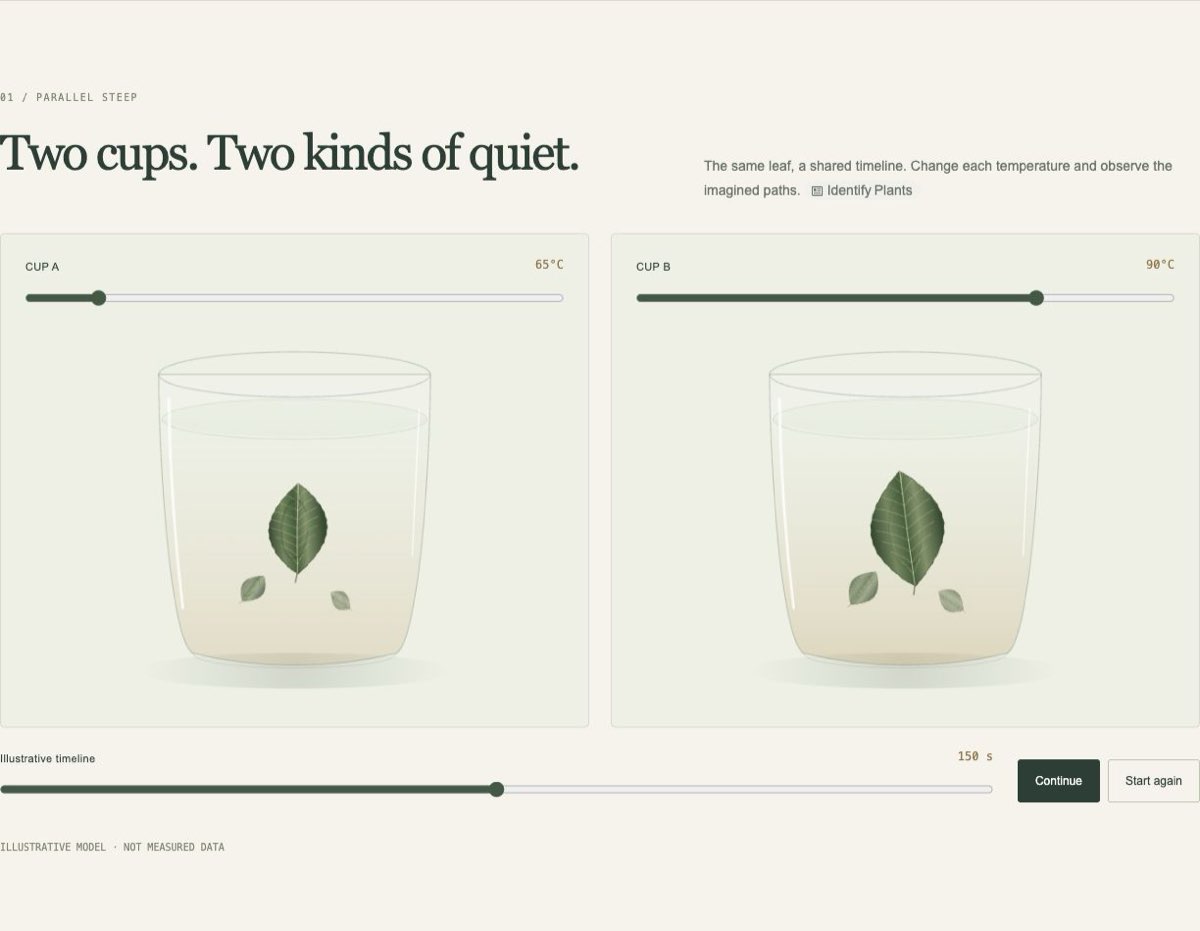
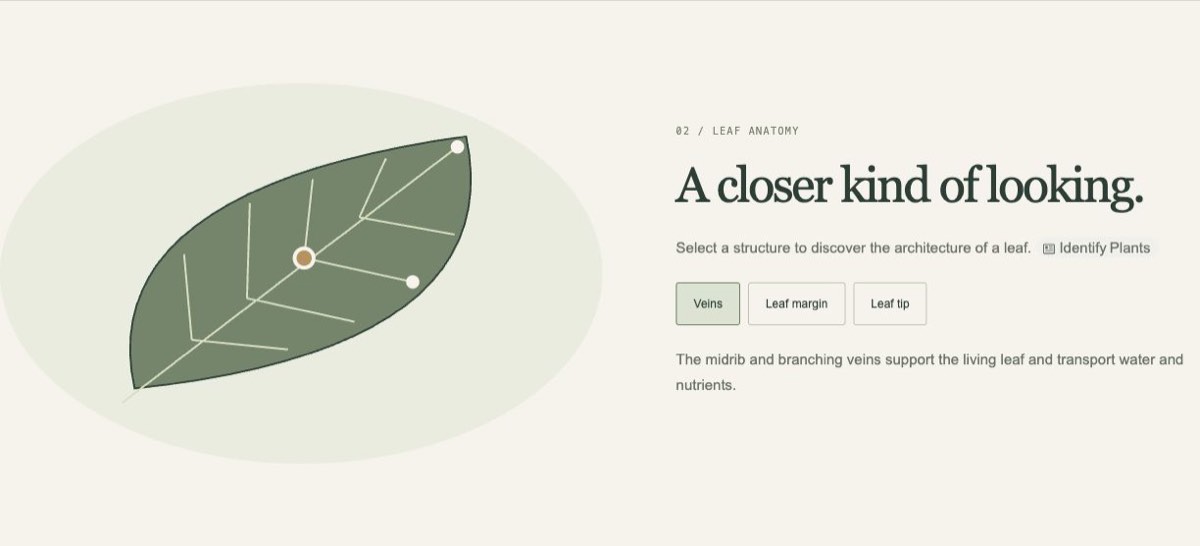
Parallel steep contains two temperature controls and one shared timeline. Leaf anatomy offers Veins, Leaf margin and Leaf tip buttons. Leaf motion atlas displays five imagined silhouettes and a PNG save control. Real leaf mirror accepts a dry and a wet image with an image/* chooser and provides Clear photos. We verified loading our two test PNGs, not every format a browser may offer through that broad accept filter.
Prepare a useful observation question
Decide whether you are studying overall silhouette, visible folding or a named structure. For example, “How does the drawn width change at the midpoint?” can be answered from a paused illustration. “Which temperature makes my tea taste best?” cannot be answered by these drawings. A well-framed question prevents the polished presentation from appearing more quantitative than it is.
Open the English or Korean edition that is easiest to read and identify the illustrative-model notice before starting. Use a larger screen for simultaneous cups if possible. On a narrow screen, controls and specimens move into a vertical layout; the specimen selector is below the main scene. A lower-page Reduce motion checkbox makes deliberate timeline stepping easier to separate from continuous animation.
If you plan to use your own pictures, choose two files that you can recognize and keep the originals outside the page. For a meaningful later comparison, keep framing, scale, background and lighting as similar as practical. These are preparation suggestions, not an image-calibration feature of UNFURL. It supplies no ruler, exposure correction, automated dry/wet matching or measured unfolding ratio in the workflow we inspected.
Tea leaf simulator: 7 essential checks
1. Choose a form rather than a quality ranking
Select one of the three specimens. We switched through Tieguanyin, Wuyi rock tea and Longjing and saw the study label change. Switching specimens returned the main timeline to zero and the infusion counter to 1 / 3. Make a note or capture before switching if you want to compare the previous state.
2. Fix the temperature and playback setting
Set a temperature and choose a playback speed. The controls are independent concepts: temperature belongs to the imagined scenario, while speed changes how quickly the illustration is played. Our Longjing test at 16× advanced from a displayed three seconds to six seconds while we performed other interface actions. This was not a wall-clock calibration test.
3. Freeze a moment with the timeline
Pause playback or enable Reduce motion and move the main timeline. Keyboard End reached 300 seconds and displayed 05:00 / 05:00. Home returned to the beginning. Choosing a fixed moment is more useful for a visual comparison than trying to remember a continuously moving leaf. The five-minute endpoint is a display boundary, not a universal brewing instruction.
4. Inspect the enlarged view and infusion counter
Magnify leaf became pressed and showed a closer-view status in our test. At the completed timeline, Next infusion became available. Activating it changed 1 / 3 to 2 / 3 and reset the displayed time to zero. The counter is part of the drawing sequence; it does not establish how many infusions a real tea should receive.
5. Compare two cups at the same displayed time
Use the shared comparison timeline and read both temperature labels. At 150 seconds, with A at 65°C and B at 90°C, the two drawn leaves had visibly different forms. The comparison slider is separate from the main timeline. Keep a written note of which panel you changed so a main-scene setting is not mistaken for a cup setting.
6. Name the structures you can actually see
Switch among Veins, Leaf margin and Leaf tip. The explanatory paragraph changed for all three choices. Use these names to describe a visible feature, then ask whether your own photo is clear enough to show it. A stylized diagram can introduce vocabulary without authenticating a cultivar or revealing the structure of a damaged leaf.
7. Separate the illustrated card from your real images
The atlas represents five imagined moments. Its Save specimen as PNG control produced Your specimen is ready and Download PNG / save again. The photo mirror is a separate pair of locally selected images. We did not verify that any exported card contains those selected images, nor did we receive and inspect a completed PNG file. Preserve each source separately.
Actual browser test results
| Interaction | Observed result |
|---|---|
| Specimen choices | All three labels selected successfully. Switching form reset the main time to 0 and the infusion counter to 1 / 3. |
| Playback and pause | At 16×, the Longjing scene advanced from 00:03 to 00:06; Pause changed to Continue after pausing. |
| Manual endpoint | With Reduce motion selected, keyboard End moved the main timeline to 300 s / 05:00. |
| Next infusion | At the endpoint the control was enabled; activation changed 1 / 3 to 2 / 3 and time to 00:00. |
| Parallel comparison | A 65°C, B 90°C and shared time 150 s produced different illustrated forms. These are model images, not measured samples. |
| Anatomy | Veins, Leaf margin and Leaf tip each displayed a different explanatory paragraph. |
| Local image input | Two editor-made synthetic PNG diagrams loaded with Photo loaded in this browser. Clear photos removed the selected previews. |
| Specimen export | Ready message and save-again control appeared. No completed download receipt was returned; encoded dimensions and contents were not inspected. |
| Reload and Korean mobile | Reload returned the main scene to Tieguanyin, 85°C and 0 s. At fresh 390 × 844, Korean Longjing selection and timeline End worked; document width was390px. |
These checks establish that the inspected controls changed the page and its drawings. They do not validate a temperature-response equation, extraction prediction, real-leaf recognition or accurate five-minute development. We did not brew tea, taste infusions or measure caffeine. Our file-input diagrams were visibly artificial and were never used as botanical evidence.
Read two cups without inventing a brewing rule
The two-cup panel is helpful because it holds the displayed time in common while allowing two temperature values. Read it as a controlled comparison inside one illustration. At150 seconds the hotter labeled cup had a more open-looking leaf in our capture. That statement describes the drawing. It does not prove that every tea opens that way, at that rate or with the same relationship to flavor.
For a clearer exercise, keep the chosen specimen fixed, set the comparison timeline to a reproducible position and write down both temperatures. Compare width, curvature or the position of a fold. Avoid changing the specimen and both temperatures simultaneously, because the visual reason for a difference becomes harder to describe. If you later do a real observation, record it in a separate table with its own times and conditions.
The temperature slider stops at60 and100°C, but those interface endpoints are not a recommended safe handling range or a recipe for your product. Use the actual tea’s instructions and suitable brewing equipment for real preparation. The illustrated clock should not run your kettle or decide when a drink is ready. Playback speed also does not change how many real seconds you have waited beside a cup.
Connect the drawing to leaf structure
Veins introduces the central and branching structure; Leaf margin directs attention to the edge; Leaf tip distinguishes the end of the leaf from the overall outline. In our test, selecting the margin explained that processing and damage can alter visible teeth. Selecting the tip noted variation with cultivar, age and picking standard. These cautions are more useful than trying to match a real leaf perfectly to one smooth drawing.
For botanical context, NC State Extension’s Camellia sinensis profile describes serrated leaf margins and explains that variety, climate, harvest, oxidation and processing contribute to differences among teas. Use that reference for background, not as validation of UNFURL’s animation. A processing label and a final silhouette alone do not establish the history or quality of an individual packet.
A practical leaf observation exercise
A practical first exercise is a three-column note: chosen form, displayed moment and visible change. Begin with the rolled illustration at zero, move to the midpoint, then reach the endpoint. Write an ordinary visual description such as “the drawn blade is broader” instead of inventing an opening percentage. Repeat with the flat form and compare which feature is easiest to notice. This is a suggested exercise, not a further experiment we claim to have completed.
If you take real dry and wet photographs later, use a consistent background and a stable camera position. Include enough of the leaf to distinguish its outline from fragments and shadows. Put the actual observation time and product identification in your own notes. The mirror does not supply an observation journal, calibrated size measurement or automatic time labels in the inspected workflow. You remain responsible for connecting a file to its context.
For a classroom activity, show the illustrative-model notice first. Ask learners which conclusions can come from the drawing and which require real observations. The anatomy panel can supply shared vocabulary, while a separate real-photo pair can expose irregularity and missing detail. Do not label the atlas as a time-lapse of the uploaded photographs: the atlas is explicitly a sequence of imagined silhouettes.
Choose a simulator, timer or photo record
| Approach | Best fit | Important boundary |
|---|---|---|
| UNFURL | Explore illustrated leaf forms, freeze a moment and learn structural vocabulary. | No measured tea data or validated extraction prediction. |
| Ordinary timer | Measure actual elapsed time during a preparation you control. | Time alone does not determine flavor or leaf identity. |
| Photo pair plus notebook | Document the actual dry/wet appearance and your conditions. | Needs consistent context; two pictures do not show every intermediate stage. |
| Spreadsheet or observation log | Compare dates, products and actual measurements you collected. | Requires careful units and entry; a chart does not validate a causal claim. |
Choose by the question you need to answer. A visual introduction can be enough before a workshop. An actual brewing session needs an actual timer if elapsed time matters. A repeated observation project needs records that survive closing the page. UNFURL combines an approachable illustration with a simple photo mirror, but it does not replace all three jobs. Avoid multiplying tools when a clear notebook entry would answer the question.
A specimen card is different from your photographs
The specimen card belongs to the illustrated atlas. Your selected dry and wet files belong to the photo mirror. A screenshot belongs to a third category: a capture of whatever was visible in the browser at that moment. Name each output according to its origin so a shared image cannot be mistaken for measured research or a real time-lapse.
We activated PNG save and saw a ready message plus a save-again control. Our documented browser download event did not return a completed file. We therefore cannot confirm dimensions, transparency, image encoding, embedded text or inclusion of any photo. Before sharing or relying on a file, confirm that it exists, opens and contains the intended specimen. Keep the original photo pair and an independent note of the context even if a card export succeeds.
Privacy, accessibility and mobile limits
The source states that its simulation and photo comparison run locally and selected images are never uploaded. Our local selection worked, but we did not audit network traffic. The site is hosted on Blogger and displays Google advertising; its own privacy note acknowledges their separate cookie policies. Do not describe the whole page as offline, free of third-party services or suitable for confidential images without further assessment.
Reduce motion lets you step through time, and the range controls responded to keyboard input in our tests. At fresh 390 × 844, the Korean mobile selector could choose Longjing and the timeline could reach300 seconds. Document width equaled 390px. Advertising still covered part of the visible screen. This is browser viewport testing, not a physical-phone touch or camera test. Large-image limits, older-device performance and a complete screen-reader audit remain unverified.
Reload returned our scene to its defaults rather than preserving the selected specimen, temperature and timeline. We cleared the two test images before that reload, so we did not separately establish whether uncleared photos survive reloading. Do not assume a permanent photo archive or cross-device synchronization. If a selector appears missing on mobile, look below the main scene; if the image seems static, check pause, timeline position and Reduce motion before treating it as a failure.
Related tools for presenting an observation
After finishing an observation, FrameMint Studio can help frame a screenshot and add context for a handout or presentation. State that the leaf is illustrated, include specimen and displayed settings, and retain the original capture. A decorative frame should improve explanation without hiding the illustrative-model notice.
For a separate web copy, use the published guides to WebP Studio for format conversion and PixelFit for upload dimensions. Check that labels remain readable at the final size. These tools prepare images for sharing; they do not add missing botanical evidence, authenticate tea or turn UNFURL output into a measured experiment.
Frequently asked questions
Is this tea leaf simulator a real brewing model?
No. The source calls its timeline, motion and color illustrative and not calibrated against observations. Use it for form study and discussion rather than an extraction prediction.
Why did my timeline return to zero?
Changing specimens reset the main timeline and infusion counter in our test. Next infusion also reset the clock while advancing the counter. Distinguish a new specimen from the next illustrated infusion.
Does the darker water indicate stronger tea?
No. The displayed water color is artistic. It is not a measurement of concentration, quality, caffeine or readiness to drink.
Can I upload a photo for automatic identification?
We verified local image selection and side-by-side display only. No automatic identification, quality grading or measured unfolding output was present in that workflow.
Is the five-minute clock an actual timer?
It is an illustrative timeline with 1×, 4× and 16× playback. Our test confirmed progress and pause behavior, not wall-clock accuracy for real preparation.
What did the PNG test establish?
The ready message and save-again control appeared. A completed file was not received for inspection. Treat file contents and dimensions as unverified until you check your actual output.
Start with one leaf and one comparison
Open the tea leaf simulator, select one form and freeze a moment worth describing. Compare a second condition only after the first is clear. Keep the drawing, your real photographs and any exported card labeled by origin. The useful outcome is a more precise observation question, not an unsupported brewing rule.
A RELEVANT NEXT STEP
Tools with a useful connection

FrameMint Studio
Screenshot Editor: 7 Smart FrameMint Studio Checks
Frame screenshots, add manual masks and build captioned stories in FrameMint Studio. Real import, order, recovery and size tests explain what to check before sharing.
WebP Studio
WebP Studio: 7 Essential Checks for Better Batch Images
Use WebP Studio’s English interface to compare image quality, keep dimensions or resize a batch. Actual tests reveal smaller JPGs, larger outputs and a rounded zero-saving total.
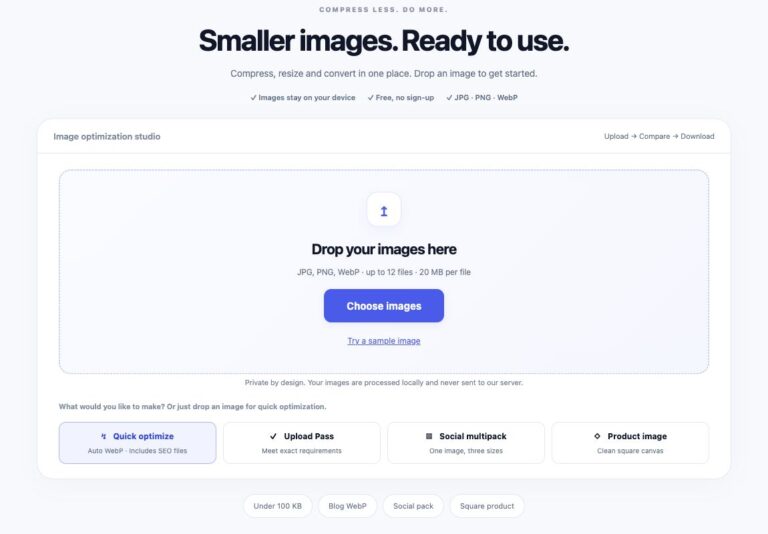
PixelFit Studio
Image Upload Optimizer: 7 Essential PixelFit Checks
Prepare exact upload dimensions and file-size conditions with PixelFit Studio. Actual sample and JPEG tests explain PASS/CHECK, crop versus contain, social totals, copied HTML and the limits of unverified file receipt.