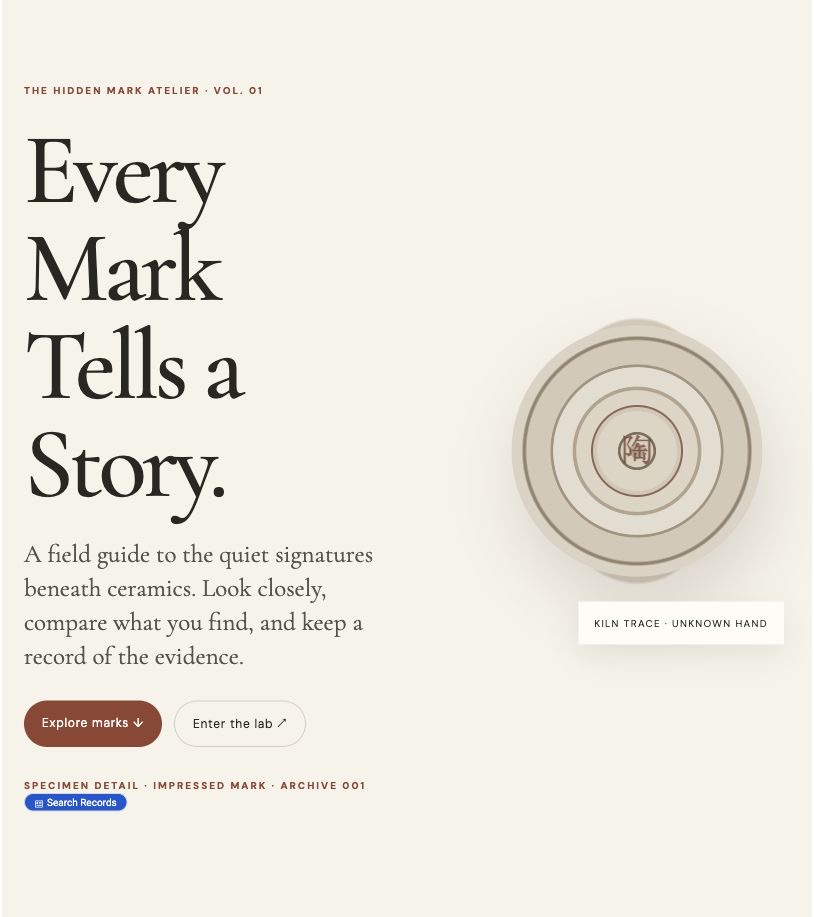
Practice pottery marks observation with two study sketches, B opacity and rotation controls, and a browser-saved note. Tested recovery, language separation and mobile use, with clear filter and identification limits.
- Brand
- Pottery Mark Journal
- Tool languages
- en, ko
- Verified date
- 2026-11-14
Pottery marks can begin an investigation, but a similar outline does not identify a maker. Pottery Mark Journal — The Hidden Mark Atelier offers two illustrative study marks, simple comparison controls and a browser-saved observation note. It is useful for practicing how to describe evidence before assigning a name or date.
Checked 14 November 2026 (KST). We operated the English controls and Korean mobile page, tested note recovery and recorded the limitations below. No historical ceramic object was supplied, photographed, authenticated or appraised during this review.
On this page
Key takeaways
The working controls change the opacity and rotation of study B. The journal saves a text note that survived a reload in our test. English and Korean notes were separate in the browser we used. The page does not accept your own object photograph and does not return a maker match, age, value or authenticity result.
Treat the shape and making-method buttons cautiously. Round, Square and Painted clicks left both illustrative cards visible in the English page. We therefore cannot recommend the finder as a successfully verified filter. The article explains how to use the available comparison and note controls without relying on that behavior.
Preserve a separate copy of anything important. A browser note is convenient for a working observation, but it is not a multi-object collection, a backed-up archive or a cross-device account. Save your wording deliberately, then check it after reloading before trusting the page with your only copy.
What Pottery Mark Journal does
The official brand is Pottery Mark Journal. Its English page uses the subtitle The Hidden Mark Atelier, while the Korean title is 도자기 마크 저널 | 숨은 서명 아틀리에. The purpose is to notice a ceramic’s small signature, compare visible features and separate observation from attribution.
The archive area contains two original study sketches. PMJ 001 is described as a round impressed seal with a crossed brush trace; its maker and date are unidentified. PMJ 002 is an incised square/cartouche study, described as three shallow lines and explicitly presented as an illustration rather than a cataloged object. These labels are teaching material, not authenticated collection records.
The comparison area shows study A and study B in separate panels. A slider labeled Overlay transparency changes B’s visibility; Rotate B changes its angle. Despite the overlay wording, our inspected display did not place B over A in one shared image. Read it as a side-by-side visual exercise with adjustments to the second drawing.
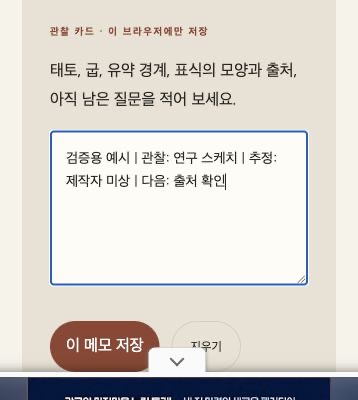
The journal area has one free-text observation box, Save this note and Clear. Supporting cards distinguish Observed, Inferred and Verified statements. The immediate outputs are changes to the study drawing and a saved text note, not a generated identification report or a searchable catalog entry.
Why a similar pottery mark is only a lead
An unfamiliar mark invites a quick image match: a circle resembles another circle, or a pair of strokes looks like an initial. The risk is that the candidate name begins to shape what you think you see. A faint line becomes a convenient letter, and a probable resemblance becomes an unsupported identification.
A better first question is what the object actually shows. Is the outline complete? Which strokes are visible? Where is the mark in relation to the foot ring? Which details are uncertain? The journal is most helpful when it slows that step down and gives the uncertainty a place in the note.
The V&A’s A–Z of Ceramics notes that familiar marks were copied and that some marks remain uncertain in meaning. This supports a modest conclusion: a visual resemblance needs further context. The museum reference does not identify either study sketch or endorse this tool.
Use the page before asking someone to assess an object, or as a classroom exercise about evidence. It can help turn “Who made this?” into a more answerable question with a description and sources. It cannot turn two generic illustrations into proof about the ceramic in your home.
Actual browser test results
| Test | Observed result | What it means |
|---|---|---|
| English finder buttons | Round, Square and Painted left PMJ 001 and PMJ 002 visible | Successful narrowing of the archive was not verified. |
| Opacity keyboard endpoints | Home → 10%; End → 100%; B visibly faded or strengthened | The opacity control affects B, with a 10% lower bound. |
| Rotation keyboard endpoints | Home → −30; End → +30; B actually rotated | The tested range is limited; it is not a full 360° orientation tool. |
| English note | A review-only sample was saved, then restored after reload | Explicit save and same-browser recovery worked. |
| Korean note | Save/reload restored the Korean sample; Clear/reload left it empty | Both save and clear worked in the mobile test. |
| Language separation | Clearing the Korean sample did not remove the saved English sample | Do not expect one shared bilingual note. |
| Reload of controls | Sliders returned to 55% and 0° | Saved text did not preserve the comparison state. |
| Korean viewport | 390 × 844; document width 390px | No horizontal document overflow was found in that check. |
These tests used the supplied study drawings and short, non-sensitive review notes. They did not test identification accuracy, a real maker’s signature, historical dating, camera capture or appraisal. We also found no file-input control for importing a photograph. The absence of an import route limits what the comparison exercise can do with a reader’s own evidence.
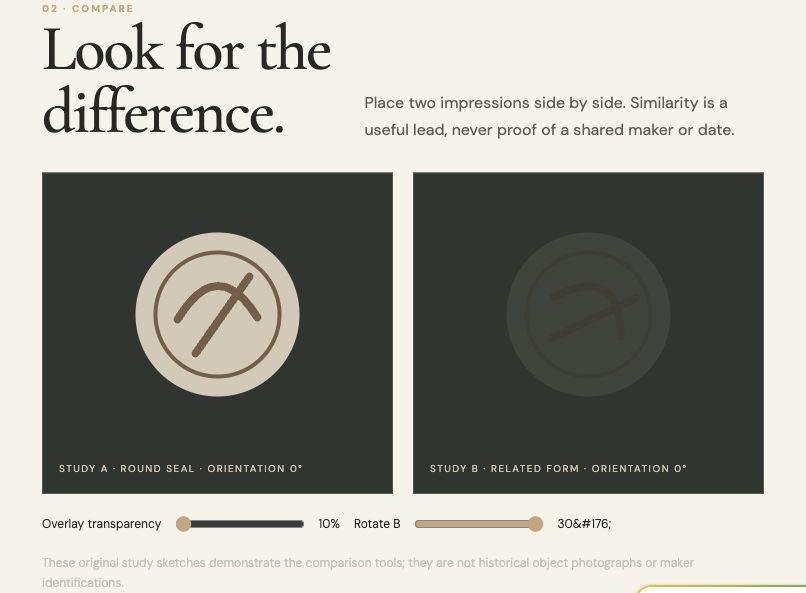
Two display details deserve attention. The updated angle readout showed encoded degree-symbol text, and the fixed caption under B continued to say orientation 0° after rotation. Use the slider value and the visible drawing to describe the test; the unchanged caption is not a reliable live record of the angle.
Prepare a useful observation
You can explore the demonstration without an object or an account. If you want to apply its observation method to your own ceramic, prepare photographs and notes outside the website. The tool has no route for bringing those photographs into the comparison panels.
Keep an overall view, an underside view and a close view of the mark together under a simple object identifier. The overall view supplies context that a tightly cropped symbol cannot. Record the source and capture date as well. This is an editorial workflow suggestion, not a photographic feature we verified inside the app.
Make a backup location before typing a long note: an ordinary text document, notebook or existing collection record is enough. Decide whether this session concerns one object or only the supplied demonstration. Because the page offers one note box rather than named specimen cards, changing subjects without labeling the text can merge unrelated observations.
Choose a narrow goal for the session. You might describe the visible lines, compare orientation in the supplied drawings or prepare a question for later research. A goal such as “prove the maker in five minutes” asks the tool to deliver an outcome it does not provide.
Pottery marks: 7 practical checks
1. Establish which page and specimen you are using
Open the English or Korean version intentionally. Record an object identifier at the top of your note, or write “study-sketch exercise” if you are using the built-in examples. English and Korean saves were separate in our test, so a blank box after changing languages does not necessarily mean your other-language note disappeared.
Read the illustration captions before interpreting them. Archive numbering and the visual style may resemble a museum record, but PMJ 001 and PMJ 002 are study drawings. Do not copy their labels into a description of a real object as if the page had identified your mark.
2. Describe the mark before naming a candidate
Write an outline and stroke description in ordinary language. For the supplied round study, you can record a circular impression and crossed lines without assigning a factory or date. Keep uncertain characters as uncertain. A shape that resembles a letter is not the same as a confidently readable inscription.
For your own notes, preserve location and context alongside the shape: underside, relation to the foot ring and the surrounding surface. Describe what is visible rather than forcing the object into a category because a nearby button offers that label.
3. Check finder behavior instead of assuming a filtered result
The page offers shape buttons for round, square, lines/letters and symbols, plus impressed, incised and painted methods. In our English tests, selecting Round, Square or Painted did not remove either study card. The presence of buttons should therefore not be reported as proof that an archive search succeeded.
You can still read the two cards directly. Note the mismatch between an intended category choice and the unchanged results, then continue to the comparison exercise. Do not interpret an unchanged card as confirmation that it belongs to every selected shape or making method.
4. Adjust B’s opacity while keeping the panels distinct
In Compare, begin at the default 55% and observe the two separate panels. Use the transparency slider to inspect B at a lighter or stronger appearance. Keyboard Home reached 10% and End reached 100% in our test. The first drawing remained a separate reference panel.
Fading can help you notice whether a feature is easy to see, but it does not calculate a difference map. At 10%, a faint line may become hard to notice because the display is faded, not because the mark lacks that line. Do not treat opacity as a confidence percentage or a similarity score.
5. Rotate B and record the setting yourself
Rotate B accepts the tested range −30° to +30°. Home and End reached those limits and changed the drawing. Compare how the orientation affects your perception of the strokes, then write the angle into your note if it matters to the exercise.
The fixed caption remains at 0° even after adjustment, and the updated readout has a degree-symbol rendering flaw. More importantly, a rotated drawing is only a changed view. It does not change the identity of the study or establish that two similar forms came from one maker.
6. Save a structured observation note
Use short labeled lines: Observed, Inferred, Source and Next question. Put the most direct description under Observed. Place a candidate maker or date, if you have one from independent research, under Inferred with its supporting source and uncertainty. The app does not verify a claim because it was entered under a heading called Verified.
Press Save this note and read the confirmation. Our sample returned after a reload in the same browser. The save is not a timestamped specimen archive, and no export button was available. Copy the text to your separate backup when it becomes useful evidence.
7. Test recovery and protect the useful record
Reload once after saving and check that the wording is intact. Expect the comparison sliders to return to 55% and 0°, as they did in our tests. If the angle or opacity is part of your reasoning, include those settings in the text rather than assuming the saved note also stores the visual state.
Use Clear only after preserving anything you want to keep. We cleared a review-only Korean sample, reloaded and confirmed an empty box while the English sample remained. That test supports the observed behavior; it is not a promise about retention in every browser, private window or future version.
A worked example using the study sketches
Actual demonstration, not an object attribution: we used the supplied A/B study pair. At B opacity 10% and rotation +30°, the right-hand drawing became faint and rotated while A remained in its separate panel. This is the comparison state shown in the screenshot above.
A suitable note is: “Observed: two supplied round study drawings; B shown at 10% opacity and +30°. Inferred: the outlines look related, but this exercise establishes no maker or date. Next question: which specific stroke differs when B is easier to see?” The observation reports the screen, and the interpretation stays limited to the exercise.
Now raise B’s visibility and reconsider the same question. If a line is easier to notice, the observation has changed because of presentation conditions. You have learned to document a viewing condition, not discovered a historical relationship between objects. That distinction transfers to later photographic research.
For a real ceramic, create a separate object record and retain the original photographs. The site cannot load those images into this pair. You can apply the same habit of separating observation and interpretation elsewhere without implying that the built-in drawings are matches for your object.
A repeatable evidence note
| Note field | Useful content | Avoid |
|---|---|---|
| Object or exercise | Local identifier; actual object or supplied sketch | An unlabeled note combining several objects |
| Observed | Visible outline, strokes, placement and unresolved areas | A maker’s name presented as something directly seen |
| Viewing conditions | Image filename, orientation and relevant screen settings | A comparison with no way to reconstruct the view |
| Inferred | Candidate interpretation and confidence | Similarity described as proof |
| Source | Direct reference, object number where available and access date | A claim supported only by an unattributed image |
| Next question | Missing photograph or specific evidence needed | Repeating a broad search without a new question |
| Backup | Where the copied note and original images are kept | The browser box as the only surviving record |
This is our suggested structure, not a set of separate form fields supplied by the website. You type the labels into its single text area. Keep the format compact enough that a later reader can distinguish the observation from the explanation without rereading a long paragraph.
Advanced comparison habits
Change one viewing condition at a time. First adjust opacity, then rotation. If you change both together, it becomes harder to tell which adjustment made a line look different. Write down the condition that matters rather than treating every slider movement as new evidence.
Preserve original orientation. When preparing external comparison photographs, keep an untouched version and identify any rotated derivative. A pleasing alignment can hide the fact that one image was tilted or cropped differently. The app’s limited B rotation does not correct camera perspective or calibrate physical dimensions.
Use source trails, not just candidate names. A collection record with a recoverable object number and direct link is easier to revisit than a screenshot detached from its description. Keep the reference date and explain which detail it supports. The presence of a familiar-looking mark in a search result is the start of comparison, not the end.
Allow an unknown result. The source explicitly makes room for unidentified marks. A note that states what remains unreadable and what evidence would help is useful. An unsupported name may be harder to correct once copied into a collection inventory or shared with another person.
Limits, privacy and mobile behavior
The archive contains two illustrative entries in the inspected page. We did not verify working category filtering, a historical maker database, photo import, OCR, automated matching, measurements, export or authentication. Similarity in the drawings carries no tested accuracy rate. No appraisal or valuation was performed.
The note is described by the source as local to this browser. Our save/reload and language-separation tests are consistent with a browser-local working note. We did not audit storage implementation, encryption, network traffic or retention policies. A visible “private” label is not evidence of a comprehensive security guarantee.
The Blogger page displayed advertising, including an interstitial on navigation and overlays that could cover part of the mobile screen. We dismissed the interstitial through its close control and did not click ad content. Reading and saving our test note did not require an account or photo upload, but that does not establish that the whole page is tracking-free or offline.
At a fresh 390 × 844 Korean viewport, the page had no horizontal document overflow. Keyboard slider adjustments, text entry, save/reload and clear/reload worked. Advertising still obstructed some visible space. Scroll to the relevant controls and check the page state rather than interpreting a covered or interrupted view as an identification result.
Alternatives and related tools
Choose this tool for a small observation exercise and a same-browser working note. Use an external viewer when you need to inspect your own photographs; use a document or collection system when you need multiple named records, backups or shared access. For an attribution, seek documented reference material and relevant expertise rather than relying on these sketches.
Three published KIOPTRIX guides connect to the image-preparation part of that workflow. FrameMint Studio helps present existing images with context. WebP Studio covers conversion and resizing for sharing copies. PixelFit Studio addresses destination dimensions and file-size conditions. None identifies pottery marks.
Keep originals before making a presentation copy. Review tiny strokes after compression or resizing, and do not use an edited image as the only evidence. These links point to existing published guides; we did not perform additional real-ceramic photograph tests in those tools for this review.
Frequently asked questions
Can I upload a photograph of my pottery mark?
No import control was available in the inspected page. The comparison panels use supplied study drawings. Apply the observation method to your photographs in an external viewer, and keep their file references in a separate object record.
Does Overlay transparency superimpose A and B?
The tested screen kept them side by side. The control changed B’s opacity from 10% to 100%; it did not create a shared image or a computed difference result. The label should not be taken as proof of a true overlay workflow.
Why do the same two cards remain after I select a shape?
That is what we observed after Round, Square and Painted clicks in English. We could not verify successful narrowing. Read the study cards directly and treat the finder as a limitation in this version rather than inferring a category match.
Will switching to Korean show my English note?
Our saved English sample did not appear in the Korean box, and clearing the Korean sample left English intact. Keep a backup and work intentionally in one language. Cross-device synchronization and a unified bilingual journal were not verified.
Can a similar symbol establish the maker or age?
No such identification result is produced here. Similarity is a lead that needs context and documented sources. The studies are illustrations, and this review included no historical-object authentication or dating test.
Start with one careful note
Begin with the supplied drawings, one viewing adjustment and a short note that states what you can see. Save, reload and copy useful wording to a separate record. Pottery marks research becomes more useful when another reader can understand both the evidence and what remains unknown.
Evidence record: interface, screenshots and sample-note behavior checked 14 November 2026 (KST). Tests concern the supplied sketches and review-only notes. The worksheet and seven-check workflow are editorial additions; the linked V&A reference supplies context, not an endorsement.
A RELEVANT NEXT STEP
Tools with a useful connection

FrameMint Studio
Screenshot Editor: 7 Smart FrameMint Studio Checks
Frame screenshots, add manual masks and build captioned stories in FrameMint Studio. Real import, order, recovery and size tests explain what to check before sharing.
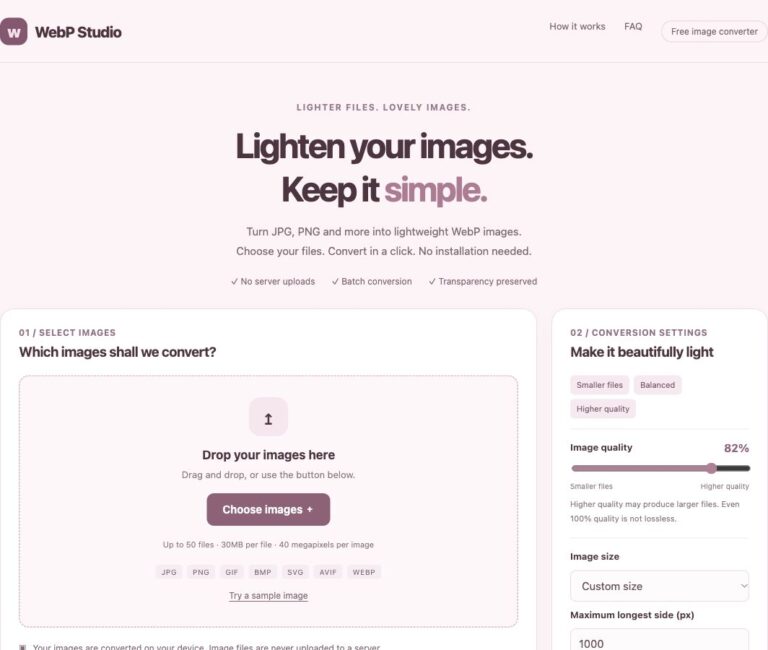
WebP Studio
WebP Studio: 7 Essential Checks for Better Batch Images
Use WebP Studio’s English interface to compare image quality, keep dimensions or resize a batch. Actual tests reveal smaller JPGs, larger outputs and a rounded zero-saving total.
PixelFit Studio
Image Upload Optimizer: 7 Essential PixelFit Checks
Prepare exact upload dimensions and file-size conditions with PixelFit Studio. Actual sample and JPEG tests explain PASS/CHECK, crop versus contain, social totals, copied HTML and the limits of unverified file receipt.