Macramé Mirror is a macrame pattern maker for planning symmetrical wall-hanging designs. Place a knot group on the left, inspect its mirrored partner and follow a numbered making sequence. The useful outcome is a clearer strand map and a provisional cord budget to test with real material.
Key takeaways: hanging strands and cut cords are different counts; mirrored pairs move together; an overlap check is not a physical feasibility test; the preview slider and completed-pair checklist measure different things. Browser-tested November 11, 2026. Exported files and a handmade sample were not verified. This library and the original tool share a creator.
In this guide
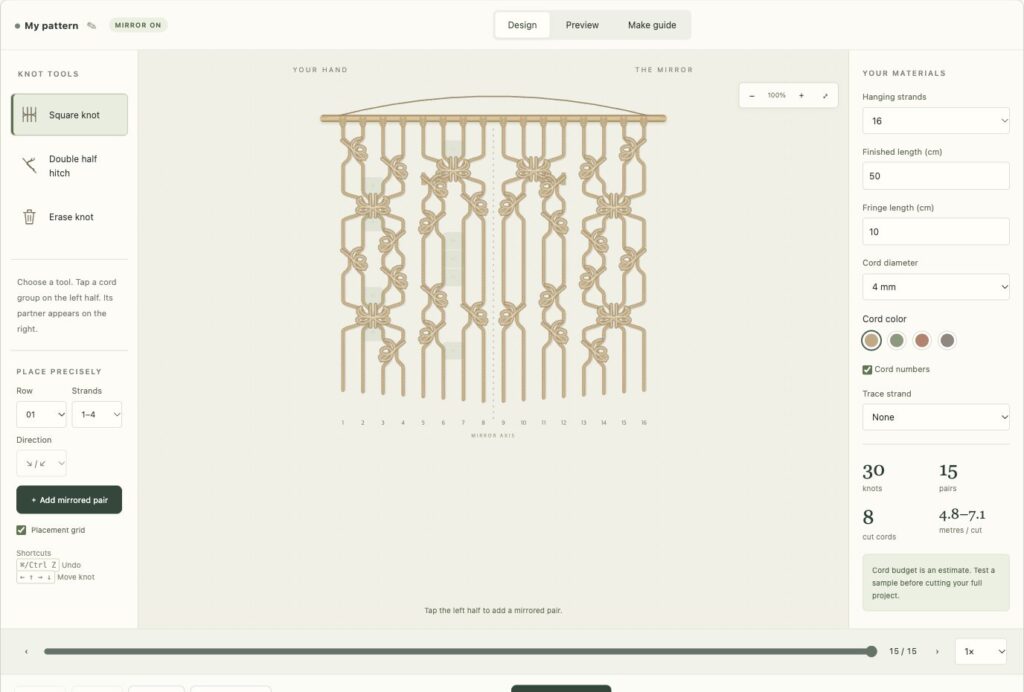
Plan mirrored macramé knots with Macramé Mirror. Actual placement, move, undo, cord-budget and making-sequence tests explain strand counts, local saving and export limits before cutting real cord.
- Brand
- Macramé Mirror
- Tool languages
- en, ko
- Verified date
- 2026-11-11
What this macrame pattern maker does
The official Macramé Mirror studio describes itself as a digital craft atelier for symmetry, cord groups and small wall hangings. It offers Square knot and Double half hitch tools, an eraser, precise row-and-strand controls, mirrored selection, material settings and three editable studies. We reached the studio without an account or installation. The English root and linked Korean page both exposed the workbench.
It addresses a practical planning problem: a symmetrical sketch can look balanced while leaving the maker unsure which strands belong to each knot. Here the groups are numbered, their partners are shown and the making guide names the row and mirrored groups. You can make a local change and inspect the pair rather than redraw both sides by hand. It is a planning aid for a design you will still need to sample.
The distinction matters when choosing an alternative. A vector editor can give more freedom over decoration and page layout, but it does not automatically understand the studio’s knot groups. A written pattern can provide an established making recipe, but may be less convenient for experimenting with a mirrored change. Macramé Mirror trades that freedom for a small schematic vocabulary. It does not simulate cord tension, drape or every real over-and-under crossing.
Count strands before planning the design
Start by identifying the hanging strands. The visible choices are 8, 16 and 24; we tested the 16-strand case. A cut cord folded over the support produces two hanging strands, so sixteen hanging strands correspond to eight cut cords. Do not buy or cut sixteen full folded cords just because sixteen strand numbers appear in the drawing. Check the attachment method and project plan before transferring numbers to physical material.
Next, distinguish a knot from a pair. The initial Diamond Bloom study displayed 28 knots and 14 pairs. A mirrored addition contributes two knots as one pair in this tested arrangement. The making sequence follows pairs, so its denominator is not the total number of knots. Keeping these three counts—hanging strands, cut cords and pairs—on separate lines prevents several common interpretation errors.
Prepare your intended knotted length and fringe length in centimetres, then choose a displayed diameter and color. These are project settings, not measurements from your actual spool. Use a small sample of the cord you intend to use and measure your own consumption before cutting the entire project. We did not tie a physical sample, test different fibers or validate the estimated range against real cord.
7 checks from a study to a making plan
1. Begin with an editable study and read its baseline
The page lists Diamond Bloom, Chevron Cascade and Linen Lattice. We used the initial Diamond Bloom, which showed 16 hanging strands, 28 knots, 14 pairs and eight cut cords. Its initial 35 cm finished-length field, 12 cm fringe and 3 mm diameter accompanied a displayed 3.5–5.1 metres per cut cord. These are observations from the starting study, not a universal recipe for a completed wall hanging.
2. Use the precise placement controls
In Design, choose Square knot, row 01 and an available left-hand group. Our first attempt at row 1, strands 1–4 left the count unchanged; repeating this occupied placement later produced an occupied-strands message. Choosing strands 3–6 at row 1 added a square knot and its partner on 11–14. The totals became 30 knots and 15 pairs. Look for the new pair and updated counts before assuming an addition succeeded.
3. Read the mirrored partner explicitly
The selected-pair panel names both groups. For sixteen strands, mirroring strand i corresponds to 17 minus i; the group is then read in ascending order. Thus 3, 4, 5, 6 maps to 11, 12, 13, 14. This is an explanation of the tested numbering, not a new feature or a claim that it proves the knot can be tied exactly as drawn. The double-half-hitch guide also records holding strands and reversed direction.
4. Move a pair and verify Undo and Redo
We moved the new square-knot pair to row 2, group 5–8. Its partner became 9–12. Undo returned it to row 1, group 3–6; Redo restored the row-2 arrangement. Use the selected panel’s Move control when precise positions matter. The page also advertises arrow-key movement and a keyboard undo shortcut, but we did not complete a full keyboard-path test.
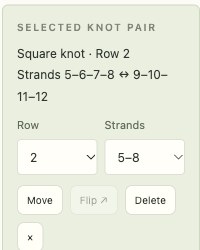
5. Enter material settings and check the summary
After committing 50 cm in the finished-length field and 10 cm fringe, with 4 mm selected, the displayed range became 4.8–7.1 m per cut cord. The making guide showed the same 50 cm setting. Read that summary as well as the input fields, especially after typing. In our test a typed value was visible before the calculated summary updated; native number-control adjustments committed the values. A screenshot of an input alone is not proof that a calculation used it.
6. Use Make guide for the ordered groups
Make guide listed the pairs in row order and identified the moved square knot as step 03 at row 2, 5–6–7–8 mirrored to 9–10–11–12. Marking pairs 1 and 3 changed the checklist to 2/15 completed. Moving Making progress to Home instead showed 0/15 on the preview slider. These two indicators are independent: the slider reveals a schematic stage, while the checkboxes record your session’s manual completion marks.
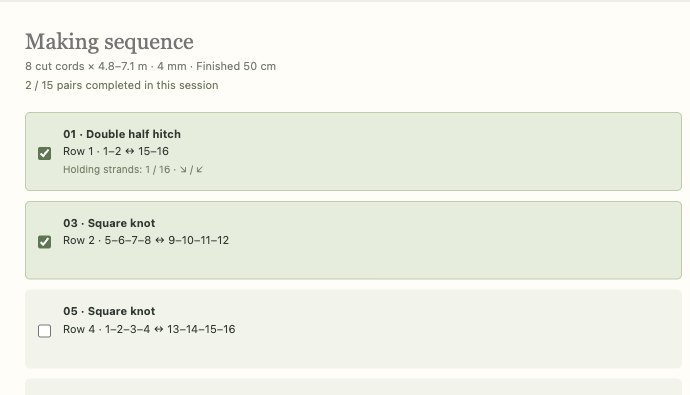
7. Preserve the design before leaving the browser
Reloading retained the 30-knot, 15-pair arrangement and material values 50/10/4 mm. The Korean page also loaded that same project in the same browser. Trace selection returned to None and the preview progress returned to the full design; the reloaded making guide showed no completed pairs. Treat those session controls separately from the saved design. The export dialog offers drawing and project formats, but we did not independently receive and inspect the files.
Actual placement and persistence tests
| Test | Observed result |
|---|---|
| Initial Diamond Bloom | 16 hanging strands; 28 knots/14 pairs; 8 cut cords; 3.5–5.1 m per cut at 35 cm+12 cm. |
| Square knot, row 1, 3–6 | Partner 11–14; totals 30 knots/15 pairs. Occupied 1–4 placement rejected. |
| Move to row 2, 5–8 | Partner 9–12. Undo restored the earlier pair; Redo restored the move. |
| 50 cm, 10 cm fringe, 4 mm | Displayed 4.8–7.1 m per cut. Switching only 4 mm to 5 mm left the displayed range unchanged. |
| Making controls | Checklist 2/15 and preview slider 0/15 coexisted. These are separate kinds of progress. |
| Reload and language view | Arrangement and material settings persisted. Trace/preview/completion marks did not establish persistent making progress. |
| Fresh 390 px Korean layout | Document width 390 px; checklist 1/15 and Home+Next preview 1/15 worked. |
| Project JSON download | Export dialog opened and JSON was attempted; completed file-receipt wait timed out. Import round trip unverified. |
All results are browser observations from November 11, 2026. Screenshots are actual captures. We did not inspect an exported SVG, PNG or JSON, save and inspect a PDF, test another device, change to every strand count or tie the design by hand. The review establishes a usable schematic planning flow and identifies the points where the maker must verify the next step.
Read the cord budget before cutting
The source explains its budget as four to six times the knotted length per hanging strand, plus fringe, doubled for a folded cut cord, with a 15% allowance. For the tested 50 cm and 10 cm inputs, that calculation gives 2 × (4 × 50 + 10) × 1.15 = 483 cm at one end and 2 × (6 × 50 + 10) × 1.15 = 713 cm at the other. That is 4.83–7.13 m, matching the displayed rounded 4.8–7.1 m range.
For eight cut cords, multiplying those unrounded formula outputs gives 38.64–57.04 m. This is arithmetic from the stated assumptions, not measured project consumption or a purchase recommendation. Multiplying the rounded display instead gives slightly different totals. Avoid treating a one-decimal display as a precise cutting mark. Write down the assumptions and refine them with your actual sample.
Read the finished-length label alongside that formula. The arithmetic treats the length field as the knotted-length input and adds the fringe separately. Do not silently reinterpret it as a guaranteed total hanging height. Allow for your support, attachment, knot density and finishing method when translating a plan into a real piece. The source estimates every cut cord at the same conservative length rather than proving the consumption of each individual strand.
In a controlled interface change, selecting 5 mm instead of 4 mm left the 4.8–7.1 m display unchanged. That observed result is useful: choosing a thicker diameter is not evidence that the budget has been recalibrated for your cord. The FAQ itself says thicker cord, denser knots and tighter tension may need more. Diameter selection and a visually attractive preview cannot replace a consumption sample.
Separate replay from completed knot pairs
Use the preview stage to inspect order, then the checklist to mark work you have actually done. The slider includes zero and the full pair count. On the Korean mobile layout, Home followed by Next reached 1/15, while checking the first completion box showed 1/15 completed in the making guide. The matching numbers refer to different actions; neither proves that a physical knot is correct.
Before starting a session, find the row and both groups for the next pair. For a double half hitch, also read the holding-strand note and direction. Keep a separate note of the last completed pair if you need to stop. Our reload test reset completion marks, so relying on them alone could cause you to repeat a pair or skip ahead after returning. This is a practical workflow suggestion based on the observed boundary.
Trace strand is intended to highlight the groups that use a selected strand. We selected Cord 6 and observed the control setting, but did not validate every traced path or every crossing of the illustration. Use the trace as an aid to reading the numbered groups, and return to the actual knot instructions and a sample for the crossing details. The studio explicitly warns that structural drawings simplify real crossings.
Choose the right form of saved work
| Output or storage | What to use it for |
|---|---|
| Browser autosave | Continue the current design in the same browser. Retention was tested; long-term backup and cross-device sync were not. |
| SVG / PNG | The source’s drawing outputs. File receipt, image content and print dimensions were not independently inspected. |
| Project JSON | The documented editable knots and material settings. A portable project requires a received file and a successful import; our round trip is unverified. |
| Print / PDF | A browser printing route for the pattern and making sequence. We did not complete or inspect a saved PDF. |
The source says projects are stored locally and shared between its English and Korean studio. Our same-browser restoration supports that limited statement. It does not establish an online account, cloud backup, collaboration or synchronization between separate devices. Clearing site data can remove local work according to the FAQ. Keep a verified portable copy when the project matters.
The export dialog was labelled Pattern Passport and separated SVG/PNG drawings from JSON project data. Waiting for a completed JSON download timed out in this environment. That is not proof that every user’s download fails; it is the boundary of what this review can certify. Before closing the only useful design, check the file in your downloads, confirm it opens and test an import on an expendable copy if continuation is essential.
A screen image can be enough to discuss proportions, but it is not automatically an editable project. Likewise, a JSON filename is not proof that the restored project matches the original. Compare strand count, knot groups, lengths and a few distinctive pairs after any restore. We did not perform that restore test and therefore do not present a successful export/import workflow as a completed result.
What the schematic and privacy claims cannot establish
This is a schematic design planner. The overlap warning checks whether strand groups are already occupied within a row; it does not test all physical crossings, tension, drape, cord friction or the final dimensions of a knotted piece. A drawing can be symmetrical while the maker’s tension varies. Preview is useful for layout, while a sample provides different evidence about the material.
The source states that pattern edits stay in the browser and are not uploaded by the studio. It separately discloses Blogger and Google advertising cookies and service data. We observed ads and interstitials, and did not audit network traffic. Browser-local editing should not be expanded into a claim that the entire page makes no external requests. Dismiss any obstructing ad through its own close control before returning to the workbench.
A freshly loaded Korean view at 390 px had a 390 px document width without horizontal overflow. We used the making checklist and preview step control. This was a narrow Chrome viewport check, not a physical-phone touch, prolonged performance or comprehensive accessibility audit. Some desktop navigation is hidden at that width; the studio controls remain available in the stacked layout. Read the current mode and selected group when switching between panels.
Related textile tools for different jobs
For decorative additions planned separately from the mirrored body, the published Tassel Atelier guide covers tassel proportions, an A/B view and batch yarn arithmetic. Its material estimates need a handmade sample too. It does not directly import this macramé project or calculate the entire combined wall hanging.
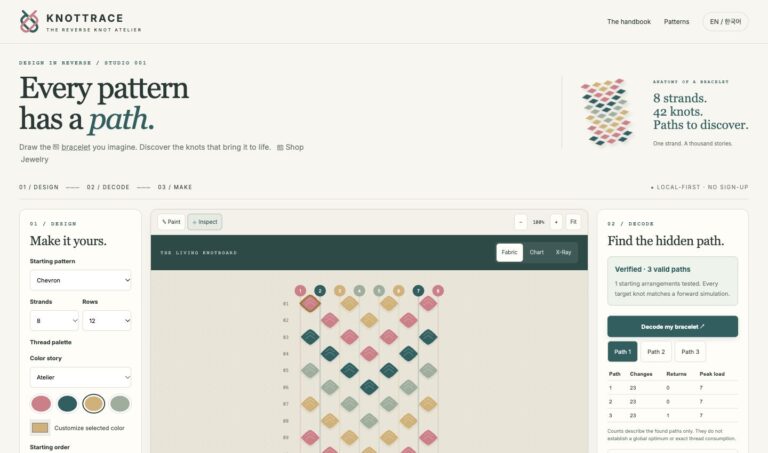
If your real goal is a normal-pattern friendship bracelet, the KNOTTRACE friendship bracelet decoder guide explains a different task: turning a painted target grid into checked knot paths. Choose it for that bracelet workflow, while using Macramé Mirror for the supported mirrored wall-hanging schematic. The two knot vocabularies and project files should not be treated as interchangeable.
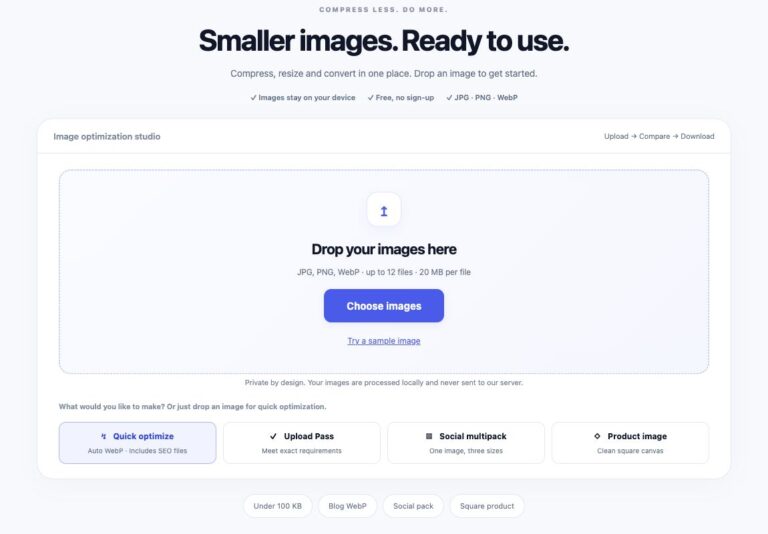
If you receive a PNG blueprint and need it for an upload form or web page, the PixelFit Studio image preparation guide explains pixel, size and crop checks. Keep a readable original and inspect every strand number after resizing; no direct project integration was tested.
Frequently asked questions
Is this macrame pattern maker free?
The page describes free creation without an account, and our studio test required no sign-in. Advertising was present. This describes observed access on the verification date, not a permanent pricing guarantee.
Why did adding a knot do nothing?
Check the chosen row and group. Our occupied row 1 group 1–4 attempt did not add a pair, and a later retry displayed an occupied-strands warning. Choose a free group or a suitable row, then verify the new pair and totals.
Why are there eight cut cords but sixteen numbers?
Each folded cut cord produces two hanging strands in the source’s attachment model. The drawing numbers the hanging strands. Confirm the attachment method before turning those counts into a physical cutting list.
Does a larger diameter automatically increase the budget?
It did not change the displayed range in our 4 mm to 5 mm check at fixed lengths. The source warns that real material and tension can require more. Treat the number as a starting range and sample the actual cord.
Will checked making steps remain after reload?
Our reloaded guide showed zero completed pairs even though the design and material settings remained. Keep an independent progress note when stopping a real project. Do not confuse the full preview stage with completed making work.
Plan one pair and test one sample
Open one study, place one free knot pair and read both mirrored groups. Check the material summary, choose the appropriate saved output and verify it before leaving. A macrame pattern maker becomes most useful when its schematic plan is followed by a measured sample and a clear making record.
A RELEVANT NEXT STEP
Tools with a useful connection
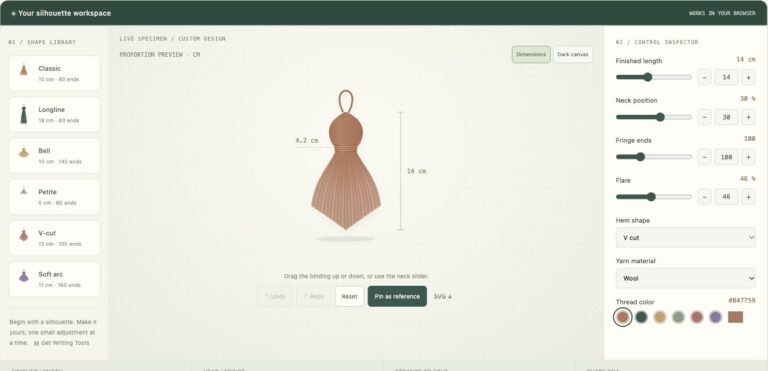
Tassel Atelier
Tassel Designer: 7 Essential Steps for Better Patterns
Compare tassel proportions and plan a batch with Tassel Atelier. Real A/B, yarn arithmetic, link restoration and mobile tests explain what to trust and what needs a handmade sample.
KNOTTRACE — The Reverse Knot Atelier
Friendship Bracelet Decoder: 7 Essential KNOTTRACE Checks
Turn a painted normal bracelet pattern into checked knot paths. Our 8-strand, 12-row tests cover 42 knots, 3 paths, strand tracing, F-to-FB changes, row marks and calibrated thread estimates.
PixelFit Studio
Image Upload Optimizer: 7 Essential PixelFit Checks
Prepare exact upload dimensions and file-size conditions with PixelFit Studio. Actual sample and JPEG tests explain PASS/CHECK, crop versus contain, social totals, copied HTML and the limits of unverified file receipt.