Hamster Night Shift is a hamster activity tracker for manually recorded observations. Enter a behaviour, local start time and observed minutes; the site turns those notes into a noon-to-noon timeline, circular activity signature and rhythm map. It helps you organize what you saw without pretending you watched the entire night.
Key takeaways: this is a manual journal; overlapping intervals are merged in totals; a blank hour means unobserved; first and last observations are not sleep times. We tested the interface on November 11, 2026 using clearly labelled synthetic entries. No hamster was observed and no animal-health experiment was performed.
In this guide
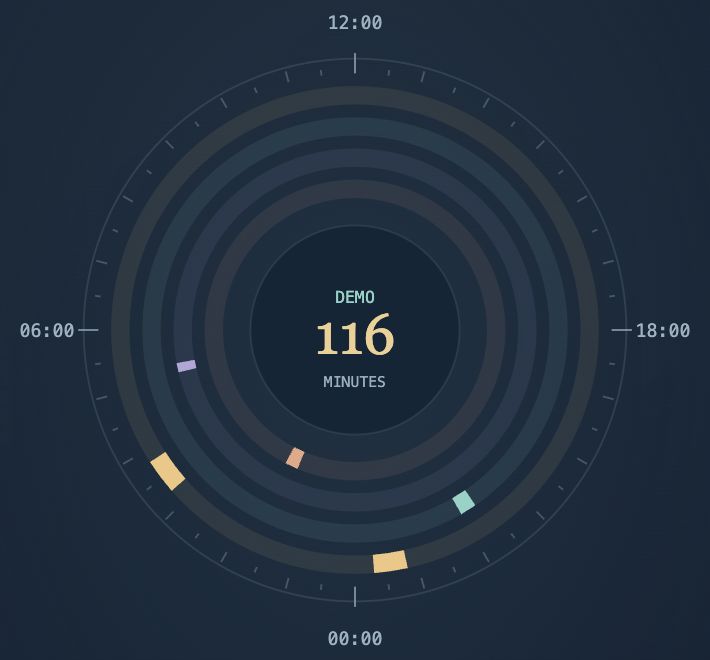
Keep manual hamster observations across midnight with Hamster Night Shift. Synthetic interface tests explain merged minutes, environment notes, local reload and Korean mobile use without inventing animal data.
- Brand
- Hamster Night Shift
- Tool languages
- en, ko
- Verified date
- 2026-11-11
What this hamster activity tracker records
A few short notes can become difficult to compare when one starts before midnight and the next starts after it. Ordinary calendar dates split an evening from the early hours that follow. This tool groups a night from noon on the selected date to noon the following day, making a late evening and its following morning part of one observation window.
You supply the information. The entry form asks for a hamster name, the night’s starting date, observed behaviour, local start time, minutes and an optional note. Four activity types appear in the visual signature: wheel running, exploring, digging and foraging. An environment-change option records contextual events separately from those activity categories.
The output includes a timeline, a morning report, a circular signature, an hourly inspection control and a rhythm heatmap with seven- or thirty-night views. A thirty-night atlas collects recorded signatures. The interface offers entry editing and removal, local journal/demo switching, SVG cards, JSON backup, CSV export and backup restore. Visible controls are not proof that every export path worked in our session; our confirmed tests are listed below.
This is useful when you want dated observations instead of a memory that “something seemed different last week.” It can help you keep a clear record for your own reference or to discuss with an appropriate professional. It does not automatically detect motion, measure wheel revolutions, track distance or determine whether an animal is healthy.
Prepare an observation you can interpret
Choose the right night label
Write down the night’s starting date before entering an after-midnight observation. For example, 00:05 following the evening of November 10 belongs to the night starting November 10 in this noon-to-noon system. Selecting November 11 would put it in the next night’s window. The displayed date is a journal label, so check it against your original note rather than relying on the date you happen to be typing.
Separate observation from interpretation
A useful note says what happened and when you saw it. “Wheel observed from 23:50 for twenty minutes” is different from “ran all night.” The latter fills gaps with an assumption. If you only noticed an animal briefly, do not turn the duration of a sound or an unattended period into confirmed continuous behaviour. The tool organizes your input; it does not verify its accuracy.
The examples in this guide are synthetic software tests. Their purpose is to check arithmetic and interface behaviour. The name “UI test — not a real hamster” and the notes in the screenshots make that distinction explicit. Do not use the test values as activity targets, a normal range or evidence about any real animal’s routine.
Keep a short capture note
If entering the form immediately would interrupt your observation, make a brief time-stamped note first and transcribe it later. Retain the original start time, the duration you actually observed and any uncertainty. Use local times consistently. When travelling or changing device time zones, keep a separate context note; we did not test time-zone migration or daylight-saving transitions.
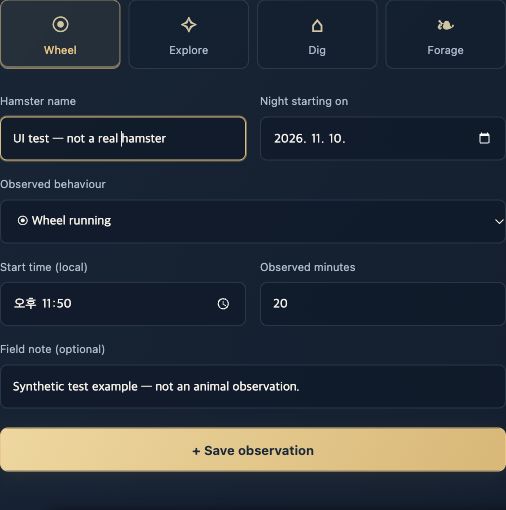
7 steps for a clear night journal
1. Inspect the demo before creating a journal
Explore demo shows illustrative records, including the 116-minute signature visible in the representative image. Those are built-in examples. The interface states that saving the first observation leaves the demo and that demo records do not enter your journal. Our first save replaced the demo display with one synthetic twenty-minute entry rather than adding it to the illustrative total.
2. Set a name and night starting date
Enter a recognizable label and verify the selected date. Keep private information out of the name and optional note if you may later export or share a file. We did not establish a multi-animal separation model, so do not assume that changing the name creates a fully independent journal for a second animal. Check the records and exported structure before relying on that workflow.
3. Choose one observed behaviour
Use the behaviour buttons or the dropdown. The four activity categories correspond to the rings and legend. Select Environment change for a contextual event rather than treating it as exercise time. In our test an environment note appeared in the list and increased the note count, while the activity total and first/last activity times stayed unchanged.
4. Enter local start time and observed minutes
Use a 24-hour interpretation when checking your result, even if your browser displays a localized AM/PM picker. Enter minutes you can support from the observation. Re-read the saved line afterward: the start and duration should match the source note. A correct-looking circular graphic is less informative than a saved record with the wrong date or a twelve-hour time-entry error.
5. Save and inspect the timeline
Press Save observation. A success message and a new list entry should appear. Check the selected night, category and duration before adding the next item. The timeline orders activity across midnight within the noon-to-noon window. Keep overlapping entries if they accurately document separate observations, but understand that total duration may merge them rather than simply adding the numbers.
6. Read the morning report and an hourly cell
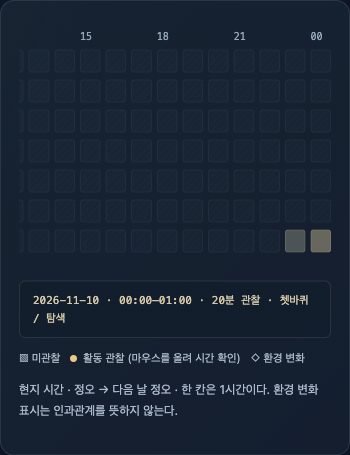
Compare first observed time, last observed end, merged minutes and behaviour types. Then inspect a relevant hour in the rhythm map. Our Korean midnight cell showed twenty observed minutes and listed wheel/explore for an hour covered by overlapping synthetic records. An hourly summary describes the part of that hour covered by your inputs; it is not an independent sensor measurement.
7. Reload and plan a backup check
Reload the same browser page and confirm that your entries remain. We verified four entries and the thirty-minute merged total after reload, and the Korean page on the same origin showed the same records. The site offers JSON, CSV and restore controls, but a completed download or successful restore was not verified here. Before relying on the journal long term, test your own backup and restore with disposable data.
Actual interface tests: midnight and overlaps
We used the night starting November 10, 2026 and explicitly synthetic input. No real hamster activity, camera footage or health outcome was measured. This makes the following results reproducible as interface arithmetic, without presenting invented animal observations as field research.
| Input or action | Observed output | Useful interpretation |
|---|---|---|
| First wheel entry: 23:50 for 20 min | First 23:50; last end 00:10; total 20 | The interval crossed midnight within one night. |
| Second wheel entry: 00:00 for 20 min | Wheel logged 30; last end 00:20 | The ten-minute overlap was counted once. |
| Explore entry: 00:05 for 10 min | Overall total 30; two behaviour types | An interval inside the existing coverage added a category, not new elapsed time. |
| Environment note: 22:00, duration field10 | Four notes; total 30; first 23:50 | Context was listed separately from activity totals. |
| Reload same browser | Four notes and total 30 remained | Local persistence worked in this session. |
| Open Korean page on same origin | Same entries and totals, localized labels | The tested language pages shared these local records. |
| Inspect Korean 00:00–01:00 cell | 20 minutes; wheel / explore | Hourly coverage was separated from the whole-night total. |
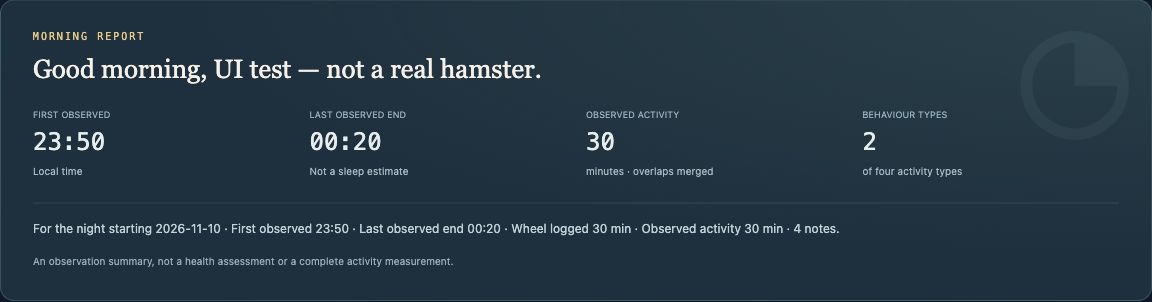
The arithmetic is a union of time intervals. The first wheel record covers 23:50–00:10 and the second covers 00:00–00:20. Their combined coverage is 23:50–00:20, which is thirty minutes rather than forty. The explore interval 00:05–00:15 lies inside that coverage, so it does not increase the overall elapsed duration.
That arithmetic does not resolve contradictory source notes. If overlapping categories were entered by mistake, the merged total can still look reasonable. Inspect the individual entries and correct the underlying record. A total of thirty minutes means thirty minutes covered by the entered activity intervals, not proof that multiple behaviours were accurately classified during the overlap.
The environment record is especially instructive. Its duration field still had ten minutes, and the list displayed that value, but the activity total stayed thirty. The first activity remained 23:50 even though the environment note started at 22:00. Treat context as a marked event in these summaries, rather than assuming every listed row contributes to activity minutes.
Read the signature without inventing a full night
Read blank areas as missing observation
A quiet-looking ring or an empty heatmap cell can mean you did not watch. It does not show that the hamster slept, stopped moving or was absent. The tool explicitly distinguishes unobserved time from inactivity. This is the most important rule when showing a visual journal to someone who did not create the notes.
Compare coverage before comparing totals
Suppose you watched for a short period one night and a much longer period the next. A larger recorded total may reflect more observation opportunity. Keep a separate note of when you were available to observe, especially if you want to compare nights. We did not verify an automatic observation-effort denominator in the tool, so do not read the minutes as a standardized daily activity score.
First and last are recording boundaries
First observed means the earliest activity in the entered records for that night. Last observed end is the end of the last relevant entered interval. Neither identifies when the hamster woke or fell asleep. The morning report labels its last time as not a sleep estimate, and that distinction should remain in any copied summary or conversation about the record.
Build a useful record-keeping routine
Use the same recording convention
Choose short, concrete notes and retain the original timing detail. If a duration is approximate, say so in the note rather than letting a precise number imply a precision you did not have. Record a relevant environment event separately and describe what changed. The presence of an event marker cannot establish that the event caused a later difference in activity.
Review entries before building a story
Before concluding that a pattern changed, look for duplicate transcriptions, an incorrect night label, an AM/PM mistake or a different amount of observation time. Review the individual list entries alongside the visual summary. A circular signature is an excellent prompt to inspect the data; it is a poor substitute for knowing how those data were collected.
Keep the animal’s routine ahead of the chart
The source’s field guide says to observe naturally and avoid waking or handling the animal just to collect a record. A gap in your notes is acceptable. Do not manufacture a continuous-looking chart by disturbing a routine or filling in periods you did not see. Our review concerns how the software records input, and does not prescribe an exercise target or a new care routine.
Write a neutral handover note
For a household handover, include the night label, the actual observation intervals and the fact that the record is incomplete. An example template is “Observed during these windows; the rest of the night was not monitored.” If you discuss a concern with a qualified professional, share the dated source observations as well as the summary and clearly identify estimates. This journal does not replace a professional assessment.
Storage, privacy and practical limitations
Local storage: the interface says records are saved on this browser without an account. Our reload and language-page tests support persistence in the same browser context. They do not establish cloud synchronization, retention after clearing site data, recovery from device loss or access from another browser profile. Browser storage should be treated as a working copy, with a backup process you have actually tested.
Privacy: a locally saved journal is not the same claim as an entirely offline website. Third-party advertising and shopping overlays were visible. We did not audit network traffic or confirm that every component avoids external requests. Avoid private identifiers in names and notes; exported files, if you create them, may contain the text you entered. We did not transmit the test journal to another person.
Export boundary: we clicked Download JSON backup but did not receive a verifiable completed file through the browser workflow. We therefore do not claim successful JSON backup, CSV export, SVG receipt or restore. Restore is described by the interface as merging records with the local journal. Before importing, retain a separate copy and test behaviour on nonessential data; a visible restore option is not a verified recovery plan.
Mobile: a fresh 390px Korean page had page width 390px and no document-level horizontal overflow. The form and report stack, while the wide hourly grid can be panned within its own panel. Selecting the midnight cell exposed a localized detail line. Small cells can make precision selection harder than on desktop, so confirm the displayed hour after tapping. Ads can cover controls; use their dismissal controls and check the workspace again.
Editing and removal controls are visible, but their complete undo/recovery behaviour was not tested. Long-duration boundary handling, daylight-saving changes, multi-animal separation and large imports were also outside this review. We did not test physical sensor integration because this interface is a manual observation journal. A sparse chart alone cannot establish illness or wellbeing.
How it differs from other ways to keep notes
| Method | Best use | What to watch |
|---|---|---|
| This journal | Manual timed observations with a night-based visual summary | Local storage, input quality and incomplete coverage. |
| Paper notebook | Quick notes without opening a screen | You must group nights and calculate overlaps yourself. |
| Spreadsheet | Custom columns and your own observation-effort calculations | Date/time formulas and merged intervals need explicit handling. |
| Recorded video reviewed separately | Returning to a captured period to check an observation | This tool does not automatically import, analyze or validate footage. |
Use the method that makes your source notes easiest to preserve. A paper note can be the original record and the journal its visual index. A spreadsheet can keep an additional column for observation opportunity. Neither route makes unobserved hours known. The valuable distinction is between the raw observation, any estimate and the later summary.
Related journals for other animals
If your household also records dog walks, the published Dog Sniff Diary guide covers a separate manual observation workflow for sniffing notes. It is useful for that species-specific task, not for interpreting hamster wheel minutes. For aquarium observations, the Betta Bubble Nest Journal guide explains photo records, missing-nest observations and tested limitations.
These journals are alternatives for different animals. We did not verify record transfer between them, and their metrics should not be compared as if they measured the same behaviour. The common useful practice is to preserve dates, source observations and uncertainty before drawing conclusions from a visual archive.
For a separate isopod habitat project, the Microclimate Atlas guide combines a virtual layout with observation notes. Its habitat model is for that different project; it does not supply hamster enclosure parameters or explain hamster activity totals.
Frequently asked questions
Does this hamster activity tracker work automatically?
No. You enter observed behaviours, times and minutes yourself. The page organizes those entries into visual summaries. It does not establish continuous monitoring, identify behaviour from a camera or measure wheel distance from the minutes field.
Why does my total differ from the sum of entry durations?
Overlapping activity intervals are merged. In our test twenty minutes plus another twenty minutes with a ten-minute overlap produced thirty minutes. A ten-minute explore interval entirely inside that coverage added a behaviour type without increasing overall time. Check the raw entries if the overlap was unintended.
Why is a 00:05 record shown under the previous date?
The night starts at noon on the selected date and continues through the following morning. An observation just after midnight can therefore belong to the night starting the previous calendar day. Verify the chosen night label against your original note.
Does a blank heatmap mean no activity?
It means unobserved in this journal. The site cannot fill the periods you did not record. Do not turn missing entries into sleep time, inactivity or a daily total. Keep the amount of observation opportunity in mind when comparing nights.
Are records shared between English and Korean?
The same synthetic entries appeared on the English and Korean pages in our browser test because they use the same site origin. That is not evidence of cloud synchronization or another device receiving the journal. Test your own environment before changing browsers or clearing data.
Can it diagnose a problem?
No. The report is a summary of entered observations, not a health assessment. Keep source notes and seek an appropriate professional assessment when needed. The tool should not be used to infer a diagnosis or to treat a low recorded total as proof of a health condition.
Start with one observed interval
Open the journal, choose the correct night and record one interval you actually observed. Check its saved line and summary, then keep a copy of the original note. A hamster activity tracker is most useful when its clear visual output remains attached to honest limits on what was observed.
A RELEVANT NEXT STEP
Tools with a useful connection
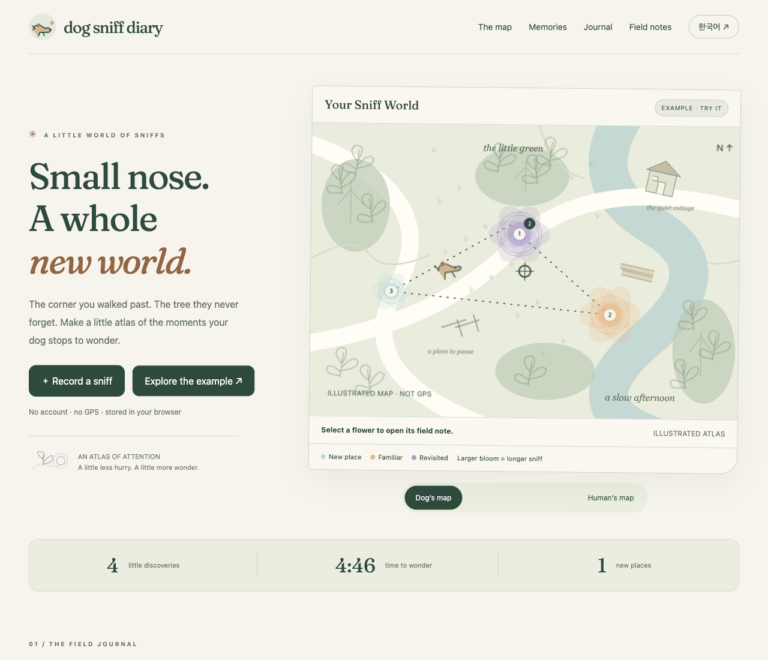
Dog Sniff Diary
Dog Sniff Diary: A Dog Sniffing Journal in 7 Steps
Keep timed sniff observations, place nicknames and an illustrated diary. Our hands-on tests cover local records, filters, JSON recovery and abstract SVG postcards without treating them as GPS or health data.

Betta Bubble Nest Journal / The Floating Archive
Betta Bubble Nest: 7 Essential Journal Checks
Keep dated betta bubble nest photos, manual outlines and missing-nest observations in a local journal. Actual synthetic tests explain image comparison, a water-change checkbox defect, privacy and unverified export limits.
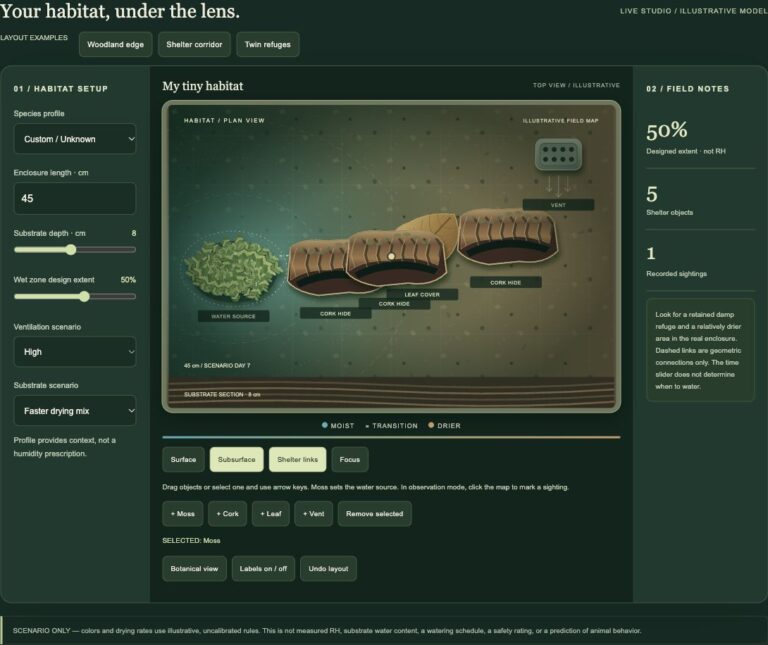
Microclimate Atlas — Isopod Moisture Gradient Planner
Isopod Layout Planner: 7 Essential Checks for Better Notes
Plan a virtual isopod habitat, compare illustrative drying scenarios and keep observation notes. Our tests separate design percentages from measured humidity and verify local reload behavior.