Plan a parcel shelf with measured dimensions, per-level load and pickup paths. Actual strategy, height, recovery and scenario tests distinguish placed boxes from accessible ones and explain JSON, SVG and unverified print outputs.
- Brand
- ShelfTrace Local
- Tool languages
- en,ko
- Verified date
- 2026-11-19
ShelfTrace Local is a parcel shelf planner for arranging anonymous boxes inside measured shelving and checking whether they can be retrieved from the front. Compare a single-row pickup strategy with multiple-row space use, inspect blockers and keep a recoverable layout. Its most useful question is whether a box is both placed and accessible, rather than whether the total box volume looks small enough.
Verified 19 November 2026, KST. We tested strategy changes, blocked pickup inspection, load limits, rejected moves, pickup Undo/Redo, height failure and correction, rescue, save/restore, JSON import/export and hypothetical arrival scenarios. JSON and SVG files were received and their contents inspected. Korean controls were tested at 390×844. Print/PDF and shelf-label controls were attempted without a verified output; no successful print or PDF is claimed. All boxes were digital examples, with no real shelving or delivery operation tested.
On this page
Parcel shelf planning takeaways
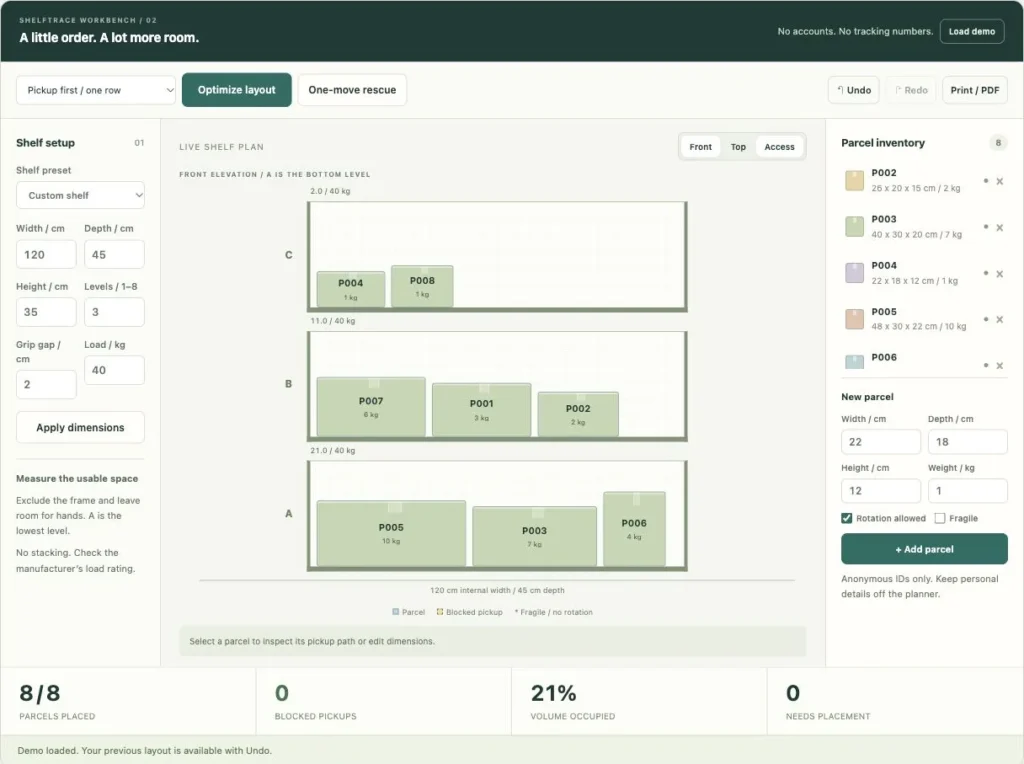
The opening 120×45×35 cm, three-level example placed all eight parcels with zero blocked pickups and 21% volume occupancy. Switching to Space first and optimizing still placed eight at 21%, but two were blocked. Selecting P004 identified P002 as the front parcel to move first. Identical placement and volume totals therefore hid a meaningful access change.
A 5 kg per-level limit left five of eight parcels placed, three needing placement and 8% volume occupied. A separate 30×22×40 cm parcel could not fit a 35 cm level even with spare volume; reducing its height to 20 cm allowed it. These tests show why volume, dimensions, weight and pickup access must remain separate checks.
What this parcel shelf planner does
The official name is ShelfTrace Local, branded The Parcel Planning Studio. It is presented as a free visual package shelf planner for apartments, dormitories and shared offices. English and Korean pages are linked from the header. The inspected workflow needed no account, recipient identity or tracking number; parcels used generated anonymous IDs such as P001.
Shelf inputs include usable width, depth and height, one to eight levels, grip gap and per-level load. Presets provide compact, standard and wide starting points, alongside custom dimensions. Each parcel has width, depth, height, weight, a rotation setting and a fragile flag. Front, Top and Access controls offer different ways to inspect the same layout. Selecting an inventory item also exposes dimension editing and manual placement controls.
Optimize layout reorganizes under the selected strategy. One-move rescue attempts to place remaining boxes while limiting disturbance. Undo/Redo, pickup handling, optional browser saving, JSON backup/import and an SVG drawing support ongoing work. A separate scenario lab uses hypothetical arrivals and pickups. None of these functions is a live courier feed, recipient notification system or delivery forecast.
Measure a useful parcel shelf model
Measure internal clear space, excluding shelf frames, doors, pipes and other obstructions. Record each usable level’s dimensions in centimetres and check whether the model’s repeated-level assumption fits your shelving. A large outside cabinet measurement can overstate space that the boxes can actually occupy. The planner uses one width, depth and height configuration across its levels, so materially different compartments need separate planning rather than an averaged dimension.
Use the shelf manufacturer’s load information and inspect the real installation separately. The entered load is a model constraint per level, not a structural assessment or a rating supplied by the tool. Anchoring, uneven floors, damaged shelves and comfortable lifting are not measured by the browser. A model that keeps the sum of box weights below an input cannot establish those physical conditions.
Prepare a minimal anonymous inventory: ID, dimensions, weight and handling restrictions. Do not put a resident’s name, address, telephone number or tracking details into screenshots or backup notes. Keep any operational mapping to recipients in an appropriately managed separate system. The planner’s anonymous codes reduce what is needed for layout work; they do not provide an access-control system for real parcels.
7 essential parcel shelf checks
1. Apply measured parcel shelf dimensions
Set width, depth, height, level count, grip gap and load, then use Apply dimensions. A is the bottom level. Read the new placement totals after applying a constraint: a previously valid box may become unplaced. Our load test changed no parcel sizes, yet three boxes left the plan because the per-level limit became 5 kg. A positive amount of empty volume did not override that input.
2. Check the current parcel form before adding
Read all dimension and weight fields, then set rotation and handling flags for the actual box. The editor can retain values from a previously selected parcel; do not assume every new entry starts from the original 30×22×18 cm example. We added a 22×18×12 cm, 1 kg P009 after editing another item. That test entry was a deliberate digital input, not an observed delivery.
3. Choose the parcel shelf strategy explicitly
Pickup first uses one row per level. Space first allows boxes behind other boxes. Select the rule and optimize, then inspect both placed count and blocked pickups. The same eight-box example used all three levels under the first rule and left the top level empty under the second, while producing two blocked pickups. More compact shelf use was not an improvement on every measure.
4. Inspect a blocked pickup by ID
Switch to a top/access inspection and select the marked box or its inventory entry. The pickup edge is shown at the top of the plan. For P004, the interface named P002 as the parcel to move first. This identifies a modeled straight retrieval obstruction; it is not a timed handling trial or a complete ergonomic path analysis. Keep the selected ID with any screenshot.
5. Review moves and orientation changes
A selected parcel exposes shelf, X and depth coordinates, Move, Rotate and Picked up. We tried moving the added P009 to level A at 0/0 and received a rejection for collision, edge gap, height or shelf load. That generic message did not prove which single condition failed. Use the plan and input values to investigate rather than repeatedly forcing coordinates until a move is accepted.
6. Distinguish pickup history from saved state
Picked up removed the digital P009 from the inventory: nine became eight. Undo restored nine, and Redo returned to eight. These actions change the current model, whereas Save workspace creates a local recovery copy. Before an operational change, know whether you want to edit the live layout, reverse an action or restore the last saved snapshot.
7. Back up the checked parcel shelf plan
Save locally if useful, export JSON and retain an access screenshot beside the drawing. We successfully imported the received JSON after loading the demo. The SVG kept shelf footprints and IDs but did not reproduce the on-screen blocked-pickup warning or load summary. Test any printing requirement separately, because neither print/PDF nor shelf-label output was verified in this browser session.
Actual parcel shelf test results
| Controlled test | Observed output |
|---|---|
| Default 120×45×35 cm, 3 levels, 2 cm gap, 40 kg/level | 8/8 placed;0 blocked;21% volume;0 unplaced. Level loads A 21, B 11, C 2 kg. |
| Space-first strategy + Optimize layout | 8/8;2 blocked;21%;0 unplaced;2 existing parcels moved. Level loads A 21, B 13, C 0 kg. |
| Select P004 in the compact arrangement | Pickup inspection names P002 as the front parcel to move first. |
| One-move rescue with all 8 placed | 0 existing parcels moved;0 still unplaced. The 2 blocked pickups remained. |
| Change per-level load to 5 kg | 5/8 placed;0 blocked;8% volume;3 unplaced. Undo recovered the prior layout. |
| Added 22×18×12 cm, 1 kg P009; attempt A at 0/0 | 9/9 placed before move; attempted position rejected. Pickup→8; Undo→9; Redo→8. |
| Korean 30×22×40 cm, 3 kg box with 35 cm height | 8/9 placed;1 unplaced;rescue moved 0 and left 1. Edit height to 20→9/9 and 23% volume. |
| Save, change state, Restore; reload then Restore | Saved eight-box space-first positions returned, including 2 blocked pickups. Reload itself began at the default layout. |
| Export JSON, load demo, import that file | Eight parcels, their saved positions and space-first strategy restored. |
| Korean 390 px strategy + access selection | Same 8/8, 2 blocked, 21%;P004 names P002;document width 390 px. |
These are digital results under entered constraints. The default inventory total was 34 kg, spread across three levels. Space-first moved the two 1 kg boxes to B, leaving C empty. Those observations explain the displayed distribution for this example; they do not establish a universal heavy-box placement rule or certify a real shelf’s suitability for the weights shown.
Parcel shelf space is different from access
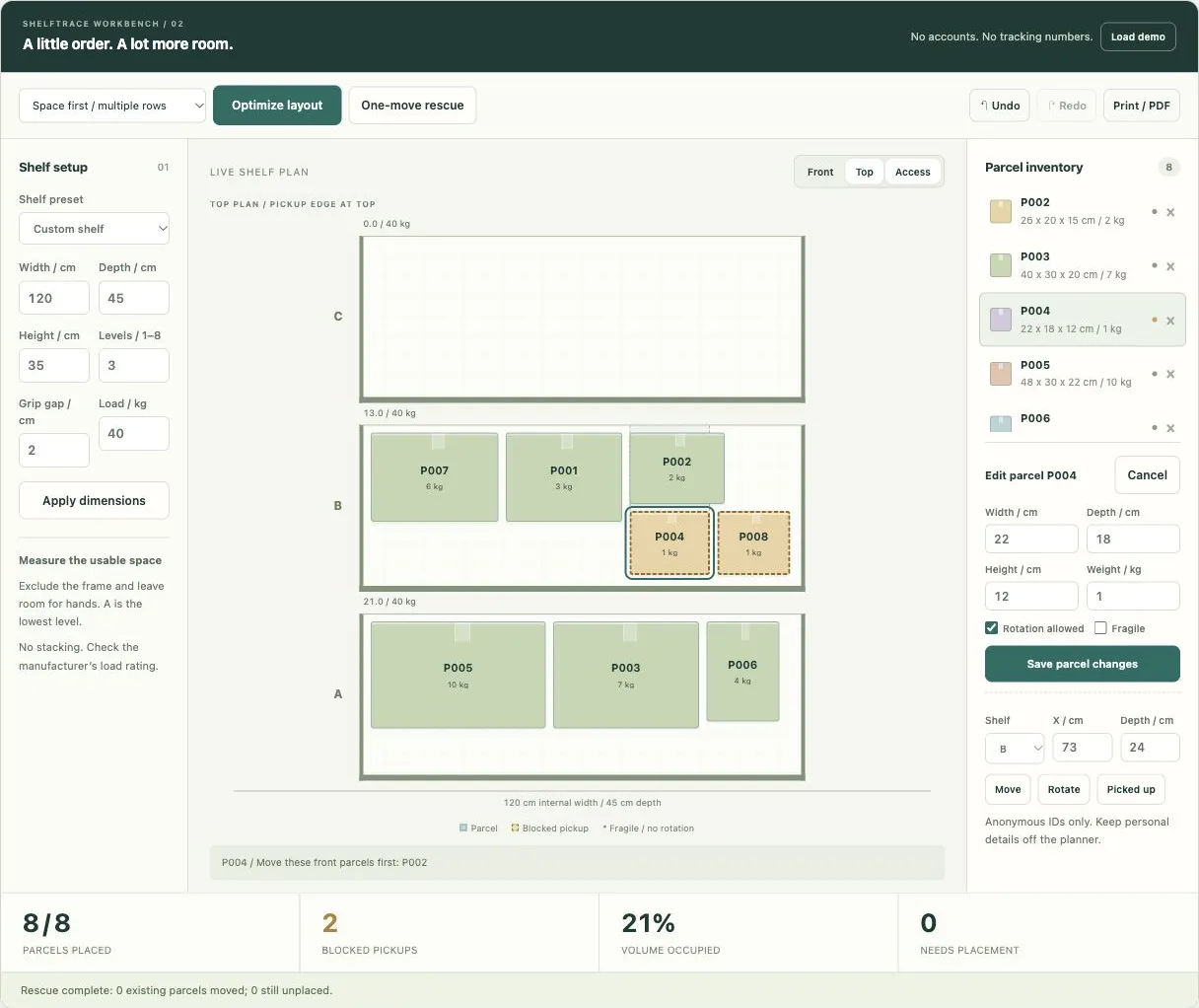
A placed box satisfies the current placement process; it can still sit behind another one. In the exported space-first geometry, P002 occupied level B at x 73, y 2 with a 26×20 cm footprint, while P004 began at x 73, y 24 with 22×18 cm. They share a width corridor and the second lies deeper. This matches the UI’s instruction to move P002 first. It is a file-and-interface cross-check, not a physical pickup test.
Use the one-row layout when direct front access is the priority being studied. Use multiple rows when you intentionally want to inspect the tradeoff of using depth. A lower level count in use, a higher placed count or a tidy-looking plan may each answer a different question. Keep the blocked count and the actual blocker list beside the capacity figures so the chosen objective remains visible.
A useful handling note states the selected parcel, the front parcel to move and the level. Avoid turning a blocked count into minutes saved or a guaranteed staffing reduction: the tool did not measure walking, lifting, identification time or actual hand movements. The model also leaves the real recipient matching process to whatever system you manage outside the planner.
Read parcel shelf volume and load separately
The eight default box volumes sum to 119, 172 cm³. The configured shelf volume is 120×45×35×3 =567, 000 cm³. Their ratio is about 21.02%, matching the displayed 21%. This arithmetic check explains the headline’s scale. It does not imply that the remaining 79% is a usable rectangular space or that an equally large additional box will fit.
Under the 5 kg limit, the five lighter boxes together occupied 45, 992 cm³, about 8.11% of the same configured volume. The inventory still contained all eight parcels, but only five were placed. The smaller occupancy headline therefore did not mean the other parcels had been picked up or deleted. Read it alongside Needs placement and the inventory rather than treating it as an inventory-wide volume total.
Volume also ignores where free space is divided and whether the available height is useful without stacking. The tested 40 cm-high box failed a 35 cm level even though the global occupied percentage was low. After reducing that input height to 20 cm, it could be placed and occupancy became 23%. We changed a digital dimension; we did not compress, repackage or measure a real parcel.
Parcel shelf rescue: what a single move can fix
The source describes rescue as preserving positions first, then searching for a solution by moving one existing parcel. It is a heuristic attempt, not a global minimum-movement proof. In our already-placed space-first example it moved zero existing boxes and left zero unplaced, while the blocked pickup count stayed two. That result is consistent with a placement objective rather than a command to eliminate every retrieval obstruction.
The separate height-overflow example is an important counterexample. Rescue left the 40 cm-high parcel unplaced because moving another box cannot create vertical clearance in a 35 cm compartment. Reducing the box’s entered height resolved that modeled constraint. A failed rescue is a reason to inspect dimensions, load, gaps and allowable orientation; it is not evidence that the real site has no possible storage solution.
The JSON also showed that P006, entered 28×20×25 cm, used a 20×28 cm footprint in the saved plan. Its 25 cm height was unchanged. This documents a base-plane orientation in the tested output. Do not interpret a rotation option as verification that a real package may be tipped onto any face, or that a fragile flag simulates damage, cushioning or stacking strength.
Use the parcel shelf scenario lab carefully
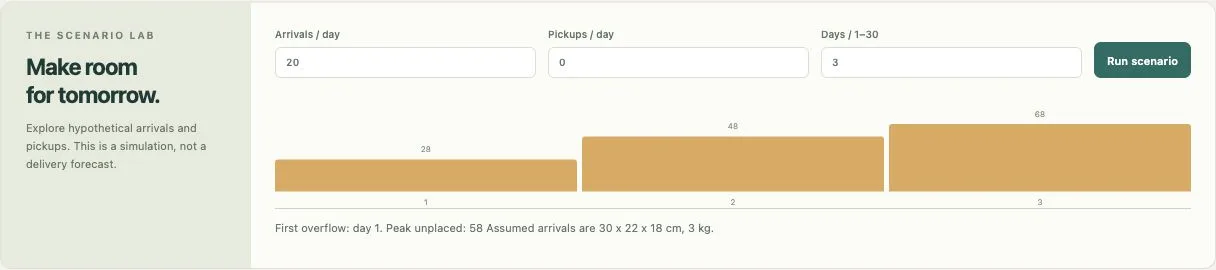
Starting from the eight-box inventory, 8 arrivals and 10 pickups per day over 7 days displayed 8 parcels on each day and no overflow. With 20 arrivals, 0 pickups and 3 days, the displayed totals were 28, 48 and 68; first overflow was day 1 and peak unplaced was 58. The live eight-box workspace remained unchanged by running the scenarios. The chart studies a copy rather than physically adding those arrivals to your current inventory.
The source specifies new example parcels of 30×22×18 cm and 3 kg, with the oldest picked up first. The daily counts therefore depend on simplified size and timing assumptions as well as the numbers you enter. The first test’s repeated 8 is consistent with removing available stock before adding the day’s arrivals; it is not a claim that the real location always holds exactly eight packages.
Use a scenario to ask a bounded question: what happens under this arrival count, pickup count and assumed box? Record those assumptions with the chart. It does not learn seasonality, courier schedules, resident behaviour, a size distribution or uncertain pickup times. A first-overflow label is conditional on the model, not a date at which your actual shelves are forecast to overflow.
Save and back up a parcel shelf workspace
We saved the space-first eight-box state, changed the workspace, then restored the saved positions and strategy. Refreshing began at the default arrangement with zero blocked pickups; Restore saved brought back the two blocked pickups. Automatic restoration on page load should therefore not be assumed. A familiar demo after refresh did not mean the saved copy had disappeared.
The received JSON used version 2 and contained shelf configuration, eight box records, placed positions, serial value 8, strategy space and view top. Those fields make it a useful editable backup. Importing that file after loading the demo restored the saved arrangement. We tested this specific file; compatibility with future versions, modified files or every malformed input was not audited.
Keep a dated backup after meaningful work and before clearing browser storage. A downloaded JSON is separate from the browser’s saved copy. The source says devices do not synchronize. Cross-language transfer of a locally saved session was not tested; our Korean tests used a fresh workbench rather than proving automatic synchronization with the English page.
Parcel shelf SVG, print and label outputs
The received SVG declared width 600, height 885 and viewBox 0 0 120 177, with separate A/B/C top-view sections. It contained labelled parcel rectangles and shelf outlines. Its dimensions were not specified in physical millimetres, so describe it as a scalable layout drawing, not a verified 1:1 cutting or installation template. File structure was inspected; we did not visually render or physically print the downloaded SVG.
Every parcel rectangle in that file used the same style. The source drawing export did not include the screen’s dashed blocked-pickup markings, selected P004 blocker message or level-load report. Keep an access screenshot or written blocker list with the drawing when those distinctions matter. A clean exported diagram alone does not demonstrate that all boxes can be retrieved directly.
Shelf labels was attempted, but no downloaded file or usable output view was verified. Print/PDF interaction also stalled in this browser environment, and the test tab was closed to continue. The source explains browser printing and A/B/C labels, but this review cannot claim successful labels, a PDF or calibrated paper output. Test those requirements before relying on them for a real handover.
Choose a parcel shelf planning method
| Method | Useful task and practical boundary |
|---|---|
| ShelfTrace Local | Quick dimension, placement and access studies with an anonymous inventory; validate physical conditions separately. |
| Spreadsheet or inventory list | Recipient mapping, retention policies and a durable record if managed appropriately; geometry and access rules need separate work. |
| Tape measure and on-site mockup | Check actual obstructions, reach and handling; follow real load and installation information. |
| Dedicated parcel-management system | Use when tracking, permissions, notifications or operational synchronization are required; those were not functions of this planner. |
A small receiving point can use the planner to compare alternatives before moving boxes, then maintain its actual receipt and collection records elsewhere. It is most valuable when the layout question is explicit and the measurements are credible. A larger workflow does not become managed merely because its shelves have been drawn, and a mathematical-looking occupancy percentage should not replace physical inspection.
Mobile use, model limits and privacy
At 390×844, the Korean strategy selector, optimization, access control and P004 selection worked with document width 390 px. The current box and blocker remained readable in the stacked layout. We did not test every device, browser or touch-drag gesture. Inventory buttons and the selected-box controls provide a way to inspect and edit without relying on a precise drag through a crowded drawing.
The model is a fast heuristic with no stacking and no structural safety certification. It does not assess anchoring, damage, real lifting comfort or a globally optimal arrangement. The default 2 cm gap and 40 kg limit are example inputs, not general recommendations. Use measured clearances and the actual manufacturer’s requirements, and investigate any placement rejection before accepting a new layout.
The source says calculations stay in the browser and dimensions are not sent to a planning server; optional saving uses local storage. We verified local recovery and JSON exchange, but did not audit network traffic, security or offline operation. The FAQ describes calculations continuing in an already-loaded tab, with no guaranteed offline reload and no installable PWA. Google/Blogger advertisements may process cookies and usage data separately; see the Google privacy policy.
Related tools for another storage task
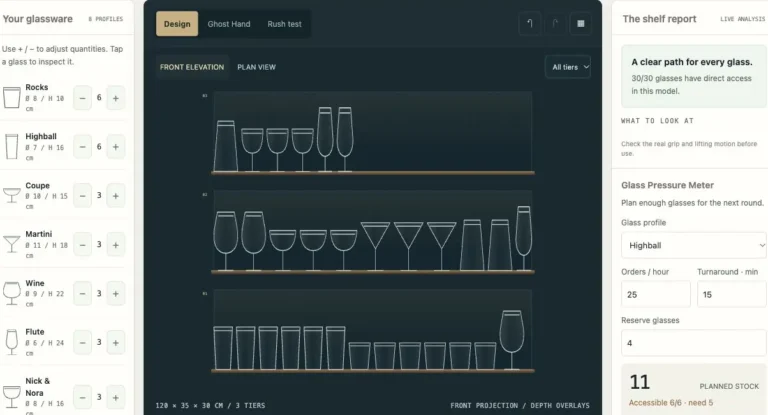
For a café managing incoming deliveries and a separate glassware shelf, the published GlassFlow guide examines glass dimensions, retrieval paths and service-stock assumptions. Use it for that beverage-storage task with its own measured inventory. The two planners do not exchange data, and glass-stock figures should not be treated as parcel-storage measurements.
More household and shared-space planning guides are listed in Home, Living & DIY. Choose the next tool for the problem that remains after the shelf study. For a physical parcel installation, the necessary next evidence is still the shelf’s real dimensions, rated load and workable pickup procedure.
Parcel shelf questions
Why does a box remain unplaced at only 21% occupancy?
Each box still needs a usable footprint, sufficient height, grip gap and permitted load. Free volume can be split into shapes the box cannot use, and this model does not stack parcels.
Does One-move rescue clear blocked pickups?
It searches for placement with limited disturbance. In our eight-box test it reported zero unplaced yet kept two blocked pickups. Inspect access separately after any rescue.
Does the SVG preserve the access warning?
The received SVG contained shelf outlines and box IDs with uniform rectangle styling. It did not carry the dashed access warning, selected blocker note or load summary. Keep those as a separate screenshot or note.
Will a scenario add its arrivals to my actual inventory?
The source says the current layout stays unchanged, which matched our tests. Its chart is a hypothetical experiment with example boxes, not a live delivery list or forecast.
Can I enter names or tracking numbers?
The inspected model uses generated anonymous IDs and provides no recipient or tracking fields. Keep personal operational records outside the layout and avoid adding them to shared screenshots or backup annotations.
Will my saved workspace appear automatically after reload?
Our refresh showed the default layout; Restore saved recovered the stored positions and strategy. Keep JSON separately before clearing storage. Device synchronization and automatic cross-language transfer were not verified.
Were PDF and shelf-label outputs confirmed?
No. Controls were attempted, but usable output was not verified in this environment. JSON and SVG receipt and JSON restoration were verified; physical printing was not.
Begin with one measured shelf
Measure one shelf, enter a small anonymous inventory and compare the two strategies. Check placed count, blockers, occupied volume and level loads separately. Save the chosen state, export JSON and keep the access evidence with any diagram. A useful parcel shelf plan makes its retrieval tradeoffs and unverified physical assumptions visible before you move real boxes.
Research record: English and Korean interfaces, actual screenshots and downloaded JSON/SVG contents checked 19 November 2026, KST. The seven checks, arithmetic explanations, comparison table and export/access distinction are editorial additions. Digital tests are separated from source claims and untested physical outcomes.
A RELEVANT NEXT STEP
Tools with a useful connection
GlassFlow
Glassware Shelf Planner: 7 Essential Checks for Better Flow
Plan a glassware shelf with measured dimensions, straight retrieval paths and stock assumptions. Actual GlassFlow tests explain weighted reach, blocked glasses, ten-order trials and JSON recovery.
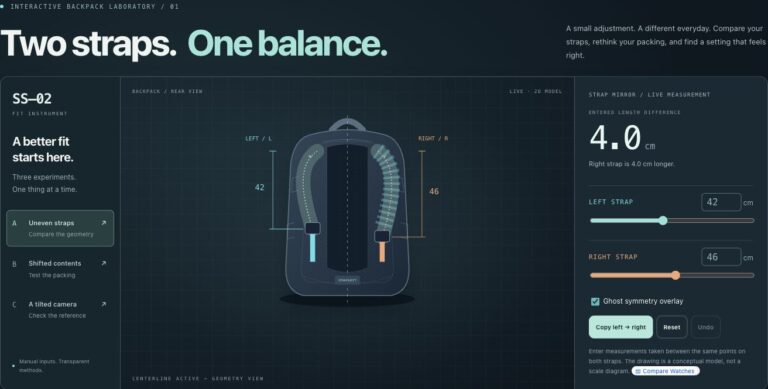
STRAPSHIFT
Backpack Fit Tool: 7 Essential Checks for Better Notes
Compare manual strap measurements, photo reference pixels and three-zone packing in STRAPSHIFT. Actual browser tests explain the model and local recipes while keeping real comfort untested.
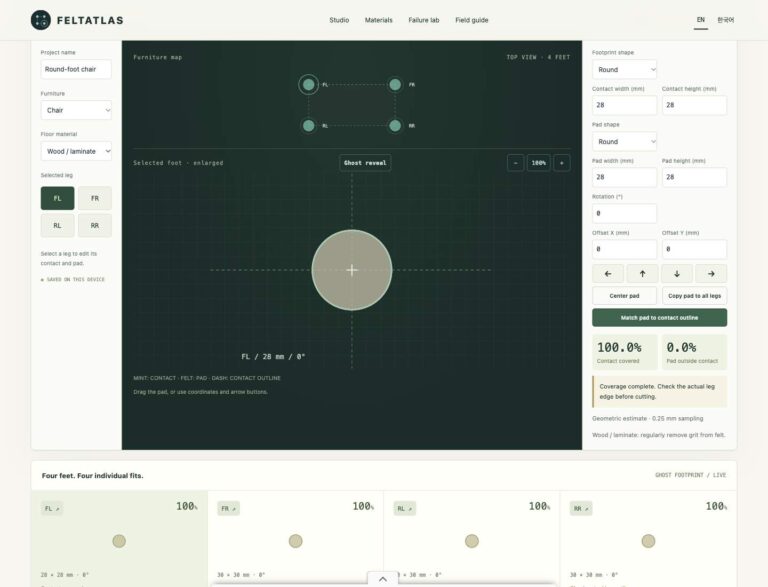
FELTATLAS
Felt Pad Designer: 7 Essential Checks for Better Fit
Compare four furniture contact shapes and felt pads, inspect geometric coverage and prepare labelled cutting-pattern previews. Includes real fit tests, print calibration and local-save limits.