PAINT STRATA is a miniature painting simulator for exploring how five coats build a surface. Build a digital recipe, adjust a layer, inspect an original procedural 3D specimen and compare wash/drybrush order. It is most useful for planning a question to test on a spare miniature before committing to a batch.
Checked 13 November 2026 in Chrome. We tested layer settings, order swaps, wash overload and restore, visibility, history positions, local save/load, a fresh shared link, batch arithmetic and Korean controls at 390px. We did not test real paints or inspect an exported JSON/image file. The numbers below describe interface behavior, not measured pigment performance.
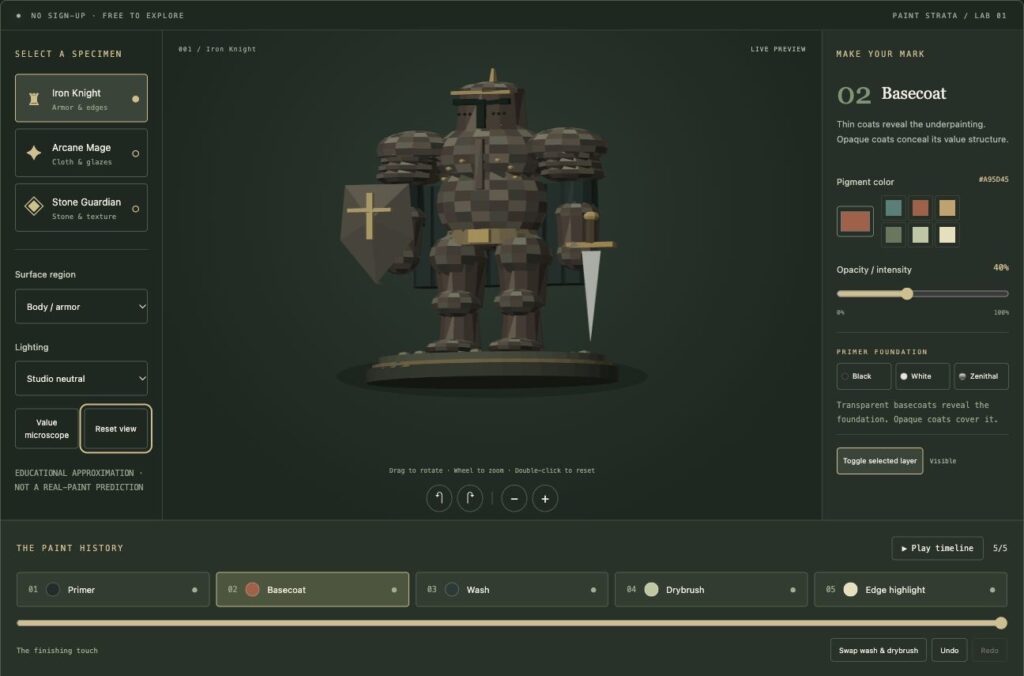
Explore miniature painting layers in PAINT STRATA. Tested order swaps, wash overload, saved recipes, sharing and mobile controls show what this 3D learning model can do.
- Brand
- PAINT STRATA
- Tool languages
- en, ko
- Verified date
- 2026-11-13
On this page
Key takeaways for miniature painting
Use the model to compare decisions, not to choose an exact retail paint match. Its three procedural specimens and five layer types make primer, basecoat, wash, drybrush and edge-highlight relationships visible. The source explicitly calls this an educational approximation and excludes real-paint prediction, brand color matching and fluid dynamics.
Our custom Iron Knight basecoat used color #a95d45 and intensity 40%. Save → reset → load, reload → load and a freshly opened share link all restored those tested settings. Wash overload moved the wash to the end at 100%; Restore recipe recovered the earlier third-position wash at 66% and the custom basecoat. Those are useful reversible experiments, not evidence that a real overpainted miniature can be recovered with one click.
The batch clock correctly returned 9.0 hours for 12 miniatures at 45 minutes each. Setup and drying are additional. Keep a separate written record of what your recipe assumes, and a real test piece for what the digital model cannot establish.
What PAINT STRATA actually simulates
The official tool is PAINT STRATA, subtitled The Pigment Time Machine. It is a browser atelier built around original procedural forms: Iron Knight, Arcane Mage and Stone Guardian. Their armor edges, cloth-like areas and stone texture provide different surfaces for studying a sequence of coats. The supplied specimens are learning objects rather than scans of a particular commercial miniature.
The practical problem is distinguishing a color decision from a process decision. Two painters can use similar colors but place the wash at different stages. A later wash can influence an already brightened surface in the model. A flat palette alone cannot explain that ordering question; the timeline and parallel comparison make it easier to isolate.
The workbench has a specimen/view panel, a live 3D preview, selected-layer settings and paint history. A second section compares your current timeline with a version that swaps wash and drybrush. Presets provide three starting recipes. The app also offers saving, sharing, image/recipe export and recipe import, plus a simple batch-work clock. File controls being present does not mean their generated artifacts were verified in this review.
Prepare one useful painting experiment
Write one question before touching the controls: “Does changing wash order alter the raised texture I want to keep?” or “How does a more translucent basecoat leave the foundation visible?” Choose one specimen, one region and one light setup for that comparison. If you change all of them at once, you cannot confidently attribute the visual difference to layer order.
Prepare a small experiment note with the specimen, selected layer, color code, opacity, surface target, layer order and history position. Color code and strength alone are not a complete recipe. A color applied to Body / armor can produce a different result from the same control applied to All surfaces, and an intermediate history stage is not the finished stack.
| Keep fixed | Change deliberately | Record separately |
|---|---|---|
| Specimen and viewing angle | Wash/drybrush order | Which surface you inspected |
| Lighting and value mode | Basecoat opacity | The displayed intensity and color code |
| Layer visibility | Primer foundation | Whether later coats may conceal it |
| History stage | One surface target | A partial history versus all five coats |
| A spare physical test piece | A real paint application later | Actual dilution, handling and dry result |
Do not enter a brand name into the color picker expecting a measured conversion. The picker takes digital color, while the model simplifies surface-aware blending. A recipe can help you choose a physical test; it cannot remove the need to examine your own material and application method.
Five layers, surface regions and lighting
Primer establishes the model foundation. Basecoat adds the main color over it. Wash emphasizes recess-like areas while potentially tinting broader surfaces. Drybrush favors exposed facets, and edge highlight emphasizes selected edges. These are the source’s explanatory layer roles; the app does not move a real wet brush or calculate a pigment film’s drying chemistry.
Select a layer in Paint history to edit it. The selected layer and the history slider are separate controls. Selecting Basecoat does not by itself mean only two coats are displayed: our basecoat settings were editable while the history remained 5/5. Use the slider intentionally when you want to inspect an earlier stage.
Surface region offers All surfaces, Body / armor and Cloth / limbs. A selected layer can have a region assignment of its own; our copied recipe represented the custom basecoat as a body-region layer even though the recipe’s overall region field was all. If a change appears restricted to armor, inspect the active layer target before assuming the color control failed.
Lighting offers Studio neutral, Warm desk lamp and Raking light. Value microscope is an inspection mode, while rotate/zoom controls change how you look at the model. Treat these as viewing assumptions rather than new coats of paint. The source describes drag, wheel and double-click interactions; our mobile check used the explicit rotation button instead of relying on a touch gesture.
7 checks for a better painting recipe
1. Establish a named baseline
Open the workbench and choose a supplied specimen. Record its name and the order of all five layers before editing. If you use a preset, write down which preset it is; Traditional stone, Zenithal blue and Slapchop jade are different starting points. We inspected their availability, but did not benchmark every preset or every specimen combination.
2. Check what is selected and what is displayed
Choose Basecoat and read its color and intensity. Confirm the history stage separately. Our starting basecoat displayed #527f79 at 80%; we changed it to #a95d45 at 40%. These are test inputs, not suggested real paint mixing ratios. A 40% slider setting is not a prescription for adding 40% paint to water.
3. Make one controlled appearance change
Keep the specimen and lighting fixed while changing opacity, color or a surface target. Compare one before/after pair. If you want to study the foundation, hold the basecoat constant while changing the primer option, then inspect the result at the same history stage. That is a suggested experiment; we did not measure every primer/opacity combination.
4. Inspect history without confusing it with coat count
Move Paint history back and forward. We verified the control reached 0/5 and returned to 5/5. A partial timeline is an inspection state, not proof that a hidden or future coat was deleted from the recipe. Read the layer buttons and visibility status when diagnosing an unexpected preview.
5. Compare wash and drybrush order
Use Swap wash & drybrush. Our current order became Primer → Basecoat → Drybrush → Wash → Edge highlight, while Recipe B showed the opposite sequence. Undo restored the earlier order. Read both captions: A is your current recipe, not a permanently fixed “correct” technique.
6. Try controlled overload and restoration
Overload wash made the wash the final layer with intensity 100%. Restore recipe recovered the prior recipe, including the wash at position three with intensity 66%. Recheck the selected layer after restoring; otherwise you can misread a restored recipe by looking at a different layer’s controls.
7. Preserve the experiment and choose a real test
Save the recipe locally, generate a share link and reopen it in a fresh tab. Check the values you care about rather than only the model silhouette. Then write a physical test plan for one spare miniature. The app can help formulate that plan; your real materials determine what happens on the actual surface.
Our actual PAINT STRATA test results
| Direct test | Observed result | What it establishes |
|---|---|---|
| Basecoat edit on Iron Knight | #527f79 · 80% → #a95d45 · 40% | The chosen color/strength controls changed |
| Swap wash and drybrush | A order reversed; B showed the alternate | The comparison tracks the current order |
| Undo swap | Earlier order restored | The edit was reversible |
| Overload wash | Wash at the end, 100% | A controlled model failure state |
| Restore recipe | Wash third at 66%; custom basecoat40% | Earlier recipe settings recovered |
| Layer visibility | Wash Hidden; undo restored visible | Visibility is an inspectable state |
| History slider | 0/5 → 5/5 | The displayed stage can be scrubbed |
| Save/reset/load and reload/load | Basecoat40% and #a95d45 recovered | Explicit local saving/loading worked |
| Fresh generated share link | Basecoat40% and #a95d45 recovered | Those recipe settings survived link restoration |
| Batch clock | 12 ×45 minutes →9.0 hours | Simple work-time arithmetic was correct |
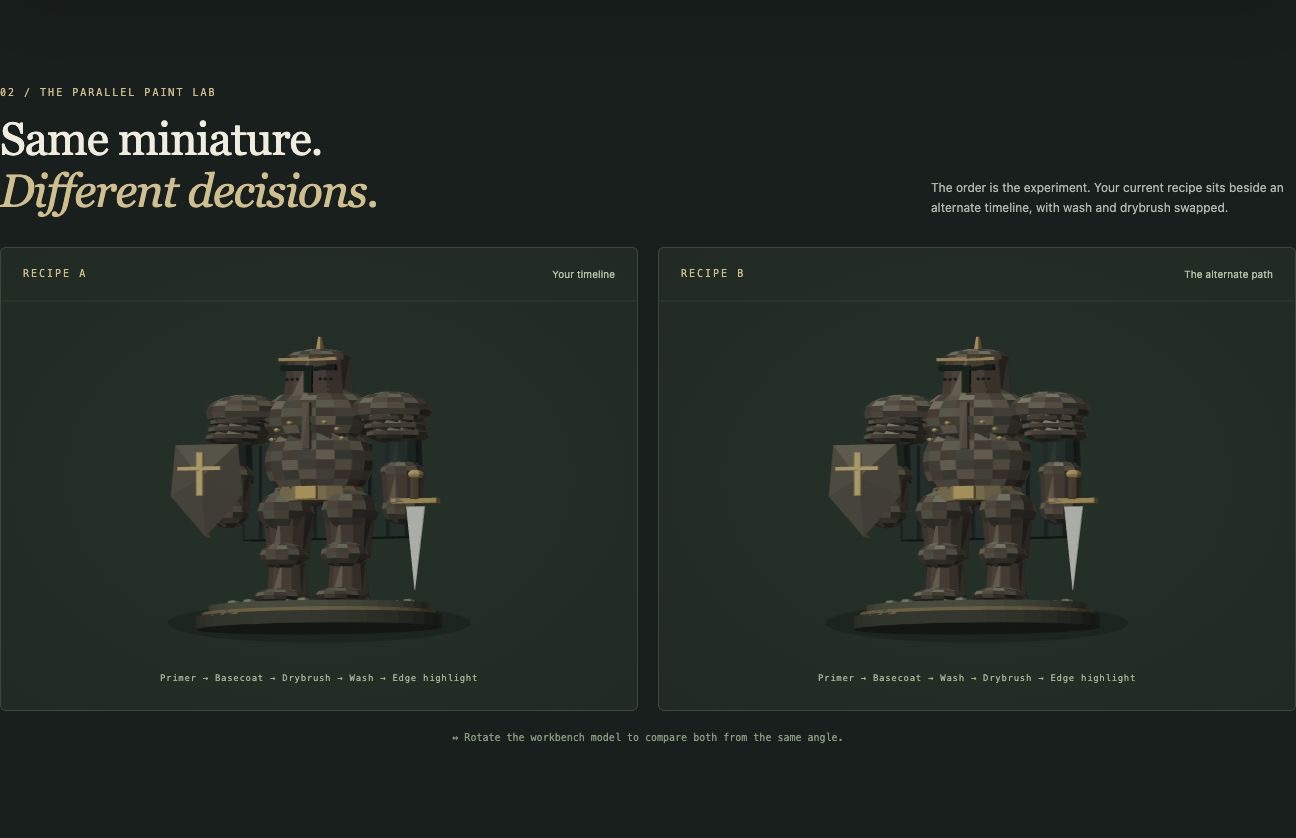
The comparison models rendered in Chrome, as shown above. Their visible appearance is useful evidence that the preview was available, but this review did not measure pixel differences, calibrated display color or physical pigment response. We therefore do not claim a measured brightness improvement or a winning recipe.
We clicked Export recipe, but no retrievable download was exposed within the eight-second observation window. That leaves the JSON artifact and re-import unverified; it does not prove the export is broken for all users. Export image and Import recipe are offered, but their file results were not tested. Local loading and fresh-link restoration are separate functions that did pass our tests.
Read the A/B painting comparison carefully
The parallel lab changes one structural choice: the order of wash and drybrush. It is not a general comparison of two independently authored miniature painting projects. Start by reading the sequence printed beneath each model. After you swap the current timeline, the roles of the two displayed sequences change.
Keep the view consistent. The source says rotating the workbench turns the comparison models to the same angle. We verified explicit rotation controls in the Korean mobile workbench, but did not instrument synchronization or measure view angles. A careful reader should compare a named edge or recess under one light setup rather than judging a whole model from different views.
Ask an observation question such as “Which order leaves this raised area visually lighter in this preview?” Write the answer as a model observation. Then test whether your own wash, brush loading and drying sequence reproduce the effect on a real spare piece. The digital result and the physical result should have separate notes.
Wash overload, visibility and reversible recovery
The overload exercise is useful because it has a defined recovery path. It moves the wash to the end and raises its strength to 100%, making an intentionally exaggerated state. Restore recipe returns the saved pre-overload experiment. This lets a beginner explore failure without treating an irreversible physical model as the first test surface.
Ordinary Undo/Redo and Restore recipe serve different purposes. We used Undo for order and visibility changes, and Restore recipe for the overload example. After any recovery, inspect order, color, intensity and visibility before continuing. A successful message is helpful, but the control values tell you what came back.
The physical recovery suggestion on the source mentions handling wet pooling and rebuilding color once dry. We did not test that process and do not present the browser restoration as proof of a real repair method. Use your paint maker’s instructions and a spare test piece when deciding how to handle actual materials.
Build a recipe worksheet before painting an army
Suppose you want to plan a small unit of twelve miniatures. First decide on one area to compare, such as a body/armor basecoat. In our recorded example the custom digital basecoat was #a95d45 at 40%, with the full timeline visible. The purpose is to preserve a repeatable screen experiment, not to prescribe a twelve-model army color scheme.
| Worksheet field | Example record | Why retain it |
|---|---|---|
| Question | Compare wash before versus after drybrush | Keeps the test about process |
| Digital input | #a95d45; basecoat40%; body-region layer | Prevents color/target assumptions drifting |
| Order A | Primer → basecoat → wash → drybrush → edge | Names the actual sequence |
| Order B | Primer → basecoat → drybrush → wash → edge | Identifies the one structural alternative |
| Evidence | Two screenshots plus the full recipe link | Makes the decision reviewable |
| Physical follow-up | One spare piece, documented materials and dry result | Separates model learning from paint validation |
For a club session, let each person describe the question before showing a preferred result. That makes it easier to notice when someone changed lighting, opacity and order at once. Keep the same vocabulary in the notes: selected layer, visible stage and surface region refer to different things.
Turn the batch clock into a realistic schedule
The Army painter’s clock multiplies miniature count by minutes per miniature and converts minutes to hours. Our 12 ×45 test returned 9.0 hours: 540 ÷60. The default visible example was20 ×30, or10.0 hours. This is arithmetic planning, not a measured estimate of your skill or a simulation of paint drying.
Use a timed sample from your own work for the minutes input if you have one. Distinguish hands-on work per miniature from elapsed calendar time. Setup, cleanup, drying, interruptions and work shared across a batch need separate decisions; the source explicitly says drying and setup are additional.
For planning only, dividing nine hands-on hours across three sessions gives three hours of counted work per session. That calculation is our worksheet example, not a tool-generated schedule or a tested painting session. Add your own extra time and do not treat overlapping drying periods as extra brush-work minutes unless your estimate is intended to include them.
Save and share a painting recipe
Save recipe is an explicit local action. In our test, Save → Reset experiment → Load saved recovered the custom basecoat; after reloading the page, Load saved recovered it again. This supports one-browser persistence in the tested session. It does not establish unlimited retention, cloud backup or automatic restoration on a different device.
Copy share link produced a URL with an encoded recipe in #recipe=…. We opened the actual copied link in a fresh tab and checked Basecoat40% and #a95d45. The payload contained specimen, region, light, foundation state and layer settings. Anyone with the complete link can inspect the included recipe, so treat the link as a shareable record rather than a private vault.
A screenshot, a link and a JSON file are different records. A screenshot shows an appearance and visible controls. A link can reconstruct settings that we tested. A JSON export is intended as a recipe file, but its downloaded contents and import were not verified here. Preserve the working link and your notes instead of assuming an uninspected file is a reliable backup.
Mobile use, privacy and model limits
At390px, the Korean page loaded without horizontal overflow. We chose Arcane Mage, selected Basecoat, adjusted intensity to30%, selected Warm desk lamp and used Rotate+. The model preview and explicit controls were available. The Korean close-up below shows the layer controls; it is not a screenshot of a real miniature or evidence of exported-image quality.
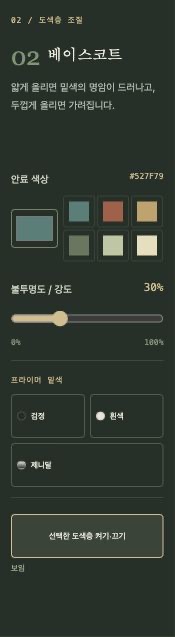
The narrow layout uses compact side controls, so a desktop screen is easier for detailed side-by-side interpretation. Try the explicit rotate/zoom buttons when a gesture is awkward. We verified the rotation button and selections; we did not test every touch gesture or browser/device combination.
The model excludes pigment chemistry, drying, dilution, brush handling, commercial color matching and real fluid dynamics. It cannot guarantee coverage on your printed or purchased miniature. The observed interface supplies three procedural specimens; we did not confirm arbitrary user-mesh upload. Recipe import should not be described as3D-model import.
The source says recipes stay in the browser unless copied or exported. Existing Google advertising was visible and sometimes covered controls; we used its close/collapse controls to continue. We did not independently audit network traffic, establish offline operation or verify that no third party processes technical data. Avoid stronger privacy claims than the evidence supports.
Related tools and alternative workflows
Use PAINT STRATA for fast process questions, a written recipe for assumptions and a spare miniature for material behavior. A flat palette helps choose candidate colors, while a real test piece answers coverage and handling questions that this educational3D model cannot. These approaches complement one another.
To share a clear comparison note, read the FrameMint Studio screenshot editor guide. It covers framing, captions and manual masks. Label the two orders and keep relevant settings visible; do not edit a comparison image in a way that looks like a different simulator result.
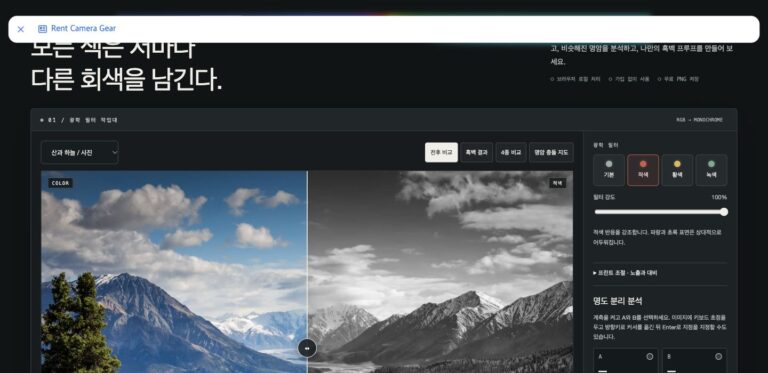
For a separate study of a photographed finished piece, the TONEPRISM monochrome guide explains how image colors map to gray and how local patch comparisons work. Its output is digital proofing, not a paint measurement. Keep photographic lighting and processing in the record, and do not compare its scores directly with PAINT STRATA controls.
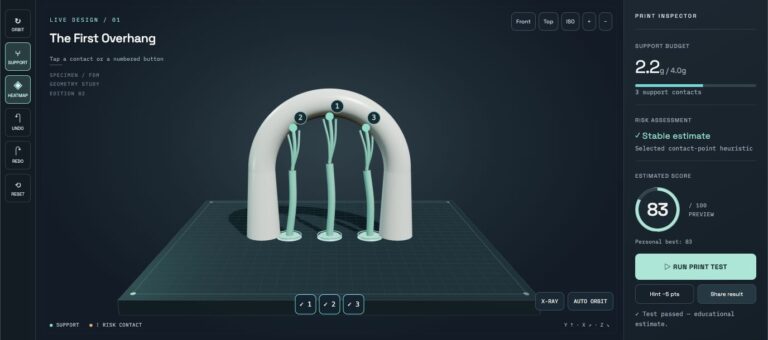
If you make your own unpainted figures by3D printing, Gravity Architect’s support-learning guide offers a separate exercise in print orientation and selected contact points. It is an educational game, not a slicer, a mesh repair service or a predictor of your actual print. Use it for that earlier process question; PAINT STRATA recipes do not transfer a user model into it.
Frequently asked questions
Is PAINT STRATA a real paint color predictor?
No. It is an educational approximation. Digital colors and opacity controls do not reproduce a brand’s pigment, dilution, finish or brush application. Use it to choose a question for a real test.
Does selecting Basecoat show only the basecoat stage?
No. Layer selection chooses what you edit; Paint history chooses the displayed stage. We edited basecoat settings while the full5/5 history remained visible. Read both controls before interpreting the preview.
Can I download and re-import a recipe?
The interface offers both controls. Our export attempt did not expose a retrievable file in the observation window, so file contents and re-import remain unverified. Local Save/Load and fresh-link restoration were separately tested and worked.
Is the batch clock a complete painting schedule?
No. It multiplies count and minutes per item. We verified12 ×45 →9.0 hours. The source excludes setup and drying; add those and your own session constraints separately.
Is there a Korean interface?
Yes. The official Korean workbench includes translated layer controls and instructions. We tested its narrow-screen basecoat, light and rotation controls at390px.
What is a useful first experiment?
Keep one specimen, one region and one light setting fixed. Compare wash/drybrush order, record both captions and save the recipe. Let that result guide one spare-piece painting test rather than an immediate change to an entire collection.
A RELEVANT NEXT STEP
Tools with a useful connection

FrameMint Studio
Screenshot Editor: 7 Smart FrameMint Studio Checks
Frame screenshots, add manual masks and build captioned stories in FrameMint Studio. Real import, order, recovery and size tests explain what to check before sharing.
TONEPRISM
Monochrome: 7 Smart Checks for Better TONEPRISM Proofs
Compare monochrome RGB responses with A/B gray patches,collision maps and exposure controls. A checked synthetic test explains local scores,1600px working size and export limits.
Gravity Architect
3D Printing Supports: 7 Essential Steps for Better Choices
Explore orientation and selected support contacts in Gravity Architect. Actual 83-point and 100-point game tests explain budgets, hints, local bests and the limits of this educational WebGL model.