Glasses symmetry checker FRAMEGHOST reflects an image around an adjustable axis and compares four manually placed points. Use it to organize photo observations, with results expressed in canvas pixels rather than physical frame measurements.
Verified 11 November 2026 (KST). We tested the sample, an uploaded screenshot of its illustration, manual coordinates and session snapshots. No real glasses, face photograph, optical fitting or physical adjustment was evaluated. Images below are actual tool captures, not before-and-after evidence of a repaired frame.
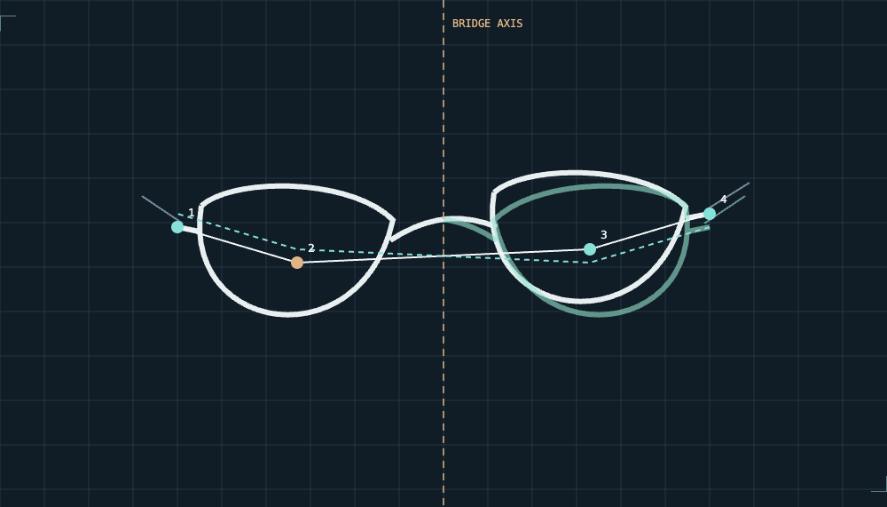
Compare reflected glasses images with manual anchors and an adjustable axis. Actual illustration-upload, coordinate and session tests explain canvas pixels, temporary records and the limits of physical conclusions.
- Brand
- FRAMEGHOST — The Optical Forensics Studio
- Tool languages
- en, ko
- Verified date
- 2026-11-11
On this page
Key takeaways
- The photo is an input for visual comparison, not an automatic diagnosis. The source explicitly says there is no automatic frame detection.
- Four anchors are required on an uploaded image. Our illustration upload showed 0/4 and dashes until we placed them manually.
- Moving one sample anchor down 1 canvas pixel changed the vertical readout to 1.0. Moving the axis from 50% to 50.1% changed the axis-distance mismatch to 2.0 pixels without changing the underlying illustration.
- The 1000 × 570 comparison canvas is the measurement basis. Its pixel differences are not millimeters, a normal range or a lens optical-center assessment.
- Two explicit snapshots could be restored and compared, but reloading cleared the timeline. The source describes a maximum of six temporary snapshots.
- PNG, Frame DNA SVG and observation-report controls are available. We did not confirm receipt or inspect the contents of an exported file.
What this glasses symmetry checker actually compares
The official site calls itself FRAMEGHOST — The Optical Forensics Studio, and its page title is “Free Glasses Symmetry Checker.” Its workbench offers ghost reflection, an adjustable center axis, photo rotation and zoom, grid and anchor controls, and four view choices. A separate observation record describes the positions you selected. A capture guide, perspective playground and small reasoning quiz explain why a picture can be misleading.
The useful problem is a question such as: “Does this same visible difference remain when I repeat a front-facing photograph?” FRAMEGHOST lets you place repeatable reference points and retain a labelled comparison during the session. It is especially useful for separating what is visible in a picture from what you have actually established about the object.
Its scope is narrower than identifying a bent frame. A photograph projects a three-dimensional object into two dimensions. The source lists camera roll, perspective, frame position and natural facial differences as possible contributors to appearance. The workbench does not resolve those causes. An asymmetric outline is an observation to investigate, rather than a verdict generated by the page.
Prepare photographs and a clear question
Begin with one explicit question and a consistent view. A frame photographed without a face answers a different visual question from a wearing-position photograph. The source separates Frame anatomy, On-face and Multi-view guidance. Keep front views with front views; a side view should not be overlaid on a front view as a deformation measurement.
For a front view, follow the source’s capture guidance: use a level camera, a centered frame, a plain contrasting background and similarly visible hinges. Keep distance, camera height and orientation consistent for a repeat. Do not press the frame into a symmetric pose to make a photograph look tidy. A changed setup can create a changed outline before any fitting question is considered.
Keep the untouched originals and identify any working copies. The upload control advertises JPEG, PNG and WebP with a 15 MB limit; we tested a small JPEG illustration capture, not every format or the size boundary. Resizing or lossy recompression can change edge appearance, so record it if you prepare a smaller copy. Do not assume that a convenient web image is the original capture.
7 smart checks for better photo observations
1. Learn the controls on an illustration
Start with Try sample and compare the three sample cases: height mismatch, balanced illustration and perspective illustration. They are labelled illustrations, not physical diagnoses. The initial height-mismatch sample displayed 15.0 canvas pixels vertically and 0.0 axis-distance mismatch. A sample is a way to learn the readouts before applying the same interface to a photograph.
2. Upload a supported working image
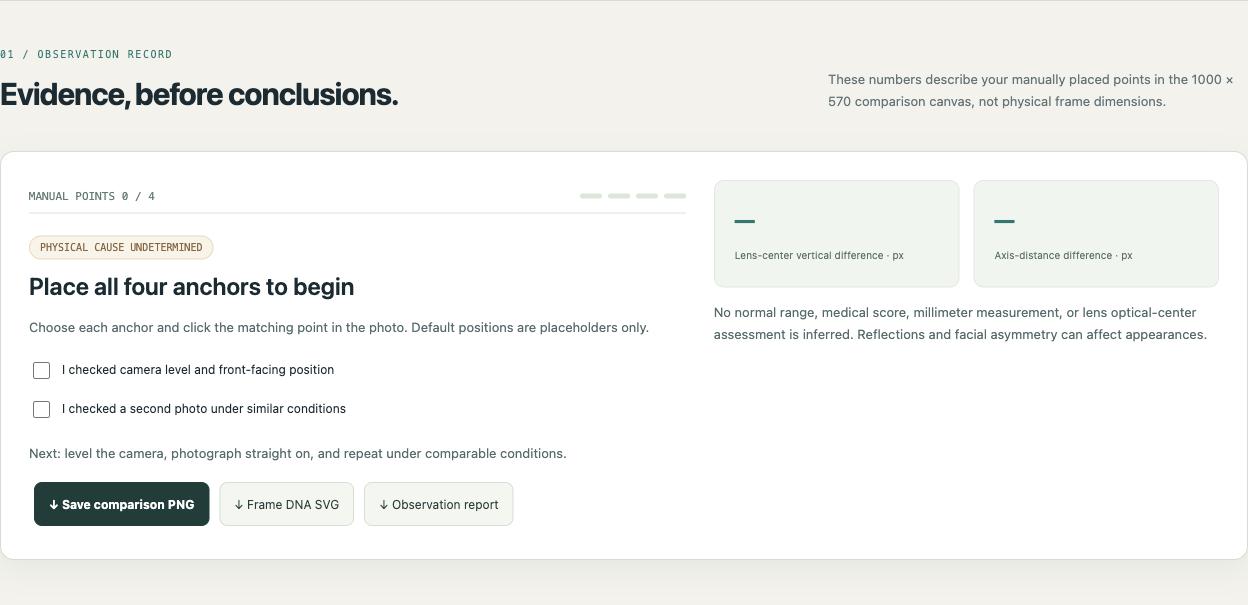
Choose Upload photo and select the file locally. Our 887 × 507 screenshot of the source illustration loaded as LOCAL PHOTO, but it remained a synthetic test image. The report changed to 0/4 manual points with dashes. This verifies the import path and manual-anchor requirement without claiming that the tool examined real glasses or detected their edges.
3. Establish the view and reflection axis
Use Fit, rotation, zoom, the axis control and the reflect-direction selector to prepare a consistent view. The page offers Move photo and Move axis modes. We directly tested the numeric axis slider; dragging and every transform combination were not independently validated. Choose a bridge-centered reference appropriate to the image and note the axis value rather than adjusting it solely to force a smaller mismatch.
4. Place all four anchors deliberately
Select outer hinge, left lens center, right lens center and the other outer hinge as labelled by the interface. You can click the image or enter X/Y coordinates, then use arrow buttons for 1-canvas-pixel edits. Confirm the selected anchor and the placed count after each edit. The labels describe your chosen reference points; they do not establish professionally measured optical centers.
5. Read the record as a statement about those points
The record reports lens-center vertical difference and axis-distance difference in pixels. Check the direction as well as the magnitude. Dashes after an upload are not a perfect-symmetry score. We kept the camera-level and second-photo checkboxes unchecked because our illustration test did not perform those real capture checks. A checklist should record work actually done, not act as a completion button.
6. Repeat a comparable capture before interpreting a cause
The source recommends checking camera level and a second photograph under similar conditions. Keep that step separate from editing an anchor. If a small coordinate or axis change moves the number, you have learned about the comparison’s sensitivity. You have not established a new physical bend in the frame. Preserve the initial observation so a later change can be explained.
7. Save explicitly and verify any durable output
Add a note describing view, capture conditions and what was or was not checked. Save a session snapshot before changing the comparison. Restore and Compare act on the temporary timeline. To keep a record after reload, use an appropriate download control and verify a real file first. Our observation-report export attempt did not establish file receipt or a complete project backup.
Our actual FRAMEGHOST tests
All test geometry came from the source illustration or deliberately entered coordinates. We did not photograph a person or a physical frame. The results below show actual interface responses and a few arithmetic consistency checks. They do not validate physical measurement accuracy, identify a cause of uneven fit or establish optical suitability.
| Test | Observed result | What it establishes |
|---|---|---|
| Balanced sample; anchor 2 moved down 1 pixel | Vertical 1.0; axis-distance 0.0 | The readout responds to a manual point edit. |
| Undo the anchor edit | Vertical 0.0; axis-distance 0.0 | The prior balanced point state returned. |
| Axis 50% →50.1%, same balanced points | Vertical 0.0; axis-distance 2.0 | A reference-axis edit changes the mismatch without changing the illustration. |
| Upload illustration capture | 0/4 points; both results— | Import does not automatically place the required anchors. |
| Enter(200,255),(335,295),(665,280),(800,255) | Vertical 15.0; axis-distance 0.0 | Four explicit canvas positions produced the displayed observation. |
| Move anchor 3 down 1, then restore the first snapshot | 14.0, then 15.0 vertical pixels | The saved state could be restored within the session. |
| Reload after two saved snapshots | Timeline empty | The session was not a durable archive. |
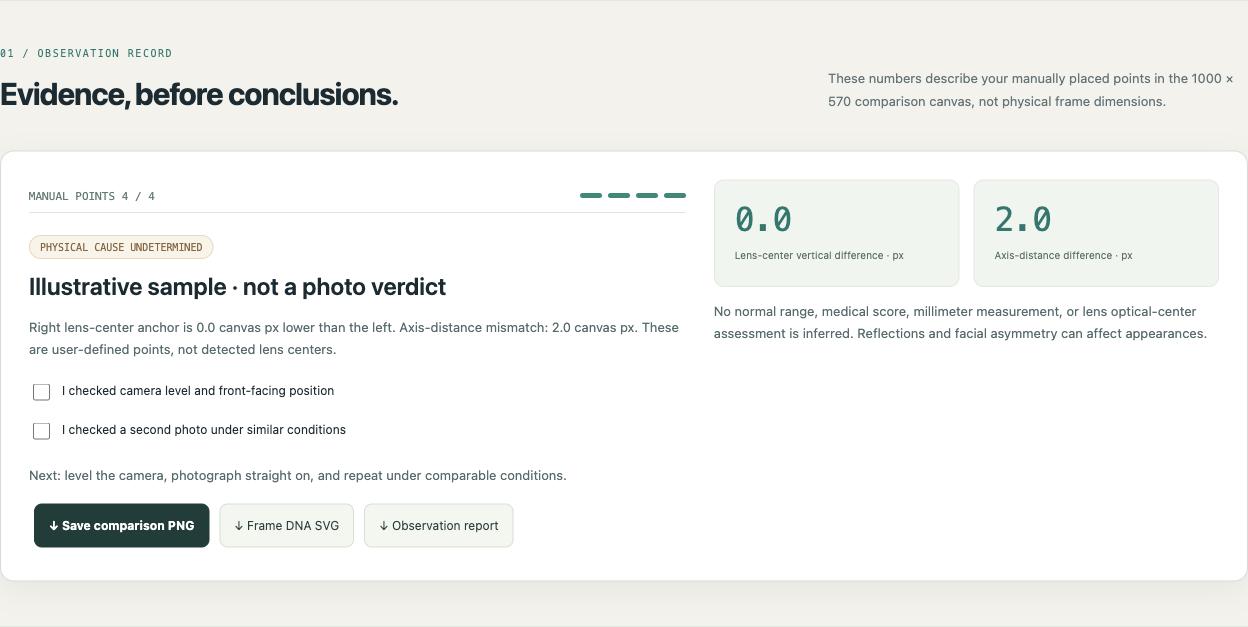
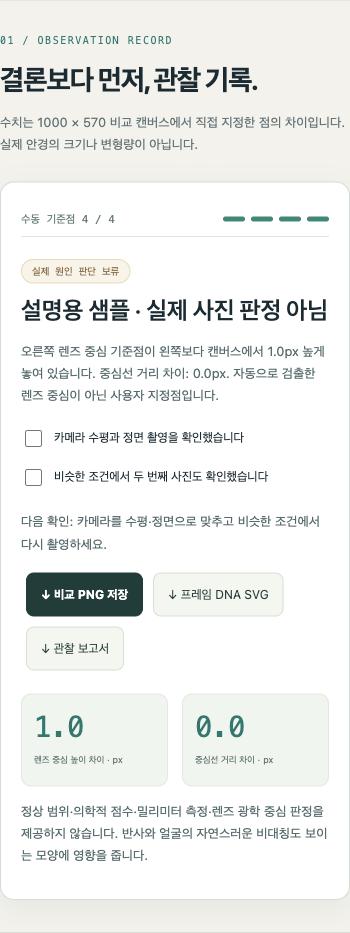
We also selected Pixel difference, enabled a saved-snapshot comparison overlay and received the quiz explanation after choosing More evidence is needed. In Korean, a freshly loaded 390 × 844 viewport accepted the balanced sample, anchor 2 downward move and Split comparison selection. The report showed 1.0 vertical and 0.0 axis-distance pixels with no horizontal page overflow.
We did not test a physical touchscreen, every transform interaction, six-snapshot capacity or the numerical correctness of every image-comparison algorithm. The export controls were observed, but a downloaded PNG, SVG or report was not inspected. This boundary is important because the on-screen report, an image export and an editable session are different artifacts.
Why a small edit changes the numbers
The most revealing test did not involve a photograph at all. In a balanced illustration, moving one lens-center anchor down 1 pixel changed the vertical difference from 0.0 to 1.0. The illustrated frame was unchanged. The measured difference arose from the manual point definition, so the apparent precision of a decimal readout should not be confused with certainty about a real object.
The axis test provides another check. On the 1000-pixel-wide canvas,0.1% of width is 1 pixel. For the symmetric x positions 335 and 665 around x 500, moving the axis to 501 makes the two distances 166 and 164 pixels. Their difference is 2 pixels, consistent with the displayed 2.0. This explains the tested case; it is not an independent audit of every branch of the implementation.
Similarly, our entered lens-center y values 295 and 280 differ by 15 pixels. The report described the right point as higher. That matches the chosen screen coordinates. The imported file was 887 × 507, while the observation record explicitly used a 1000 × 570 canvas. Do not silently describe those results as native-photo pixels, a real-world length or a calibrated millimeter difference.
For repeat work, record the image, anchor choices, axis, view and transform settings together. After moving or rotating a photo, recheck that the markers still represent the intended structural points. We did not establish that every transform preserves a physically meaningful correspondence. An honest note about uncertainty is more useful than adjusting controls until the display says zero.
Choose a comparison view without overreading it
| View | Useful question | Interpretation limit |
|---|---|---|
| Ghost overlay | Where do original and reflected outlines appear to diverge? | A doubled edge can also come from setup, lighting or point placement. |
| Pixel difference | Which color values differ between original and reflection? | The source says background, skin, glare and lighting also contribute; this is not a defect map. |
| Split comparison | Can I inspect the two presentations separately? | A split view does not calibrate camera perspective or establish a physical cause. |
| Anchors only | What geometry did I explicitly mark? | A sparse diagram reflects manual choices, not automatic detection. |
Use the view that answers your current question, rather than treating the most dramatic contrast as the strongest evidence. A bright region in a difference display may be a reflection or background change. For transparent or rimless frames, the source recommends a contrasting background and repeatable structural points instead of bright lens reflections.
The perspective playground is explicitly conceptual. It illustrates how one side can appear narrower without setting physical damage in the diagram. We selected the reasoning quiz’s More evidence is needed option and received an explanation about perspective, frame shape and positioning. Neither that exercise nor the camera-angle illustration calibrates the camera used for a real photograph.
Keep observations beyond the current tab
The timeline keeps explicit saves, with up to six snapshots described by the source. We saved two notes, changed an anchor, restored the first state and switched its comparison overlay on. Reloading removed both entries. This is useful for a focused working session, but it is not automatic cloud storage or a promise that returning to the URL will restore a prior photograph.
A useful note identifies whether the image is front, side or wearing view; whether it is an original or resized copy; the axis and reference choices; and what capture checks were actually completed. “Illustration upload test; no real glasses” was our first saved note. The second marked a deliberate 1-pixel edit, so it could not be mistaken for a before-and-after fitting result.
The source distinguishes output purposes. Save comparison PNG is intended for the visual comparison. Frame DNA is described in the FAQ as an SVG of four manual anchors and a reflected guide without the source photograph. Observation report is another download control. We did not inspect exported bytes, so the source’s no-photo SVG description should not be presented as our own file-content audit.
Before relying on an output, confirm that the file exists, opens and contains the intended view and labels. Preserve the untouched capture separately. A comparison image may contain a face or background when a real photograph is used, as the source warns. A diagram or report does not establish that an editable session can be reconstructed; we did not verify a full project round trip.
Limitations, privacy and mobile use
FRAMEGHOST does not infer a normal range, medical score, millimeter measurement, prescription accuracy or lens optical centers. It does not detect frame edges automatically. The source provides no instructions for bending a frame and directs persistent fitting concerns, discomfort or damaged parts to an in-person optician assessment. Use the observation to describe what you saw, not as a substitute for that assessment.
Its FAQ says selected photographs are read locally rather than sent to an analysis server, and session snapshots remain in memory. Our import and reload tests establish the visible local workflow and temporary-record behavior; they are not a complete network or storage audit. Blogger and Google advertising have independent cookies and requests, and advertising was present during the visit. “Local photo processing” should not be expanded into “the entire page has no third-party processing.” See Google’s privacy policy for that service context.
The Korean narrow-browser test showed translated controls and an observation card that fit 390 pixels. The manual point and view selector responded. This does not certify a physical phone, keyboard-only use, screen readers or every browser. Use the numerical inputs and 1-pixel arrows when a small-screen pointer placement is difficult, then verify the selected point and readout again.
Related tools for preparation and presentation
- For a smaller working copy, compare WebP Studio’s English interface with WebP 공방’s Korean interface. Both guides cover conversion and resizing. Choose one preparation path, retain the original and do not assume compression or resizing preserves the same visual evidence.
- For a captioned explanation after the comparison, read the FrameMint Studio screenshot editor guide. It offers manual annotations and masks. Review the actual final image before sharing; adding a mask is not a verified privacy guarantee or a replacement for preserving the original observation.
Frequently asked questions
Can this glasses symmetry checker prove a frame is bent?
No. It compares a two-dimensional image and manual reference points. The source explicitly leaves physical cause undetermined. A mismatch can motivate a better capture or in-person inspection without identifying the cause by itself.
Why are there coordinates but still 0/4 anchors?
After our upload, coordinate boxes contained placeholders while the report still required four points. Confirm each anchor is placed. Numeric results appeared only after we explicitly entered all four positions.
Does 15 pixels mean 15 millimeters?
No. Our 15-pixel test came from chosen canvas y values 295 and 280. The record uses the 1000 × 570 comparison canvas and supplies no millimeter calibration. It also does not determine lens optical centers.
Is Pixel difference an automatic defect detector?
No. The FAQ describes color-value comparison between original and reflected images. Lighting, glare, background and skin can also create differences. We selected the mode but did not validate every pixel calculation.
Will a saved snapshot survive a reload?
Our two saved timeline entries disappeared after reload, consistent with the temporary-session description. Download and verify a suitable record before closing or reloading. The URL is not a durable session archive.
Did you test an actual person’s glasses?
No. The test used the provided illustration and a screenshot of it as an upload fixture. Every measurement in this review is a manual-coordinate interface result, not a physical fitting or clinical finding.
Start with an illustration, then a careful photograph
Start with the balanced illustration, move one anchor and shift the axis slightly. Once the readouts make sense, use a carefully prepared photograph and document your choices. Keep the visible difference, the capture conditions and any physical conclusion as separate questions.
A RELEVANT NEXT STEP
Tools with a useful connection
WebP Studio
WebP Studio: 7 Essential Checks for Better Batch Images
Use WebP Studio’s English interface to compare image quality, keep dimensions or resize a batch. Actual tests reveal smaller JPGs, larger outputs and a rounded zero-saving total.
WebP 공방
WebP Converter: 7 Essential Checks for Better Images
Convert and resize images in WebP 공방’s Korean interface. Actual PNG,JPEG and SVG tests explain quality choices, file growth, batch results and download limits.

FrameMint Studio
Screenshot Editor: 7 Smart FrameMint Studio Checks
Frame screenshots, add manual masks and build captioned stories in FrameMint Studio. Real import, order, recovery and size tests explain what to check before sharing.