Gift reaction game Gift Opening Theater turns an awkward present into a short puppet performance. Choose an audience, adjust three expression sliders and deliver a line. Start in rehearsal to learn the acts before trying the ten-second mode.
Tested 11 November 2026 (KST). We completed an English rehearsal with a 91-point total and a Korean mobile rehearsal with 99, tested the timed curtain-call transition and inspected a generated 1080 × 1080 PNG ticket. These are comic game results, not measurements of a person’s gratitude or social ability. Screenshots are actual game captures.
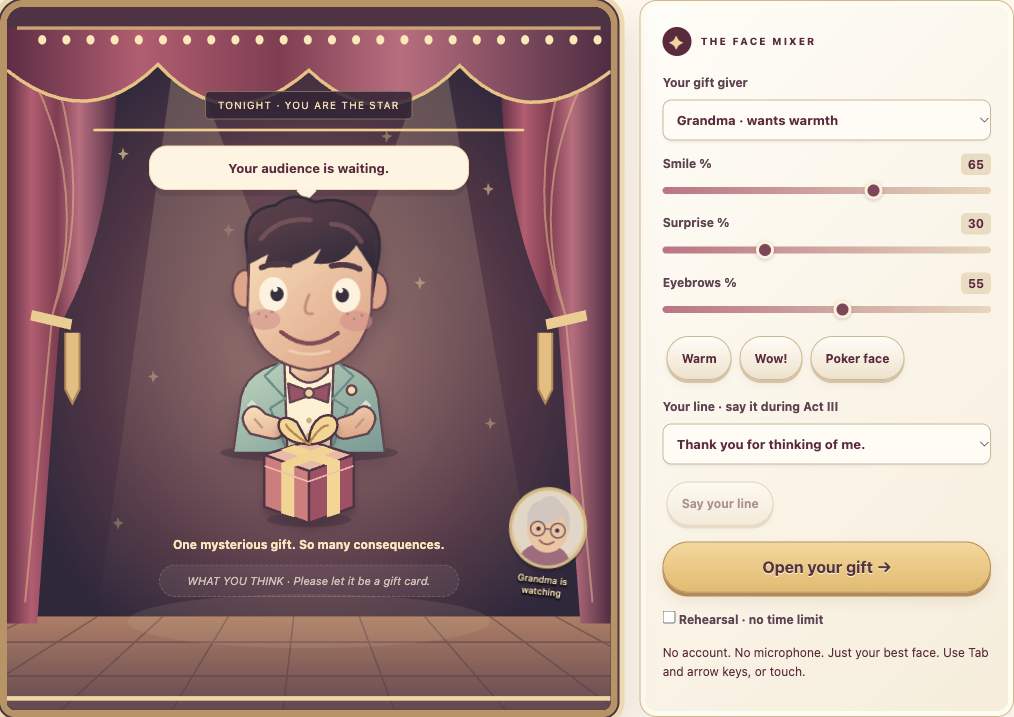
Play a manual puppet gift-reaction comedy in timed or rehearsal mode. Actual 91/99-point rehearsals, the final-reply wait and an inspected PNG ticket explain timing, output differences and limits.
- Brand
- Gift Opening Theater
- Tool languages
- en, ko
- Verified date
- 2026-11-11
On this page
Key takeaways
- The face belongs to an illustrated puppet. Sliders and presets control it; no camera, microphone or account was required in our tests.
- Rehearsal advances with a Next act button. The timed version progresses automatically but waited for our final reply after its ten seconds.
- Selecting a line and saying it are different actions. In our first rehearsal we said it in Act I, then could not say it again in Act III.
- Our two completed rehearsals showed the same social-grace and sincerity subscores, 100 and 95, but different totals. They used different gifts and timing, so they are not a controlled language comparison.
- The inspected PNG preserved the grade, gift, chosen line and two subscores. It omitted the overall total shown on the result screen.
- The source advertises twelve gifts and six comic endings. We did not exhaust either collection or verify sharing delivery.
What this gift reaction game actually does
The official game name is Gift Opening Theater. Its Blogger site title adds “The Art of Looking Grateful.” The playable English page presents an illustrated theater, a manual face mixer, three audience choices, three dialogue choices, a follow-up reply and a performance certificate. A Korean page localizes the interface and dialogue. The root address initially showed an empty Blogger shell before navigating to the playable English page; the launch button above uses that direct page.
The game’s central problem is deliberately comic: the gift is not what the character hoped for, but someone is watching the response. It lets you experiment with a warm expression, excessive surprise or a blank face without recording yourself. A short play session can be an amusing conversation starter or a way to compare fictional dialogue choices. It is not a gift-shopping recommender, a personalized message writer or a facial-expression detector.
The useful distinction is between acting inside the game and responding to a real person. The source includes a courtesy guide, but a numerical grade does not establish a universal rule for families, workplaces or friendships. Enjoy the exaggerated premise, then describe any real preference in your own words. The test results below tell you how the interface behaved, not how another person would react to you.
Choose a comfortable first session
Choose English or Korean before starting a performance. The audience selector offers Grandma, The Boss and Best Friend, each with a different expectation described in the cast notes. You can choose the setting you find funny without providing a real person’s identity. No text entry containing personal details is needed to play, and the illustrated character does not require a photograph.
For a first session, select the no-time-limit rehearsal checkbox before opening the gift. The audience selector and mode checkbox became unavailable during our active performances. Planning those choices first avoids trying to change the audience halfway through a scene. Keep a small note of the audience, mode and expression settings if you want to compare later attempts rather than relying on memory.
The control page supports a keyboard route as well as pointing or touch. We changed the smile slider one step with an arrow key in the Korean test and moved it back before the performance. That verifies one adjustment, not full keyboard or screen-reader accessibility. If a short timed game makes the controls hard to learn, rehearsal gives you time to read each stage and locate the action buttons.
7 smart checks for your first performance
1. Pick the audience and rehearsal mode
Use Your gift giver to choose the fictional observer, then enable Rehearsal for manual advancement. Our first completed run used Grandma. The game’s cast descriptions associate that audience with warmth, the boss with composure and the friend with honesty. Those are game character descriptions; they do not tell you how every real grandmother, manager or friend wants to be treated.
2. Set a visible expression before opening
The three sliders control smile, surprise and eyebrows on a 0–100 scale. Warm, Wow and Poker face are shortcuts. Warm produced 65/30/55 in our tests; Poker face produced 20/10/20. The initial page values were 55/40/50. Read the displayed numbers after a preset rather than assuming the button only changes one feature. These values describe the puppet controls, not your real face.
3. Open the gift and read the act label
Open your gift begins Act I and reveals a peculiar item. Our English rehearsal revealed a luxury potato; the Korean run revealed a pet rock. The source says twelve gift types exist, but we did not inspect all of them. In rehearsal the main button changes to Next act, giving you control over when the scene moves forward. Read the current act instead of guessing from the drawing alone.
4. Save the spoken line for the intended act
Choose a dialogue option in the line menu, then use Say your line when you mean to deliver it. The source recommends Act III, described as seconds four through seven in timed play. We intentionally tried the default line during Act I in the first rehearsal. The sentence appeared in the speech bubble, and the Say button was disabled afterward, including when we reached Act III. Selecting a sentence alone does not deliver it; saying it early is not a reversible preview.
5. Resolve the follow-up instead of advancing past it
Act IV adds an unexpected comment and three possible replies below the stage. In rehearsal, pressing Next act before choosing one produced a message directing us to select a final reply. We then chose the curious, story-oriented answer and the report appeared. In the timed test, automatic progression also stopped at a curtain-call state waiting for that choice. Time expiring did not make the final decision for us.
6. Read the result screen as game feedback
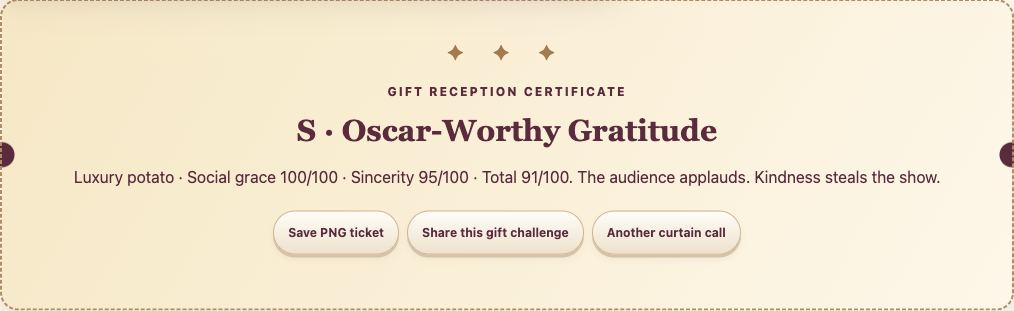
The report presents a letter grade and ending title, a gift name, two named subscores and an overall total. Our first rehearsal ended with an S grade and 91/100 overall; the Korean rehearsal ended with S and 99/100. Do not substitute those totals for Rank Math SEO scores or an editorial rating: they are unrelated game values. Keep the performance settings beside a result if you intend to discuss what you tried.
7. Check the ticket before keeping or sharing it
Use Save PNG ticket after a completed run. A generated PNG download link appeared in both tested languages. We inspected the Korean link’s encoded PNG as a local image; it was 1080 × 1080 pixels. The normal browser download-completion flow was not confirmed. Compare the ticket with the on-screen report before assuming it preserves every field, and review the content before using a share control.
Our actual English and Korean tests
| Test | Actual observation | What it establishes |
|---|---|---|
| English rehearsal: Grandma, Warm | 65/30/55; luxury potato; early line; S,100/95,91 total | A complete manual-act performance and report |
| Say a line in Act I | Speech appeared; Say disabled afterward | The tested early delivery could not be repeated in Act III |
| Next act without a final reply | Prompt to choose the reply below the stage | Rehearsal waits for that interaction |
| Timed: friend, Poker face | 20/10/20; glowing hat; no line; curtain call waited for reply | Timed progression and final-choice boundary; total not recorded |
| Reload English page | Default audience/settings returned; result absent | The tested result was not restored as a saved session |
| Korean at 390 px: Grandma, Warm | Pet rock; line in Act III; story reply; S,100/95,99 total | Localized controls and a completed narrow-screen run |
| Generated Korean PNG | 1080×1080; grade, gift, line,100/95; no overall 99 | Actual output differs from the full result report |
The two rehearsal scores are deliberately reported separately. Language, gift and line timing differed between the runs. We did not change just one variable, inspect the scoring implementation or repeat enough trials to establish a general score rule. The eight-point difference therefore cannot be attributed solely to timing or to translation. A game guide should preserve that distinction rather than turn two examples into an optimization claim.
For the timed test we used Best Friend with Poker face and left the dialogue unsaid. The game reached a curtain-call state for a glowing hat and waited for a final reply. We activated a reply, but did not record a settled final score before reloading, so no numeric timed result is claimed here. The source’s ten-second description and the observed waiting state refer to different parts of the interaction.
Understand acts, timing and the final reply
| Stage | What to notice | Common mix-up |
|---|---|---|
| Act I: reveal | Gift and audience context | Treating the first enabled Say button as the recommended timing |
| Act II: recovery | Expression controls remain available | Looking only at the scene and missing the act label |
| Act III: line | Select the sentence and activate Say | Assuming a selected sentence was already spoken |
| Act IV: follow-up | Choose a reply below the stage | Trying to complete the scene with Next act alone |
| Curtain call | Final reply may still be pending | Assuming the timer creates a report without a decision |
The stage label is a better navigation cue than the puppet’s expression. You can move the sliders while the character continues to look like the same illustrated person. A preset changes the control values; it does not certify that the act has advanced or that a line has been delivered. Keeping those three kinds of action separate makes the first rehearsal much easier to follow.
Timing should also stay inside the game’s context. The source’s seconds-four-to-seven instruction is a play mechanic, not a required response window for an actual gift exchange. A pause while reading a note or considering a practical concern is not a real-life game failure. The source itself frames the social pressure as comedy. Use that framing when sharing the result with someone else.
Read comic scores without overinterpreting them
Both completed reports showed social grace 100 and sincerity 95, yet the overall totals were 91 and 99. The simple average of 100 and 95 is 97.5, so the visible total should not be reconstructed as that average. We have not audited how the total is calculated. The safest description is to name the displayed fields exactly and avoid inventing weights, thresholds or psychological meaning for them.
Likewise, an S grade in a game about a luxury potato is a comic ending, not an actual award or proof of a person’s empathy. The source advertises six endings, but only the completed ending shown here was verified. We did not test all audiences through all dialogue paths or establish a universally best preset. A high result can be fun without being a measure you should apply to another person.
What the generated PNG ticket contains
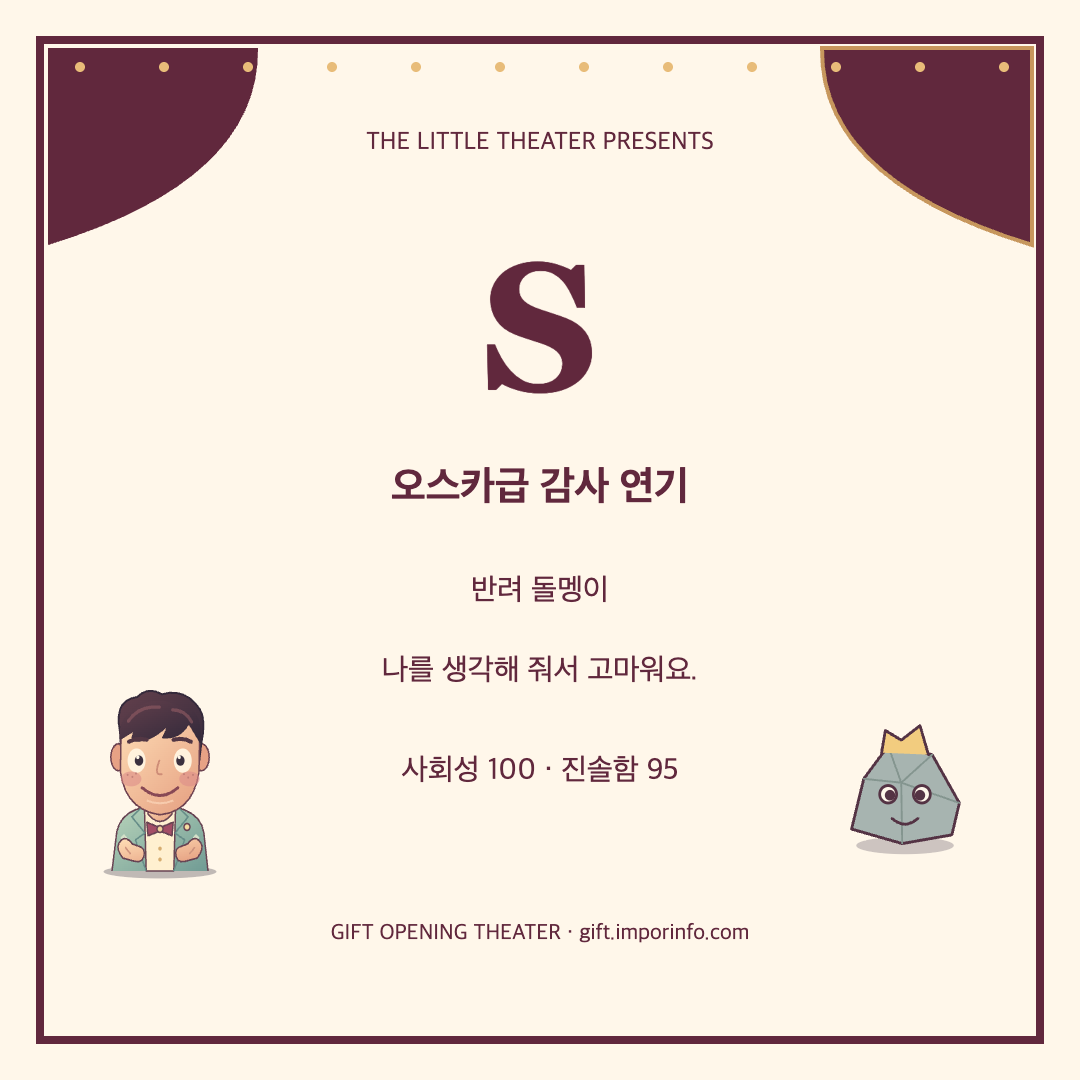
The inspected ticket included an S grade, the localized ending title, the pet-rock gift, the chosen sentence and the social/sincerity values 100 and 95. The overall 99/100 total visible on the report was absent from this image. That makes the ticket a compact souvenir rather than a complete copy of every result field. Save a separate note or screenshot if the total matters to your comparison.
The PNG was 104,398 bytes in our inspection. That is one output, not a guaranteed file size for every language or ending. We decoded the data from the visible download link and inspected the resulting image; we did not confirm an operating-system download notification or test every device’s save behavior. A generated link, an inspected image and a browser-saved file are related but distinct observations.
The game offers a challenge-sharing button as well as Blogger’s own Share controls. We did not activate external sharing or verify delivery to another person. Do not confuse a share label with proof that it carries the same gift, every score or a playable saved session. Review the destination and any generated text before sending something yourself. The published guide does not claim that a message was sent during the test.
A useful way to compare performances
A sensible comparison plan starts with rehearsal. Keep the audience and mode fixed, record the gift and sliders, note the act in which the line was said, and write down the final reply plus the displayed result. Then change one choice deliberately. If the gift changes too, acknowledge that extra difference. This is a proposed play protocol, not an experiment we already completed or a claim that it exposes the hidden scoring formula.
For example, you might compare a small, honest acknowledgement with an exaggerated promise while keeping the other visible settings as similar as possible. The purpose is to notice how choices fit the story. It is not to determine the “correct” response for a real relative or colleague. A group can discuss why a line sounds considerate without ranking the people playing by their fictional scores.
| Alternative | Useful when | What it does not provide |
|---|---|---|
| Static courtesy guide | You want ideas without game controls | A staged performance or result ticket |
| Ordinary role-play with a willing partner | You want an actual conversation and feedback | The game’s repeatable puppet controls |
| Gift Opening Theater | You want a short comic scene and visible choices | Face analysis, personalized coaching or a validated social score |
Privacy, reload and mobile limits
The source FAQ says the puppet is entirely controlled by sliders and buttons, and that the game itself uploads no faces, audio or results. No camera, microphone or account prompt appeared in our tests. Blogger and advertising services are explicitly covered by separate policies, and advertisements appeared during the visit. Local gameplay is not a claim that the entire webpage makes no external requests. We did not audit all network traffic, storage behavior or browser extensions.
After reloading the English page, the audience returned to Grandma, sliders to 55/40/50, rehearsal was unchecked and the previous result was absent. That verifies the observed reset, not a promise that every browser behaves identically or that there is no storage anywhere on the site. We did not find and test an account archive, leaderboard or cross-device session recovery. Keep the result you want before navigating away.

The Korean page worked at a fresh 390 ×844 viewport: audience selection, rehearsal, slider arrow-key adjustment, manual acts, Act III dialogue and the final reply all responded, with document width matching 390 pixels. This is a narrow-browser check, not a test on a physical phone or a full accessibility audit. On a small screen the next action may be below the stage, so scroll to find the face mixer and follow-up replies before treating the game as unresponsive.
Replay is different from reload
We also clicked the Korean result’s replay button. It immediately began Act I with an onion-scented candle, retaining Grandma, Warm 65/30/55 and rehearsal while replacing the previous result. It did not stop at a fresh setup screen or preserve the same gift. By contrast, reloading the English page restored the defaults. This is one tested replay route, not a guarantee of persistent performance history. Record the result before starting again, and check whether audience and mode controls are available before trying to change them.
Related tools for another kind of awkward moment
- For another dialogue-based comedy, Awkward Goodbye explores the uncomfortable moment after saying goodbye while still walking together. It changes the situation and controls rather than extending this performance.
- For a camera-free attention game, Accidental Eye Contact turns a subway glance into a different fictional challenge. Its reports are also game feedback, not an evaluation of a player.
- If you want to explain a ticket or result, FrameMint Studio can add manual captions to a screenshot. Keep an original copy so an annotated image is not mistaken for an untouched game output.
Frequently asked questions
Is this gift reaction game a camera filter?
No. You control an illustrated puppet manually. The source says no camera or microphone is used, and neither was requested in our tested route. It does not read your expression or listen to a spoken thank-you.
Can I play without the ten-second pressure?
Yes. Choose rehearsal before starting. Our completed rehearsals advanced through Next act buttons and waited for the final reply. The mode checkbox was unavailable during an active scene, so choose first.
Why can I not say the line again in Act III?
In our early-delivery test, saying it in Act I disabled the action afterward. Use a new performance if you want to try the recommended act. Do not assume the line menu changes undo an already delivered sentence.
Why is the report not appearing after the timer?
Our timed run waited at curtain call for a final reply below the stage. Check that interaction before assuming it failed. We did not verify every possible interruption or browser state.
Does the PNG include the overall score?
The inspected Korean ticket did not. It contained the grade, gift, line and two subscores, while 99/100 remained on the result screen. Verify your own output rather than assuming the ticket duplicates the whole report.
Will the same choices always produce 99?
We did not establish that. The two complete runs had different gifts, language and timing, and the scoring implementation was not audited. The documented 99 is a single observed result, not a guaranteed walkthrough reward.
Start with rehearsal and a modest goal
Choose rehearsal, read the act label and give yourself time to find the next action. Try one expression and one line, resolve the follow-up and inspect the souvenir. The most useful first goal is understanding the performance, with the comic grade treated as part of the story.
A RELEVANT NEXT STEP
Tools with a useful connection
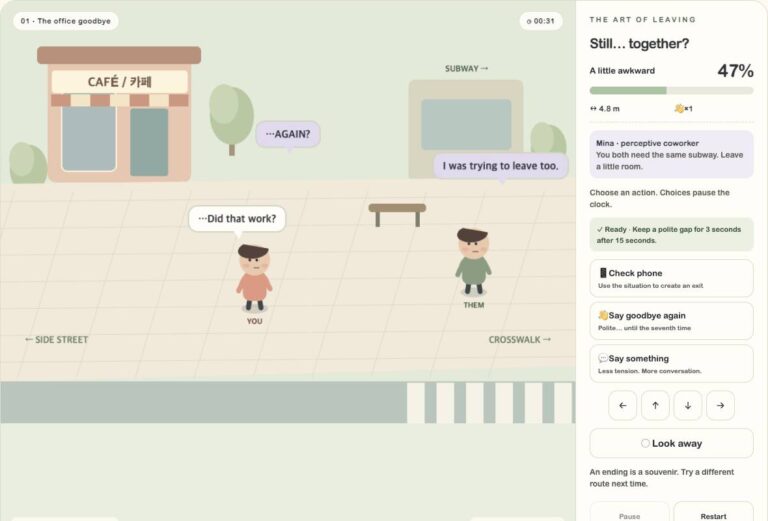
Awkward Goodbye
Awkward Goodbye: 7 Essential Exit Checks
Play Awkward Goodbye with routes, context actions and paused dialogue choices. Our completed 32-second office escape explains peak awkwardness, stage stamps, ending collection, the POV mirror and export limits.

Accidental Eye Contact — LOOK AWAY.
Accidental Eye Contact: 7 Useful Checks for a Better Commute
Play a camera-free subway eye-contact game with four modes, named gaze controls and humorous commuter reports. Tested controls, sharing limits and mobile layout.

FrameMint Studio
Screenshot Editor: 7 Smart FrameMint Studio Checks
Frame screenshots, add manual masks and build captioned stories in FrameMint Studio. Real import, order, recovery and size tests explain what to check before sharing.