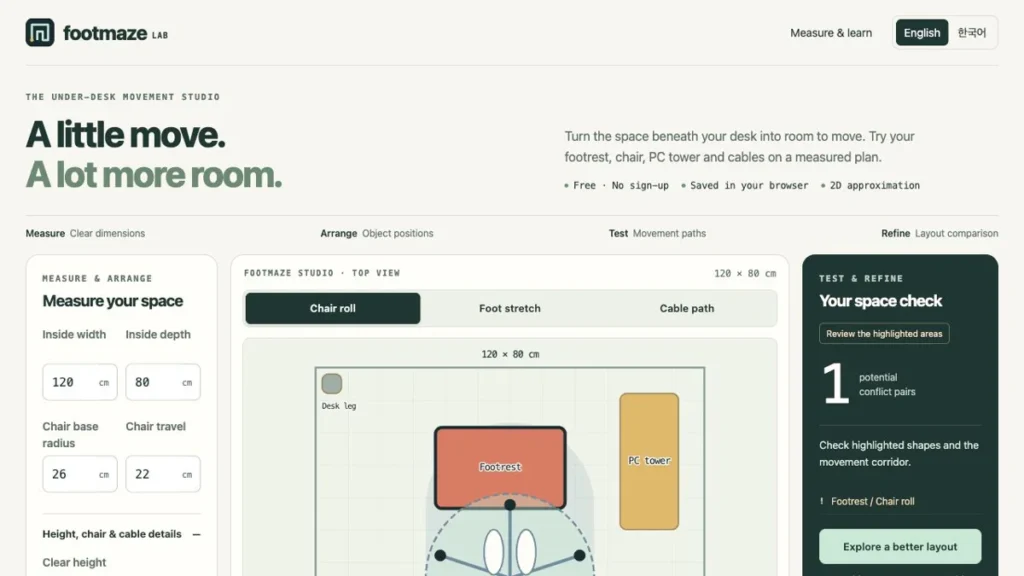
Plan a footrest layout with FootMaze Lab. Actual chair, stretch, cable and PNG tests explain movement conflicts, one-object proposals and why zero is not ergonomic approval.
- Brand
- FootMaze Lab
- Tool languages
- English, 한국어
- Verified date
- 2026-11-19
A useful footrest layout leaves room for movement as well as storage. FootMaze Lab places a footrest, PC tower and desk legs on a measured under-desk plan, then checks simplified chair-roll, foot-stretch and floor-cable shapes. Use it to find a layout worth checking at your actual desk. The overlap count is a model result, not a safety or ergonomic certificate.
Verified 19 November 2026, KST. We tested object movement, adding/removing a test footrest, parked versus moving chair conditions, three test modes, automatic proposals, a height-reference change, restore and a downloaded PNG. Korean measurement controls were operated at 390×844. These were digital examples, not a physical comfort or caster test. A completed PDF, a new local-save/load cycle, offline use and a network/security audit were not verified.
On this page
Footrest layout takeaways
In the 120×80 cm example, Chair roll reported one Footrest / Chair roll conflict. Explore a better layout moved and quarter-turned only the footrest, reducing the count to zero. Switching that improved arrangement to Cable path still showed three conflict pairs. A result must stay attached to the movement test that produced it.
With the original furniture positions and chair centre Y 75 cm, zero chair travel gave zero overlaps;22 cm travel gave one. This is the practical reason to test getting in and out rather than only looking at a parked chair. We also found that the automatic explorer could move a modeled desk leg. A lower count is not an instruction to relocate a fixed structural part.
What FootMaze Lab does
The official name is FootMaze Lab, branded footmaze LAB / The Under-Desk Movement Studio. The English root links to dedicated English and Korean pages. It is free and requires no signup. The workflow is Measure → Arrange → Test → Refine, with a top-view drawing, object editor, result list and baseline/current comparison.
Inputs include clear inside width and depth, chair-base radius and travel distance. Expand Height, chair & cable details for a clear-height reference, chair centre X/Y and cable start/end X/Y. The object library adds Footrest, PC tower and Desk leg rectangles. A selected object has width, depth, rotation,1 cm movement buttons and Remove object. Named controls and arrow keys offer alternatives to dragging.
Chair roll sweeps a full circular chair base in steps no larger than 1 cm according to the source. Foot stretch uses a fixed 24×50 cm corridor; Cable path models one straight floor-level segment. Rotated objects are rectangular approximations. These shapes deliberately simplify the task and can flag a larger envelope than the actual wheels occupy. They do not model posture, individual leg proportions or a fully routed three-dimensional cable.
Measure clear space and fixed obstacles
Measure between the inside faces of the desk legs and from the open front to the nearest real obstruction. Include protruding handles, wheels, drawers and crossbars. Record the lowest underside height separately. Keep actual support legs in their measured locations; a convenient gap on the drawing does not authorize changing the desk’s structure.
Measure the footrest’s widest footprint rather than only its top plate. A rocking or adjustable product can occupy different space during use, which the single rectangle may not capture. The PC tower footprint also leaves ventilation, connector access, heat, maintenance and electrical requirements for direct review. The planner does not establish those product-specific clearances.
Choose one movement question before comparing layouts. Decide where the chair starts, how far it travels and whether the question concerns chair access, stretching or a cable crossing. Keep the same assumptions when changing one object. If you alter chair position, cable endpoints and desk size together, the resulting count cannot isolate the effect of buying a smaller footrest.
7 essential under-desk checks
1. Enter the measured inside dimensions
Replace the example’s 120 cm width and 80 cm depth with your clear space. Chair radius 26 cm and travel 22 cm were the starting values in our tests; they are examples, not recommendations. Compact 100×65, Everyday 120×80 and Wide 160×80 starting points are available, but we did not independently test every preset.
2. Set the chair and cable assumptions
Expand the details. Our original chair centre was X 60/Y 65 cm, clear-height reference 70 cm and cable endpoints(8,5)→(112,76). A cable segment drawn across the chair envelope asks a different question from one along the back. Record the real route and slack outside the tool when one straight floor segment cannot represent it.
3. Select the exact footrest or obstacle
Use Choose an object or a named shape on the main plan. Edit its width, depth and rotation. The initial footrest was 40×25 cm; the PC tower 18×42 cm; the desk leg 6×6 cm. Adding a second footrest created four objects and three conflict pairs in our test, so a count is not simply the number of objects on the plan.
4. Test a complete movement
Choose Chair roll, Foot stretch or Cable path and read the named conflict list. Our original Foot stretch result was one Footrest / Foot stretch pair. Cable path showed four pairs, including a chair-roll conflict as well as cable crossings. Do not assume that the mode name means every listed pair is a separate cable or a different physical object.
5. Try a proposal and inspect what moved
Explore a better layout checks one object at a time on a 5 cm grid with a quarter-turn. From the default chair case it moved the footrest centre from(57,31) at 0° to(20,30) at 90°, while the other two objects stayed unchanged. Those are drawing-centre coordinates read from the rendered plan, not extra position fields in the object editor.
6. Compare under the same selected test
Read baseline and current diagrams together and keep the selected movement with the comparison. The chair PNG showed 1→0, while the later Cable path comparison showed 4→1. Restore before reversed our first automatic change. We did not verify a multi-step undo history; do not treat that button as a complete project version archive.
7. Export and check the real arrangement
Save PNG delivered an actual 1440×790 file with baseline/current plans. Open the received file, then keep the dimensions, selected test and unresolved physical checks beside it. The image is a record of a comparison, not a demonstrated editable backup. Verify the actual chair movement, underside height and cable slack before accepting a layout at the desk.
Actual controlled layout tests
| Controlled digital case | Observed result |
|---|---|
| Original 120×80; chair radius 26/travel 22; three objects | Chair roll:1 pair, Footrest / Chair roll. |
| Original positions → Foot stretch | 1 pair, Footrest / Foot stretch. |
| Original positions → Cable path | 4 pairs: footrest/chair roll, footrest/cable, desk leg/cable, chair roll/cable. |
| Default Chair roll → layout explorer | 0 pairs; only footrest moved to(20,30),90°; baseline/current 1→0. |
| Chair-improved arrangement → Cable path | 3 pairs remained; the chair-mode zero did not carry over. |
| Cable explorer, two further proposals | 3→2→1; footrest moved to(15,40),90°, then desk leg to(5,10). |
| Explore again at Cable path count 1 | No lower-conflict single-object move found; Chair roll / Cable path remained. |
| After those proposals, cable endpoints(8,5)→(112,5) | 0 modeled pairs after a manual endpoint change; fixed-leg feasibility still needed review. |
| Original Cable path; height reference 70→40 cm | Count stayed 4 and the same pair list remained; the displayed height reference changed. |
| Original objects; chair Y 75, travel 0→22 cm | Chair roll count 0→1 with the same radius 26 cm. |
| Add a test footrest; then remove that added item | 4 objects/3 pairs, then back to 3 objects; pair count differs from object count. |
| Controlled right-arrow key, then Move left 1 cm | Footrest centre X 57→58→57, Y 31 unchanged. |
Rows identify their own conditions. The cable-zero result followed automatic changes to both the footrest and modeled leg; it is not a claim that moving only a cable solved the original real desk. We restored unsaved changes by reload. All fourteen original numeric fields and the three original object transforms matched the starting record. Save locally was not used, and existing saved data was not overwritten.
A parked chair can fit while its route conflicts
The parked-versus-travel test kept the original footrest, tower and leg, then changed chair centre Y to 75 cm. With travel 0 the modeled circle did not overlap an object. With travel 22 cm the full swept base encountered the footrest. The same relationship was reproduced through Korean controls in a fresh 390-pixel viewport.
This is more informative than asking whether a rectangle fits beneath the desk. A stored footrest can occupy space needed during entry or exit. Start with the movement you actually perform and leave the real access route usable. The software’s circular envelope does not reproduce caster steering, chair arms, the user’s body or balance, so inspect those on site rather than interpreting the count as a complete clearance test.
Read the one-object proposal as a candidate
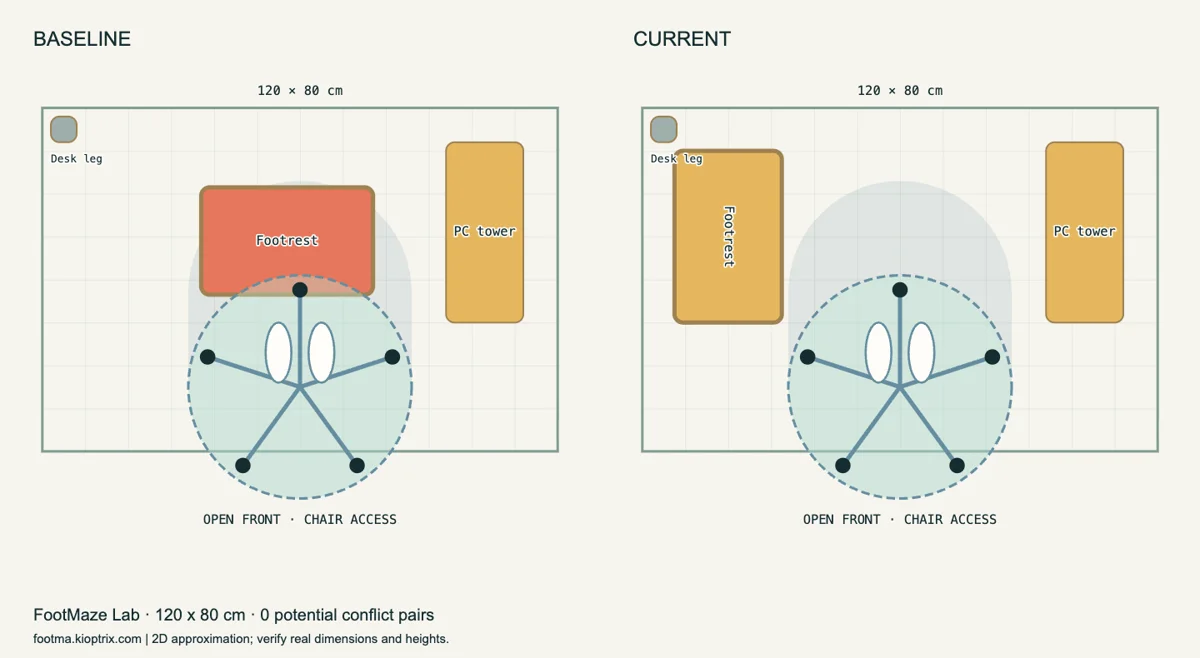
The first automatic change was specific and reversible: the 40×25 cm footrest moved from centre(57,31),0° to(20,30),90°. The PC tower remained(103,29) and the desk leg(5,5). This is useful for exploring an alternative orientation without pretending that the whole desk has been optimized. Restore before returned the first proposal to its prior arrangement.
Later cable proposals changed the footrest again and then moved the desk leg from(5,5) to(5,10). A desk leg attached to your desk is not normally a loose accessory. Keep that proposal hypothetical unless a legitimate redesign changes the measured structure. Do not move, remove or modify a support simply because the model reduced a conflict count. The drawing lacks the structural constraints that determine whether such a change can be made.
At one remaining chair/cable pair, another explorer request reported that no lower-conflict single-object move was found. That is the limit of this search under the entered assumptions, not proof that every possible layout is optimal or impossible to improve. The source describes 5 cm positions and quarter-turns; another chair position, a feasible cable route or a different physical arrangement can be a separate question.
One mode’s zero is not an all-movement pass
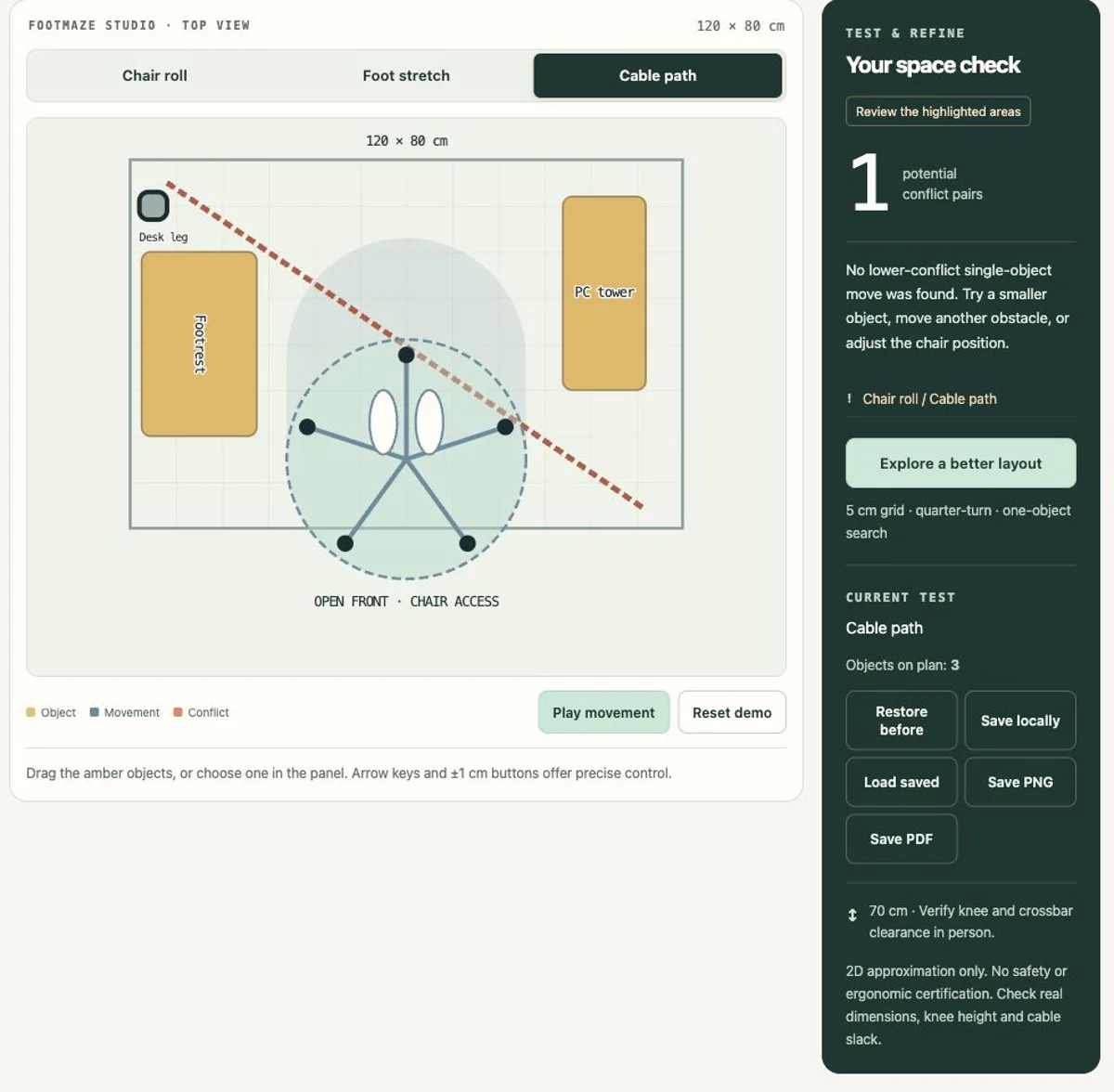
The chair-improved arrangement still had three pairs in Cable path mode. Two further proposals reduced that to one, but a manual cable endpoint change could alter the problem differently. With start(8,5) and end(112,5), the already-modified model showed zero pairs. We also tried a vertical end position at(8,76), which introduced footrest/cable and leg/cable pairs rather than providing a universal fix.
A real cable is not one perfectly straight floor segment. It may rise to a device, bend around supports and need slack for movement. The horizontal zero case is a model study, not a verified installation recommendation. Keep both endpoints and the actual physical route with your notes. Do not infer suitable cable length, bend radius, electrical safety or trip-risk elimination from this overlap result.
The comparison count also depends on the selected test. Our Cable path screenshot showed baseline 4 and current 1 for the same stored starting layout that had baseline 1 in Chair roll. Keep mode, layout and numbers together when exporting or explaining a result. Comparing a chair-mode baseline to a cable-mode current count would combine different tests and obscure what changed.
Conflict pairs, height and model limits
The score counts potential conflict pairs. Adding a second footrest produced Footrest / Footrest plus two Footrest / Chair roll entries: three pairs involving four total objects. It did not mean three square metres of obstruction, three independent people at risk or a measured probability of collision. Pair names are the most useful next step after the headline number.
Changing Clear height from 70 to 40 cm in the original cable case changed the displayed reference while all four modeled pairs remained. This tested result should prevent a dangerous reading of a low planar count as knee-height approval. The source repeatedly asks for knee and crossbar clearance to be checked in person. We did not establish a universal height threshold or verify a three-dimensional height-collision system.
The fixed 24×50 cm stretch corridor is not a personalized measurement of your legs. The full chair-base circle can be more conservative than the real wheel geometry, while omitted arms, body parts or sloped furniture can introduce other concerns. A zero result means no tested 2D shapes overlapped under the current inputs. It does not certify posture, comfort, desk stability or a safe workstation.
Inspect the PNG and preserve the settings
Two actual PNG files were received and opened. The initial export showed baseline 1/current 1; a fresh chair improvement export showed 1/current 0. Both were 1440×790 pixels. The image includes the plan, basic dimensions, count and a simplified-model note. It is useful for reviewing what changed, but it does not preserve every editable numeric field as a demonstrated restore format.
Keep a short companion record: inside dimensions, chair radius/centre/travel, object dimensions and positions, selected movement, cable endpoints and unresolved real checks. The Save PDF control was present, but no finished PDF or print output was inspected. We did not test every animation frame of Play movement or claim an ergonomics trial from the visual replay.
Korean controls and mobile use
The Korean page localizes the measurement and diagnosis controls. At 390×844, 측정 · 물체 조절 opened the input panel. We expanded 높이 · 의자 위치 · 케이블, set 의자 Y 75 and 의자 이동 거리 0, and returned to the plan. Diagnosis showed zero. Reopening the panel and changing travel to 22 reproduced one footrest/chair pair. The page stayed 390 pixels wide without horizontal overflow.
On a small screen, use 도면으로 돌아가기 to return from measurements, and 진단 결과 to reach the result panel. The main plan and the baseline/current diagrams can contain objects with the same names, so select the intended plan rather than assuming every matching label is the live editor. We tested the numeric and panel workflow; physical touch dragging and comprehensive assistive-technology use were not independently assessed.
Local storage and privacy
The source says Save locally stores the layout in this browser on request and that the planner does not send the dimensions to a server. No account was needed. We left Save locally and Load saved untested to preserve existing stored data. Our verified reload concerned unsaved changes returning to their original values, not a newly saved layout being recovered.
Browser clearing may remove saved layouts. Do not assume cloud recovery, transfer to another device or English/Korean saved-layout sharing without checking your own workflow; we did not verify those transfers. The PNG is a readable image rather than a proven editable backup. Offline operation and a network/security audit were outside the completed tests.
Blogger and existing Google advertising services are present and may use cookies under their own policies. Local calculation does not mean the whole page makes no external requests. The source links Google Privacy. Avoid adding identifying room details to an image you plan to share, and keep the distinction between the planner’s stated data processing and separate advertising services.
Related tools and an on-site workflow
For the next cable question, the published BENDATLAS cable routing planner guide explains a more detailed desk-cable sketch, length allowance across standing-desk travel and sampled bend radius. FootMaze highlights a simple floor crossing; BENDATLAS addresses different route assumptions. Neither substitutes for inspecting the actual installation, and no automatic plan exchange between the tools was verified.
A practical manual sequence
Measure the clear space → identify fixed supports → compare the footrest in one movement mode → inspect each proposed move → test the other modes → save an image and its settings → check the real desk. If the model moves a fixed leg, revise the hypothetical study rather than implementing it literally. Change one feasible condition at a time so that the resulting count remains interpretable.
Choose the method that answers your question
| Method | Useful role |
|---|---|
| Tape measure and annotated sketch | Captures actual supports, heights and irregular shapes; requires manual consideration of movement. |
| FootMaze Lab | Quickly compares simplified rectangular objects and movement envelopes; does not personalize body dimensions or certify safety. |
| Direct desk review | Checks actual access, comfort, caster behaviour, stability and cable slack that the diagram leaves unresolved. |
Frequently asked questions
Does zero mean the footrest is ergonomic or safe?
No. It means the tested 2D shapes did not overlap. Body fit, real wheel geometry, stability, height and cable slack still need direct review.
Why did Cable path show conflicts after Chair roll reached zero?
They are different tests. Our chair-improved arrangement had three cable-mode pairs. Keep the selected mode beside any exported result.
Can I follow a suggestion that moves a desk leg?
Treat it as hypothetical. We observed the explorer move a modeled leg; a real fixed support must remain subject to structural and practical constraints.
Does the height input validate knee clearance?
In our 70→40 cm reference test, the cable count stayed four. We did not verify a 3D clearance system; the source asks for direct knee/crossbar checks.
What did the PNG export actually contain?
A received 1440×790 baseline/current comparison image. We inspected 1→0 for the chair case; it is not a demonstrated editable backup or evidence of physical testing.
Were PDF and local-save recovery completed?
No. Those controls are available, but a finished PDF and a new Save locally/Load saved cycle were not verified. Existing storage was preserved.
Start with one measured movement
Start with the movement that currently feels obstructed and the measurements you can verify. Keep fixed obstacles fixed, inspect the named pairs and compare a feasible change. Use FootMaze to choose what to check at the desk, with the model’s limits attached to the plan.
A RELEVANT NEXT STEP
Tools with a useful connection
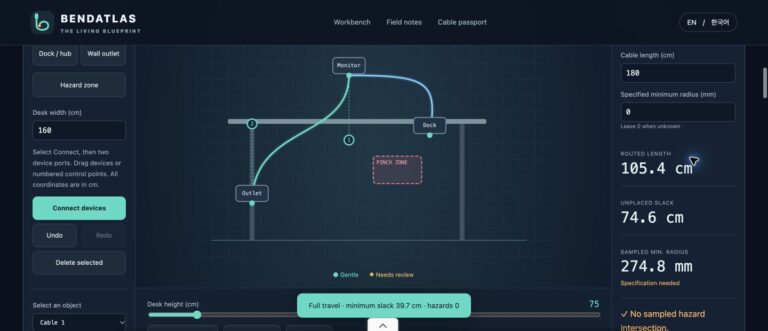
BENDATLAS
Cable Routing Planner: 7 Essential Checks for a Better Desk
Sketch desk cable routes and compare length allowance, sampled bend radius and standing-desk travel. See real BENDATLAS tests and what its model cannot establish.
STRAPSHIFT
Backpack Fit Tool: 7 Essential Checks for Better Notes
Compare manual strap measurements, photo reference pixels and three-zone packing in STRAPSHIFT. Actual browser tests explain the model and local recipes while keeping real comfort untested.
FELTATLAS
Felt Pad Designer: 7 Essential Checks for Better Fit
Compare four furniture contact shapes and felt pads, inspect geometric coverage and prepare labelled cutting-pattern previews. Includes real fit tests, print calibration and local-save limits.