Perfect Staple is a free stapler game about lining up illustrated paper sheets and placing one virtual staple. Choose a sheet or the mint stapler, adjust its position and angle, then inspect the result. It suits a short precision puzzle break when you want feedback on a specific move.
Tested 9 November 2026. We played actual browser rounds, compared three attempts on the first Zen stack, waited for an Office Rush session to end, and checked Korean mobile controls. The results below are game scores, not tests of real staplers or document-binding strength.
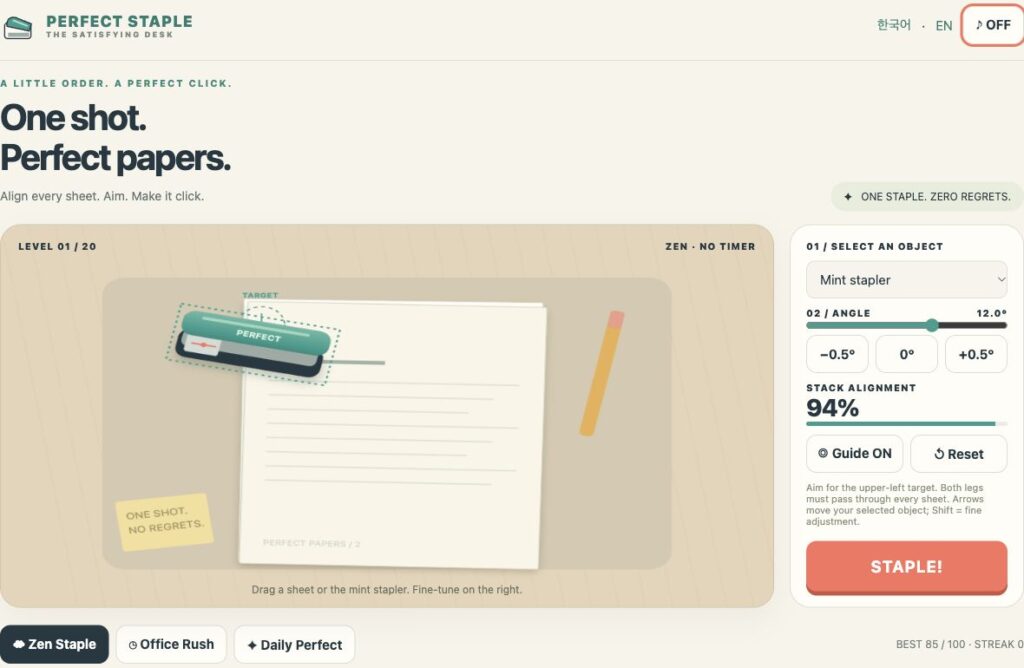
Play Perfect Staple with a clear plan: compare position, angle, penetration and fold scores. Our actual 32→42→85 trials explain the controls, daily practice, timer and local-record limits.
- Brand
- Perfect Staple
- Tool languages
- en, ko
- Verified date
- 2026-11-09
Table of Contents
Key takeaways
- The initial stack showed 94% alignment, yet the untouched stapler scored 32/100 and pierced 0/2 sheets. Stack alignment is not the final result.
- Changing only the stapler angle from 12° to 0° raised our next attempt to 42, but it still hit no sheets. Position matters separately.
- A further visible position adjustment produced 85: Position 39, Angle 25, Pierce 20, Fold 1. Both sheets were pierced, but the fold category remained weak.
- Zen removes the timer. Office Rush counts down from 60 seconds. Daily saves the first result locally and labels later attempts as practice.
- Best 85 survived reloading and switching to Korean. This verifies local continuity in our test, not cloud storage or a global leaderboard.
What this stapler game does
The official name is Perfect Staple. Its purpose is a small, satisfying alignment puzzle: bring a paper stack together, aim near the upper-left target and commit one shot. The result view presents a back-side staple illustration, a numerical breakdown, a short message, and retry or next-level controls. The game displays a 20-level sequence; we tested early levels, not completion of all 20.
The reader problem here is usually “How do I improve this attempt?” rather than “How do I staple a PDF?” Nothing in the tested game asks you to upload a document. Papers are illustrated objects inside the game board. There is no demonstrated PDF editing, scanning, printing service or physical office-hardware advice. Choose it for play, not for preparing an actual bound document.
Its useful distinction from a simple click-to-score toy is the separate treatment of position, angle, penetration and fold. An attempt can earn points even when it does not catch any paper. That makes a single total easy to misread. The breakdown helps you decide which variable to change instead of assuming every low score means the stapler needs to move closer to the dotted target.
Before your first attempt
Start with Zen if you want to understand the controls without a countdown. The opening screen selects the mint stapler, not a sheet. Read the object selector before turning the angle slider: it applies to the selected object. To straighten a paper, select that paper first; to change the staple direction, reselect the stapler. This is the most useful preparation for avoiding accidental changes.
Leave the guide on while learning. It gives the target and selection context for your next move. A visible edge can be dragged, while the selector provides another way to identify an object in an overlapping stack. The page also describes arrow-key movement and Shift for fine adjustment. Our successful position test used pointer dragging; we did not quantify keyboard step sizes or test every input method.
Decide whether you want practice or a daily attempt before firing. The Daily FAQ says the first daily result is the official local attempt, with retries counted as practice. We confirmed a first 32 and a later Korean practice result retaining official 32. If you care about that first result, learn in Zen first. Do not treat the daily badge as a server-verified competition entry.
Controls and scoring explained
You can select the stapler or individual sheets, drag visible objects, and adjust rotation with a slider or −0.5°, 0° and +0.5° buttons. Guide toggling and Reset are available beside the firing button. On a freshly loaded Korean 390px page, +0.5° changed the displayed angle from 12 to 12.5; the zero control also responded. Mode selection rebuilt the play setup, so recheck your selected object and angle after changing modes.
| Component | Maximum | What to read |
|---|---|---|
| Position | 40 | How well the staple placement matches the target. |
| Angle | 25 | Rotation contributes separately from placement. |
| Pierce | 20 | Whether both staple legs pass through the sheets. |
| Fold | 15 | The site describes safe fold margin and stack thickness. |
| Total | 100 | Sum of the four categories, not the stack-alignment percentage. |
These are the published scoring categories, checked against the actual result display. The site calls 100 PERFECT, 90–99 EXCELLENT and 75–89 GOOD. We observed GOOD at 85. We did not independently audit the implementation, derive its coordinate formula or obtain 100. Therefore, the steps below are a reproducible way to inspect your own progress, not a guaranteed perfect-score recipe.
The fold label deserves attention because the game combines a safe-margin idea with stack thickness under that one category. Our result does not reveal how many pixels or logical units are required. Do not invent a universal distance from the corner, and do not transfer an on-screen fold score to real staple leg length or binding capacity.
How to play in 7 deliberate steps
1. Choose a mode intentionally
Use Zen Staple for an untimed trial. The screen displays the level and “NO TIMER.” Office Rush begins a countdown when selected, while Daily changes to the dated challenge. Switching modes is more than changing a label: the active setup can change. Check the screen before starting a comparison.
2. Select and inspect every sheet
Use the object list to select the sheet you mean. Its name distinguishes the top sheet. Adjust its angle and placement, watching the alignment readout. Repeat for other sheets as needed. This describes the available workflow; our three-attempt experiment deliberately left the paper stack unchanged to isolate stapler adjustments. A high alignment number alone is not a reason to skip aiming.
3. Reselect the mint stapler
Make sure the selector now names the stapler. In our initial Zen setup its angle was 12°. Resetting that angle to 0° earned 25/25 for the angle component, compared with 15/25 initially. This is evidence from the tested stack, not proof that every other parameter has become correct. Position and penetration remained unchanged until we moved the stapler.
4. Aim using the visible staple location
Read the upper-left target and the staple placement marking on the illustration, then move the stapler in a small, deliberate drag. In our successful trial we shifted it visibly toward the target after setting 0°. Avoid copying our screen-pixel drag as a universal solution: the board has a different displayed size on mobile, and other stacks differ. Use the game’s visual cues and inspect the next breakdown.
5. Fire once and inspect the back view
Select STAPLE! and let the result appear. Read all four components, the sheet count and the total. Our 85 was 39+25+20+1, with 2/2 sheets caught. The 94% alignment readout remained a separate quantity. The back-view animation is feedback from simplified game geometry, not a physical penetration experiment.
6. Retry with one planned change
Choose Retry if you want another attempt on that setup. Our retries returned the stapler to its initial 12° setting, so we explicitly set 0° again before the third trial. Do not assume your last adjustment survives a retry. Write down what you intend to change before touching the controls; otherwise you cannot tell which move explains the next result.
7. Advance or record the result carefully
Choose Next level when you want a different stack. We saw the early sequence advance and alignment change to 81%, but did not finish all 20 levels. The result also offers Save image and Share. We clicked Save image and could not obtain an inspectable download within the observed 10-second window. We did not send a Share result. For a reliable personal record, check any actual downloaded file before claiming it saved successfully.
Our actual 32 → 42 → 85 test
This was a small hands-on comparison in desktop Chrome. We started from the same early Zen stack and used Retry between attempts. The first two tests differed only in stapler rotation; the third added a visible drag toward the target. We did not move or straighten the papers during this sequence.
| Attempt | Change | Actual result |
|---|---|---|
| 1 · initial | No adjustment | 32=17+15+0+0; 0/2 pierced. |
| 2 · angle | Stapler set to 0° | 42=17+25+0+0; 0/2 pierced. |
| 3 · position | 0° again, then dragged toward target | 85=39+25+20+1; 2/2 pierced. |
| Alignment | Paper stack unchanged | 94% remained separate from the total. |
| Next level | Advanced from result | Changed stack; alignment read 81%. |
| Reload/language | Reloaded, opened Korean | Best 85 remained visible. |
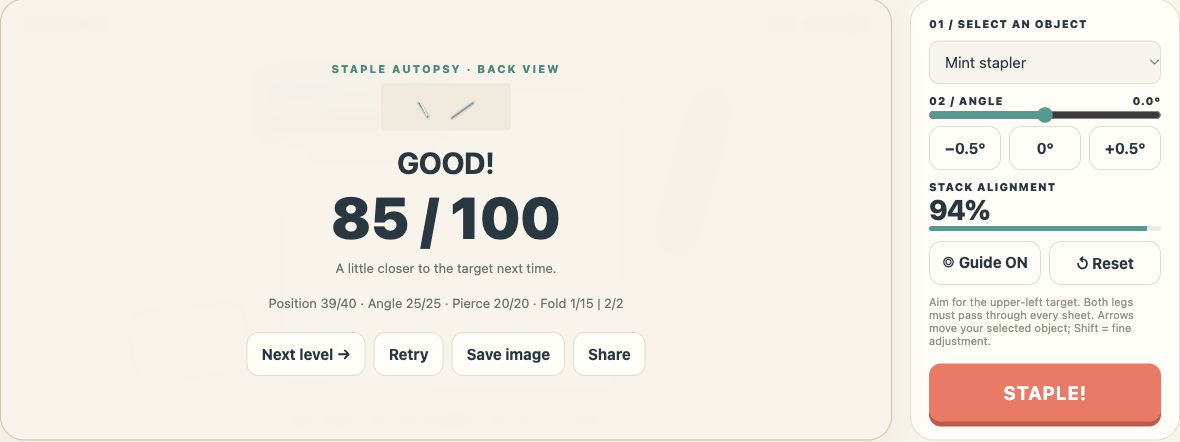
The comparison shows why a clean-looking angle is insufficient. Going from 32 to 42 gained exactly 10 points in Angle and no penetration points. Moving the stapler then changed Position and Pierce, while Fold still contributed only 1. These observations support separating controls and reading components; they do not establish an optimal strategy for every level.
It also shows a limitation in the short result message. At 85 the game told us to get a little closer to the target. Yet only 1 point was missing from Position, compared with 14 missing from Fold. That arithmetic makes Fold the largest remaining gap in this particular result. A useful next experiment would investigate that category with controlled changes, but we did not perform that follow-up or claim it would produce 100.
Zen, Office Rush and Daily compared
| Mode | Observed or stated behavior | Best use |
|---|---|---|
| Zen Staple | Untimed; level sequence shown as 01/20 | Learn controls and compare individual attempts. |
| Office Rush | 60-second countdown; our expiry showed 32 pts and 1 processed stack | Practice after you know what to adjust. |
| Daily Perfect | Dated stack; first 32 saved locally; later 32 labeled practice, official 32 | One deliberate first attempt, followed by practice. |
Office Rush’s result is a session total in points, so it should not be read as the same kind of number as a single stack’s /100 rating. We fired once for 32, then left the session running. At 0 seconds it displayed “SHIFT COMPLETE, ”32 pts and “Processed stacks:1, ” and the firing control was disabled. That verifies timer expiry and one-stack accounting. We did not test the maximum total or every way of continuing between stacks.
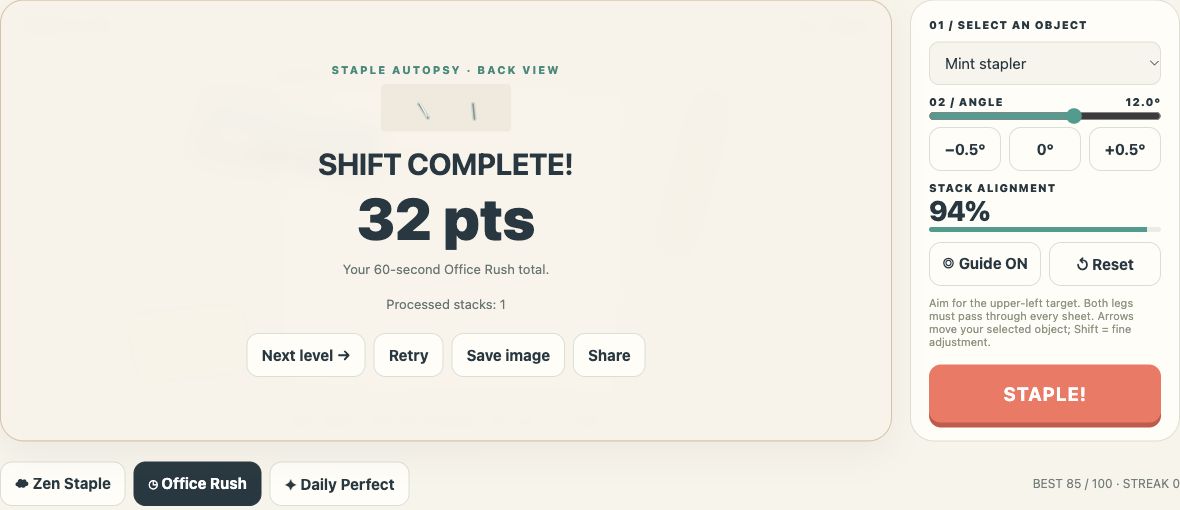
Daily Perfect’s FAQ says it uses the same UTC-date seed worldwide. We confirmed the displayed date 2026-11-09, not matching challenges on multiple independent devices. The first unadjusted daily shot saved 32. After reload and Korean navigation, another unadjusted shot said practice and retained official 32. The persistent local result is the useful verified fact here; the worldwide-seed claim remains attributed to the publisher.
The general best display still showed 85 from the earlier Zen attempt. Do not confuse that best with today’s official 32 or the Rush total 32 pts. All three numbers can coexist because they describe different contexts. When comparing with a friend, state the mode and date instead of sharing a bare number that hides which kind of result it is.
Read the breakdown before changing your aim
- Keep a four-number note. Record Position/Angle/Pierce/Fold, not just the total. A change from 42 to 85 means more when you know which categories moved.
- Separate paper alignment from staple accuracy. Our 94% stack still produced two complete misses before the position adjustment. The percentage answers a different question.
- Check state after Retry. We had to set 0° again. Repeating the same plan while forgetting that reset would mix an angle change into your position experiment.
- Use the largest point gap as a question. At 85, Fold lost 14 while Position lost 1. This identifies what to investigate, not a guarantee about the correct next move.
- Read numerical results alongside messages. The short encouragement is less specific than the score breakdown. Neither should be treated as a real-world engineering recommendation.
- Practice before choosing Daily. A retry can be useful without replacing the official local first attempt. We confirmed the practice label after changing language and reloading.
- Use Zen for short interruptions. Office Rush begins timing immediately on mode selection in our test. Reading help or dealing with an ad during the session can consume your available time.
A simple practice plan is to keep the papers unchanged for two trials, change only the stapler angle, then compare the Angle value. For a separate placement trial, restore the same angle and move only the stapler. This is an editorial suggestion based on the experiment above, not a new experiment we conducted on every stack. It helps make the feedback understandable even when your overall score does not improve.
Limitations, privacy and mobile findings
It is a simplified 2D game. The publisher explicitly distinguishes it from real stapler physics. Do not infer actual paper capacity, staple dimensions, office productivity or motor-skill improvement from a score. We played early levels and did not test a perfect 100, all 20 levels, accessibility across assistive technologies or physical-phone touch gestures.
Mobile controls worked within the tested scope. A freshly loaded Korean page at 390px had a 390px document and a 360px-wide board. We changed 12° to 12.5°, used 0°, and completed a Daily practice attempt. No page-wide horizontal overflow appeared. This is browser viewport testing, not a claim that every handset or touch-drag interaction has been validated.
Local records need the same environment. Best 85 and official daily 32 were retained across reload and Korean navigation. Sound was toggled ON, remained ON after reload, and was restored OFF. We verified labels and persistence, not the sound output itself. We did not test migration, clearing site data, private browsing or synchronization between profiles.
Privacy statements have a specific scope. The page says no files are uploaded, results are generated on the device and best scores/preferences/daily attempts are stored in the browser. We observed a game with no file-upload input and verified persistence, but did not audit network requests or storage implementation. Blogger and Google advertising cookies are separately disclosed. Ads, shopping annotations and an interstitial appeared during use.
Output is only partly tested. Save image was activated without an inspectable file becoming available to us. That does not prove all users will fail to download; it means we cannot verify the image contents, dimensions or final format. Share was not submitted. No global leaderboard was observed, and the privacy note explicitly calls daily scores local and unverified.
Alternatives and a useful next tool
Choose a simple puzzle if you want a brief feedback loop; choose another activity if you need a document workflow. A real document editor or PDF utility solves file tasks that this game does not. The board’s sheets are not your uploaded pages, and “stapled” does not mean a downloadable multi-page document has been assembled.
For explaining your own attempt to someone else, a screenshot can be more informative than a score alone. Keep the mode, result breakdown and date visible. The published FrameMint Studio screenshot-editor guide covers adding context to a screen you have already captured. This is a separate optional annotation workflow, not an automatic integration or a way to validate a score.
A useful comparison image would show the initial miss and the adjusted result with captions identifying the changed variable. Avoid presenting images from different modes as a controlled comparison. If you crop away the component scores, explain them in the surrounding text. The goal is to make the move understandable, not to imply that a prettier image is stronger evidence of game accuracy.
Frequently asked questions
Is Perfect Staple free and do I need an account?
The tested browser flow was free to play and required no account. Advertising appeared. That describes the observed version and does not guarantee future policies or an ad-free session.
Why did 94% alignment still miss every sheet?
Alignment describes the paper stack. Position and angle describe your staple attempt. Our initial 94% stack scored 32 with 0/2 penetration, and zeroing the stapler reached 42 while still missing. The placement adjustment mattered separately.
Why was 85 not almost perfect in every category?
It was 39/40 Position, 25/25 Angle, 20/20 Pierce and 1/15 Fold. The total hides the weak fold category. The message suggested getting closer, but the numeric breakdown showed the largest missing points elsewhere.
Can a daily retry replace my first score?
In our test it did not: the first daily 32 was saved locally and a later Korean result was labeled practice with official 32. We did not inspect other dates or independent devices, and this is not a global ranking.
Can I save or share a result image?
The interface offers both controls. We activated Save image but could not inspect a downloaded file, and we did not submit Share. Verify your actual file or share preview before relying on those outputs.
Does it work on a phone?
The Korean 390px browser test supported angle controls and a completed practice shot without page-wide overflow. Actual handset touch dragging and all mobile ad layouts remain untested.
Try one controlled improvement
Begin in Zen, name one variable you intend to change, and read the four-component result afterward. Perfect Staple is most useful as a small game when its feedback makes your next move more deliberate. Your goal can be understanding one failed attempt rather than assuming the current score proves every part of the stack is correct.
Evidence record: actual English/Korean game screens and publisher FAQ/privacy notice checked 9 November 2026. Screenshots are real captures from that session. Tests covered 32/42/85 comparisons, timer expiry, daily practice, persistence and 390px controls. Downloaded image contents, Share delivery, full-level completion and real hardware were not verified.
A RELEVANT NEXT STEP
Tools with a useful connection

FrameMint Studio
Screenshot Editor: 7 Smart FrameMint Studio Checks
Frame screenshots, add manual masks and build captioned stories in FrameMint Studio. Real import, order, recovery and size tests explain what to check before sharing.
쓰리쿠션 길 안내소
3 Cushion Simulator: 7 Smart Practice Checks
Compare experimental three-cushion routes, save a position and calculate points per inning with 쓰리쿠션 길 안내소. Korean interface; actual table accuracy is unverified.

Group Photo Chaos
Group Photo Game: 5 Fun Ways to Master the Timing
Catch the shared ready moment in an animated group portrait. A tested guide to timing, shutter delay, replay and reading the score.