This 3 cushion simulator is most useful as a practice notebook with an experimental model attached. 쓰리쿠션 길 안내소 lets you arrange a position, replay a route and change one condition at a time. It also calculates your scoring average. Its Korean interface needs a little translation, but the bigger decision is knowing which outputs to trust.
The button opens the separate original website in a new tab. The interface is Korean; an English introduction does not mean the tool has an English mode. We required no account or checkout for the checks below.
Key takeaways
- Use the six preset positions to compare inputs and contact order, not to predict your real-table success rate.
- For multiple games, add points and your innings first. Our test of 10/10 and 10/30 returned 20/40 = 0.500, not 0.667.
- Save deliberately: share codes and optional browser storage help preserve work, while observations can disappear on refresh. The original site also displays Google advertising.
Table of Contents
Compare experimental three-cushion routes, save a position and calculate points per inning with 쓰리쿠션 길 안내소. Korean interface; actual table accuracy is unverified.
- Brand
- 쓰리쿠션 길 안내소
- Tool languages
- ko
- Verified date
- 2026-11-04
What this 3 cushion simulator actually does
The official name is 쓰리쿠션 길 안내소. Think of it as a Korean-language three-cushion learning workbench, rather than a certified digital twin of a billiard table. You can place the white, yellow and red balls, choose the cue ball, draw a route or request an experimental prediction, then replay what you have built.
The practical problem is remembering the conditions behind a route. A sketch records an idea, but it may omit the starting direction or confuse a longer route with a better result. Here, the position, shot inputs and contact sequence can be reviewed together. That makes the 3 cushion simulator useful for asking a precise question before taking that question to a real table.
- Position and route work: tap or drag balls, enter normalized coordinates, add manual path points and undo a change.
- Model comparison: adjust direction, relative power and spin; inspect the prediction or choose an automatic-search candidate.
- Study material: six preset exercises, comparison buttons, temporary observation notes and a rotating prepared quiz.
- Record keeping: generate and restore a share code, use device storage and calculate a combined points-per-inning average.
Beginners can use the presets to learn what to observe. A player keeping practice notes can use the coordinate and sharing controls to make an idea reproducible. Someone seeking calibrated cushion contacts, tournament adjudication or a guaranteed scoring line should choose a different kind of evidence.
A short translation key
| Korean control | Meaning | Use it for |
|---|---|---|
| 첫 배치로 시작 | Start with the first position | Load the initial exercise and model route. |
| 경로 재생 / 처음으로 | Play route / rewind | Review or restart the displayed sequence. |
| 힘 −10 / 힘 +10 비교 | Compare power −10 / +10 | Run a controlled preset comparison. |
| 옆회전 반대로 | Reverse side spin | Compare the opposite sign of side spin. |
| 공유 코드 만들기 / 코드로 복원 | Create share code / restore from code | Transfer the position and settings as text. |
| 득점 / 본인 이닝 | Points / your innings | Enter the two totals used in the average. |
7 practical checks before you trust a result
These are seven review steps, not seven built-in lessons: the tool currently has six presets. Start with one position and keep your experiment small. A browser, a few minutes and non-sensitive test entries are enough. No photograph upload is needed for this workflow.
1. Load a known baseline
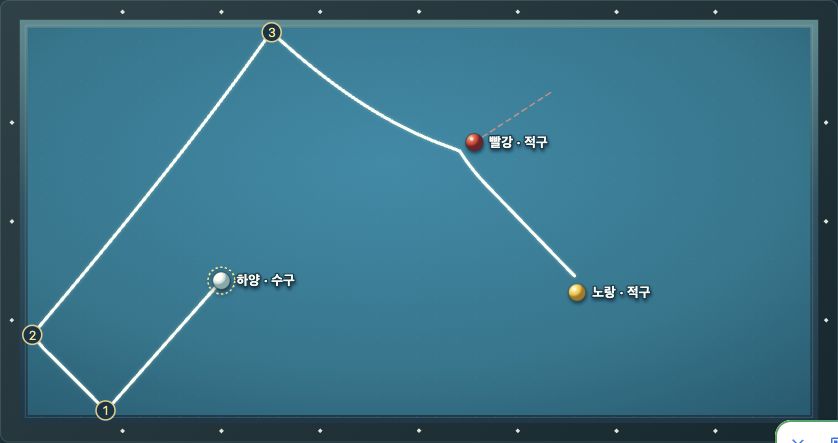
Select 첫 배치로 시작 or 배치 1 불러오기. Confirm the exercise label before changing anything. For our lesson-one baseline, the displayed direction was 131.5°, power 85, side spin 50 and top/bottom spin 0. Record the ball positions and default environment too; a direction by itself does not define a shot.
2. Read the route before playing it
Use the contact-order text as well as the drawing. The baseline listed bottom cushion, left cushion, top cushion, red object ball, then yellow object ball. Replay helps connect those labels to the numbered contacts. A line touching a cushion is not, by itself, proof that both object balls were reached.
3. Change only one condition
Use the built-in −10, +10 or reverse-spin comparison. The interface says these buttons restore the original preset and table conditions before changing the named input. They are useful controlled comparisons, but they are not a way to preserve a custom environment. For your own experiments, write down every setting first.
4. Watch for invalidated predictions
We moved the selected white ball from (0.250, 0.650) to (0.300, 0.600) through the coordinate inputs. The prior route was cleared and the interface announced that the position had changed. Recalculate after a position, cue-ball or shot-setting change. Do not photograph an old route and label it with new inputs.
5. Treat automatic search as a candidate list
On the baseline position, automatic search reported 1,908 calculations and three candidates. Choosing candidate 2 set the direction to 132.00°, power to 85 and side spin to 50. That shows the selection control worked in this test; it does not establish a success probability. Failure to find a candidate also does not prove that no real shot exists.
6. Save and restore before you need the file
Our generated share code was 173 characters. After changing the white-ball position, restoring that code returned its coordinates to (0.250, 0.650). The visible code contained a version, ball coordinates, cue-ball choice, shot settings and environment. This was a same-browser round trip, not a cross-device compatibility test. Keep a separate copy when a position matters.
7. Check the arithmetic separately
For the average calculator, enter points and your own innings, then select 기록 추가. Repeat for the next game. Confirm that the combined points and innings match your notes before relying on the displayed average. A convincing route animation cannot validate a scoring record, and a correct average cannot validate the physics model.
What our 3 cushion simulator tests showed
We operated the original interface on 4 November 2026 (UTC). The table below records displayed model outputs, not physical shots. We did not measure cushion error, repeat real-table trials or calculate a real-world success rate.
| Lesson 1 condition | Displayed result | Useful interpretation |
|---|---|---|
| 131.5°; power 85; side 50; top/bottom 0 | Model condition met: bottom → left → top → red → yellow. | A baseline to reproduce before a comparison. |
| Power 75; other baseline inputs unchanged | Same contact order; model condition met. | Less power did not change the named sequence in this case. It does not prove identical contact locations. |
| Power 95; other baseline inputs unchanged | Bottom → left → top → right → bottom → yellow; model condition not met. | More power was not a better outcome in this model test. |
| Side spin −50; power 85 | Bottom → left → top → right → bottom; model condition not met. | Changing the sign was consequential for this position. |
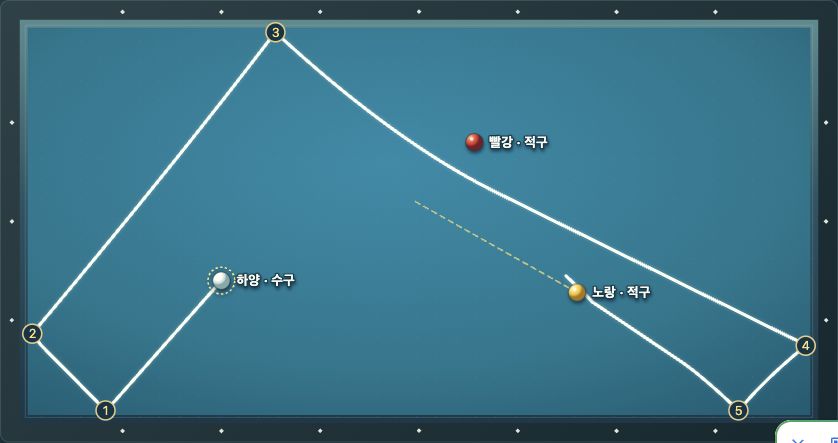
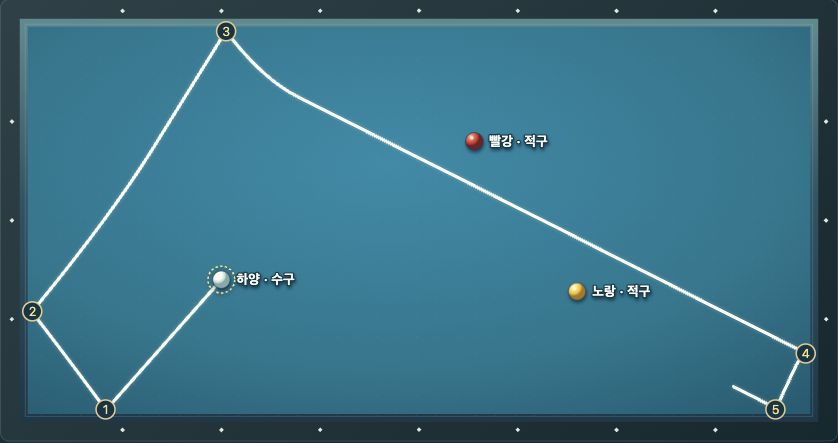
All six preset buttons loaded a position and displayed the model’s three-cushion-condition message in our check. Their sequences differed: some contacted an object ball before the third cushion. Read the complete event order and the model’s criterion rather than assuming every preset follows lesson one’s cushion-first pattern.
We also added two manual path points and used Undo; the interface reported the added point and its removal. A manually drawn route expresses an idea. It should not be mistaken for an independently calculated prediction merely because the same replay controls can display it.
Calculate an average without averaging averages
The 3 cushion simulator includes a useful arithmetic companion: total points ÷ total own innings. Use the same definition of an inning consistently across the records you enter. Do not substitute elapsed minutes, both players’ combined turns or a target match length for your own innings.
| Test entry | Points | Own innings | Individual average |
|---|---|---|---|
| Game A | 10 | 10 | 1.000 |
| Game B | 10 | 30 | 0.333… |
| Combined | 20 | 40 | 0.500 |
A simple mean of 1.000 and 0.333… would be about 0.667, which gives the short game too much influence. The combined calculation correctly weights the longer game through its 30 innings. This is why adding the underlying totals is safer than averaging already-rounded averages.

Entering zero innings produced a validation message and left our two-game result unchanged. We also enabled the optional browser-storage checkbox, refreshed and saw the same two entries restored. Turning the option off removed persistence while keeping the current screen’s entries until refresh, as the interface explains.
Practice tips that add value beyond a route line
- Use an observation sheet: note the preset, ball coordinates, direction, power, spin and environment; then record the first event that differs. “Missed” is less informative than “the red-ball contact disappeared after the third cushion.”
- Separate order from location: matching event lists can still conceal different cushion contact points or endpoints. Our 75/85 comparison supports an order observation, not a measured location claim.
- Use coordinates when a finger hides the ball: the normalized system runs from top-left (0,0) to bottom-right (1,1). A 0.01 change means one percent of that axis, not one centimetre.
- Separate hypotheses from match records: label model screenshots and synthetic arithmetic tests. Reserve your actual practice log for observed play.
- Back up what matters: a share code is a useful explicit copy; device storage is convenient but can disappear with browser data. Temporary notes are not a durable journal.
| Method | Strong point | Boundary |
|---|---|---|
| Paper or a static diagram | Fast for sketching a remembered route. | Does not automatically retain model inputs or calculate a new prediction. |
| This 3 cushion simulator | Connects a position, relative inputs, replay and arithmetic in one browser workflow. | Uncalibrated coefficients; Korean interface; model candidates are not real-shot guarantees. |
| A recorded table session | Shows what actually happened under the recorded conditions. | Camera perspective and incomplete setup notes can make comparison difficult. |
| An experienced instructor with the actual setup | Can observe execution and offer contextual feedback. | Not supplied or verified by this website; do not infer coaching endorsement. |
Limitations, language and privacy to check first
The original model explanation describes simplified ball and cushion interactions with assumed, uncalibrated coefficients. It does not reproduce cushion deformation, jump or massé shots, cue flex or aiming error. Relative power and spin are not a direct mapping to cue force or tip position. A green result in this 3 cushion simulator is a model classification, not an official ruling.
The prepared daily quiz rotates using the Seoul date; it is not a promise of newly authored material every day. The actual interface we reviewed was Korean. Browser translation can help with labels, but compare any translated warning against the original wording before treating it as a new feature or guarantee.
The original privacy notice says position data and experimental calculations are handled in the browser, with local storage for selected records and settings. We verified storage controls and restoration in our session; we did not independently audit every request or the source code.
Google ads and an interstitial were visible during our visit. Browser-side computation therefore does not mean the entire website makes no third-party requests or uses no cookies. Ads may also interrupt navigation or cover part of a small screen. Use the ad provider’s dismiss control where available, and keep advertiser links separate from the tool’s controls. Avoid putting personal information into practice notes or share codes.
This library and the original tool are made by the same creator. This is a documented first-party walkthrough, not an independent third-party endorsement. Our editorial standards explain how observed behavior, source statements and unverified claims are separated.
Related reading, without invented recommendations
There were no other published tool introductions in this library when this article was prepared. We therefore link no research draft as a recommendation. Use How This Library Works to understand the route from an introduction to the original tool; related-tool cards can appear later when genuinely relevant published entries exist.
3 cushion simulator FAQ
Can this replace practice on a real table?
No. Use it to make a position, an assumption and a comparison explicit. Physical practice is still needed to observe execution, cloth and cushion behavior. We have not established real-table prediction accuracy.
Does more power always improve the route?
No. In our lesson-one model test, power 75 and 85 met the displayed condition, while 95 did not. That is a result for those inputs, not a universal recommendation for power selection.
Can I use the 3 cushion simulator in English?
The reviewed tool interface was Korean. This English guide provides control translations, but we did not find or verify a complete English interface.
Why did my previous prediction disappear?
The interface clears stale predictions after relevant position or input changes. Recalculate so that the route belongs to the settings you are inspecting. Undo can restore a previous edit, but confirm both the position and path afterward.
Will a saved record follow me to another device?
Not automatically. Device storage belongs to that browser. We verified a share-code round trip in the same browser; cross-device restoration was not tested.
Is the calculator’s 0.500 a real match result?
No. It came from two deliberate arithmetic test entries, 10/10 and 10/30. The calculation is correct for those inputs, but they are not a claim about anyone’s sporting performance.
Is everything private because calculations run locally?
No. Local calculation and browser storage are different from the site’s advertising and hosting traffic. Read the original privacy notice and avoid sensitive data.
Start with one question, not an entire training plan
Open lesson one, reproduce the baseline and ask one question: which event changes when only power changes? Record the answer, restore the baseline and compare again. That is a productive way to use this 3 cushion simulator without asking its model to prove more than it can.
Verification: 4 November 2026 (UTC). Actual browser interactions and cropped original screenshots. No real-table trials, coach certification, cross-device test or independent network audit was performed.