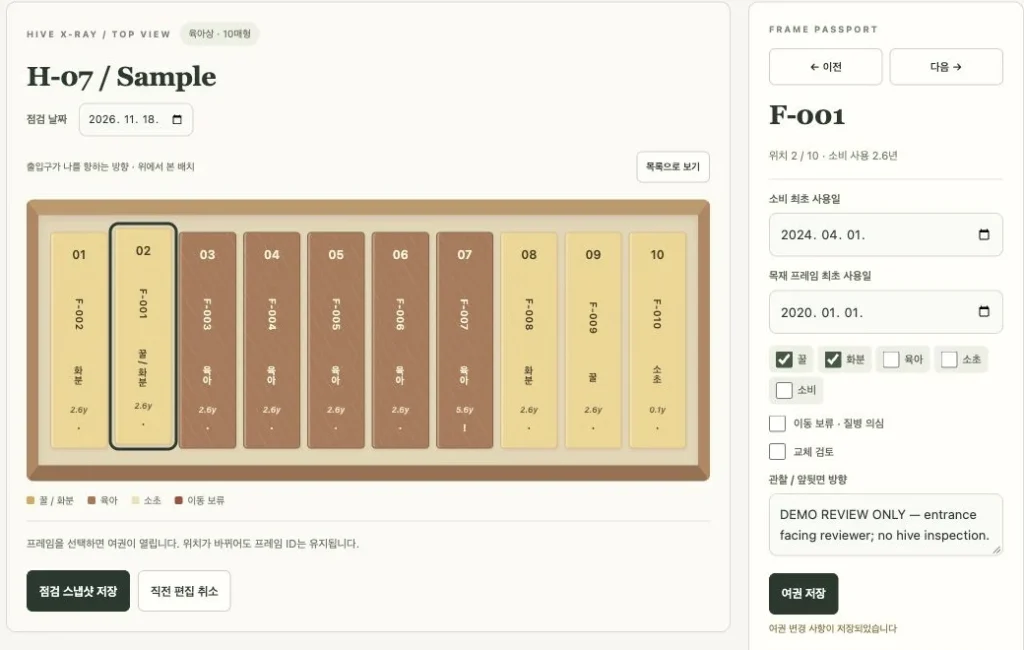
Keep frame IDs, comb and wood dates, inspection snapshots and annual targets distinct in CombAtlas. Actual sample tests explain movement counts, search, local storage and JSON/CSV backup limits.
- Brand
- CombAtlas
- Tool languages
- English, 한국어
- Verified date
- 2026-11-18
CombAtlas is a beehive frame tracker for mapping frame positions, keeping a passport for each ID and comparing inspection records. It brings contents, comb dates, wooden frame dates and observations into one browser notebook. Use it to make the next visit easier to reconstruct. It does not diagnose disease, assess colony strength or decide which frames are safe to remove.
Directly checked 18 November 2026, KST. All trials used the initial H-07/Sample dataset; no hive was opened or inspected. We saved a passport, an inspection snapshot and a position swap, compared history, changed the annual target, downloaded JSON/CSV and checked the Korean page at 390×844. New-hive creation, inter-hive transfer, retirement, JSON restoration and print/PDF output were not completed in this review. A temporarily unresponsive English tab required checking the stored result from the Korean page before continuing.
On this page
Key takeaways
The sample began with ten frames, one review flag on F-007 and no inspection snapshots. Changing the annual target 20→33% changed the plan 2→4 frames per year, while the review list still contained only F-007. The target is a rounded-up count, not a statement that four frames are currently eligible for removal.
We added Pollen alongside Honey on F-001, entered a separate 2020-01-01 wood date and saved a clearly labeled test note. The original 2024-04-01 comb date remained independent. After swapping positions 1 and 2, the IDs and the saved passport followed the physical-frame identity. A snapshot comparison reported two moved frames, not one, because both IDs changed position.
What this beehive frame tracker does
The official brand is CombAtlas, subtitled The Living Hive Notebook. The root opens its English tracker, and the header links dedicated English and Korean pages. No account was required for the inspected work. The notebook stores records in the browser and shares them between language pages on the same domain; the source says it has no cloud synchronization.
The workspace includes a hive selector, Create hive control, frame-ID search and Field mode. The map is a top view with the entrance facing the observer, and a list view offers another presentation. Selecting a frame opens its passport with first-used dates, multiple content boxes, Hold, Review and an observation/orientation note. Previous/Next buttons move through the current arrangement.
Movement controls offer position swapping, an inter-hive same-position swap and retirement with a new frame. These controls were inspected; only the within-hive position result was verified. Inspection snapshots and an event history sit beside the annual target. JSON backup, CSV export, JSON restore and print controls are available, but each output and recovery path needs its own verification. We inspected the actual downloaded JSON and CSV rather than inferring their contents from button labels.
Prepare IDs and observation dates
Use a durable physical ID before treating the digital map as your only reference. Position 2 is a place in the box; F-001 is the identity that should follow a frame when its location changes. Write a consistent hive code and an orientation convention in your own worksheet. A careful digital history is difficult to reconcile if physical labels are missing or reused ambiguously.
Prepare three dates separately:the inspection date, the first use of the comb and the first use of the wooden frame. The sample inspection field opened on the review date. Do not turn that default into evidence of a visit. Leave an unknown first-use date blank rather than choosing a plausible season. An honest unknown is easier to correct than a precise invented history.
The initial H-07 is explicitly sample data. Practice there before entering real records, but keep review notes labeled so an exported file cannot be mistaken for an apiary observation. This review did not complete the Create hive workflow and therefore does not invent its naming, capacity or duplicate-ID rules. Before adopting the notebook for production, verify that a real hive can be created and backed up in your intended browser.
7 essential frame record checks
1. Establish the hive and viewing convention
Select the intended hive and inspection date. Read the entrance-facing top-view label before translating a notebook position into a physical frame location. The sample has ten positions; this test does not establish every supported hive capacity. Keep the physical order and orientation as observed rather than rearranging a colony to make the screen look tidy.
2. Find the ID and open its passport
Select a map/list button or use Previous/Next. Searching F-007 showed one match while all ten buttons remained in place; nonmatching buttons became faint. The selected passport stayed on its previous ID. Search was a visual locator, not an automatic selection or a reduction of the recorded active-frame count.
3. Record contents and material dates independently
Check the contents actually observed. Honey, Pollen and Brood can coexist; the app permits multiple boxes. In the sample we saved Honey+Pollen on F-001 and a wood date independent of its comb date. A content checkbox is a manual record, not a measured area, weight or health assessment.
4. Save the passport and inspect the saved state
Editing changed the button from Save passport to Save changes and displayed an unsaved warning. We saved and then saw All passport changes saved. The Korean page later showed the same dates, combined contents and test note. Do not confuse typing into a field with committing that change; verify the status before selecting another frame or leaving.
5. Save a dated inspection snapshot
After checking the live records, use Save inspection snapshot. Our saved-inspection total became one. A passport save and a snapshot are different actions: one updates the current record, the other gives history a past layout to compare. The notebook does not prove that an inspection physically occurred; the date and observations remain the user’s responsibility.
6. Record a movement and compare the identities
The saved swap placed F-002 at position 1 and F-001 at position 2. F-001 retained its dates, contents and note. Comparison with the preceding snapshot showed 0 new, 0 removed, 2 moved and 0 content changes. Verify the resulting IDs before retrying an action after a stalled tab; an attempted click and its final stored result can differ.
7. Read the plan and keep an off-browser backup
Set an annual target appropriate to your planning context, then review the actual candidates separately. Export JSON for a potential recovery path and CSV for a readable inventory. Open the received files and check the hive, IDs, notes and history you intended to keep. Our files were verified, but a full restore round trip was not.
Actual sample-data tests
| Actual sample-data operation | Observed result |
|---|---|
| Initial H-07/Sample | 10 active frames; 1 review, F-007; 0 saved inspections; 20% target gives 2/10. |
| Change target 20→33% | 4/10 per year; review list remained F-007. |
| F-001:Honey+Pollen, wood 2020-01-01, test note; save | Comb date remained 2024-04-01; combined contents, wood date and note appeared on Korean page. |
| Save one snapshot, then swap positions 1↔2 | One snapshot; F-002 at 1, F-001 at 2; comparison 0 new/0 removed/2 moved/0 content. |
| Save Hold on F-001, then compare | Comparison 0/0/2/1; the changed condition counted once as content-related difference. |
| Undo the latest hold edit | Subsequent comparison returned 0/0/2/0; position swap remained. |
| Search F-007 | 1 match; ten map buttons remained; others faded; passport selection unchanged. |
| Actual JSON and CSV downloads | JSON:1 hive, 10 frames, 4 events, 1 snapshot, rate 33, empty retired list. CSV:9 columns, 10 data rows, no snapshot/event history. |
| Fresh Korean 390 px viewport, Field mode, select F-007 | Document width 390 px; field mode simplified the page; F-007 passport showed position 7, 5.6 years and Review. |
The hold flag was true when the files were exported and was undone afterward. That sequence explains why the saved backup can differ from the final live notebook. The files are a point-in-time result, not a live synchronized mirror. All these entries describe an illustrative dataset, not equipment seen in a field visit.
Keep comb age separate from wooden frame age
Comb and wood have different histories. Our F-001 example used 2024-04-01 for the comb and 2020-01-01 for the wood. The passport still displayed comb age 2.6 years on the review date. Entering an older wood date did not make the displayed comb age the age of the wooden frame. This is particularly useful when a wooden frame receives fresh foundation, but the tool is not evidence that any real equipment was renewed.
The sample’s F-007 had a 2021-04-01 comb date, displayed 5.6 years and a review flag. Those are sample values. Do not present that age as an automatically diagnosed replacement threshold or infer that every review flag is derived from age. Review is also a manual checkbox. The note should distinguish what was seen, what is unknown and what requires local advice.
Read the annual target without turning it into a removal order
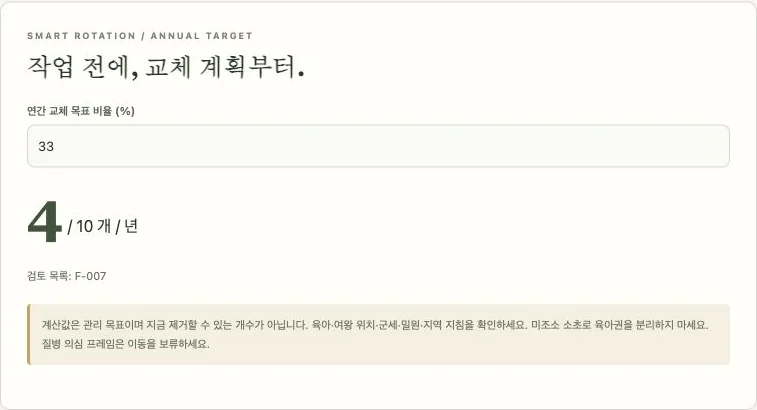
The calculator rounds up frame count×percentage. Ten×33%=3.3 becomes four. With only ten frames, each whole frame represents ten percentage points, so the implemented count can exceed the entered percentage when expressed as a fraction of the current box. This is arithmetic granularity, not a recommendation to raise the biological replacement rate.
The official CFIA Honey Bee Producer Guide, independently read for this review, describes replacing at least 20 percent, ideally one-third, of brood frames annually in its Canadian biosecurity context. CombAtlas applies a configurable goal to its frame count. That does not make every listed frame a brood frame or turn Canadian guidance into a universal timetable for other climates, systems or disease rules.
Keep four questions separate: the numerical annual target, the currently flagged IDs, their present contents and whether work is appropriate at the next visit. The source reminds readers to consider brood, queen location, colony strength, nectar flow and local guidance. A count does not establish that foundation can be inserted anywhere or that the brood nest should be split. No removal operation was performed for this review.
Compare a snapshot without restoring it
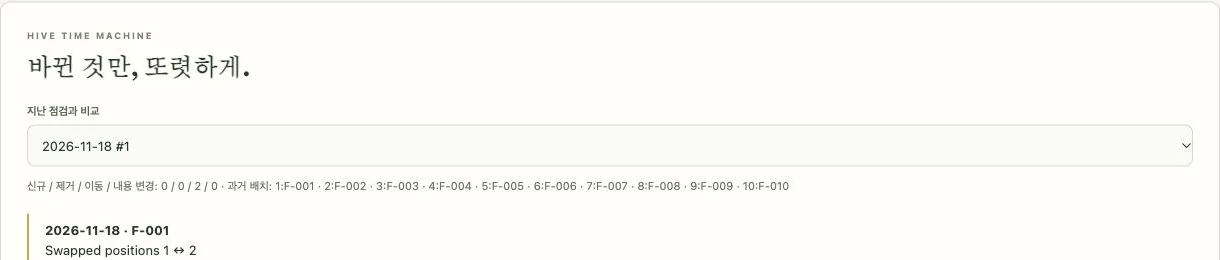
The snapshot selector showed the earlier order beginning 1:F-001, 2:F-002, while the live map remained 1:F-002, 2:F-001. Choosing a past snapshot compared it rather than overwriting the current arrangement. The two moved count reflects two IDs changing positions, even though the operator recorded one swap action. Count frame differences separately from user actions.
Saving Hold on F-001 changed the comparison’s content-related total from zero to one, even though Honey+Pollen stayed the same. The category is therefore broader than just a content-box change in this test. After Undo, the comparison again showed zero content differences and retained two moved IDs. We verified the most recent edit in that session; we did not establish an unlimited persistent undo stack or every event category.
The saved history contained English events from the original operations and a Korean passport-update event. Opening the Korean page did not rewrite earlier free-text event descriptions into Korean. If several people share an exported notebook, choose consistent note conventions and preserve original wording rather than assuming the interface language translates the historical record.
Frame identity, position and hold status
Identity and position are separate fields in practice. Use the passport ID to reconnect dates and notes after a move. The source offers transfers that swap the same position between hives, and retirement with a new frame, but those workflows were not completed here. Do not assume a transfer appends an extra slot, that retirement preserves a particular new-ID format or that every hive size is compatible.
Hold and Review are different concepts. We saved a Hold flag and observed it on the passport and in the exported records. The source says hold blocks swaps, transfers and routine retirement; we did not independently exercise every blocked path. The movement buttons remained visible. A visible button is not proof that an operation will be permitted, and clearing a flag to force a workflow would erase the meaning of the record.
JSON backup and CSV inventory serve different jobs
The received JSON declared version 1 and contained hives, frames, history, snapshots, rate and retired. Our file had one hive, ten current frame records, four events, one snapshot and an empty retired array. F-001 appeared in its current second position with both dates, Honey+Pollen, the test note and Hold true. The snapshot retained its earlier position and Hold false. We inspected those differences directly.
The CSV contained nine columns: hive, position, frame_id, comb_first_used, wood_first_used, contents, hold, review and note. It had ten data rows. Multiple contents were separated by a vertical bar in the contents cell. It was useful as a readable current inventory, but it did not include the event list or the snapshot. A spreadsheet copy of this CSV cannot be claimed to reproduce the tested JSON notebook history.
JSON restore is described as replacing the local dataset, not merging records. We did not import a file or verify restoration. Keep an independently received backup before testing that workflow, and verify its contents and recovery in an appropriate test context. A successful download is stronger evidence than a button label, but it is still not proof of a successful restoration. Print/PDF output was also not verified.
Mobile field mode and language continuity
The Korean page showed the same saved passport, target 33 and one snapshot from the English workflow. Fresh 390×844 testing produced no page-wide horizontal overflow. Field mode changed to an exit-field-mode button and simplified the header/summary presentation. Selecting F-007 opened its passport with position 7, 5.6 years and Review. This was browser viewport and control testing, not a physical-phone or gloved-field trial.
Search returned one match while leaving the layout intact and the previous passport selected. That distinction is valuable on a small screen: matching an ID does not mean you have edited it. Confirm the passport heading before saving a note. Field mode did not establish offline capability, and the source explicitly says offline reopening is not guaranteed on Blogger.
Limitations and privacy
Records are manual observations. The app does not identify disease, verify a queen’s location, measure brood coverage or confirm that a movement actually occurred. We used no real apiary information. Multi-hive creation and transfer, retirement, full restoration, large datasets, offline reopening and print output remain outside the verified scope. A temporarily stalled English action was checked from the reloaded Korean page; the stored swap was present, so blindly repeating it would have been inappropriate.
The source says its notebook stays in the browser with no account/cloud sync and no record upload by the tool. The site also uses Blogger and Google advertising services; advertising appeared during the review. We did not independently audit network traffic, security or storage durability. Do not convert a browser-storage claim into a guarantee that the entire hosting page sends no data. Exported notes and hive codes are present in readable files, so inspect them before sharing.
Related resources and alternatives
A paper notebook is useful when reliable offline access matters, but needs explicit IDs and a movement log to reconstruct changes. A spreadsheet makes sorting a current inventory convenient, while snapshots require a separate dated-copy convention. CombAtlas adds a visual map and ID-based comparison in one workspace; this review does not establish collaborative editing or a shared multi-user database.
No additional published beekeeping-specific companion was identified in the checked KIOPTRIX library. The Animals & Aquariums directory is an internal route to other verified introductions; check each tool’s purpose before using it for a different animal-care task. A population sandbox or visual identification exercise should not be presented as a hive-health service. The CFIA guide above is the relevant external context for the annual-planning discussion.
Frequently asked questions
Does 33% mean remove four frames today?
No. Four is the rounded-up annual target for ten listed frames. Review IDs, contents and local management requirements separately. The tool does not assess immediate eligibility.
Why did one swap count as two moved frames?
Both F-001 and F-002 changed positions relative to the snapshot. The comparison counts IDs with changed locations, not the number of clicks or swap events.
Does choosing a past snapshot restore it?
Our selector displayed differences and the historical order while leaving the current swapped order intact. Comparison is distinct from JSON restoration.
Is CSV the same as the notebook backup?
No. The inspected CSV was a nine-column current inventory. The JSON also contained events, snapshots and the target rate. A complete restore round trip was not tested.
Are old wood and old comb interchangeable?
No. Separate first-used fields let the histories differ. Our older wood date did not replace the displayed comb age. Leave unknown dates blank.
Can I rely on the same records on another device?
The source describes browser-local storage and no cloud sync. Same-domain language continuity was verified, but cross-device synchronization and offline reopening were not.
Start with a small, verified notebook
Start with a clearly identified sample frame, save one honest passport and a dated snapshot, and inspect a downloaded backup before relying on the notebook. Keep the annual number separate from operational decisions. CombAtlas is most useful when it preserves the relationship between a frame’s identity, its current position and what was actually observed at a particular visit.
A RELEVANT NEXT STEP
Tools with a useful connection
Dog Sniff Diary
Dog Sniff Diary: A Dog Sniffing Journal in 7 Steps
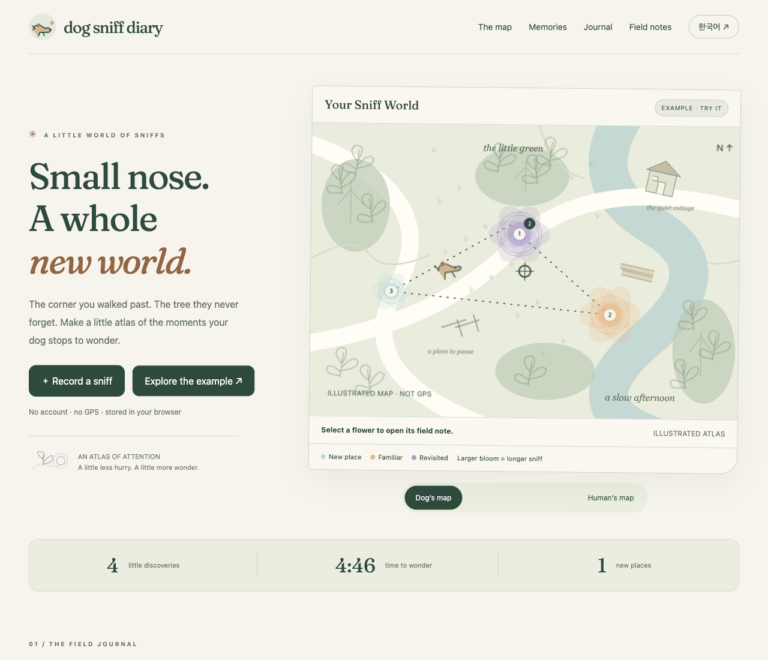
Keep timed sniff observations, place nicknames and an illustrated diary. Our hands-on tests cover local records, filters, JSON recovery and abstract SVG postcards without treating them as GPS or health data.
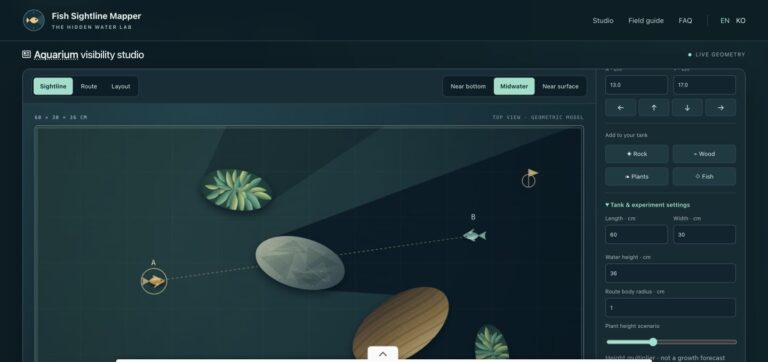
Fish Sightline Mapper
Fish Sightline Mapper: 7 Essential Aquarium Layout Checks
Compare aquarium sightlines with Fish Sightline Mapper. Our measured-input tests cover a 26.9% to 38.8% one-move experiment, depth and body-clearance changes, shared layouts and the model’s animal-care limits.
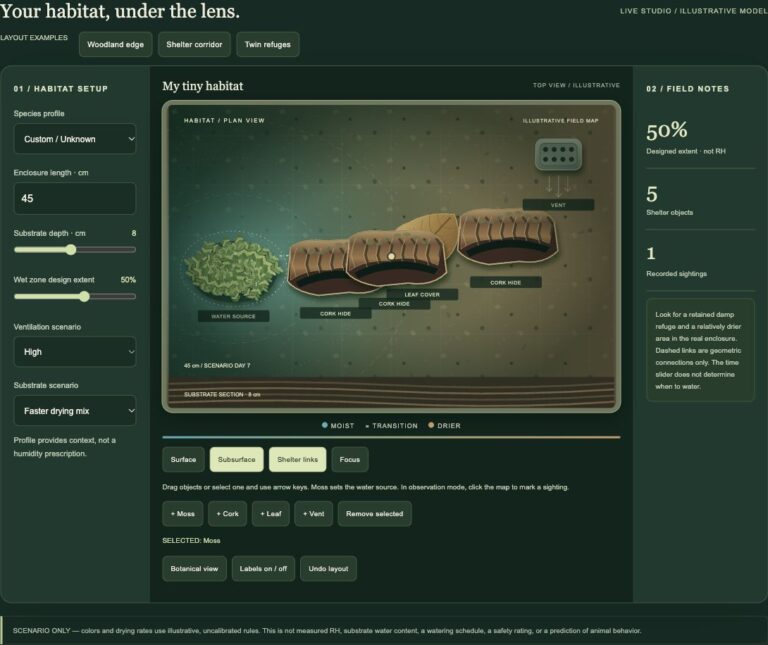
Microclimate Atlas — Isopod Moisture Gradient Planner
Isopod Layout Planner: 7 Essential Checks for Better Notes
Plan a virtual isopod habitat, compare illustrative drying scenarios and keep observation notes. Our tests separate design percentages from measured humidity and verify local reload behavior.