Plan pottery across kiln shelves with measured footprints, clearances and stack heights. Actual KilnFit Lab tests cover transfers, custom outlines, calibration demos, local restores and model limits.
- Brand
- KilnFit Lab
- Tool languages
- English, 한국어
- Verified date
- 2026-11-15
KilnFit Lab is a kiln shelf packing planner for rehearsing pottery placement across multiple layers. Draw the usable shelf, enter full piece footprints and heights, reserve posts, then inspect planar conflicts and the complete stack. Its value is finding a missing measurement before lifting ware into the kiln chamber, while keeping geometry separate from firing suitability.
Verified 15 November 2026, KST. We operated the English and Korean interfaces, changed piece and chamber heights, duplicated a layer, moved ware, arranged the destination layer, edited an outline, applied the built-in calibration demo, tried a puzzle hint and restored a saved project after reloading. Screenshots are actual captures. No kiln was loaded or fired. Completed JSON files, physical print scale and real-photo calibration accuracy were not verified.
On this page
Key takeaways
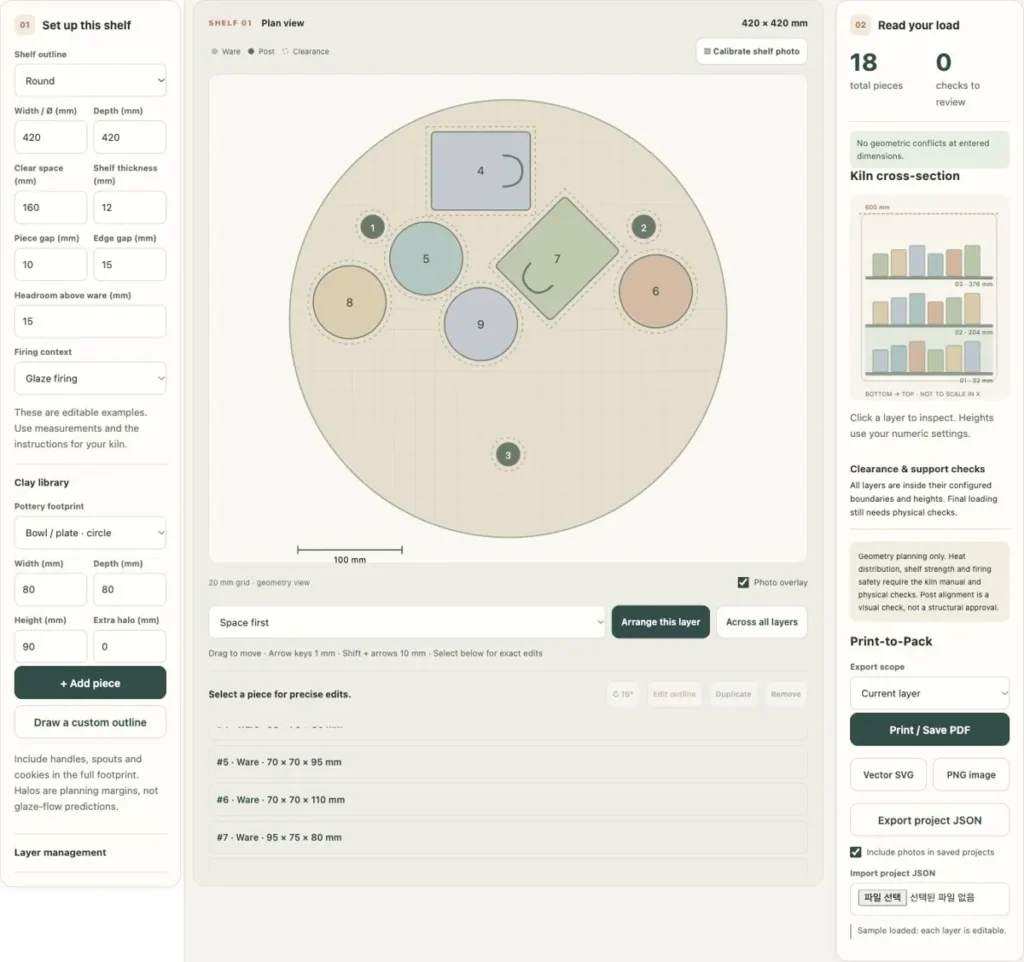
The default project had three layers, six ware pieces per layer, three posts on each layer, 18 total ware pieces and zero geometric checks. The allocated height was 536 / 600 mm. That number includes the 20 mm bottom gap plus three repetitions of 12 mm shelf thickness and 160 mm clear space. It is not the sum of the tallest pots alone.
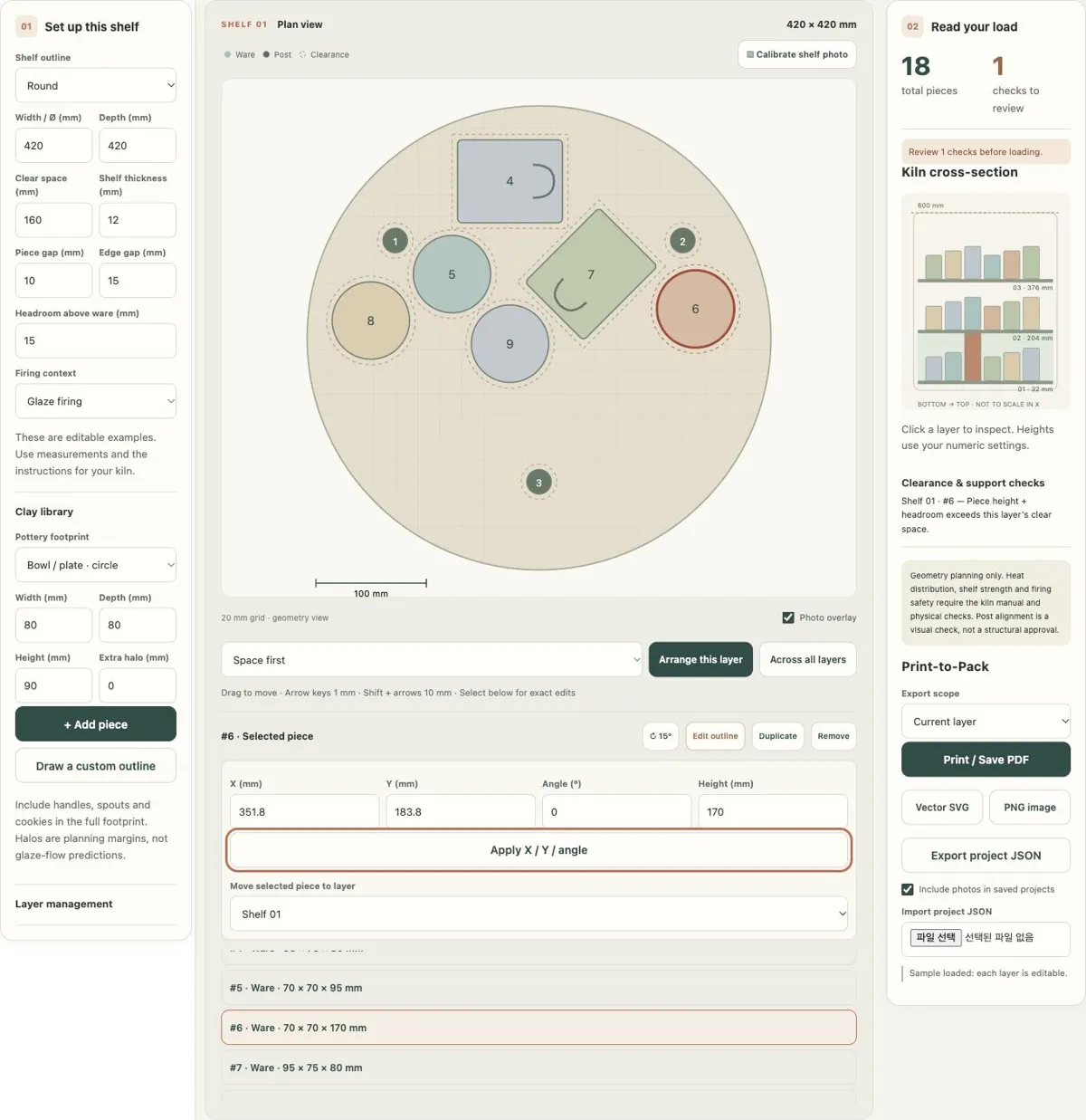
Changing piece #6 from 110 to 170 mm triggered a headroom warning with 160 mm clear space and 15 mm overhead margin. Switching to Bisque firing did not remove it. Duplicating a layer produced 708 / 600 mm and a top-layer height warning. A zero-warning diagram still does not model heat distribution, shelf strength, glaze behavior or the actual support structure.
What this kiln loading planner does
The official brand is KilnFit Lab, presented as a free multi-layer pottery studio with no sign-up. It supports English and Korean and describes a range of one to eight layers. Round, Rectangle, Half-round and Octagon shelf outlines are offered. Measurements are in millimetres, so convert any inch-based measurements before entry: one inch equals 25.4 mm.
Each layer has its own shelf dimensions, clear space, shelf thickness, piece gap, edge gap, headroom and firing context. The library includes circles, mug envelopes, oval bounding boxes, rectangular trays, editable custom polygons and shelf posts. The source explicitly uses rectangular envelopes for mugs and ovals unless you replace them with an outline. A decorative drawing of a handle does not substitute for measuring its full reach.
The center map supports selection, movement, rotation, duplication and exact X/Y/angle/height edits. An item can be moved to another layer without re-entering its dimensions. A cross-section shows layer elevations and piece heights. Space first, More breathing room and Loading access strategies provide alternative heuristic arrangements. Additional workspaces handle photo calibration, fixed-clearance puzzles, local projects and export controls. None of these is an automatic maximum-capacity certificate.
Measure the load before arranging it
Measure the usable shelf rather than relying on a catalog chamber diameter. Reserve the edge distance required by your actual procedure and represent posts and other excluded areas. Identify thermocouple and vent locations in the real kiln; this drawing cannot discover them. Keep a separate record of the manual and studio rules that determine the margins you enter. Default clearances are editable examples, not universal recommendations.
For each piece, record its complete horizontal envelope and current height at the loading stage. Include handles, spouts and any supporting cookie in the footprint. A name such as mug does not tell the software how far an individual handle extends. If measurements came from a wet design instead of the actual piece being loaded, state that difference. The tool does not infer shrinkage or glaze movement from those numbers.
Separate three vertical measurements in your notes: clear space above a shelf, the shelf’s own thickness, and space below the first shelf. Then record the kiln’s usable height. Entering the same number for chamber height and shelf clearance confuses an overall limit with one layer’s allocation. Decide on a consistent layer order before you compare layouts or save a project for someone else to follow.
Kiln loading planner: 7 essential checks
1. Establish the kiln chamber and layer order
Open the sample to follow our three-layer test: usable height 600 mm and bottom space 20 mm. Inspect the tabs from bottom to top. Each layer starts with 12 mm thickness and 160 mm clear space. Confirm these fields for every layer rather than assuming a change on one tab updates all shelves.
2. Define the usable shelf and clearances
Choose the shelf outline and enter width or diameter and depth as appropriate. Set piece gap, edge gap and headroom deliberately. Our 420 mm round sample used 10 mm piece gap, 15 mm edge gap and 15 mm headroom. These are test inputs, not instructions for a particular firing. A larger apparent capacity obtained by reducing margins changes the planning assumptions.
3. Include posts and full pottery footprints
Use the library to add measured ware and support obstacles. The default selected layer contains nine selectable objects: three posts plus six ware pieces, even though the tab reads six pieces. Keep those meanings separate when checking inventory. Measure protrusions and supports instead of entering only a bowl rim or mug body diameter.
4. Compare an arrangement before moving it physically
Select a packing strategy, use Arrange this layer and read the resulting checks. Posts remain fixed according to the completion message in our test. Inspect any unplaced items rather than removing them from the count to make the result look successful. Across all layers is a separate command; do not assume a current-layer arrangement will redistribute the complete project.
5. Edit one item precisely and inspect both views
Select a listed piece to reveal its X, Y, angle and height controls, then apply edits. The map and vertical cross-section answer different questions. We changed piece #6 to 170 mm while leaving its footprint and 160 mm layer clearance unchanged. It still looked horizontally placed, yet its height plus headroom failed the vertical check.
6. Review transfers and the total stack
Moving ware to a new layer retains its geometry and can place it on existing ware. In our case the layer counts changed from 6/6/6 to 5/7/6 and two overlaps were reported. Arranging the destination layer cleared those checks without reducing the 18-piece total. Duplicating a complete layer, by contrast, increased allocated height and exceeded our chamber.
7. Save, restore and reconcile with the actual kiln
Save the reviewed project explicitly and check Restore before treating browser storage as your working record. We recovered a 19-piece project containing a custom outline after reloading, but the page initially opened its standard sample. Finally compare the plan with actual shelves, posts, access and equipment instructions. A saved diagram is a rehearsal, not a firing authorization.
Actual tests and results
These results come from the original sample and stated edits. Each independent height or duplication test began from the default project. The transfer and outline exercises were separate sequences. We read actual interface messages; no temperature, structural capacity, real firing outcome or physical printed dimension was measured.
| Test | Observed result | Interpretation |
|---|---|---|
| Default three-layer project | 18 ware; 0 checks; 536 / 600 mm | Posts are objects but not included in the ware count |
| Piece #6 height 110 → 170 mm | 1 height-plus-headroom warning | A planar fit does not establish vertical fit |
| Same tall piece; switch to Bisque | Height warning remained | The context label does not waive the configured checks |
| Usable height 600 → 500 mm | 536 / 500 mm; Shelf 03 exceeds usable height | The entire stack is checked against the kiln chamber |
| Duplicate one default layer | Four layers; 708 / 600 mm; top-layer warning | Shelf thickness and clear space both consume height |
| Shift+Right on lower post #1 | X became 89.8 mm; overlap and post-alignment messages | Post changes affect more than the selected shelf |
| Move #6 to layer 2, then Arrange this layer | 5/7/6 ware; two overlaps → no checks; total 18 | Transfer preserves a piece; arrangement is a second action |
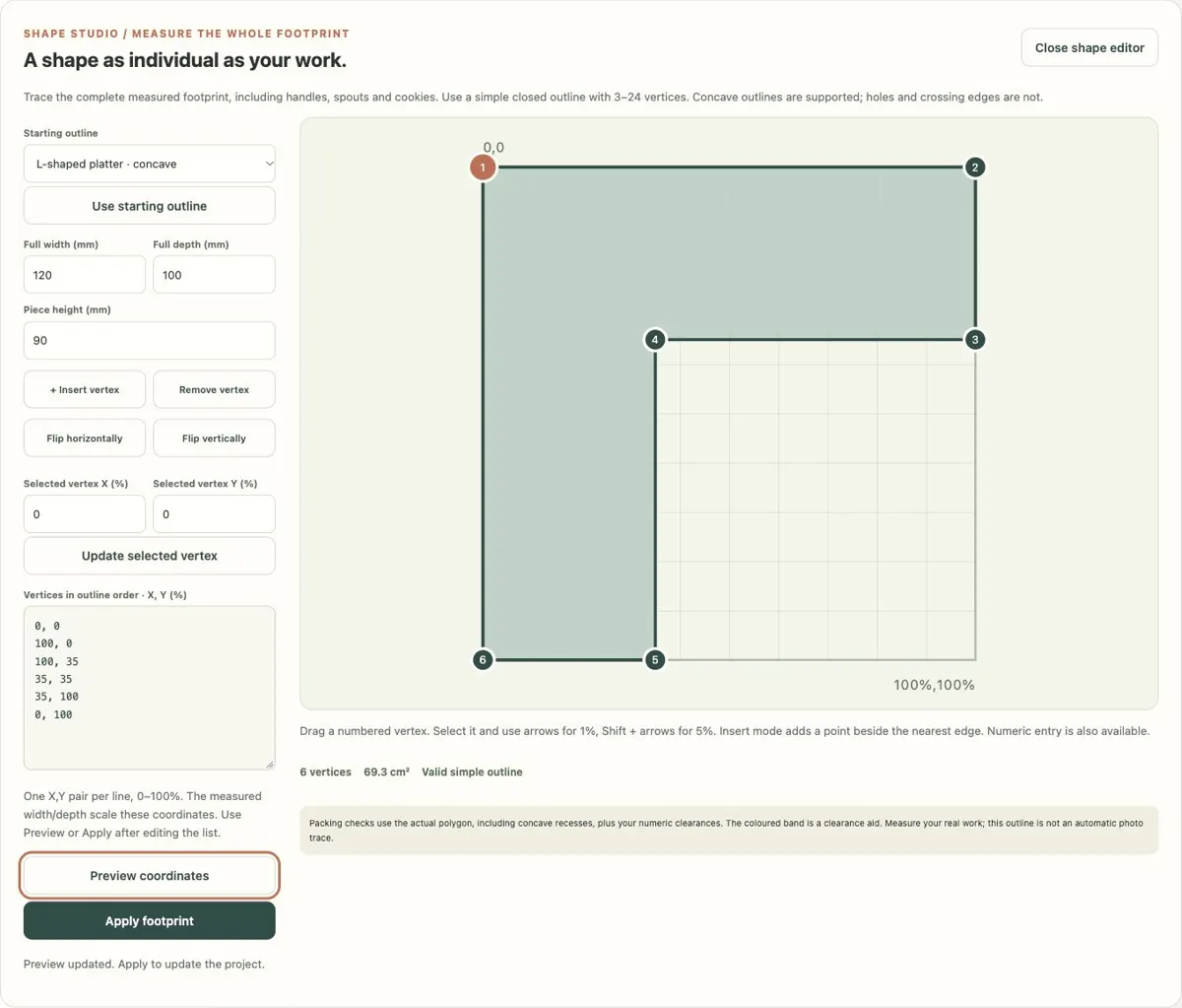
| 120 × 100 mm L outline | 6 vertices; 69.3 cm²; valid simple outline | Polygon area differs from its rectangular envelope |
| Crossed four-point outline | Validation error describing distinct vertices and no crossing edges | An invalid outline was not accepted as a valid preview |
| Built-in four-point photo demo; Apply | Calibration applied; 100% image coverage | Coverage is not measured real-world dimensional accuracy |
| Morning shelf; one hint and Check | 1/6 placed; 5 checks; 1 hint | Puzzle progress is separate from studio loading |
| Save custom project, reload, Restore | Default sample first; saved 19-ware project returned | Explicit local recovery worked in this browser |
Read floor space and vertical space separately
The sample’s shelf surfaces were shown at 32, 204 and 376 mm. The first combines 20 mm under the shelf and 12 mm of thickness. Each subsequent surface rises by 160 + 12 = 172 mm. Allocated height reaches 20 + 3 × (12 + 160) = 536 mm. A fourth identical layer makes 708 mm, so the 600 mm chamber no longer contains the allocation.
Piece height and layer clearance are another comparison. The tested tall piece needs its entered 170 mm plus 15 mm headroom within a 160 mm clear space, which fails before considering any other firing concern. Changing only the kiln chamber to a taller value would not fix that local mismatch. Conversely, fixing one piece’s height does not lower a four-layer allocation that still exceeds the kiln chamber.
The cross-section is not a physical survey. The source labels the horizontal direction as conceptual, and post alignment remains a visual comparison rather than structural approval. Use elevations and warning text as cues to check the real stack. Do not derive a load rating or claim that aligned drawn posts establish sufficient strength for a particular shelf and load.
Moving a piece is not rearranging a shelf
An item transfer is useful when the upper shelf has room but the lower one does not. It carries the existing piece dimensions to the chosen layer. In our transfer the destination immediately reported #6 overlapping #16 and #18. That is not evidence the move control failed: it demonstrates why a destination needs its own placement review. The tool did not silently discard the transferred piece to resolve the collision.
After Arrange this layer, the report returned to no geometric conflicts. This is a successful result for that sample and strategy, not proof that any collection of seven pieces fits or that the heuristic found the best arrangement. Keep dimensions, margins, shelf outlines and post positions fixed when comparing strategies. Otherwise an apparent improvement may simply come from permitting less clearance or changing the usable region.
Use a measured custom outline
The outline editor accepts a simple closed polygon with 3–24 vertices in percent coordinates, scaled to measured width and depth. Concave shapes are supported; holes and crossing edges are not. The L-shaped starter used points (0,0), (100,0), (100,35), (35,35), (35,100), (0,100). At 120 × 100 mm it showed 69.3 cm², compared with 120 cm² for the full bounding rectangle.
That area difference explains why a rectangular envelope can be conservative for an irregular platter, but it does not tell you a second pot will fit in the recess. Clearances, rotation and neighboring polygons still matter. Include the entire actual footprint, including protrusions and supports. Editing a smaller attractive silhouette than the real work only creates an inaccurate model with better-looking capacity.
We entered a crossed four-vertex sequence and Preview returned a validation message. Restoring the L-shaped starter produced a valid six-vertex preview, and Apply added the custom piece to the project. Adding it initially caused three overlap checks; its valid outline was not automatically a valid placement. Previewing a shape and applying that shape are separate steps, followed by another arrangement review.
Calibrate the shelf plane, not the pottery
Photo calibration is a visual reference for a flat shelf plane. The interface offers two points for scale and rotation or four corners of a measured rectangle for perspective correction. It also asks for reference position on the shelf. The source specifies JPEG, PNG or WebP up to 12 MB and provides a built-in demo, so you can inspect the workflow before choosing your own photo.
We applied the four-point demo and received a 100% image coverage message plus a request to verify a second known distance. That percentage does not establish measurement accuracy. We did not photograph or survey an actual shelf. A planar transform cannot correct lens distortion, a curved shelf or a reference raised above the intended plane. The tool itself keeps numeric geometry authoritative over the overlay.
Prepare a measured reference on the same plane, keep the complete reference visible, and compare the result with another measurement before using it. A photo of tall pottery is not an automatic footprint trace. Outline editing still requires deliberate geometry. Keep the photo’s purpose clear: it can help orient a measured plan, but the four clicked points do not measure every object in the picture.
Practise without losing the studio project
Morning shelf supplied six pieces with fixed 12 mm piece and edge gaps. The chamber, shelf, gap and creation controls were disabled during the challenge. One hint placed one piece; Check my layout returned 1/6 placed with five checks remaining and one recorded hint. We did not complete the puzzle or measure a best-score result, so the test does not claim a winning layout.
Return to my project recovered the three-layer 18-piece studio project and its 536 / 600 mm allocation. The page says the project is held in that tab during practice and asks you to return before closing or reloading. Treat that temporary holding state separately from Save project. Do not close a puzzle assuming it has created a permanent cloud copy of your studio work.
Local saves, exports and actual-size printing
Before the local test, Restore reported no valid saved project. We saved a project with the custom outline and later restored its 19-ware total and associated checks. After a full reload the standard sample appeared first; Restore brought back the edited project. This verifies an explicit save-and-recover sequence, not automatic storage of every keystroke or synchronization between devices and language pages.
JSON export was invoked, but no completed file was received through the supported download observation. We therefore did not inspect the file contents or test an import round trip. PNG, SVG and Print / Save PDF controls and current/all-layer scope were present. Their completed artifacts, tiled pagination and physical dimensions were not inspected. Check an exported file yourself before using it as the only backup or handoff.
The source describes A4 or Letter tiled maps with alignment borders and a 100 mm verification line, using clean geometry without the photo. For a physical template, choose Actual size or 100% rather than Fit to page, then measure the printed line with a ruler. This is the published workflow, not a successful print test performed here. Keep output scale verification separate from whether the on-screen geometry has no warnings.
Mobile operation and privacy
A fresh Korean page at 390×844 had a 390 px document width. We selected the 110 mm piece, entered 170 mm and received the Korean headroom warning. This confirms the tested numeric workflow at a narrow viewport. Controls and results form a long page, so scroll back to the report after an edit. Physical-phone touch gestures, every device and screen-reader navigation were not audited.
The source states that projects, photos and imports stay in the browser and that local saved data can be removed by clearing site storage. It separately notes Blogger and advertising usage data. We tested local restoration, not all external traffic or offline operation. Advertising overlays appeared during the English investigation and had to be closed to reach controls. Use non-sensitive sample data when exploring, and review whether photos are included before sharing saved projects.
What a clear geometry report cannot establish
KilnFit Lab does not simulate heat, shrinkage, glaze chemistry, electrical systems or shelf strength. A no-conflict report only concerns entered geometry and configured limits. Halos are planning margins rather than forecasts of glaze flow. Bisque mode does not automatically authorize contact or nesting. The practical question is whether the model describes your intended load accurately enough to inspect it in the studio.
We read the manufacturer’s Skutt loading and firing guidance. It discusses shelf separation, load distribution and thermocouple clearance as factors in firing performance. That supports treating geometric fit as one part of preparation. It does not validate this planner’s default clearances or endorse a specific drawn load. Use the instructions for your actual kiln and studio procedure.
A related tool for a separate loading checklist
If you need a separate written loading checklist, our published PrintFix Studio guide explains basic HTML pagination and overflow checks. Keep that text document alongside the kiln map rather than treating it as a conversion pipeline. PrintFix does not import KilnFit projects or reproduce arbitrary websites, and reformatting a measured template can change its intended scale.
Frequently asked questions
How many mugs fit on my kiln shelf?
There is no universal count. Enter the usable shelf, posts, full handle envelopes, heights and chosen clearances. The sample and heuristic are starting points; neither proves maximum capacity or firing suitability.
Why are there nine objects but only six pieces on a layer?
The sample has three posts and six ware pieces. Posts appear in the selectable object list but are not included in the six-piece ware count or the project’s 18-ware total.
Does Bisque mode allow pieces to touch?
The source says it does not automatically allow contact or nesting. Our tall-piece warning remained after the context change. Follow the actual procedure rather than interpreting the mode as an exemption.
Does a valid outline mean a valid placement?
No. Our valid L outline initially overlapped three neighbors. Shape validation and arrangement checks answer different questions; review both after applying the footprint.
Is 100% photo coverage an accuracy certificate?
No. It was the built-in demo’s image coverage message. A second measured distance still needs verification, and a planar transform has lens and reference-plane limitations.
Can I rely on local save or exported files?
Explicit local Restore recovered our saved project after a reload. Completed JSON receipt, import round trip and physical print scale were not verified. Check your own backup and output before relying on them.
Bring a reviewed plan to the studio
Start with one measured shelf and one question: is the problem a footprint, a clearance or a vertical allocation? Change one input, inspect both views and read the warning text. Save a reviewed project, verify any physical template and compare the proposed load with the actual kiln. Use the planner to make the next studio check clearer.
A RELEVANT NEXT STEP
Tools with a useful connection
PrintFix Studio
PrintFix Studio: 7 Smart HTML Printing Checks
Prepare basic HTML for printing with overflow checks, repairs, page breaks and CSV document batches. Our hands-on tests show why 100 readiness does not catch a missing field and what remains to verify in the actual print output.
KNOTTRACE — The Reverse Knot Atelier
Friendship Bracelet Decoder: 7 Essential KNOTTRACE Checks
Turn a painted normal bracelet pattern into checked knot paths. Our 8-strand, 12-row tests cover 42 knots, 3 paths, strand tracing, F-to-FB changes, row marks and calibrated thread estimates.
Tassel Atelier
Tassel Designer: 7 Essential Steps for Better Patterns
Compare tassel proportions and plan a batch with Tassel Atelier. Real A/B, yarn arithmetic, link restoration and mobile tests explain what to trust and what needs a handmade sample.